

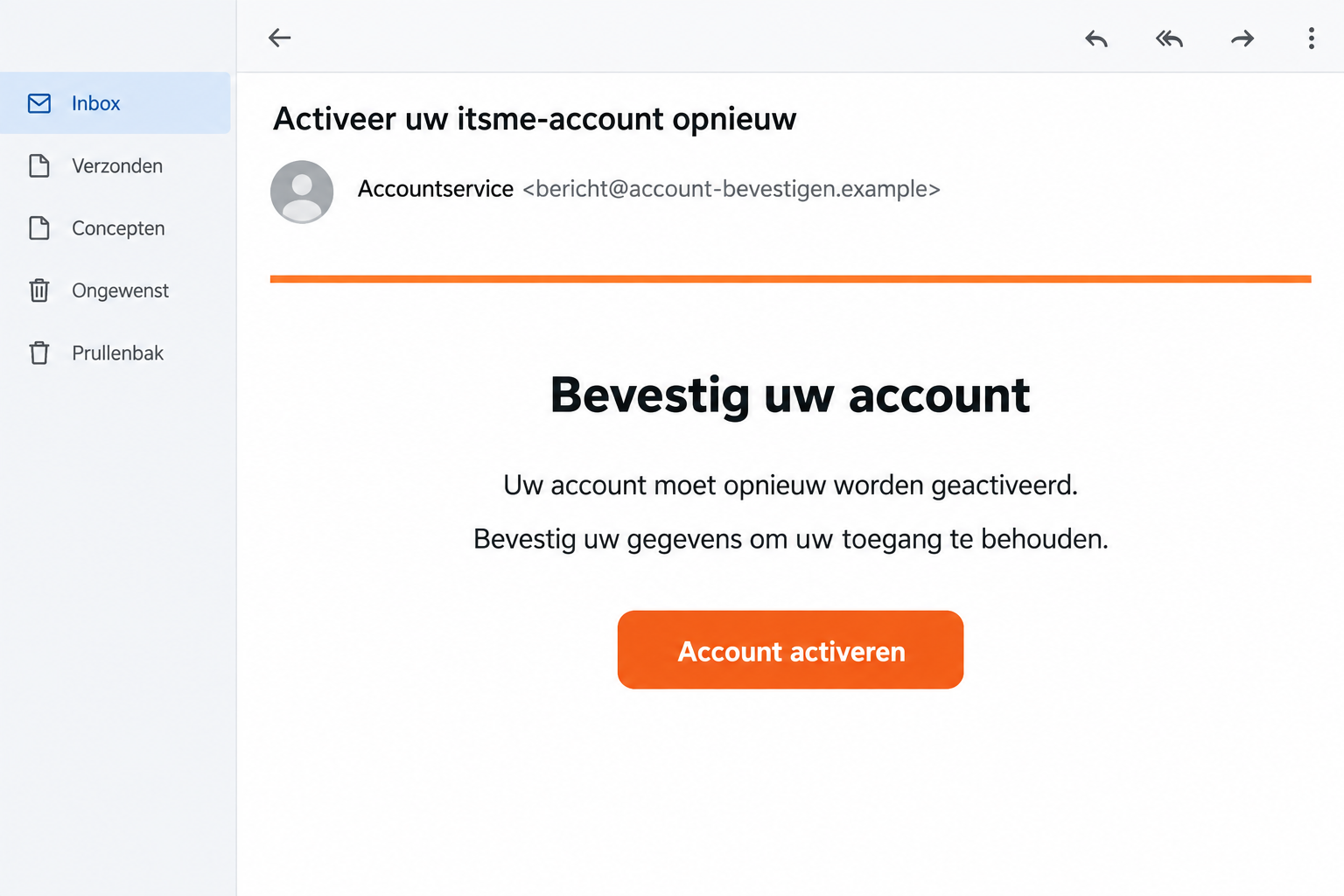
An email says your itsme account needs reactivation. You use the app for important services, so losing access sounds like a problem worth fixing now.
The itsme reactivation scam can begin with that familiar worry. Before following the link or confirming a request, take a closer look at the proposed fix.
Overview
The message imitates a real digital identity service
itsme is a legitimate identity service. The scam involves outsiders borrowing its name to steer people into sharing information or authorizing an unwanted action.
A request to reactivate an account sounds like routine maintenance. That framing helps hide a more important question: who started the action you are being asked to confirm?
The danger is not limited to a fake webpage. A fraudulent conversation can also lead someone to approve a request inside the genuine app.
That does not mean the app was hacked. It means a person can be misled about the purpose of a real authorization.
Official warnings describe recurring campaigns, not an isolated complaint
In its August 27, 2026 phishing warning, itsme described daily reports and multiple campaigns circulating at once.
The warning covers messages about reactivation or banking information, alongside follow-up impersonation calls. Individual versions differ, so not every recipient sees an identical sequence.
This is evidence of repeated identity-service impersonation. It is not an allegation that itsme itself deceives customers or operates a fraudulent subscription.
The images here are illustrative reconstructions. They show an email pretext and an approval decision, not original victim screenshots or an exact replica of every app screen.
Read the action before touching the confirmation button
The key safety check is whether the displayed request matches something you deliberately initiated through a trusted service.
- Which service is asking for approval?
- Does the request concern a login, a signature, or another action?
- Did you start that specific action yourself?
- If payment details appear, do the recipient and amount match your intention?
- Is someone on the phone telling you to disregard what the screen actually says?
Do not approve an unexpected request to make a warning disappear. Declining it gives you time to verify the situation independently.
A Genuine Approval Screen Can Still Be the Wrong Request
There are two separate trust questions. Is this the real app, and is this the action I intended? A positive answer to one does not settle the other.
Imagine opening your normal app while a caller explains that a confirmation will “restore access.” The app may be genuine even if the explanation is false.
If the screen actually describes a login to another service, the confirmation relates to that login. The caller cannot redefine it by choosing reassuring words.
This is a hypothetical example to explain the decision, not a claim about a particular victim’s transaction.
The same reasoning applies when a caller claims you must approve something to cancel fraud. Read the actual operation instead of following the spoken story.
A joint Febelfin and itsme warning describes criminals exploiting confusion around approvals and alleged payment cancellation.
A request arriving at a convenient moment does not make it yours. Someone else may have started it while keeping you occupied with instructions.
You do not need to argue with the caller about the technology. End the conversation and contact the relevant service yourself.
How the itsme Reactivation Scam Works
Step 1: A message makes access sound temporary or at risk
The pretext gives you a task: reactivate, verify, or update something so you can continue using a familiar service.
The pressure works because digital identity connects to practical needs. You may be thinking about banking or paperwork rather than examining the email’s origin.
Look for the change the sender wants you to make. A button labeled “activate” still needs a trustworthy destination and a legitimate reason.
Do not assume a message is genuine because you happen to use itsme. A widely used service gives impersonators plenty of likely recipients.
If you do not use the service, that mismatch makes the contact easier to dismiss. If you do, it makes independent verification more important.
Step 2: The link gathers information or prepares the next interaction
A counterfeit form may seek personal or banking information under the reactivation story. The exact fields depend on the version of the scam.
Information entered there can help a later caller sound informed. Do not mistake knowledge supplied through the form for proof of an official relationship.
For example, a caller repeating your name after you typed it into a link has not independently authenticated themselves. They may simply be repeating your submission.
The same applies to a case reference shown on the page. A professional-looking reference is easy to invent and easy to repeat.
Stop if a supposedly simple reactivation starts asking for secrets or banking details you did not expect to provide.
Step 3: An impersonator may turn the message into a live conversation
Official warnings include calls pretending to come from a bank, itsme, or another authority. A call is a possible escalation, not a mandatory stage.
The caller can explain away contradictions while keeping you engaged. They may frame each new request as the next small step in solving the original problem.
Do not stay connected while checking their identity through links or numbers they provide. Those details remain part of the same unverified contact.
Use a number or support route you already trust. If the caller is legitimate, your service should be able to assess the issue through its normal process.
Urgency does not make an exception to that rule. A demand to remain on the line is a reason to slow down, not speed up.
Step 4: A real request is given a false explanation
The most important moment may happen away from the phishing email. You are asked to confirm something in an app you correctly recognize.
The illustration below shows a generic request naming a service and an action. Its layout is illustrative; always read the actual details on your own screen.
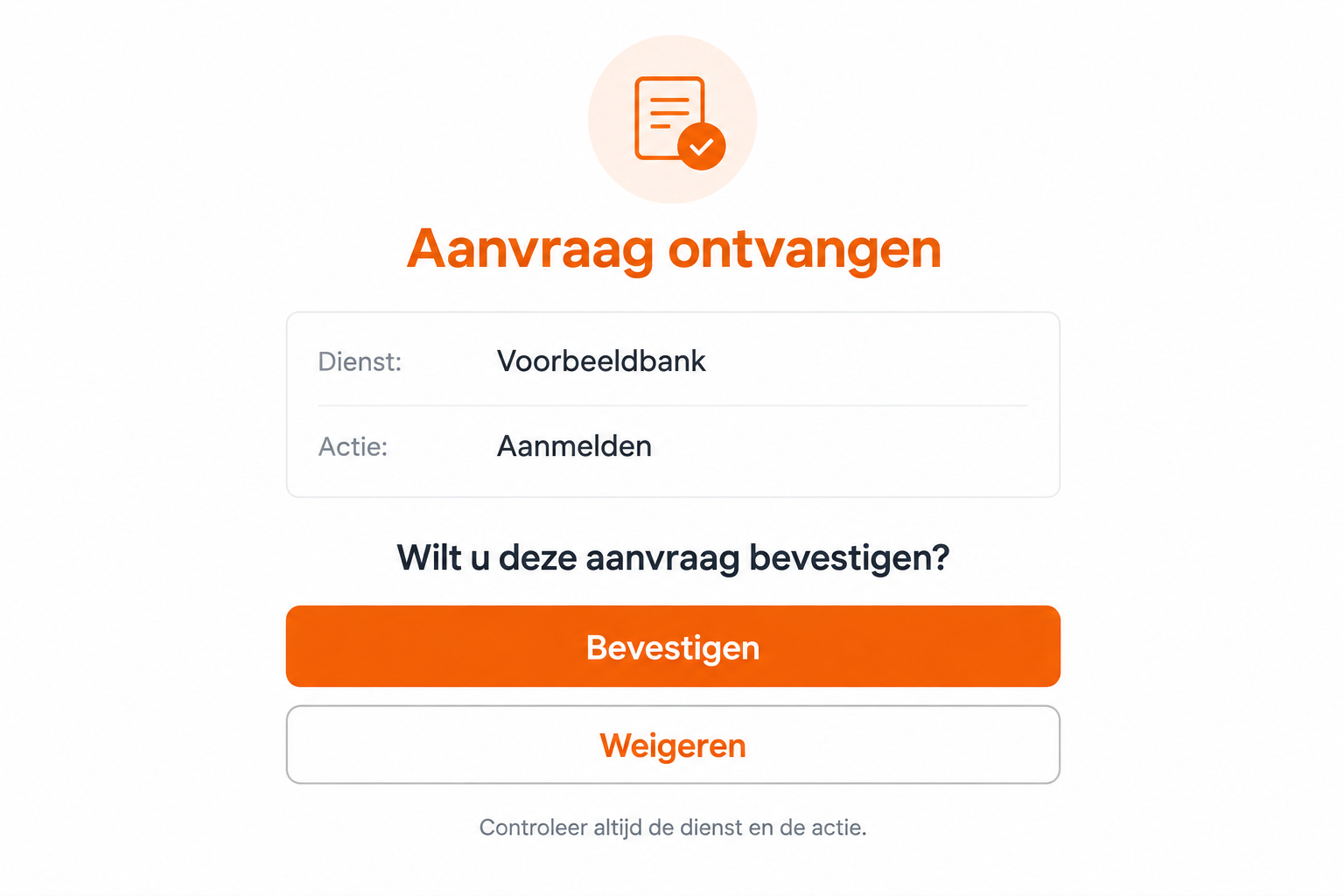
What matters is the mismatch between the request and your intention. An unsolicited login is not made safe by someone calling it account maintenance.
Refuse a request you did not initiate. Then check the account through a separate, trusted route rather than accepting the caller’s next explanation.
Step 5: The outcome depends on what was authorized
An approval can have different consequences depending on the service and operation involved. Do not assume every incident causes the same type of loss.
A banking action, account login, or account-setup change needs to be investigated on its own terms. Tell support exactly what the request displayed.
Likewise, sharing a name is not equivalent to sharing a banking code. Accurate details help the provider prioritize the right containment measures.
If money moved, contact the bank promptly. If an identity-service account may be affected, contact itsme through its official support route as well.
Sender, Link, and Approval Checks That Actually Help
Use the full sender address as one clue
A friendly display name can conceal an unrelated address. Expand the sender details, but do not treat that one check as a complete security assessment.
MalwareTips’ introduction to phishing covers the broader deception. Here, the approval request deserves as much scrutiny as the email.
A convincing-looking address cannot authorize an unexpected financial action. The content and the requested behavior still need to make sense.
Similarly, an encrypted webpage only tells you about the connection to that page. It does not certify a stranger’s reactivation claim.
Open the service without the message
Start with the app you already installed or an independently opened official website. Check whether there is actually an account issue.
If you are uncertain, contact official support before submitting anything. You can describe the message without clicking its button again.
Do not search for a support number inside the questionable email. That gives the same sender another opportunity to keep you in their conversation.
Trust the operation description over the spoken explanation
Read slowly enough to identify the service and action. If the request concerns a payment, examine its payment details instead of relying on the caller’s summary.
A caller saying “ignore that label” is asking you to discard the very information needed to make an informed decision.
If you cannot confidently match the request to your own action, decline it. You can restart a legitimate task later through the proper service.
What to Do if You Have Fallen Victim to This Scam
- Stop the contact and refuse further requests.
Leave the suspicious webpage and end any related call. Do not approve a second request because the caller says it will undo the first.
Keep your own notes about what happened. Record whether you entered data, confirmed an app request, or installed anything.
- Contact your bank immediately if banking was involved.
Use the bank’s established app, card details, or independently verified contact route. Explain that an itsme-themed message or caller led to an unwanted action.
Ask the bank to review the specific authorization and protect affected access. If a transfer occurred, request its fraud-response and recovery process promptly.
Do not assume a reversal is guaranteed. Give the bank the time, amount, and recipient information you have so it can assess available options.
- Report the account concern to itsme through official support.
The itsme support guidance on suspicious contact helps distinguish receipt of a message from more serious interaction.
Describe any approvals or account changes accurately. Ask whether protective action is needed for your account instead of following the suspicious message’s reactivation instructions.
Receiving phishing does not, by itself, mean the app or phone was hacked. Avoid unnecessary account changes based solely on an unsolicited warning.
- Preserve the request details and the original message.
Save screenshots showing the service and action involved, along with timestamps. Retain the sender address and caller details where available.
Never send your itsme code, banking PIN, password, or one-time security codes in a report. Describe the kind of secret disclosed without repeating its value.
Keep a private incident record. Redact personal and financial information before sharing a public warning with friends or an online community.
- Review exposed accounts through their normal recovery routes.
If you supplied a password, change it on the legitimate service. Address reuse on other accounts, especially where the same email and password were paired.
Ask the provider to assess unfamiliar access or changes. Do not stop at changing a password if an unwanted authorization may already have taken effect.
Watch for further messages using details you submitted. Familiarity after the incident is not proof that the next caller is helping you.
- Investigate downloads or device changes only if they occurred.
If a related link led you to install software on a computer, Malwarebytes can help check that computer for unwanted programs.
That scan cannot reverse a banking approval or determine the validity of an identity transaction. Continue working with the relevant provider.
AdGuard’s applicable phishing protection can reduce exposure to some malicious websites. It is an extra precaution, not a substitute for reading approval details.
Avoid installing “security fixes” supplied by the same caller. Obtain any legitimate security software independently and use the right version for your device.
- Report the impersonation without forwarding the danger casually.
Use the reporting instructions on itsme’s official website. If financial loss occurred, also follow your bank’s reporting advice and the appropriate local fraud-reporting process.
Warn relatives in plain language: do not confirm an unexpected request because a caller says it will reactivate or protect an account.
You can share a redacted screenshot instead of a clickable phishing link. That preserves the warning without inviting another accidental visit.
A Simple Routine for Anyone Who Uses Approval Apps
Before confirming, say the intended action to yourself: “I am signing in to this service” or “I am authorizing this specific payment.”
Compare that sentence with the request on the screen. If they do not match, do not invent an explanation to make them fit.
This routine is especially useful while multitasking. A caller, a webpage, and a notification can each describe the situation differently.
For family members who need assistance, help read the request without asking for their secret code. Support should not require taking control of their identity.
Discuss the refusal option before an emergency. People sometimes approve because they fear declining will damage the account; an unexpected request deserves verification first.
Keep legitimate support contacts available outside suspicious messages. That small preparation makes it easier to end a pressured call and check independently.
Frequently Asked Questions
Is itsme itself a scam?
No. The service is being impersonated. The fraud lies in deceptive messages, callers, and unwanted authorizations, not in the legitimate identity app.
Can an approval in the real app still be unsafe?
Yes, if it authorizes an action you did not intend. Check the named service and operation, not only whether the app looks familiar.
Should I approve a request to cancel a payment?
Do not follow that instruction from an unsolicited caller. Read the actual request and contact your bank independently if a payment is in question.
Does receiving the email mean my account was hacked?
No. Receipt alone does not establish account compromise. The response depends on whether you disclosed information, approved something, or changed the device.
What if the caller knows my personal information?
Knowledge is not authorization. The details may come from information you submitted or another source. Verify the caller through an independent official channel.
Are these images genuine itsme campaign screenshots?
No. They are illustrative examples using fictional details. Official warnings establish the scam pattern; the images explain the decisions a recipient may face.
The Bottom Line
The itsme reactivation scam borrows a trusted name and gives an unwanted action a reassuring explanation. The real app cannot make that explanation true.
Approve only the action you knowingly started. If you already confirmed something unexpected, contact the affected service promptly and explain exactly what appeared.








