

The invoice arrives while your permit application is moving through city hall. It cites your property address and the hearing you have been waiting for.
Everything looks familiar enough to pay. That familiarity is the danger, because accurate case details can appear in a fraudulent message.
Overview
The warning for permit applicants
The FBI warned in March 2026 that criminals impersonate city and county planning officials to collect fake fees from people with active land-use applications.
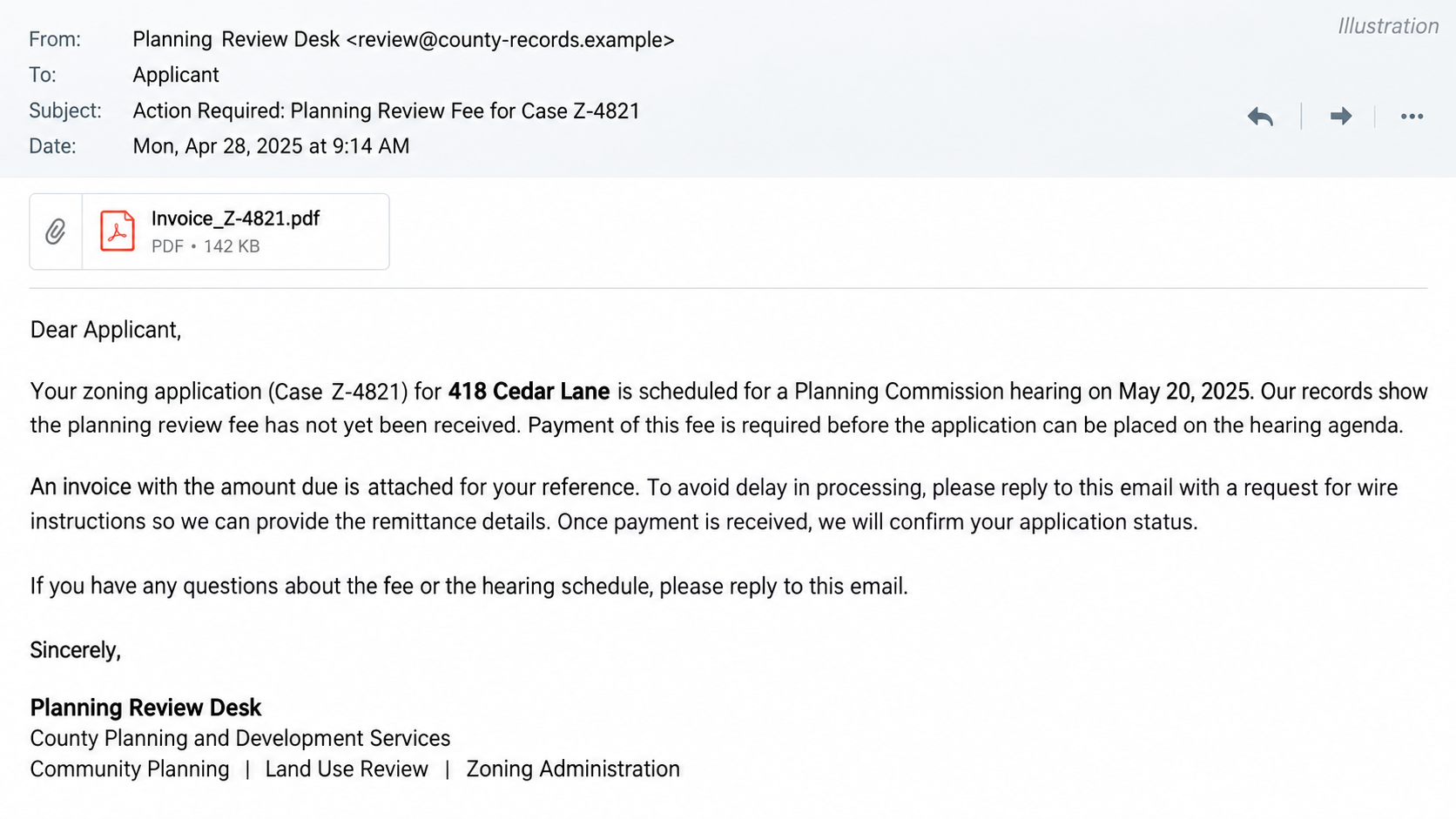
The emails may include real addresses, case numbers, and official names. A PDF invoice then directs applicants to pay by wire, peer-to-peer transfer, or cryptocurrency.
Victims have been identified across the United States, according to the FBI. This is not limited to one county, one type of project, or one local government.
Why the email seems credible
Planning applications often involve public notices, hearing schedules, and published case files. Fraudsters can mine those details before contacting the applicant.
The message may arrive near a genuine exchange with a real planner. Its language about review, compliance, and commission procedures sounds like ordinary permitting work.
Knowing your property address does not make the sender a county employee. It may only show that someone read a public record.
The verification rule
Do not pay from the email. Contact the planning office through the phone number on its official website and ask whether the exact fee is due.
- Compare the sender’s complete domain with the official contact you already know.
- Ask the office to confirm the case number, fee amount, deadline, and approved payment method.
- Do not accept a PDF letterhead as proof that the attached invoice came from the government.
- Be wary when an email says to request payment instructions only by reply rather than call.
A genuine fee can exist at the same time as a fake invoice. The important question is whether this particular demand came from the authority managing your application.
How Real Permit Details Become a Persuasive Lure
A person applying for zoning approval already expects unfamiliar fees and deadlines. Public hearings, plan reviews, inspections, and legal notices may each have separate costs.
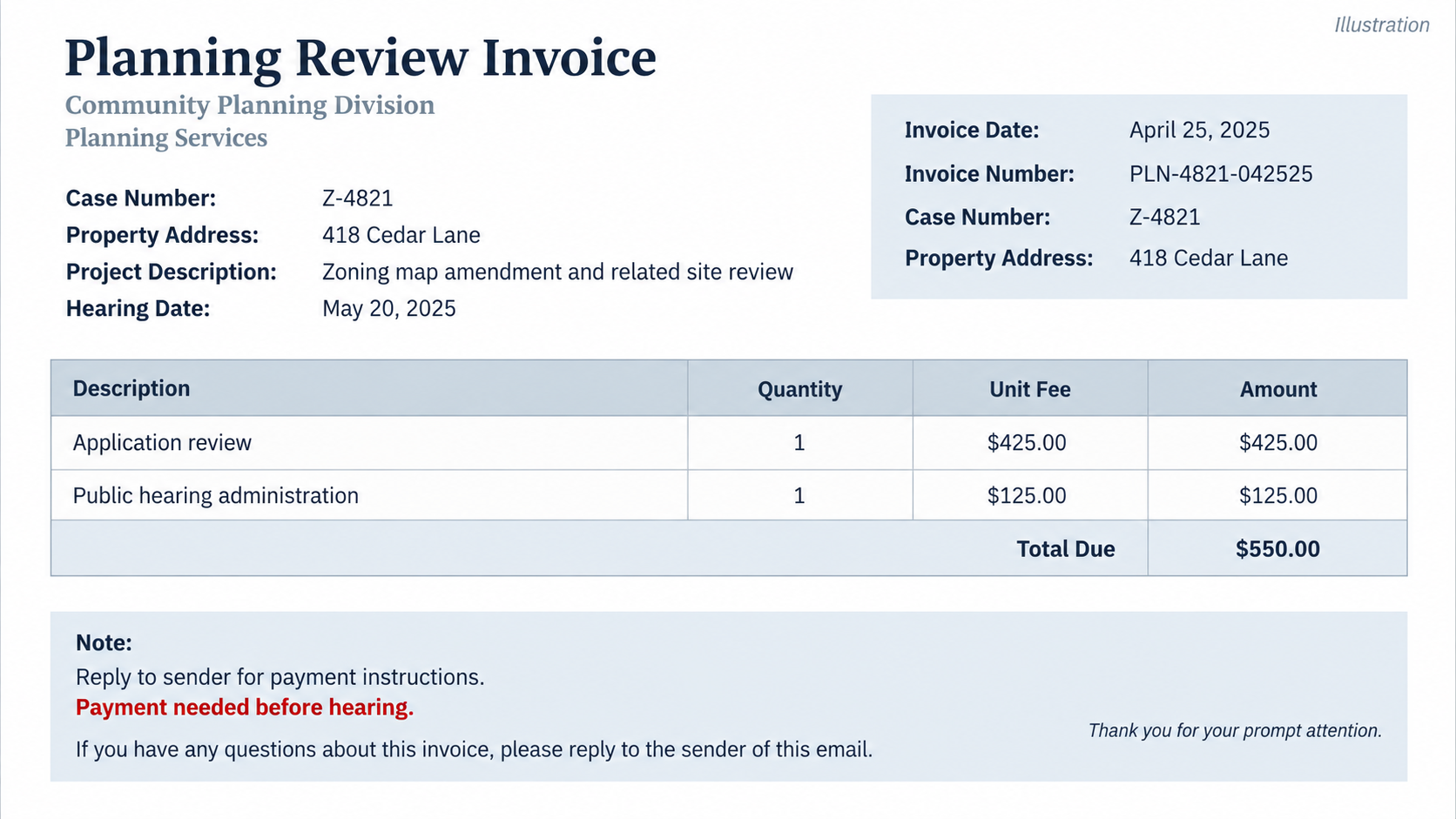
That complexity creates room for an invoice that looks plausible. A homeowner may not know whether a new $550 line item is normal.
The FBI says scammers use public permit data to locate current applicants. A current file provides the property’s address and perhaps a case identifier.
Some jurisdictions also publish staff names, meeting agendas, and project descriptions. The scammer can assemble these fragments into a message that appears unusually informed.
The criminal does not need access to the county’s internal system to do this. Public information can be enough to create a convincing email.
That is why the usual advice to ignore generic greetings is insufficient here. The message may address the correct person and cite the correct parcel.
The sender’s email address often provides a stronger clue. The FBI says suspicious messages may use government-like usernames on non-government domains, including examples such as usa.com.
Even a similar-looking domain deserves inspection. A county name placed before an unrelated ending is not the same as the county’s official website.
Official-sounding language can also hide the switch. The email may mention ordinances and hearing procedures while routing payment to an account the government does not control.
The attached invoice creates another layer of formality. Itemized lines, reference numbers, and PDF formatting can make a request feel accounted for.
Yet a PDF is easy to create. The document’s appearance cannot authenticate its sender, payment destination, or legal authority to charge a fee.
One especially revealing instruction is to email back for payment details, rather than telephone the office. The FBI says this tactic is used to discourage independent verification.
The message may call email an audit trail. That sounds sensible until you realize the only trail leads through an address controlled by the sender.
Another pressure point is the hearing date. A warning that your application will be delayed can make checking feel costly.
In fact, a short call to the real planning department is usually the safest way to protect both the application and the money.
How the Fake Zoning Permit Invoice Scam Works
Step 1: Criminals identify an active application
The target is not chosen at random. Scammers search for land-use matters already in progress, when a payment request would not seem out of place.
A pending application may involve a homeowner, architect, contractor, developer, or small business. Any of them might be responsible for paying review fees.
By learning who handles the file, the sender can address the person most likely to act before checking with the rest of the project team.
Step 2: The email borrows authentic details
The message cites a real property address, case number, hearing date, or staff name. These details lower suspicion because they are not common spam filler.
The FBI specifically warns that such information can be accurate. Accuracy in the body does not validate the sender’s identity.
Look at the actual domain after the @ sign. A display name reading “Planning Department” is controlled by the person who sent the email.
Step 3: A fee is made to sound procedural
The sender invents or misdirects a payment for plan review, a commission hearing, or another plausible stage in the process.
It may say the file cannot be scheduled until payment clears. That threat uses the applicant’s real project timeline as leverage.
Fee schedules vary by jurisdiction, so a generic list cannot prove an amount is false. Only the actual office can verify what your case owes.
Step 4: A PDF gives the demand a paper trail
The attachment may resemble a county invoice, with official formatting and itemized charges. It can include details copied from public filings.
Do not infer that opening a PDF itself caused a payment loss. The immediate fraud in the FBI alert is the diversion of funds to a criminal.
Attachments can carry separate security risks, so use caution with unexpected files. The central question remains who issued the invoice and where payment goes.
Step 5: Payment instructions move outside normal channels
The sender asks for a wire, peer-to-peer transfer, or cryptocurrency. Those methods can be difficult to recover once sent to the wrong recipient.
Some messages tell the applicant to request account details by email, claiming a written exchange protects the audit trail.
That maneuver keeps the person away from the real office’s phone number, public payment portal, and established billing contact.
Step 6: Urgency blocks the final check
The email warns of delays or obstacles if payment is not immediate. A project already waiting for approval makes that threat especially effective.
The applicant may also feel embarrassed to question an official-looking invoice. That discomfort is precisely why a routine callback should be standard practice.
If the office confirms no such fee, preserve the email. The scammers may contact another person on the same project after one recipient refuses.
How to Check a Permit Fee Without Delaying Your Project
Start with the department’s website, found independently. Use its general line or the number on paperwork you already know is genuine.
Tell the clerk the case identifier and ask for the current balance. Request the exact fee name and due date in the office’s own system.
If someone says the amount is real, still verify the approved destination. A real balance can be paired with a fake payment account.
Ask whether the jurisdiction takes payment through a portal, at a counter, by check, or through another documented method. Rules vary widely.
Do not assume a government agency never accepts a particular method. The decisive point is what your own office confirms for your case.
Compare the sender’s domain with earlier authentic messages. A slight difference in spelling or a public email service can reveal the impersonation.
If a project manager or architect handles payments, forward the suspicious invoice only after warning them it is unverified. Otherwise a second person may pay it.
Ask the office whether other applicants have received similar messages. A public warning may already exist on the county website.
Keep the call factual. You do not need to accuse a named staff member; their real name may have been borrowed without their knowledge.
Once verified, record the confirmation in your project file. An email from the official domain or a portal balance helps prevent later confusion.
If the fee is legitimate, pay through the independently confirmed channel. A short verification step should not derail a genuine application.
Make this a standing rule for a long project. Every change in payment destination should be confirmed by a voice call to a known number.
What to Do If You Paid a Fake Permit Invoice
- Contact the sending bank immediately. Explain that the transfer followed an impersonation invoice. Ask whether a wire recall, hold, or fraud investigation is possible.
- Notify the real planning office. The fee may still be unpaid. Ask the office to note the fraud and confirm your actual application status.
- Preserve the full evidence. Keep the original email with headers, the PDF invoice, payment instructions, transaction confirmation, and project correspondence.
- Report to the FBI’s IC3. Include the email address, date, phone number, hearing date, amount, payment method, and recipient account details if available.
- Warn the project team. Tell any co-owner, contractor, architect, or finance employee not to pay a second invoice from the same sender.
- Secure exposed accounts. If you entered credentials into a linked page, change them through the genuine service and enable multi-factor authentication.
- Watch for follow-up attempts. Scammers may offer to recover the payment or send a revised invoice. Verify every new contact independently.
Timing matters with a wire. Contact the bank before spending hours gathering every screenshot, then supplement the report as details become available.
Recovery is not guaranteed. A fast report gives the bank and investigators more useful information than a delayed, perfectly formatted complaint.
What This Scam Is Not
It is not evidence that planning departments are inventing fees. Local governments may legitimately charge for applications, notices, hearings, and inspections.
It is not proof that a public permit database has been hacked. The FBI specifically notes that criminals use publicly available application information.
It is also not a failure by an applicant who trusted correct case details. The attack is built around details that a careful person expects an official to know.
The problem is the false sender and fraudulent payment destination. Separating those facts helps people respond without abandoning a real project.
If your office published the file details, ask what personal information appears online. That may help you understand the lure without assuming private records leaked.
A city may choose to issue a public notice or alert other applicants. Reporting the attempt helps the real office detect a wider campaign.
Applicants can also ask whether the office has a standard invoice template. That comparison may reveal differences in fee names or payment instructions.
Do not forward the suspicious attachment as a normal invoice to a bookkeeper. Mark it unverified so nobody processes it by mistake.
If multiple people receive project email, agree on one person who confirms every payment change with the official office.
That simple division of responsibility reduces confusion when an urgent message arrives just before a hearing or holiday.
Keep earlier legitimate receipts nearby. They may show the same payee and portal, making a sudden new account easier to notice.
Some fraud emails are grammatically polished. Spelling alone is a poor test when criminals can copy the tone of real government correspondence.
Likewise, a long email thread can be deceptive if a scammer inserted themselves after observing public project updates.
Verification is not distrust of a hardworking planning office. It is a routine safeguard against someone else pretending to speak for it.
Frequently Asked Questions
Can a fake invoice contain my real zoning case number?
Yes. The FBI says criminals use public permit details, including case numbers and property addresses. Correct data does not prove the email is official.
Does a PDF with county letterhead prove the fee is real?
No. A document can copy official formatting. Verify the balance and payment destination through the planning office’s independently found contact channel.
Why does the email ask me to reply for wire details?
The FBI says this can deter applicants from calling the real office. A written “audit trail” claim does not authenticate the sender.
Are all zoning fees paid through a government portal?
No. Payment methods vary locally. Ask your own city or county which method and recipient apply to your specific case.
What if the hearing is tomorrow?
Call the official planning office immediately. A genuine deadline can be confirmed there, while rushing to an unverified account could lose both money and time.
Where should a victim report the fraudulent invoice?
Contact the bank and the real planning office first. The FBI also asks victims to file a detailed complaint at IC3.gov.
The Bottom Line
Fake zoning permit invoices work because the details are real. Criminals use public case information to make a false fee demand look like routine government business.
Verify the sender, balance, and payment destination with the actual planning office before transferring funds. One independent call can protect an expensive project.








