

A parcel update arrives in iMessage, complete with a courier name and a link to fix a small delivery problem. It looks less like spam than expected.
The details after the tap matter. A recent campaign shows how an ordinary delivery notice can pull a recipient away from the safeguards they already use.
Overview
Why iMessage changes the first impression
Singapore police warned in August 2026 that scammers were using Apple iMessage accounts to impersonate delivery companies. Some messages came from overseas numbers or random email addresses.
Because the message appears inside Apple’s familiar Messages app, people may process it like a routine parcel update. The app itself does not certify the sender.
Police said they had disrupted more than 30,000 iMessage accounts used for scams since June 2026. That is an enforcement figure, not a count of victims.
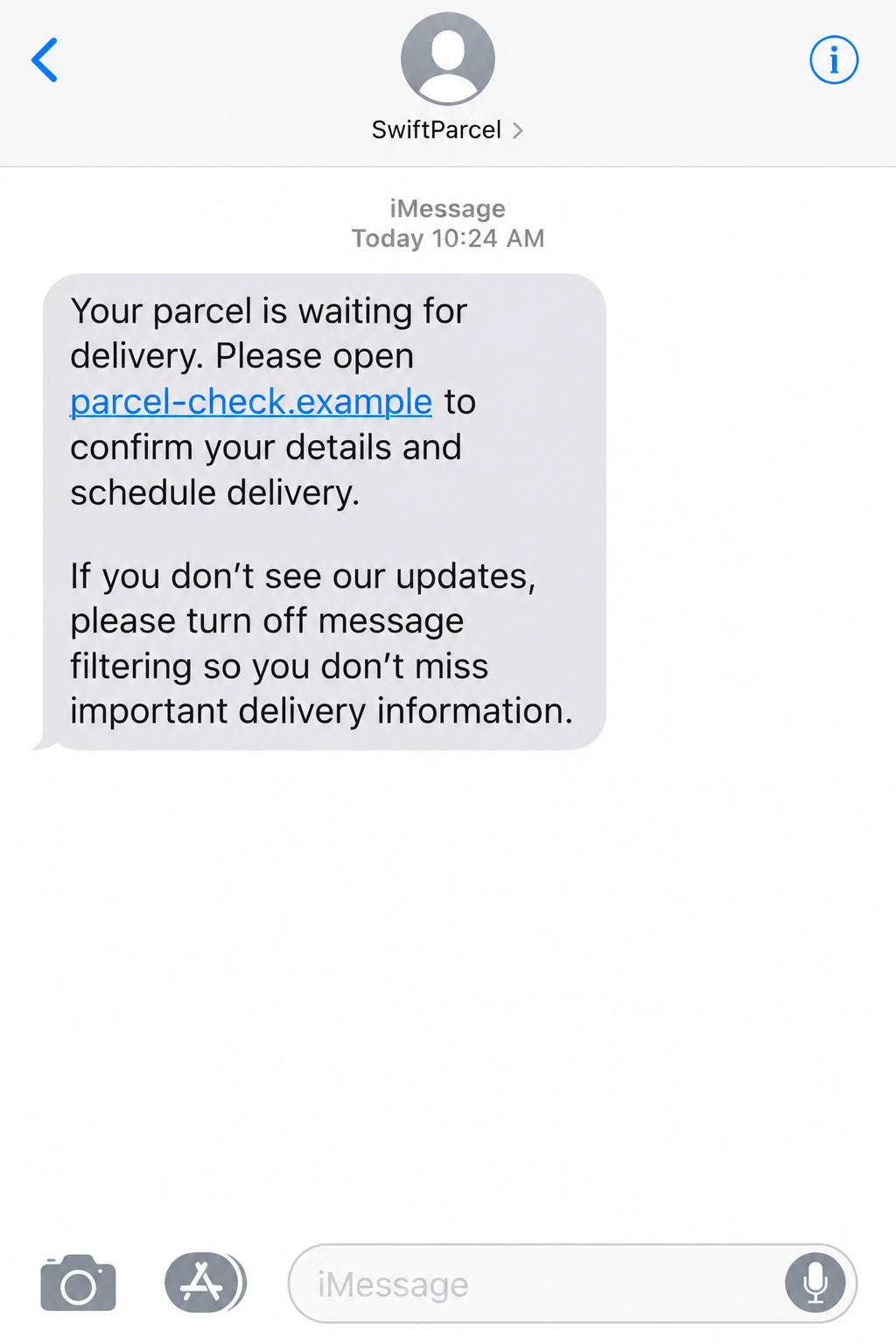
The image above illustrates the sort of message a recipient might see. The courier and link are fictional, not an intercepted message.
The delivery problem is a payment pretext
The alert claims that an address needs correction, a package is held, or a small fee remains. These are familiar enough problems to invite a quick fix.
The linked page then asks for personal or card details. Once entered, that information can support unauthorized payments or further account abuse.
A tiny quoted fee is not the full risk. The card number, security code, and one-time bank approvals are often the assets the operator wants.
Do not assume an accurate first name or partial address proves the message is genuine. Such details can come from previous leaks or public information.
The filter-bypass instruction is unusually revealing
Some messages told recipients to turn off filtering to make the courier link work. That instruction is a warning sign, not a normal delivery requirement.
Before acting on any parcel message, check these details:
- Does the sender match the courier’s documented contact method?
- Is the tracking number visible in the official app or website?
- Does the link lead to the courier’s real domain, not a variation?
- Does the page request card details for an unexpected charge?
- Does anyone ask you to weaken spam filtering or security settings?
How the Courier iMessage Scam Works
Step 1: Scammers choose a plausible delivery moment
Many households have packages in transit on any given week. The scammers do not need to know exactly what you ordered to make a delivery warning feel timely.
They borrow a courier’s name, sometimes one common in the recipient’s country. Singapore police cited impersonation of Ninja Van, J&T Express, and SPX Express.
Those companies are not being accused of sending scam messages. Their names are used because recipients already recognize them from legitimate deliveries.
A rushed reader may see the company name first and skip the strange sender address. That is the moment the fake notice gets its opening.
Step 2: The message arrives through iMessage
Traditional smishing often travels as SMS. In this campaign, many messages arrived through Apple’s data-based iMessage channel instead.
That route can avoid some checks applied by mobile network operators to SMS. It does not mean iMessage has no protections.
Messages from unknown email addresses can still appear alongside ordinary conversations. A blue bubble is not an endorsement from Apple or the courier.
Police warned that scam operators had also used large numbers of accounts. Disrupting one account does not stop the same script from another.
Step 3: The text creates a small, fixable problem
Instead of announcing a large prize, the lure says the package cannot move until a detail is corrected. That sounds like an administrative nuisance.
Common versions mention an incomplete address, a missed delivery, or a modest redelivery fee. Each makes the linked form look like a practical next step.
The timing pressure can be subtle. A recipient may worry the parcel will be returned if they do not act before evening.
That anxiety is exactly why the safest move feels inconvenient: leave the message and open the courier’s official site independently.
Step 4: The link opens a lookalike courier page
The page may use the courier’s colors, logo, tracking layout, and country-specific language. Visual familiarity can distract from the domain in the address bar.
Some pages ask for an address first, making the process appear administrative. Payment details arrive later, after the visitor has already invested attention.
Others move straight to a card form. A low fee lowers resistance, but the entered card credentials have a much higher value.
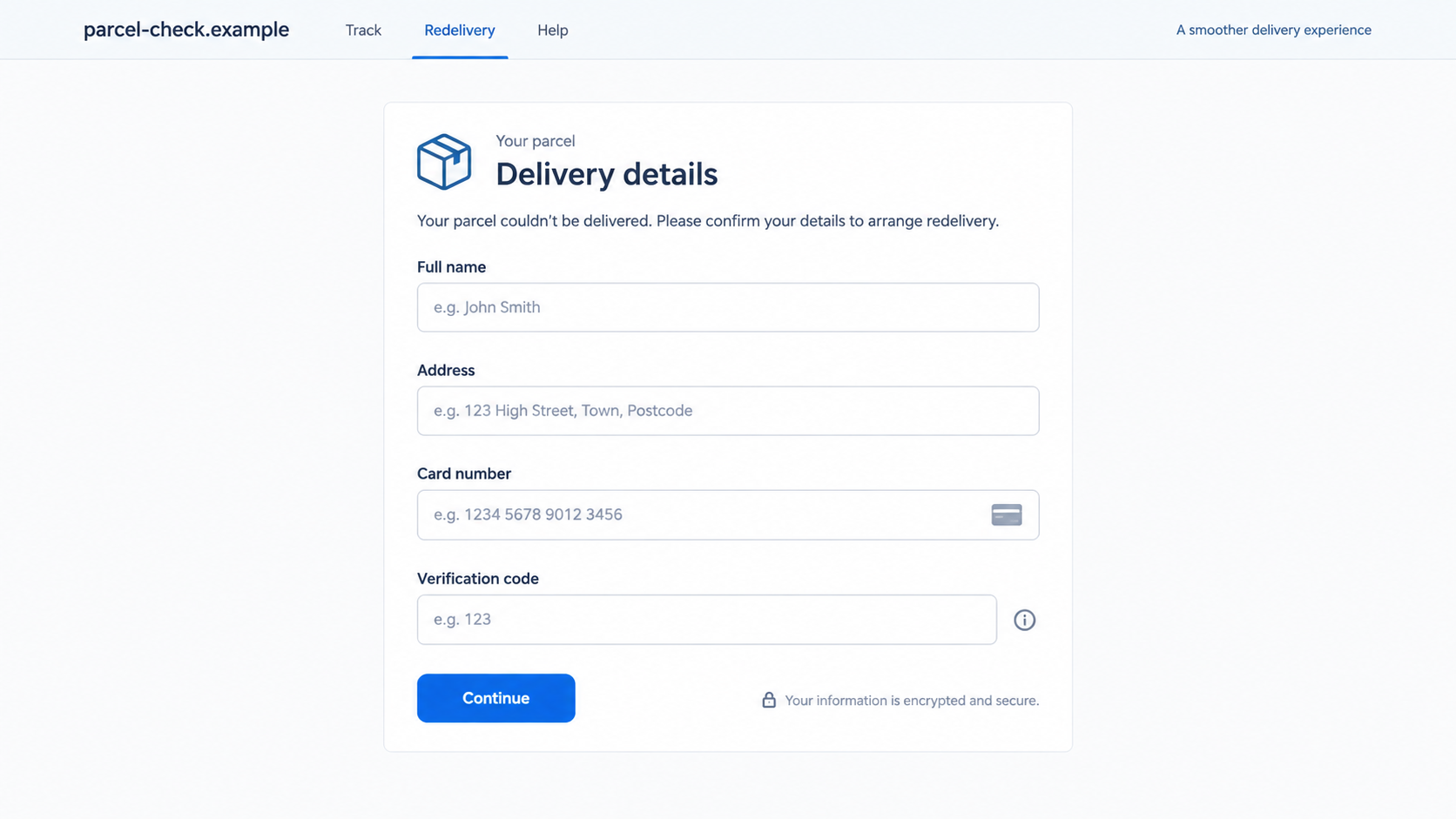
The second illustration shows this pattern in a fictional form. It is not a working checkout and should not be used to identify one specific active domain.
Step 5: The victim may be pushed to approve a payment
If card details are submitted, a bank may send a one-time code or approval prompt. The scam page can ask for that too.
Do not read the bank prompt as proof that the courier fee is real. It may authorize a different transaction or enroll the card elsewhere.
In Singapore, police estimated about $2.2 million in losses tied to the wider iMessage scam activity at the time of their advisory.
That figure is specific to the reported Singapore campaign and date. It is not a worldwide estimate for every parcel text.
Step 6: The sender asks users to weaken their filter
Instructions to disable filtering make more fraudulent messages likely to reach the inbox. A real courier does not need you to turn off spam controls.
The request may be framed as troubleshooting: if the link fails, adjust your settings and try again. That turns a protective feature into a supposed obstacle.
Once filters are relaxed, later impersonation messages can arrive with less friction. The original parcel may never have existed at all.
Resist the urge to test the link repeatedly. A failed page is not a reason to provide more information or change device settings.
How to Verify a Real Delivery
Use the order, not the message
Open the store where you bought the item. Find the order number and the courier named in the shipping update there.
Then type the courier’s official address yourself or use its official app. Enter the tracking number from the order, not from the suspicious text.
If you cannot find any matching order, the message becomes less credible. But even a matching delivery does not authenticate a link from an unknown sender.
The illustration above shows how a fake form can look tidy. Appearance alone is not a reliable delivery check.
Read the actual link destination
A courier’s logo can be copied in seconds. Its official domain is harder to imitate perfectly, although scammers can still exploit unfamiliar subdomains.
On a phone, press and hold a link to preview the full destination without opening it. If the preview is unclear, do not use the link.
Be wary of shortened addresses and domains with added words such as tracking, verify, delivery, or support. These words do not prove ownership.
For a genuine problem, customer service can confirm it through the official website or phone number printed on your order confirmation.
Separate delivery details from payment details
A legitimate courier may sometimes collect charges, such as customs fees. The existence of real fees does not make an unsolicited payment link safe.
Verify the charge in your order record and official courier account. Do not submit card details through a page reached only from an unexpected iMessage.
If you are in doubt, contact the retailer. They can often confirm whether an address correction or import fee is expected.
A genuine employee will not ask you to read out a bank verification code so they can release a parcel.
What to Do If You Entered Details on the Courier Page
- Stop interacting with the page. Close it without sending more information. Do not follow later messages asking you to retry payment or disable filtering.
- Call your bank using an official number. If you entered card data or approved a prompt, ask for the card to be blocked and transactions reviewed.
- Check recent authorizations. Tell the bank whether you entered a one-time code or approved a transaction. This changes the urgency and the bank’s response.
- Secure reused passwords. If the page asked you to create or enter a password, change it anywhere else you used it and enable multifactor authentication.
- Save evidence. Keep the sender address, message, website address, payment prompts, and bank transaction IDs. Take screenshots before deleting the conversation.
- Report the message. Use your carrier’s and Apple’s reporting options, and contact local police or consumer authorities if money was taken.
- Restore filters. If you changed Messages settings, turn filtering back on. Block the sender, but expect new accounts to use the same script.
- Check device risk. If you installed an app or profile from the page, remove it with professional help, scan with Malwarebytes, and consider AdGuard for future web protection.
Why This Is More Than a Bad Link
The message leans on several small expectations at once: parcels are common, delivery problems happen, and an iMessage looks like ordinary phone communication.
Its request to disable filtering reveals a broader campaign mindset. The sender wants not only one payment attempt, but a less protected route for future contact.
This does not mean every parcel message is fraudulent. It means the message should be treated as a notification to verify, not as the verification itself.
The distinction is simple enough to use under pressure: your order and the courier’s official system decide whether a parcel issue exists.
If those sources show no issue, a polished iMessage cannot invent one. If they do show an issue, you can resolve it inside the official system.
Keep spam filtering on and let an inconvenient verification step work in your favor. A real package can wait while you check.
What to Watch After a Fake Delivery Payment
Scammers may test a card with a small charge before attempting a larger one. A tiny unfamiliar transaction deserves the same attention as a large charge.
Bank alerts can arrive in a different currency or merchant name than the fake courier fee. Read the actual authorization details before approving anything.
If you supplied an address and phone number, expect follow-up messages that seem better informed. Those details can make the next impersonation more convincing.
A caller may claim to be from the bank’s fraud team and mention the parcel charge. End the call and dial the official number yourself.
Some victims receive a second message saying their refund is ready. A refund link is not safer just because it follows a scam report.
Keep watching the account for several weeks. Card details can be reused later, even after the first fake delivery page disappears.
Ask your bank whether replacing the card is enough or whether recurring merchant tokens also need review. The answer depends on your bank and payment network.
Tell household members about the message pattern. Another person at the same address may receive a convincing copy while expecting a real parcel.
Do not publish the full fraudulent URL in a social post if it exposes personal tracking data. A screenshot with private details hidden is safer.
When reporting, distinguish the courier brand being impersonated from the sender actually operating the message. That helps the real company investigate misuse.
A legitimate delivery problem will still be visible through the order or courier account. Let those records guide your next move.
One careful minute spent opening the official app can prevent hours spent replacing a card and disputing charges.
For a parcel shared with someone else, ask the purchaser to check the order. A real tracking event should be visible to the account holder too.
If you cannot confirm it, leave the parcel unresolved until the merchant or courier responds through its official support channel.
Frequently Asked Questions
Can a courier really contact me through iMessage?
It is possible for businesses to use messaging channels, but the channel alone does not prove identity. Confirm the alert using your order and courier account.
Does a blue iMessage bubble mean Apple verified the sender?
No. It indicates the message used Apple’s data-based messaging service, not that Apple authenticated the courier claim.
Why does the message ask me to turn off filtering?
That request can help scam messages reach you. Legitimate delivery services do not require a customer to disable spam protection to track a parcel.
Is a small delivery fee always fake?
No. Real fees exist, but an unexpected link is not proof of one. Check the charge through the retailer or courier’s official channel.
What if I only opened the page?
Opening a page is not the same as submitting card details. Close it, avoid any downloads, and watch for unusual prompts or repeated messages.
Are the police loss figures worldwide?
No. The cited account and loss figures came from a Singapore Police Force advisory in August 2026 and describe that reported campaign.
The Bottom Line
A courier iMessage can look unusually ordinary while leading to a fake delivery form. The dangerous step is trusting its link over the real order record.
Keep filters on, verify tracking independently, and contact your bank quickly if you entered card details or approved a payment.








