

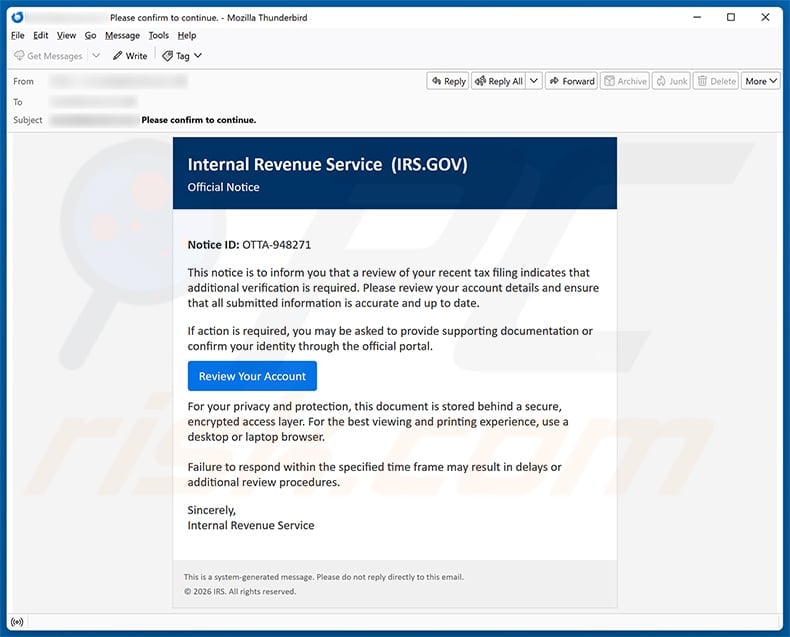
An official-looking IRS notice says a recent tax filing needs additional identity verification. The message offers one button to review the account and avoid delays.
Tax season already carries enough uncertainty. This particular notice adds a hidden computer-security risk that deserves a careful, evidence-based response.
Overview
The email impersonates an IRS account review
The captured message presents itself as an Internal Revenue Service Official Notice and uses the IRS.GOV name in its header.
It displays a fabricated notice identifier, OTTA-948271, then claims a recent tax filing requires additional verification.
The recipient is told to review account details, confirm identity, and ensure submitted information is accurate.
A “Review Your Account” button appears beneath that explanation.
The email warns that failure to respond may cause delays or additional review procedures, creating pressure without stating a real statutory deadline.
No taxpayer name, tax year, form number, secure IRS inbox reference, or verifiable case information connects the notice to an actual filing.
The destination downloads a remote-access installer
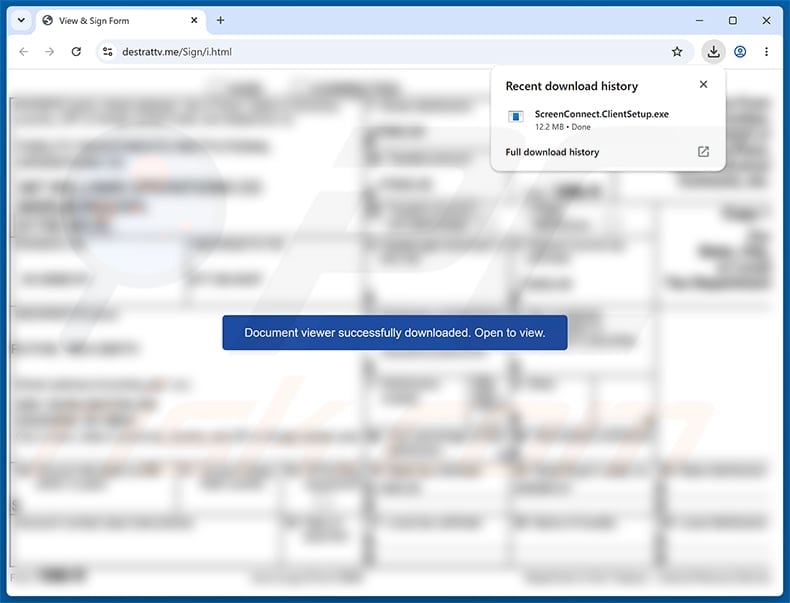
The observed button opened a counterfeit secure-document page rather than IRS.gov.
That site automatically downloaded a file named ScreenConnect.ClientSetup.exe during the documented test.
ScreenConnect is legitimate remote-access software made by ConnectWise. Criminals can abuse preconfigured installers to establish access to a victim’s computer.
Downloading a file is not the same as executing it. The most serious risk begins if the installer is opened and a remote client becomes active.
The IRS and ConnectWise did not create or authorize this campaign.
The response depends on whether the file ran
Someone who only received the message can report and delete it without treating the device as infected.
Someone who visited the page should locate the download, avoid opening it, and remove it after preserving any evidence required by workplace security.
If the executable ran, the computer should be disconnected from networks and treated as potentially remotely controlled.
Passwords must then be changed from a separate clean device, because typing new secrets on the affected computer could expose them again.
Organizations should involve their incident-response team before deleting software or logs that may be needed for investigation.
- The email uses IRS branding and a fabricated notice number.
- It claims tax-filing verification is required.
- The button leaves IRS.gov.
- A supposed document viewer downloads an executable file.
- The filename invokes ScreenConnect remote-access software.
- Downloading and running are different exposure levels.
- A running remote client may provide screen, file, and system access.
- The IRS and ConnectWise are legitimate entities being impersonated or abused.
How the IRS Account Detail Verification Scam Works
Step 1: Tax uncertainty gives the notice emotional weight
Many taxpayers do not know exactly how an identity review, delayed return, or filing discrepancy should look.
The attacker uses that uncertainty instead of making a detailed claim that could be checked immediately.
Mentioning a “recent tax filing” reaches people awaiting refunds, confirming extensions, answering preparer questions, or simply worried about compliance.
The notice sounds procedural, not theatrical, which helps it resemble routine government administration.
A false case identifier supplies precision without providing any record that exists inside a real IRS account.
The recipient is encouraged to resolve the concern before asking whether the IRS initiated contact this way.
Step 2: A security story explains why normal access is unavailable
The email says the document is stored behind a secure, encrypted access layer.
That language prepares the recipient for a separate viewing page and additional software.
It also recommends a desktop or laptop for the “best viewing and printing experience,” steering the victim toward a system capable of running Windows executables.
The recommendation sounds practical but aligns with the later payload.
Government logos and privacy wording cannot authenticate the sender because they are public material.
The IRS says unexpected tax-related emails should not be answered, linked, or opened.
Step 3: The review button leaves the government domain
A real IRS online service should remain within an IRS-controlled and independently verifiable route.
The captured campaign sent the browser toward destrattv[.]me, not IRS.gov.
The counterfeit page blurred a form behind a message claiming a document viewer had downloaded successfully.
That presentation encourages the visitor to open the new file instead of inspecting its type.
The .exe extension identifies a Windows program, not a PDF, tax form, image, or passive document viewer.
No legitimate tax verification requires an unsolicited remote-access client from an unrelated domain.
Step 4: The browser receives ScreenConnect.ClientSetup.exe
The screenshot shows a 12.2 MB download named ScreenConnect.ClientSetup.exe.
ScreenConnect is designed for legitimate remote support and unattended access when deployed by an authorized administrator.
Those same capabilities are dangerous when an installer is configured by a criminal and presented under a false IRS story.
The software may connect the device to a remote ScreenConnect instance controlled by the campaign operator.
Security products cannot classify every remote-management tool as malware because businesses use them lawfully.
Context, configuration, installation source, and authorization determine whether this instance is hostile.
Step 5: Execution can establish interactive remote access
If the victim opens the installer and completes or silently triggers setup, the operator may gain a persistent connection.
Depending on privileges and configuration, remote access can expose the screen, keyboard, clipboard, files, running processes, and command execution.
The criminal may watch the user log in, copy documents, install additional payloads, or manipulate browser sessions.
Administrator approval can widen control, but meaningful theft may still occur under ordinary user permissions.
A visible cursor or support window is not guaranteed. Unattended agents are intended to function without continuous local interaction.
That is why an executed installer requires isolation even when the computer appears normal.
Step 6: Remote control supports financial and identity theft
Tax records may contain Social Security numbers, addresses, income, bank details, dependents, and employer information.
Browser profiles can contain active sessions that bypass the need to know every password.
The attacker may open online banking while the victim is signed in, intercept email, or copy documents from local and synchronized folders.
Additional malware can steal credentials, encrypt files, capture keystrokes, or create another persistence method.
A criminal posing as IRS support may also call and guide the victim through transfers, refunds, or supposed verification payments.
The initial executable can therefore become the opening step in several different crimes.
Step 7: Legitimate software complicates discovery
ScreenConnect files and services may look less suspicious than an obviously random malware name.
An installed client can be mistaken for a tool placed by an employer, repair shop, or managed service provider.
Attackers benefit from that ambiguity and from security policies that permit remote-management software.
The answer is not to label every ScreenConnect installation malicious.
Instead, verify the instance, deployment time, connected server, installer source, authorized owner, and change records.
Anything introduced through this fake IRS notice should be treated as unauthorized.
The Evidence That Separates This From a Real IRS Notice
The contact method does not fit the claimed event
The IRS generally initiates contact through postal mail and limits email to defined, often consent-based situations.
An unexpected email asking the taxpayer to follow an account-review button should be verified through IRS.gov rather than trusted directly.
The official agency advises recipients not to click links or open attachments in suspicious tax-related messages.
Real account notifications do not require installing remote-control software from a third-party domain.
The executable contradicts the document story
The page claims a document viewer was downloaded, but the filename ends in ClientSetup.exe.
A setup program changes the computer. A document should not need that level of access merely to display information.
Windows may hide known file extensions under some settings, making the item appear less revealing in File Explorer.
View full filenames and properties before opening anything obtained from an unsolicited message.
The notice number cannot be verified in an official account
OTTA-948271 looks structured, but an invented identifier costs the sender nothing.
A legitimate notice should correspond to records available through an authenticated IRS account or established IRS contact route.
Do not type the number into a website reached from the email.
Open IRS.gov independently and use official notice lookup or support information.
Understanding ScreenConnect Abuse Without Blaming the Product
Remote support software has powerful legitimate uses
Authorized technicians use ScreenConnect to troubleshoot systems, maintain endpoints, and support users across different locations.
The product’s remote screen and access capabilities are useful precisely because they let an approved operator work directly on a device.
ConnectWise documents ScreenConnect as remote-access and support software.
Its presence in a criminal installer does not mean the vendor participated in the deception.
Authorization is the dividing line
A company-deployed agent should have an owner, management record, approved server, and documented business purpose.
An executable downloaded after an unsolicited IRS email has none of that trusted context.
Do not accept a caller’s claim that the IRS needs remote access to inspect tax records.
Government identity verification does not require surrendering control of a personal computer.
Removing one tool may not remove the incident
If a hostile remote session existed, the operator could have installed other programs or created new accounts.
Uninstalling ScreenConnect alone does not prove the system returned to a trustworthy state.
Security logs, persistence points, browser sessions, scheduled tasks, startup entries, and additional remote tools need review.
High-risk cases may require professional analysis or a clean operating-system reinstall.
How to Check Whether the Installer Ran
Start with the Downloads folder and browser history
A completed download should appear in the browser’s download list and usually in the Downloads folder.
Check its creation time and full filename without opening it.
Windows security history may show whether the file was blocked, quarantined, or allowed.
Do not upload confidential files to random online scanners while investigating.
Look for installed applications and services
Review recently installed programs around the email’s timestamp.
Search running processes and services for ScreenConnect, ConnectWise Control, or unfamiliar remote-access entries.
Organizations should use endpoint-management records and forensic tooling rather than relying only on the visible application list.
An absence from one screen does not conclusively prove the installer never executed.
Check network and account evidence
Unexpected outbound connections, remote sessions, new user accounts, or security-setting changes can support an execution finding.
Review email, banking, cloud, and identity-provider logs from a separate clean device.
Look for access beginning shortly after the installer timestamp.
Preserve logs before cleanup when the computer belongs to a business or contains regulated data.
What to Do if You Have Fallen Victim to This Scam
- Do not open the downloaded executable. If it has not run, leave it untouched until workplace security preserves evidence, then remove it safely.
- Disconnect a potentially affected computer. If the installer ran, turn off Wi-Fi and unplug Ethernet without signing into sensitive accounts on that device.
- Contact authorized security support. Business users should notify incident response immediately. Home users may need trusted professional help when remote access was established.
- Identify and contain the remote agent. Verify installed ScreenConnect services and sessions, terminate unauthorized access, and preserve relevant logs before removal.
- Run comprehensive security checks. Use Malwarebytes or approved enterprise tools for payloads and persistence. AdGuard can block many later malicious destinations.
- Change passwords from a clean device. Begin with email, banking, IRS, cloud, and password-manager accounts, then revoke active sessions and unknown applications.
- Protect financial and tax identities. Contact banks about suspicious activity and use official IRS identity-theft resources when tax information may be exposed.
- Report the impersonation. Forward the original email as an attachment to phishing@irs.gov and follow current IRS and TIGTA reporting instructions.
- Consider rebuilding the system. When privileged remote access or additional malware is confirmed, a clean reinstall may provide stronger assurance than selective removal.
- Monitor after recovery. Watch tax filings, credit reports, bank activity, email rules, new devices, and follow-up calls using information taken during the incident.
Preventing Similar Remote-Access Lures
Block unexpected executable downloads
Organizations can restrict users from running software downloaded from email-driven websites and temporary hosting domains.
Application control allows approved remote tools while blocking unknown installers with similar names.
Email filtering should flag government impersonation, executable routes, and messages that push users toward external document viewers.
Technical controls work best alongside an easy reporting process.
Require an authorized support identity
Before remote software is installed, the user should know the technician, organization, ticket number, approved product, and expected session purpose.
Initiate support through a known portal or telephone number.
Do not grant access because an unsolicited email or caller describes an urgent tax, banking, refund, or security problem.
Close the conversation and contact the organization independently.
Keep remote-management tools visible to defenders
Businesses should inventory every authorized remote agent and alert when a new one appears.
Network monitoring can identify connections to unapproved ScreenConnect instances or other remote platforms.
Regular reviews prevent obsolete agents from becoming unexplained background software.
Home users should periodically inspect installed applications and remove remote tools they no longer need.
Frequently Asked Questions
Is the IRS Account Detail Verification email genuine?
The examined email is malicious. Its review link leads outside IRS.gov and downloads a ScreenConnect client instead of opening a tax notice.
Is ScreenConnect malware?
ScreenConnect is legitimate remote-access software. In this campaign, criminals abuse a configured installer to seek unauthorized control under a false IRS story.
Am I infected if the file only downloaded?
Not necessarily. A download alone is different from execution. Do not open it, preserve evidence when required, and remove it using trusted security guidance.
What if I ran ScreenConnect.ClientSetup.exe?
Disconnect the device, contact security support, terminate unauthorized remote access, scan for additional threats, and change important passwords from a separate clean device.
Would the IRS ask me to install a document viewer?
An unexpected IRS email should not direct you to install remote-access software. Verify any real tax issue by opening IRS.gov independently.
Where should I report the fake IRS email?
The IRS asks recipients to forward suspicious tax-related email as an attachment to phishing@irs.gov and provides additional reporting routes on IRS.gov.
The Bottom Line
The IRS Account Detail Verification scam disguises a remote-access installer as a secure tax document.
Its fabricated notice ID, non-IRS destination, and ScreenConnect.ClientSetup.exe download reveal a malware-delivery path, not a government account review.
Do not run the file. If execution occurred, isolate the computer, involve security support, protect accounts from a clean device, and report the IRS impersonation.








