

An email in Portuguese says personal details must be confirmed before banking can continue without interruption. The red Santander styling makes the instruction look familiar.
That appearance deserves careful scrutiny, especially when the message turns a routine data check into an unexpected path toward online banking credentials.
Overview
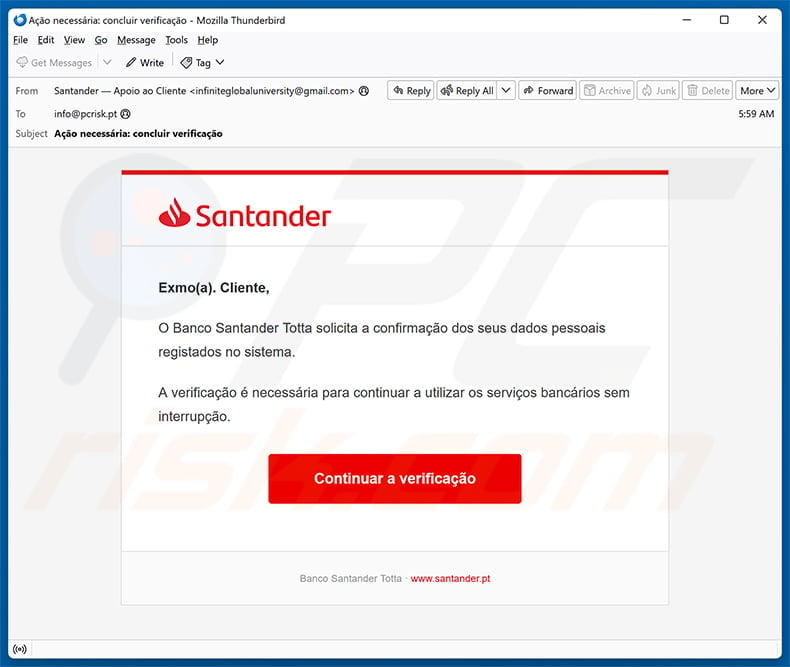
The email imitates Banco Santander Totta
The captured message uses Santander’s logo and addresses the recipient as “Exmo(a). Cliente,” a formal Portuguese greeting.
It claims Banco Santander Totta needs confirmation of personal data registered in its system.
According to the email, verification is required to keep using banking services without interruption.
A large red “Continuar a verificação” button provides the only apparent way forward.
The footer displays santander.pt, but visible footer text does not control where the button actually sends the browser.
The sender in the captured email used a Gmail address unrelated to Santander, despite presenting itself as customer support.
The link uses a misspelled imitation domain
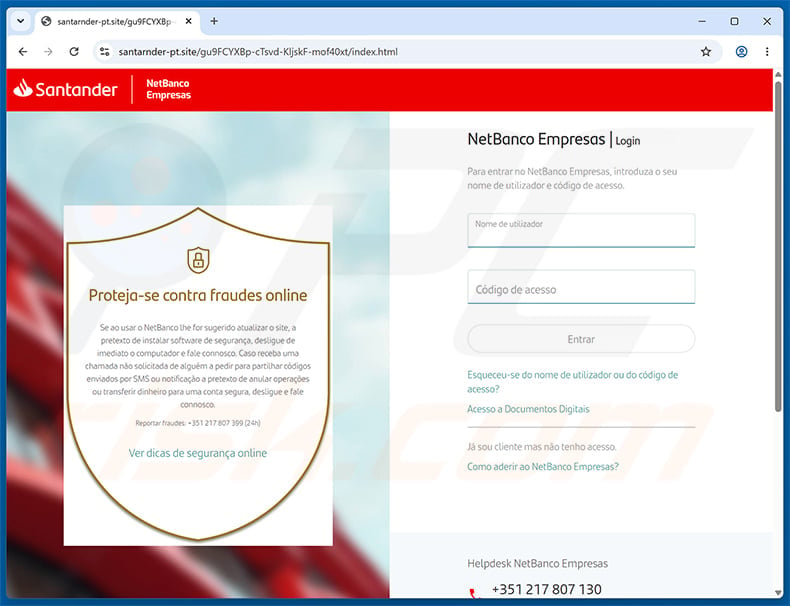
The button led to santarnder-pt[.]site, with an extra “r” inside the bank’s name.
That spelling can be difficult to notice during a hurried mobile session, especially beside convincing red branding.
The page copied Santander NetBanco Empresas and requested a username plus an access code.
It even reproduced fraud warnings and official-looking telephone details, creating the impression of a security-conscious environment.
Those elements sit inside a website controlled outside Santander’s official domain.
The page’s purpose is credential collection, not customer-data maintenance.
Santander’s own advice contradicts the request
Santander Portugal says it does not request personal data through email or telephone.
Its official security guidance tells customers to report links leading to pages that are not Santander properties.
The bank publishes 24-hour fraud contacts on santander.pt, including separate numbers for account fraud and card fraud.
Customers should obtain those numbers from the official site or banking application rather than copying anything from the suspicious message.
Banco Santander Totta is a legitimate institution and is not responsible for this impersonation campaign.
- The message creates fear of interrupted banking access.
- The sender uses a free Gmail address.
- No customer name, account reference, or secure inbox context appears.
- The button leaves the real santander.pt domain.
- “Santarnder” contains an easy-to-miss extra letter.
- The page requests NetBanco credentials.
- Copied fraud warnings do not validate the page.
- Santander is being impersonated, not exposed as the operator.
How the Santander Personal Data Confirmation Scam Works
Step 1: A banking interruption warning creates urgency
The email does not threaten an immediate fine or arrest. It suggests that normal banking may stop unless the recipient completes verification.
That consequence feels practical and close enough to matter, especially before bills, payroll, or travel.
Banks genuinely maintain customer records, which gives the false request a believable administrative foundation.
The scammer avoids explaining which detail is outdated because any specific claim could be disproved inside the real account.
Instead, the recipient is asked to discover the issue by entering the supplied verification journey.
Fear of losing access replaces the need for evidence.
Step 2: Familiar Portuguese branding narrows suspicion
The message uses local language, Santander red, and the Banco Santander Totta name.
Targeting Portuguese-speaking customers makes the campaign feel more deliberate than a generic English-language blast.
However, the sender address belongs to Gmail and does not establish any link with the bank.
Logos and colors can be copied from public pages within minutes.
The footer’s printed santander.pt address is also ordinary text, not proof that the button shares that destination.
The full sender and actual link target carry more evidential value than the design.
Step 3: The button moves the victim to a look-alike hostname
The observed destination begins with santarnder rather than santander.
Typosquatting relies on the brain recognizing the overall shape of a familiar word while skipping one misplaced or repeated character.
Adding “-pt” encourages the assumption that the address is a Portuguese regional portal.
The top-level domain is .site, not the bank’s established santander.pt address.
An HTTPS padlock, if present, would confirm only encrypted communication with the misspelled site.
It would not transfer ownership or approval from Santander to that host.
Step 4: The counterfeit page reproduces NetBanco Empresas
The landing page uses a split layout, Santander logo, NetBanco Empresas label, and fields for the username and access code.
It also shows a shield containing advice about online fraud.
That copied warning is psychologically useful because readers often interpret security messaging as proof that a page is protected.
In reality, the person who controls a webpage can place any warning, logo, or telephone number inside it.
The browser address remains santarnder-pt[.]site throughout the interaction.
A business-banking label may also attract credentials with higher payment authority than a personal account provides.
Step 5: Entered banking credentials reach the operator
Submitting the username and access code exposes them to the phishing site.
The next screen may request a one-time code, card detail, telephone number, or additional identity information.
Such requests can arrive in stages so each screen resembles a normal banking step.
If the real bank sends an authorization code during the attack, that code must not be shared or approved.
The criminal may be attempting a live login, beneficiary change, device registration, or payment at the same moment.
An error message does not mean the data was rejected by the attacker.
Step 6: Real-time social engineering can complete the fraud
Stolen static credentials may trigger additional security challenges that the phisher cannot answer alone.
The operator may call while impersonating fraud staff and claim the verification produced an alert.
They can ask the customer to read a code, confirm a notification, or transfer funds into a supposed safe account.
That second contact can feel credible because the caller knows the email address, username, and timing of the recent interaction.
Santander advises customers to be cautious about requests to install security updates, simulate payments, or disclose authorization codes.
The bank’s real fraud team does not need a customer to send money somewhere “safe.”
Step 7: The account may be abused before the victim notices
Successful access can expose balances, payees, statements, personal details, and transaction history.
Criminals may attempt transfers, register a new device, change contact details, or gather information for later impersonation.
Card details collected on follow-up screens can support online purchases or additional scams.
Business accounts carry broader risk because one user may control supplier payments or payroll files.
Fast contact with the real bank gives fraud staff the best opportunity to freeze access and investigate pending activity.
Waiting for a visible loss can allow temporary authorizations to settle.
The Strongest Warning Signs
One extra letter changes the owner completely
Santarnder and Santander look similar, but the registered domain is an exact technical boundary.
A company controls only the names it has registered or officially delegated.
Words before or after the brand do not compensate for a misspelling inside it.
Read important hostnames slowly from right to left, beginning with the ending and registered name.
The sender address is not bank infrastructure
The captured sender used a Gmail account while claiming to provide Santander customer support.
Banks may use outside vendors for some communications, but sensitive verification should still be confirmed through authenticated banking channels.
A free address combined with an access-threat story is a decisive reason to stop.
Do not reply to ask whether the message is genuine, because the response returns to the same unverified sender.
The fraud warning is part of the imitation
The counterfeit page tells customers to protect themselves from online fraud while requesting credentials on a fraudulent domain.
This contradiction is not accidental. Security language makes the surrounding interface appear mature and official.
Evaluate who controls the page before accepting advice printed within it.
Official warnings should be read on santander.pt or inside the real banking application.
How to Verify a Santander Request Safely
Open NetBanco through a trusted route
Close the email and launch the official Santander application or type santander.pt yourself.
Check the secure message center, account banners, and profile notices after signing in normally.
Do not copy the suspicious URL into another browser, because that still visits the attacker’s site.
If the real account shows no request, contact the bank before taking any further action.
Use contact details obtained independently
Santander Portugal lists 24-hour contacts for suspected account and card fraud on its official reporting page.
Retrieve those numbers directly from santander.pt, the back of a genuine card, a statement, or the official application.
Do not call a number displayed by the email or counterfeit page, even when it matches the visual design.
Explain exactly which fields were entered and whether any codes or prompts were approved.
Treat unexpected authorization prompts as an active incident
A genuine one-time code can be generated by a criminal attempting a real action with stolen credentials.
The fact that a code comes from the bank does not validate the person requesting it.
Read the authorization text carefully and deny anything you did not initiate inside the official application.
Call the bank immediately when prompts arrive during or shortly after a suspicious interaction.
What Criminals May Do With Banking Credentials
Attempt account access and device registration
The first goal may be establishing a trusted session before the customer changes the credentials.
Registering another device can create a longer-lived path into the account.
The bank may send alerts about these actions, so customers should preserve and report them rather than dismissing them as verification noise.
Review contact details because changed telephone or email information can redirect future security messages.
Build a precise impersonation profile
Statements and payee lists reveal employers, utilities, lenders, subscriptions, and frequent transfer recipients.
That information supports believable calls or messages even when the immediate login attempt fails.
The attacker may mention a real merchant or approximate balance to sound like bank staff.
Knowledge of account facts does not make an incoming caller legitimate.
Target connected email and reused passwords
If the same credential protects email or another service, the exposure extends beyond banking.
Inbox access may let an attacker intercept bank notices and password-reset links.
Every reused password should be replaced from a clean device, beginning with email and financial services.
Unique credentials limit the incident to the account whose secret was entered.
What to Do if You Have Fallen Victim to This Scam
- Call Santander through an official channel immediately. Report the phishing interaction, identify every field entered, and ask the bank to secure online access.
- Block affected cards or payments when advised. Use the official application or verified fraud line and review pending transfers, beneficiaries, and purchases.
- Change banking credentials from a clean route. Open the genuine application or santander.pt and create credentials not used on any other service.
- Deny and report authorization prompts. Never share one-time codes, approve unfamiliar devices, or confirm transfers initiated by someone claiming to protect the account.
- Secure the connected email account. Replace its password, revoke sessions, inspect forwarding and recovery settings, and enable strong multi-factor authentication.
- Replace reused passwords elsewhere. Prioritize financial, government, shopping, cloud, and workplace accounts that used the same or similar secret.
- Preserve transaction evidence. Save the email, headers, URL, screenshots, SMS messages, call details, bank alerts, and transaction identifiers.
- Inspect the device if anything downloaded. Use Malwarebytes and built-in protection after unexpected files or applications. AdGuard can block many later malicious destinations.
- Report the phishing page. Notify Santander through its official security channel and report the malicious message within your email provider.
- Monitor the account and identity. Watch statements, credit activity, telephone changes, and fresh impersonation attempts after the immediate access is secured.
Practical Protection for Future Banking Messages
Make the official application your starting point
Banking actions should begin inside an installed official application or a manually typed, bookmarked site.
An email can alert you that something needs attention, but it should not define the route used to resolve it.
This habit removes most look-alike links from the decision entirely.
It also makes a message less urgent because the real account status is available independently.
Slow down when access is threatened
Statements about interruption, suspension, or mandatory verification are designed to compress decision time.
Pause before entering credentials, even when upcoming bills make the warning feel costly.
The bank can restore legitimate access through verified support.
Recovering money after authorizing a fraudulent payment is considerably harder.
Keep security codes private
One-time codes and approval prompts authorize actions. They are not troubleshooting numbers to read aloud.
Bank staff may discuss an alert, but an unsolicited caller should never direct the customer to approve an unknown transaction.
Read the exact action shown in the official app.
If it does not match something you initiated, reject it and contact the bank separately.
Frequently Asked Questions
Is the Santander Personal Data Confirmation email genuine?
The examined version is phishing. It came from an unrelated Gmail address and led to the misspelled santarnder-pt[.]site domain.
Is Santander itself involved in this scam?
No. Banco Santander Totta is a legitimate bank being impersonated. The fake email and website copy its name, colors, and NetBanco appearance.
Why does the fake page include fraud warnings?
Anyone controlling a webpage can copy security text. The warnings make the imitation feel trustworthy but do not change the unrelated domain owner.
What if I entered only my username?
Contact the bank and monitor the account. A username can support targeted follow-up attempts, especially when combined with other leaked personal information.
What if I shared an SMS code or approved a prompt?
Call the bank immediately through an official number. The attacker may have authorized a device, login, beneficiary, or payment in real time.
How do I find the correct Santander fraud number?
Use santander.pt, the official banking application, the back of your card, or a genuine statement. Never rely on contact details inside the suspicious message.
The Bottom Line
The Santander Personal Data Confirmation scam converts a routine customer-record story into a counterfeit NetBanco Empresas login.
Its Gmail sender and misspelled santarnder-pt[.]site address expose the impersonation, even though the page carefully reproduces Santander branding and fraud advice.
Use the official application and bank contacts. If any credentials or codes were shared, contact Santander immediately and secure the connected email account.

Join the discussion
0 commentsShare your experience or ask a question about this article.
Discussion
Start the conversation
Have a question or something useful to share? Add the first comment.