

A property purchase has enough moving parts without a surprise email changing where the money should go. Yet that is exactly the sort of message buyers are being warned about.
The details matter here. A seemingly routine instruction can carry a very different meaning when a buyer is rushing toward completion day.
Overview
What the warning actually describes
The Solicitors Regulation Authority, or SRA, published a scam alert concerning TMJ Legal Services Limited on September 18, 2026.
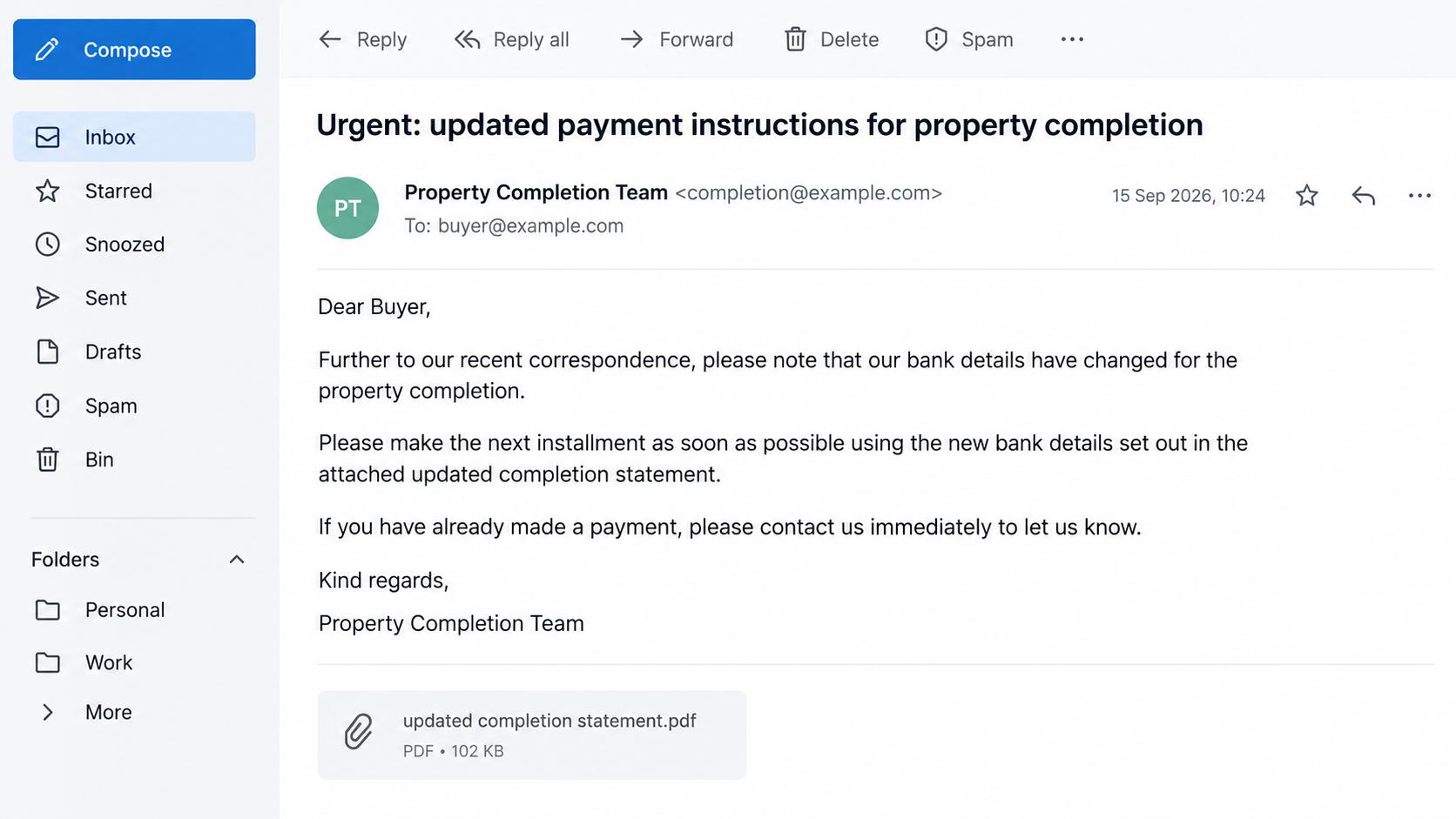
It says fraudulent emails were sent about property purchases, claiming to come from a solicitor at the genuine firm. They asked for money in tranches.
The money was meant to go to what the messages called a trust account. The SRA does not say that the genuine firm requested these payments.
The almost-right email address
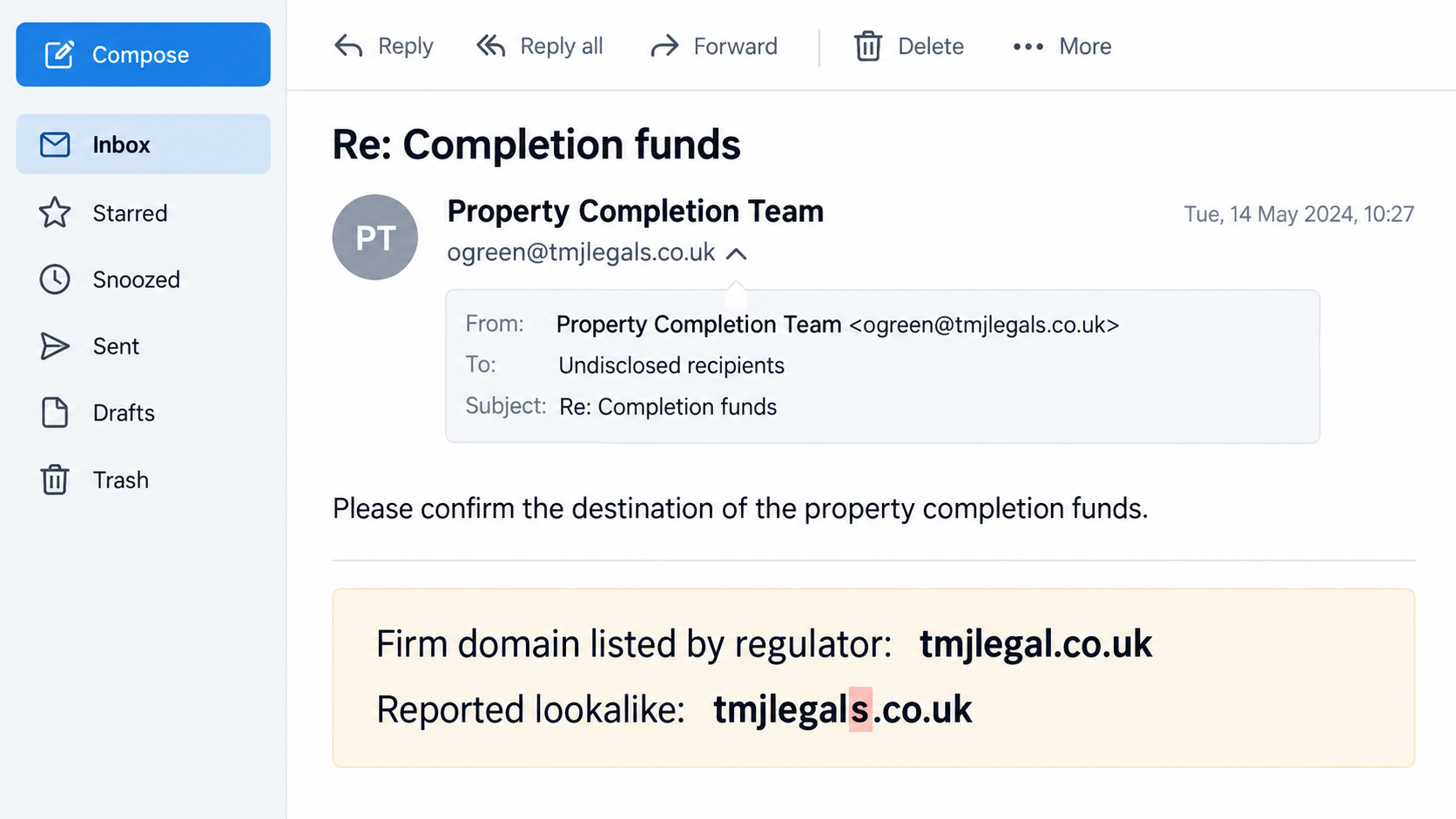
The reported sender was ogreen@tmjlegals.co.uk. The firm told the regulator its genuine email domain is tmjlegal.co.uk, without the extra letter near the end.
That small difference is easy to miss on a phone screen. A display name can hide it until the recipient expands the full sender details.
The alert also says the messages misused the name of real solicitor Olivia Green and the firm’s Peterlee office address.
What remains unproven
There is no basis to say TMJ Legal Services sent the emails, that its mailbox was hacked, or that the named solicitor participated.
The genuine firm and solicitor confirmed to the SRA that they had no connection with the correspondence described in the alert.
- Reported impersonation: TMJ Legal Services Limited and Olivia Green.
- Reported lookalike domain:
tmjlegals.co.uk. - Genuine firm domain identified by the SRA:
tmjlegal.co.uk. - Requested action: transfer property money to an account supplied in the suspect email.
These details describe the reported case, not every property transaction. Fraudsters can change domains, names, and bank instructions without changing the basic tactic.
How the TMJ Legal Services Property Email Scam Works
Step 1: Place a believable name in the buyer’s inbox
A buyer expecting conveyancing updates may recognize a solicitor’s name or a familiar office location before checking who actually sent the message.
Here, the SRA says the emails borrowed a real solicitor’s identity and the firm’s address. Those details make the request feel connected to legitimate work.
Someone who is already exchanging documents with several parties may assume this is simply another administrative update. That assumption is the opening.
The alert does not establish how recipients were selected. It would be wrong to conclude that a conveyancer leaked a client list or that an account was compromised.
Step 2: Hide the mismatch in a plausible domain
The sender address used tmjlegals.co.uk. The extra s turns it into a different domain from the genuine firm’s stated tmjlegal.co.uk.
Email applications often emphasize the sender’s display name. Some collapse the address altogether, so the mismatch may remain out of sight unless you open sender details.
A message can also quote prior-looking context without proving the sender knows your transaction. Names, addresses, and timing can be copied or guessed.
Neither a professional signature nor a matching office address establishes that the email came through the firm’s authorized systems.
Step 3: Tie the request to a real estate milestone
Property buyers know that completion involves deadlines and large payments. A demand linked to those deadlines has a better chance of being treated as urgent.
The warning describes requests concerning property purchases and transfers in tranches. An installment plan can make an unusually large payment instruction seem procedural.
The alleged trust account wording adds a layer of legal language. It does not prove the account is a regulated client account or belongs to the firm.
Even if the amount matches an expected payment, the destination still requires independent confirmation. Correct figures are not a substitute for verified bank details.
Step 4: Move the buyer away from a trusted verification route
The dangerous moment is when an email becomes the only source of payment instructions. The buyer may reply to the same thread or call a number in its signature.
That keeps the conversation inside the channel the impersonator controls. A polished reply can then reinforce the original claim without adding real proof.
Some property scams use a sudden account change. Others introduce a supposed new client account. The SRA alert confirms a suspect payment demand here, not every variant.
A safer check starts with contact details obtained earlier from the genuine firm, preferably from signed engagement papers or its independently located website.
Step 5: Ask for the transfer before doubts catch up
Bank transfers can move quickly, while recalling one can be difficult. That timing explains why a completion-day email is such an effective pressure point.
The reported messages asked for money in tranches. Sending one smaller portion may feel like a test, but it still directs funds to an unverified recipient.
Once an initial payment is made, a buyer may be more inclined to follow later instructions from the same sender. This is a risk, not a claim about known victims.
The SRA alert does not report how many people received the emails or whether any transfer succeeded. Its warning is about the impersonation and demand.
Step 6: Let the buyer discover the mismatch too late
A buyer may only learn something is wrong when the real conveyancer says the funds never arrived. By then, the completion deadline can add panic.
That is why the best intervention happens before payment, not after an alarming reply or a failed transaction. Confirm the account through a separate channel.
If your solicitor calls to verify bank details, call back using a number you independently checked. Caller ID can be misleading, too.
The simple rule is practical: treat any new destination for property money as a fresh instruction requiring fresh verification.
Why This Email Looks More Convincing Than Ordinary Spam
A real solicitor’s name is not proof
Olivia Green is a real solicitor according to the SRA alert. Her name in a suspicious message therefore makes the story more plausible, not more authentic.
Fraudsters can lift names from professional directories. They can also copy a letterhead, office address, and signature block from public material.
The genuine solicitor’s denial matters because it separates an impersonation from wrongdoing by the person whose name was borrowed.
The Peterlee address can be copied
The message reportedly used the firm’s Peterlee branch address. A correct physical address only shows that the sender knew, or found, a public detail.
It does not establish control of the office, a client account, or the firm’s email infrastructure. Search results are full of legitimate addresses available to anyone.
That distinction is particularly important when a buyer is checking a message quickly and sees one familiar line in a longer signature.
Legal language can conceal an account switch
Words such as trust account and completion statement sound ordinary in conveyancing. They can also draw attention away from the actual destination of a transfer.
Ask whether the account details match those already verified with your conveyancer. If they do not, stop and investigate before trying a small payment.
No solicitor should object to an independent call before a substantial transfer. A sender who discourages that check is creating another warning sign.
How to Check a Property Payment Instruction Safely
Start with the paperwork from the beginning of the matter. It should identify the firm, your reference, and the channels the firm uses for payments.
Call the office number from that paperwork or from the firm’s website that you navigated to yourself. Do not use the number inside the suspicious message.
Ask the firm to read back the beneficiary name and full bank details it expects you to use. Compare them character by character with your saved instructions.
If a message says the account changed, ask why, when, and who authorized the change. Confirm that answer through a second known contact if possible.
Consider speaking with the named solicitor or the firm’s accounts team, but reach them through the main switchboard. An emailed confirmation alone is not enough.
Do not let a completion deadline force you into an unverified transfer. A brief pause can be less damaging than sending purchase funds to the wrong account.
Keep the suspect email intact, including headers if you know how to export them. The original message may help the firm and investigators trace the attempt.
Three Situations That Deserve an Immediate Pause
The new account appears near completion
Last-minute changes are common in a house move, which makes a last-minute payment instruction tempting to accept without question.
But a change in destination is different from a change in appointment time. It determines who receives a very large sum.
Ask your conveyancer how the account change was approved and whether the details were delivered through the firm’s normal process.
If the answer arrives by replying to the suspect email, you have not created a separate line of confirmation.
The message mentions a familiar solicitor
Recognizing Olivia Green’s name may feel reassuring to someone who searched the firm’s staff page. The SRA warning shows why that can mislead.
A person’s professional status confirms only that the person exists. It does not connect them to an email from a different domain.
Ask the office to put you through to the solicitor or accounts team. Describe the exact sender address and request they confirm it.
A legitimate employee can help resolve confusion without asking you to proceed blindly.
The sender suggests splitting the payment
Tranches can make a request seem controlled, particularly if a buyer fears losing the property by waiting too long.
Splitting an unverified transfer does not fix the recipient problem. Each installment can still go to an account outside the firm’s control.
Never interpret a successful first transfer as validation. Banks can process payments to fraudsters as readily as payments to genuine solicitors.
Resolve the destination first, then follow the verified firm’s instructions for the full transaction.
What a Bank Confirmation Can and Cannot Tell You
Your banking app may show that an account exists or that a name broadly matches. Those checks are useful but do not replace a call to the firm.
A fraudster may use an account name chosen to resemble a legal client account, or persuade a buyer to ignore a mismatch.
Do not override a warning simply because an email says the bank’s system is outdated. Ask the real solicitor to explain the discrepancy.
If the payment has already been scheduled but not released, contact the bank immediately and ask whether it can be stopped.
Tell the firm what the bank displayed. That detail may help distinguish a typo from a deliberate account substitution.
What to Do if You Have Fallen Victim to This Scam
- Call your bank’s fraud team immediately. Say you may have sent a property payment to a fraudulent account. Give the transfer time, amount, reference, and recipient details. Ask for a recall and whether the receiving bank can be alerted.
- Contact the real conveyancer through an independently verified number. Explain exactly what the email instructed and which payments you made. The firm can confirm the genuine account and address urgent completion issues.
- Preserve the message and payment record. Save the full email, any attachments, the bank confirmation, and subsequent replies. Do not edit screenshots or forward the message to other buyers as a warning.
- Report the impersonation. Share the material with the SRA and the relevant fraud-reporting authority in your location. If you are in the UK, your bank can explain current fraud-reporting routes.
- Secure any account you used in the conversation. Change its password from a trusted device if you entered credentials on a linked page. Review sign-in history and enable multifactor authentication.
- Reject follow-up recovery offers. Someone claiming they can retrieve a transfer for an advance fee may be exploiting the same incident. Work through your bank and official channels instead.
A fast bank report matters even if you feel embarrassed. Fraud teams see payment diversion cases regularly, and precise transaction details help them act.
If no money moved, notify the real firm anyway. It may need to warn other clients about the lookalike domain.
Frequently Asked Questions
Is TMJ Legal Services itself a scam?
No. The SRA describes a genuine firm being impersonated. The firm and named solicitor told the regulator they were not connected to the suspect emails.
What was different about the sender address?
The reported email used tmjlegals.co.uk. The genuine domain identified in the SRA alert is tmjlegal.co.uk. That extra letter matters.
Does the firm’s real office address make the email genuine?
No. Public office details can be copied into a fraudulent signature. Verify the sending domain and payment request through contact information you obtained separately.
Should I send a small test payment first?
Not to an unverified account. Even a small transfer can be lost, and a successful test does not prove that the destination belongs to your conveyancer.
Can I trust a reply in the same email thread?
A reply proves only that the other party controls that thread. Use a known telephone number and have the firm read back its authorized account details.
Did the SRA say buyers already lost money?
The public alert describes the emails and requests for transfer. It does not provide a victim count or say that a particular payment succeeded.
The Bottom Line
The TMJ Legal Services property email scam is an impersonation attempt, not a warning against the genuine law firm. Its most important clue is a near-match domain.
Before paying property money, verify the destination through a number you already trust. One independent call can interrupt an expensive mistake.








