

The trading site looks polished. It has a login page, market charts, and a company name that appears in a regulator’s records.
Those pieces do not necessarily belong together. A closer look at the domains and the authority’s record tells a more complicated story.

Overview
A clone of a genuine regulated firm
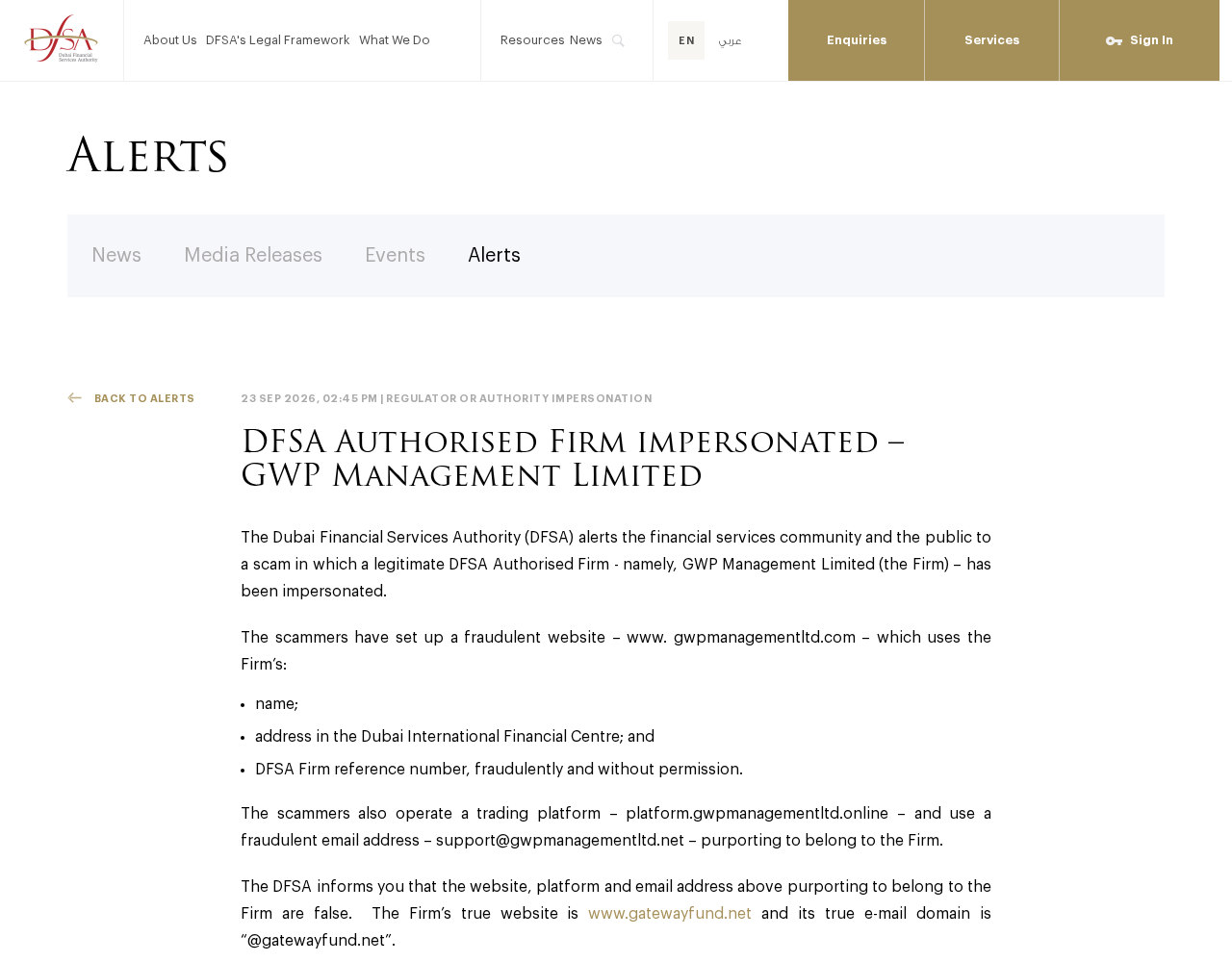
The Dubai Financial Services Authority warned on September 23, 2026, that GWP Management Limited had been impersonated.
The real GWP Management Limited is a DFSA-authorized firm. The warning says a separate operator used its name, Dubai International Financial Centre address, and firm reference without permission.
That distinction is essential. A search result confirming that a company is regulated does not authenticate a website using its identity.
Which online properties the DFSA named
The authority identifies gwpmanagementltd.com as fraudulent. It also names a trading platform at platform.gwpmanagementltd.online and a purported support address at support@gwpmanagementltd.net.
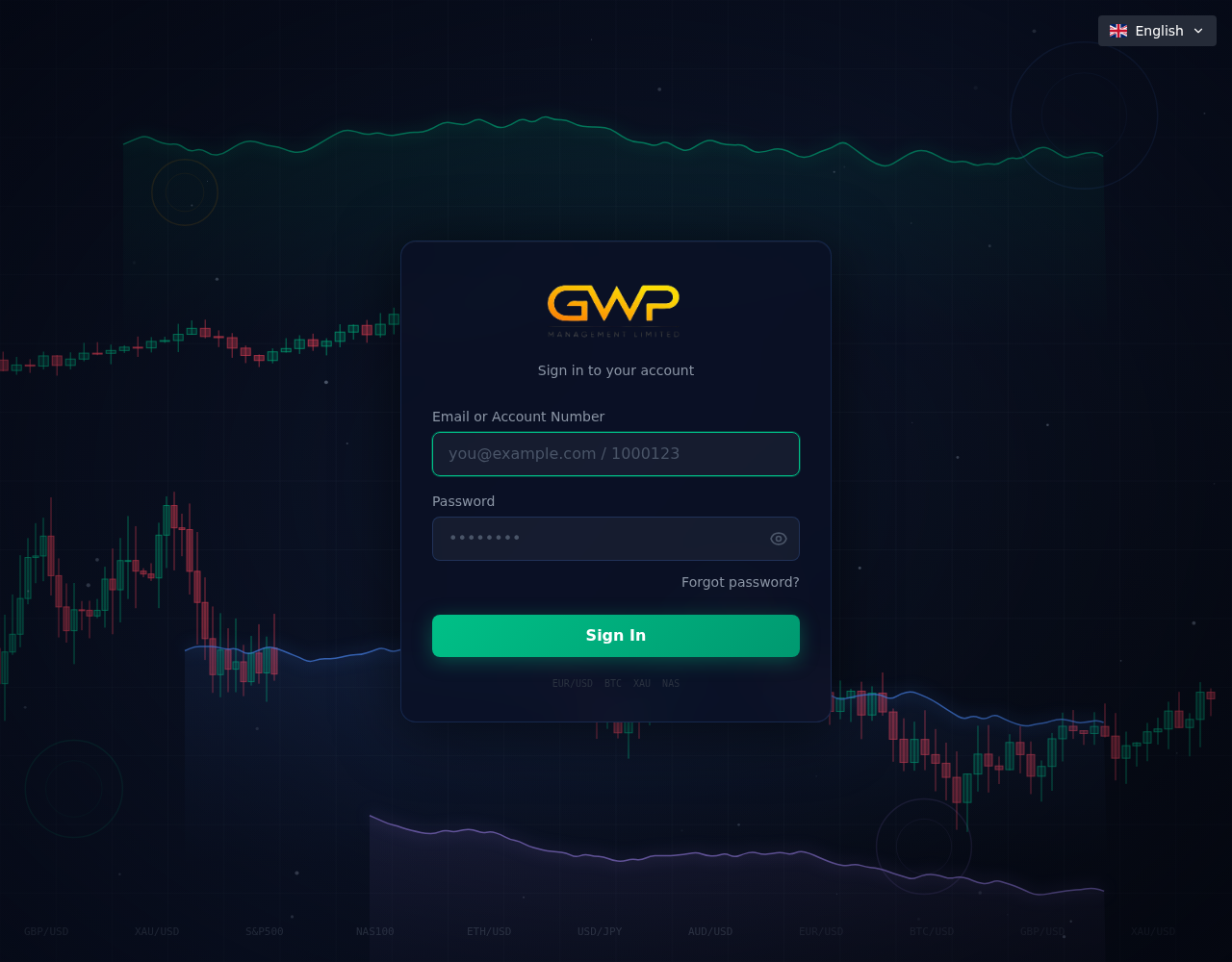
When checked for this article, the site displayed trading claims and a sign-up button. The linked platform displayed a branded sign-in screen.
Those live visuals support the warning’s description, but they do not establish how many visitors registered or whether anyone deposited money.
Where the genuine firm points people
According to the DFSA, the genuine firm’s website is gatewayfund.net and its email addresses use @gatewayfund.net.
Do not use a suspect site’s contact form to verify that claim. Begin with the regulator’s warning and independently locate the authentic company.
- Impersonated entity: GWP Management Limited, a real authorized firm.
- Fraudulent website named by the DFSA:
gwpmanagementltd.com. - Fraudulent platform named by the DFSA:
platform.gwpmanagementltd.online. - Genuine website identified by the regulator:
gatewayfund.net.
These addresses are included to help readers recognize the case, not as links to visit. Other domains could be used later.
How the GWP Management Clone Website Scam Works
Step 1: Borrow the identity investors might verify
Someone researching GWP Management Limited can find a real authorized firm. The clone takes advantage of that legitimate public record.
The DFSA says the fraudulent site used the firm’s name, DIFC address, and regulatory reference. Each detail gives a hurried visitor another reason to trust it.
The problem is ownership. The genuine firm’s regulatory status cannot be transferred to an unrelated domain by copying text into a homepage.
When checking a financial company, match its official domain and communication channels to the regulator’s record, not just its printed name.
Step 2: Make the website feel like a complete brokerage
The visible landing page advertises trading across forex, stocks, indices, commodities, and cryptocurrencies. It uses a conventional broker layout with a prominent sign-up prompt.
That breadth can make the operation feel established. A professional design is cheap compared with the value of an investor’s deposit or credentials.
The site also presents support details in its header. The DFSA specifically identifies the purported email as fraudulent, despite its businesslike appearance.
Do not infer that each product shown is actually offered by the real GWP Management Limited. The page belongs to the impersonation described in the alert.
Step 3: Send visitors to a separate branded platform
The second named domain hosts a login screen. It uses GWP branding over a market-chart background and asks for an email or account number and password.
That page can make an investor feel the business has an operating platform, not merely a sales page. It also creates a place to collect credentials.
The existence of a login form does not prove live trading, custody of funds, or independent market execution. A form is only a form.
We did not create an account or submit personal information. The visible page is enough to show why the regulator’s domain warning matters.
Step 4: Direct inquiries into the operator’s own support channel
The suspicious web presence supplies its own contact details. A visitor who asks whether the platform is genuine may receive an answer from the same operator.
The DFSA names support@gwpmanagementltd.net as a fraudulent address purporting to belong to the firm. It is not the genuine @gatewayfund.net domain.
That is why calling or emailing details on the clone does not verify it. The check must leave the clone’s network of pages.
Use the regulator’s alert and the real firm’s independently confirmed website to ask whether the domain or account is theirs.
Step 5: Make a deposit appear to be ordinary onboarding
A trading website is designed to move a visitor from curiosity to registration and funding. The DFSA alert does not publish a particular payment demand or victim transfer.
Still, a cloned platform creates an obvious risk: a user may provide identity records, credentials, or money while believing a regulated firm is receiving them.
If an agent tells you to deposit through the suspect domain, the regulator’s warning should stop the process before you send anything.
Do not test a small payment. A successful transaction only proves the operator can receive it, not that the account belongs to the real firm.
Step 6: Use a dashboard to keep the story going
A branded account area can display balances and trades, but an on-screen number is not proof of real ownership or withdrawable funds.
The public warning does not describe post-deposit behavior. We should not invent withdrawal refusals or extra fees for this specific platform.
The general safeguard remains the same: verify the legal counterparty and payment destination outside the website before treating any dashboard as evidence.
If you have already entered credentials, change them at any other service where they were reused and contact the genuine firm.
What the Two Websites Reveal
The sales page and login page reinforce each other
One page markets a brokerage experience; the other provides a member sign-in. Together they create more confidence than either page alone.
A visitor may reason that a company with a platform must be established. That is a dangerous shortcut because setting up two coordinated pages is straightforward.
The screenshots show what was publicly visible when we checked. They do not verify any backend trading operation.
The domain family looks related, not authentic
The site, platform, and support email share variations of the GWP Management name. Similar spelling makes the properties look like one coherent company.
According to the DFSA, they are not the genuine firm’s web and email channels. The authentic website has a different domain altogether.
A domain can be memorable and still be unauthorized. The regulator’s explicit identification is more important than how professional the URL appears.
Regulatory details are copied, not inherited
The alert specifically says the impostor used the real firm’s DIFC address and reference number without permission. Those are not random mistakes.
They are credibility cues aimed at anyone who checks a company page against a register but fails to compare contact channels.
When a broker claims regulation, the verification is incomplete until you confirm that your exact website and representative belong to the regulated entity.
How to Check a Broker Before Sharing Money or Identity
Open the regulator’s register through a trusted path. Search the legal entity and read its contact information, permissions, and any current warnings.
Then contact the firm through the independently verified domain. Ask whether the particular website, platform, account representative, and payment instructions are theirs.
Do not rely on a broker’s PDF license or an image of a certificate. Those can be copied from public sources or edited.
Ask where client funds would be held and in whose legal name. A sales representative should not object to clear written answers.
Compare the company named on your contract with the recipient of a proposed payment. A mismatch deserves an explanation before any transfer.
Search for warnings using the full domain, not only the brand. Here, the DFSA’s alert names the suspicious web properties directly.
Be especially cautious when someone presses you to decide before you can confirm the firm’s identity. A legitimate opportunity can survive an independent check.
Four Checks the Cloned Site Cannot Answer for You
Who owns the domain?
A website’s registration record can be private or incomplete. That means a lookup may not identify the operator, but it can still expose mismatches.
Do not treat a recent registration as the only test. The DFSA’s direct warning is stronger evidence about this particular site.
Check whether the genuine firm names the domain on its own verified channels. Here, the authority instead identifies another website.
Who receives a deposit?
The name on a screen can be copied. The legal name of the beneficiary matters more when money is about to move.
Ask for a written explanation if a representative wants payment to an individual, an unrelated company, or a wallet address.
Do not send funds while that question remains unanswered. A later dashboard credit would not cure a transfer to the wrong recipient.
Who can confirm the account?
A support agent reached through the cloned website can validate only what the cloned website says. That is not independent verification.
Contact the real firm through the DFSA-confirmed domain and ask whether an account in your name exists.
If the actual firm has no record, save the response and tell your payment provider promptly.
What is the platform actually doing?
The login screenshot shows fields for credentials and a chart backdrop. It does not reveal whether orders reach a market or funds are held safely.
Do not rely on displayed profits, trade history, or a balance unless the legal operator and custody arrangement are independently established.
A sophisticated interface can still be a front end for a simple collection operation.
Why the Regulator’s Warning Matters More Than Reviews
A search for the brand may return affiliate reviews or promotional pages. They can repeat the site’s claims without confirming who runs it.
The DFSA alert does something different: it names the suspicious domains, explains the copied identity, and states the genuine firm’s website.
That direct comparison is especially valuable when the clone borrows a real authorization number. A review may miss the ownership problem entirely.
Be wary of “official” search ads that point to the named false site. Paid placement does not change the regulator’s assessment.
If a review recommends registering immediately, ask whether it verified the domain against the authentic firm, not simply its homepage.
Search advertisements can also use the genuine company name while sending visitors to a different address. Always inspect the landing domain after a click.
Do not enter credentials just to see the platform. Registration itself can disclose information to the operator identified in the warning.
Save the regulator’s alert as a reference if a promoter disputes the warning. The alert describes the exact site, platform, and email address.
When in doubt, pause the transaction and ask the real firm to confirm your account. An authentic firm can answer without using the clone’s support channel.
What to Do if You Have Fallen Victim to This Scam
- Stop using the cloned platform. Do not make further deposits or provide more documents. Save your account screens, communications, and transaction history first.
- Contact your bank, card issuer, or crypto service. State that the DFSA identified the site as fraudulent. Ask about chargebacks, recalls, account holds, or trace options relevant to your payment.
- Protect your credentials. Change any password reused elsewhere and enable multifactor authentication. Watch your email for new sign-ins or password resets.
- Handle documents carefully. If you uploaded identification, ask your local identity authority or credit-monitoring service what protective steps apply.
- Report the impersonation. Send the domains, email address, representative names, screenshots, and payment details to the DFSA and local fraud authorities.
- Reject paid recovery promises. Anyone demanding a fresh fee to unlock a balance or recover losses should be treated as a separate warning sign.
If you downloaded software from the site or followed unusual redirects, scan your device with Malwarebytes and use AdGuard to limit exposure to malicious advertising.
If you only viewed the homepage, do not assume your finances were compromised. The urgent steps apply when information, credentials, or money were shared.
Frequently Asked Questions
Is GWP Management Limited itself fraudulent?
No. The DFSA says a genuine authorized firm was impersonated. The named website, platform, and support address were not its legitimate channels.
Which GWP Management website is genuine?
The regulator identifies gatewayfund.net as the real firm’s site. Use the DFSA alert or register to confirm current details before contacting it.
Why does the clone show a DFSA reference?
The DFSA says the operator copied the firm’s reference without permission. A correct-looking number does not establish that the website is controlled by the firm.
Is the trading platform a real brokerage account?
Its visible login page exists, but the DFSA identifies the domain as part of the fraudulent impersonation. A login screen does not prove genuine trading.
Did the regulator confirm investor losses?
The public alert identifies the fake web properties. It does not give a verified loss total or describe a particular victim’s deposit.
Should I contact the support email on the suspicious site?
No. The DFSA specifically labels the named support address fraudulent. Reach the genuine firm through independently verified contact information instead.
The Bottom Line
The GWP Management clone shows how a real firm’s name, address, and regulatory reference can be repackaged into a convincing sales page and trading login.
The DFSA has identified the named web properties as fraudulent. Verify the exact domain and payment route with the real firm before registering or depositing.








