

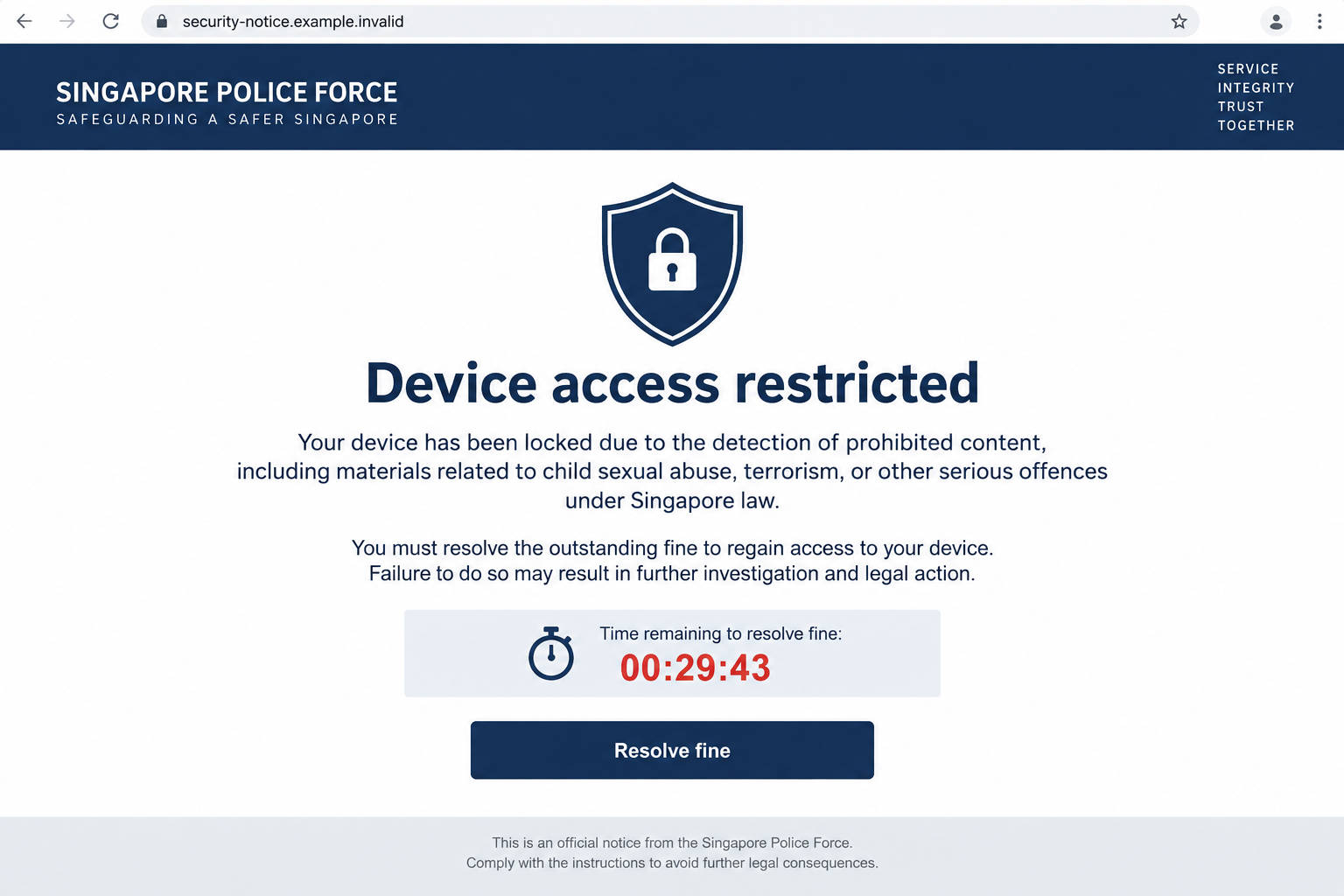
A page suddenly says the Singapore Police Force has locked your device. A timer is running, and the warning demands a fine before it reaches zero.
It feels personal, urgent, and frightening. Before touching the payment button, take a breath and look at what is actually on your screen.
Overview
The warning tries to turn a browser page into a police order
The Singapore Police Force warned on September 20, 2026 about fraudulent pop-ups using its identity to claim personal devices were locked.
The alerts accused visitors of repeatedly accessing websites with illegal content. They demanded payment of supposed fines within hours and threatened prosecution or a permanent lock.
The page may look official because it borrows police language, a badge-like graphic, and an urgent clock. Its appearance is not proof of authority.
In the reported version, the next action was a request for bank card details. Some victims later saw unauthorized foreign-currency charges exceeding the advertised fine.
What the real police have confirmed
The police explicitly say these pop-ups are fraudulent. They do not remotely lock personal computers or laptops, and they do not demand fines through browser alerts.
That statement matters more than the warning’s polished design. A web page can display alarming text, but it cannot grant itself police powers.
The official advisory does not identify a single universal website, fine amount, or browser. Treat the mechanism as the warning sign, not one exact phrase.
What a reader should notice first
Several details make this Singapore Police pop-up scam easier to recognize once the initial shock passes.
- A browser alert claims your whole device is locked because of alleged criminal activity.
- A countdown pushes you to act before you can verify the accusation.
- The only offered solution is immediate payment through a card form.
- The page threatens prosecution or permanent restriction if you hesitate.
- The demand appears while browsing, not through an independently verified police contact.
One clue alone might be confusing. Together, they describe a coercive payment page, not a legitimate process for handling an alleged offence.
Why This Message Feels So Hard to Ignore
The accusation is deliberately embarrassing. Many people instinctively want the screen gone before anyone else sees it, even when they know they did nothing wrong.
That emotional jolt is useful to the attacker. Fear shortens the time between reading the claim and reaching for a bank card.
The timer adds a second pressure point. It suggests there is no opportunity to call someone, search the police website, or think through the demand.
Sometimes a malicious page also uses full-screen presentation, repeated dialogs, or browser notification permission to feel harder to dismiss. Those behaviors vary by campaign.
The September police advisory describes the pop-up and countdown. It does not establish that every version installs software or takes over the operating system.
If a tab refuses to close, that is unsettling, but it is not evidence that the police remotely control your machine. Browser behavior can be manipulated.
How the Singapore Police Lock Pop-Up Scam Works
Step 1: The visitor lands on a deceptive page
The opening may be an advertisement, a redirect, a compromised page, or a misleading search result. The police advisory does not establish one exclusive entry route.
What matters is that the person ends up viewing an attacker-controlled message in the browser. Its words and graphics are supplied by that page.
A URL in the address bar can reveal the mismatch. Even a padlock icon only says the connection is encrypted, not that the warning is authentic.
Do not assume you must have visited an illegal website to see the message. Exposure can occur through ordinary browsing paths and deceptive advertising.
Step 2: The page impersonates a police alert
The message adopts the Singapore Police Force identity and alleges that access to illegal material has triggered a device lock.
It may show a logo-like symbol, formal wording, and a neat layout. Those features are easy for anyone controlling a page to imitate.
The claim is carefully chosen. Instead of offering a vague security warning, it suggests a serious legal problem that a reader may feel reluctant to discuss.
Legitimate police investigations do not begin and end with a browser checkout. The police have specifically disowned this pop-up payment method.
Step 3: A countdown removes room to verify
The alert says payment must happen within hours. It threatens permanent locking and prosecution if the clock runs down.
A timer on a webpage is controlled by the webpage. It does not establish a court deadline, a fine, or an action by authorities.
Scammers use that visual cue to stop the most effective response: closing the page and checking independently through official channels.
Even if the clock reaches zero, you should not let the page dictate what happens next. Leave it and assess your exposure calmly.
Step 4: The supposed fine becomes a card-data request
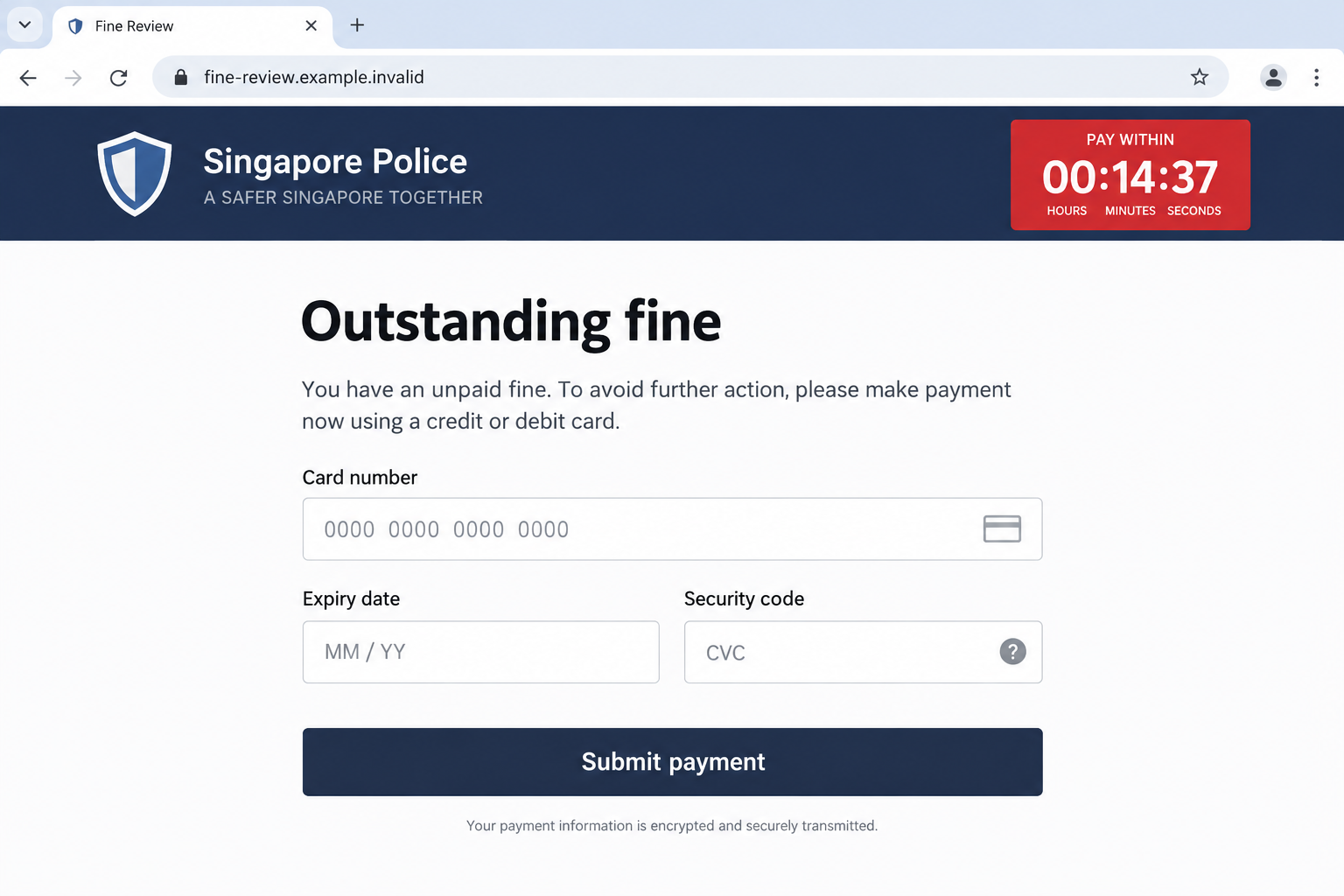
The screen funnels the reader to a payment form. That is the point where a frightening story turns into a financial theft attempt.
Card number, expiry date, security code, and personal details give criminals material they can use for unauthorized transactions or later impersonation.
Do not test the form with real details to see whether the lock clears. The page’s entire premise has already been rejected by the police.
The next image illustrates the kind of card form a victim may encounter. It is a nonfunctional reconstruction, not a capture of a specific reported website.
Step 5: The transaction can exceed the advertised fine
The Singapore Police Force says victims realized the fraud when their cards were charged in foreign currency, often for more than the stated fine.
That does not mean every victim sees the same amount or merchant descriptor. The official warning provides a pattern, not a complete transaction list.
Once card data is entered, the attacker may attempt multiple charges or pass the details to another criminal operator. Treat the card as exposed.
A seemingly successful payment also does not settle any real case. It only confirms that the visitor interacted with the fraudulent form.
Step 6: The victim may be pressured again
After a payment, a page or caller could claim another fee is needed to finish the unlock. That is a possible follow-on, not a confirmed feature of every case.
Criminals may also reuse contact details supplied with the card form. A later message claiming to be a bank, police officer, or recovery specialist deserves independent verification.
Do not let a new demand turn the first loss into a larger one. The correct next contact is your bank using a number you find yourself.
The Police Claim Versus What a Browser Can Actually Do
A website can display a warning, request notification permission, open new tabs, or repeatedly try to keep your attention. It cannot lawfully impose a fine.
A browser tab can also make navigation awkward without controlling the rest of the device. Try closing the tab or browser before assuming the computer itself is locked.
If the browser opens the same page after restarting, check whether session restore is bringing back the tab. Reopen with a fresh window instead.
Another possibility is a malicious browser notification subscription. If alerts keep appearing after the page is closed, inspect notification permissions in browser settings.
Do not click the pop-up’s own instructions for removing it. Those instructions can be part of the payment path.
If you installed software, permitted remote access, or downloaded a file because of the alert, that changes the response. A device scan then becomes important.
The official advisory does not say software installation is required for this specific variant. Avoid assuming an infection solely from seeing the warning.
How to Check a Suspicious Alert Without Engaging It
First, note where the message appears. A webpage with a visible URL is not the same as a system notice from your operating system.
Look at the full address, not the page’s badge or headline. A lookalike domain, random path, or unrelated host is a strong warning.
Then leave the page. Open a new tab and navigate to the Singapore Police Force website by typing its official address yourself.
The September 2026 police advisory gives a direct answer: these alleged device-lock pop-ups are fraudulent, and the police do not demand payment this way.
Singapore’s ScamShield service can help check suspicious links and messages. The advisory also lists its 24/7 helpline at 1799.
Do not call a number printed inside the threatening alert. A phone line on a fraudulent page may connect you to the same operators.
Saving a screenshot can help with a report, but do not keep the page open merely to document it. Your safety comes first.
What the Bank Needs to Know After a Card Submission
Tell the card issuer that you entered details into a police-impersonation page, not that you simply bought something you later regretted.
That description helps the bank assess unauthorized use and replace the card before more attempts appear.
Give the approximate time, the displayed fine, and any merchant descriptor or foreign-currency amount visible in your account.
Do not send a full card number in an ordinary email to document the event. Your bank already has the card record.
Ask whether pending authorizations need monitoring after the replacement. Some suspicious charges may not appear as completed transactions immediately.
If you typed an address or phone number, be alert for a follow-up contact claiming to “confirm” the payment or reverse it.
The person contacting you may know details you just entered. That does not make them an officer or a bank employee.
Use a fresh, independently found bank number each time. Do not let the pop-up’s story control your recovery process.
When an Alert Keeps Reappearing
A recurring warning can come from a restored tab, a permitted browser notification, or a malicious extension. The remedy depends on which one is present.
Start by closing the original tab and reopening the browser without session restore. If the alert returns as a notification, review site notification permissions.
Remove unfamiliar extensions only after identifying them. Keep your browser and operating system updated, then scan if you installed anything suspicious.
These checks are useful but separate from card response. If payment details were entered, calling the bank remains the urgent step.
What to Do if You Have Fallen Victim to This Scam
- Leave the page without paying. Close the tab or browser. If it will not close normally, use your system’s application controls, then reopen the browser without restoring that tab.
- Call your bank immediately if you entered card details. Use the number on your card or the bank’s official app. Ask to block or replace the card and dispute unauthorized transactions.
- Review transactions carefully. The police warn that charges may appear in foreign currency and exceed the supposed fine. Check pending and posted items over the following days.
- Change any password you entered. Start with the affected account using its real website. Enable multifactor authentication and end unfamiliar sessions where supported.
- Inspect the browser and device if you interacted further. Remove suspicious notification permissions or extensions. If you downloaded software, run a reputable scan such as Malwarebytes.
- Reduce repeat exposure. AdGuard can help block malicious advertising and deceptive pages, but it cannot reverse a card charge or replace a bank report.
- Report the incident. In Singapore, contact the police and use ScamShield’s official reporting resources. Share the URL, screenshots, and transaction details without publishing card information.
- Ignore recovery-fee demands. Anyone promising to erase a police record or retrieve money for an advance fee may be extending the same fraud.
If you only saw the pop-up and entered nothing, the immediate financial risk is lower. Close it, review permissions, and watch for repeat alerts.
If you paid, prioritize the bank. A dispute started quickly may have a better chance than one delayed while you investigate the page.
Frequently Asked Questions
Can the Singapore Police Force lock my laptop through a browser pop-up?
No. The police say they do not remotely lock personal devices or demand payment through pop-up alerts. A web page’s claim is not a police action.
Does seeing the alert mean I visited an illegal website?
No. The accusation is part of the deception. Seeing the page does not establish that you accessed prohibited material or committed an offence.
Is the countdown a real payment deadline?
No. The countdown is displayed by the fraudulent page. It is designed to pressure a quick card entry before you check the claim.
What if I paid but the page says I still owe money?
Do not pay again. Contact your card issuer, explain that the first charge followed a police-impersonation pop-up, and ask about blocking further use.
Do I need to remove malware after seeing this pop-up?
Not automatically. A web alert can appear without infection. Scan if you installed a download, added an extension, or notice persistent suspicious behavior.
Where can I verify or report a suspicious police alert?
Use the Singapore Police Force and ScamShield websites reached independently. The official advisory lists ScamShield’s 24/7 helpline at 1799.
The Bottom Line
The Singapore Police lock pop-up scam uses a serious accusation, a timer, and a fake fine to push people toward a card form. The police have disowned it.
Close the page, verify through official channels, and involve your bank promptly if you entered payment details. The browser warning has no authority over you.








