

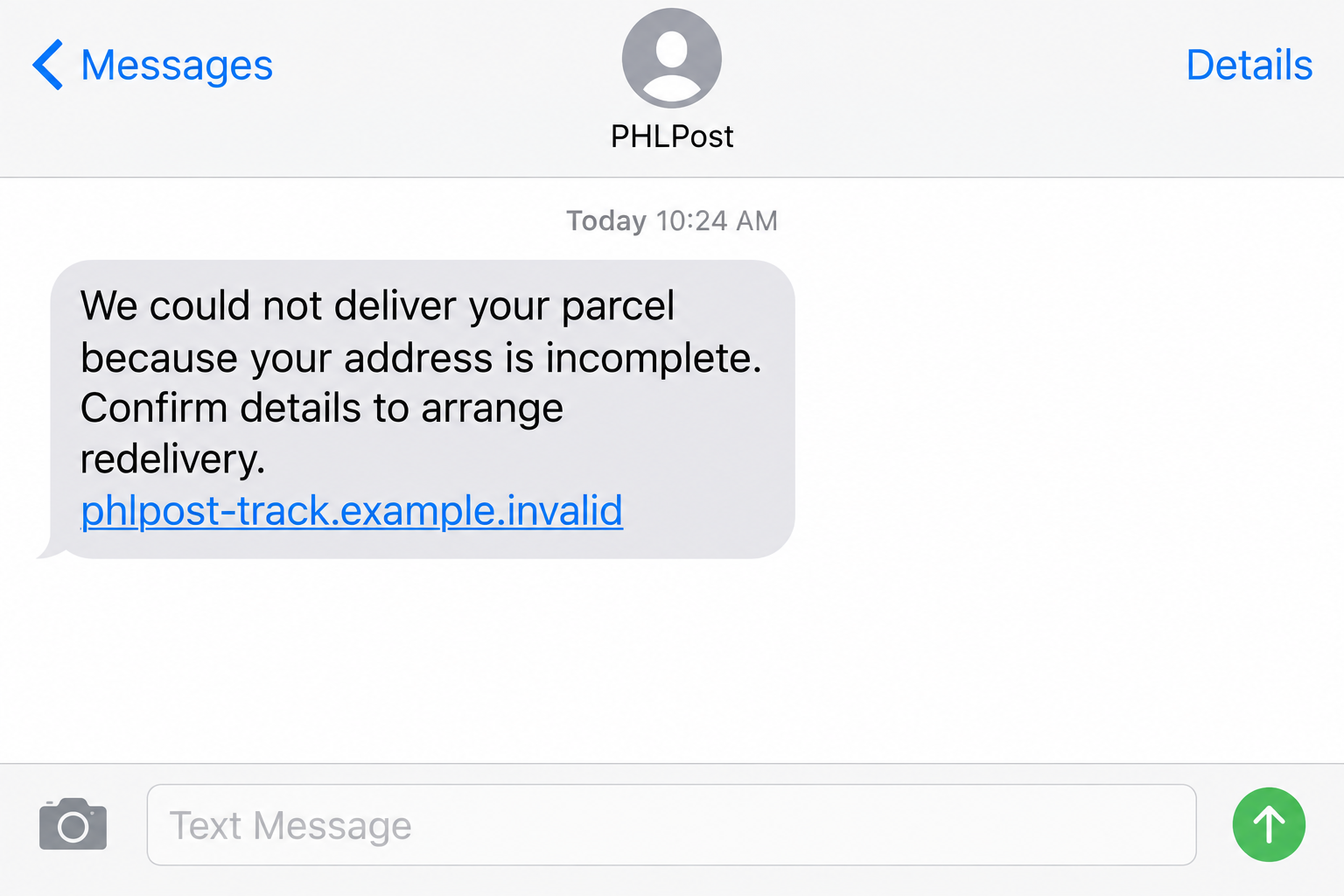
A text says your parcel cannot be delivered because the address is incomplete. It offers a quick link to fix the problem before the package is returned.
That small interruption can feel routine, especially if you are already waiting for an order. The important detail is where the message asks you to go next.
Overview
The message borrows a familiar delivery problem
On September 9, 2026, the Philippine Postal Corporation warned about fraudulent texts using the PHLPost name and identity.
One version claims an incomplete address has interrupted delivery. Another asks for an immediate redelivery fee, often directing the recipient to a payment page.
The supposed problem is easy to believe because real parcels sometimes do need address corrections. The text exploits that ordinary possibility.
PHLPost says the suspicious messages are not from its service. It does not request card information, passwords, banking details, or one-time passwords by text.
The link is the part that changes the risk
The sender name alone cannot authenticate an SMS. A short link, brand-like hostname, or borrowed postal graphic can point away from the real postal service.
Following the link may lead to a form for personal data and a small delivery payment. That form can collect information unrelated to any real parcel.
The official PHLPost notice does not identify one permanent scam domain or a fixed fee. Both can change while the same story remains effective.
What to check before you respond
The safest first step is to compare the message with a shipment you can verify independently. Do not use the text’s link for that comparison.
- Look up the actual tracking number from the merchant or sender, not from the unexpected SMS.
- Use PHLPost’s official site or customer-service channel that you locate yourself.
- Check whether the text asks for a bank card or one-time password.
- Inspect the full destination address rather than a familiar-looking word in it.
- Be suspicious of urgent redelivery fees presented before the parcel is identified.
These checks protect against the fraudulent message while leaving room for the possibility that you also have a legitimate parcel in transit.
Why the PHLPost Delivery Story Works
A parcel notification is a low-friction lure. You do not need to believe in a prize or an unlikely windfall to tap it.
The text asks you to solve a practical problem: a package might be stuck because one line of the address is missing.
If several online orders are pending, you may not remember which carrier handles each one. That uncertainty gives the scam room to operate.
The redelivery fee is another psychological shortcut. A modest charge can seem easier than calling a support line or risking a return.
However, the amount on a phishing page is not the full measure of the risk. Card details and one-time codes can enable much larger harm.
The text can also arrive during a busy workday. A reader may fill the form on a small screen without examining the web address carefully.
That is why PHLPost directs customers to its own site and authorized channels. Verification must begin outside the message.
How the PHLPost Redelivery Text Scam Works
Step 1: An unexpected SMS claims a parcel problem
The message names PHLPost and says delivery failed because an address is incomplete or needs confirmation.
Some versions may emphasize a deadline or imply the package will be returned. The official warning highlights the delivery pretext, not one universal script.
The recipient might genuinely expect a parcel, but that coincidence does not authenticate the message. Bulk campaigns reach many people at once.
Do not rely on the displayed sender name. An SMS thread can look familiar even when the actual message is unverified.
Step 2: The text offers a convenient link
The proposed fix is a link in the message. It avoids the slower path of checking a merchant receipt or visiting PHLPost independently.
A destination can contain the letters of a familiar brand without belonging to that brand. Read the complete domain, including what appears after the final dot.
Some links redirect through multiple pages. The first visible address may not be the final page where data is requested.
Because domains change quickly, memorizing one bad link is less useful than recognizing the request to leave official channels.
Step 3: A delivery form asks for identifying details
A fake page may present fields for a name, street address, telephone number, or email. Those fields make the process feel like a normal delivery correction.
They also provide information criminals can reuse in future messages. An accurate address does not prove the page is handling your parcel.
If a page shows a tracking number, compare it with your own order records. A number displayed by the suspicious site is not independent proof.
A generic parcel picture or tracking bar is similarly weak evidence. The sender of the page controls those visuals.
Step 4: The repair turns into a redelivery payment
PHLPost’s warning specifically describes texts asking for an immediate redelivery fee by credit or debit card.
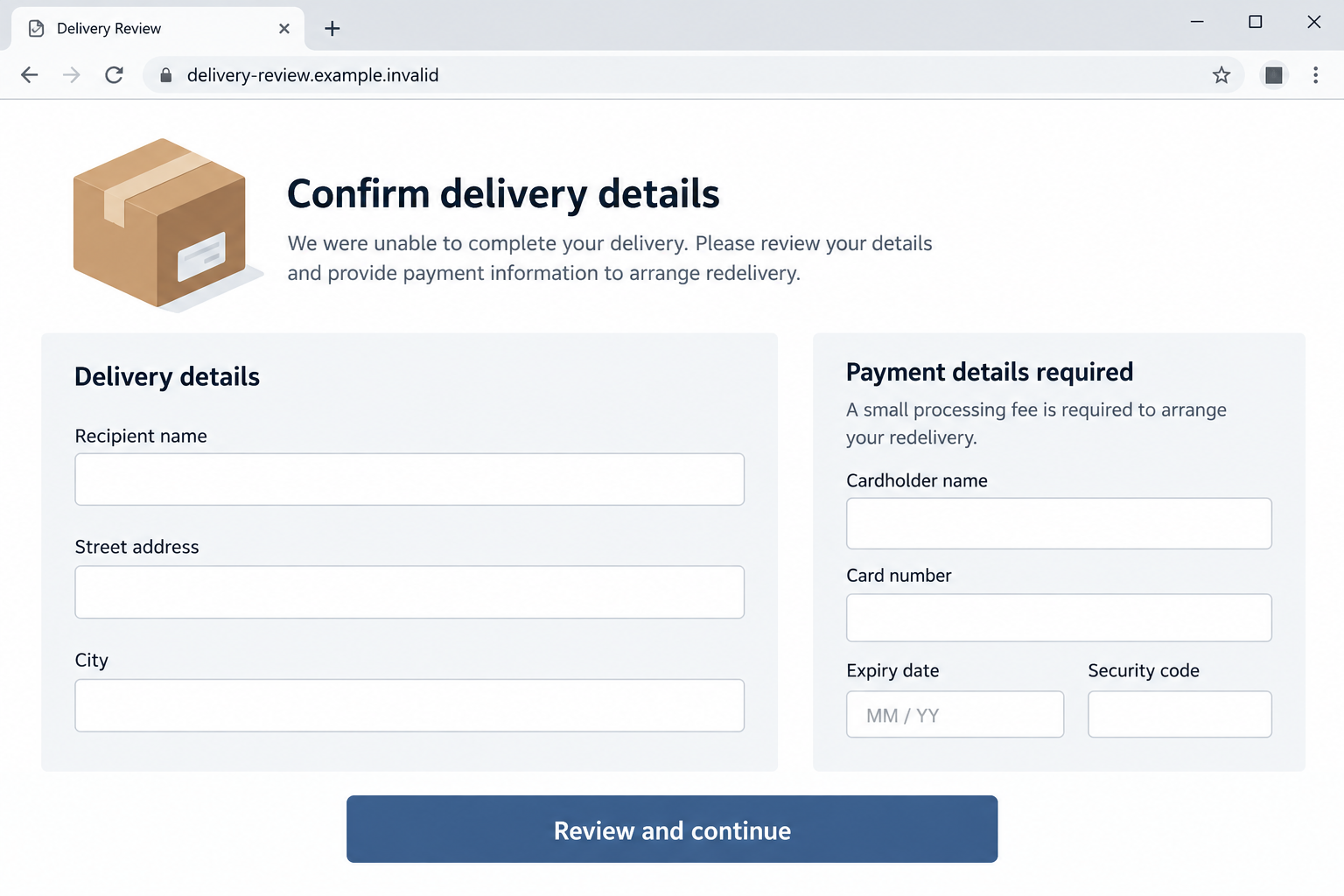
A card form can capture the card number, expiry date, security code, and billing details. Even if the fee looks small, the data exposure is not.
The next image shows an illustrative form with blank fields and a fictional domain. It is not a capture of an identified live phishing site.
Do not complete a payment simply to find out whether the page recognizes your parcel. The request itself is the reason to stop and verify.
Step 5: A one-time code may be requested
PHLPost also warns that it does not request one-time passwords through SMS. A page or follow-up contact asking for one is a serious escalation.
Such a code may authorize a bank transaction or account change. Never read it aloud or enter it into a link supplied by an unexpected message.
Look closely at what the bank’s own code message says it is for. If it names a purchase you did not initiate, contact the bank.
The official notice does not establish that every PHLPost-themed text reaches this stage. Treat it as a possible risk when card or account access is involved.
Step 6: The victim discovers the parcel was never being fixed
The fraudulent page cannot correct a real shipment. The package status, if one exists, must be checked through the seller or legitimate postal channels.
Meanwhile, personal or card information entered into the form may be available to the attacker. A confirmation page does not make the transaction safe.
If the page also asked you to create a password, assume that password is compromised wherever you reused it.
Keep a copy of the text and destination for reporting, but avoid reopening a malicious page after the fact.
How to Verify a Real PHLPost Parcel
Begin with the order confirmation or the sender who mailed the item. Find the shipment identifier in a record you already trust.
Then visit PHLPost by entering its official address directly, or use the customer-service details published on its official site.
The agency’s September advisory lists its customer service line as (02) 8288-7678 or 8288-POST. Verify current contact details before relying on them.
If the tracking information shows a genuine exception, ask the postal service how it handles address corrections. A legitimate issue can be solved without trusting the SMS.
Do not let a fake message push you into ignoring a real package. Separate the delivery question from the suspicious link.
If you cannot match the text to a particular parcel, that absence of context is another reason to stop.
Warning Signs That Matter More Than the Sender Name
A display label saying “PHLPost” is persuasive, but sender identity in a messaging app is not a substitute for official tracking.
A website’s visual resemblance is also weak proof. A phishing page can reproduce logos, colors, parcel icons, and progress indicators.
Focus instead on the request. Does an unsolicited text ask you to type card data or an OTP into a link it provided?
PHLPost says it does not ask for those sensitive details through SMS. That direct statement is far stronger than the page’s own assurances.
Another sign is urgency without a verifiable parcel. The message may describe a deadline while giving no reliable independent shipment reference.
Watch for mismatched domains, strange spelling, or a web address that only includes “phlpost” as part of a longer unrelated hostname.
Even a well-spelled domain should be approached carefully if it came from the suspicious text. Open the official site independently.
Why a Tracking Number Can Still Be Misleading
A phishing text may show a reference number to make the message look tied to a real parcel. The number alone is easy to invent.
Do not enter that number on the linked page and accept the page’s answer as confirmation. The site can be programmed to recognize any input.
Instead, compare the number against the seller’s dispatch email or the original sender’s paperwork. Then use the official postal tracking tool.
If the number does not match, the discrepancy is useful evidence. If it does match, still verify the delivery request through PHLPost itself.
Order details can be exposed through forwarded messages, public posts, or compromised accounts. A specific reference is reassuring only when checked independently.
What Happens After You Enter an Address
Sharing a street address without card details is not the same emergency as exposing a card. Still, the information can help personalize later fraud.
Future texts may mention your neighborhood or claim a second delivery attempt. Do not let familiarity with your address substitute for proof.
If you also provided an email address, watch for follow-up parcel notices that reuse the same story. Filter and report them instead of replying.
A phone number can make repeated calls possible. Let unknown callers leave a message and call the real service independently if needed.
Write down exactly which fields you completed. That helps you tell your bank or postal service the relevant facts without guessing.
You do not need to change every password if no password was entered. Focus your response on the information actually exposed.
What to Do if You Have Fallen Victim to This Scam
- Stop using the link. Do not submit another form, pay a second fee, or enter a code to “complete” a failed attempt. Close the page.
- Call your card issuer if you entered payment details. Use the number on the card or your banking app. Explain that a parcel redelivery page may have captured the card.
- Tell the bank about any OTP you shared. A one-time code can authorize a transaction. Ask the bank to review recent activity and secure the account.
- Change exposed passwords. If you typed a password into the page, update it on the real service. Change reused versions elsewhere and enable multifactor authentication.
- Review the actual shipment. Use the merchant’s confirmation and official PHLPost tracking. Make sure a real parcel is not waiting for a separate legitimate action.
- Check the device if you downloaded anything. An SMS link alone does not prove malware. If you installed an app or profile, remove it and run a reputable scan such as Malwarebytes.
- Reduce future malicious links. AdGuard can filter deceptive advertising and some harmful destinations, but it cannot replace a card dispute or undo submitted information.
- Report the message. PHLPost’s official advisory provides customer service and reporting channels. Send the text, link, and screenshots without including full card details.
If you only read the SMS, you have not necessarily exposed your data. Delete or report it and verify any pending parcel through official channels.
If you filled a form, act according to what you supplied. A name and address call for vigilance; card credentials demand prompt bank contact.
Frequently Asked Questions
Is a PHLPost text about an incomplete address always fake?
Do not decide from wording alone. This specific delivery pretext appears in the official scam warning, so verify any claimed problem through PHLPost independently.
Does PHLPost ask for card details or OTPs by SMS?
No. Its September 2026 advisory says it does not ask for card information, banking details, passwords, or one-time passwords through text messages.
What if I really am expecting a parcel?
Use the tracking number in your order confirmation and visit the official postal site yourself. A real order does not authenticate an unrelated text link.
Can a small redelivery fee still cause a larger loss?
Yes. The danger is not limited to the displayed fee. A card form can expose payment credentials that may be misused later.
Should I reply to the text to ask for proof?
No. Replying confirms engagement but does not establish the sender’s identity. Use an official support channel you found separately.
Do I need an antivirus scan after opening the link?
Opening a page does not automatically mean infection. Scan promptly if you installed software, granted unusual permissions, or notice suspicious behavior.
The Bottom Line
The PHLPost redelivery text scam uses a believable parcel problem to move people from an SMS to a page asking for sensitive information or a fee.
PHLPost has warned that these texts are not its own. Verify the shipment separately, and contact your bank quickly if you entered card details.








