

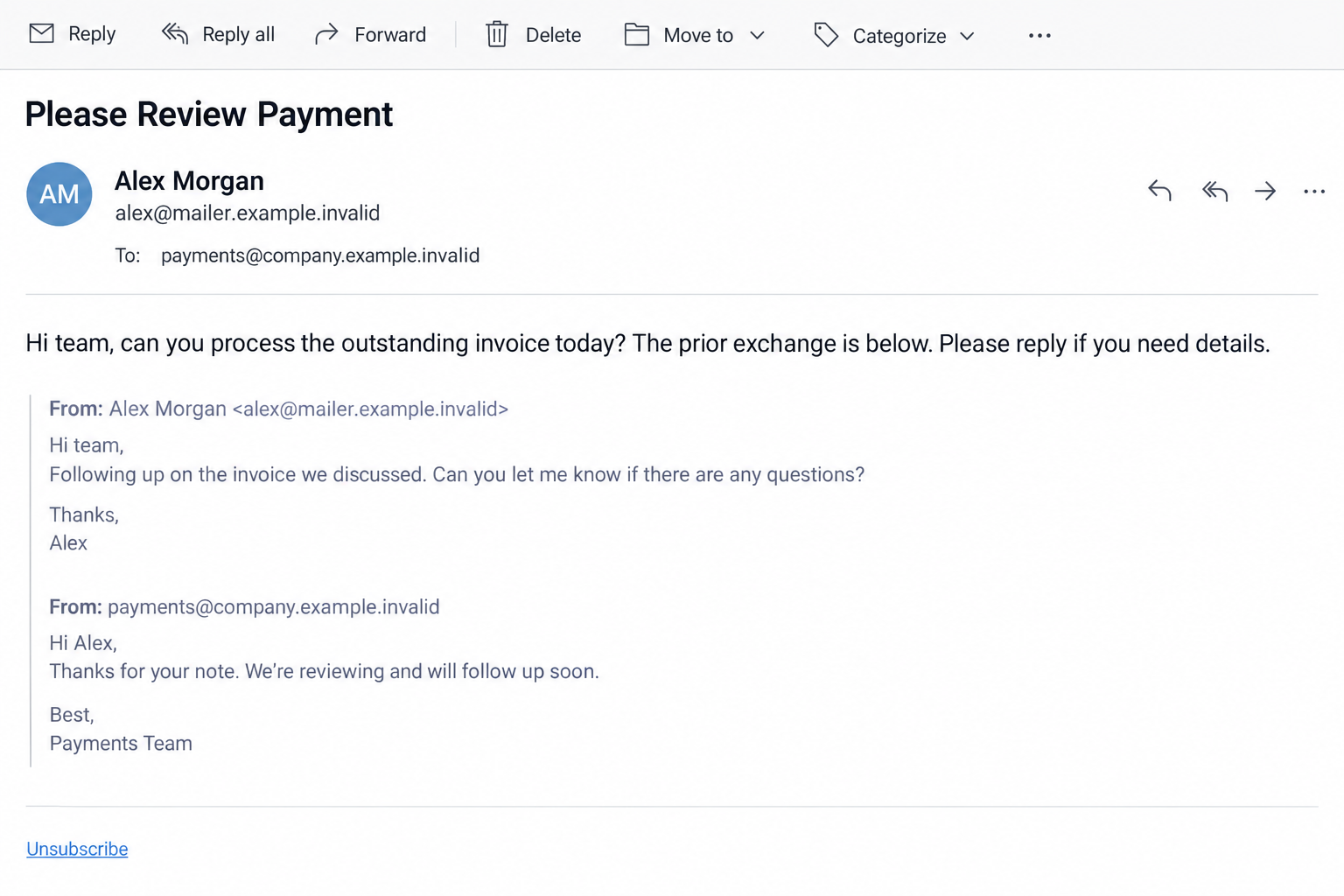
The invoice email looks unusually tidy. It has a familiar colleague’s name, an old conversation below, and even a working unsubscribe link.
That combination can make a payment request feel routine. The details worth checking are the ones hidden behind the display name.
Overview
An invoice arrived through a real mailing system
In a case published September 3, 2026, IRONSCALES analyzed a payment-fraud email sent to a regional financial-advisory firm.
The message used an unrelated company’s legitimate marketing-list infrastructure. Authentication checks passed, and its one-click unsubscribe mechanism was genuine.
Those features described how the message was delivered. They did not make the invoice or the supposed internal conversation true.
The visible sender name matched a real advisor at the recipient organization, while the actual address belonged to a different company.
The thread was a prop, not a record
Below the payment request, the email contained a quoted exchange that appeared to document earlier discussions with an outside business.
IRONSCALES found that the quoted messages had been fabricated. The recipient was meant to treat them as a paper trail and approve payment.
No malicious attachment or login page was needed in this case. The objective was to redirect a normal payment decision through social pressure.
What made this example unusual
The attack joined several signals that are individually easy to misread.
- The email passed SPF, DKIM, and DMARC checks for the sending route.
- A genuine unsubscribe link made it resemble routine bulk mail.
- The sender’s displayed name matched a known internal person.
- The quoted thread created a false history around the invoice.
- Different reply addresses gave the operator a way to continue the conversation.
The central lesson is specific: authenticated delivery does not authenticate the business instruction inside a message.
The Difference Between a Real Email Route and a Real Invoice
Email authentication answers a technical question about the sending domain. It does not verify that a vendor completed work or that an employee approved payment.
A familiar company may run a genuine newsletter system. If someone abuses access to that system, its legitimate technical features can travel with a fraudulent message.
IRONSCALES said the most likely explanation was unauthorized use of the mailing-list account. Its analysis did not establish how that access occurred.
That distinction protects an innocent party. The established business owning the sending domain was not identified as the fraud operator.
A recipient reviewing only green authentication labels might miss the actual discrepancy: a supposed coworker was writing from somebody else’s domain.
For an invoice, the right verification target is the request to move money. Who authorized it, what work was done, and which bank details were agreed?
Those questions require records and people outside the new email. The email itself cannot be both the request and its proof.
How the Fake Invoice Email Scam Works
Step 1: The attacker gets a credible delivery channel
The analyzed message went through a legitimate bulk-mail setup associated with a long-established, unrelated business.
SPF, DKIM, and DMARC passed. The message also carried normal mailing-list headers and a functional unsubscribe option.
Researchers could see the delivery result, but not the exact method by which the attacker caused that account to send the message.
It is safer to describe the account as apparently abused than to accuse the domain owner of intentionally participating.
Step 2: The visible sender borrows a colleague’s identity
The display name matched a financial advisor known to the recipient firm. A busy payment approver might see that name without expanding the address.
The underlying address did not match the advisor’s real workplace domain. That mismatch was a vital clue, not a minor formatting issue.
Display names are easy to set. They are not a reliable identity check when the requested action involves money.
Even a perfect spelling match can be suspicious when the sender address belongs to a different organization.
Step 3: Fabricated history creates pressure to pay
The body presented an earlier conversation with an outside business, complete with quoted replies and dates.
IRONSCALES determined those older messages had never existed. They were typed into the new email to make the final request seem like unfinished routine work.
This matters because people often trust a forwarded thread more than a cold payment request. It appears to provide context without asking them to investigate.
But quoted text can be manufactured by anyone composing an email. It does not prove a real correspondence happened.
Step 4: The payment instruction avoids suspicious links
The email did not need a malicious file, a fake login page, or a phishing URL. It asked a human to settle an invoice.
That makes the event a business email compromise-style payment attempt, not a malware infection simply because it reached the inbox.
The request sought a change in business behavior. A payment approver was supposed to act without checking the invoice through existing records.
Scammers can adapt the wording as they learn how a company handles approvals, so a reply may deepen the pretext.
Step 5: Reply addresses carry the conversation forward
Investigators found two divergent reply paths. One matched the fabricated outside-business persona; another used a freshly registered, unrelated domain.
Both offered routes for a continued exchange. The newly registered domain was the asset IRONSCALES could most clearly tie to attacker control.
An expanded sender panel can reveal such differences. The following image is an illustrative interface, not the original customer’s private email.
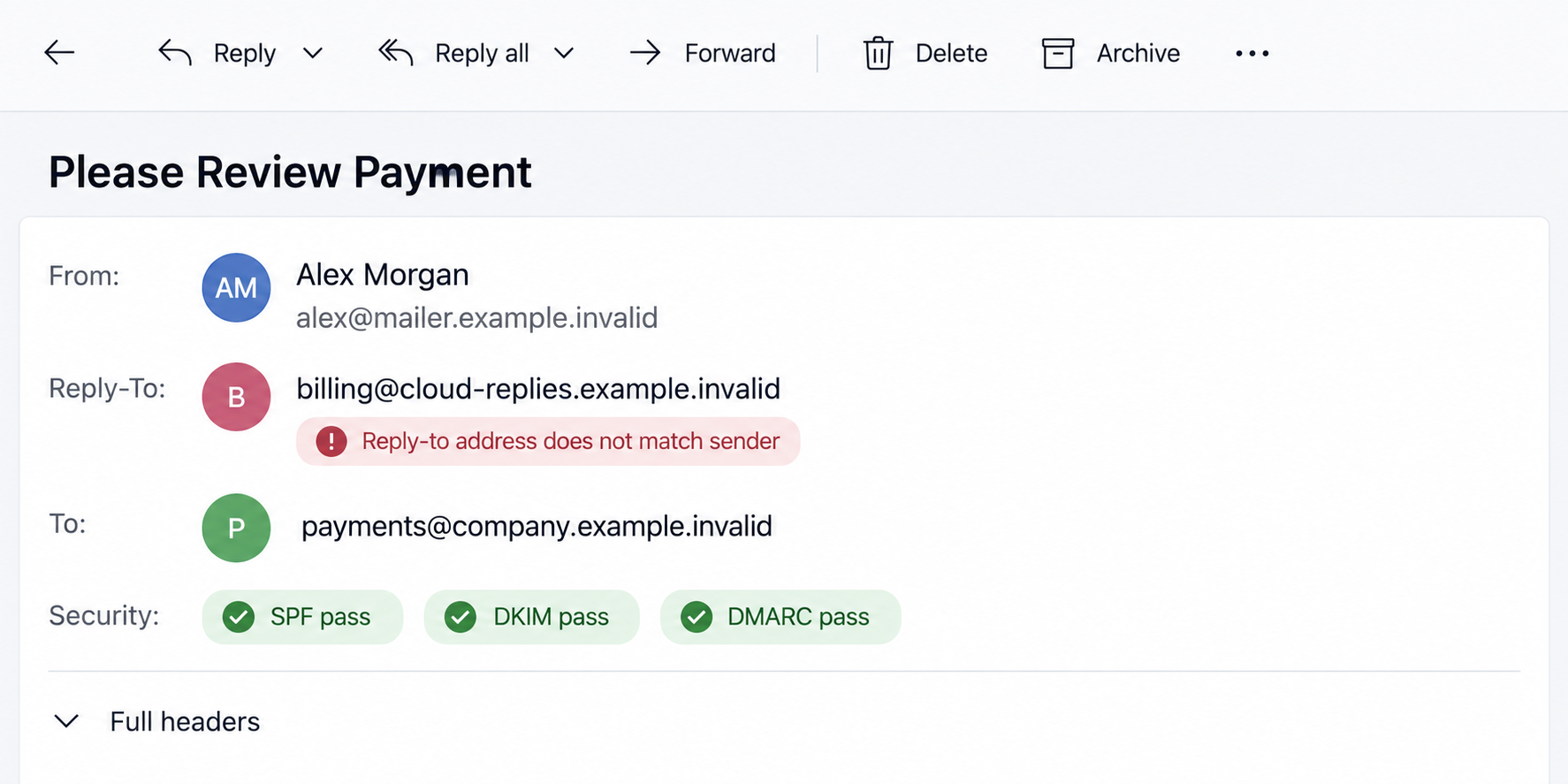
Before replying, compare the From and Reply-To fields with your contact records. The appearance of a coworker’s name does not settle that question.
Step 6: A transfer may be approved under false assumptions
If the approver relies on the fabricated thread, a payment could leave for an account supplied during the fraudulent conversation.
The public research does not say the originally targeted mailbox made a payment. It says no action was recorded there.
Four other mailboxes at the same organization later received similar variants, and those were quarantined. That showed persistence, not a confirmed financial loss.
Descriptions of a possible transfer must therefore remain conditional. The documented fact is an attempted invoice fraud with a deceptive delivery path.
Why a Working Unsubscribe Link Does Not Clear an Invoice
An unsubscribe link can be genuine because it belongs to the mailing platform. It only controls a mailing-list preference.
It cannot verify the supposed vendor, internal approver, invoice, or bank account. Those are separate business facts.
In this case, the mailing-list features were exactly what made the message appear less suspicious. Treat them as context, not evidence of a debt.
Likewise, a long-lived sending domain can indicate an established company whose infrastructure was abused. It does not prove the payment request came from your colleague.
The safest habit is to expand the sender details whenever an email asks for money, even when other signs look reassuring.
Which Details Actually Changed the Assessment?
Investigators did not label the message fraudulent because the unsubscribe link looked odd. The link worked exactly as ordinary list mail would.
They focused on the relationship between sender and recipient. The display name belonged to a known advisor, while the authenticated address did not.
The claimed vendor history was also unverifiable. The older replies appeared only as text inside the new message, not as separate messages in the recipient’s mailbox.
That is an important distinction for finance teams. A screenshot of a conversation or pasted quote is not the same as an independently searchable approval record.
The reply routing introduced another inconsistency. A genuine colleague and vendor relationship should not require a fresh, unrelated mailbox to continue payment discussions.
There was also an invisible trick in the message body. IRONSCALES found a zero-width character between the letters throughout the text.
To a person, the payment request still looked normal. To a simple filter searching for complete words, many expected phrases were broken apart.
That trick did not create the false invoice, but it helped the message avoid crude keyword rules while the delivery checks remained clean.
You do not need to inspect invisible characters to protect a payment. The sender mismatch and independent invoice check are more practical first steps.
None of these signals requires advanced forensic software to notice. They require expanding headers, comparing records, and refusing to let urgency shortcut normal controls.
A Practical Approval Rule for Small Teams
Small companies often lack a dedicated fraud desk. A two-person payment check can still stop this kind of attack.
One person matches the invoice to the purchase order and existing vendor account. Another independently confirms the requester and bank details.
Make the second check happen through a known phone number or approved internal chat, never through the new email’s reply address.
If someone says the invoice is too urgent for that process, the urgency itself should trigger the check. Legitimate work can withstand a short verification call.
Record the outcome in the accounting system. A clear note helps the next approver avoid repeating the same uncertainty.
These controls are useful even when the sender is a genuine employee. Email accounts can be compromised, and payment instructions can be mistyped.
The goal is not to distrust every colleague. It is to make a high-impact decision depend on more than one unverified inbox message.
Why the Sender Mismatch Is More Important Than the Subject Line
Subject lines change easily. IRONSCALES saw variants such as payment review and reminder messages reaching other mailboxes in the same organization.
A warning focused only on one exact subject would miss the next variation. The stronger check is whether the claimed person truly controls the address.
Even that check is not enough if a real account has been compromised. Pair it with independent confirmation of the payment instruction.
Finance teams should also compare bank details with those used for earlier approved invoices. A sudden new destination deserves its own verification.
Do not rush to block an established sender company merely because its list account was abused. Investigate the message and notify the provider appropriately.
Blocking a bystander domain can disrupt legitimate mail while leaving the attacker free to switch channels.
The useful lesson is procedural: confirm the person, the invoice, and the destination outside the message before funds move.
How to Verify a Payment Request Without Trusting the Email
Find the invoice in your accounting system. Compare the vendor name, purchase order, work description, amount, and bank details with records already on file.
Call the supposed internal requester using the company directory, not a number in the email signature or quoted thread.
If the vendor truly changed bank details, verify the change through a previously known telephone number and a separate approval path.
Ask a second authorized person to review the instruction before a transfer. This is especially important when a message says payment is overdue.
Review the full email address and Reply-To. An unrelated domain behind a familiar display name deserves an immediate pause.
Authentication passes can remain useful technical facts, but they should never override an address mismatch or an unverified invoice.
Preserve the message headers for your security team. They can help identify additional recipients and block the attacker-controlled reply route.
What to Do if You Have Fallen Victim to This Scam
- Stop the payment process. Tell accounts payable and the authorizing manager that the invoice thread may be fabricated. Place the invoice on hold.
- Contact your bank immediately if money moved. Ask whether the transfer can be recalled or frozen. Speed matters, especially before funds leave the receiving account.
- Verify the real colleague separately. Call through the company directory and ask whether they sent the instruction. Do not reply to the suspicious message for confirmation.
- Check the vendor record. Compare the claimed engagement, invoice, and destination details against prior contracts and approved payment data.
- Preserve evidence. Keep the original email, full headers, payment records, reply messages, and timestamps for your security team and bank.
- Warn nearby teams. IRONSCALES saw follow-on variants at the same organization. Tell finance and security colleagues what subject lines and sender mismatches to watch for.
- Report the fraud attempt. Use your organization’s incident process and appropriate local financial-crime reporting channels. Share only necessary business data.
A device scan is not the first remedy for the documented case because the observed message had no malicious link or attachment.
If your version did include a download or login page, treat that as a separate exposure and ask your security team to assess the device and accounts.
Frequently Asked Questions
Can an email pass SPF, DKIM, and DMARC and still be fraudulent?
Yes. Those checks authenticate aspects of the sending route. They do not verify whether an invoice, quoted conversation, or payment request is true.
Was the company behind the sending domain the scammer?
The public analysis does not establish that. It describes apparently abused legitimate mailing infrastructure and treats the domain owner as another affected party.
Was the unsubscribe link fake?
No. In this case, researchers found a working one-click unsubscribe link. It was a real mailing-list feature attached to a fraudulent payment request.
Did the target company lose money?
IRONSCALES reported no action on the initially observed mailbox. Later variants were quarantined. The published case does not confirm a completed payment.
Why does a quoted email thread not prove prior approval?
Quoted history is ordinary text inside a new message. A sender can fabricate it without ever sending or receiving the alleged earlier emails.
What is the fastest safe way to check this invoice?
Call the claimed internal requester through a known directory number and compare the invoice with approved vendor records before authorizing anything.
The Bottom Line
This invoice scam used a real mailing route and a real unsubscribe link to make a fabricated payment history feel credible.
The decisive check is outside the email: confirm the colleague, invoice, and bank details through records and contact paths you already trust.








