

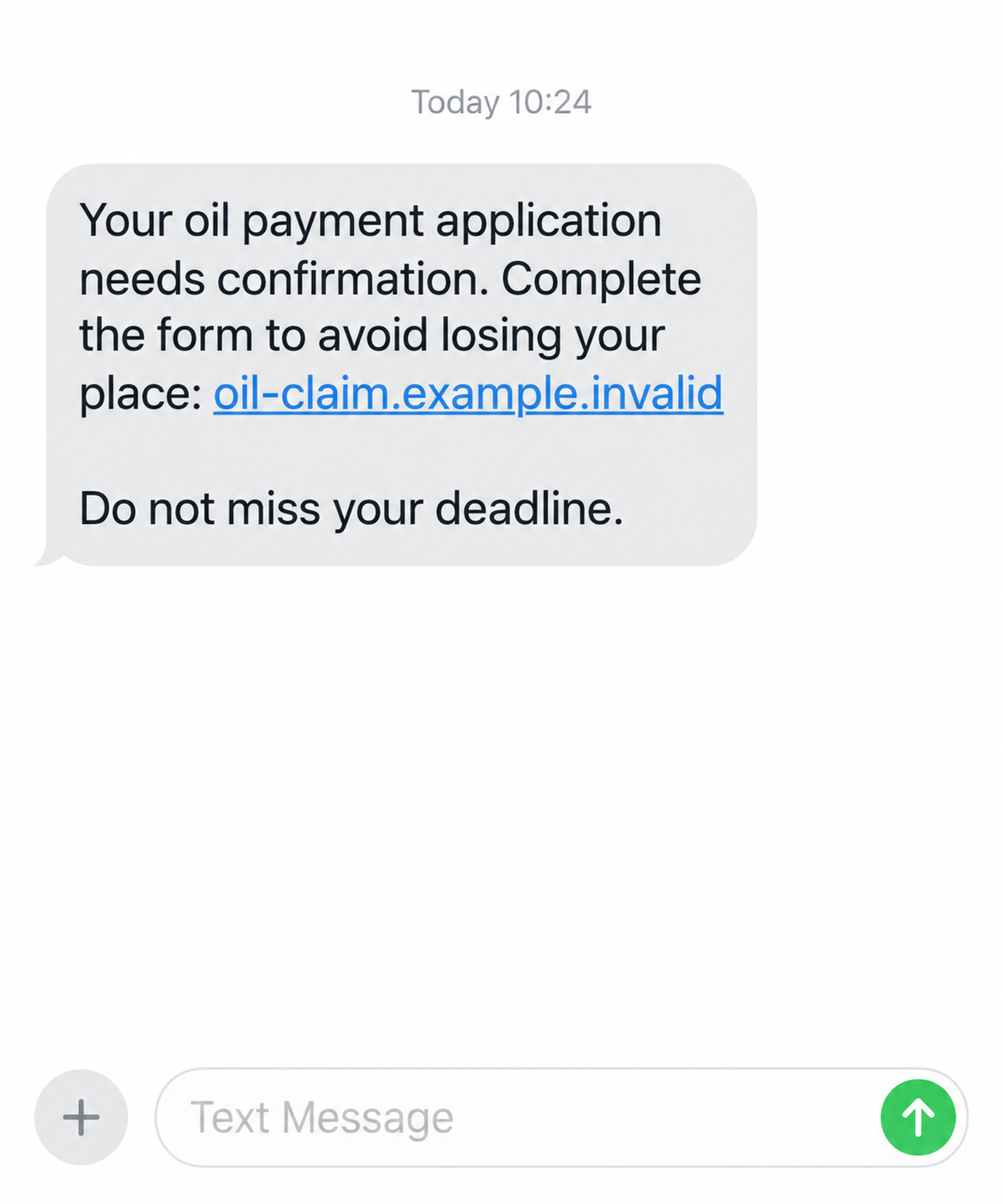
A text says your heating-oil payment is waiting, but you need to confirm an application today. It arrives just when household costs are on your mind.
There may be a real support program behind the headline. The question is whether this particular message has anything to do with it.
Overview
The lure attaches itself to genuine financial pressure
On September 9, 2026, the Police Service of Northern Ireland warned about fraudsters using cost-of-living and oil-payment themes.
The warning covers false offers of energy refunds, energy discounts, tax rebates, and support payments. The goal is personal or banking information.
One route is a text with a link claiming that a fee or bank details are needed to unlock an oil voucher.
Other routes include calls claiming to represent the Department for Communities or a local council, and emails imitating official government portals.
The real application is not unlocked by a fee
The police emphasize that the official application process through NI Direct is free. An upfront processing fee is therefore a clear contradiction.
That distinction matters because the scam may use a real benefit’s name. Calling the text fraudulent does not mean every government support program is fake.
Government bodies do not cold-contact residents to demand bank details, PINs, or payment to grant an oil payment, according to the police warning.
The basic decision is simple
If an unsolicited message asks you to act on a cost-of-living claim, move the verification outside that message.
- Do not pay a fee to release a support payment.
- Do not use the link or callback number supplied in a surprise text.
- Visit NI Direct by entering its official address yourself.
- Do not provide a banking PIN, one-time code, or login password to a caller.
- Ask the police or your bank for help promptly if you already shared details.
The important issue is not whether the message sounds compassionate. It is whether the process matches the official, free application route.
Why a Real Support Program Can Still Be Used in a Scam
Fraudsters frequently borrow the name of something people have heard about in the news. Familiarity gives a cold message a head start.
A person facing an expensive heating season may feel that delaying an application means losing help. The text turns that concern into urgency.
The proposed fee is especially manipulative. It reframes a fraudulent payment as a small administrative step required to receive something larger.
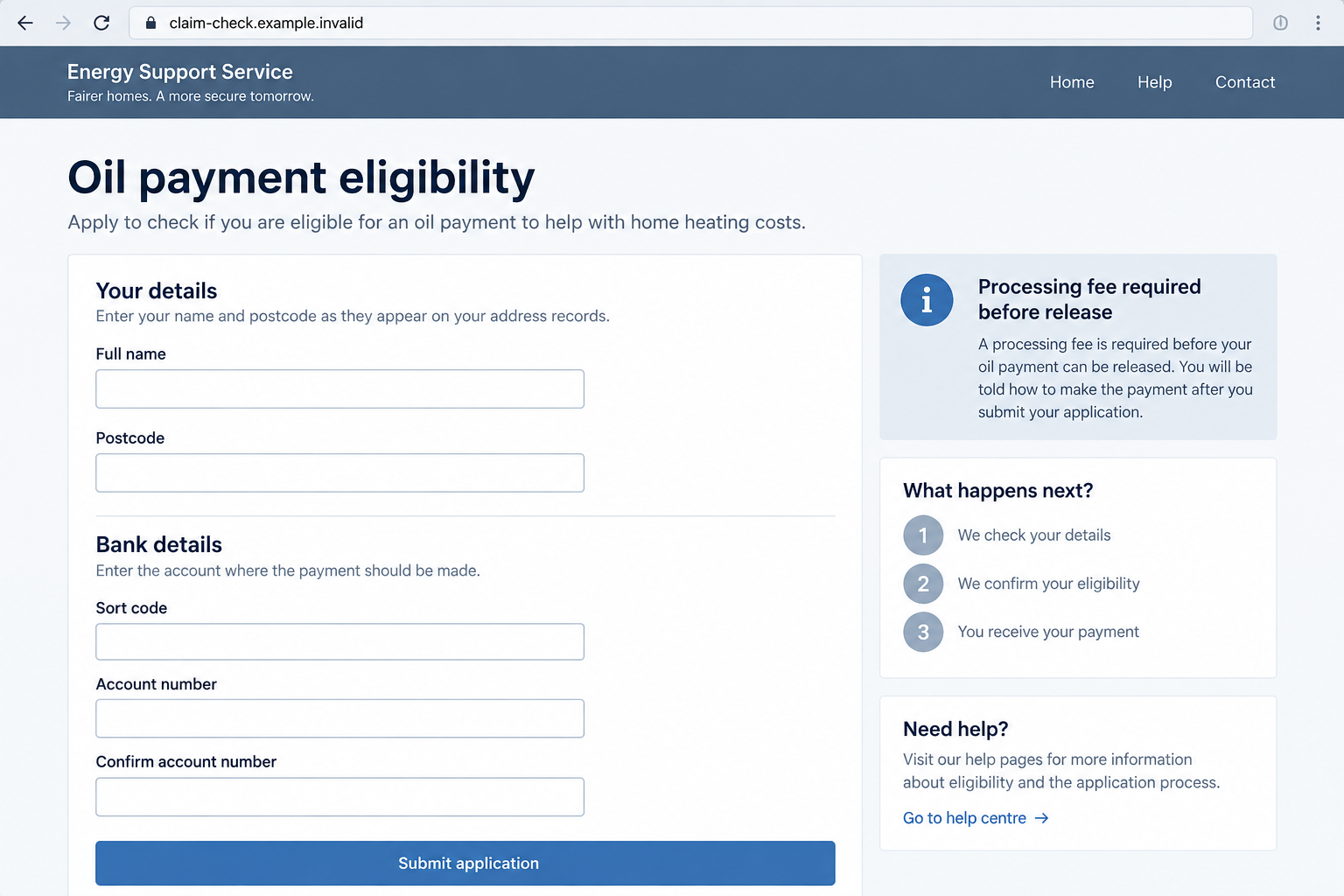
A fake portal can display formal colors, eligibility questions, and a progress bar. Those are web-design choices, not proof of a government connection.
Likewise, a caller can know your name or area without representing a public agency. Personal details can come from many sources.
The PSNI warning describes several contact channels rather than one fixed sender, domain, or script. The story can change while the underlying request stays the same.
That is why checking only a spelling mistake or a single known scam number is not enough. Check the claimed process against NI Direct.
How the Northern Ireland Oil Payment Scam Works
Step 1: A message or call raises a support payment
The first approach may be a text, phone call, or email. It offers help with heating or another cost-of-living expense.
A text can claim an application is waiting. A caller may say they are from the Department for Communities or a local council.
The police did not publish one universal script. Treat unfamiliar contact about a payment as a reason to verify, not a reason to obey.
The scam works because it begins with a plausible need. It does not require the recipient to believe in an impossible prize.
Step 2: The approach creates a deadline or obstacle
The message may say a claim will expire or that a voucher must be unlocked. Such language pushes the recipient to resolve a problem immediately.
In the PSNI’s example, the text may require a fee or bank details before the oil voucher can be claimed.
A real application can have eligibility rules and dates, but those should be verified on the official service, not through an unsolicited link.
Do not let the claimed deadline stop you from checking. A government payment does not become safer because a stranger says the clock is running.
Step 3: The victim is moved to a fake portal or conversation
A text or email may open a website that imitates a government service. A phone call may continue the same story without a website.
Either way, the attacker wants the recipient to treat the new channel as authoritative. A copied logo or formal tone can assist that illusion.
Look at the full web domain before entering anything. The PSNI advises using official government addresses ending in .gov.uk.
Do not assume a domain is official because “NI,” “support,” or “government” appears somewhere in the address. The ending and ownership matter.
Step 4: The application asks for banking information or a fee
This is the point where the supposed help turns into a request that benefits the fraudster. Bank details, card data, or an upfront fee may be requested.
The PSNI says the genuine NI Direct application process is free. Paying to unlock it does not fit the official route.
The image below illustrates a fictional claim form with those red flags. It is not an authentic screenshot of a specific fraudulent site.
Do not enter a banking PIN or one-time code to “confirm” eligibility. Those secrets are not needed for an unsolicited application link.
Step 5: Information is used for theft or follow-up contact
A submitted fee may be taken immediately. Banking details can also be used in further attempts to move money or impersonate the victim.
The police warning identifies the attempt to obtain personal and banking information. It does not prove every recipient loses money in the same way.
If a caller follows up, they may ask for more details by claiming the first application failed. Treat that as a new suspicious demand.
Any later contact should be checked through a phone number published independently by the relevant agency or bank.
Step 6: The real support question remains unanswered
Completing a fake form does not create a legitimate benefit application. You may still need to check eligibility through NI Direct.
That is why recovery has two tracks: protect your banking information, then handle any real support application through official channels.
Do not abandon genuine assistance because a scammer borrowed its name. Separate the fraud from the program it imitates.
How to Check an Oil Payment Claim Safely
Start with NI Direct, using a browser bookmark or address you enter yourself. Look for the relevant program and current eligibility information.
If you are unsure which agency manages the payment, contact the public service through a number listed on its official website.
Do not use a number embedded in the suspicious text or email. The same person who sent the message can answer that line.
The PSNI’s advice is explicit: official applications are free, and government bodies do not cold-call, text, or email seeking upfront fees or sensitive banking details.
If a caller pressures you to transfer money to a different account, hang up and call your bank directly. Do not continue the conversation to gather proof.
You can save the caller’s number or a screenshot afterward. Protecting access to your accounts is more important than interviewing the scammer.
Text, Email, and Phone Versions Are Not Identical
The text version relies on a clickable link. It is easiest to stop before the browser opens.
The email version may resemble an official notice and direct you to a fake portal. Check the sender and domain, but verify outside the email.
A phone call uses live conversation to answer objections. The caller may sound patient and knowledgeable while requesting information they should not need.
The response differs by exposure. A clicked link without data entry is not the same as a bank login supplied to a caller.
Document what you actually did, and tell your bank or reporting agency those specifics. They can target the risk more effectively.
A Free Application Should Not Begin With a Transfer
A processing fee is not merely an annoying extra cost in this story. It directly conflicts with the free NI Direct application process described by police.
Fraudsters may describe that fee as verification, administration, release, or a refundable deposit. A change in label does not make it official.
Be equally wary of a request to move money temporarily to a “safe” account. The police advise never transferring money because an unknown caller says so.
A genuine application may ask for relevant information through its official process. That does not authorize a cold caller to collect the same data.
If the text says someone has applied for you already, ask NI Direct whether such a record exists. Do not rely on a screenshot supplied by the sender.
How to Talk to a Relative Who Received the Message
A family member may feel embarrassed after replying. Begin by asking what the message requested, not why they believed it.
Help them open their bank’s official app or find the number printed on their card. Do not use any contact shown inside the suspicious message.
If they shared a PIN, password, or one-time code, tell the bank that explicitly. Those details affect the bank’s immediate response.
Offer to sit with them while they check NI Direct for the genuine program. That resolves the original concern without reopening the scam link.
Keep the suspicious text for reporting, but avoid forwarding its clickable link widely. A screenshot is often safer for discussion.
Clear, calm help is more useful than a lecture. The fraud was designed to exploit pressure around household expenses.
Could a Real Council or Agency Call?
A legitimate office may sometimes contact residents about ordinary administrative matters. The PSNI warning is about unsolicited demands for sensitive details or fees.
If a caller names a real agency, end the conversation politely and call the published agency number yourself.
Do not press a number offered by an automated menu to “verify” the call. The caller controls that route too.
Ask the agency whether there is an actual application, what information it needs, and how to provide it securely.
This approach avoids a false choice between trusting a stranger and ignoring genuine support altogether.
What to Do if You Have Fallen Victim to This Scam
- Stop contact and do not pay another fee. End the call or close the page. An additional “release” charge is not a route to the genuine benefit.
- Contact your bank if you shared account or card details. Use its official app or the number on your card. Explain precisely what information you supplied.
- Report any transfer immediately. Ask the bank whether it can freeze, recall, or dispute the payment. Preserve reference numbers and timestamps.
- Secure passwords and one-time codes. If you entered login credentials, change them on the real service and enable multifactor authentication. Tell the bank if you shared an OTP.
- Check the real application separately. Visit NI Direct independently so a fraudulent form does not prevent you from applying for genuine help.
- Inspect your device if you installed something. The PSNI warning does not require malware for this scam. A scan such as Malwarebytes is useful if a link prompted a download.
- Consider filtering repeat lures. AdGuard may block some malicious links or advertising, but it cannot replace immediate bank action after data disclosure.
- Report the approach. The PSNI accepts reports through its official website or 101. The warning also directs victims to Action Fraud.
People are targeted because they need assistance, not because they were careless. Acting quickly can still limit the harm.
If you did not share details, you can stop at verification and reporting. There is no reason to assume your bank account was compromised from reading a text.
Frequently Asked Questions
Is the Northern Ireland oil payment itself a scam?
No. The PSNI warning concerns fraudulent messages and calls that exploit the payment theme. Check any real program through NI Direct.
Do I need to pay a processing fee to apply?
No. The police say the official application process through NI Direct is free. An advance payment to unlock a voucher is a red flag.
Will a government office text me for my bank PIN?
No. The PSNI says government bodies do not cold-contact residents for PINs, bank details, or upfront fees to grant the oil payment.
What if the caller knew my name and address?
Those details alone do not prove identity. Hang up and call the agency using contact information from its official website.
I opened the link but submitted nothing. What now?
Close it and verify the program independently. If the page requested a download or unusual permission, review your device and browser settings.
Where should I report an oil-payment scam?
Use the PSNI’s official reporting channel or 101, and inform your bank immediately if money or banking information was involved.
The Bottom Line
The Northern Ireland oil payment scam borrows a real household concern to ask for a fee or banking details through an unsolicited message.
The genuine NI Direct process is free. Leave the text, email, or call behind and check the program through official channels.








