

A text says Spain’s Social Security system found a problem with your contributions. The message offers a link that seems easier than waiting for an official notice.
If the wording feels unusually specific to your situation, pause. The real question is whether your account shows the same issue when you reach it independently.
Overview
The message borrows a real administrative concern
Spain’s Social Security agency warned on September 21, 2026 about SMS messages impersonating it.
Some texts claim an update is needed or a contribution difference has created an outstanding debt. Others suggest a benefit payment is waiting to be collected.
Both stories send the recipient to an imitation government portal. The destination seeks bank information under the guise of payment or reimbursement.
The campaign particularly targets people who already use online Social Security services, including self-employed workers and benefits recipients.
The name in the text is not the authority
TGSS and Importass are familiar to many people in Spain. Criminals can put those words into a sender label, page heading, or domain.
That does not make a text official. The agency says it does not request debt payments or personal-data updates through links sent by SMS.
Its warning lists multiple lookalike domains, some with spelling errors and unusual endings. Their existence shows why a convincing page title cannot verify the host.
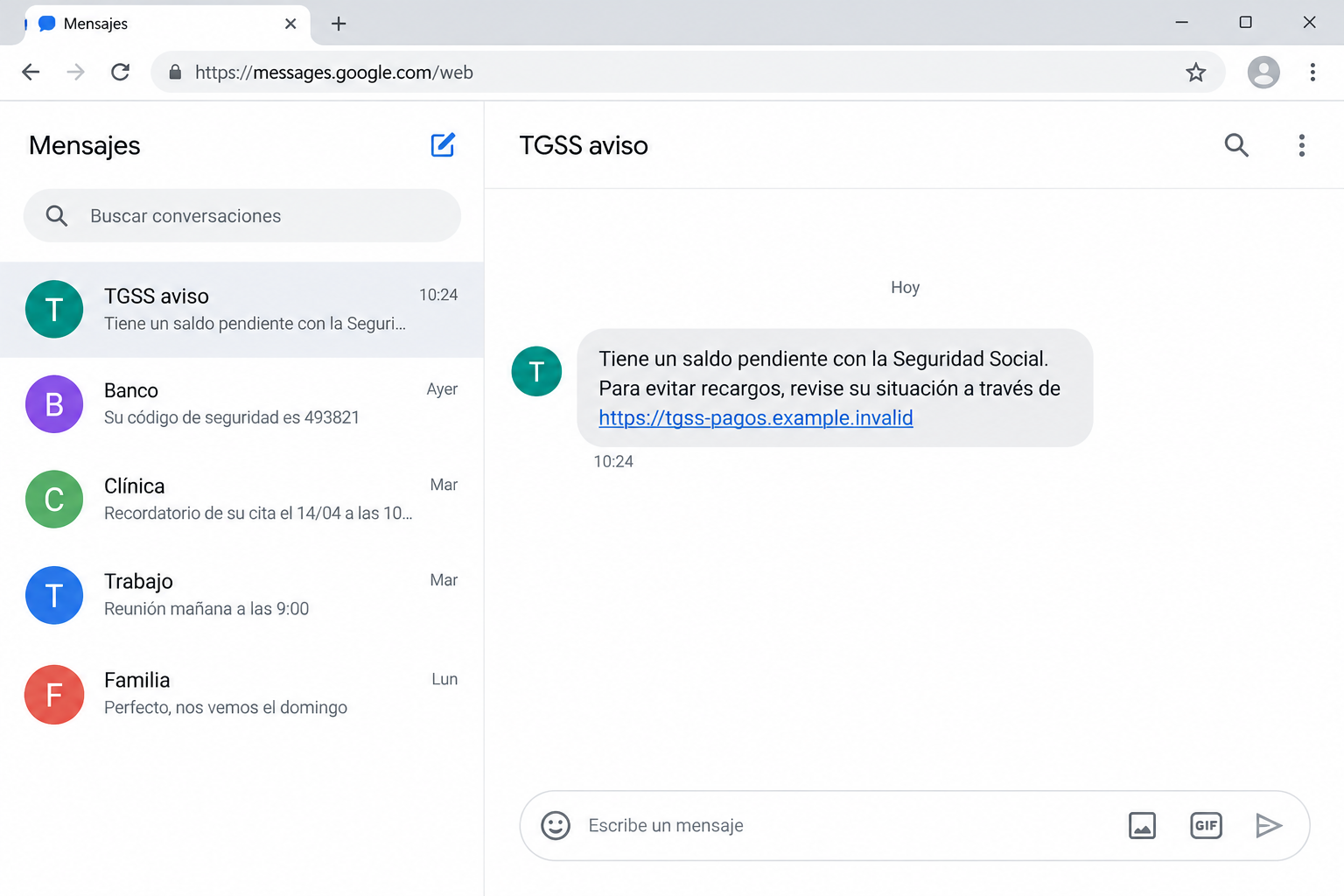
The image above is an original reconstruction with a nonworking sample address. It does not display one of the live sites identified by the agency.
The same link can support opposite stories
One version says you owe money. Another says the government owes you money. The emotional triggers differ, but the requested action is similar.
- An unexpected SMS names a debt, update, contribution issue, or benefit.
- A link promises to resolve the matter immediately.
- A false Social Security page imitates a familiar service.
- A payment form asks for bank or card details.
- The attacker can use the submitted information for fraud.
Do not infer that a refund text is safer than a debt text. Both can place the recipient in front of a form controlled by criminals.
Why This Message Can Feel Personal
Self-employed workers may genuinely track contributions and payment dates. Benefits recipients may also expect updates from government services.
A generic message can therefore land at a convincing moment. The scammer does not need to know the recipient’s account balance to trigger uncertainty.
Administrative language adds weight. Terms about pending contributions, reassessment, or an account update resemble ordinary bureaucratic notices.
The text then offers a shortcut. It suggests that a simple tap can prevent a surcharge or release money already due.
On a phone, a lookalike site has less space to reveal its true host. A visitor may notice the blue header and form before inspecting the address.
The agency specifically warned that some fake pages mention IRPF tax payments. Social Security does not manage that tax, making the claim an important clue.
But do not rely only on bad grammar or a strange tax reference. A carefully written message can still lead to the same fraudulent payment page.
How the Spanish Social Security SMS Scam Works
Step 1: A text announces a contribution problem
The sender claims to represent Spain’s Social Security administration. It may mention TGSS, an account update, or a discrepancy in contributions.
Recipients are asked to act quickly to avoid a penalty or resolve a pending administrative matter. The pressure discourages checking official records first.
The agency has not said that one precise message text defines the whole campaign. Expect variations in spelling, amount, deadline, and sender name.
Even if the text arrives in a thread that previously held legitimate messages, inspect the request. Sender displays can be misleading.
Step 2: A link leads to a government-looking page
The SMS contains a web address styled to resemble a Social Security service. The agency documented several lookalike hosts rather than one permanent domain.
Some names use plausible words separated by hyphens; others contain transposed letters. A trusted-looking prefix cannot change who owns the actual domain.
A lock icon only indicates an encrypted connection to that site. It does not mean the site belongs to the Spanish government.
Close the page if the host is unfamiliar. Open the official portal from a saved bookmark or a verified government source instead.
Step 3: The page confirms the fake story
After the tap, an imitation site displays a debt, update, or benefit claim. The text may repeat the language from the SMS to feel consistent.
For debt lures, it can frame a payment as the last step needed to clear an account. For benefit lures, it can frame bank entry as necessary to receive funds.
Those two paths are not evidence of a real account query. A fake page can show a generic result to every visitor.
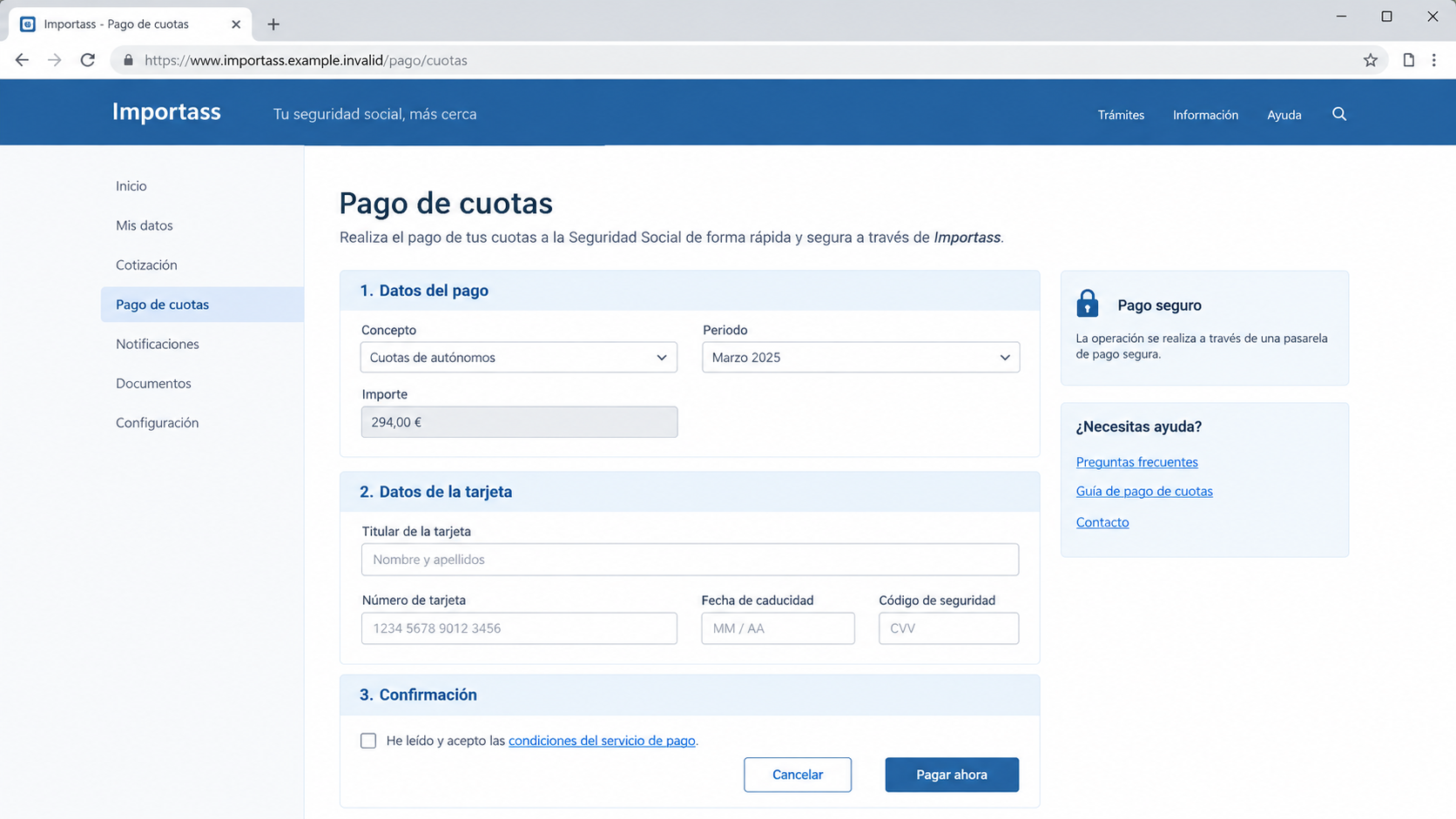
The second image illustrates a fictional payment form. It is not a captured government page, and no card data appears in its fields.
Before entering anything, compare the alleged case with the records displayed inside the official service you opened independently.
Step 4: A false payment gateway collects details
The official alert says the attack ultimately funnels people to a fake payment gateway. It asks for financial data, whether the pretext is paying or receiving.
A refund should not require entering card security codes into a site reached through an unsolicited text. A debt should be verifiable in the official account.
The form may ask for a name, card number, expiration date, security code, and possibly online-banking confirmation. Each new field increases exposure.
Do not complete a transaction simply to see whether the page is real. A small charge can be followed by additional attempts.
Step 5: The attacker may use the banking data
The direct objective described by Social Security is the collection of banking information. The agency advises victims who paid or shared data to contact their bank.
Fraudsters may try unauthorized card transactions, social-engineering follow-ups, or account access using whatever the form collected.
The exact downstream activity depends on the information submitted. A person who only received the SMS has a different risk than someone who entered card details.
Save the message and bank evidence, but do not revisit the counterfeit portal to gather more screenshots.
Official Portals and the Fastest Independent Check
The agency directs people to its real Importass portal, the Social Security Electronic Office, Tu Seguridad Social, and its benefits portal.
Those services can show whether a genuine contribution matter or benefits action is pending. Reach them by typing or using a trusted bookmark.
Do not copy a domain from the suspicious SMS into your browser and assume careful typing makes it safer. The destination itself may be fraudulent.
For self-employed contributions, check the actual TGSS records in Importass. A credible account notice should agree with what your authenticated portal displays.
For benefit payments, inspect your official benefit record and bank statement. A supposed windfall announced only by SMS is not adequate proof.
If the message mentions IRPF as though Social Security collects it, treat that as another inconsistency. The agency explicitly called out that claim.
When in doubt, contact the administration using a phone number obtained from an official site, not the text message.
How to Read a Spanish Government-Looking URL
Scam domains often contain recognizable fragments such as “portal,” “seg,” “social,” or “gob.” These fragments are chosen to be read quickly.
Focus on the registered domain and ending, not just the first word or path. A site can prepend government-like terms to a completely unrelated host.
Misspellings are useful warning signs, but a perfectly spelled lookalike can still be counterfeit. The independent entry route is the stronger check.
Some fake sites rely on short-lived domains. A page disappearing after one day does not mean the original message was harmless.
Links may also pass through redirects or analytics addresses. Do not assume the first visible host is the final page that will receive your data.
The safest question is not whether a link looks almost right. It is whether you reached the service through a channel you controlled.
Why the IRPF Claim Deserves a Second Look
IRPF is a tax term many residents recognize. A fake portal can insert it beside contribution language to make an invented balance seem official.
The Social Security agency called out this mixture because it does not administer IRPF payments. The mismatch reveals how the message borrows authority from several systems.
That does not mean every message without IRPF is genuine. It means the tax reference is one concrete inconsistency worth noticing.
Administrative acronyms can overwhelm readers. Slow down and ask which organization actually handles the issue described, then check that organization’s official records.
If the text says a government office will collect a tax through a newly supplied payment link, avoid guessing. Seek clarification through the real office.
Scammers count on urgency to replace this simple jurisdiction check. A deadline in a text cannot make an unrelated agency responsible for another office’s payment.
Why the Sender Label Cannot Settle the Question
An SMS may display a name instead of a number. That label is easy to read, but it does not provide a complete authentication trail for the reader.
Messages can also arrive next to older notices in the same conversation view. The visual grouping can create trust even when the new link is malicious.
Judge the action requested, not only the thread in which it appeared. A sudden demand for card details through a new website remains suspicious.
If you receive a second text correcting a link or offering a different domain, do not follow that either. Rotating addresses are common in short-lived campaigns.
What to Do If You Fell for the TGSS Text
Take the next action according to what you actually did. Opening a page calls for monitoring; entering payment details calls for urgent bank contact.
- Stop interacting with the SMS and website. Do not pay a second “correction” charge or reply to messages claiming your first attempt failed.
- If you entered card information, call your bank through its official app or the number printed on your card. Ask to block or replace the card.
- Tell the bank whether you also approved a banking notification, gave an SMS code, or shared an online-banking password. Those details change the response.
- Check recent and pending transactions. Dispute unauthorized charges promptly, and request a reference number for the fraud report.
- If you entered a government-account password, change it through the real service. Revoke suspicious sessions and update reused passwords elsewhere.
- Save the original SMS, sender display, full address, screenshots, bank entries, and conversation times. Keep the evidence without reopening the malicious site.
- Report the incident to Spanish law enforcement. The Social Security agency recommends a police report when data or money was surrendered.
- Use Malwarebytes if the page asked you to install an app or file. The official alert describes data collection, not automatic infection from merely reading the text.
- AdGuard can help filter known malicious domains and ads later. It cannot reverse a card payment or verify a tax debt on your behalf.
- Watch for follow-up calls. A criminal who knows you clicked may pretend to be the bank or government and request another code.
The Debt Story and the Refund Story Need Different Checks
When the SMS alleges a debt, confirm the amount and period in your official account. Ask whether the contribution calculation actually changed.
When it alleges money owed to you, verify the benefit status and payment method in the official benefits portal. Do not rely on the message’s promised date.
In neither case should an SMS dictate which website receives your bank details. The agency’s warning is categorical on this point.
A person may have a real debt while receiving a fake text about it. The coincidence does not validate the link or payment form.
Similarly, a genuine benefits application does not make a random reimbursement notice legitimate. Check the case directly in the authorized service.
Keep any legitimate administrative matter separate from the security incident. Handle the real case through official channels after protecting your accounts.
Frequently Asked Questions
Does Spain’s Social Security send debt-payment links by SMS?
Its September 2026 warning says it does not request debt payments or personal-data updates through SMS links. Check obligations in official portals instead.
What if the text mentions a real contribution period?
That detail may be guessed, reused, or coincidental. Verify the period and amount in Importass through an independently opened official address.
Can a fake message promise a refund rather than demand payment?
Yes. The agency described both debt and pending-benefit variants. Both can steer visitors toward a false page requesting banking information.
Is a padlock symbol enough to trust the page?
No. Encryption protects the connection to the domain shown, including a domain controlled by a scammer. It does not certify government ownership.
What if I tapped the link but entered nothing?
Close the site, keep the SMS for reporting, and watch for downloads or prompts. A visit alone does not establish that your card was exposed.
Should I call the phone number in the text?
No. Obtain contact details from an official Social Security site or an existing document. A number in the suspicious message may reach the attacker.
The Bottom Line
The TGSS-style SMS is not proof of a debt or refund. Spain’s Social Security documented fake texts leading to imitation portals and requests for bank data.
Check the real account independently. If you supplied card information or approved a payment, contact your bank immediately and report the incident.








