

A sponsored streaming offer promises movies and shows through a new Android app. The page looks polished, and the download button is easy to find.
Before installing anything, notice where the app comes from and what access it asks for. A streaming subscription should not need control over your banking sessions.
Overview
A streaming advertisement is the entry point
In September 2026, Intel 471 researchers described Meta advertisements steering Spanish-speaking users in Mexico toward counterfeit streaming apps.
Early campaigns imitated Netflix. Later waves used NovaFlix and other invented streaming names, making the offer seem like one of many entertainment services.
Visitors downloaded an Android package rather than a normal app-store installation. That package acted as a loader for malware the researchers call PanDa.
The affected streaming brands were impersonated. Intel 471 did not suggest that the legitimate services created the malicious software.
The app’s real purpose is remote access
PanDa is an Android remote-access trojan. Researchers documented screen streaming, remote control, keylogging, screen-lock capture, and other surveillance capabilities.
Its loader, called ShellA, encouraged users to allow installation from outside the official app store. It then sought Android Accessibility access.
Those permissions are far beyond what is needed to watch a film. Accessibility access can let a malicious app observe and act inside other apps.
Intel 471 found a target list covering 62 banks and financial institutions in Mexico and Nigeria. A target list is not proof every institution suffered an incident.
The scale reflects reach, not confirmed infections
During one week beginning July 2, 2026, an exposed campaign panel recorded more than 350,000 landing-page visits and nearly 15,000 malicious APK downloads.
Those are infrastructure figures. They do not tell us how many visitors completed installation, granted permissions, or lost money.
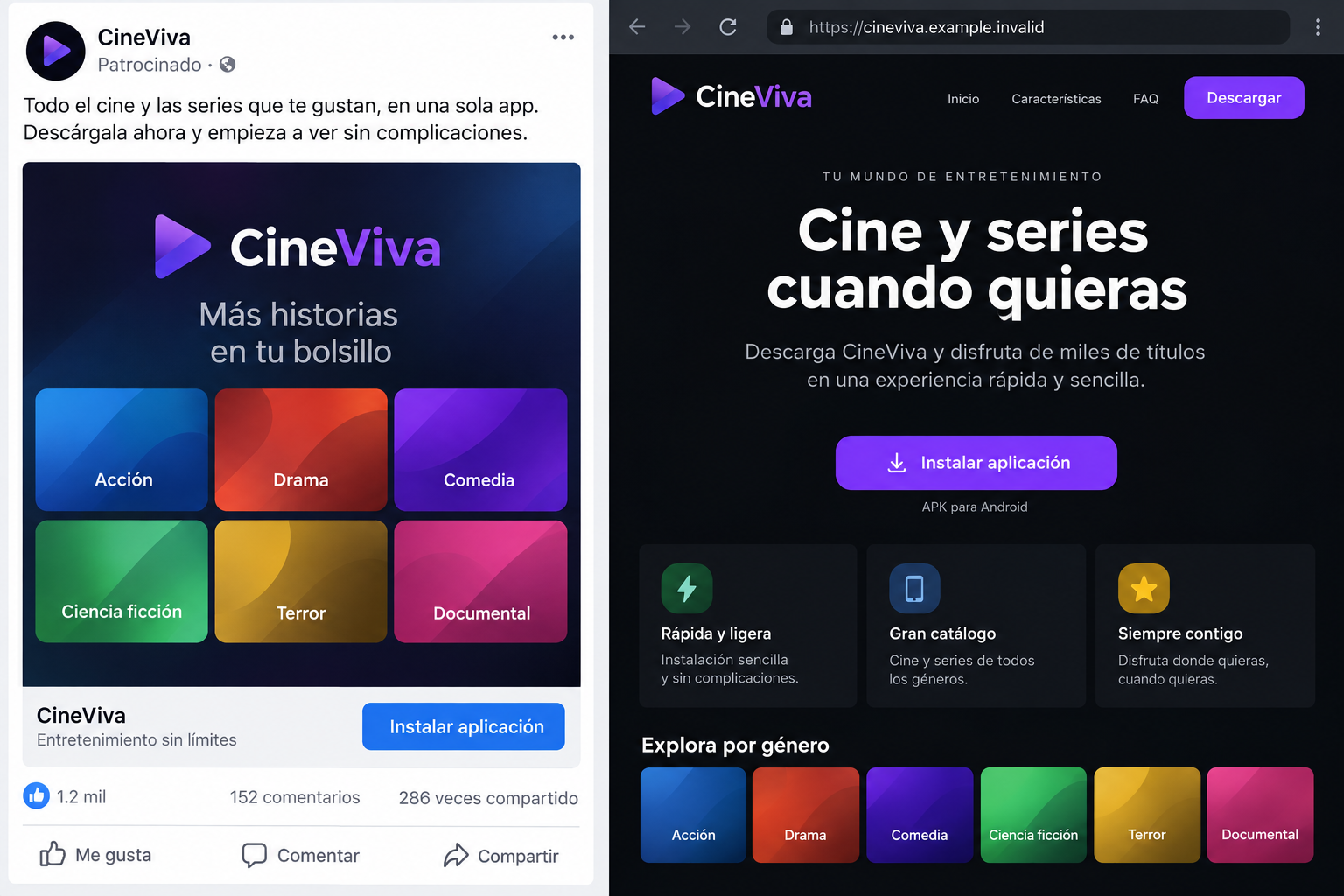
- A social advertisement promotes a streaming app.
- A lookalike site delivers an Android APK.
- The installer asks for outside-source installation.
- The payload seeks powerful Accessibility permission.
- Banking and screen activity can become visible to the attacker.
The opening image is a fictional illustration of this path, with an unusable sample address. It is not an image copied from the researchers.
Why the Streaming Story Fits the Attack
People routinely install entertainment apps and accept new streaming brands. A weekend offer or exclusive catalog can make an unfamiliar name feel ordinary.
A social ad adds another layer of apparent legitimacy. The platform delivered it, but ad delivery does not mean the software was vetted as safe.
The landing page can borrow familiar layouts and phrases without reproducing a famous logo exactly. That makes a disposable brand easier to replace.
Users may also tolerate unusual installation instructions when told a title is unavailable in their region or the app needs a special player.
That explanation changes the question from “Why is this outside the store?” to “How do I make it work?” The malware campaign benefits from that shift.
Intel 471 saw operators change themes and domains over time. A single blocked link therefore does not remove the broader installation pattern.
How the Fake Streaming App Attack Works
Step 1: A sponsored post reaches a likely viewer
The operation used Meta Ads to reach Spanish-speaking users, particularly in Mexico. Its promotion looked like an offer for a streaming application.
In May, Intel 471 observed Netflix-themed advertisements. By July, the operators had expanded to NovaFlix and other fabricated brands.
The ad’s job is not to explain the malware. It is to move a potential subscriber from a familiar social feed to a controlled download page.
Remember that a paid social placement is available to advertisers, including criminals who evade review or replace pages after approval.
Step 2: The landing page supplies an APK
The website offers an Android installation file. The address and page design can change quickly, while the promise of streaming stays the same.
Intel 471 identified disposable jump domains that helped route ad visitors to the final pages. Those intermediate addresses also complicated takedowns.
Downloading an APK from a website bypasses the usual app-store installation path. That does not automatically make every APK malicious, but it removes a useful checkpoint.
The researched file was a loader, not the promised entertainment app. Researchers called it ShellA.
Step 3: The loader asks to install from unknown sources
When opened, ShellA prompts the user to allow installation outside the official store, supposedly for smooth playback.
That rationale has no connection to screen quality. It is a permission change that lets the package install additional software.
According to Intel 471, the loader reconstructs a hidden APK and varies part of its signature, making simple file-hash blocking less reliable.
The next installation depends on the user enabling the outside-source permission. Refusing that step can interrupt the attack before the remote-access payload runs.
Step 4: The final app requests Accessibility access
After the payload installs, it seeks Android Accessibility permission. This service is meant to help people use their devices, but malicious apps can abuse it.
Intel 471 found that PanDa could monitor information typed into login screens and control interactions through the granted capability.
A fake player may display a loading screen while the malicious component initializes. The absence of a usable catalog may be a symptom, not merely poor service.
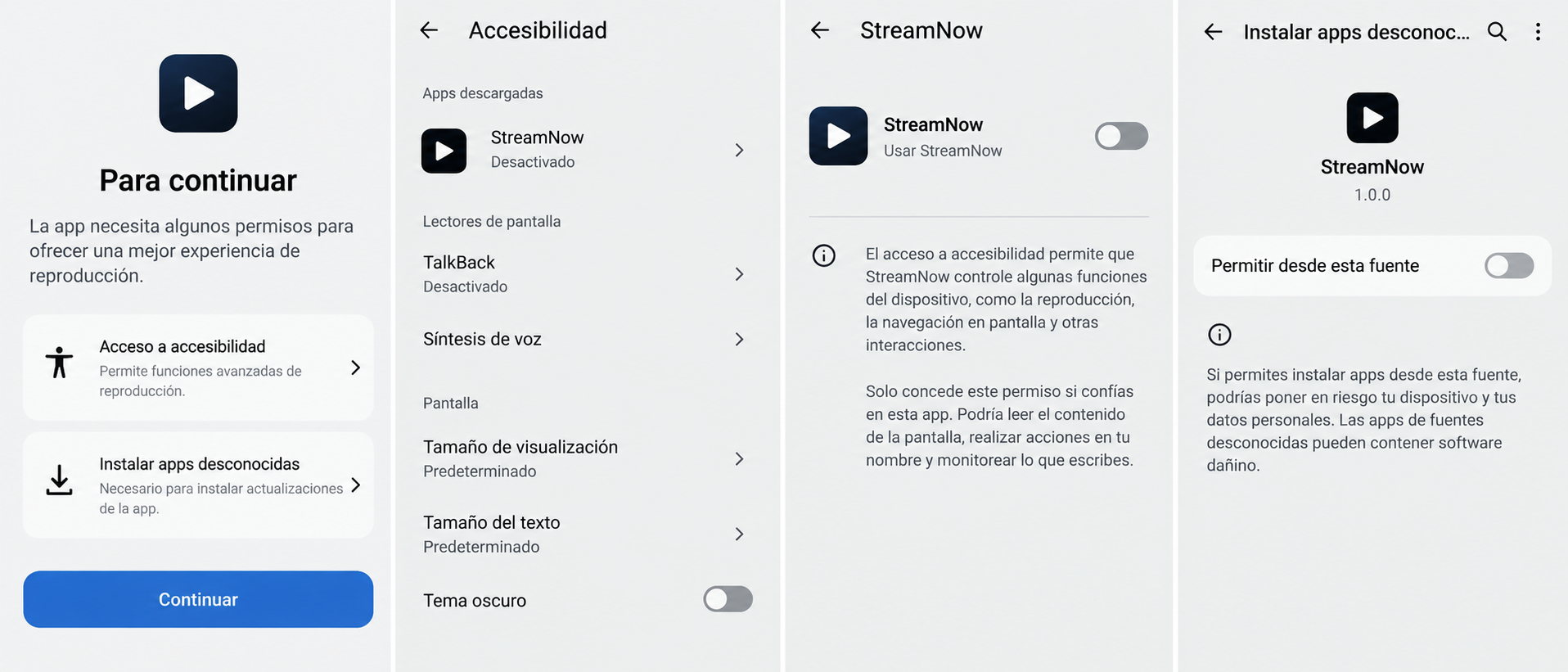
The second image shows a fictional sequence of permission screens. It illustrates the decision points without reproducing an actual infected phone.
Read each permission in plain language. A movie app needing to control other apps or inspect screen content is a serious warning.
Step 5: PanDa can observe banking activity
Researchers found capabilities for screen streaming, hidden remote control, keylogging, and screen-lock capture. The malware can therefore gather more than a streaming password.
Its observed target list included 62 financial institutions across Mexico and Nigeria. That shows attacker interest, not confirmed compromise of every listed bank.
If an infected person opens a banking app, the attacker may try to observe credentials, codes, balances, or transaction details.
Actual theft depends on installed permissions, victim activity, and bank defenses. The risk is serious without pretending every download led to a transfer.
Step 6: The campaign learns which ads work
Intel 471 saw later campaign waves add Facebook Pixel SDK and attribution identifiers to measure which advertisements produced downloads.
This marketing infrastructure makes the operation more adaptive. Operators can invest in the themes and audiences that respond best.
The researchers also found an AppPanda management panel and services for page templates, APK builds, and rapid domain registration.
Chinese-language content in the panel suggests Chinese-speaking operators or developers. It does not establish their nationality or physical location.
How AppPanda Supported the Campaign
AppPanda was a centralized panel identified during the investigation. It organized landing pages, payloads, and campaign statistics for operators.
One week of records showed more than 200,000 unique visitors and nearly 15,000 malicious downloads across at least 22 phishing domains.
That scope helps explain why blocking a single fake streaming name is insufficient. The platform could launch new domains and visual themes.
Intel 471 also documented APK Factory, a builder supporting PanDa and another banking trojan called BTMOB. The two names refer to different malware.
This distinction matters because MalwareTips already covers BTMOB. This article concerns the PanDa-delivering campaign and its ShellA loader.
A separate service repackaged and re-signed APKs frequently. Fresh files could therefore evade defenses based solely on one known hash.
For readers, the practical lesson is simpler: avoid a site-delivered APK promoted by a social ad, especially when it requests high-risk Android privileges.
What a Legitimate Streaming App Should Not Demand
A normal streaming app may need network access, media playback permissions, and perhaps notifications. It should not need to read banking screens.
Accessibility access is sometimes used legitimately for specific features, but the app should explain those features clearly and come from a verifiable publisher.
“Install unknown apps” is especially concerning when the source is a newly encountered ad. The setting enables a broader installation path outside the store.
Do not assume a familiar streaming brand in a page header means the file belongs to that brand. Open the service’s official site or app-store listing yourself.
Check the developer name, publication history, permissions, reviews, and support address. Recent positive reviews can be manipulated, so weigh multiple signals.
If a service is supposedly exclusive to a country, verify that claim with the real rights holder before changing device security settings.
What to Do If You Installed the Fake App
Do not continue banking on a device that may permit remote observation. Use a separate trusted device to secure accounts while preserving evidence.
- Disconnect the Android device from mobile data and Wi-Fi. Stop opening financial apps until the installation and permissions have been investigated.
- From a clean device, contact your bank using its official app or known phone number. Explain that remote-access malware may have observed your sessions.
- Review account transactions, new payees, pending transfers, and security changes. Ask the bank which immediate restrictions it recommends for your exposure.
- Change banking, email, and other important passwords from the clean device. Revoke sessions and update multifactor methods where necessary.
- Inspect Android’s installed apps, Accessibility services, device administrator settings, and permission history. Document anything unfamiliar before removal.
- Run Malwarebytes for Android and follow its remediation guidance. When remote-access malware is confirmed, a factory reset may be the safest recovery path.
- Before resetting, back up photos and documents only. Avoid restoring unknown APKs or a full app backup that could reintroduce the malicious package.
- Preserve the advertisement URL, download page, APK filename, screenshots, installation time, and bank alerts. Share them with your bank or investigator.
- Use AdGuard to reduce malicious ad and domain exposure after the device is clean. It cannot remove a trojan already installed or reverse a bank transfer.
- Report the ad to the platform and file a police or cybercrime report if financial information was exposed. Beware follow-up “support” accounts offering paid cleanup.
What the Research Numbers Actually Measure
A figure near 15,000 downloads in one week is alarming, but it is not a confirmed infection count. Some people may have downloaded without installing.
More than 350,000 visits also do not mean that many individual victims. Campaign dashboards can record repeat visits, redirects, and other traffic.
The 62 financial institutions are targets listed in malware logic, not 62 organizations that reported breaches.
Using precise definitions keeps the warning credible. The documented remote-control capability is enough reason to respond seriously if the app was installed.
The campaign also evolved after the measured week. Intel 471 observed further ads and themes in August, so old domain lists cannot capture every version.
Why Deleting the Icon May Not Settle the Problem
The first downloaded app was a loader. Its job was to prepare and install a second component, so the original icon may not represent everything present.
Removing a visible streaming app can leave a separate payload or lingering permissions behind. Check the full installed-app list and Accessibility settings.
Malware may also have observed information before deletion. A clean device does not undo a password already captured or a banking session already accessed.
That is why account response and device cleanup are parallel jobs. Handle both, even if the phone appears normal after uninstalling the player.
Ask your bank to look for unusual sessions, newly added recipients, and transactions around the installation window. Give them a precise timeline.
If the phone belonged to an employer, notify the security team before resetting it. Device logs or managed-app records may be useful for investigation.
Reinstalling from an old full-device backup can restore the same risky app or permissions. Restore only data and applications from sources you trust.
After cleanup, re-enable Android protections you changed for installation. Confirm that unknown-source installation is no longer allowed for the browser or file manager.
Finally, watch for targeted messages. Someone who collected screen or contact data may craft a convincing follow-up about your bank, subscription, or device repair.
Frequently Asked Questions
Is Netflix itself involved in the malware?
No. Researchers reported that criminals impersonated Netflix-themed offers. The genuine streaming company was the borrowed brand, not the payload publisher.
What is the difference between ShellA and PanDa?
ShellA is the loader delivered through the fake app page. PanDa is the remote-access malware it installs after the required device settings change.
Does downloading the APK mean my bank was accessed?
No. Download, installation, permission grant, and banking activity are separate stages. Investigate what happened on your device before assuming a transfer occurred.
Why does a streaming app request Accessibility access?
In this campaign, the request supported malicious observation and control. A legitimate entertainment feature should not require reading banking interactions.
Were all 15,000 downloads confirmed infections?
No. That figure came from a campaign panel’s download records for one week. Researchers did not equate it with successful installations or losses.
Should I keep using the phone after deleting the app?
Not for banking until it is examined and cleaned. Remote-access malware can require broader remediation than removing one visible icon.
The Bottom Line
The PanDa campaign turned a streaming ad into an Android malware installation path. The decisive warnings were the off-store APK and requests for powerful device permissions.
Use official app sources, question unexpected Accessibility access, and secure financial accounts from a clean device if you installed the file.








