

A bargain on a household item can feel like a small win. You find the exact thing you wanted, the price looks right, and checkout takes minutes.
For shoppers who encountered Acormm, that ordinary purchase led to a much less ordinary question: who was actually taking the payment?
Overview
What shoppers reported about Acormm.com
Acormm.com presented itself as an online store selling a changing assortment of household goods. Public complaints describe orders for furniture, appliances, drinkware, lighting, and other everyday items.
The common thread is not one product category. It is the reported experience after checkout: payment taken, little useful tracking information, and difficulty reaching anyone who could resolve the order.
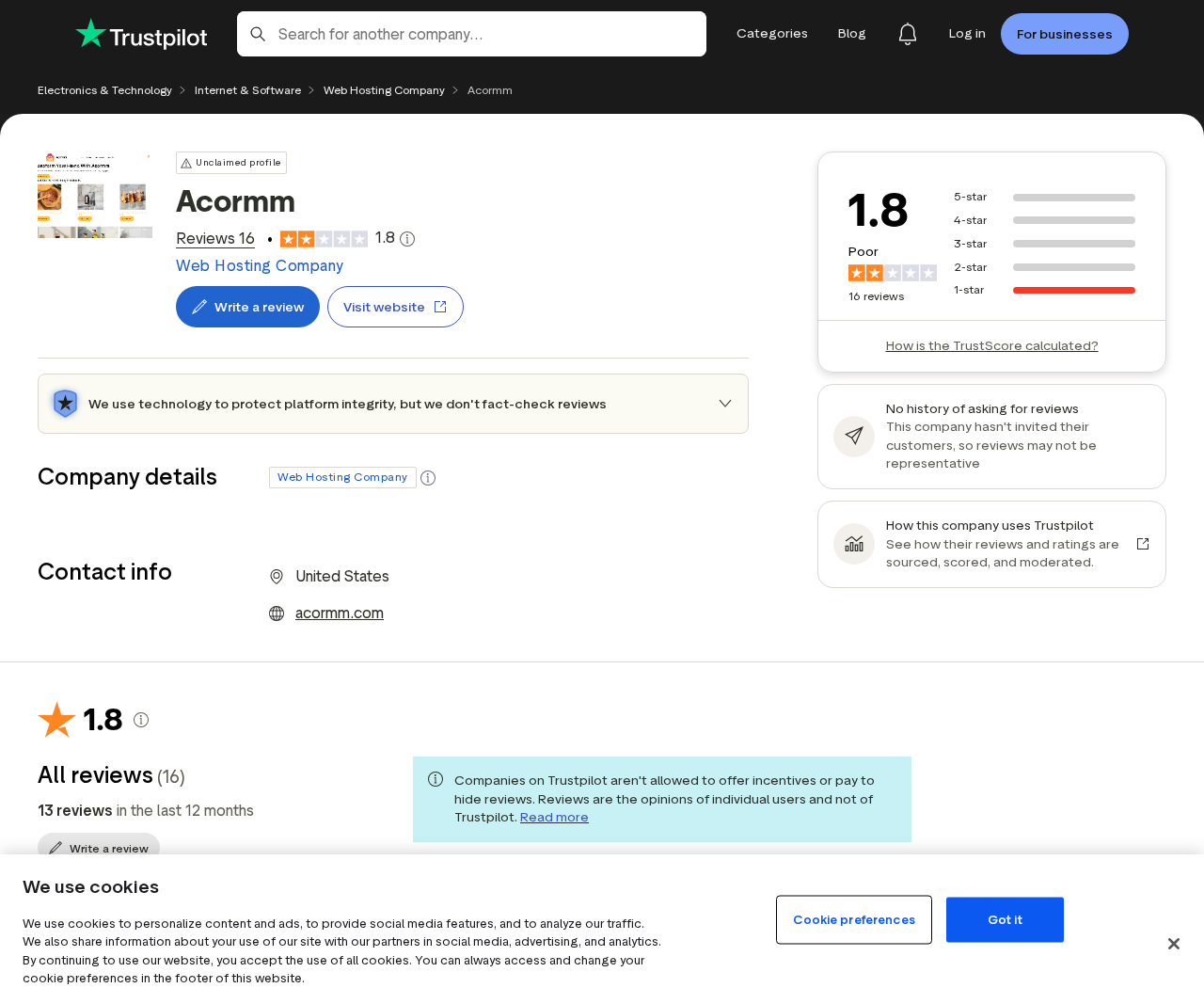
On Trustpilot’s Acormm profile, 16 reviews were visible during our review, all rated one star. Reviewers described non-delivery, unresponsive contact channels, and confusing payment descriptors.
Those are customer accounts, not court findings. We cannot independently verify every transaction or identify every person who controlled the checkout.
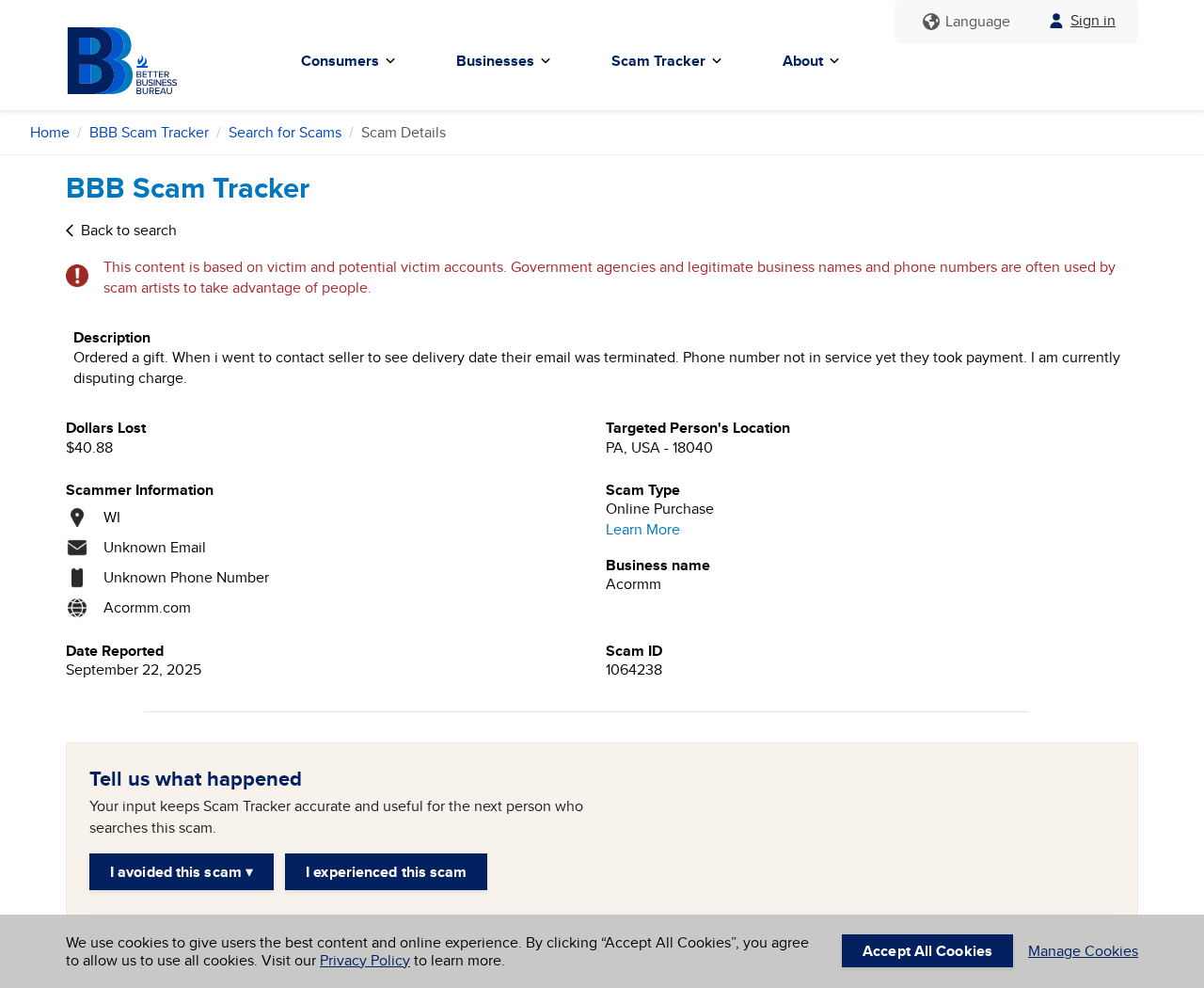
A separate BBB Scam Tracker report, filed in September 2025, describes a $40.88 purchase followed by a dead email address and phone number.
Another BBB report describes two chairs that never arrived, a changed PayPal charge, and messages that went unanswered. These reports are independently submitted accounts, not BBB adjudications.
Why the date matters
The most detailed public complaints cluster in 2025. A domain can lapse, redirect, change hands, or be rebuilt, so old reviews alone cannot establish what every visitor sees today.
When we tried to reach the storefront for this investigation, we could not reliably inspect a live Acormm checkout. We therefore do not claim to have tested a current purchase.
That limitation cuts both ways. We cannot call the current site verified safe or attribute every future page at that address to the same operator.
If an advertisement sends you to Acormm now, judge the exact landing page, legal seller, payment recipient, and delivery terms you see today.
The risk is bigger than a missed parcel
Several reviewers say the name shown on their payment record did not match the storefront. A mismatch can make a dispute harder when the buyer remembers only the website name.
Some complaints describe a charge higher than the displayed price. Others mention checkout appearing to fail, followed by a bank alert or an unexpected transaction.
We cannot confirm these outcomes happened to every buyer. The pattern is still serious enough to make independent verification essential before entering card details.
- Acormm attracted multiple public non-delivery and contact complaints in 2025.
- BBB Scam Tracker includes specific reports naming the domain and lost amounts.
- Customer reviews mention mismatched payment names and disputed charges.
- A domain age or HTTPS padlock cannot prove that a particular storefront is trustworthy.
- Today’s domain content and operator should be checked separately from historical complaints.
The distinction matters for readers. This article examines documented warning signs and reported losses, not an unsupported claim that every order placed through the domain was fraudulent.
How the Acormm Shopping Trap Worked
Step 1: An unusually convenient listing meets a specific need
People do not usually set out to find an obscure store. They search for a particular item, compare prices, and click the result that seems to solve their problem.
Acormm reviews mention different goods, including a Brita pitcher, folding scaffolding, a sewing machine, replacement lights, and chairs. This variety made the site resemble a broad retailer.
A wide catalog can be legitimate. It can also hide whether the seller has actual stock, supplier relationships, or a workable fulfillment system.
One reviewer said the desired brand was difficult to find elsewhere, making the listing especially tempting. Another pointed to a price that should have prompted more research.
The lesson is not to mistrust every discount. It is to pause when a little-known merchant offers the rare item everyone else lacks.
Step 2: A familiar-looking store supplies borrowed confidence
A polished product grid, shopping cart, and checkout can make a store feel established. None of those elements tells you who will actually fulfill an order.
The address on a contact page is only useful if it belongs to the seller’s real operations. A residential building or unrelated business cannot answer warehouse questions.
Several Acormm reviewers claimed the listed contact details failed them. One said email bounced. Others said calls or messages received no meaningful response.
Those statements should be treated as reports, not as our own live phone test. Even so, they show what buyers should verify before paying.
Search the address independently. Check whether the company name appears in business records, return instructions, and payment terms, not just in decorative website text.
Call a listed number with a product question before buying. A seller who cannot identify the item or explain returns is not earning your trust.
Step 3: Checkout separates the storefront from the recipient
At checkout, the decisive fact is the party receiving money. That may be a processor, merchant account, or individual name different from the brand you clicked.
One public reviewer reported paying through PayPal, then seeing a personal name instead of Acormm. Another described an unfamiliar descriptor on a bank alert.
Different descriptors are not automatic proof of fraud. Payment processors and parent companies sometimes appear on statements. But the seller should explain that relationship clearly.
If the checkout says one amount while the payment approval shows another, stop. Do not retry repeatedly just because the site displays an error.
Some buyers reported that a failed-looking checkout was followed by a charge. Repeated attempts can create multiple authorizations or charges that require separate disputes.
Save a screenshot of the final cart, currency, taxes, shipping, merchant name, and approval screen. That record is much stronger than a memory of the advertised price.
Step 4: The order confirmation offers little reassurance
A confirmation email is useful only when it connects to a real order and a credible shipment. A message saying processing is underway does not prove dispatch.
The BBB chair report says the buyer received no shipping email after payment. The gift-order report says attempts to ask about delivery reached invalid contact details.
Several Trustpilot reviewers similarly describe silence after the initial payment. One says a pitcher was ordered in September and no delivery followed by November.
These accounts differ in details, but the practical problem is the same. The shopper has paid while the seller controls the information needed to prove fulfillment.
Real tracking should resolve on a carrier’s own website and show movement toward your address. A generated number or vague status on the store page is not enough.
Watch the promised shipment date. If a seller misses it, promptly request a definite solution and preserve its response for your payment dispute.
Step 5: Support becomes a dead end
When an order fails, support is where a legitimate retailer can still make things right. Buyers need a reachable person, a concrete delivery date, or a refund.
The public reports describe the opposite: unanswered calls, returned emails, and no usable way to check an order. A consumer cannot resolve a missing item through silence.
Do not keep waiting because a checkout page promised fast shipping. Each extra week can eat into the deadlines set by your bank or payment platform.
If the merchant replies with vague delay language, ask for the carrier, tracking number, and a firm dispatch date. Keep the request polite and written.
A seller who provides a real refund has resolved the immediate problem. A seller who sends only reassurance has not.
Step 6: The buyer must reconstruct what happened
The dispute often starts with an awkward question from the bank: which company charged you? That can be difficult if the receipt, website, and statement show different names.
One review alleges two separate charges for the same sewing machine. Another describes a payment amount that changed after the order. We have not verified those records.
Still, they illustrate why you should document each transaction separately. Note the timestamp, exact amount, statement descriptor, order number, and promised item.
Use the bank’s official app or the number on the back of your card. Do not call a number supplied by a suspicious seller to investigate a charge.
Tell the bank whether the item never arrived, the amount was wrong, or you did not authorize a second payment. Those are different dispute grounds.
If you used PayPal, open the transaction in your account and check the Resolution Center. Follow the platform’s current deadlines rather than relying on a seller’s assurances.
What the Evidence Does and Does Not Prove
The strongest public evidence is specific, dated buyer testimony. BBB lists two separate Acormm reports from September 2025, each identifying payment and non-delivery concerns.
Trustpilot shows a small collection of uniformly negative reviews. The consistency is concerning, but a review profile is not a forensic audit of every checkout.
Automated website scores can be misleading here. One checker emphasizes the domain’s long registration history, while customer reports focus on the actual shopping experience.
A domain registered years ago may be sold, repurposed, or compromised. Domain age says little about whether the current operator can deliver the item in your cart.
Likewise, an HTTPS certificate protects data in transit but does not guarantee honest fulfillment. A deceptive store can have encrypted checkout.
We did not obtain company records linking every payment descriptor mentioned by reviewers to a single legal entity. We will not invent that ownership chain.
Nor can we verify claims about the physical address, warehouse, or origin of goods without current records. Treat any unsupported shipping-origin assertion with caution.
What can be said fairly is narrower and sharper: multiple buyers reported paying Acormm-related checkouts and not receiving the goods or useful support.
That is enough reason to avoid a fresh purchase until the legal seller, current delivery process, and contact route are independently verified.
How to Check a Store Before You Buy
Look past the storefront name
Open the terms, privacy policy, refund policy, and checkout summary. The same legal seller should appear consistently, or a clear explanation should connect the names.
Search the exact merchant name likely to appear on your statement. If the seller will not disclose it before payment, consider that a serious warning sign.
A web address alone is not a company. Look for registration details, a verifiable contact address, and a way to reach the business beyond a generic form.
Test the practical promises
Ask whether the item is physically in stock and where it ships from. Request a specific delivery estimate rather than accepting vague phrases like fast fulfillment.
Check the return address and who pays return shipping. A returns warehouse may be legitimate, but it is not proof of headquarters or manufacturing.
For branded products, compare the model number and images with the manufacturer’s own listing. Extremely low prices and ambiguous model descriptions often deserve another look.
If you cannot find independent recent buyers who received the exact item, do not let the discount decide for you.
Choose payment methods that leave a remedy
The FTC’s online shopping guidance recommends credit cards because they offer strong dispute rights when orders do not arrive.
A seller insisting on gift cards, wire transfers, cryptocurrency, or payment outside a marketplace makes recovery far harder. Walk away from that checkout.
PayPal can provide a dispute route for eligible purchases, but its rules and deadlines depend on the transaction. Read them in your own account.
Whatever method you use, save the listing and policy as they appeared at purchase. Stores can change wording later, and your evidence should not depend on a live page.
What to Do If You Ordered from Acormm
- Collect the order trail now. Save the product listing, cart total, receipt, confirmation email, tracking, support messages, and card or PayPal transaction details. Record the website address exactly.
- Check whether a real shipment exists. Enter any tracking number directly on the carrier’s official website. If it shows no movement or a different destination, save that screen.
- Ask the seller once, in writing. Request delivery proof or a full refund by a reasonable date. Keep the message brief and avoid sending additional identity documents or card details.
- Open a payment dispute promptly. Explain the precise problem to your card issuer or PayPal. The FTC explains that credit-card billing errors have important time limits, so do not wait for endless delay emails.
- Review every related charge. Compare the advertised amount with the posted transaction. Flag duplicate charges and unfamiliar merchant descriptors separately. Ask your bank whether the card needs replacement.
- Secure any reused password. If you created an account using a password shared with other sites, change it everywhere it was reused. Turn on two-factor authentication where available.
- Report the incident. File a report with ReportFraud.ftc.gov and consider BBB Scam Tracker. Include dates and amounts, but do not publish full card numbers or private contact details.
A missing order is stressful, but a timely, documented dispute improves your chance of recovery. You need not identify the website operator before contacting your bank.
Frequently Asked Questions
Is Acormm.com a scam?
Public reports describe non-delivery, unreachable support, and disputed charges linked to the site. That warrants strong caution. We cannot verify every historical order or identify today’s domain operator.
Was Acormm a real registered company?
A functioning checkout or long-lived domain does not answer that question. We did not verify a legal entity that matched all the storefront and payment names reported by buyers.
Why did my statement show a different name?
A processor or parent company can create a different descriptor, but buyers should receive a clear explanation. If the name is unrecognized, ask the card issuer to investigate.
Can I recover money if nothing arrived?
Possibly. Contact your card issuer or payment platform quickly, provide the order trail, and describe non-delivery accurately. Eligibility and deadlines depend on your payment method.
Does an old domain registration make the shop safe?
No. Ownership and content can change. Registration age and HTTPS are technical facts, not proof that an advertised product is in stock or will ship.
Should I cancel my card after using the checkout?
Ask your bank after reviewing the transactions. Replacement may help if you see unauthorized charges or exposed card details. Never share card data with supposed support agents.
The Bottom Line
Acormm’s public complaint trail is unusually concrete: shoppers describe paid orders, missing goods, and contact routes that failed when help was needed.
We cannot certify what the domain hosts today. If you already paid, preserve your records and start a dispute. If you have not, verify the seller before risking your card.








