

An urgent wallet message arrives just when you are following news about Liquid. It offers a security check, reimbursement, or a quick way to protect your assets.
The Blockstream recovery scam borrows that moment of uncertainty. Before treating the message as the next official update, look closely at what it asks you to do.
Overview
Why Blockstream issued a warning
On September 9, 2026, Blockstream warned about impersonators exploiting a Liquid Network incident through emails, lookalike sites, and direct messages.
The company described false security updates, reimbursement checks, re-pegging requests, downloads, and supposed recovery addresses. It said the incident did not require those unsolicited actions.
This is an impersonation scam abusing real products and a real network. The warning does not mean that Blockstream, Liquid, or Jade is a fraudulent service.
It also does not establish a particular malware family or a loss total. The verified issue is the deceptive action being requested under another organization’s identity.
Several promises can lead to the same dangerous decision
One message may offer to secure a portfolio. Another may promise compensation. A third may insist that assets need moving before a deadline.
The wording matters less than the permission, secret, transfer, or installation that follows. That is the part a reader needs to examine.
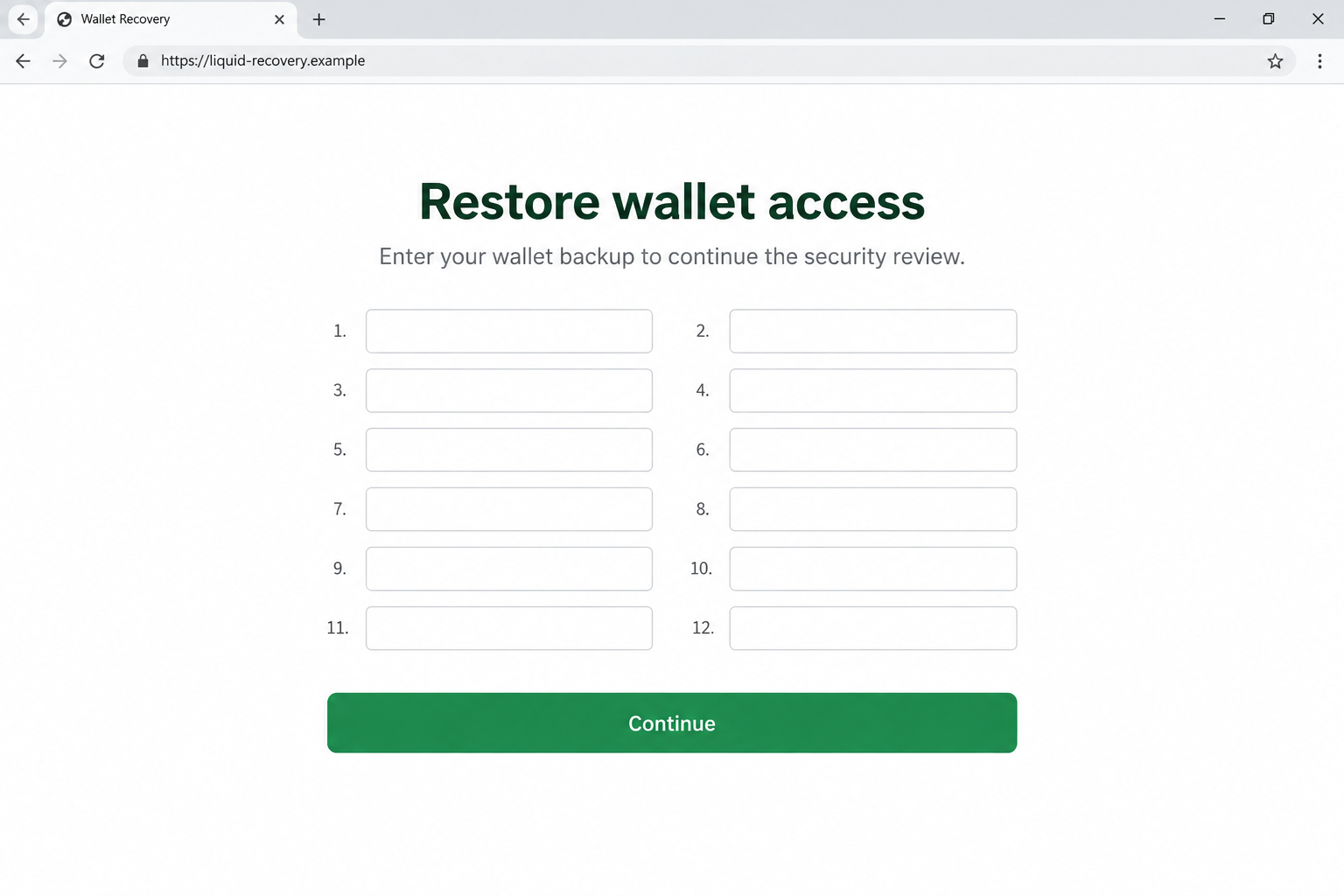
- A reimbursement checker asks for wallet backup words.
- A security notice pushes an unfamiliar installer.
- A support account supplies an address for supposedly protected funds.
- A migration page asks for signatures the user cannot explain.
- A sender discourages checking through ordinary support.
These are warning patterns, not a claim that every message contains all five. Different impersonators can pursue different outcomes.
The legitimate support route stays separate
Blockstream identifies its help center as the support route. Open it independently instead of following a support link supplied by an unsolicited sender.
A direct message from an account with a familiar avatar is not the same as a conversation you initiated through that help center.
The screens shown here are original illustrations with fictional domains. They make the suspicious requests visible without pretending to document a specific victim’s inbox.
The Trick Is Making a Risky Action Feel Protective
Ordinarily, a wallet owner knows not to give away a recovery phrase. A frightening incident can make that same request sound like an exception.
The sender does not need you to abandon security. They need you to believe that following their instructions is how security works today.
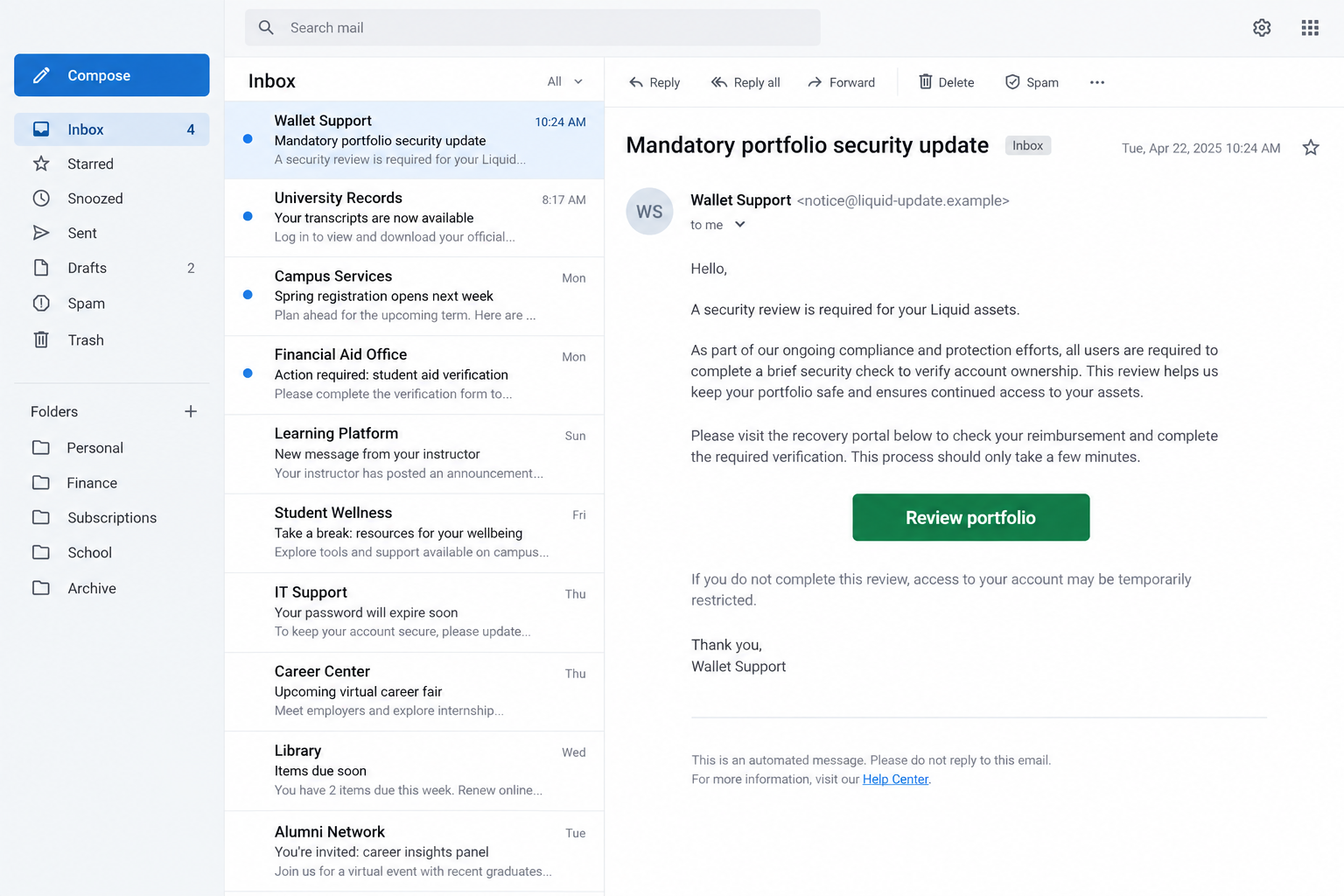
Consider an illustrative message promising to check reimbursement eligibility. The promise suggests money coming back, so a form can feel administrative rather than dangerous.
If that form asks for backup words, the situation has changed completely. Those words are not proof that you deserve compensation.
They are sensitive information that may enable another person to recreate access to a wallet. A refund label does not reduce that exposure.
Likewise, an installer named emergency update is still software from a particular source. The filename cannot establish who created it or what it will do.
A useful pause is to describe the action without the sender’s reassuring language: entering a secret, sending funds, installing software, or approving a transaction.
If the plain description sounds inappropriate for a support check, do not let the branding supply the missing justification.
How the Blockstream Recovery Scam Works
Step 1: A real event gives an unsolicited message context
The contact arrives when users may already be searching for explanations. The sender can refer to the public event without possessing any private knowledge.
That reference makes the message feel relevant, but relevance is not authentication. Anyone following the news can repeat the same incident description.
For example, a message might address Liquid users generally rather than identify a transaction you made. Broad wording lets it reach many people at once.
Do not interpret receiving it as proof that your wallet was affected. Check your own activity and official information before accepting the sender’s diagnosis.
Step 2: Familiar names make the sender look connected
The impersonator presents themselves as support, a security team, or someone coordinating recovery. A copied name can place them inside a trusted story.
A domain can repeat Blockstream or Liquid while belonging to someone else. Read the actual registered domain, not just a recognizable word within it.
The address support.blockstream.example would be under the fictional example domain. It would not belong to blockstream.com merely because that word appears earlier.
Bad spelling can expose a fake, but clean spelling does not clear it. The sender’s identity must be verified independently of the message’s presentation.
Step 3: A portal turns concern into a task
A button opens a page that appears to offer a straightforward next step: review assets, validate a wallet, check eligibility, or complete an update.
This reduces a complicated security story to a form the user can finish. The convenience is part of what makes it persuasive.
At this stage, look for a mismatch between the promised service and the information requested. A public transaction inquiry should not require your wallet’s secret backup.
A page can display a successful connection or a reassuring checkmark without proving anything about the operator. Those graphics are controlled by the page itself.
Step 4: The requested action creates the exposure
In a seed-harvesting version, the form collects recovery words. In a transfer version, the supposed helper directs assets to an address they provide.
A download version introduces a separate device risk. Do not assume that every such installer behaves identically or that this warning identifies a single infection.
A signature request also needs scrutiny. Some signatures are simple messages; others can authorize consequential actions depending on the protocol and the exact request.
There is no universal rule that clicking Connect alone transfers everything. The practical danger depends on what the user discloses, runs, signs, or sends.
That distinction is useful after an incident. It helps you avoid both underreacting to a disclosed seed and overreacting to a page you merely viewed.
Step 5: Follow-up instructions try to keep control of the conversation
If the first request fails, a sender may offer another route or claim that a previous attempt needs correction. Treat new instructions as new risks.
Possible follow-ups include a different link, an extra payment, or an appeal to keep the conversation private. These are general escalation patterns, not verified universal steps.
Do not let time already spent with the sender become a reason to continue. You can stop even after entering information or completing part of the process.
Once doubts arise, move the conversation to independently located official support. An impostor’s refusal to allow that move is itself a useful warning.
Recovery Phrase, PIN, Public Address: Different Kinds of Information
A public address is not a wallet backup
A public address can identify where assets were received. A transaction hash can identify a particular recorded transaction.
Neither serves the same purpose as the secret material used to control a wallet. Be precise when someone casually calls all three verification details.
Even public information can reveal financial activity. Share only what is relevant through a support route you have independently verified.
A recovery phrase is not a customer-service password
Wallet backup words are designed for recovery within appropriate wallet procedures. They are not something an unsolicited assistant needs to inspect.
Entering them into a website can expose the underlying wallet even if you never confirm a later transaction on a hardware device.
Closing the page afterward does not reliably erase what was entered. A form can transmit information before a final confirmation screen appears.
A device PIN does not make a leaked seed harmless
A PIN generally protects access to a particular device or application. It is not a promise that disclosed recovery material becomes unusable elsewhere.
Changing that PIN may be appropriate in some circumstances, but it does not substitute for addressing a compromised wallet backup.
If you are uncertain which kind of information you supplied, write down the field labels and consult official support without sending the actual secret.
How to Verify an Update Without Following the Message
Begin by naming the supposed problem in plain language. Is the sender asking you to replace software, reveal wallet secrets, or transfer an asset?
These actions carry different risks. A technical phrase such as re-peg should not obscure what your own device or wallet is actually being asked to do.
Compare that action with the official notice. A real incident report does not authorize every procedure that another person attaches to the same event.
If someone sends a support case number, verify it through the independently opened support service. A number printed in a message can be invented.
Likewise, an accurate description of public network trouble is not privileged knowledge. Anyone can read a public incident report and repeat its details.
The most revealing part is often the proposed remedy. A person who correctly describes an outage can still direct you to a wallet they control.
Slow the conversation down enough to understand the requested action. You are allowed to stop even when the person sounds technically knowledgeable and impatient.
Close the unsolicited page. Open the official website or an already installed official app using a route you trust.
Look for the relevant announcement there. Compare the requested action, date, affected product, and update method with the message you received.
A genuine incident notice and a fake follow-up can coexist. Confirming that an incident happened does not confirm the instructions in your inbox.
For software or firmware, use the update path documented by the provider. Do not substitute an attachment simply because the message calls it a faster emergency version.
If a search result offers live support, check whether it belongs to the provider before opening a conversation. Paid placement is not an identity check.
Keep a trusted support bookmark when things are calm. It is easier to recognize a changed route when you already know the normal one.
What to Do if You Have Fallen Victim to This Scam
- End the recovery conversation.
Stop following the sender’s instructions. Save the message, profile address, and page URL before blocking the account where practical.
Do not announce what security actions you plan to take. An impostor does not need another opportunity to redirect you.
- List the exact exposure.
Separate a viewed page from a downloaded file, installed program, entered seed, shared PIN, signed request, or completed transfer.
Include approximate times and device names. Clear notes help you and legitimate support decide which accounts or assets need attention first.
- Prioritize disclosed wallet secrets.
If backup words or a private key were entered, consider the affected wallet compromised. Use a clean device and official guidance to protect remaining assets.
Do not restore the same exposed seed and assume the danger is gone. A new wallet must use newly generated secret material.
- Address suspicious software separately.
Disconnect a device from the network if an untrusted installer was run, and avoid using it for sensitive logins until it has been assessed.
A Malwarebytes scan can help identify supported threats. Obtain it through the official source and seek professional help if unauthorized access or persistent symptoms continue.
- Review signatures and outgoing transactions.
Use your trusted wallet and appropriate explorers to record unexpected activity. Ask official support about the actual request rather than assuming every signature works alike.
A completed transfer may be irreversible. Disconnecting the website is still sensible, but it does not bring transferred assets back.
- Report the impersonation and any loss.
Use Blockstream’s independently located support or security reporting route, plus your local fraud-reporting authority. Include public evidence and omit wallet secrets.
If funds reached an exchange, provide the transaction details promptly through that exchange’s official reporting process. Recovery remains uncertain.
- Reduce repeat exposure.
Consider AdGuard for blocking some malicious advertising and browsing destinations. Keep browser and device protections updated, and remove notification permissions you granted to suspicious pages.
These protections are supplementary. They cannot verify a support identity or repair the consequences of giving someone a recovery phrase.
Frequently Asked Questions
Is an unsolicited Liquid reimbursement message trustworthy?
Do not trust it on branding alone. Check current official communications independently, especially if the message asks for secret words, a download, or a transfer.
Did Blockstream say users must re-peg funds after the incident?
Its September 9 warning specifically rejected unsolicited instructions to re-peg assets or take similar recovery actions because of that incident.
Can a realistic support profile prove the sender is legitimate?
No. Names, pictures, and copied announcements are easy to reproduce. Start a separate conversation through the official help center rather than validating the unsolicited account.
What if I typed backup words but did not click Continue?
Treat the words as potentially exposed. Websites can capture input before submission, so waiting for a success message is not a reliable way to assess disclosure.
Will changing my wallet PIN solve a leaked recovery phrase?
Not by itself. The PIN and recovery phrase serve different purposes. Follow trusted wallet guidance for securing assets controlled by exposed recovery material.
Can antivirus recover cryptocurrency that was sent away?
No. Security software can help with supported device threats, but it cannot reverse a blockchain transfer or force an impersonator to return funds.
The Bottom Line
The Blockstream recovery scam turns concern about an incident into pressure to disclose secrets, install software, or move assets.
Keep updates and support inside independently verified channels. If you already responded, identify the exact exposure and act on it without accepting another stranger’s recovery offer.








