

A tax-form reminder is easy to take seriously when it mentions your investment account. Most people would rather finish the paperwork than risk an avoidable interruption.
The RBC W-8BEN email scam deserves a closer look before you open its renewal link. A familiar form name can hide an unfamiliar request.
Overview
The warning concerns a false renewal route, not a fake tax form
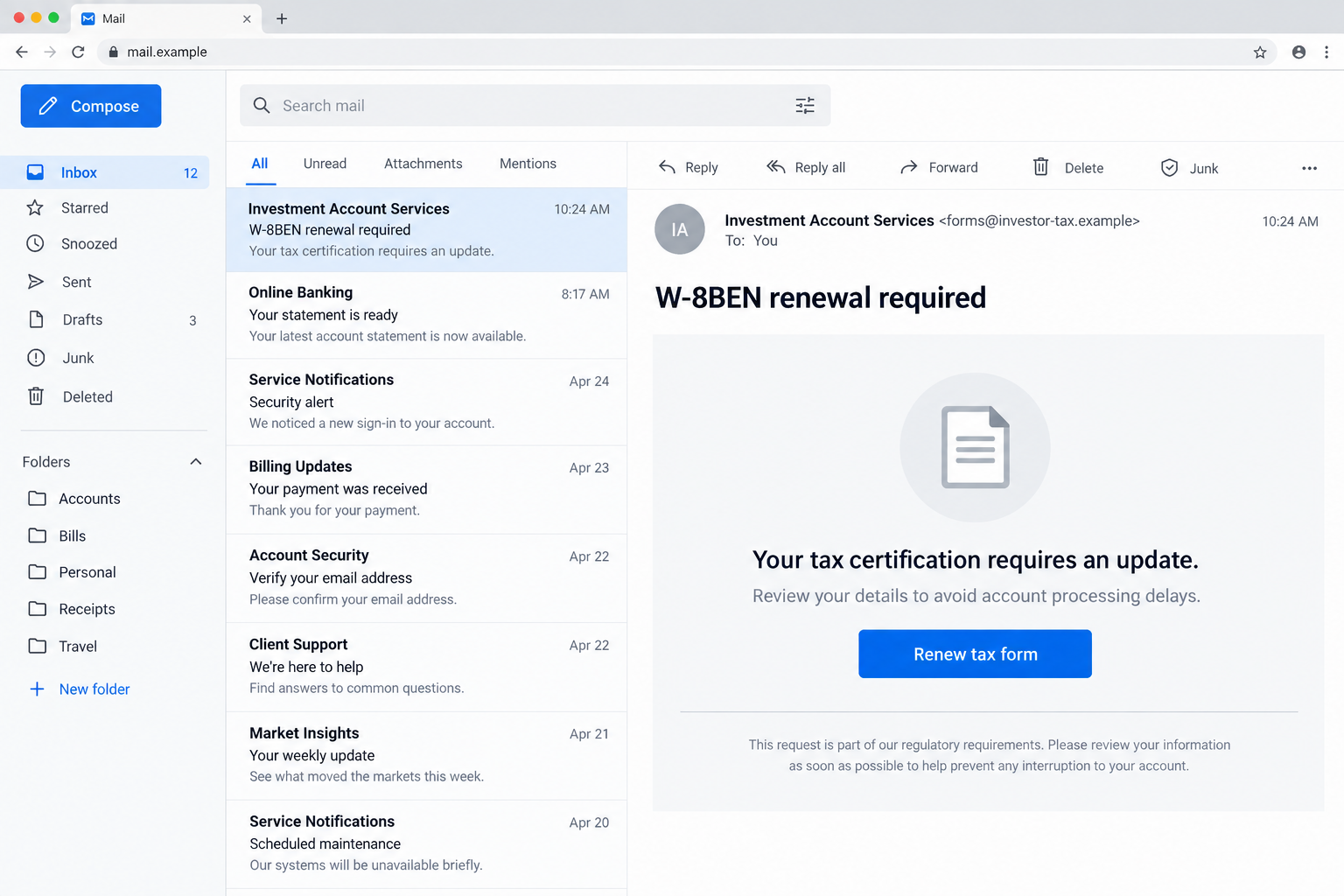
RBC’s April 2026 alert describes phishing messages impersonating RBC Direct Investing and claiming that a customer’s W-8BEN has expired.
The messages push recipients toward a fraudulent portal, where account credentials and sensitive personal or tax information can be collected.
RBC Direct Investing is a legitimate service being impersonated. The documented deception is the email and its destination, not the existence of investment-account tax requirements.
This distinction matters. W-8BEN is a real form, so readers should verify genuine requirements rather than dismiss every mention of it as fraud.
Tax language supplies the pressure
A compliance notice sounds different from a prize offer. It suggests something you must do, not something you might choose to buy.
The campaign uses that expectation alongside possible account disruption. The recipient is encouraged to solve an apparent administrative problem through the sender’s chosen link.
You may not remember when you last completed the form. That uncertainty makes the expiration claim feel plausible without making it true.
What to establish before sharing anything
- Whether your actual account has a tax-document requirement.
- Whether you reached the account through your own trusted banking route.
- What information the genuine process requires for your circumstances.
- Whether the message is requesting credentials outside the authentic service.
- Whether support can confirm the notice without using its links.
The RBC security alerts page documents the impersonation. Our illustrations use fictional domains and show the lure, not an actual customer’s account.
Why W-8BEN Makes a Convincing Cover Story
Tax paperwork often contains terminology that ordinary investors rarely use. A notice mentioning a specific form can therefore sound knowledgeable before you check its source.
RBC’s investor tax toolkit explains that W-8BEN certifies tax residence outside the US. Its legitimate purpose is separate from this phishing campaign.
This article does not determine your tax status, withholding rate, or renewal deadline. Those depend on the real account process and your circumstances.
The safe response is not to complete a random form immediately or ignore all paperwork indefinitely. Check the requirement within the service you actually use.
Think of an ordinary calendar reminder. Knowing that an appointment exists does not prove that a stranger sending payment instructions is connected to it.
The same reasoning applies here. An accurate form name does not authenticate the sender, the deadline, or the website requesting information.
A fraudulent message can contain correct background information. Scammers do not need every sentence to be false if the final instruction sends you somewhere they control.
The crucial question is therefore practical: who receives what you enter? That matters more than whether the email sounds comfortable discussing tax administration.
How the RBC W-8BEN Email Scam Works
Step 1: An apparent investment-account notice arrives
The message presents itself as account correspondence rather than an advertisement. A reference to RBC Direct Investing gives the reader a recognizable institution to focus on.
If you hold an account, the subject may seem personally relevant. If you do not, that mismatch is a strong reason to disregard the request.
Even a relevant message may have been distributed broadly. Receipt alone does not show that the sender knows your holdings, tax residence, or document history.
A display name and logo are only presentation. Neither proves that the message came from the organization whose identity appears in the email.
Before opening its form, leave the inbox and check your investment account through the app or bookmark you already trust.
Step 2: Expiration turns paperwork into a deadline
The alleged expired form creates a reason to act now. References to compliance or service interruption make postponement feel like a financial mistake.
Someone who worries about missing a legitimate requirement may concentrate on completing it rather than checking how the request arrived.
That is the pressure point. The email combines an ordinary administrative subject with consequences the recipient would naturally prefer to avoid.
Do not let a claimed deadline dictate your verification route. A genuine requirement can be discussed with the institution through independently obtained contact information.
If a deadline genuinely is close, contact legitimate support promptly. Urgency is a reason to verify efficiently, not a reason to trust an unknown form.
Step 3: The renewal link opens an impostor portal
The email supplies a convenient path to resolve the supposed problem. Its button may describe renewal, verification, or document submission.
Those words describe an apparent purpose, not the destination’s ownership. The link can lead to a website unrelated to your investment provider.
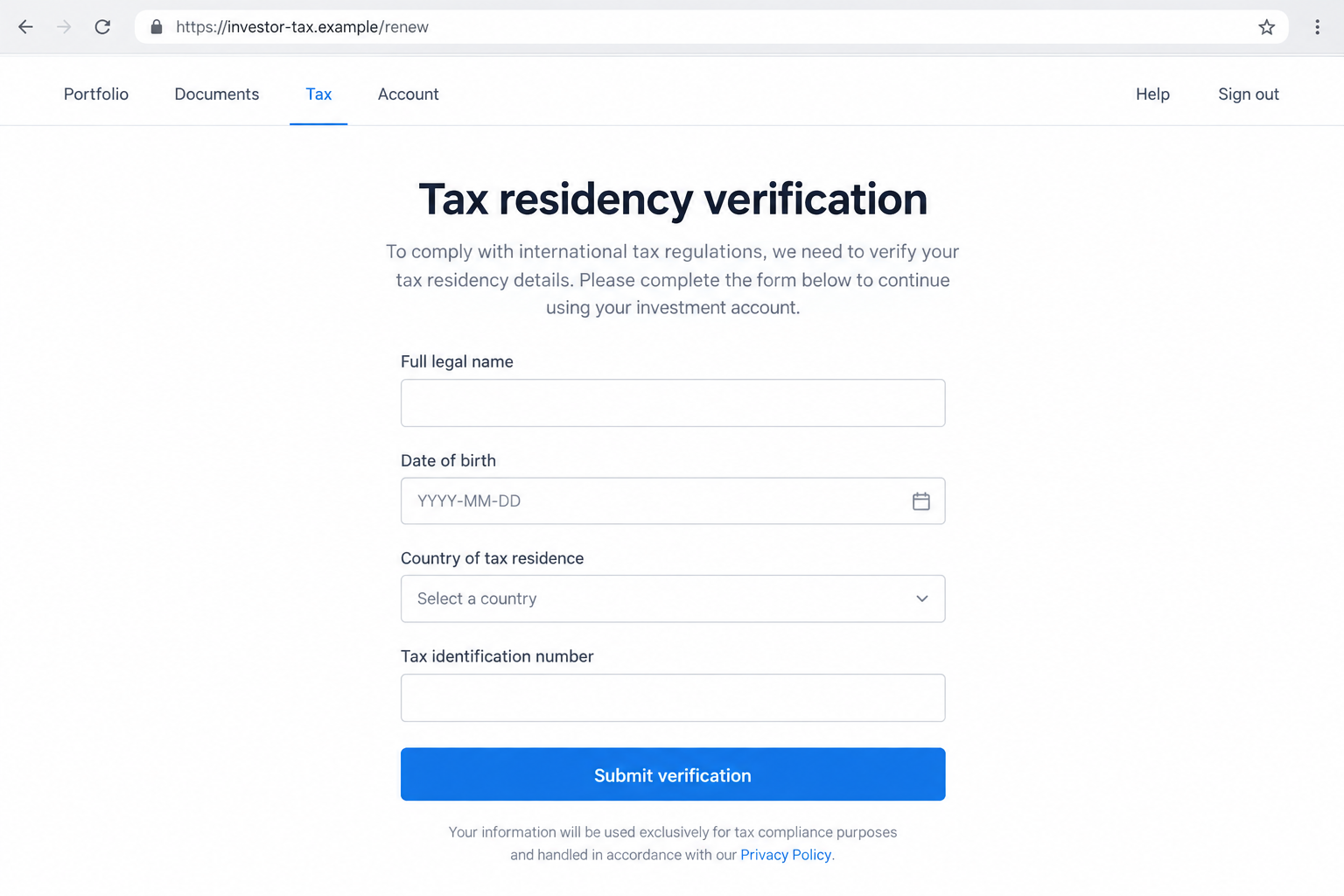
A counterfeit portal may look organized and professional. Form fields, navigation labels, and a privacy link can all be placed on an unauthorized site.
An encrypted connection does not settle the issue. It can protect data in transit while delivering that data directly to an impostor.
Do not test a questionable page with your real password. Verification should happen before disclosure, not after the form returns a reassuring confirmation.
Step 4: Account access and tax information become targets
A login prompt can expose credentials. Additional forms can seek identifying information under the explanation that tax records need updating.
The combination is more concerning than either request considered alone. Account access and personal details can support different kinds of follow-up abuse.
Exactly what was exposed depends on the fields you completed. Record the categories of information, rather than assuming every version collected an identical set.
RBC’s warning identifies the phishing objective, but does not establish that every recipient lost funds or that every page installed malicious software.
A failed submission is not proof of safety. A page controlled by an attacker can collect information and still display an error.
Step 5: The stolen information can outlast the email
Closing the browser does not retrieve information already supplied. A changed password can protect future access, but it cannot erase a copied identity detail.
Possible later approaches may refer to the renewal, your account, or a verification problem. Those details can make a second message feel connected and credible.
This is a risk to anticipate, not a claim that every person targeted received a follow-up call. Keep your response tied to your actual exposure.
Do not disclose additional information simply because someone accurately repeats what you typed earlier. That knowledge may have come from the fraudulent form itself.
Return to independently verified support when another request arrives. A convincing reference to the first incident does not authenticate the second contact.
Checks That Matter More Than the Logo
Confirm the request inside your account
Open your established investment-account entry point yourself. Look for relevant document notices, then ask support if you cannot find a clear answer.
Not finding a notice does not automatically prove fraud. Some legitimate processes differ, so uncertainty should lead to a verified conversation rather than guesswork.
Explain the claimed form expiration without reading out passwords or security codes. Support can clarify the process without needing secrets from an unsolicited message.
Read the actual address
A link containing the bank’s name somewhere in its text is not necessarily a bank-owned address. Page paths and subdomains can create misleading impressions.
In the fictional address investor-tax.example/rbc, the final word is just a page label. It does not make that site part of RBC.
You do not need to become a domain investigator. If an address is difficult to interpret, abandon that route and use the one you already know.
Keep genuine forms separate from unsolicited attachments
A recognizable document title does not establish that an attachment is safe or that its return instructions are legitimate.
Obtain any necessary paperwork through the authentic service. Ask where completed documents should be submitted instead of following an unfamiliar email’s upload instructions.
Do not install a document viewer, browser extension, or remote-access program merely because an unexpected notice says it is required to read tax paperwork.
What to Do if You Have Fallen Victim to This Scam
- Tell RBC Direct Investing what happened through a trusted channel.
Use the official app, established website, or contact information from existing account records. Explain that a W-8BEN renewal notice led you to another page.
Ask what account protections are appropriate and whether a genuine tax-document request is outstanding. These are separate questions, and both deserve clear answers.
If money moved or unfamiliar activity appears, report it immediately. Do not wait to assemble a perfect evidence package before contacting the institution.
- Identify exactly which information you disclosed.
List whether you entered a login, password, tax identifier, address, birth date, or uploaded a document. Include any verification code or approval you provided.
Keep the list private and describe information by type. Do not email complete passwords or sensitive identity numbers as part of an ordinary incident summary.
Specific details help support assess the exposure. Simply saying you clicked an email can understate what happened if you also completed several forms.
- Secure affected logins through the real service.
Change an exposed password using a trusted device and legitimate account recovery process. Replace matching passwords on other accounts, especially your primary email.
Ask support about ending existing sessions and checking recovery settings. A password change should not be treated as proof that every other account setting remains intact.
If you approved an unexpected authentication request, say so explicitly. A successful approval can matter even when you never verbally disclosed a password.
- Review account records without making panicked transactions.
Check for unfamiliar activity and changed contact information. Save relevant records and let the institution advise which protective steps apply.
Do not move investments or send money to an account suggested by a caller claiming to protect your portfolio. Verify any proposed action independently.
Refunds and recovery are not guaranteed. Be accurate about which actions you authorized under deception and which occurred without your involvement.
- Address identity-information exposure separately.
If a tax identifier or identity document was disclosed, seek guidance from the relevant issuing authority and your financial institution about appropriate protective measures.
Depending on your jurisdiction, fraud alerts, credit monitoring, or other safeguards may be available. Ask which measures fit the information actually exposed.
Continue checking future correspondence. A stolen identity detail may be reused after the original website disappears, so deleting the email is not a complete remedy.
- Assess downloads and browser changes if they occurred.
Use Malwarebytes to check a device if the incident involved suspicious downloads, installed software, or signs of infection. A form submission alone does not prove malware.
AdGuard can help reduce exposure to some malicious advertising and destinations. It cannot retract tax information, replace account recovery, or guarantee that every phishing page is blocked.
Remove unexpected notification permissions and extensions when relevant. If you allowed remote access, disconnect that session and seek trustworthy help before using the device for sensitive tasks.
- Preserve evidence and report the impersonation.
Keep the original email, sender details, link, and approximate interaction times. Record your support case number so later conversations can refer to the same report.
Use RBC’s published reporting guidance and your mail provider’s phishing function. If you suffered loss or identity misuse, consider a report to the appropriate authorities.
Avoid sharing unredacted tax forms in public warnings. Your experience can help others without exposing the very information you are trying to protect.
A Useful Way to Explain the Incident to Support
Start with the sequence, not your conclusion: you received a renewal email, opened its link, and entered certain types of information at an approximate time.
Then separate what you observed from what you suspect. An unfamiliar transaction is an observation. Whether the sender controlled your entire account may still be unknown.
Say whether you used a password manager, entered a code, downloaded a file, or spoke with anyone. These details can change the recovery advice.
You do not need to investigate the criminal yourself. A concise, accurate report is more helpful than spending another hour exploring the fraudulent portal.
If a relative handled the email, help them describe the steps without blame. Embarrassment can delay disclosure of information the institution needs to protect the account.
Once immediate access risks are addressed, return to the original administrative question. Confirm any genuine document obligation directly so the scam does not leave legitimate paperwork unresolved.
Frequently Asked Questions
Is the W-8BEN form itself fraudulent?
No. It is a legitimate tax form. The scam involves an impersonation message and unauthorized renewal portal, not the existence of the document.
Does this mean RBC Direct Investing was hacked?
The cited alert describes phishing impersonation. It does not establish a breach of the institution’s systems or prove that every recipient’s account was accessed.
Can a real renewal request arrive by email?
A message channel alone cannot determine legitimacy. Check any request using independently accessed account services or verified support before supplying sensitive information.
What if I clicked but did not type anything?
Close the page and check for downloads or permissions you granted. Clicking alone does not mean you disclosed your password or tax identification details.
Should I complete the form again on the suspicious page?
No. Do not return to correct or withdraw submitted details. Use legitimate support to secure the account and establish the proper document process.
Will antivirus recover information I already submitted?
No. Security software can address some device threats, but exposed credentials and identity information require separate account and identity-protection steps.
The Bottom Line
The RBC W-8BEN email scam borrows a genuine tax form to make a fraudulent portal seem necessary. Official-sounding paperwork is not proof of an official sender.
Verify the requirement through your established account route. If you shared information, tell legitimate support exactly what was exposed and address account access and identity risks separately.








