

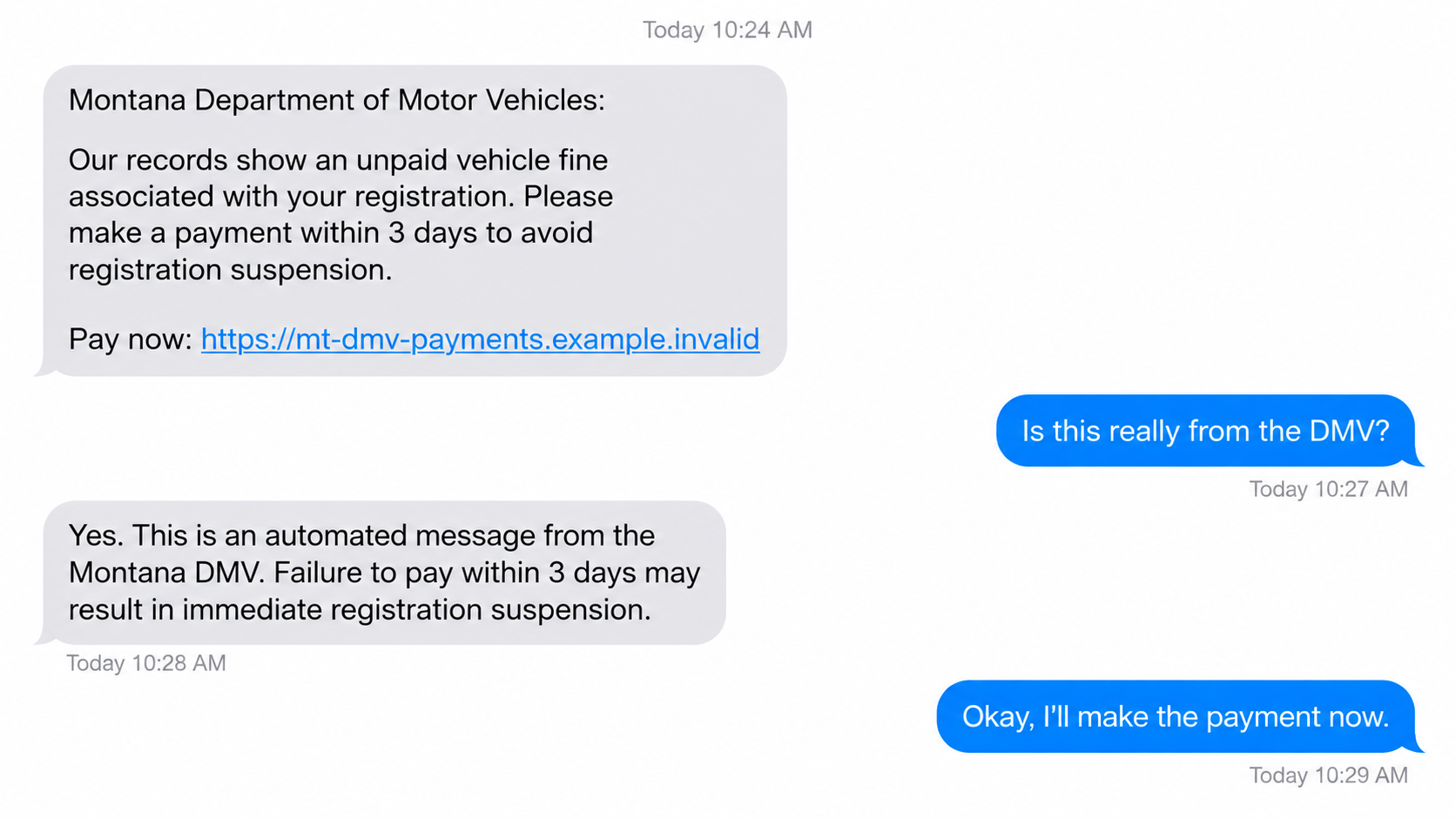
A text arrives while you are doing something else. It says a Montana vehicle fine is overdue and your registration could be suspended soon.
The deadline sounds serious, but the message is asking you to make a decision before you have checked who sent it. That pause matters.
Overview
The warning behind the Montana MVD scam text
Montana’s Department of Justice warned residents about texts pretending to come from the state Motor Vehicle Division, or MVD. The messages demand payment for supposed tickets or tolls.
The official warning is direct: Montana MVD does not send text messages asking people to pay unpaid tickets or toll-road fees through a link.
Scammers add looming deadlines, higher fees, and threats to vehicle registration. The goal is to make an ordinary driver pay or enter details before checking with the agency.
What is real and what is invented
Montana MVD is a real state division. The text’s payment demand is not an official notice merely because it uses the agency’s name.
Some messages call it the “Montana DMV,” an informal name that may feel familiar. The impersonation matters more than the precise label.
- A text payment link is not the state’s verified billing channel.
- An international sender number is a warning sign, not definitive proof by itself.
- A legal citation or case number inside a text can be invented.
- A lock icon on a payment page does not prove the page belongs to Montana.
The safest first move
Do not pay through the message. Open the official MVD website yourself or call the number published by Montana DOJ to verify any real issue.
If you already entered card data, contact the issuer immediately. If you only saw the text, reporting and deleting it is usually enough.
There is no need to assume every unfamiliar Montana-related text is criminal. The specific red flag is an unsolicited demand for money through a supplied link.
Why a Fake Vehicle Fine Feels Believable
Most drivers have encountered a parking ticket, registration notice, or routine renewal. Scammers borrow that familiar administrative language to make a vague claim sound personal.
A message may say “final notice” even though there was no first notice. The word “final” creates pressure without providing evidence.
Threats about suspension are especially effective because losing a registration or license disrupts work and family life. Fraudsters count on that emotional shortcut.
The text might include a date only hours away. A short deadline reduces the chance that you will call the real agency during business hours.
Some variants cite a made-up rule or add a percentage penalty. A string of legal-looking characters can be typed by anyone with a phone.
The sample circulated online also used a strange web address with “mvd” embedded inside a longer domain. The relevant domain ending was not a Montana government site.
Do not copy and visit a suspicious address to test it. You can evaluate the message without opening the landing page.
Montana DOJ says scammers have used numbers from outside the United States. Caller ID and message origin can be altered, so neither should replace direct verification.
How the Montana MVD Scam Works
Step 1: The sender impersonates a state office
The fraud begins with a message that claims to come from Montana’s vehicle authorities. It may mention a ticket, an unpaid toll, or a registration issue.
The sender does not need to know your driving record. Bulk texts can be sent to many numbers, and the wording is broad enough to worry almost anyone.
A driver who lives outside Montana might still receive the text. That mismatch is useful evidence, although scammers also target residents of the named state.
Look for the absence of details that a genuine case would contain: a correct name, specific incident, and a verifiable reference through official channels.
Even when details appear, they may have been copied from public data or guessed. Specificity is not authentication.
Step 2: The message invents a payment emergency
The next move is urgency. The text may say fines will rise or registration will be suspended unless payment arrives before a near-term deadline.
Montana DOJ specifically warned about fake deadlines, increased fees, and suspension threats. Those are persuasion tactics, not proof that a state action is pending.
Some messages borrow the language of automated enforcement. This can make the threat feel system-generated rather than written by a person.
Scammers may add “reply Y” or tell you to copy the link into a browser. Such instructions can help them bypass phone filtering or get around a non-clickable link.
Do not treat a request to reply as verification. A criminal can respond or automate follow-up messages just as easily.
Step 3: The link leads away from Montana
The supplied address is the pivot. Its visible text may contain “mt,” “mvd,” or “gov,” while the actual registered domain belongs to someone else.
A path ending in “/gov” does not make a website government-owned. Everything after a domain’s first slash can be chosen by the page operator.
Likewise, “gov” inside a long commercial hostname is not the same as a .gov domain. Read the end of the hostname before trusting it.
The link can change from campaign to campaign. Memorizing one bad domain will not protect you from the next version.
Opening a page can also expose you to tracking or another prompt. The safer check is to ignore the link and go to Montana MVD independently.
Step 4: A payment screen asks for private data
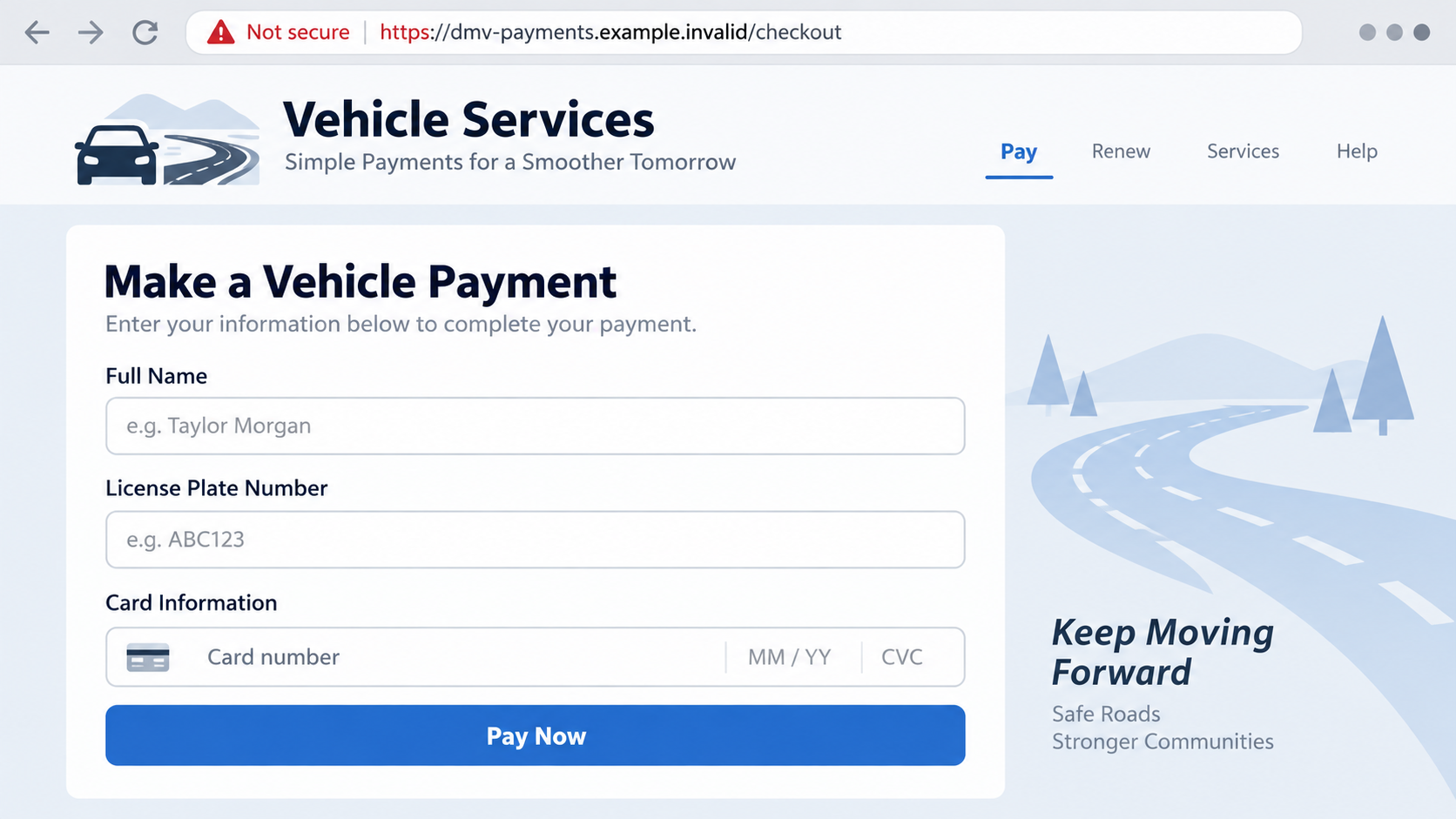
A fake landing page may ask for a name, plate number, address, and card details. These fields make the interaction look like an ordinary government payment.
That appearance is dangerous because the card information can be captured even if the page later claims your payment failed.
A small fee may feel harmless. Once card details are entered, the potential problem is larger than the claimed ticket amount.
Some phishing pages seek extra identifiers as well. Do not enter a driver’s license number or Social Security number into a page reached through a surprise text.
A “secure connection” icon only means the browser is encrypting traffic to that site. It does not tell you whether the site is honest.
Step 5: The scam tries to preserve the illusion
After payment, the page may show a confirmation number or say the matter is resolved. That message is generated by the page operator, not automatically by Montana.
A fake receipt can delay a victim’s call to the bank. It can also cause the driver to ignore an actual registration issue discovered later.
If the first payment appears to fail, the page may request another card. Do not try a second card to “fix” an unverified state transaction.
Scammers can reuse the same design under a new link. That is why the protective habit is independent verification, not spotting one exact template.
Once a card or identifying information is shared, the next steps depend on the information exposed. Act early rather than waiting for a visible unauthorized charge.
How to Check a Real Montana Vehicle Notice
Start with the Montana Department of Justice warning. It explains the agency’s policy and lists trusted routes to verify a suspicious message.
The warning directs people to contact Montana MVD at (406) 444-3933 or visit its official website. Get those details from the agency page, not the text.
If you have a paper notice, compare its reference number with your official account or ask the agency to verify it. Do not assume paper is automatically genuine.
Actual government messages can vary by program. The specific Montana alert concerns texts demanding payment for tickets or toll fees through a supplied link.
Check your registration status through the agency’s own process. If there is a genuine issue, you can resolve it without trusting an unsolicited text.
Do not call a phone number displayed on the phishing page. Fraudsters can staff a fake support line to keep you inside the same deception.
Keep the verification simple: exit the message, find the state agency independently, and ask about the claim. There is no deadline too urgent for that basic check.
What Your Exposure Means
People often ask whether simply seeing the text puts their money at risk. Reading the message does not give a stranger access to your bank account.
The exposure changes when you interact. A click may open a deceptive page, while entering card information gives the operator data that can support unauthorized purchases.
If you typed a password that you also use elsewhere, change it wherever it is reused. A fake payment portal should not require your email password.
If you gave an address and plate number, watch for later messages tailored to those details. Personalized follow-ups can feel more convincing than the original bulk text.
A payment failure message is not reassurance. The page may have recorded your card before displaying an error or asking you to try again.
A browser may also ask to send notifications. Do not allow a suspicious page to do this; a stream of fake alerts can continue after you close the tab.
If you already allowed notifications, remove the permission in your browser settings. Check the list of permitted sites and revoke the unfamiliar domain.
Malware risk depends on what happened next. Merely opening a web page is different from installing an application or granting remote access.
That distinction prevents unnecessary panic while keeping the response proportionate. Tell the bank and any security professional exactly what you clicked, downloaded, entered, or approved.
Why Reporting Still Helps When You Did Not Pay
A scam text is evidence even when you ignored it. The sender number, message body, time, and link may help carriers and investigators identify a campaign.
Take a screenshot before deleting the text. Avoid posting the active link publicly where another person might tap it by mistake.
Forwarding to 7726 can help your mobile carrier identify abuse. The Montana Office of Consumer Protection accepts reports of suspicious phone, email, and mail messages.
If you paid or lost money, include the transaction amount and date in your report. Keep full card numbers and identity documents out of public complaint fields.
You may not hear back about an individual case. Reporting still adds a data point that can help detect repeated messages or domains.
The immediate priority remains personal recovery. A report does not cancel a card, reverse a charge, or resolve a genuine vehicle issue for you.
After reporting, use your issuer and the real state agency for those separate tasks. Doing each one through the right channel makes the situation easier to untangle.
What to Do if You Have Fallen Victim to This Scam
- If you only received the text, do not engage. Do not click, reply, or copy the link. Capture the message for reporting, then delete it.
- If you opened the page but entered nothing, close it. Clear the tab. Watch for unexpected downloads or browser notification requests, but do not assume compromise from a simple visit.
- If you entered card details, call the issuer. Use the number printed on the card or in the official banking app. Ask about blocking the card and disputing charges.
- If you shared identifying data, document it. Record which fields you entered. For serious identity exposure, consult IdentityTheft.gov for a tailored plan.
- If you downloaded an app or file, stop using it. Do not grant permissions. Run a reputable security scan, including Malwarebytes, and change passwords from a trusted device if needed.
- Verify the real fine separately. Contact Montana MVD through the official channel. Ask whether any registration or citation problem actually exists.
- Report the attempt. Forward the text to 7726 where supported, report it to Montana’s Office of Consumer Protection, and file a report at FTC ReportFraud.
AdGuard can help block some malicious ads and known deceptive pages. It is an extra layer, not a replacement for checking the agency or contacting your card issuer.
If someone calls later offering to recover your payment, verify that person independently too. Follow-up recovery requests may be another attempt to collect money.
Frequently Asked Questions
Does Montana MVD text drivers to collect unpaid tickets?
Montana DOJ says the MVD does not send text payment requests for unpaid tickets or tolls. Treat a link demanding immediate payment as an impersonation attempt.
What if the text names a real Montana agency?
Agency names are public. Their presence in a message proves nothing about who sent it. Contact the agency through its official site or published number.
Could the threat to suspend my registration be real?
A real registration issue is possible, but the text is not reliable evidence. Ask Montana MVD to check your record before paying anyone.
Is it safe to reply “Y” for more information?
No. A reply can continue the conversation with the scammer. Verify independently instead of following instructions in the unsolicited message.
What if I entered my card but no charge appeared?
Contact the issuer anyway. Card information may be stored and used later. Ask whether a replacement card or added monitoring is appropriate.
Will a security scan recover the payment?
No. A scan addresses possible device exposure, not card fraud. The card issuer handles payment disputes, and the state can verify any real citation.
The Bottom Line
The Montana MVD scam text uses a real agency’s name to make an invented fine feel urgent. The payment link, not the driver’s record, is the scammer’s destination.
Do not pay through a surprise text. Verify through Montana’s official channels, and contact your card issuer quickly if you already entered payment details.








