

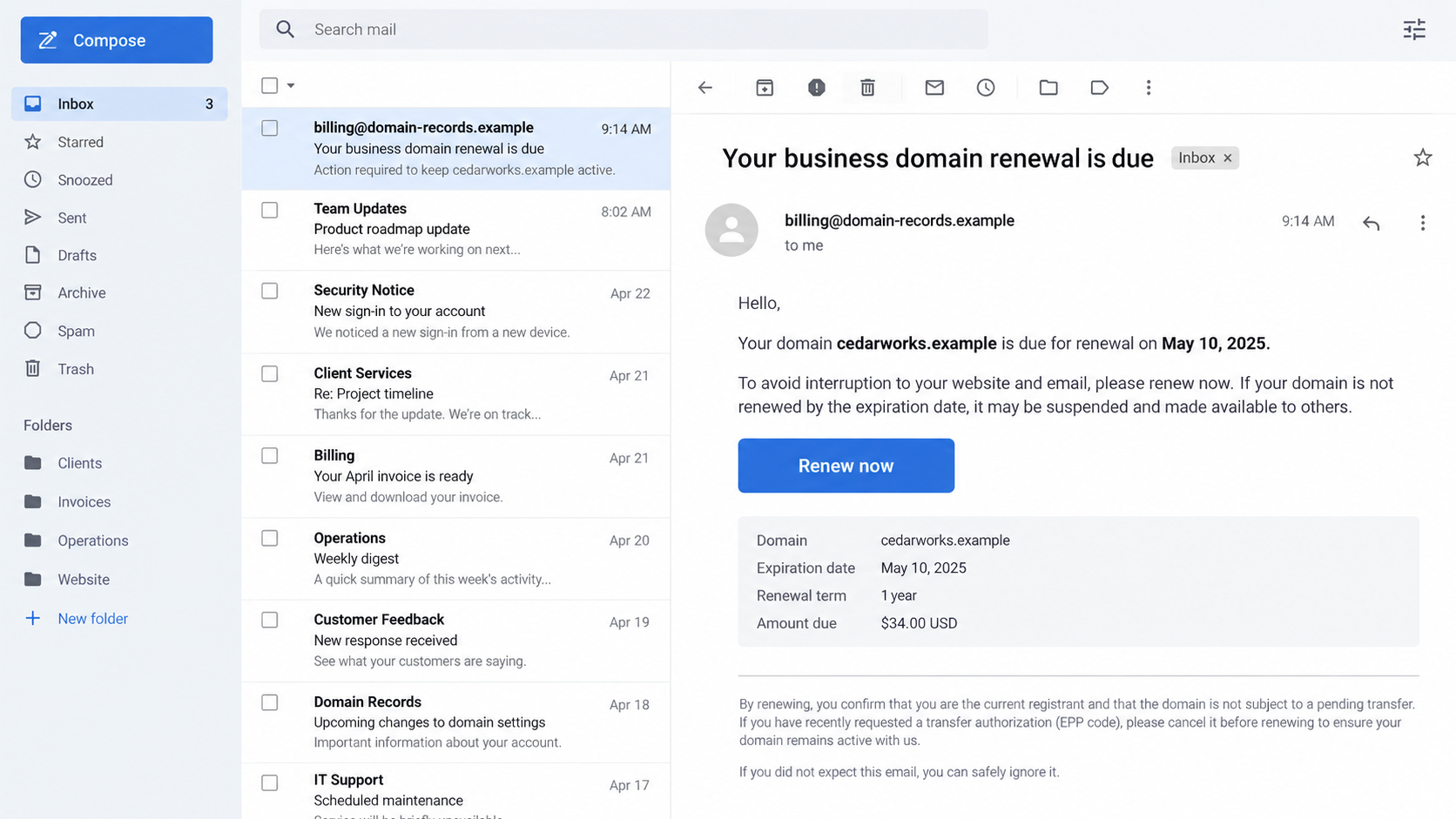
A renewal notice lands in a business inbox. It names your website address, says the deadline is close, and offers one convenient button to keep everything online.
That looks like routine maintenance. Yet the company asking for payment may not be the company that actually manages your domain.
Overview
A notice that blurs who is billing you
A fake domain renewal notice presents itself as a reminder from your current registrar, the company through which your domain name is registered.
ICANN describes several possible goals: an unnecessary fee, an unwanted move to another registrar, or credentials and authorization codes used to take control.
Not every unsolicited domain offer is fraud. The deception begins when a sender misrepresents the relationship or makes a transfer look like a routine renewal.
Why business owners notice it
A domain is tied to email, the website, customer trust, and often online sales. The thought of losing it can make an unexpected invoice feel urgent.
The message may list your exact domain and contact details. Those facts can be available through records, data brokers, prior breaches, or ordinary online research.
Knowing the name is not proof of being the registrar. The strongest check is inside the account where you already manage the domain.
The simple rule before paying
Open your registrar’s website from a saved bookmark or a manually typed address. Check the domain’s expiry date, renewal status, and current registrar there.
- Do not use the email’s Renew button to reach your account.
- Compare the payee with earlier registrar receipts.
- Keep transfer authorization codes private.
- Ask your registrar about any unfamiliar renewal request.
ICANN itself does not send registrants domain renewal requests or collect renewal fees from them directly. A message claiming otherwise should not be paid.
How the Fake Domain Renewal Notice Scam Works
Step 1: Identify a domain worth protecting
A small shop’s website, a nonprofit’s donation page, or a consultant’s email address can all depend on one domain. Scammers need not target a famous brand.
The email may arrive months before actual expiry. A recipient who does not remember the date may assume the warning is timely.
Some notices use information that appears personalized. The exact domain name and business address are persuasive, but they are not secret authentication factors.
Step 2: Imitate a familiar billing cycle
The message uses language like renewal, final notice, or service continuity. It may look more like an invoice than an advertisement.
That ambiguity matters. A busy bookkeeper might approve a payment because it resembles a routine supplier bill rather than a new sales offer.
ICANN’s work on fake renewal notices specifically identifies correspondence that falsely claims to be from the current registrar or its representative.
A legitimate competitor can offer to transfer a domain. It must not pretend that paying it is the only way to prevent expiry at your existing registrar.
Step 3: Hide a different transaction behind “Renew”
The button may lead to a payment page for an unnecessary service, not your normal registrar account. Another notice may initiate a transfer instead of a renewal.
A transfer moves a domain’s registration to another provider. That is not inherently bad, but it should be a deliberate choice by the domain owner.
Read the service description and terms before paying. Small print that says transfer, listing, or marketing can expose a very different product from the email’s headline.
Step 4: Ask for account access or a transfer code
Some fake notices seek a registrar login, a one-time code, or the authorization code used in a domain transfer.
ICANN warns that obtaining credentials or authorization codes can facilitate domain theft. Once control shifts, restoring the website and email may be complicated.
Never type a registrar password into a page reached only from an unexpected email. Open the real service independently and check the notice there.
Step 5: Create a problem even if the site stays online
A business may pay the wrong party yet keep its domain with the original registrar. That can hide the mistake until the genuine renewal date arrives.
An unwanted transfer can change billing relationships and support contacts. A stolen login can create broader risks, including DNS changes that redirect visitors or email.
The harm depends on what the sender obtained. Keep separate records of payments, credentials, and transfer activity so you can respond precisely.
What ICANN Does, and What Your Registrar Does
ICANN coordinates parts of the domain-name system. It does not act as the retail registrar that renews your individual domain.
ICANN says it does not send registrants expiration reminders or ask them to pay renewal fees. Those tasks belong to the registrar and its account processes.
Your registrar should be identifiable in your existing account and past receipts. If you do not know which company it is, use a trustworthy domain lookup.
Be careful with an email that invokes ICANN’s name as a payment authority. A copied logo does not give the sender a billing relationship with you.
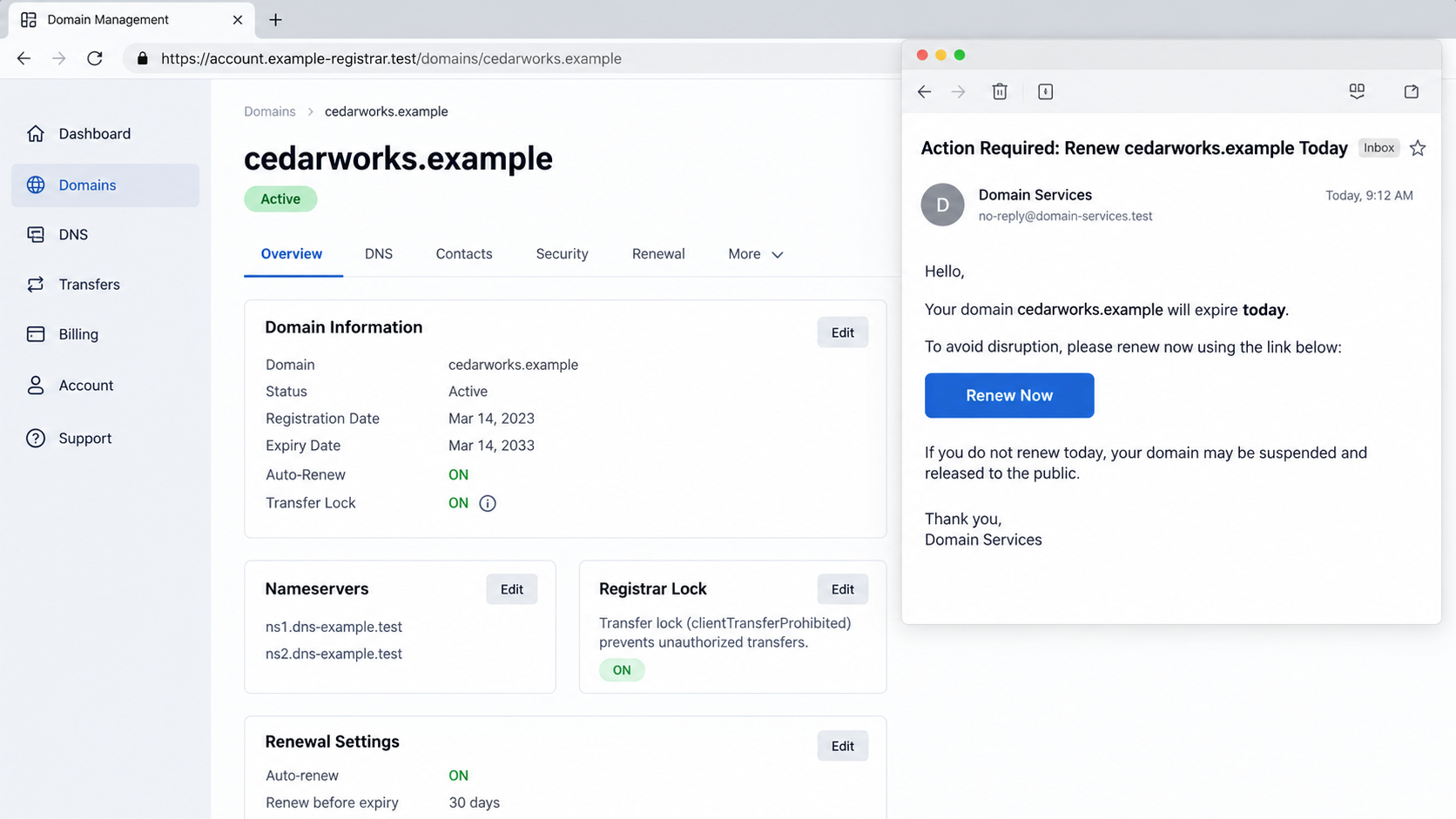
The second image is an illustrative comparison of an account and a suspicious email. It does not show a real registrar or actual victim information.
How to Tell a Renewal From a Transfer Offer
Start in your account dashboard
Look up the actual expiration date and whether auto-renew is enabled. Check the payment method and recent invoices inside the account you already use.
If the email says the domain expires tomorrow but your account shows months remaining, treat the discrepancy as decisive until the registrar explains it.
Do not rely on a screenshot sent by the notice provider. A real account page reached independently is the stronger source.
Read who is charging you
The billing name should match your registrar or an authorized reseller you recognize. A different company may be selling a transfer, listing, or unrelated service.
That service might be lawful when clearly disclosed. The problem is presenting it as an existing bill or mandatory renewal when it is not.
Compare the domain term, total price, refund policy, and nameservers or transfer instructions. Do not let a familiar domain name substitute for reading the transaction.
Understand the authorization code
A domain transfer often requires an authorization code. Treat it like a sensitive account credential, not as a harmless reference number.
If an unexpected “renewal” email requests that code, stop and contact your registrar. Ask what action the code would authorize.
A registrar lock can help prevent unwanted transfers. ICANN recommends using that protection where available.
Red Flags on a Domain Renewal Email
- The sender is a company you have never paid for domain registration.
- The deadline conflicts with the expiry shown in your registrar account.
- The message claims to be from ICANN and requests a renewal payment.
- The checkout requests a transfer code, password, or one-time login code.
- The “renewal” terms quietly describe a transfer or directory listing.
- The email threatens immediate website loss without a matching account alert.
No single design clue catches every case. A plain email from the right registrar may be genuine, while a polished invoice from another company may not be.
The more reliable test is the relationship: who holds your domain today, what expires when, and what transaction are you authorizing?
The Three Different Outcomes Hidden Behind One “Renew” Button
Paying for something your registrar never requested
The simplest loss is a needless payment. A third party takes a fee while the domain’s expiration date with your actual registrar remains unchanged.
This can be especially confusing when the invoice description sounds close to registration. Website listing, search submission, and directory maintenance are not domain renewal.
Keep the receipt, but do not let it reassure you that the domain is safe. Log into the genuine registrar account to verify renewal directly.
Moving the domain without intending to
A different company may use renewal language to obtain consent for a registrar transfer. Transfers can change your support and billing relationship.
They may also introduce operational work: updating payment methods, confirming contact details, and checking that nameservers and other settings remain correct.
If the offer is transparent and you want the move, that is your choice. If the move was hidden in a renewal pitch, ask both registrars what happened.
Losing control of the registration
The highest-risk version asks for a password, one-time code, or transfer authorization code. That information can let another party change registration control.
A domain is not merely a web address. DNS settings can steer visitors to a different site and can affect where email is delivered.
If account access was exposed, inspect nameservers, DNS records, forwarding rules, and contact details with your registrar. Have a technical administrator help if needed.
Not every suspicious renewal email attempts all three outcomes. Identify which action you actually took so the recovery response matches the risk.
Why Small Businesses Are Easy to Confuse
The person managing a domain may not be the person paying invoices. A developer might have registered it years ago while the owner now receives billing email.
That gap gives misleading notices room to operate. The recipient recognizes the domain but cannot immediately name the registrar or confirm the expiration date.
Create a simple asset record: domain, current registrar, account owner, renewal date, billing card, and the person authorized to approve changes.
Store it securely, since account details and recovery channels are sensitive. The goal is clarity for the right staff, not a public spreadsheet of credentials.
If a web agency manages the account, clarify whether your business or the agency is the registrant. Know how to reach the agency through an established channel.
An invoice arriving at the accounting address should be checked against that record. A familiar-looking domain name alone should not bypass approval.
When the Notice Uses a Real Expiration Date
A matching date can still be used in a misleading offer. Expiration information may be visible or previously disclosed, and a competing provider can repeat it.
Confirm which registrar is currently responsible. Then decide whether to renew there or deliberately transfer to another provider under clear terms.
A real deadline does not make a random payment link trustworthy. It makes independent renewal more important, because you may have little time to correct a mistake.
If the domain has already expired, contact your actual registrar immediately about its status and available recovery options. Do not assume a stranger can restore it faster.
Keep copies of messages that threatened instant loss. The language can help establish whether the notice was a clear offer or a deceptive impersonation.
Managing Future Renewal Messages
Use auto-renew if it suits your business, but still monitor the payment method and notices in the real registrar account. An expired card can defeat a good plan.
Turn on multifactor authentication and registrar lock. Keep the recovery email current and separate from the domain when practical.
Set two calendar reminders before expiration, one well in advance and one closer to the date. Compare them with the registrar dashboard, not an inbox warning.
Ask accounts payable to flag any domain invoice from a new vendor. A brief verification call can protect a website that the entire business relies on.
What To Do If You Fell Victim
- Contact your actual registrar first. Explain what you paid or disclosed and ask whether a transfer, account login, DNS change, or renewal event occurred.
- Secure the registrar account. Change its password from the genuine website, enable multifactor authentication, review recovery details, and turn on a registrar lock where available.
- Act quickly on an unauthorized transfer. Ask the current registrar about available reversal or dispute processes. Preserve the solicitation, checkout receipt, and authorization-code request.
- Call the payment provider. If you paid a misleading invoice, ask your card issuer or bank whether a dispute is possible. Do not assume the payment renewed your domain.
- Check devices and browser behavior. If the linked page downloaded software, run an updated Malwarebytes scan. Review extensions and permissions, and consider AdGuard for unwanted ads or redirects.
- Report the notice. Send it to your registrar and follow ICANN’s guidance for suspicious ICANN-branded messages. Keep copies of all responses.
Keep the genuine expiration date on your calendar. Dealing with a misleading invoice does not remove the need to renew a domain when it truly becomes due.
Frequently Asked Questions
Why did the sender know my exact domain name?
Domain names and some related business information are discoverable. Knowing your address does not prove that the sender manages it.
Does ICANN send renewal invoices to website owners?
No. ICANN says it does not send registrants renewal requests or ask them to pay domain-management fees directly.
Is switching registrars always suspicious?
No. A voluntary transfer can be sensible. The warning is about a transfer disguised as a required renewal or initiated without informed consent.
What if I paid but the domain still works?
Check your real registrar account. You may have paid a third party without extending the registration. Verify the actual expiration date and billing status.
Can someone steal my domain with an authorization code?
ICANN identifies code disclosure as a route to domain theft. Contact your registrar immediately if you shared one unexpectedly.
How can I prevent this next year?
Bookmark your registrar, enable account protections, record the real expiry date, and have a second person review unfamiliar domain invoices.
The Bottom Line
A fake domain renewal notice succeeds by making a new seller look like the company you already use. The domain name in the email is not proof.
Check your existing registrar account before paying, and never share login or transfer codes through an unexpected renewal link.








