

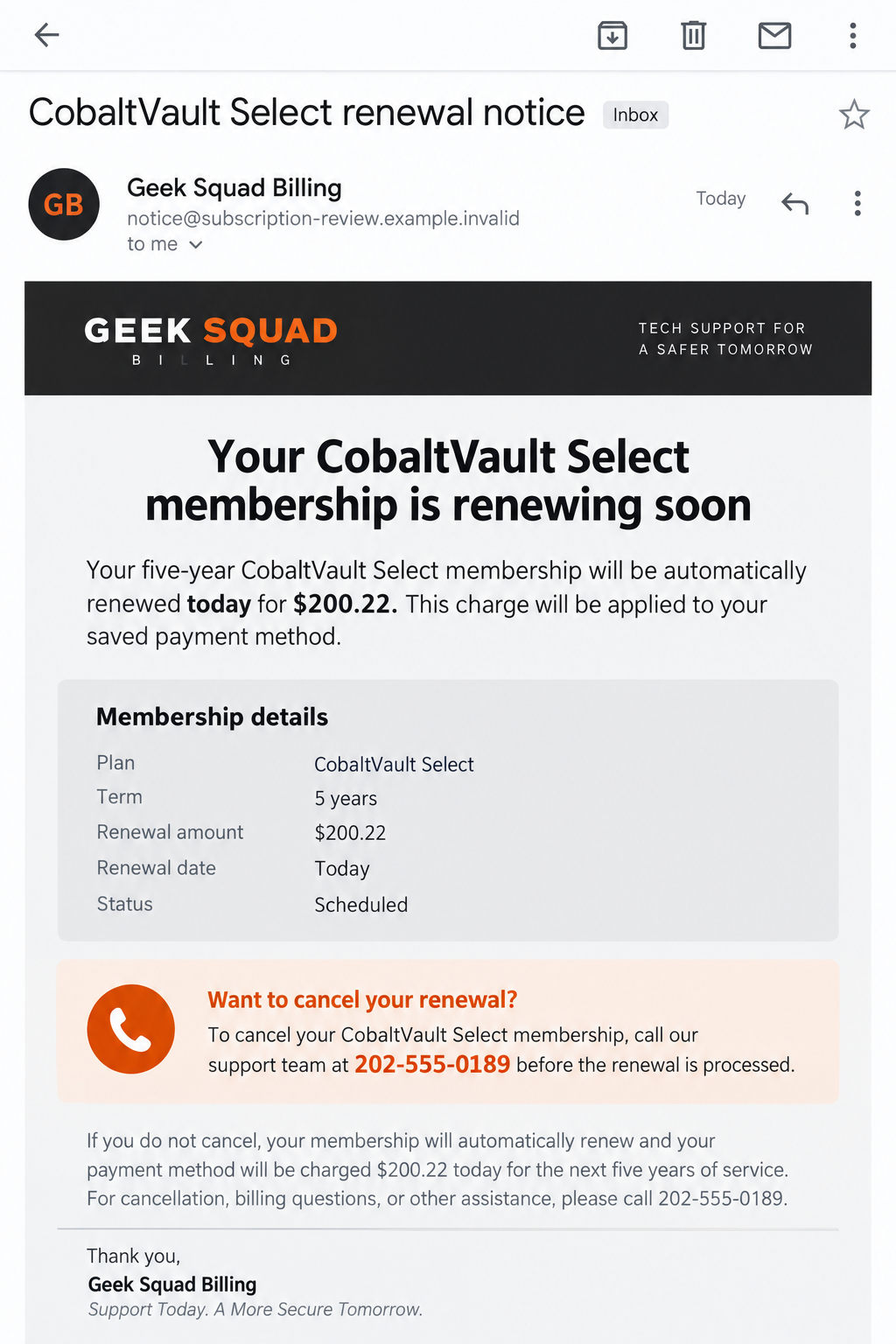
An email says your Geek Squad CobaltVault Select membership will renew for $200.22. You do not remember buying it, and the message offers one way out: call now.
That number may be the most important part of the email. It is also the part you should not trust.
Overview
The CobaltVault Select renewal claim
A reported message uses Geek Squad’s name and describes a “CobaltVault Select” membership with a five-year term and a scheduled $200.22 charge.
The copy says renewal will run against a saved payment method. It directs the recipient to call 1-808-221-0525 to change billing or cancel.
It also claims that physical Best Buy stores cannot handle the issue. That line tries to steer the reader away from an ordinary independent check.
The exact phone number and amount may change. The stable tactic is an unexpected subscription claim paired with a callback line controlled by the sender.
What the evidence supports
Best Buy and Geek Squad are real. The company warns that scammers impersonate its support staff in email, text, calls, and pop-ups.
The FTC has also described fake Geek Squad renewal messages that push recipients to call and then request remote access or financial information.
The reported CobaltVault sample is a message, not proof that any recipient was charged $200.22. Nor does it prove every caller reached the same person.
If you have a real Best Buy service plan, check it in your account. A genuine recurring charge is possible, but this email cannot verify one.
The one rule that breaks the trap
Do not call the number printed in an unexpected invoice. Open BestBuy.com yourself or use contact information from the company website.
- Check whether CobaltVault Select appears in your real account history.
- Look at your actual card statement for a $200.22 transaction.
- Do not provide a card number to “cancel” a charge you cannot verify.
- Refuse remote access offered as a refund or cancellation step.
If no matching order or transaction exists, you do not need a stranger’s permission to ignore the email.
Why the Five-Year Membership Detail Matters
Fake invoices often use broad labels such as “Premium Protection.” CobaltVault Select is more distinctive, which can make the document feel like a specialized plan.
A five-year term also creates confusion. A reader may wonder whether the purchase was bundled with a device years ago and then forgotten.
The $200.22 amount looks calculated rather than rounded. That gives the line item an accounting feel, although anyone can type an exact amount.
Some legitimate protection plans have renewal terms. The existence of real renewals is precisely why a fake one can be persuasive.
The correct comparison is not whether the email looks like a normal invoice. It is whether your account, receipt, and payment records show the same plan.
The instruction to avoid a retail store serves another purpose. It isolates the recipient inside the callback channel the sender selected.
A genuine support process should survive independent verification. If the representative says you must stay on the line or lose a cancellation window, step away.
Watch for identity clues in the sender address. A display name can say “Geek Squad Billing” while the underlying address belongs to an unrelated domain.
Even a familiar logo is easy to paste into a message. The strongest evidence of a charge is the payment account, not the graphic design.
The FTC’s fake Geek Squad renewal warning describes the same underlying pressure: call to stop a charge that may never have happened.
That pattern does not mean every variation follows identical steps. The particular caller may ask for different information, or no one may answer at all.
The Detail That Makes This Version Distinct
The reported message does not merely say “your subscription renewed.” It gives the product an unfamiliar name, a long term, and an exact total.
That combination can make a reader search memory for an old purchase instead of asking whether the sender is trustworthy.
The phrase “primary payment profile” also suggests that the sender already holds a card. The message offers no proof that such a profile exists.
Another line claims store employees cannot adjust the membership. That is an instruction about where not to seek help, not a verified company policy.
Scammers often need to keep a target away from ordinary customer service because an independent agent could expose the fiction.
Compare the named plan with your own receipt or Best Buy account, not with an internet search result that may repeat the scam wording.
A search result proves only that other people have seen the phrase. It cannot show that you bought a plan.
If your account lists a different genuine membership, do not let the fake message blur them together. Match the exact plan, date, and payment record.
Also notice what the email does not need: a password, card number, or reply from you to send itself. The risk begins when you follow its directions.
The safest response is deliberately uneventful. Check the account, check the card, report the message, and move on if neither shows a charge.
How the Geek Squad CobaltVault Scam Works
Step 1: An unexpected renewal lands in the inbox
The message presents a plan name, account reference, term, amount, and scheduled processing statement. Those fields imitate the structure of a billing notice.
It may address you by name or use an email address already exposed in a data breach. Personalization does not establish a real subscription.
The reported sample is unusually emphatic that billing management happens through the supplied support route. That reduces the chance you check elsewhere.
Read the message as a claim until you verify it. An invoice layout cannot debit a card by itself.
Step 2: Fear of the charge drives a callback
Most recipients do not want to buy a five-year tech-support plan they never ordered. Calling feels like a quick way to prevent a mistake.
The person answering can refer to the same plan name and amount because those details were in the message. That is not independent proof.
They may ask you to confirm a name, email, or account ID. Giving small pieces can make the interaction feel like a normal verification call.
Ask whether a real transaction appears on your card before discussing cancellation. If the caller objects to that check, end the conversation.
Step 3: Cancellation becomes a data request
A scammer may ask for the card that “will be billed,” a bank account for a “refund,” or a one-time code to “authenticate” the request.
Those requests can create a new problem. You may reveal the information needed to charge a card or take over an account that was previously safe.
A few digits of a card can seem harmless, but they can also help a caller sound informed during a later contact. Share nothing until identity is verified.
The reported email does not document the exact conversation after calling. These are known possibilities from FTC warnings about fake renewal scams, not confirmed outcomes for every recipient.
Step 4: Remote access may be presented as a refund tool
Some tech-support impersonators say they need to control your computer to process a refund or remove a subscription. That is not a normal billing requirement.
With remote access, they can see your screen and possibly guide you through bank logins or payments. The FTC documents this pattern in fake renewal scams.
A caller may show a fake balance or claim they refunded too much. The supposed excess then becomes a demand for repayment.
Do not send a gift card, wire, cryptocurrency, or payment-app transfer to correct a stranger’s claimed refund error. Ask your bank what actually happened.
Step 5: The story can continue after you hang up
Someone who called back may receive more emails or calls. The sender now knows the address and phone number reached a responsive person.
A second “billing supervisor” could offer another cancellation route. A fake bank representative might claim to reverse the charge.
Do not accept a later caller as independent just because they use a different number. Verify each organization from its own website or statement.
If you already shared card or login information, act on those exposures even when your statement shows no $200.22 charge.
How to Check Whether a Geek Squad Charge Is Real
Start with your Best Buy account, using the address you type yourself or an app you already trust. Review plans, orders, receipts, and payment methods.
If another household member may have bought coverage, ask them. An authentic plan should have an order or receipt trail.
Next, inspect your card statement. A scheduled charge described in email is not the same thing as a posted transaction.
If the amount is there, ask the issuer for the merchant descriptor and transaction details. A charge can be disputed or investigated through the issuer.
If the charge is not there, do not “cancel” through an unknown callback line. The FTC says to ignore a fake renewal once no matching transaction exists.
You can contact Best Buy through its published support options to check whether the plan belongs to your account. Best Buy lists its own contact channels online.
Do not rely on a number found in a search advertisement without examining the destination. Ads can also be used to place a fake support line.
Keep the original email until the check is finished. Its headers, sender address, and number can help you report the attempt.
Clues That Separate This Message From a Real Account Notice
Any one clue can have an innocent explanation. Together, these details make the CobaltVault email a poor basis for action.
- You do not remember the plan and cannot find a receipt.
- The sender address does not belong to a Best Buy-controlled domain.
- The message insists that one unverified number is the only cancellation route.
- The five-year term and amount appear without a verifiable account record.
- A caller asks for remote access, codes, or payment to issue a refund.
- The representative discourages you from contacting Best Buy or your bank independently.
The real Geek Squad brand is not the problem. The suspicious use of its name is the problem.
A person can also receive a real service notice and a separate scam email in the same week. Check each message against your account rather than assuming all are alike.
What to Do if You Have Fallen Victim to This Scam
- End contact and save the email. Do not continue calling the number in the message. Preserve the sender address, headers if possible, screenshots, call log, and any instructions you received.
- Check your bank and Best Buy account. Look for a real plan and transaction. If you gave card details or paid, call the issuer from the number on your card and discuss a dispute, replacement, and monitoring.
- Disconnect remote access if you granted it. End the session, disconnect the device from the internet if control is uncertain, and seek help from a trusted professional. Change important passwords from a clean device.
- Look for new software and account changes. Remove unfamiliar remote-control tools only after documenting them. Run a reputable scanner such as Malwarebytes on the affected computer. AdGuard can reduce malicious-ad exposure, but it cannot reverse a transfer or secure a compromised account on its own.
- Secure email and financial accounts. Change reused passwords, enable multifactor authentication, and inspect account recovery details. Review bank activity for transfers beyond the claimed $200.22 charge.
- Report the impersonation. Best Buy says suspicious Best Buy or Geek Squad offers can be reported to abuse@BestBuy.com. Report money loss to the FTC and, if appropriate, local law enforcement.
- Reject any “over-refund” request. If a caller says you must return excess funds, verify the actual bank ledger first. A screen shown during remote access is not proof money arrived.
Frequently Asked Questions
Is CobaltVault Select a real Geek Squad plan?
The reported email does not prove a real plan exists in your account. Check your Best Buy orders and ask the company through official support.
Was I charged $200.22 because the email says so?
No. Only your payment records can confirm a transaction. A message about a scheduled charge is not a bank statement.
Should I call 1-808-221-0525 to cancel?
No. That number appears in the reported suspicious message. Contact Best Buy using a channel you find independently on BestBuy.com.
Can a real Geek Squad plan renew?
Some legitimate service plans have renewal terms. That is why you should check the actual plan and card record, not assume every renewal notice is fake.
What if I only opened the email?
Opening an email alone does not prove an account or device was compromised. Avoid its links and number, then verify any claimed charge independently.
What if the caller controlled my computer?
Stop the session, use a clean device to change important passwords, contact your bank, and get trusted help checking for remote-access software or malware.
The Bottom Line
The CobaltVault Select message uses a $200.22 renewal story to make a callback feel urgent. The email is not evidence that Best Buy charged you.
Check the account and card yourself. If the supposed billing desk asks for secrets, payment, or remote control, end the contact and secure what you shared.








