

The note arrives in the middle of an ordinary workday. It sounds like a small favor from someone whose requests you normally handle without much fuss.
Then the conversation moves away from your usual workplace channels. That is the moment worth slowing down for, even when everything looks familiar.
Overview
An office favor that was never authorized
The fake boss gift card request is an impersonation scam. An outsider poses as a manager and asks an employee to buy cards for a supposed business need.
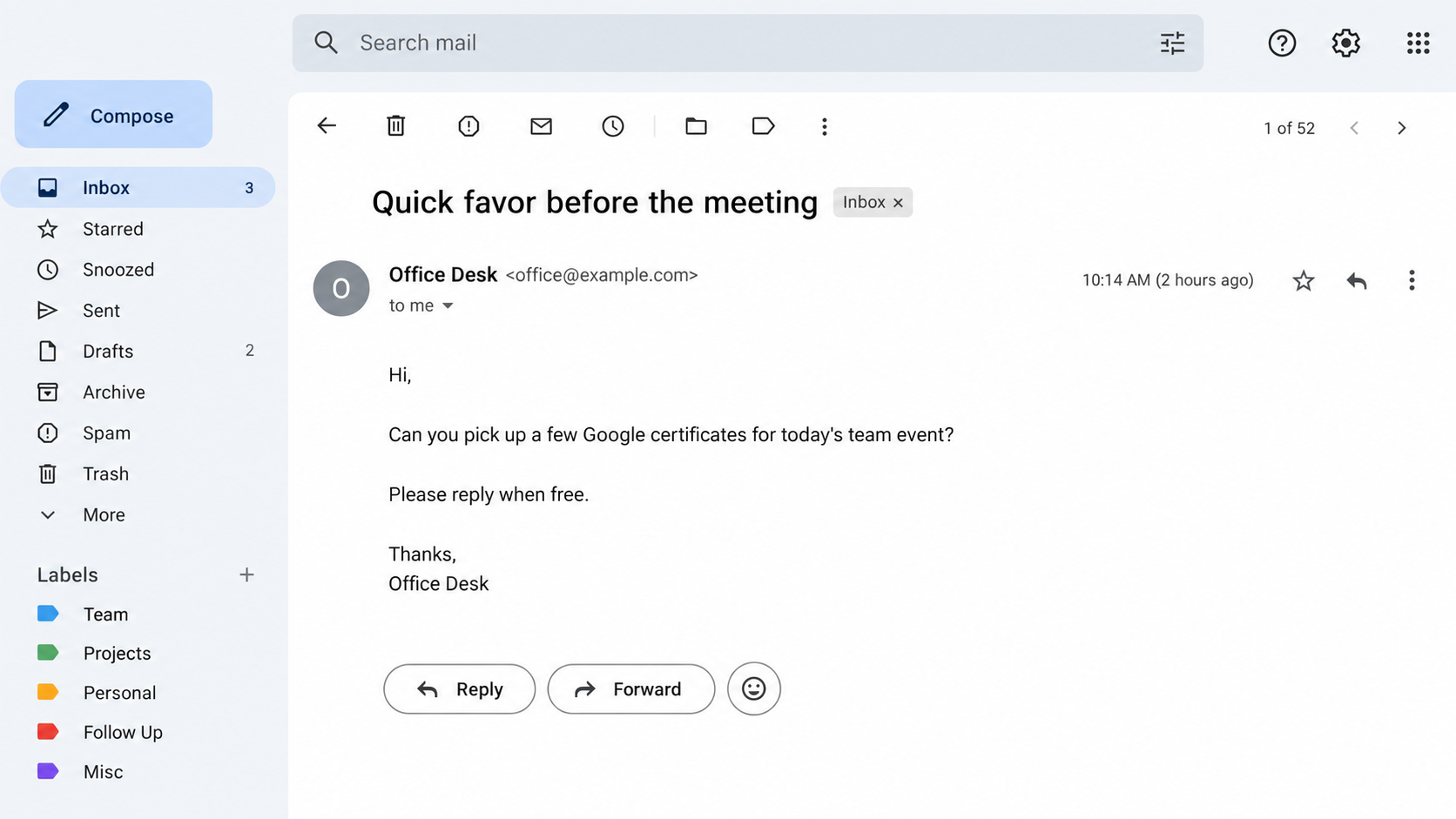
The Federal Trade Commission describes unexpected texts, emails, and calls asking for an urgent favor. One reported wording asks for “Google certificates,” meaning gift cards.
That odd phrase matters. It may make the recipient ask a question, which opens a conversation the impostor can control.
The legitimate manager, workplace, and gift card brand are not the fraudsters. The problem is the person borrowing their identity to get card numbers.
What the scammer actually wants
The purchase itself is only halfway. The thief needs the card number and PIN, usually hidden on the back or shown on an electronic receipt.
Once those details are shared, the balance can be redeemed remotely. Keeping the plastic card does not keep the money safe.
The request may be framed as prizes, client thank-you gifts, a staff event, or a last-minute executive task. The label changes; the payment method does not.
A gift card is a convenient target because it moves value without a bank transfer. The card itself looks like a normal retail purchase.
That normal appearance can make employees hesitate to call it fraud. The danger is not shopping for gifts; it is surrendering the redemption information.
The simplest safe check
Contact your manager through a work number, chat thread, or email address you already used before this message arrived. Do not use the reply details in the request.
- Pause before buying anything with personal funds.
- Verify the request with the actual manager, preferably by voice or an established internal channel.
- Never send photos of card backs, redemption codes, or PINs.
- Tell your security or finance team if the message names your workplace.
The inbox shown above is an illustrative reconstruction. It is not a captured message from a particular employer or a copy of the FTC’s evidence.
How the Fake Boss Gift Card Scam Works
Step 1: Pick an employee who might recognize the name
A stranger’s request for cards is easy to dismiss. A message carrying your manager’s name, job title, or familiar sign-off gets a second look.
Those details are often public. Company directories, professional profiles, event announcements, and social posts can reveal who supervises whom.
An impostor does not need access to your company’s systems to know a manager is traveling or that your team has an upcoming meeting.
For a new employee, the impersonation may lean on uncertainty about workplace customs. A request that seems routine to everyone else feels awkward to challenge.
For an experienced assistant, the pitch may borrow an actual responsibility, such as arranging staff recognition. Familiarity with the role makes verification more important.
Sometimes the contact is generic, with no insider knowledge at all. A busy recipient can still fill in the missing context on the scammer’s behalf.
That is why the absence of spelling mistakes means little. A short, correctly written message can be more effective than an elaborate fake letterhead.
Step 2: Send a small request instead of an obvious demand
The first message may simply ask whether you are available. That sounds more natural than opening with a payment demand and tests whether you will respond.
If you answer, the person can match your tone, mention the manager’s name, and build a short exchange. The apparent familiarity comes from your replies.
The FTC’s example begins with an unexpected “urgent favor.” That phrase makes a normal question feel like a task with an invisible deadline.
An email display name can say your boss’s name while the underlying address belongs to someone else. A text contact can use a new number and blame travel.
Step 3: Give the cards a plausible office purpose
A staff celebration or client gift sounds less suspicious than an emergency fine. It also makes gift cards seem like a reasonable purchase.
The impostor may say the manager is in a meeting and cannot shop personally. That detail answers the obvious question before you can ask it.
“Google certificates” is particularly revealing because it is not normal procurement language. The FTC says scammers may use it to draw people into conversation.
If you ask what the phrase means, the sender can smoothly explain that it is a gift card for a team member. Your question becomes their opening.
Do not treat that wording as a required fingerprint. Another thief may ask for Apple, Amazon, Target, or different cards without using the phrase.
Step 4: Separate the purchase from normal approvals
The person may insist you use your own money and promise reimbursement. That moves the transaction outside purchase orders, company cards, and shared records.
If your job normally includes buying gifts, the scam is harder to spot. The key question is whether this specific request came through your normal approval path.
Pressure often arrives as short follow-ups: “Are you at the store yet?” or “I need them before the meeting starts.” Each message narrows your thinking time.
Some impostors direct employees to buy cards at more than one store. The FTC warns that scammers may do this to avoid questions from cashiers.
A manager who genuinely needs a purchase should be able to name the business purpose, amount, recipient, and approval method. Secrecy weakens that story.
If the alleged manager asks you to keep the surprise from everyone, verify with another authorized colleague. Confidentiality is not a reason to bypass controls.
Step 5: Ask for the numbers before anyone uses the cards
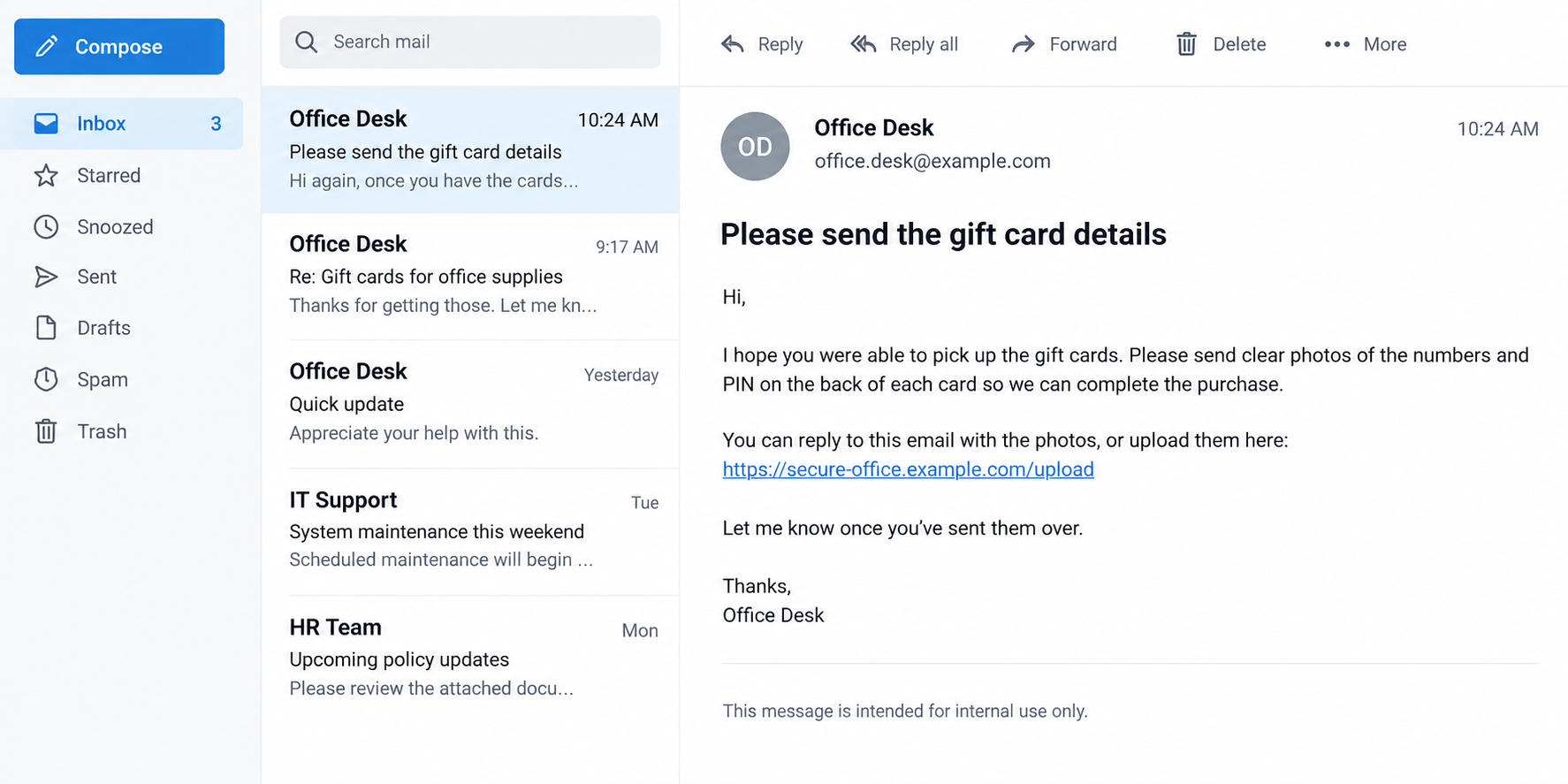
The final request may sound administrative: send a clear photo of each card so the manager can distribute the gifts digitally.
That is the theft point. The recipient can still be standing in the store while the scammer spends the balance elsewhere.
The second image illustrates that follow-up. Its sender, link, and text are fictional; the mechanism is the request for usable card credentials.
Step 6: Keep the employee waiting for reimbursement
After the codes are sent, the impostor may promise accounting will reimburse you. They may ask for another set because a card supposedly failed.
The message thread can remain polite throughout. Fraud does not always sound threatening, especially when a thief wants the employee to keep cooperating.
By the time the real manager hears about the “favor,” the thief may have emptied the cards. Quick reporting still matters because redemption timing varies.
Some employees blame themselves after this discovery. The impostor deliberately used workplace trust, urgency, and a plausible task to avoid the normal pause.
Why Familiar Names and Work Details Are Not Proof
A display name is easy to imitate
Most email apps emphasize the sender’s chosen display name. The full address may be hidden until you open message details.
Even a familiar-looking address needs context. Compromised mailboxes and deceptive domains exist, so compare the request with normal practice rather than trusting one field.
A message in an existing thread deserves care too. A stolen account could be used to reply from a real mailbox, though that is not required here.
Knowledge about your office may be public
Job titles, reporting lines, and employee anniversaries can appear on company pages. A scammer can use them to make a generic request feel tailored.
They may also pick a moment when a manager is publicly at a conference. “I can’t call” then sounds convenient, but it prevents verification.
Small true details should prompt a better check, not a conclusion. Ask the manager directly whether they want gift cards and which budget covers them.
Reimbursement promises do not protect personal money
An employee who buys cards with personal funds may feel they are helping the team. Yet the store receipt names the buyer, not the impersonated manager.
Your employer may have policies for reimbursing approved expenses. Those policies cannot automatically restore a card balance sent to a criminal.
If the request claims exceptional urgency, use the emergency approval route your workplace already has. Inventing a new route is the impostor’s advantage.
How to Verify a Genuine Manager Request
Use a contact method that existed before the new message. Call the manager’s saved work number or message the established company account.
Ask a concrete question: “Did you ask me to buy gift cards today, and do you want redemption codes by email?” A vague “Is this you?” invites ambiguity.
If the manager is unavailable, ask a known colleague or finance contact whether the purchase has been approved. Waiting is safer than financing a secret task.
Do not let the sender dictate a new communication channel, such as a personal messaging app, for a task that should remain inside company systems.
If your office has a shared purchasing mailbox, send the request there. A second set of eyes may catch an address mismatch you missed.
Compare the proposed expense with company policy. Are personal card purchases allowed? Are gifts handled by procurement? Who approves reimbursement?
A real manager may ask for urgent help, but should understand independent confirmation when money and transferable codes are involved.
Document the verification, even if the answer is yes. A short written approval helps prevent confusion over reimbursement and who receives the cards.
Do not forward the suspicious email to the person who sent it for “verification.” That only gives the impostor another chance to explain away warning signs.
What to Do If You Fell for the Fake Boss Gift Card Scam
- Contact the card issuer immediately. Use the number on the physical card or the issuer’s official website. Explain that codes were disclosed in a scam and ask whether any balance can be frozen or refunded.
- Keep the cards and receipts. Photograph both sides for your private records, but do not post the numbers publicly. Keep purchase times, amounts, store locations, and all transaction receipts.
- Tell your actual manager and security team. They can warn colleagues, examine whether an account was compromised, and block the sender. Provide the original message with full headers if requested.
- Check any account you used to communicate. If you clicked a link or entered a password, change it on the real service, end unfamiliar sessions, and review multifactor authentication settings.
- Ask your bank or card provider about the purchase. A gift card purchase may not be reversible, but report the circumstances and ask what options apply to your payment method.
- Report the incident to the FTC. File at ReportFraud.ftc.gov and include the impersonated name, sender address, card type, amounts, and how the codes were transmitted.
- Watch for a second approach. Someone offering to recover the gift card balance for an upfront fee may be another scammer. Verify any recovery claim independently.
If you only replied to the message, you have not necessarily lost money. Stop communicating, verify the manager, and tell your workplace so others receive a warning.
Do not delete the thread before reporting it. The sender address, phone number, timestamps, and exact wording help security staff warn the right colleagues.
Check whether the same request went to a shared inbox or another employee. A coordinated warning can stop a second purchase while the first report is handled.
If you opened an attachment or installed anything, run a reputable Malwarebytes scan. AdGuard can help filter malicious advertising, but neither tool can restore spent card balances.
Those tools are relevant to malicious links or downloads, not to the gift card exchange itself. Keep the issuer and workplace report at the top of your list.
Questions Employees Often Ask Before Buying
What if my manager really does need cards?
Ask for confirmation through a previously established channel and follow company purchasing rules. A legitimate request survives a short verification call.
Can I trust a message from a company email address?
It is stronger evidence than an unknown number, but not conclusive. Accounts can be compromised, and a displayed name can conceal a different address.
Does the store receipt prove the cards are still mine?
No. Someone with the number and PIN may redeem the balance without holding the card. Save the receipt to support an issuer report.
Frequently Asked Questions
Why would a fake boss say “Google certificates”?
The FTC notes that scammers sometimes use this phrase while seeking gift cards. It can start a conversation, but its absence does not make a request safe.
What should I do if I already bought cards but shared no codes?
Do not send photos or PINs. Contact the real manager, check return policies with the issuer or store, and keep your receipt.
Can a scammer spend the money with only a card photo?
Yes, if the photo reveals usable card numbers and PINs. Cover those details whenever you share an image for a legitimate administrative reason.
Should I reply to ask the sender to prove their identity?
No. Use your manager’s known work contact instead. The person controlling the suspicious thread can invent more convincing answers.
Will the FTC recover my gift card funds?
The FTC accepts reports and provides guidance, but recovery is not guaranteed. Contact the card issuer quickly because it controls the card balance.
Is every office gift card purchase suspicious?
No. The red flag is an unexpected, independently unverified request for transferable codes, especially when it bypasses normal spending approval.
The Bottom Line
A fake boss gift card request trades on familiar authority and everyday helpfulness. The decisive move is asking an employee to buy cards and hand over redeemable numbers.
Step outside the message thread and contact the real manager before spending. If codes were already shared, call the issuer and alert your workplace promptly.








