

A security email from a wallet company deserves attention. When it lands among messages you already expect, even experienced crypto users may open it without hesitation.
One September message used that familiarity especially well. Before clicking anything, it is worth asking what the sender is actually asking you to do.
Overview
What Trezor confirmed happened
The Trezor security alert phishing email was sent during a breach of Brevo, a third-party newsletter provider used by Trezor. This was not a breach of the hardware wallet.
Trezor’s own incident report says the unauthorized actor used the provider’s system to send mail from customer accounts, including Trezor’s.
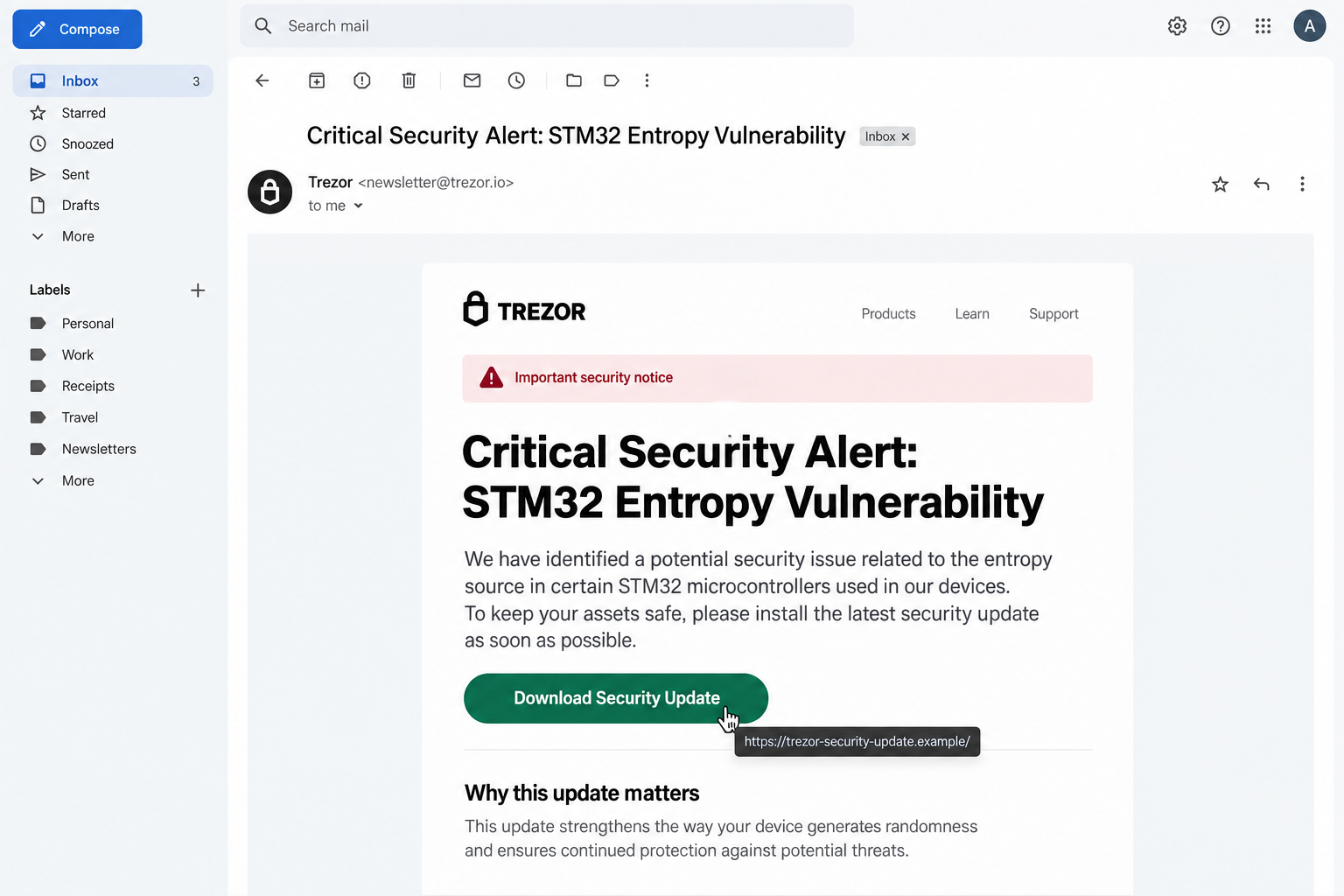
The subject line was “Critical Security Alert: STM32 Entropy Vulnerability.” The message linked to an app that asked users to enter their wallet backup.
Trezor says its wallet products and account systems were not affected. The dangerous part was the message and the destination it promoted.
The familiar sender and technical-sounding warning made the message feel credible. The linked action, not the visual polish, defined the danger.
What the attackers had and did not have
Brevo later confirmed that 347,149 marketing email contacts were exported from Trezor’s list. Those addresses can be used to aim further phishing attempts at interested readers.
Trezor says the Brevo database held newsletter addresses, not wallet backups, passwords, or the contents of hardware devices. An email-address exposure is serious but not identical to wallet theft.
That distinction should guide the response. Someone who received the email but did not enter a recovery phrase faces a different risk from someone who disclosed the phrase.
A compromised mailing channel can make a fake alert look unusually authentic. A familiar sender name or address therefore cannot settle the question alone.
The one rule that protects the wallet
Your wallet backup, also called a recovery phrase, is the key to restoring control of the assets associated with that wallet. It must remain private.
Trezor explicitly says it will never contact users asking for their wallet backup. A request to type it into an app or website is the decisive warning.
- Do not open the update link inside an unexpected security email.
- Do not enter recovery words on a website or in a downloaded “fix.”
- Check notices in Trezor’s official channels opened independently.
- If a backup was exposed, create a new wallet and move funds promptly.
There is no benefit in waiting for a second email to confirm the instruction. The secret itself is what a criminal needs.
How the Trezor Security Alert Phishing Scam Works
Step 1: Start with a channel users already recognize
A random stranger announcing a hardware-wallet flaw would raise suspicion. A message delivered through a newsletter provider used by the brand has a better chance.
Trezor says Brevo suffered the security incident on September 9, 2026. The provider served many customers, and the attacker used its sending capability.
This does not mean every email ever sent from that service was fraudulent. It means the specific alert described by Trezor was an unauthorized phishing message.
The sender context helps explain why ordinary advice to inspect the From address is incomplete here. The trust boundary was the sending platform itself.
Even when a message passes technical mail checks, the content can be malicious. Ask whether the requested action matches the wallet company’s real security rules.
Step 2: Make a technical-sounding warning feel urgent
The subject mentions an STM32 entropy vulnerability. That wording sounds like an engineering issue inside a hardware device, not a generic spam campaign.
A reader may not know what entropy means in cryptography. The uncertainty can make the message feel more authoritative, especially when savings are at stake.
The premise is designed to reverse the normal instinct to protect a recovery phrase. The user is told security requires an immediate update.
A genuine security notice could discuss a technical issue, but it would not need your wallet backup emailed or typed into a stranger’s program.
Do not accept the title alone as proof of a device flaw. In this incident, it was the lure used in a phishing email.
Step 3: Move the reader from email to a download
Trezor says the email contained a malicious link prompting users to download an app. The app then asked for the wallet backup.
The download stage matters because it can appear more official than a bare web form. People expect wallet companies to distribute software and updates.
But the email chooses the destination for you. A polished button can send you somewhere you would never visit if you inspected the address directly.
Opening the official Trezor site through a saved bookmark or typed address breaks that control. You can compare any alert with Trezor’s published notices.
Never substitute an email attachment, ad, or chat link for the official wallet installation path. A malicious app can mimic the familiar setup sequence.
Step 4: Ask for the backup under a safety pretext
The decisive moment is a prompt for recovery words. The criminal may call it verification, migration, restoration, entropy repair, or a security check.
Those labels do not change what entering the phrase does. Anyone who obtains it can recreate access to the wallet, regardless of who holds the hardware device.
Any phrase-entry page reached from an email should be treated as hostile. A recovery phrase belongs only in a verified wallet recovery process.
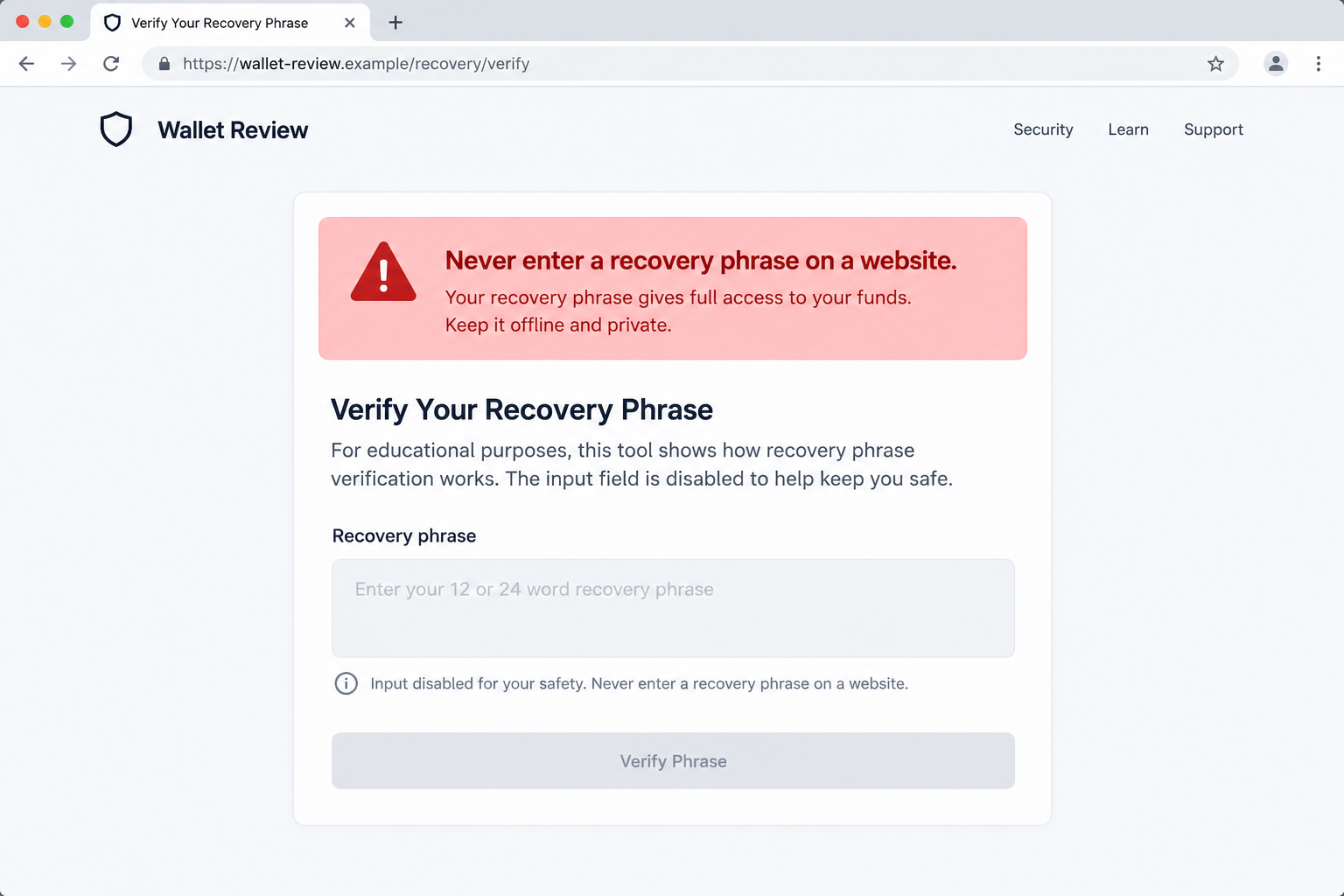
Do not test a suspicious form with part of your phrase. Even partial disclosure may help an attacker, and interacting with the page adds unnecessary risk.
Use the wallet maker’s documented recovery procedure only when you intentionally restore a wallet. Confirm the device and software path independently beforehand.
The company did not request a recovery phrase in this incident. The demand came from the attacker who controlled the deceptive email path.
Step 5: Move funds if the phrase is exposed
A leaked recovery phrase cannot be changed like an email password. The safe response is to create a new wallet with a new backup and transfer assets.
Trezor’s guidance is direct: if you entered your wallet backup through this email’s link, move funds to a new wallet immediately.
Use a trusted device and official wallet software. Do not follow a second “recovery” link from the same message or someone claiming to help afterward.
Prioritize assets secured by the exposed phrase. Consider every account derived from it at risk, including less visible tokens and chains.
Network fees and timing vary, but delay gives a thief an opportunity. If you need help, contact official support through a bookmarked address, not the phishing thread.
Step 6: Reuse exposed addresses for later approaches
Trezor says marketing contacts were exported. That creates a risk of follow-up emails that sound more personal because the sender knows the recipient’s interest.
The next lure may not repeat the STM32 subject. It could claim a refund, wallet migration, account suspension, or emergency support callback.
Knowing an address appeared on a newsletter list does not prove the person owns a wallet. Attackers still benefit from contacting a self-selected audience.
A second message may refer to this very incident and claim to protect users from it. That is why the recovery-phrase rule remains the anchor.
Do not try to determine safety solely from the sender label. Evaluate the action requested and confirm any notice on official Trezor channels.
What the Brevo Incident Does and Does Not Mean
Your hardware wallet was not remotely emptied by the mailing breach
Trezor states that its products, wallets, and account systems were untouched. The incident involved the newsletter delivery provider and its contact list.
A device storing private keys offline is not exposed simply because its owner’s email address receives spam. The problem begins when the user follows the fraudulent instructions.
This is important for worried readers. Receiving the alert is not the same as losing coins, and clicking a link is not the same as sharing the backup.
Trezor says it disabled sending and took down the malicious domain quickly. It reported roughly 2,500 clicks before the domain was disabled.
Those figures explain the incident’s scale but do not tell you what happened to your individual wallet. Your own actions determine the immediate recovery steps.
An apparently authentic email can still carry an attack
People often rely on sender authentication, familiar layout, and a recognizable signature. In a provider compromise, those signals may be less useful.
Look instead for the transaction the message requests. Is it asking for a private recovery secret? Is it forcing a download through an email link?
Legitimate companies can alert users to problems without collecting the secret that controls their assets. A security notice should direct you to independently verifiable channels.
Do not conclude that every vendor email is fake. The lesson is narrower: trusted infrastructure can be misused, so critical actions require a second check.
The newsletter export changes future vigilance
Trezor reported 347,149 exported newsletter contacts. A recipient may now see more tailored wallet-themed spam, even if they ignored the original alert.
Filtering suspicious messages helps, but it is not a complete defense. A well-written follow-up could reach an inbox that normally blocks obvious spam.
Consider using a dedicated address for financial and wallet services. More importantly, keep the backup offline and avoid support conversations initiated by unsolicited messages.
If a new message mentions a wallet model, do not assume the sender obtained that detail from this incident. It may come from other sources or broad guesswork.
How to Check a Wallet Security Notice Safely
First, stop at the email. Do not click its call-to-action button or open its attachment while you decide whether the notice is real.
Second, open Trezor’s official website or app by your usual route. Look for a matching alert in its news or support section.
Third, compare the proposed action with the company’s standing rule. Trezor says it never asks for a wallet backup in a message.
Fourth, be skeptical of a downloaded app that appears because an email demanded it. The link could be changed while the message remains in your inbox.
Fifth, check what information the notice actually requires. Public firmware guidance and security advisories do not need your complete recovery phrase.
Sixth, ask official support through a separately located contact form if you still cannot tell. Describe the subject line without forwarding private wallet information.
A real security issue will still be real after a careful pause. A phishing campaign relies on turning that pause into a fearful click.
What to Do If You Followed the Trezor Security Alert Email
- Separate the actions you took. Receiving the email, clicking its link, installing an app, and entering a backup have different consequences. Write down exactly which occurred.
- If you entered your backup, create a new wallet. Use official software and a trusted device. Generate a new recovery phrase and transfer affected assets without waiting for another email.
- If you installed the promoted app, stop using it. Disconnect the device from sensitive accounts, preserve evidence, and run a reputable Malwarebytes scan before relying on that computer again.
- Review wallet activity. Check transactions through a trustworthy wallet interface or block explorer. Record suspicious transfers and relevant transaction identifiers.
- Secure connected accounts. Change passwords for email and exchanges if you entered them into the downloaded app. Revoke sessions and review MFA methods.
- Report the phishing message. Use Trezor’s official support channel and your email provider’s phishing report option. Include headers and the destination address without publishing any secret.
- Beware of recovery offers. Anyone promising to reverse a blockchain transfer for an upfront fee or a recovery phrase is likely trying to take more.
AdGuard can reduce exposure to malicious ads and deceptive destinations, but it cannot make a disclosed recovery phrase safe again. Moving funds is the priority.
If you clicked the link but did not enter a backup, Trezor says the link alone does not expose your funds. Close the page and watch for any download.
If you only received the email, delete or report it. There is no reason to reset a wallet merely because an address appeared on a newsletter list.
For a confirmed device infection, consider professional help before entering any new wallet backup on that system. A clean environment matters during recovery.
Frequently Asked Questions
Was Trezor itself hacked?
According to Trezor, no. The security incident involved Brevo, its third-party newsletter provider, not Trezor hardware wallets or wallet account systems.
Did the attackers get my recovery phrase from the email list?
Trezor says the exported data comprised marketing email contacts, not wallet backups. The phishing email tried to make recipients surrender the backup afterward.
What if I only clicked the email link?
Trezor says clicking alone did not expose funds in this incident. Check whether anything downloaded or ran, then avoid the page and monitor official notices.
Does an authentic sender address mean the message is safe?
No. This case involved misuse of a legitimate sending provider. A familiar address can deliver harmful instructions when an account or vendor is compromised.
Can I change an exposed wallet recovery phrase?
Not in place. Create a new wallet with a new phrase and move all affected assets. Do not reuse the compromised backup.
Will Trezor support ever ask me to type my backup into a link?
Trezor says it will never contact you asking for your wallet backup. Treat any such request as a warning, even if the page looks polished.
The Bottom Line
The Trezor phishing email exploited a real third-party mailing incident to make a false hardware-wallet warning look credible. The wallet itself was not breached by that email.
Keep recovery words offline, verify alerts through official channels, and move funds promptly if the phrase was disclosed. The backup, not the branding, is the key fact.








