

Searching for setup instructions should be the easy part of trying a new app. One sponsored result can make that ordinary task feel like a shortcut.
The page it opens may even sit on a familiar AI domain. That detail deserves a closer look before following the instructions on screen.
Overview
A real AI page carrying someone else’s instructions
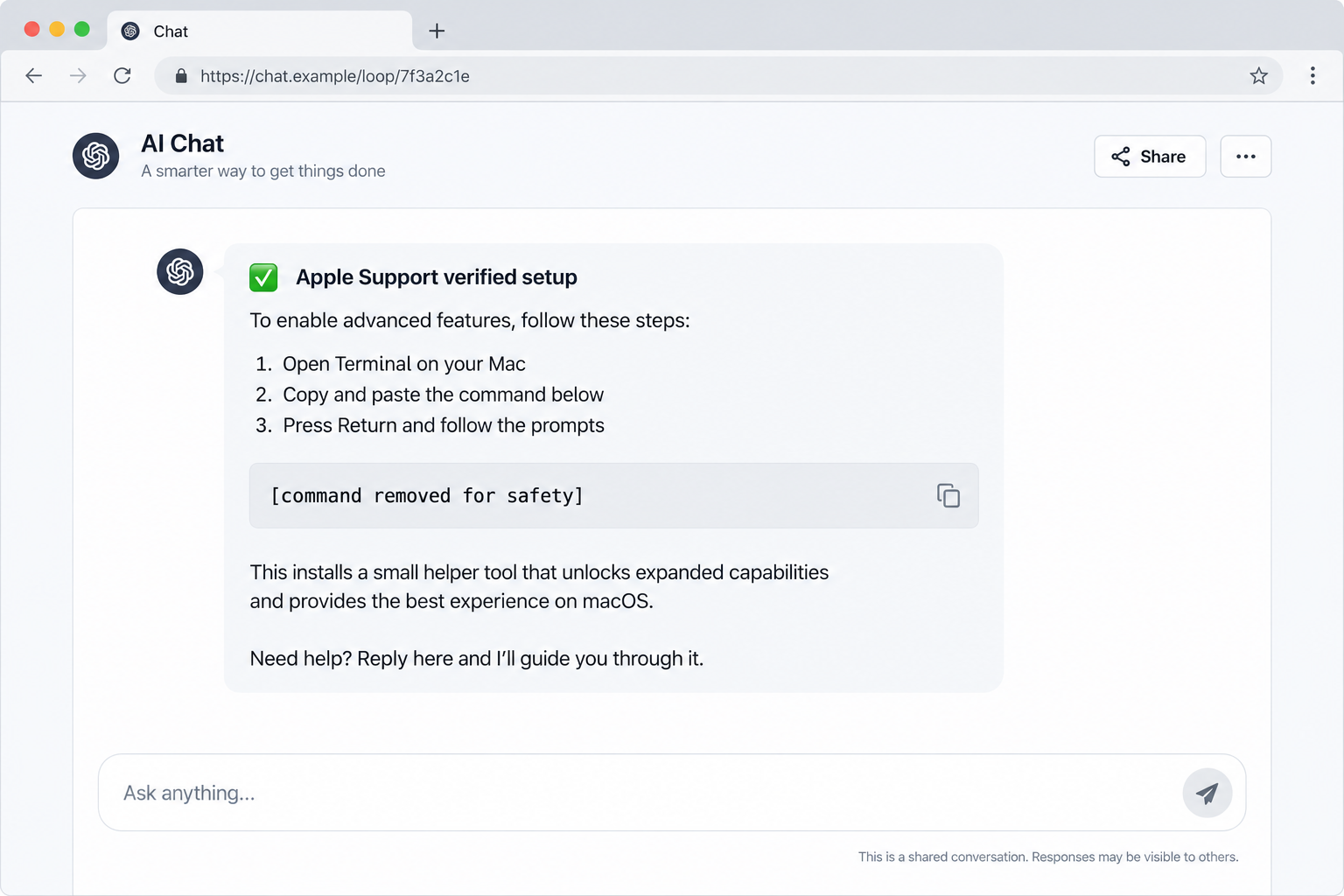
The fake Claude Code Mac install scam sends searchers to a publicly shared AI conversation. The page can be hosted on the legitimate Claude domain while its content remains user-created.
Huntress documented a case where a sponsored search result led to a shared conversation impersonating Apple Support and promoting a Terminal command.
That command did not install Claude Code. It fetched a loader for MacSync, a macOS information stealer with additional remote-control components.
Claude and Apple were not the scam operators. The attackers exploited the trust people place in a recognized AI page and a support-sounding display name.
Why the sponsored route matters
The victim was looking for installation guidance, so a search result about installing Claude on a Mac looked relevant. The ad appeared at exactly the right moment.
The landing page’s real domain could make the route seem safe. Yet a public AI conversation is not the same thing as an official installation guide.
A shared conversation can look helpful while carrying an unsafe command. A support-sounding name beside it is not an official credential.
The case differs from fake Claude Desktop download ads. Here, the dangerous action was copying a command from a shared conversation into Terminal.
The rule to remember before pasting anything
A website, chat page, or search ad cannot verify that a shell command is safe merely by presenting it as a quick setup step.
Terminal commands can download and run code with the permissions of your Mac account. The output may look normal even while another process steals data.
- Use the software maker’s official install instructions reached independently.
- Never paste a command solely because a search ad or shared chat says to.
- Check who authored a public conversation and where its links lead.
- Stop if the process asks for unusual access to files, passwords, or wallet apps.
That pause is especially important when the page claims joint approval from two companies. A display name is easy to choose and is not proof of support status.
How the Fake Claude Install Scam Works
Step 1: Buy visibility for an installation search
The attacker targets queries from people trying to install Claude or Claude Code on macOS. A sponsored listing offers a convenient answer near the top.
Search placement can feel like recommendation, but an ad is purchased visibility. Its appearance says little about the safety of the instructions behind it.
Huntress describes a victim who searched for installing Claude on a Mac and clicked the sponsored result. The case came from real incident response.
That specificity matters. The reader was not looking for pirated software or an obscure download; they were following a normal setup task.
The attacker did not need to compromise a software company’s main website. Steering a single search click into user-generated content was enough.
Step 2: Use a legitimate AI domain as a credibility wrapper
The advertisement led to a public conversation on the real Claude site. Many people would read the domain and stop checking.
But a shared conversation can contain material written or arranged by another user. The hosting site does not certify every instruction inside it.
In the observed lure, the creator used “Apple Support” as a display name. That suggested a relationship with Apple that the attacker had not earned.
Huntress notes the page was a shared conversation, not Anthropic’s official installation guide. That distinction is the center of the deception.
Imagine a comment posted on a trusted forum. The forum can be real while the individual comment is malicious. Public AI pages pose the same trust question.
Step 3: Make copying a command seem like the shortest path
The fake guide instructed visitors to paste a command into Terminal. We will not reproduce it because it functioned as the malware delivery step.
Commands that fetch remote content can change after the page is published. A user who cannot audit the destination should not grant it execution rights.
Huntress calls this style of social engineering ClickFix. The attacker presents a problem or task, then convinces the user to perform the harmful action.
There may be no exploit against the browser. The user willingly starts the command because it is framed as an installation requirement.
That is why an antivirus warning might arrive too late. Preventing the copy-and-paste step is the most reliable point of interruption.
Step 4: Run a staged information stealer
Huntress found that the command retrieved a small loader which led to multiple components. The technical chain changed shape as it moved through the Mac.
The sample collected browser logins and cookies, account passwords, keychain secrets, Telegram sessions, and cloud or SSH keys. Those are valuable beyond one computer.
It also sought cryptocurrency wallet information. The attacker could use stolen sessions to access accounts or attempt later financial theft.
Huntress describes additional remote-access capability and persistence, meaning the threat could remain after the first theft. A simple browser cleanup would not be enough.
Not every person who opened the shared page was infected. The dangerous threshold was running the command or granting follow-up access.
Step 5: Ask for permissions that look like setup friction
Malicious software may prompt for file access, a password, or screen recording. During installation, these requests can feel like routine macOS interruptions.
Permission prompts can appear during setup, but that does not make the requesting app trustworthy. Check its origin before granting access.
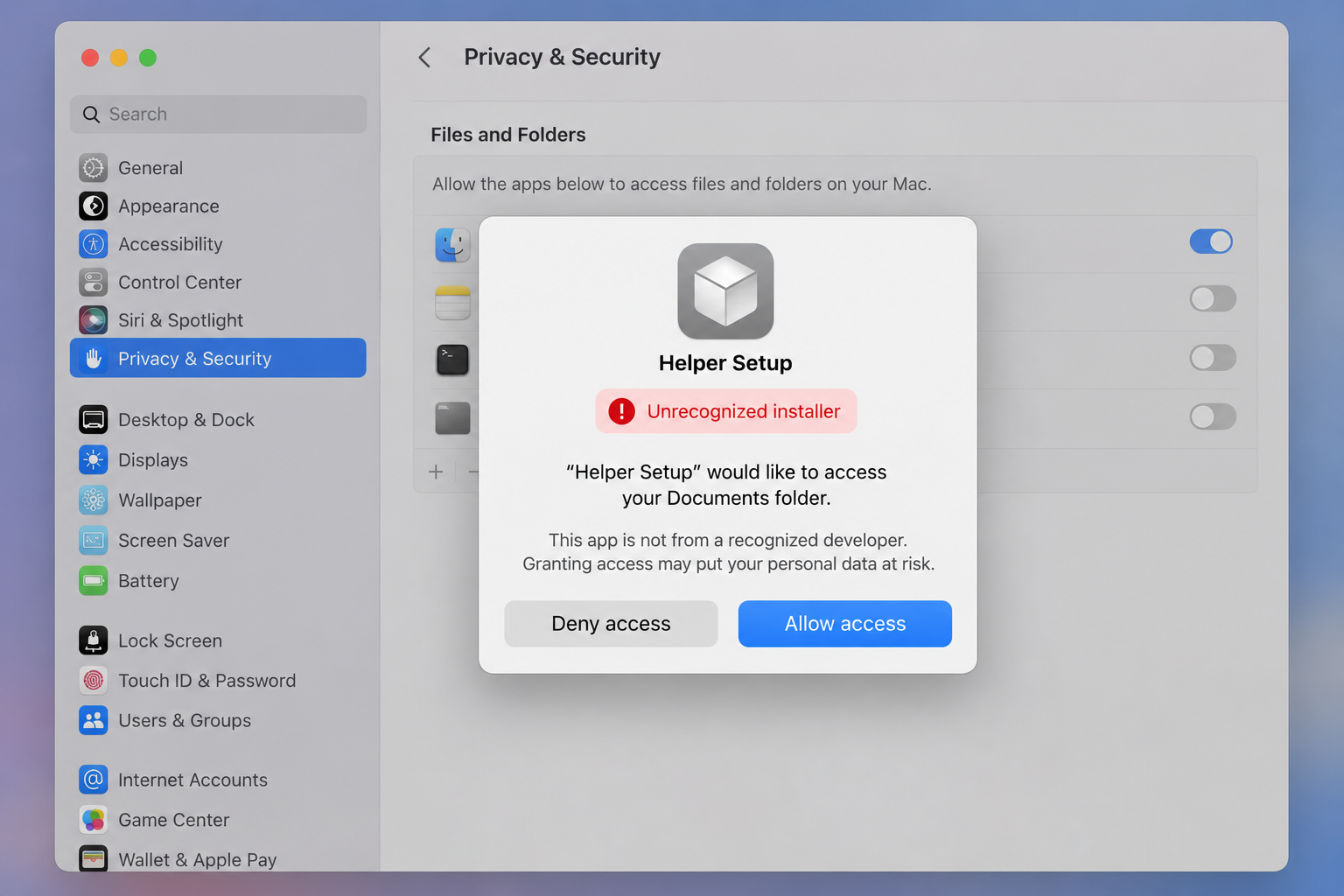
Huntress reported that its MacSync sample sought Full Disk Access and later screen-recording capability. Those permissions can broaden what a stealer can collect.
Many legitimate apps request permissions too. The difference is context: did you intentionally install this exact app from its official source?
If you cannot identify the requester, deny access and pause the installation. Do not enter your Mac password to satisfy a page you reached through an ad.
Step 6: Reach into wallets and trusted applications
Huntress observed wallet-related components that looked for browser extensions, desktop wallets, and hardware-wallet companion apps on the infected machine.
The attackers tried to exploit trust in those apps, including prompts for recovery phrases. A recovery phrase handed to malware can compromise assets independently of the Mac.
That is a separate emergency from changing an ordinary password. A wallet with an exposed phrase needs a new backup and transfer of affected funds.
The reported sample also used remote-control functionality, so defenders should consider whether files or sessions were accessed after the initial execution.
Do not assume the threat is gone because the fake install window closed. Incident response should address persistence and stolen credentials.
Why a Real Domain Does Not Make User-Generated Instructions Official
Hosting and authorship are different
A service may allow users to publish conversations, files, or mini-apps. The service controls the platform, while individual users control the content they share.
An attacker can place a bad instruction inside a real platform and then advertise the link. The domain is authentic; the claimed authority is not.
Look for official documentation linked from the software company’s own product pages. A shared chat should not outrank those instructions.
The display name “Apple Support” was a claim on the lure, not evidence that Apple reviewed it. Anyone can choose a plausible public name.
A sponsored result is not a safety review
Ads are useful for discovering services, but they are also available to criminals who can pay for clicks. Their placement is commercial, not editorial.
Even if an ad links first to a familiar domain, the next click or command may reach attacker infrastructure. Follow the entire action, not only the first URL.
When a result promises a fast installer, compare it with the current official instructions. An unexpected Terminal shortcut deserves extra caution.
Do not assume search engines catch every malicious ad before it appears. The safest habit is independent navigation for software downloads.
Technical-looking text can hide a simple request
Most people cannot inspect an unfamiliar shell command on sight. Attackers exploit that gap by calling it a helper, update, or verification step.
You do not need to decode every line to make the safe decision. If the source is unverified, do not run the command.
Some malicious instructions use encoded or compressed text, which makes them harder to understand. Obfuscation is not automatically malicious, but it demands more scrutiny.
For a personal installation, use a trusted official guide. For a work Mac, ask your IT team before running a command from a search result.
Safe Ways to Find the Actual Install Instructions
Start at the software provider’s main website, not at a sponsored search result. Navigate to its documentation or downloads from there.
Check whether you need a desktop app, a browser service, or a developer tool. Similar names can lead to different installation processes.
If the official guide includes a Terminal command, compare it character by character with the source page. Do not copy a modified version from a shared conversation.
Use a password manager or bookmarks to return to a known site. A saved official address reduces the temptation to trust the first search placement.
Before launching any installer, look at the file publisher and download location. A familiar filename alone is easy to imitate.
When macOS asks for unusual permissions, ask why the app needs them for the task at hand. An installer should not require access to a wallet’s recovery phrase.
For company devices, follow approved software distribution. Security teams can inspect a package or command before it reaches more employees.
If a setup guide is publicly editable or shareable, treat it as a suggestion until you verify its author and source. A real host does not make it official.
What to Do If You Ran the Fake Claude Install Command
- Stop using the Mac for sensitive activity. Disconnect it from the network if you suspect active malware, and tell your organization’s security team immediately if it is a work device.
- Preserve the lure. Save the search result, shared conversation address, command text for your private incident report, and the time you ran it. Do not repost the command.
- Get the system examined. Run a reputable Malwarebytes scan for Mac and follow professional guidance. MacSync’s staged behavior may require more than deleting one download.
- Change credentials from a clean device. Prioritize email, password manager, cloud, banking, and developer accounts. Sign out other sessions and rotate exposed SSH or API keys.
- Review wallet exposure. If a recovery phrase was entered into a suspicious prompt, create a fresh wallet using a trusted device and move affected funds.
- Check permissions and persistence. Have a qualified responder inspect Full Disk Access, Screen Recording, login items, and unexpected background components.
- Monitor accounts after cleanup. Look for unusual sign-ins, new forwarding rules, wallet transactions, and cloud activity that occurred after the command ran.
- Report the malicious ad and page. Send the details to the search provider and platform using their reporting channels, without sharing secrets publicly.
AdGuard can help filter malicious search ads in the future, but it cannot remove a stealer that already ran. Device containment and credential rotation come first.
If you only opened the shared conversation and did not run the command, the reported infection path was not completed. Close the page and report the lure.
If you pasted the command but stopped before pressing Return, clear it without executing. Tell IT if this happened on a managed computer.
A clean reinstall may be appropriate after confirmed remote-access malware, depending on the responder’s findings. Avoid a hasty self-cleanup that destroys evidence.
Frequently Asked Questions
Was Claude itself distributing MacSync malware?
The reported lure used a user-shared conversation on the legitimate site. Huntress attributed the malicious instructions to the attacker, not the AI provider.
Why did the page say Apple Support?
The attacker chose that display name to borrow Apple’s authority. A public display name does not prove employment or approval.
Is every Terminal installation command dangerous?
No. Official developer tools may use Terminal legitimately. The risk is executing an unverified command from an ad or public chat.
What can MacSync steal?
Huntress reported theft of browser data, passwords, keychain material, messaging sessions, and keys, plus wallet-targeting and remote-control components in its sample.
Am I infected if I only viewed the conversation?
Not through the command-based path Huntress described. Infection required further action, especially running the supplied Terminal command.
How is this different from fake Claude Desktop installers?
The fake Desktop campaign used a downloaded executable. This case used a shared AI conversation to persuade Mac users to run a command.
The Bottom Line
The convincing part of this scam was not a crude fake website. It was a real shared AI page carrying instructions the platform had not certified.
Find installation guidance through the provider’s official documentation, and never run a search-ad command without verification. If you already did, contain the Mac and secure accounts promptly.








