

Open Enrollment can turn an ordinary web search into a high-stakes decision. One result promises quick answers, while another looks nearly identical to a government page.
The difference may be a tiny label or a few letters in the address. Take a breath before giving either site your details.
Overview
Why this search is a tempting target
During Open Enrollment, people search for Medicare and Marketplace coverage while comparing prices, benefits, and deadlines. That urgency gives dishonest advertisers an opening.
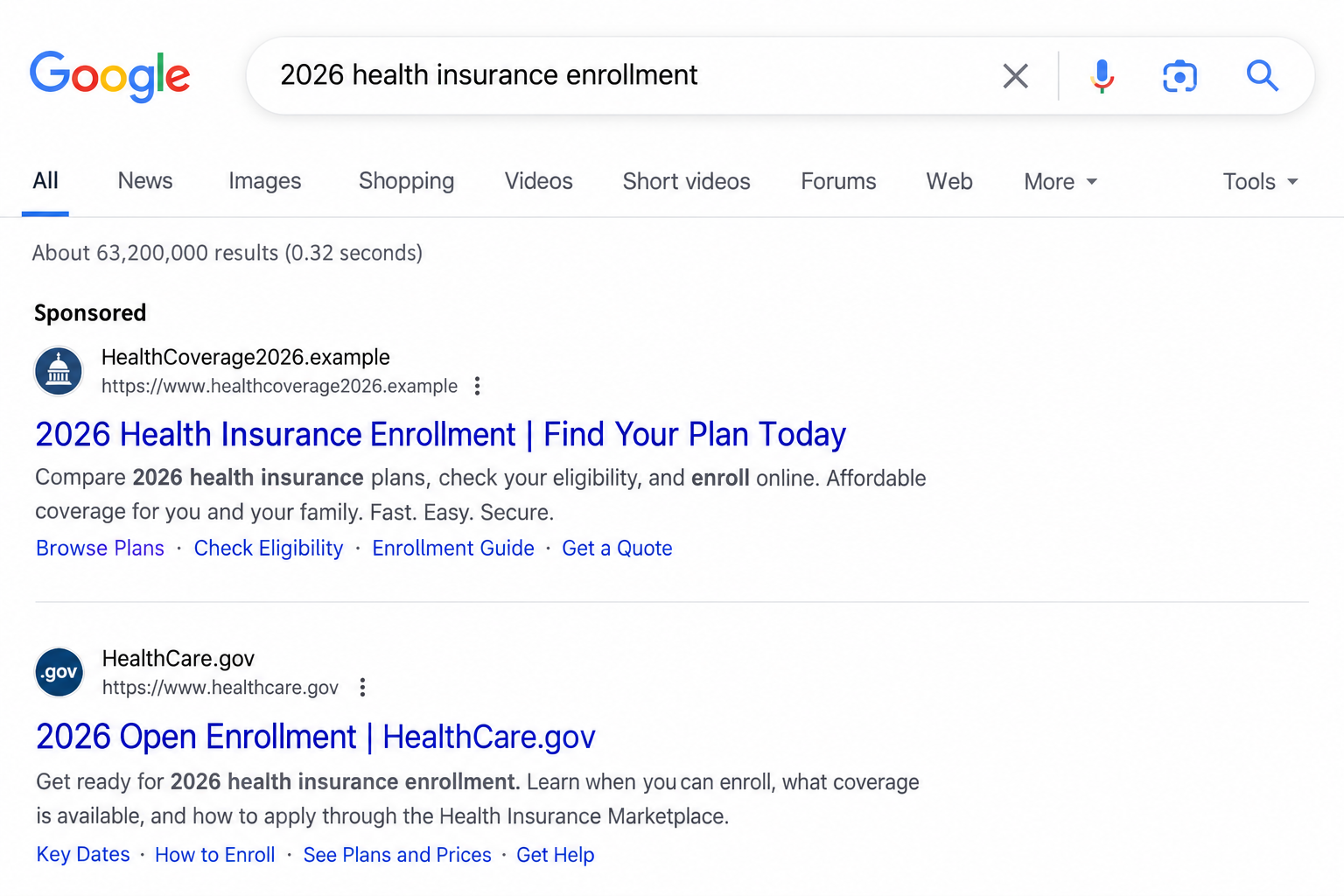
The Federal Trade Commission warned in September 2026 that scammers and deceptive businesses can pay to appear near the top of search results.
Some use addresses and official-looking logos that resemble HealthCare.gov or Medicare.gov. A visitor may end up with a misleading product or expose sensitive information.
This is not a claim that every paid health insurance ad is fraudulent. The risk is an impostor or confusing seller borrowing government credibility.
What may be offered instead of real coverage
A deceptive page may invite visitors to check eligibility, compare plans, or request savings. The form can collect phone, health, and personal details before explaining the seller.
In some cases, the offer is a medical discount arrangement or limited-benefit product rather than the comprehensive insurance a shopper thought they were buying.
Other pages simply collect leads for follow-up calls. A call center agent can then pressure the shopper to enroll before they have reviewed coverage terms.
The outcome varies by seller. Do not assume every visitor is charged, but do not provide sensitive information merely because a search result looks official.
The fastest independent check
Look at the actual website address and confirm the program through a source you opened yourself. Government-style colors and a sponsored position are not proof.
- For Marketplace plans, start at HealthCare.gov.
- For Medicare, begin at Medicare.gov.
- Notice the small “Sponsored” or “Ad” label above paid results.
- Read what the product covers before providing payment details.
A result’s ad label and destination reveal more than its headline. An unofficial domain should prompt a pause before personal information is submitted.
How the Open Enrollment Search Ad Scam Works
Step 1: Wait for shoppers to search a familiar program name
Someone looking for a plan may type “Medicare enrollment” or “health insurance Marketplace” into a search engine instead of entering an address directly.
That is understandable. The enrollment process involves unfamiliar terms, changing circumstances, and questions about which site handles which plan.
A dishonest advertiser can target those exact search phrases. The resulting ad appears in the context of a legitimate information search.
The FTC specifically warns that bad actors use program keywords and official-looking logos. The user’s own search makes the ad feel relevant.
Relevance is not endorsement. Search engines display paid placements for many advertisers, and the top position may reflect an auction rather than authority.
Step 2: Make the ad resemble an official answer
A listing may mention enrollment, subsidies, or plan comparison. Its wording can be close enough to an official notice to catch a hurried reader.
The website address may also contain words such as health, gov, benefits, or marketplace. Those words do not convert an ordinary domain into a government service.
A .gov ending is a useful signal for U.S. federal websites, but read the complete address. A deceptive page can display “.gov” in its title or subdomain.
A paid listing can appear above a government result. The wrong click does not require a dramatic pop-up or obvious typo.
The “Sponsored” label is often small. On a mobile screen, it may be visible for only a moment before the user taps.
Step 3: Present a reassuring enrollment page
The landing page may show family imagery, government-like colors, or a simple form asking for a ZIP code. That first question seems harmless.
As the visitor continues, the site may ask for phone, email, date of birth, insurance status, or financial details. Each answer makes the next step feel routine.
The page may have a footer disclosure stating it is not affiliated with the government. That disclosure does not erase a misleading overall impression.
A small disclosure in a footer can contradict the page’s official-looking headline. Read the whole site before entering details or agreeing to a call.
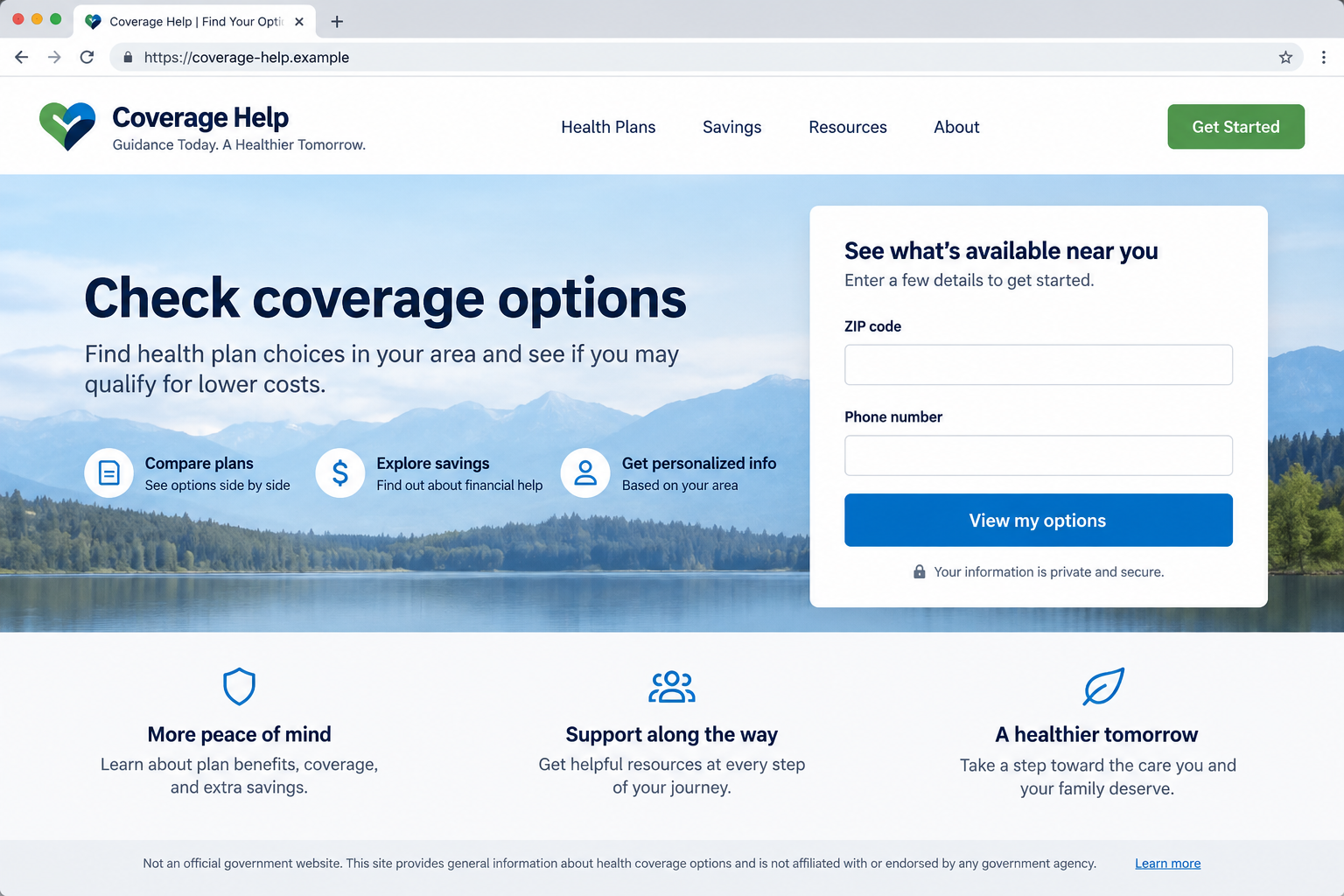
A polished form is easy to create. The hard question is who receives your data and what product, if any, they are offering.
Do not assume a page is safe because it uses a secure connection. Encryption protects data in transit to the operator, whether that operator is trustworthy or not.
Close the page if the identity of the organization remains unclear. Find the real program yourself before returning to any commercial comparison service.
Step 4: Convert the lead into a sales conversation
Once a phone number is submitted, the shopper may receive calls or texts. The caller may claim to be a licensed agent, enrollment specialist, or government partner.
Some agents may be legitimate brokers. Others may misstate affiliation, hide limitations, or rush someone toward a plan that does not match their needs.
Ask for the company’s legal name, the insurer’s name, plan documents, and the license information relevant to your state. Verify those details independently.
Do not accept “the enrollment window closes today” without checking the official schedule. Artificial urgency can prevent comparison of deductibles, networks, and exclusions.
A salesperson’s confidence is not a substitute for a policy document. If the coverage is unclear, pause before sharing a payment method.
Step 5: Charge for a plan or gather identity information
The FTC warns that visitors to deceptive ads may pay for a plan that is not health insurance. They may also face medical identity theft.
That can mean a payment to a seller, disclosure of a Medicare number, or both. The exact request depends on the site and the follow-up call.
A Medicare number deserves the same care as other sensitive identifiers. Do not give it to a cold caller claiming to “confirm eligibility.”
Before paying, ask what services the plan covers, which providers accept it, what is excluded, and when coverage begins. Get the written answer.
If the seller refuses to provide documents until after payment, that is a practical reason to stop. Genuine coverage can be reviewed before enrollment.
Step 6: Leave the shopper thinking enrollment is complete
The most damaging misunderstanding is believing you now have coverage when you do not. A receipt for a membership or discount card may not be an insurance policy.
Check for an insurer name, policy number, effective date, summary of benefits, and access to the insurer’s official member portal.
Verify those details with the insurer using contact information found independently. Do not use only the number printed on a suspect landing page.
If the seller submitted an application without your understanding, correct the record quickly. An enrollment error can affect later choices and medical bills.
This is why the article focuses on the search-to-enrollment journey, not merely on spotting a fake logo. The real harm may become visible much later.
How to Tell an Official Enrollment Site From an Advertiser
Start with the full address
HealthCare.gov is the federal Marketplace starting point. Medicare.gov is the official Medicare site. Enter those addresses directly or use a trusted bookmark.
A search result titled “official health plans” can still lead to a commercial domain. The text under the title is marketing copy, not an agency credential.
Look for unusual prefixes and extra words. “medicare.gov.example” is not Medicare.gov, because its actual domain ends in .example.
Do not rely on the padlock icon. It confirms an encrypted connection, not an honest seller or a government relationship.
Recognize legitimate help without assuming affiliation
There are licensed brokers and navigators who can help people compare plans. The issue is whether they clearly identify themselves and the product they represent.
A seller should explain whether it represents multiple insurers, one insurer, or a non-insurance membership. That distinction affects what choices you are shown.
The FTC points shoppers to State Health Insurance Assistance Programs for Medicare help and to HealthCare.gov’s Find Local Help for Marketplace assistance.
Those routes let you choose a helper after checking the source. They are safer than returning a call from an unfamiliar advertisement.
Read the benefit details before deciding
Monthly price is only one part of a health plan. Deductibles, out-of-pocket limits, prescriptions, provider networks, and exclusions all affect its value.
Discount arrangements may reduce certain prices without paying claims like comprehensive insurance. They can be marketed with language that sounds similar.
Ask the seller to identify the insurance company underwriting the product. If there is none, do not assume the offer is regulated health coverage.
Keep written copies of everything you were shown. A screenshot of the ad can matter if the later documents tell a different story.
Check whether the doctor you rely on is actually in the network, not merely listed in an advertisement. Provider directories can change.
For prescriptions, compare the plan’s formulary and pharmacy rules. A low monthly premium may conceal substantial costs for regular medication.
Questions to Ask Before Entering a Health Plan Form
Who runs this site, and where is its legal business name displayed? A brand slogan is not enough to identify the company collecting your information.
Is the page an official government enrollment service, an insurer, a broker, or a lead generator? Each role has a different purpose.
Will submitting this form enroll me, or only authorize someone to call me? Read the consent language near the button, especially on mobile.
Which specific plans are being compared? A page that offers “all plans” may in fact present only participating sellers.
What happens to my phone number and health information? Check the privacy notice before you send either into an unfamiliar system.
Can I find the same plan through the official Marketplace or Medicare route? If so, compare there before committing.
Will I receive written policy documents before paying? An answer that depends on paying first is a warning sign.
If a caller refuses these basic questions, end the conversation. You can restart the search from an official website with no penalty for pausing.
What to Do If You Used a Misleading Enrollment Ad
- Identify what you actually submitted. Note the website address, date, form fields, any documents uploaded, and whether you gave a payment method or Medicare number.
- Confirm coverage independently. Contact the named insurer through its official site. Ask whether a policy exists, what it covers, and its effective date.
- Contact your bank or card issuer if charged. Explain that the offer may have been misrepresented. Ask about stopping future charges and disputing eligible payments.
- Protect exposed medical identifiers. If you shared a Medicare number, contact Medicare through Medicare.gov or 800-633-4227 for guidance about suspicious activity.
- Review your information. Watch explanations of benefits, claims, mail, and account notices for services or enrollments you did not authorize.
- Report the seller. The FTC accepts reports at ReportFraud.ftc.gov. Your state attorney general and insurance regulator may also help investigate.
- Restart from an official source. Visit HealthCare.gov or Medicare.gov directly, and ask a verified counselor about deadlines and available coverage.
If you merely viewed the ad and left without submitting data, you probably do not need identity recovery steps. Close the page and continue through the official site.
If a downloaded file or unexpected browser extension appeared, run a reputable Malwarebytes scan. AdGuard may help block deceptive ads later, but cannot undo submitted data.
Keep copies of the ad, landing page, emails, and receipts before they disappear. Those records help explain exactly what was promised.
Do not assume every unwanted call afterward came from the same seller. Treat new callers independently and refuse to verify sensitive details on inbound calls.
Frequently Asked Questions
Are all sponsored health insurance results scams?
No. Paid placement is a reason to check the destination and seller, not proof of fraud. The FTC warns specifically about impostors and misleading offers.
Is a .com health plan site automatically fake?
No. Private insurers and licensed brokers use commercial domains. The danger is a site pretending to be an official government enrollment service.
Where should I start for Marketplace coverage?
Visit HealthCare.gov directly. It provides plan comparison, eligibility information, and a route to local help without relying on an unfamiliar ad.
Where should I check Medicare information?
Use Medicare.gov or the official Medicare phone number, 800-633-4227. Do not rely on a number inside an advertisement claiming government affiliation.
What if I bought a discount plan by mistake?
Read the agreement, contact the seller and your payment provider, and compare the product with real coverage. Report any misleading claims to regulators.
Can entering my ZIP code alone cause identity theft?
A ZIP code alone is generally limited information. The risk grows when the form collects phone, date of birth, Medicare number, payment, or medical details.
The Bottom Line
An Open Enrollment search can place an official-looking advertisement ahead of the actual program. Check the domain and seller before trusting the form.
Use HealthCare.gov or Medicare.gov as your starting point, and verify any commercial offer in writing. A careful comparison now can prevent a painful coverage surprise later.

Join the discussion
0 commentsShare your experience or ask a question about this article.
Discussion
Start the conversation
Have a question or something useful to share? Add the first comment.