

The offer sounds unusually simple: receive a work laptop, keep it connected, and collect a monthly payment. Someone else will handle the actual work.
Before you agree, look closely at what they want attached to that arrangement. The laptop hosting scam can reach much further than your spare desk.
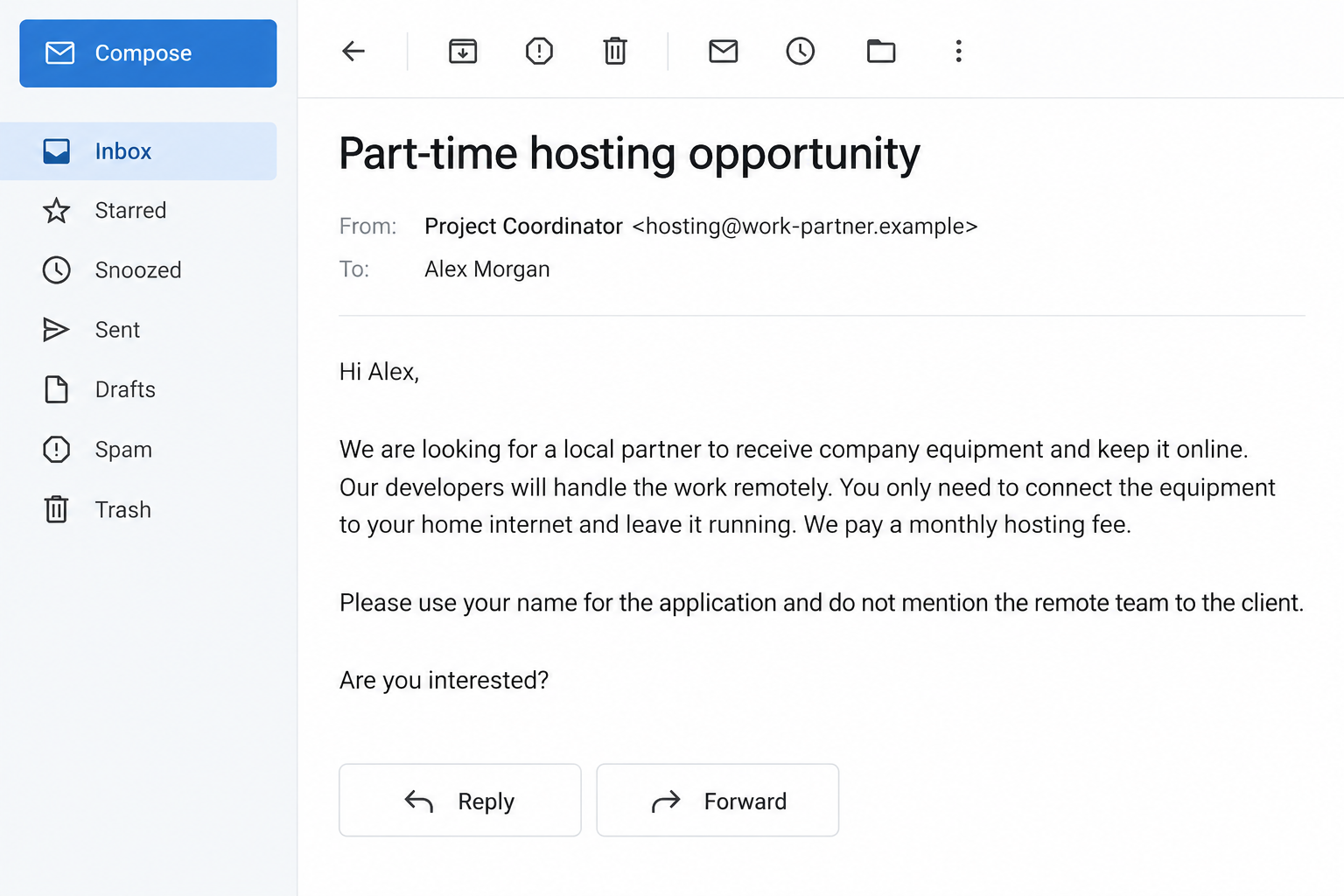
Overview
The host supplies a location, an identity, or both
In this fraud, a recruiter asks someone to receive employer equipment or lend a job account while another person secretly performs the work.
The employer believes it hired the named applicant under agreed conditions. The arrangement conceals who actually uses its systems, where they work, or both.
The host may be offered money for accepting deliveries, maintaining an internet connection, attending an interview, or allowing a professional profile to be used.
Those are not interchangeable requests. Giving someone your identity introduces risks beyond receiving a package, while unauthorized access can expose an employer’s confidential information.
Authorities have documented the scheme, not just complaints
An FBI advisory describes facilitators who host equipment and help conceal remote workers through identities, accounts, and access arrangements.
In April 2026, the Justice Department announced sentences in a scheme involving more than 100 companies and at least 80 stolen identities.
These cases establish a real fraud mechanism. They do not establish that every questionable recruitment message belongs to the same group or country.
A recruiter using similar language requires verification, not an invented attribution. The relevant question is whether the employer knowingly authorized the actual worker and access.
The strongest warning is a request to hide the arrangement
Pause if the proposed role includes any of the following:
- Apply under your name for work someone else will perform.
- Keep employer equipment online for an undisclosed third party.
- Let a stranger control a work account or complete identity checks as you.
- Receive wages and forward an agreed share elsewhere.
- Tell the employer you are doing work that you are not doing.
- Avoid contacting the company that owns the equipment.
Remote employment, international collaboration, and approved subcontracting are legitimate. Deception about identity and authorization is what makes this scheme different.
The interface examples in this article are fictional illustrations. They show the requests to question, not an intercepted conversation or evidence about a particular recruiter.
Why a Small Hosting Payment Can Conceal a Much Larger Risk
The pitch describes your contribution as almost nothing. Electricity, an internet connection, and occasional help sound like ordinary expenses rather than a job with serious responsibilities.
That framing leaves out the most important party: the company whose equipment, payroll, and internal systems are being used.
A recruiter can promise that everything is approved. Unless the actual employer confirms that through its own channels, you only have the recruiter’s assurance.
The offer may also arrive through someone you know. A friend passing along an opportunity can be sincerely mistaken about what the arrangement involves.
Referral payments create another reason to recruit quickly. Before recommending it to anyone else, establish what those people would be asked to receive, sign, or conceal.
Do not let the modest payment distract you. An activity does not become harmless because the person helping with it receives only a small share.
How the Laptop Hosting Scam Works
Step 1: A recruiter offers easy income for a minor favor
The opening may describe a developer partnership, account rental, equipment hosting, or administrative support. The labels can differ while the underlying request stays similar.
Ask what work you personally would perform. An answer centered on your identity, address, or account access deserves much more scrutiny than an ordinary job description.
A genuine employment process should identify the employer, responsibilities, and authorized contacts. A private chat promising future explanations is not a substitute.
You do not need to supply identity documents just to learn who would employ you. Request the basic information before completing any verification.
Step 2: Your name or address becomes part of the cover
The organizer may want an applicant profile, a delivery address, or help passing an interview. In documented schemes, identities and local facilitators supported false employment arrangements.
Someone else’s technical ability does not make it acceptable to present their work under your identity without the client’s knowledge.
Similarly, receiving a company package does not prove the company approved you as a host. Equipment can be sent under a misleading application.
Keep a distinction between what the recruiter claims and what the employer has confirmed directly. They are not independent sources if one controls both conversations.
Step 3: Employer equipment is made available to another person
The host is instructed to keep the equipment connected or allow remote control. The actual worker then uses an access path the employer may not understand.
Remote-support software has legitimate purposes. Here, the concern is using access tools to conceal an unauthorized operator, not the mere presence of an application.
Do not install additional software on a company device at a stranger’s request. Ask the company’s IT team whether the instruction is approved.
If the recruiter insists that asking would jeopardize the arrangement, that is a reason to stop, not a reason to remain quiet.
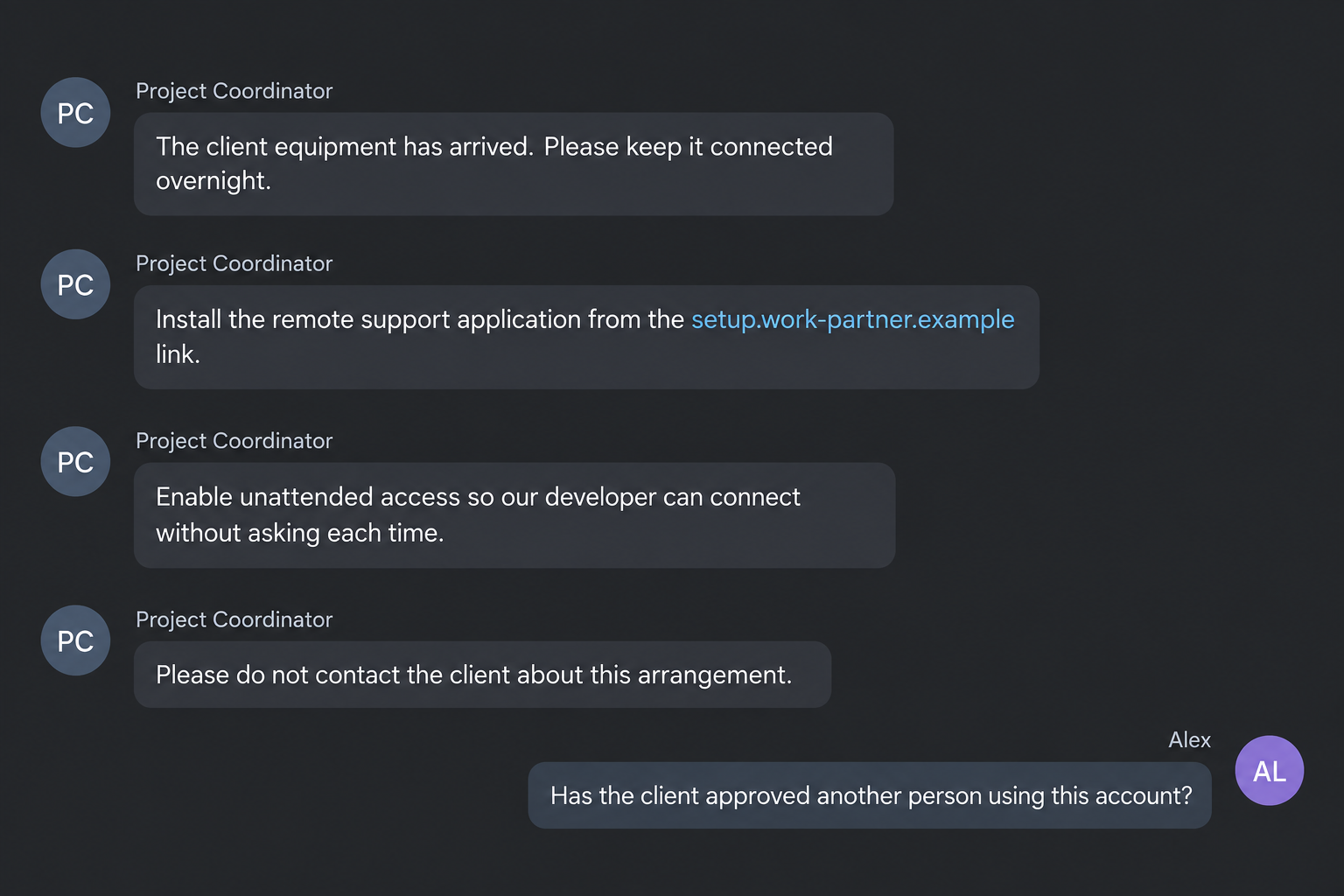
Step 4: The host is asked to maintain the story
Once the arrangement starts, small follow-up requests can become more consequential. A message may ask you to answer a call, confirm a location, or approve access.
Consider the statement each action would make to the employer. Are you confirming something true, or helping another person appear to be you?
Payment handling adds another layer. If money arrives under your name, forwarding it does not erase the record connecting you with that income.
The Justice Department’s February 2026 laptop-farm case describes proxy identities and income falsely attributed to people whose identities were misused.
Step 5: The employer discovers an unauthorized worker or connection
Discovery can leave several people dealing with different problems. The employer must investigate access, while an identity victim may need to correct records.
A person who knowingly facilitated deception may also face legal consequences. Participation is not automatically excused because the recruiter described it as passive income.
At the same time, receiving a suspicious offer does not make you a criminal. What happened, what you knew, and what you actually did matter.
If you already participated, stop following the organizer’s instructions and obtain independent help. Do not invent explanations, erase messages, or quietly forward equipment elsewhere.
Questions an Honest Arrangement Should Survive
Start with the company receiving the work. Find it independently, then ask its verified hiring or security contact to confirm the proposed setup.
Explain the arrangement plainly. Say who will perform the work, who will hold the equipment, and whose name will appear on accounts and paperwork.
If describing the deal accurately makes the recruiter uncomfortable, you have learned something useful. Approval cannot depend on withholding the central facts.
Ask whether the company permits third-party hosting and subcontracting for that specific role. General statements about remote work do not answer either question.
Confirm the recruiter through a contact you found outside their messages. A copied employee biography or a realistic company page is not enough.
Check who owns any equipment before accepting responsibility for it. Get return instructions from the verified owner, not solely from the person arranging the shipment.
A contract deserves the same scrutiny. A signed agreement with an intermediary cannot authorize access to another company’s systems without that company’s permission.
Do not sign a false description of your duties because someone calls it a formality. Keep a copy of anything you already signed for independent review.
What This Warning Does Not Mean
If equipment unexpectedly arrives, leave it disconnected while you establish its owner. Photograph the shipping label for your records without sharing the address publicly.
A courier delivery confirms only that a parcel reached you. It does not verify the applicant’s identity or the employer’s understanding of the arrangement.
Do not use the device to contact support through an account the recruiter configured. Find the company independently on a separate device.
If the recruiter asks you to reship it immediately, verify that instruction with the owner first. Keep the original packaging and tracking details in the meantime.
These precautions protect legitimate equipment as well as potential evidence. They also avoid creating network access while you are still working out what happened.
You should not have to choose between opening a stranger’s remote session and losing a promised payment. Authorization comes before either decision.
An overseas colleague is not a warning sign by themselves. Neither is an accent, a particular nationality, a remote interview, or a distributed team.
Many organizations knowingly employ people across countries and authorize contractors to work together. Their arrangements identify the participants and establish permitted access.
Likewise, a genuine technical support session can involve remote control. The authorized owner understands who is connecting and why.
The fraud described here depends on a mismatch between the real arrangement and what the employer was led to believe.
Focus on that mismatch rather than trying to identify criminals by appearance. Verification should be consistent, relevant to the role, and respectful of legitimate applicants.
For employers, a concern should go to the appropriate security and hiring teams. Avoid public accusations based on one unusual interview or delivery address.
For applicants, being asked to impersonate someone is enough to decline. You do not have to prove which network is behind the request.
Finally, a clean malware scan does not validate employment. Software can function normally while the person using it lacks authorization.
What to Do if You Have Fallen Victim to This Scam
- Stop facilitating access or recruiting other hosts.
Do not accept additional devices, create more accounts, or approve new sessions. If you invited friends, tell them to pause while the arrangement is verified.
Avoid confronting the recruiter with accusations. Preserve the messages and stop taking operational instructions from them.
- Notify the verified owner of company equipment.
Contact the employer’s security or IT team using independently obtained details. Explain where the device is and what access you permitted.
If an unauthorized session is active, disconnect the device from the network if you can do so safely. Leave investigation and recovery to authorized personnel.
- Preserve equipment and records without investigating it yourself.
Do not wipe the device, browse company files, or install cleanup tools on employer-owned hardware. Those actions can damage evidence or create further unauthorized access.
Keep shipping labels, tracking records, contracts, chat exports, and payment references. Return equipment only through a process confirmed with its genuine owner.
- Secure personal accounts from a separate trusted device.
If you shared your email, job-profile, or financial login, change the password and review recovery details. Revoke unfamiliar sessions with the service’s support.
If identity documents were disclosed, use the relevant official identity-theft reporting service. Keep records of any employment or financial activity you do not recognize.
- Explain suspicious money movements to your bank.
Tell the bank what the recruiter asked you to receive or forward. Do not move remaining funds simply because the organizer demands an immediate refund.
Ask how to preserve the transaction trail and handle disputed funds. A transfer back to a new account could create another loss.
- Get independent legal or tax help where needed.
If work or income appeared under your identity, a qualified professional can help assess the records. Do not assume the recruiter’s reimbursement promise resolves your position.
Someone already involved in a deceptive arrangement should obtain legal advice about their own circumstances. This article cannot determine individual liability.
- Report the recruitment and address personal-device exposure.
For a US connection, report relevant details through the FBI’s official channels or IC3. Include identities used, employer names, account addresses, and the timeline.
On your own device, Malwarebytes can help check unwanted software after a suspicious installation. Coordinate company-device checks with the employer instead.
AdGuard may reduce exposure to malicious ads leading to fake recruitment sites. It cannot authorize a remote worker, clear an identity record, or validate a contract.
If you only received the offer, keep a record and report the account. There is no need to assume your identity was stolen without further evidence.
If someone threatens you for leaving, preserve the threat and seek appropriate local assistance. You do not owe continued access because a recruiter claims inconvenience.
Frequently Asked Questions
Is getting paid to host a laptop always illegal?
No. An authorized arrangement can be legitimate. This warning concerns concealed workers, false identities, and access the actual employer did not knowingly approve.
Can I rent out my job profile if I never touch the work?
Letting another person present themselves as you can mislead employers and expose your identity. Do not agree without transparent authorization from the affected service and employer.
Does an actual company laptop prove the recruiter is genuine?
No. Documented schemes obtained genuine employer equipment through deceptive hiring. Verify the proposed host and worker directly with the company’s authorized team.
Should I uninstall the remote-access software immediately?
On employer equipment, contact its security team first and contain active unauthorized access safely. Uninstalling or wiping may interfere with evidence and the company’s response.
Are these offers always connected to North Korea?
No attribution can be made from the pitch alone. Authorities have confirmed specific cases, but similar wording does not identify an unknown sender.
What if the recruiter already paid me?
Keep the transaction records and seek bank or legal guidance before moving disputed money. Payment does not establish that the employment arrangement was authorized.
The Bottom Line
The laptop hosting scam sells a small favor while concealing who uses an employer’s systems. Your name, address, and access are not harmless extras.
If the deal requires hiding the real worker, stop. Confirm the arrangement with the actual employer before lending your identity or connecting its equipment.








