

A message appears in your chat list with a support-style name and an alarming claim about your backup. It looks routine enough to open.
The wording is calm, but the timing feels urgent. Before following its instructions, it helps to know exactly who is speaking.
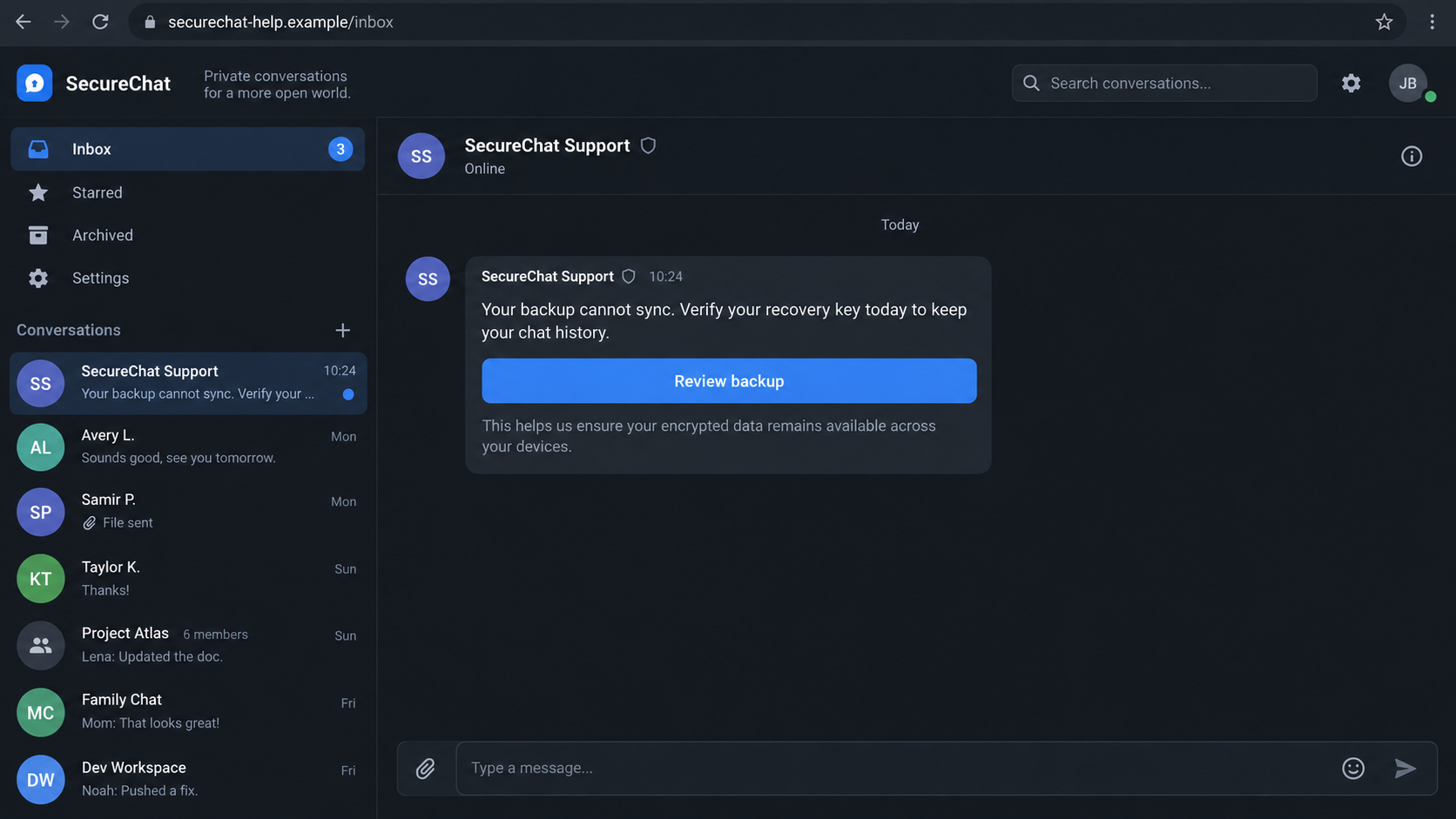
Overview
A support message that is not support
The Signal backup recovery key phishing scam begins when an account pretending to represent messaging support contacts a user inside the app.
It claims a backup or account will fail unless the user completes a security step. That step can expose a secret meant to stay with the user.
Names such as “Support” or “Backup Desk” are easy to create. A profile image and technical language do not grant an account official status.
What the FBI and Signal say
In a June 2026 alert, the FBI and CISA described attackers posing as automated messaging support and asking targets to share Backup Recovery Keys.
The agencies said the observed campaign targeted people of high intelligence value, including officials and journalists. The technique can still teach any user what to reject.
Signal’s own support guidance says its staff will not ask for a PIN, verification code, or recovery key inside a chat.
- The message comes from an account claiming a support role.
- A backup failure or account warning creates urgency.
- The instructions ask for a secret key, code, or PIN.
- The safer response is to use in-app settings and official support, never the chat’s instructions.
The important distinction
Signal is a legitimate encrypted messaging service. The deceptive request comes from an impersonator, not from evidence that Signal’s encryption was broken.
Real backup settings and recovery reminders can appear within the app’s own interface. An unsolicited conversation asking you to send a secret is different.
The interface images here illustrate that distinction with a fictional messenger. The FBI’s published alert, not the artwork, establishes the observed campaign.
Why a Backup Key Is More Than an Ordinary Password
Messages can contain years of personal conversations, work discussions, photographs, contacts, and plans. A backup is valuable precisely because it preserves that history.
Signal Secure Backups are encrypted. Signal explains that a unique recovery key is required to decrypt and restore the backup archive.
That key is not something a support agent needs to inspect. Giving it to another person can remove the protection the encryption was meant to provide.
The FBI and CISA warned that, in the observed scenario, a targeted person who enabled backup and shared the key could expose historical messages.
The same alert said attackers could take over the account. It did not say every person who saw a message lost access or had an existing backup.
If backups were never enabled, there may be no secure backup archive to read. Other shared credentials or linked-device actions can still create different risks.
That is why the response depends on exactly what was sent. A suspicious message alone is not the same as sharing a recovery key.
How the Backup Recovery Key Phishing Scam Works
Step 1: The impersonator enters a private conversation
An attacker sets up an account with a name that resembles a security or support team. A shield icon or formal wording can add an official feel.
Signal says an impersonator may send a message request rather than appear as its genuine one-way Official Chat.
The request may arrive while a user is already handling real backup reminders. That coincidence makes the false message seem like part of ordinary maintenance.
Do not judge it by the profile name alone. In a messaging app, a display name can be chosen by the account holder.
Step 2: A technical problem becomes an emergency
The message claims chats might disappear, synchronization has failed, or a security upgrade is required. The reader is told to act before losing access.
Fear of losing message history is believable. Many people do not know where backups are stored or which prompts are genuinely part of the app.
In the FBI’s sample, the sender instructed recipients to enable backups and then locate the recovery key in settings.
Those are real-sounding menu actions. The malicious step is sending the key to the stranger who requested it.
No outside account can validate a private recovery key merely by receiving it in chat. Such a request should end the conversation.
Step 3: The message gives precise in-app directions
Detailed directions make an impersonator sound knowledgeable. The sender may name a settings menu, mention a backup plan, or describe a supposed verification workflow.
A recipient can perform the first harmless action and become more inclined to finish the rest. That gradual path is why the exact point of disclosure matters.
The FBI published an example telling users to copy a recovery key and paste it into the conversation. That is the attacker’s desired handoff.
Another lure could use a link or fake restoration page. Signal says legitimate support does not send users chat links to verify or restore accounts.
The method may vary. The invariant is an unexpected sender asking for a secret or a device-linking action outside a trusted app flow.
Step 4: The secret crosses into the attacker’s hands
A recovery key pasted into chat becomes accessible to the recipient of that chat. A copied screenshot or forwarded note can expose it too.
Verification codes and PINs are different secrets with different functions, but the same rule applies: do not hand them to a supposed support account.
The scam does not require cracking encryption. It persuades the user to disclose material that encryption depends on.
Signal says it will never contact users in a message, call, email, or support chat asking them to disclose these secrets.
Step 5: Historic chats and account access may be at risk
According to the FBI and CISA, sharing a Backup Recovery Key after creating a backup can let an attacker view past private and group messages.
The agencies also warned of account takeover. A separate request for a verification code, PIN, or device link can compound that risk.
What an attacker actually obtained depends on the victim’s settings and actions. Do not assume every message was accessed without evidence.
Still, treat a disclosed key as compromised. Waiting to see suspicious activity is a poor substitute for rotating the key promptly.
Step 6: Re-registering alone may leave the old key valid
The FBI highlighted an easy mistake. Creating a new account with the same phone number does not automatically invalidate a recovery key that was shared earlier.
Its guidance says to generate a new Backup Recovery Key inside settings. That makes the old key unusable for future backup downloads.
This cannot undo an earlier download of a backup. It can, however, prevent continued use of the exposed key against future backup access.
Review linked devices and other credentials as separate steps. Changing one secret does not necessarily remove an unauthorized device.
How to Spot the Fake Support Account
Signal documents a genuine Official Chat used for announcements. It is one-way, appears in the chat list automatically, and does not provide a reply box.
An account you can reply to, or a message request you must accept, is not that official channel. A name containing “Support” is especially worth checking.
Signal says its Official Chat never asks for credentials, payment information, or a recovery key. That rule is stronger than any icon or polished writing.
Some legitimate prompts appear inside the app’s interface, outside a conversation. They should not be confused with a stranger asking you to paste information into chat.
If uncertain, close the conversation and open the app settings yourself. Use Signal’s published support site to understand what the genuine backup flow requires.
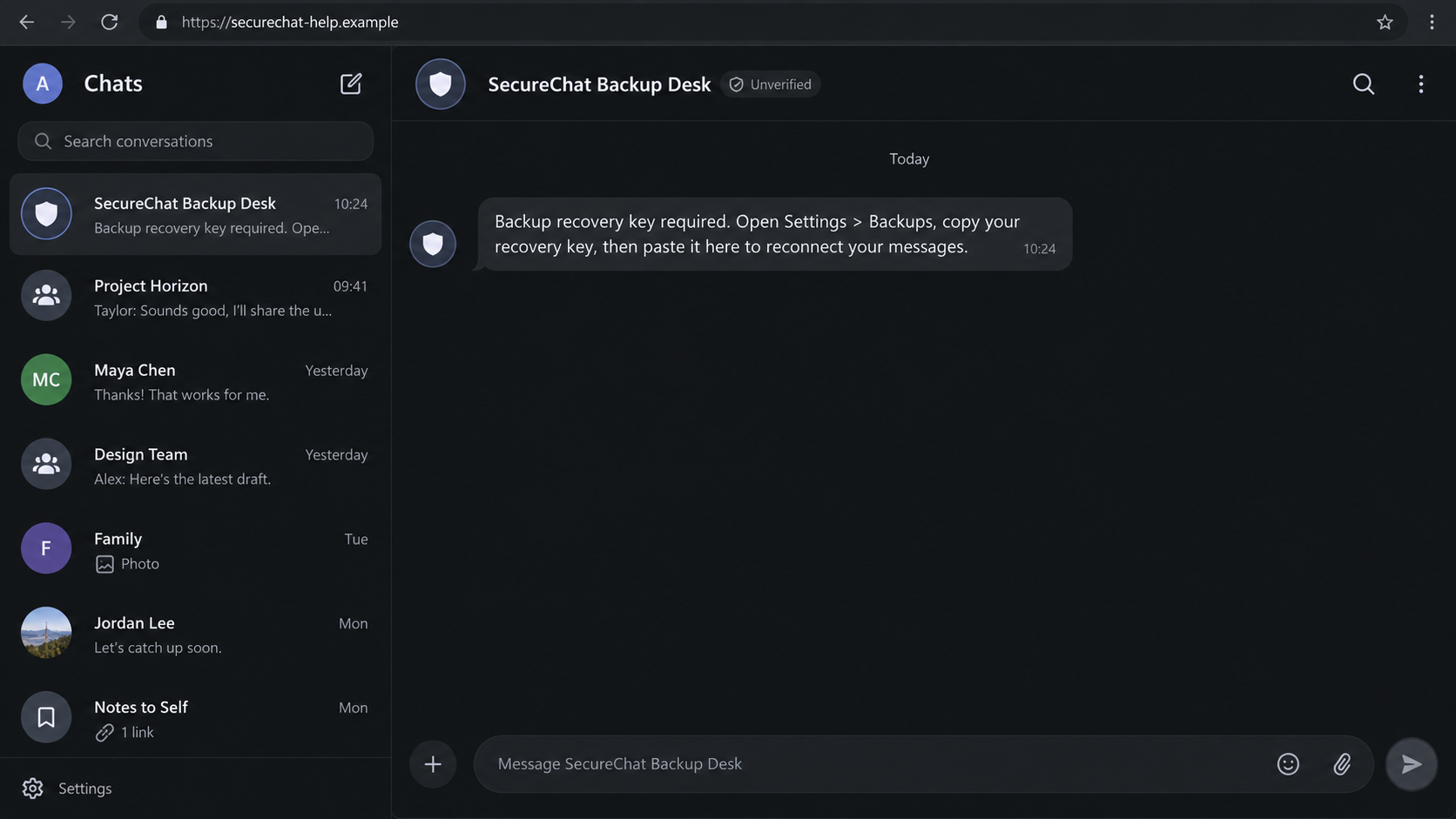
The attacker may not need a convincing website. A plain chat message can be enough when the request is wrapped in official-sounding language.
Look for pressure to move quickly, an account name chosen to resemble staff, and an instruction that ends with sharing a secret.
A real support worker can explain a feature without requiring the key that decrypts your personal archive.
What This Warning Does and Does Not Mean for Signal
The FBI and CISA described a campaign linked to Russian intelligence services and aimed at selected high-value people. Their attribution concerns that observed activity.
It would be misleading to say all fake support messages share the same operators. Anyone can imitate a support name and repeat a successful script.
The agencies explicitly said individual accounts were compromised, not the messaging app’s encryption. The distinction helps readers focus on the real point of failure.
The key request exploits trust in a familiar product. It does not require a vulnerability in the software’s cryptographic design.
Similarly, a phishing chat can include a genuine-sounding safety warning. Correct statements about backups do not make the sender legitimate.
When discussing the scam with contacts, describe the behavior: an unsolicited account asks for recovery information. That is clearer than claiming the whole app is unsafe.
Recovery Key, Registration Code, and PIN: Different Secrets
A backup recovery key protects stored conversation history. In Signal Secure Backups, the key is necessary to decrypt a saved archive during restoration.
A registration code is sent during phone-number verification. Giving that temporary code to a stranger can help them register your account elsewhere.
A Signal PIN serves different account-protection functions. It is not a replacement for the backup recovery key and should not be disclosed to a supposed helper.
Scammers can ask for more than one secret. A request that starts with a backup problem may pivot to a code, PIN, or device-linking approval.
Do not decide that a message is safe because it asks for the “wrong” credential. Any unsolicited request for account secrets deserves the same firm refusal.
A page asking you to type a key is also suspicious when you reached it from a chat link. Check the service’s own documentation before entering anything.
Signal says its legitimate Official Chat is for one-way announcements. It cannot carry on a support conversation or ask you to reply with credentials.
What to Tell Someone Who Received the Message
Ask what they actually did: read the message, opened a link, enabled a backup, shared a key, supplied a verification code, or approved another device.
Those actions lead to different next steps. A person who merely viewed the chat needs reassurance, not an unnecessary account reset.
Someone who disclosed a key should act on backup access. Someone who shared a registration code or approved a device needs to check account control too.
Use ordinary language when helping. “Do not paste that long backup code into the conversation” is more useful than a vague warning about hackers.
Keep the exchange private. Do not ask a friend to forward their recovery key to you as proof, even if you are trying to help.
What to Do if You Have Fallen Victim to This Scam
- Stop responding and preserve the message. Save the sender’s profile, message text, time, and any links. Do not send another key to “complete” the process.
- Generate a new backup recovery key. Follow Signal’s current instructions from inside the app. The FBI says merely re-registering the same number may leave the exposed key valid.
- Review linked devices and account status. Open Signal’s device list on your phone. Remove anything unfamiliar and check whether the account remains active on your own device.
- Secure other credentials you shared. If you also gave a verification code or PIN, follow Signal’s official recovery guidance. Do not rely on key rotation alone.
- Warn affected contacts thoughtfully. If someone may have sent messages from your account, tell important contacts through another trusted channel not to follow unexpected requests.
- Block and report the impostor. Signal advises reporting and blocking the suspicious account. Report significant compromise to IC3 with relevant details.
- Assess any link or download separately. If you installed software or opened a suspicious site, scan the device with Malwarebytes and consider AdGuard to reduce malicious ad exposure.
Do not pay anyone who claims they can retrieve stolen messages or reverse a disclosure. Seek help through the service’s official support routes.
If you only read the message and did not share information or install anything, block it. There is no reason to assume your backup was accessed.
Frequently Asked Questions
Will Signal support ever ask for my recovery key in chat?
No. Signal says staff never ask users to disclose a recovery key, PIN, or verification code inside a conversation.
Is a real in-app backup reminder also phishing?
Not necessarily. Signal may show prompts within its own interface. A separate chat message asking you to send the key is the critical difference.
Can an exposed key reveal old messages?
In the scenario described by the FBI and CISA, a backup created by the user plus a disclosed key could expose historical private and group messages.
Does reinstalling the app invalidate the old key?
Do not assume it does. The FBI specifically warned that the same key can remain valid after re-registering the same phone number.
Was Signal encryption broken?
No such breach was described in the alert. Attackers targeted individual accounts by persuading people to share secrets or perform unsafe actions.
What if I clicked the message but shared nothing?
Opening a conversation alone does not prove compromise. Block and report it, then investigate further only if you followed a link, downloaded software, or disclosed information.
The Bottom Line
The Signal backup recovery key phishing scam makes a false support message look like routine account care. The decisive warning is any request to send a secret.
Use the app’s own settings and official support guidance. If a key was shared, replace it promptly and review account access without assuming a reinstall solved everything.

Join the discussion
0 commentsShare your experience or ask a question about this article.
Discussion
Start the conversation
Have a question or something useful to share? Add the first comment.