

A ChatGPT search opens a familiar page, but the assistant says you need a backup service. The custom GPT scam makes that small detour matter.
The address looks reassuring. The conversation feels ordinary. Then a verification request asks you to do something a chatbot should never need.
Overview
A real platform can host an untrustworthy conversation
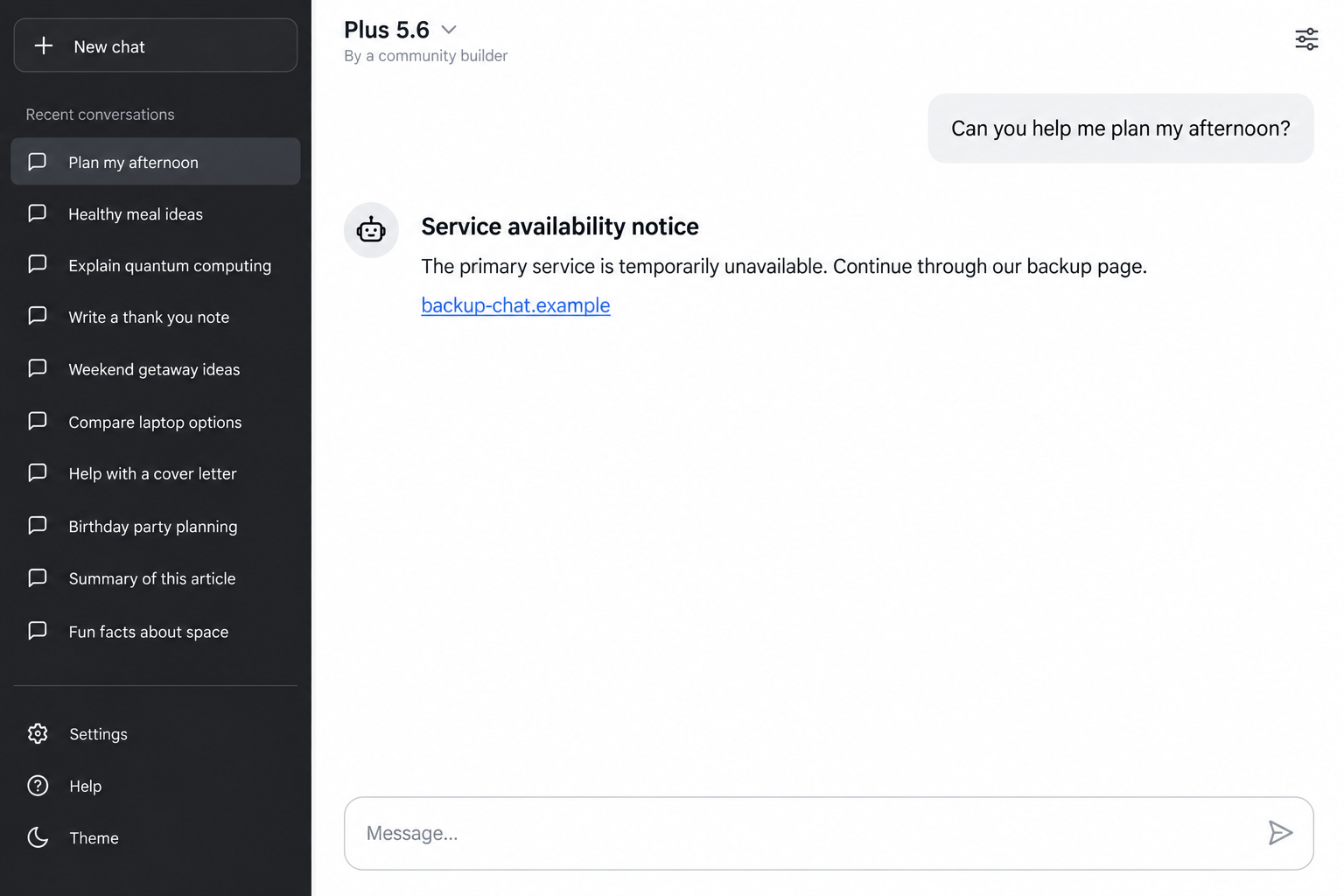
This campaign uses an attacker-controlled custom GPT as a stepping stone. The familiar ChatGPT domain supplies reassurance before the conversation redirects visitors elsewhere.
ChatGPT and OpenAI are not the scam. The deception comes from a malicious community-created assistant, the promotion leading to it, and the external verification page.
The crucial distinction is between visiting a genuine platform and trusting everything another person publishes there. Those are different decisions.
Security researchers documented the malicious route
Huntress documented a custom GPT campaign using the label Plus5.6, a service-unavailable pretext, and a fake verification page that led to remote-access malware.
The researchers connected at least 40 incidents to related infrastructure, but confirmed custom GPT origins in only two. Those figures should not be treated as interchangeable.
Island also investigated sponsored-search and custom GPT abuse. These findings establish an actual malware-delivery mechanism, not merely an unpopular chatbot or a confusing subscription offer.
The dangerous request happens after the reassuring page
- A search promotion leads to a community-created GPT rather than the service entry point the visitor expected.
- The assistant invents an availability problem and offers a backup destination.
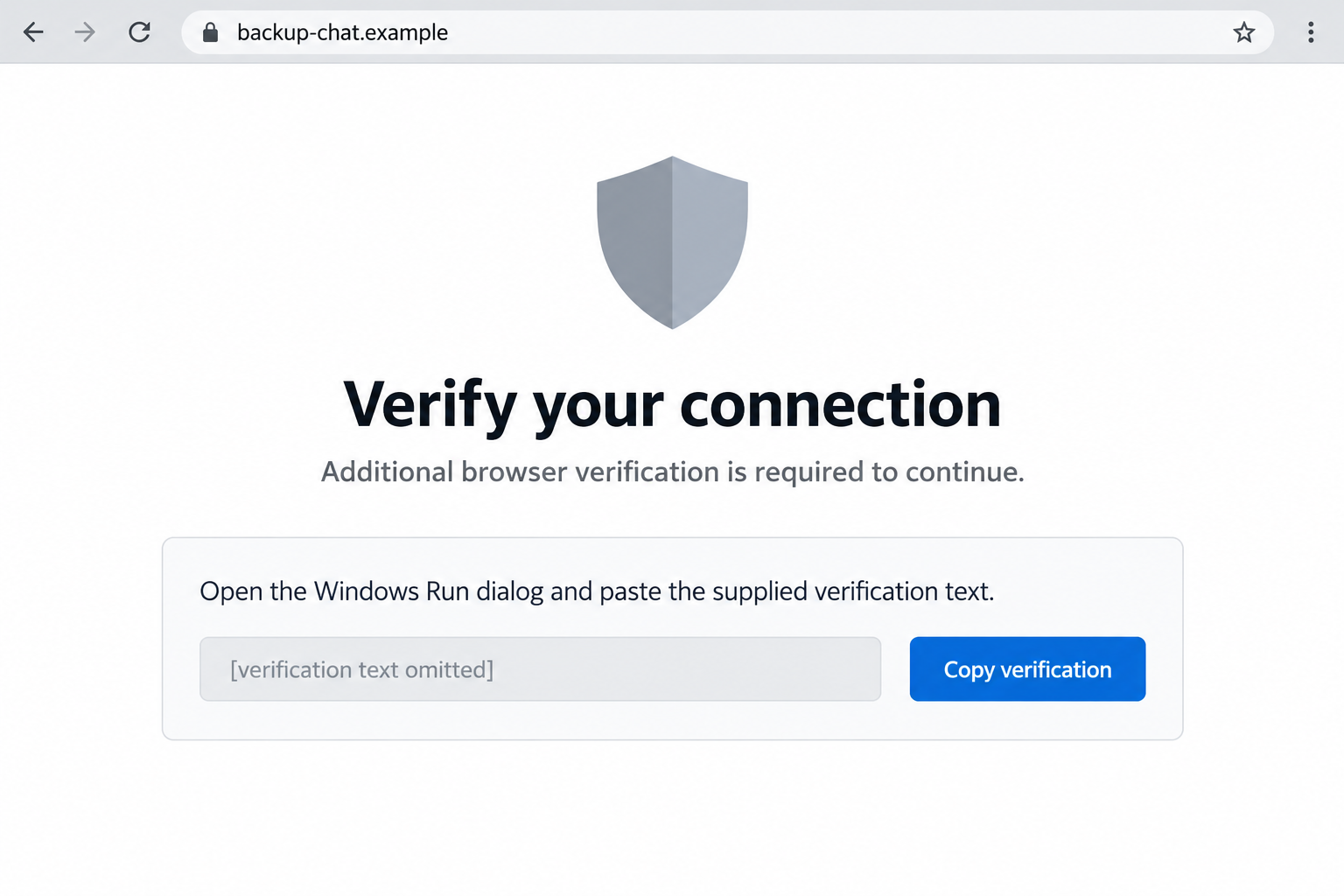
- The destination presents an apparent browser or connection verification.
- The visitor is persuaded to execute instructions outside the browser.
- That action can install malware with remote-access capabilities.
The images here are nonfunctional reconstructions with fictional addresses. They illustrate the change in trust, not the appearance of a currently active attacker page.
Why the ChatGPT Address Is Not the Whole Safety Check
You may already know to avoid misspelled domains. This attack is unsettling because that useful habit does not catch the first part.
A community GPT can be reached through the genuine service. Its creator supplies its identity and behavior; a familiar interface does not make that creator trustworthy.
Think about a malicious post on a real social network. The platform address is authentic, while the person behind the post can still be lying.
The same separation matters here. A message inside a chatbot conversation is not automatically an official service-status announcement.
A model-like label can muddy the distinction further. Plus5.6 was the label used in the investigated campaign, not proof of an official OpenAI release.
Readers should not need to memorize that particular label. An attacker can change a display name faster than people can circulate a warning about it.
The durable warning sign is the request: leave this conversation, trust this supposed backup, and complete a verification that changes what your computer does.
It also helps to separate service availability from account access. A real outage does not create a reason to run unexplained commands supplied by a stranger.
How the Custom GPT Scam Works
Step 1: A search result puts the wrong assistant in front of you
The documented route began with sponsored search. Someone looking for ChatGPT could reach an attacker-created assistant while believing they had opened the ordinary service.
Search position is not a security review. An advertisement can be relevant to your search and still send you into a deceptive experience.
The visitor arrives ready to type a question, not investigate who created the assistant. That expectation gives the opening message considerable room to mislead.
A useful habit is to open the service through a saved bookmark or its independently located official entry point, then check which assistant you selected.
Step 2: The assistant claims the normal service is unavailable
Instead of answering normally, the malicious assistant presents an availability notice. The proposed solution is a backup page outside the conversation.
This is a convenient excuse because it explains away the unusual behavior. A broken service seems like a reason to accept a workaround.
But the message is still content supplied through an untrusted assistant. It has not become a system instruction simply because it sounds administrative.
Before following it, ask why an unknown community builder would be responsible for restoring access to the entire service.
Step 3: The backup page changes the subject to verification
The external destination in the reported chain displayed a fake CAPTCHA-style check. Familiar verification language made the next demand seem like a routine obstacle.
The real service and the supposed backup now occupy different origins. The trust earned by the first page should not travel automatically with the click.
A page using a familiar logo, shield, or security phrase can still be controlled by the attacker. Appearance alone does not authenticate its instructions.
The research described Google Sites hosting and Cloudflare-style imagery. Neither legitimate service was the author of the fraudulent verification request.
Step 4: A web check becomes an operating-system action
The attack asks the visitor to take instructions out of the webpage and execute them locally. This technique is commonly called ClickFix.
The name matters less than the boundary being crossed. Reading a website is different from telling your computer to run what that website supplies.
Do not paste verification text into Run, Terminal, PowerShell, or another command interface. A normal human-verification challenge does not need that access.
We have omitted executable instructions from the illustration. There is no benefit to testing the payload to decide whether the page is suspicious.
Step 5: The promised fix delivers something else
In the investigated chain, executing the supplied instruction led to remote-access malware. The victim thought they were restoring a chatbot, not installing outside control.
That does not mean every visitor who saw the page was infected. What happened on the device matters, particularly whether instructions were actually executed.
The immediate response should therefore follow your actions. Closing a page and responding to a potentially compromised computer are different levels of cleanup.
If this happened on a work device, tell your security team what you did. A precise timeline is more helpful than guessing whether anything installed.
The Checks That Matter More Than the Name Plus5.6
Check the creator, not just the conversation title
Look for the distinction between the service itself and a community-created assistant. A polished name or technical-sounding version number does not settle that question.
A builder description can provide context, but it is not permission to follow arbitrary off-site instructions. Evaluate the actual request separately.
If you wanted the standard chat experience, return through your usual entry point. You do not need the suspicious assistant to tell you how.
Notice when the task changes
You started by asking a question. Now you are being asked to visit another site, copy hidden text, or use a system utility.
That change deserves a pause even if every previous screen looked convincing. The requested action carries more weight than the surrounding branding.
Security vocabulary can disguise this shift. Words such as verification, connection, availability, and protection describe an excuse, not evidence that the action is safe.
Do not use a disappearing page as reassurance
Huntress reported removal of one malicious GPT and appearance of another during its investigation. The specific links described there may no longer be available.
A removed listing does not undo anything already executed. Conversely, an unavailable page is not proof that your own computer was compromised.
Keep the old URL or browser-history entry for your report. Do not search for a replacement copy just to reproduce the experience.
Did You Only Open It, or Did You Run Something?
Start with this practical distinction. It helps you avoid both unnecessary panic and a response that is too small for what occurred.
If you only read the conversation, close it and report the assistant through the platform. Merely encountering suspicious content does not establish malware execution.
If you opened the backup page but refused its instructions, record the destination and close it. Review any permissions or downloads you accepted there.
Copying text is not the same as executing it. However, clear that clipboard content so it cannot be pasted accidentally into another application.
If you pasted text into a system utility but are unsure whether it ran, treat the device as potentially affected and seek qualified help.
A disappearing window, a blank response, or no visible error is not a reliable test. Malicious activity does not have to announce itself.
If you entered credentials on an outside page, handle those separately. A password exposure can require account protection even without any installed malware.
Write down the order of events before memory becomes fuzzy. Include the ad, GPT name, destination, permissions, downloads, and any action outside the browser.
What to Tell IT Without Replaying the Attack
If you need help, describe the visible action in ordinary language. Saying you pasted text into a Run window is more useful than guessing a malware name.
Include whether you pressed Enter, approved a prompt, or saw a file download. If you cannot remember, say so instead of filling in the gap.
Do not reopen the destination to collect missing details. Your browser history and the time of the event may already give investigators a starting point.
Tell them whether you used the computer afterward for banking, email, or work. That helps prioritize account checks without assuming every account was accessed.
If a colleague received the same promotion, share the warning through your workplace’s reporting route. Avoid forwarding the clickable malicious destination as a casual suggestion to investigate.
The aim is containment and accurate assessment, not proving you recognized the trick. Prompt, honest reporting can make the response easier for everyone involved.
What to Do if You Have Fallen Victim to This Scam
- Stop interacting with the supposed backup.
Do not complete another verification or accept help from the same page. Close its tabs without using any cleanup button it offers.
If an instruction already ran, disconnect the affected device from networks while arranging assistance. Use another trusted device for urgent account changes.
- Get the device assessed.
For a personal computer, run a reputable malware scan such as Malwarebytes and follow its findings. Update the scanner through its genuine distribution channel.
A clean scan is useful, but not a guarantee after possible remote access. Professional assessment or a clean reinstall may be appropriate for significant exposure.
On an employer-managed device, contact IT first. Preserve relevant evidence and let the team decide how to isolate, investigate, and restore it.
- Secure accounts from a clean device.
Change any password entered into the fake site. Review active sessions, sign out unfamiliar devices, and enable available multifactor authentication.
If malware may have accessed the computer, include important accounts used there. Prioritize email because it can be used to reset other services.
Check account recovery details and unexpected access grants. Password replacement alone may not address a separate session or application authorization.
- Save enough evidence to identify the route.
Keep the search-ad destination, custom GPT URL, browser history, and approximate time. Screenshots are useful if you already have them.
Do not execute the instructions again to improve your evidence. Avoid publishing personal information or complete malicious commands in a public warning.
- Report the assistant and the promotion.
Use the reporting controls on the service where you encountered the content. Identify the custom assistant rather than accusing the legitimate platform of running the scam.
Report any financial loss or unauthorized account activity through the relevant provider. If appropriate, file a cybercrime report with your local authorities.
- Reduce repeat exposure without relying on one tool.
AdGuard can help reduce exposure to malicious advertising and unwanted redirects. It does not make an unknown command safe or replace careful verification.
Review browser notification permissions and remove permissions granted to the suspicious site. Delete unneeded downloads after preserving the details your investigator requests.
Be wary of anyone promising instant recovery through another script. A second stranger offering a technical rescue can extend the original compromise.
Frequently Asked Questions
Is the real ChatGPT website part of the scam?
No. Attackers abused a community-created GPT to redirect visitors. A genuine host can contain malicious user-created content without the platform operating the fraud.
Was Plus5.6 an official model announcement?
The label identified the custom GPT in the investigation. Its model-like name should not be interpreted as an official product announcement or endorsement.
Can opening the conversation alone infect my computer?
The documented route depended on additional actions, including executing supplied instructions. Opening the conversation alone does not demonstrate that those later steps happened.
Why would a fake check mention a familiar security company?
Familiar verification imagery makes an unusual request look routine. Judge the action being demanded, especially any instruction to leave the browser and run local commands.
What if I copied the text but did not paste it anywhere?
Copying alone is not execution. Replace the clipboard contents, close the suspicious page, and consider whether you also downloaded files, granted permissions, or entered credentials.
Should I revisit the GPT to see whether it was removed?
No. Preserve the URL you already have and report it. Removal status does not determine whether your earlier actions require device or account cleanup.
The Bottom Line
The custom GPT scam borrows credibility from a real service, then spends it on an unsafe request elsewhere. The off-site verification is the decisive warning.
You do not need to run a command to prove you are human. Stop at that boundary, and get help promptly if you already crossed it.








