

An invitation to help shape AI policy can sound flattering, especially when it appears to come from someone whose work you already know.
In one recent campaign, the conversation mattered as much as the link that arrived later.
Overview
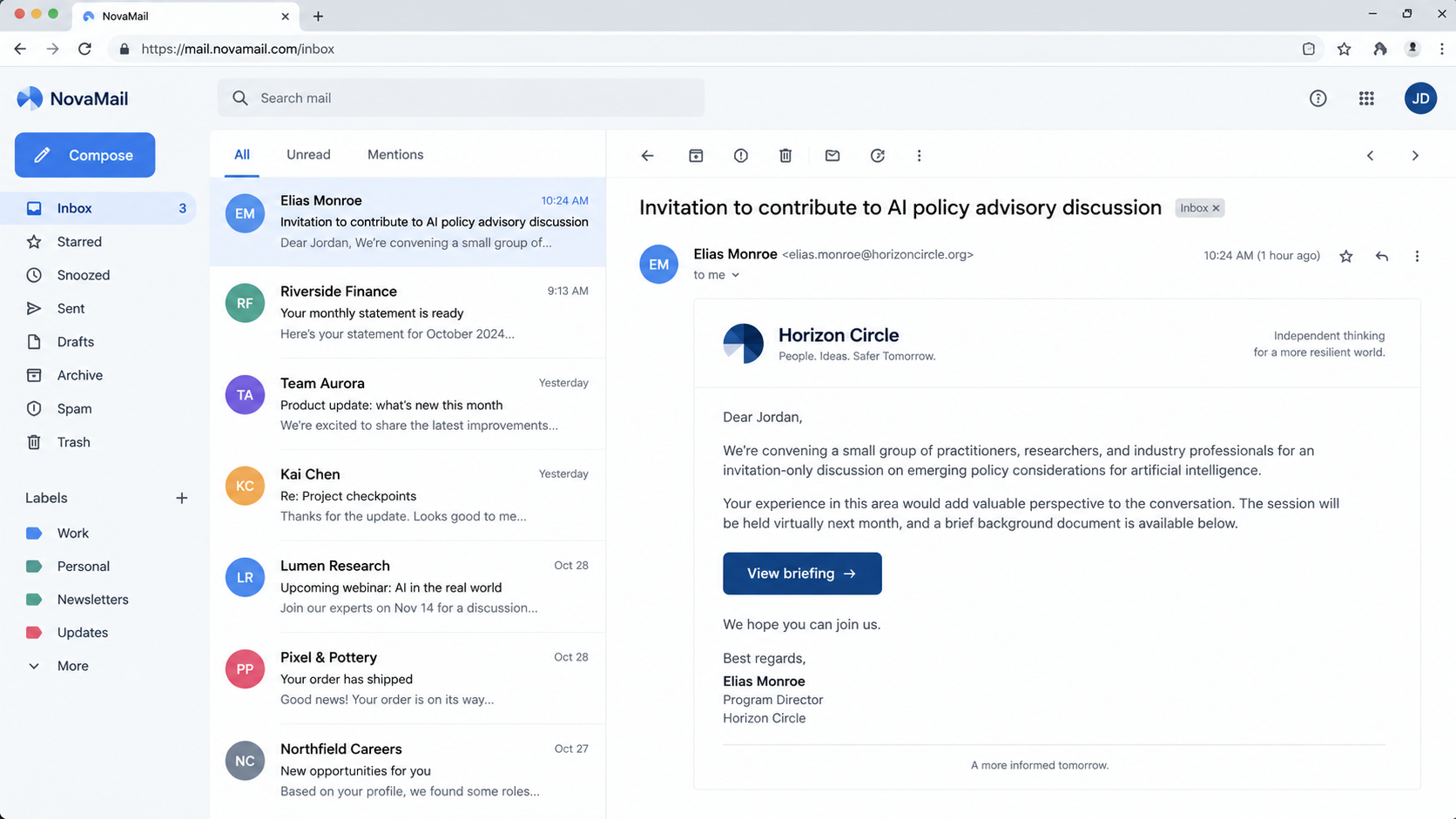
The invitation researchers followed
Targeted emails invited AI policy experts to join an advisory committee or contribute to a report about export controls and supply chains.
The people named as senders were prominent professionals. The messages sounded like ordinary intellectual outreach, not a crude password warning.
Proofpoint reported that the invitations were part of credential phishing campaigns aimed at think tanks, universities, and legal-sector organizations.
The real individuals and institutions being impersonated were not described as participants in the attack.
Why the first email was easy to misread
The opening message did not immediately demand a password. It asked a relevant question and waited for a reply.
Only after the recipient engaged did a follow-up link arrive, supposedly containing background material or a shared document.
That delay gave the exchange a human rhythm. A link inside an ongoing conversation feels different from an unexpected attachment in a cold email.
- The bait was a professional invitation tied to real AI policy debates.
- The sender identity was impersonated, not evidence of involvement by the named expert.
- The follow-up link led through redirects toward a fake document-sharing experience.
- The intended prize was Microsoft 365 account access and an authenticated session.
What the evidence does and does not prove
Proofpoint tracks the actor as TA419 and assesses it as China-aligned. That is the researcher’s attribution, not a fact independently proven here.
The public report describes observed campaigns in February and July 2026. It does not mean every AI policy invitation is malicious.
Nor does it say the real former officials, economist, or Anthropic employee endorsed the messages. Their identities were copied as credibility cues.
The article addresses that specific impersonation and sign-in mechanism. A reader should verify an invitation without dismissing legitimate collaboration by default.
How the AI Policy Invitation Phishing Works
Step 1: The sender chooses a believable professional pretext
Researchers observed outreach to people whose work intersected with AI regulation, national strategy, university research, or legal policy.
The topic was tailored to those recipients. A request about an advisory committee or export-control report would not seem random in their inbox.
Proofpoint described one campaign impersonating a former White House science policy official and another using an economist’s identity.
An earlier message impersonated a senior Anthropic employee and asked for feedback on military integration of Claude.
In each case, the name in the From field was part of the attack. It did not show that the person sent the email.
Check the full sender address and independently contact the supposed sender through a known channel before sharing documents or opening links.
Step 2: A harmless first exchange builds trust
The opening email could ask whether the recipient was interested, available, or willing to review a topic. It did not need to carry the dangerous page yet.
A reply tells the attacker the mailbox is active and that the recipient is interested in the subject.
It also creates a thread. When the next message arrives, the recipient sees their own words above the link.
That social detail matters. People often inspect a first message carefully and give later messages in the same thread less scrutiny.
The attacker can use the reply to personalize the next note. It may mention a question the recipient asked or promise a document that addresses it.
Professional etiquette can become a pressure point. A researcher may not want to seem rude by doubting an apparently distinguished colleague.
Step 3: The follow-up moves to a document link
After engagement, the attacker sent a shortened URL presented as additional information about the policy invitation.
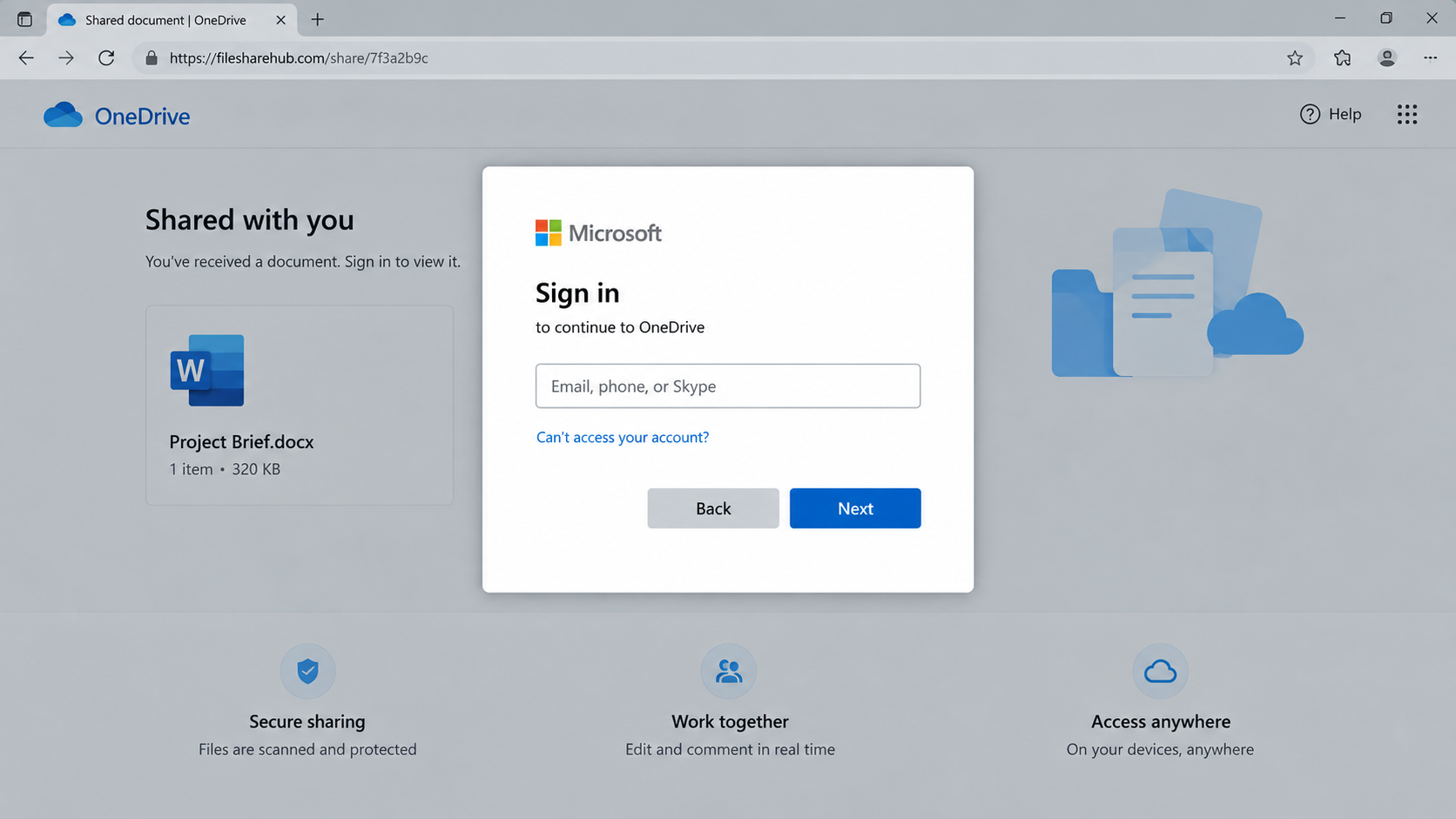
Proofpoint traced a series of redirects to a page that resembled a shared OneDrive document or loading screen.
The first attacker-controlled page used a security check before sending the visitor onward. That can make the path feel routine.
URL shortening also hides the final address from a quick glance in the email. A recipient may see a tidy link rather than the destination.
Before opening, ask for the document through an independently verified account or a known organizational channel.
A real collaborator should understand a request to confirm identity when sensitive work or account access is involved.
Step 4: The fake document page asks for sign-in
The destination displayed a document-sharing setting and then prompted for Microsoft credentials to continue.
Proofpoint found a browser-in-the-browser overlay, a page element that imitates the appearance of a separate sign-in window.
That visual trick can make a website-controlled box resemble a trusted browser dialog. It blurs where the real address bar is.
The attack also proxied a genuine Microsoft sign-in flow in real time. A familiar authentication screen can therefore coexist with a malicious intermediary.
Do not judge the sign-in only by whether the password page looks polished. Examine where the browser actually navigated and who initiated it.
If a shared file was unexpected, close the prompt and open Microsoft 365 directly from a bookmark to review legitimate invitations.
Step 5: MFA can succeed while the session is captured
Many people assume a successful multi-factor authentication check proves they reached the real service safely. Here, it did not settle the question.
The adversary-in-the-middle setup relayed the sign-in to genuine Microsoft infrastructure while the attacker-controlled page observed the session.
Proofpoint reported that the kit tracked the victim through password and MFA steps and could capture resulting session cookies.
A session cookie can let an attacker use an already authenticated account without repeatedly asking for the password or MFA code.
That is why a password change alone may not close the incident. Active sessions may need to be revoked by the account owner or administrator.
Phishing-resistant, origin-bound authentication can reduce this type of risk because the credential is tied to the legitimate site.
Step 6: An accessed mailbox can expose more people
Once an attacker has a work account, they may read correspondence, search files, or send convincing messages from a real mailbox.
The Proofpoint report focused on the phishing chain. It did not publicly establish every downstream action for every target.
Still, an account used for policy work may contain unpublished drafts, personal contacts, and sensitive organizational conversations.
Investigators should review suspicious sign-ins, inbox rules, app grants, forwarding settings, and recent outbound mail.
Colleagues may need a warning if the compromised account sent files or links. A genuine sender address is no guarantee after account takeover.
Respond quietly through the organization’s security process, not by forwarding the malicious link around as a demonstration.
Why This Is Not an Ordinary Mass Phishing Email
The campaign did not start with a generic claim that an account would be deleted tonight. It began with a relevant professional request.
That relevance made the deception costly to reject. The recipient could lose a real opportunity by ignoring a genuine invitation.
The attacker also used real people as social proof. A recognizable name carries trust even when the email address is unfamiliar.
A reply-before-link sequence creates apparent consent to the later document. The recipient may feel that they asked for the material.
The fake OneDrive stage then supplies a familiar reason to sign in. Many organizations genuinely share research documents through Microsoft services.
Finally, the live sign-in proxy complicates simple visual checks. MFA may appear to work because Microsoft is involved in the relayed session.
These layers do not make the attack invisible. They make independent verification more important than relying on a single clue.
Verify the person, the project, the domain, and the requested sign-in as separate questions.
Checks Before Opening a Policy Collaboration Link
Start with the sender address. A display name can be typed by anyone, and a lookalike domain may differ by one character.
Ask whether the committee, report, or project exists on an official site. A title in an email does not create a real organization.
Contact the named person through an address published by their employer or a known prior thread. Do not use a phone number inside the invitation.
If the request came from a new contact, ask a colleague familiar with the project whether they received the same approach.
Inspect shortened links cautiously. A legitimate collaborator should be willing to share a normal document URL or explain the hosting location.
When a sign-in window appears, look at the browser’s true address bar. A page drawn inside another page is not an independent browser window.
Use a trusted bookmark to open Microsoft 365 directly and check whether the file appears among legitimate shared documents.
Be wary of authentication prompts that repeat after a successful sign-in. Repeated requests can signal a broken or manipulated flow.
For sensitive organizations, use phishing-resistant passkeys or security keys where supported and require approval for unfamiliar sign-in contexts.
Keep a way to report suspicious invitations that does not require the recipient to prove the entire technical chain.
For a proposed government-linked advisory group, look for an official announcement or staff contact. A prestigious name in a signature block is not enough.
When the request cites a pending report, ask for its commissioning organization, publication plan, and editorial contact. Legitimate contributors usually receive those details.
Notice whether the sender can answer ordinary questions without sending you to another login page. A real colleague can explain a project in plain language.
Check whether the shared file belongs to the same organization named in the email. Unexplained jumps between unrelated domains deserve closer scrutiny.
Security teams can provide a safe way to inspect suspicious documents. Do not open a questionable link on a personal account merely to spare a colleague inconvenience.
If an invitation turns out to be genuine, the small verification delay is usually harmless. If it is false, that pause may prevent a serious account incident.
What to Do if You Followed the Fake Invitation
Respond according to the action you took. Reading an email is different from signing in through the linked page.
- Stop the session. Close the page, preserve the message and full URL, and tell your organization’s security team promptly.
- Revoke active sign-ins. Ask your Microsoft 365 administrator to invalidate sessions and refresh tokens. A password reset may not end stolen sessions.
- Change the password from a trusted route. Open Microsoft directly, reset credentials, and review recovery methods and MFA registrations.
- Inspect account changes. Check inbox forwarding, rules, app permissions, recent sign-ins, file access, and messages sent from the account.
- Contain sensitive work. Identify documents and contacts potentially exposed. Follow organizational notification requirements rather than guessing at impact.
- Check the device and browser. Malwarebytes can help scan for unrelated payloads, while AdGuard may block known phishing destinations. Neither removes a stolen cloud session.
- Report the campaign. Provide headers, timestamps, and the suspicious URL to security staff and appropriate cybercrime reporting channels.
Do not use the suspicious thread to tell the sender you discovered the attack. The address may belong to the operator.
If you only replied to the first invitation, stop before opening follow-up links. A reply may bring more targeted messages, but it is not account takeover.
If you entered credentials, disclose that fact promptly. Fast containment matters more than embarrassment about a realistic deception.
Frequently Asked Questions
Did the real AI experts send these invitations?
Proofpoint reports that the campaign impersonated prominent individuals. The report does not describe those people as participants.
Confirm a new invitation through a separately obtained professional address before accepting documents or calls.
What is a browser-in-the-browser sign-in?
It is a webpage element styled to resemble a browser window. The apparent address or frame may be part of the page itself.
Use the real browser address bar and trusted bookmarks to judge where authentication is happening.
Can MFA prevent this campaign?
Ordinary one-time codes may be relayed through an adversary-in-the-middle page. The attacker can attempt to capture the resulting session.
Phishing-resistant, origin-bound methods offer stronger protection, but account monitoring and independent verification still matter.
Is every AI policy committee invitation suspicious?
No. The warning concerns a documented impersonation campaign, not legitimate scholarly or policy collaboration in general.
Verification protects real opportunities too, because it helps a recipient distinguish an actual colleague from someone using their name.
What if I clicked the link but did not sign in?
Preserve the link and tell security staff, especially if it was on a work device. Do not revisit the page to investigate personally.
The most serious reported mechanism required interaction with the sign-in flow. A device check may still be appropriate under organizational policy.
Why is changing the password not enough?
An attacker who captured an authenticated session may retain access until that session is invalidated, depending on account controls.
Ask an administrator to revoke sessions, review tokens and app grants, and inspect account activity alongside the password reset.
The Bottom Line
The email’s first job was to feel like a real professional conversation. The dangerous link arrived after that trust had been earned.
Verify the sender independently and treat unexpected document sign-ins as account-security decisions, even when a familiar name started the thread.

Join the discussion
0 commentsShare your experience or ask a question about this article.
Discussion
Start the conversation
Have a question or something useful to share? Add the first comment.