

An email says your employer has opened a code of conduct case. It looks like a routine compliance notice, right down to the case details and the attached PDF. The message asks you to review the material before a deadline.
For someone worried about work, ignoring it can feel riskier than clicking. That pressure was the point.
In the code of conduct email scam, the PDF did not contain an ordinary workplace case file. It was the beginning of a journey toward a sign-in request.
Overview
The accusation makes a routine-looking email urgent
The code of conduct email scam was a broad phishing campaign, not a quarrel about a real employer policy. Microsoft’s security researchers observed it reach more than 35,000 users across more than 13,000 organizations in 26 countries between April 14 and 16, 2026.
Messages impersonated internal compliance or regulatory teams. Names such as “Internal Regulatory COC,” “Workforce Communications,” and “Team Conduct Report” were chosen to sound administrative. Some subjects said an internal case log had been opened; others said a non-compliance case required attention.
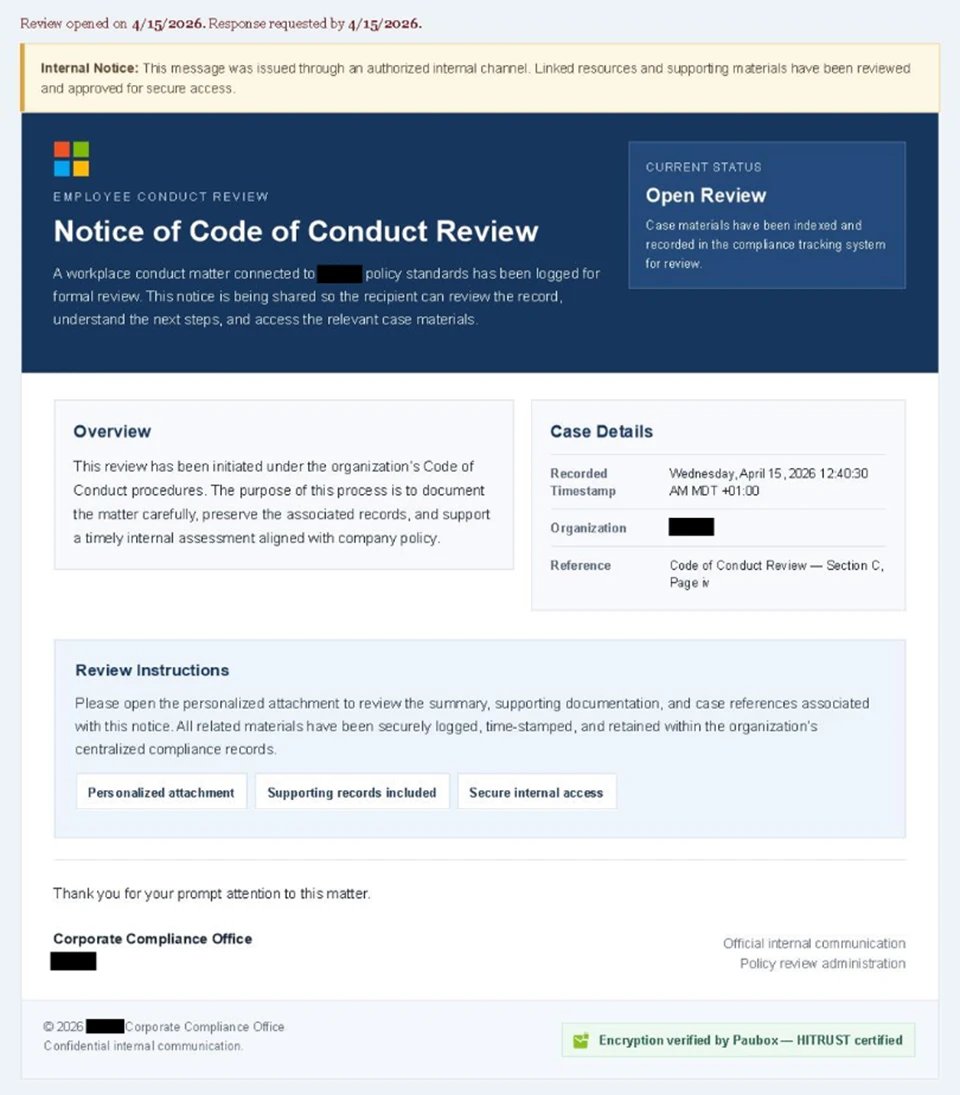
The email could include an organization name and a carefully formatted “authorized internal channel” claim. That appearance did not make it an employer communication. A criminal can type the name of your organization into a template.
The attachment is an instruction sheet, not evidence
Each message included a PDF that talked about the supposed case and offered a “Review Case Materials” link. The PDF was meant to bridge the gap between a worrying email and an external website. It did not establish that any allegation was real.
Microsoft found that the link led through a CAPTCHA and other staging pages. Those steps can feel like careful security, but a criminal can place a CAPTCHA in front of a phishing flow. Passing a challenge only shows that the page accepted your response.
- The sender name claims internal authority.
- The alleged conduct case creates anxiety and a deadline.
- A PDF makes the process feel formal.
- A “Review Case Materials” button moves the reader out of the mailbox.
- CAPTCHA and document pages add a sense of controlled access.
- A final sign-in flow seeks control of the work account session.
The aim is a live account session
The confirmed final stage was adversary-in-the-middle phishing, often shortened to AiTM. The attacker placed a system between the user and a genuine sign-in experience and could capture authentication tokens from that live session. That can let an attacker access an account even when the person completed a conventional multifactor prompt.
Microsoft noted that one intermediate page resembled device-code phishing, but said it could only confirm the AiTM portion of this campaign. We are not treating an unconfirmed device-code stage as a fact.
Our EvilTokens report explains a separate, confirmed device-code scam. It should not be mistaken for the conduct-case email examined here.
The 35,000 figure counts users targeted by messages, not 35,000 confirmed account takeovers. Microsoft did not publish an individual victim list or a complete number of compromised accounts in the report.
The Small Details That Make the Email Feel Official
The email did not use the usual vague line about a mailbox being full. It claimed a workplace conduct review had been logged. That is personal, potentially embarrassing, and hard to discuss with a colleague. The criminal benefits if the recipient acts alone.
Its design reinforced the story. The sample Microsoft published had boxes labeled like a case-management system, a review status, a timestamp, and instructions to open the attachment. It also claimed linked materials had been approved for secure access.
One version included a green banner invoking Paubox, a legitimate service associated with encrypted communications. That banner was a credibility cue inside the scam email, not independent proof that Paubox sent or approved the message.
The PDF added another layer. Many organizations do send policy documents as attachments, so opening it can seem less risky than following a bare link. But the dangerous step was the link inside the attachment that carried the reader into a page controlled by the campaign.
Some recipients would see a Cloudflare CAPTCHA after clicking. A familiar CAPTCHA brand can make a site feel mainstream. Here, Microsoft assessed that the challenge also helped screen out automated analysis before the later stages appeared.
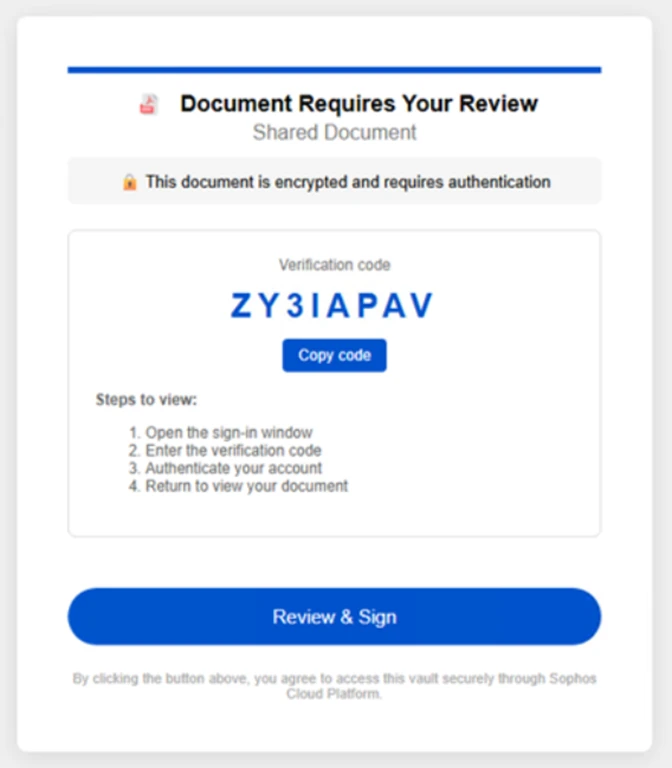
After that came a page saying the document was encrypted and required authentication. The page in the second image is one of the actual intermediate screens researchers captured. Its verification code and “Review & Sign” button push the user forward without ever showing a verifiable employer case record.
The final page asked the person to schedule a discussion about the case and sign in with Microsoft. By then, several small steps had made sign-in feel like the natural next action. That is the real function of the long journey.
A legitimate HR process should have an independent route for checking it. You can open your employer’s known HR portal or ask the relevant team using a number or address already in your directory. The PDF’s button is not the only possible way to respond to a real concern.
How the Code of Conduct Email Scam Works
Step 1: A compliance notice lands in the inbox
The sender display name appears to come from an internal office. The email says a case has been logged and gives the impression that the recipient must review details promptly. The message may include the organization’s name, which makes a mass campaign feel tailored.
Microsoft traced a large wave across many employers and industries. That breadth is another reason not to read the wording as evidence that your own HR department opened a case.
Step 2: The PDF supplies the next click
The attached file provides a summary of the alleged review and a “Review Case Materials” link. The file can be opened like an ordinary PDF, which may lower suspicion. The link, however, leaves the document and starts the phishing route.
Do not assume a PDF is safe just because it does not ask you to enable a macro. A document can be used to carry a convincing link and social pressure without installing any software.
Step 3: A CAPTCHA and review page slow the reader down
The link sends the user to a site with a CAPTCHA. After the challenge, an intermediate page says a protected document needs account authentication. These stages make the flow look structured and may reduce the chance that simple scanners reach the credential stage.
The “Review & Sign” button is not an employer approval step. It is another transition. In the observed campaign, the sequence included further email and image-selection prompts before a final sign-in invitation.
Step 4: The final sign-in can hand over a session
The campaign’s last page asked users to sign in with Microsoft. Microsoft confirmed an AiTM authentication flow. In plain language, the attacker can sit in the path of an otherwise familiar sign-in and capture a token that represents a successful login.
A standard one-time code or authenticator approval may not stop this kind of attack if the person voluntarily completes it in the attacker-directed flow. That is why the best defense begins before entering credentials: verify the case independently.
Step 5: A stolen session can outlive the email
If an attacker obtains a usable session token, deleting the phishing message will not necessarily end the account risk. An organization’s security team may need to revoke sessions, review sign-ins, and inspect mailbox rules or other changes.
That does not mean every recipient was compromised. The response depends on how far you got: received the email, opened the PDF, clicked the link, entered an address, or completed the sign-in.
Check the Case Without Using the Email
Do not reply to the sender to ask whether the notice is real. A reply can go to the campaign’s mailbox. Do not call a number in the PDF or enter a code because the intermediate page asks for one.
Instead, use a channel you knew before the message arrived. Open your organization’s HR or compliance portal from a saved bookmark, find the office in the internal directory, or ask your manager how formal conduct notices are delivered. You do not need to disclose the alleged accusation to an unknown website to perform that check.
If the message looks suspicious, send it to your IT or security team using the organization’s established reporting method. Forwarding it to coworkers to ask “is this real?” may spread the dangerous link. A proper report lets defenders search for similar mail and warn others.
If you work in IT, examine the full message headers and the exact attachment link in a controlled environment. A display name alone proves very little. Microsoft noted that the campaign used legitimate email delivery services and attacker-controlled domains, so routine-looking mail infrastructure did not make the sender authorized.
Be careful with generic advice to “look for HTTPS.” Phishing pages can have valid HTTPS too. The question is whether the request originated from your employer’s real process and whether the sign-in was initiated from a verified destination.
Company, Address, and Fulfillment Checks
The alleged department is not proof of identity
“Workforce Communications” or “Internal Regulatory COC” is a display name the attacker can choose. It is not a legal identity or evidence of a connection to your employer. Confirm the sender through internal channels rather than the wording of the title.
The website address is outside the case record
The PDF link led to attacker-controlled pages, not a verified employer portal. Microsoft documented several domains in the campaign, but domain names can rotate. The useful distinction is an external path introduced by the unsolicited message versus a case found in the employer’s known system.
A “support” reply can keep you in the trap
If you ask the message sender for clarification, that person can simply repeat the need to sign in. Use your company’s previously known security or HR contact. For an urgent workplace issue, a genuine team can direct you from a trusted internal directory.
No workplace case was verified by the attachment
The PDF and page only made claims. They did not prove that an actual conduct complaint existed. If your employer confirms a real case through its own process, handle it there. This report concerns the documented phishing campaign, not the merits of any real HR matter.
Why a Password Change Alone May Not Be Enough
Traditional phishing steals a password and hopes it still works. AiTM phishing can capture a token produced after the user finishes authentication. That token may represent a live session rather than a reusable password.
Changing your password is still sensible after a suspicious sign-in, but your IT team may also need to revoke active sessions or tokens. Tell them exactly what happened, including whether you approved a multifactor request or clicked “Sign in with Microsoft.”
Check for unusual mail forwarding rules, sent messages, app permissions, and sign-ins if your organization gives you access to those controls. A compromised work account can be used to reach coworkers, documents, or customers. The exact scope depends on the account’s privileges.
If you opened only the email or PDF but did not follow the link, report it and let IT assess it. Do not automatically assume your account was taken over. The observed flow required further interaction before the token-capture stage.
What to Do if You Have Fallen Victim to This Scam
- Tell your IT or security team immediately. Use a known internal contact, not the reply button. Say whether you opened the PDF, clicked the link, entered your address, and completed Microsoft sign-in or multifactor prompts.
- Ask for session revocation. If you signed in through the campaign page, have the security team end active sessions and review authentication tokens. A password change alone may not cut off a stolen live session.
- Reset credentials from a trusted route. Open the organization’s real account portal independently. Change the password if directed and review recovery methods and registered authenticators with IT.
- Check for account changes. Look for unexpected sent mail, inbox rules, forwarding, app permissions, and unusual access to files. Your security team can inspect logs that you cannot see.
- Preserve the evidence. Keep the email, PDF, timestamps, and screenshots. Do not forward the active link broadly; submit it through the official phishing-report channel.
- Scan if anything was downloaded or run. The confirmed campaign was a sign-in attack, not a documented malware installer. If you downloaded additional files, a Malwarebytes scan can help check the device, but it does not revoke stolen cloud sessions.
- Reduce repeat exposure. AdGuard can help block known malicious pages and advertisements, although it cannot decide whether a conduct notice is genuine. The independent HR check remains essential.
- Watch for follow-up approaches. An attacker may send a second message claiming to fix the case or recover access. Treat new instructions from the same sender as part of the risk until verified internally.
Frequently Asked Questions
Was the code of conduct email scam sent to many organizations?
Yes. Microsoft observed messages targeting more than 35,000 users at over 13,000 organizations in 26 countries during the April 2026 wave. Those are targets, not a count of confirmed compromised accounts.
Does opening the PDF infect my computer?
The documented PDF carried a link into the phishing flow. The report did not describe it as an installer. Opening a file and following its link are different actions; report what you actually did to your IT team.
Was the Cloudflare CAPTCHA proof that the page was safe?
No. A CAPTCHA can be used by criminals to make a page look normal and to delay automated scanners. It says nothing about whether the alleged workplace case exists.
Did Microsoft confirm device-code phishing in this campaign?
No. Microsoft said an intermediate page had some hallmarks of that technique but confirmed the AiTM part of the attack chain. That distinction matters when describing what was observed.
Can multifactor authentication still be bypassed?
A real-time AiTM flow can capture a session after a user completes some forms of multifactor authentication. Phishing-resistant methods provide better protection, but verifying the request before signing in is still important.
How can I check a genuine HR notice?
Use the HR portal or contact details your employer already gave you, preferably from an internal directory or bookmarked site. Do not use the email’s attachment link as the sole way to verify the case.
The Bottom Line
The code of conduct email scam borrowed the appearance of an internal review to lead workers into a staged sign-in. The anxiety was deliberate; the PDF and CAPTCHA were stepping stones.
Verify any alleged case through your employer’s existing channels. If you completed the sign-in, tell IT promptly so it can address the session itself, not just the password.

Join the discussion
0 commentsShare your experience or ask a question about this article.
Discussion
Start the conversation
Have a question or something useful to share? Add the first comment.