

You spot an offer to get shipping costs back after placing an order. It sounds like a small bonus attached to something you already bought.
The offer is easy to remember. The details behind it are easier to miss, and they deserve a closer look.
Overview
What ShipmentsFree says it sells
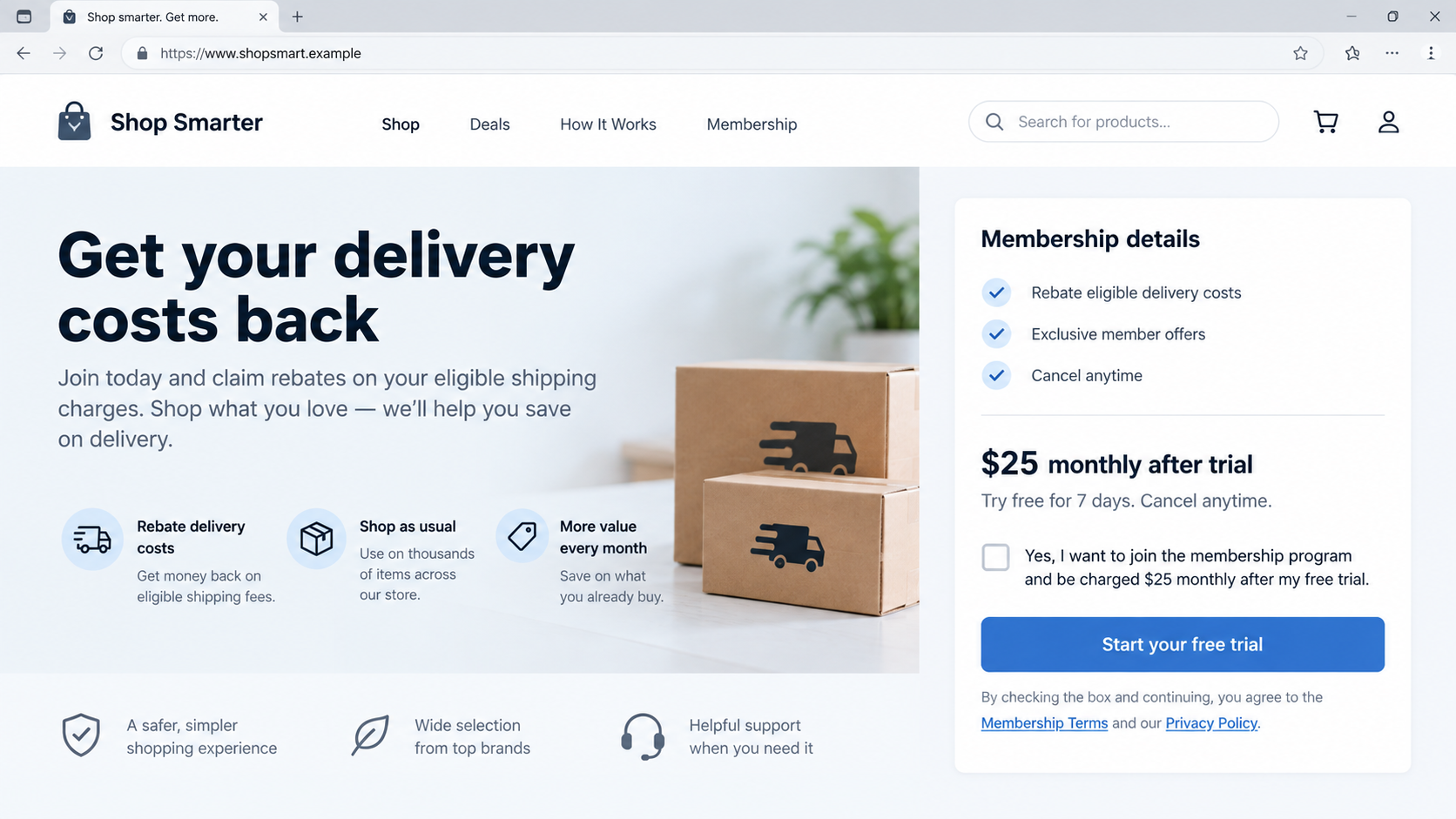
ShipmentsFree describes itself as a paid rebate membership. Members can submit eligible shipping or return costs and request money back under its rules.
That is different from a delivery company. It does not transport parcels or automatically refund every shipping charge at checkout.
The membership renews, and a reader may encounter the offer while shopping somewhere else. Those details explain much of the confusion.
A shopper remembers the original retailer, not necessarily the name of a separate rebate service attached to the purchase journey.
Why buyers are questioning the charges
Malwarebytes documented related shipping-themed domains, overlapping account pages, recurring membership terms, and consumers surprised by monthly billing.
Better Business Bureau complaints include people who say they did not understand the offer would become a $25 monthly charge.
The company disputes unauthorized enrollment in responses and says sign-up requires active agreement to disclosed pricing.
Those conflicting accounts do not establish that every enrollment was improper. They do show why the exact offer screen and consent record matter.
- The service is a rebate membership, not a parcel carrier.
- The advertised benefit depends on eligibility and submitting a claim.
- Membership billing can continue whether or not a customer files a rebate claim.
- Some customers report discovering $25 charges they did not recognize.
How to read the evidence fairly
A large complaint count is a signal to investigate, not a court finding that each complaint is proven.
Likewise, the existence of terms on a website does not prove that every shopper saw, understood, and agreed to those terms in a specific checkout.
Malwarebytes found several similar domains linked by branding and support details. A buyer should identify the precise site and merchant shown in their own records.
The practical question is not whether all rebate programs are illegitimate. It is whether this particular enrollment and continuing charge match what the buyer knowingly accepted.
How the Shipping Rebate Membership Journey Works
Step 1: A buyer sees money-back language near a purchase
A shipping rebate offer can appear after checkout, in an advertisement, or through another promotion related to a recent purchase.
The timing matters. The shopper is already thinking about delivery fees and may believe the new page is part of the retailer’s order.
But a rebate service can be a separate business. The original retailer’s name on the order does not necessarily identify the membership operator.
Words such as “claim back shipping” emphasize the benefit. A recurring membership cost can be less memorable than the refund promise.
That does not mean the promise is automatically false. It means the buyer must compare the fee with the conditions required to receive a rebate.
Before entering payment information, check who is accepting the card, when the trial ends, and how future charges are calculated.
Step 2: The offer leads to a separate membership
ShipmentsFree’s public materials describe an auto-renewing subscription and a process for requesting eligible rebates.
According to Malwarebytes, its FAQ described up to $100 per month in shipping and return rebates, subject to proof and terms.
That ceiling is not a guaranteed payout. A member must understand qualifying purchases, documentation, deadlines, and excluded transactions.
A person expecting an automatic refund may not realize that submitting a claim is an additional task after enrollment.
Even a customer who never makes a claim can keep paying membership fees until they cancel under the applicable terms.
Read the total recurring price rather than judging the offer by the trial charge or first rebate amount alone.
Step 3: The billing name may look unfamiliar
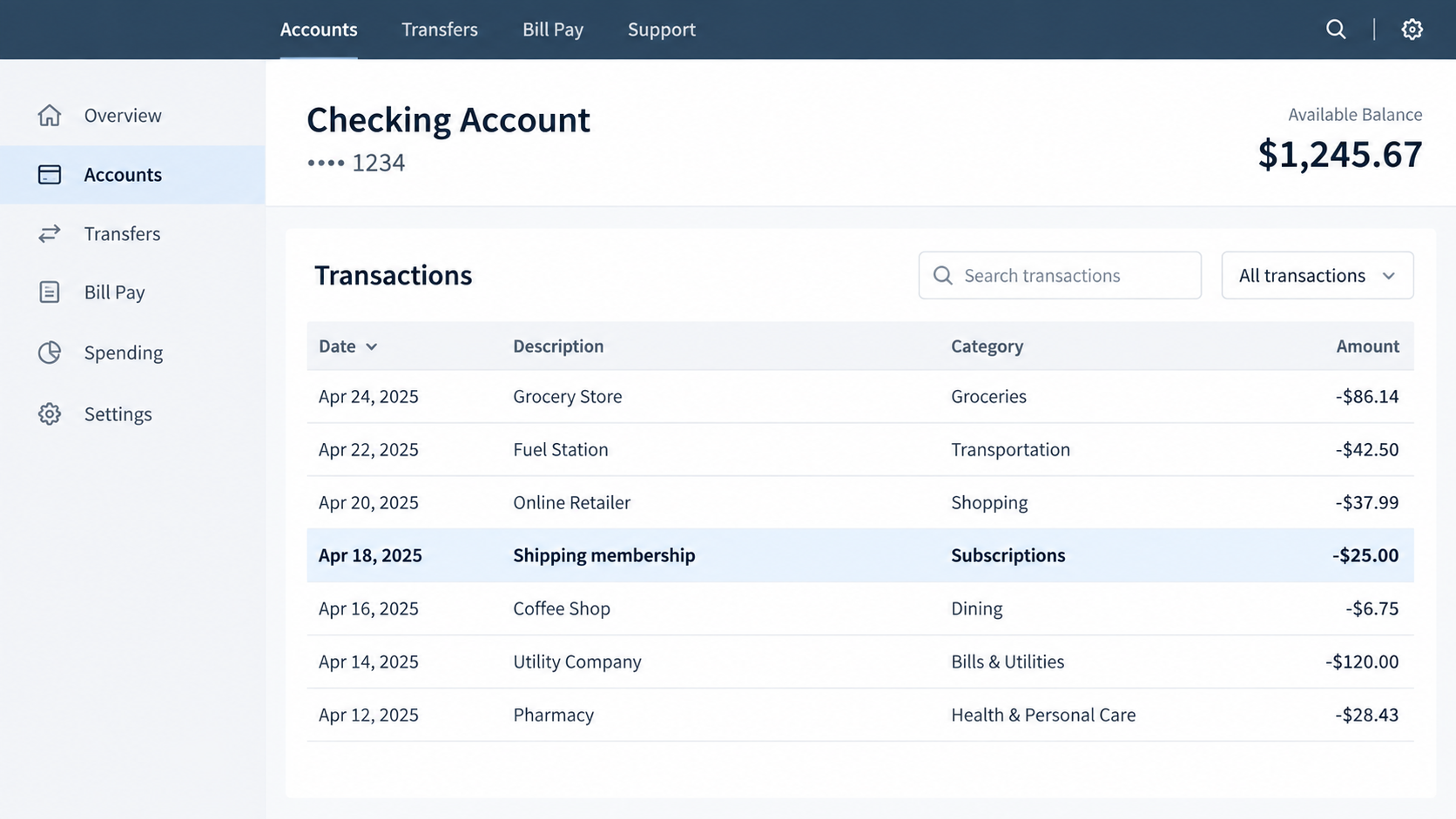
The card statement may show a shipping-related merchant name rather than the retailer where the shopper bought a product.
Similar domain names and account pages can make it hard to reconstruct where the sign-up happened weeks later.
Malwarebytes reported overlaps among ShipmentsFree and related shipping-themed pages, including support and policy details.
That linkage is a reason to inspect records carefully, not permission to assume every similarly named website has identical terms.
A $25 recurring charge may be easy to miss between ordinary purchases. Several BBB complainants described noticing it only after months.
As soon as you spot an unfamiliar charge, write down its exact statement descriptor, date, amount, and payment card’s last four digits.
Step 4: The member tries to understand or stop billing
The first useful step is to find the membership account or confirmation email. Look for the sign-up date and any trial expiration.
Review the terms that applied when the account was created, not just a current page that may have changed.
Ask customer support for the enrollment record, consent screen, timestamps, invoice history, and the method used to authorize the card.
Those records can clarify whether a buyer overlooked a disclosure or whether the charge does not match what was shown.
Several BBB complaints describe a dispute over refund amounts after cancellation. Company responses sometimes state limits under their refund policy.
A canceled membership stops future billing only if the cancellation is completed and confirmed. Keep the confirmation and monitor later statements.
Step 5: A disagreement becomes a billing dispute
If the company and customer disagree about consent or refunds, the card issuer may need to review the evidence.
Contacting the bank promptly matters because dispute windows can vary by card network, issuer, and jurisdiction.
Describe the facts precisely. “I do not recognize this merchant” is different from “I canceled and was charged again.”
Provide screenshots, the original offer, confirmation emails, cancellation record, and the company’s replies.
Do not invent a fraud claim to strengthen a dispute. Accurate records are more useful than labels that the evidence does not support.
Continue checking the account after filing. A dispute about past charges does not always cancel an active membership automatically.
Company, Address, and Checkout Checks
The company behind the charge
The name on a parcel, checkout, promotion, and card statement may differ. Identify the legal seller of the membership from the terms and billing record.
Malwarebytes linked several shipping-themed domains through shared account pages and support details. Record which domain actually handled your sign-up.
Do not presume the original retailer enrolled you or controls the rebate account. Ask both companies if the relationship is unclear.
For a new offer, confirm whether the rebate service has a business name you can independently verify and a support channel that matches the terms.
Addresses are evidence, not a verdict
The BBB lists Shipmentsfree.com business locations. A listed address alone does not prove where decisions are made or where customer records are kept.
A suite, mail center, or registered-office address can be legitimate, but it does not answer questions about cancellation or billing authorization.
Compare the address on the seller’s terms with the one on receipts and business profiles. Note discrepancies without calling them fraudulent automatically.
If a returns or mailing location is listed, do not confuse it with the operator’s headquarters. This service is digital, not parcel fulfillment.
Support must answer the concrete question
Ask support when you enrolled, where the offer appeared, what you agreed to pay after any trial, and whether the membership is now canceled.
A generic assurance that “all terms were disclosed” is less useful than the actual screen or record associated with your transaction.
Use contact details from the provider’s official account area or documented policies, not a phone number in a surprise text.
Save chat transcripts and emails. If support gives different answers across channels, those differences may help your card issuer understand the dispute.
The checkout record decides the hard cases
The clearest evidence is the exact page a customer saw, including pricing next to any consent control and the final button.
Check whether the terms identified a recurring fee, trial length, cancellation method, and the separate company accepting enrollment.
The business says customers actively agree to the membership. Customers in complaints sometimes say they understood the page as a one-time rebate.
Rather than assuming either account is universally correct, compare the records for the individual charge. That is the fairest route to resolution.
When a Rebate Membership May Not Be Worth It
Even a legitimate membership can be a poor fit. If shipping fees are rare, the monthly price can exceed any rebate a customer could claim.
A headline maximum such as $100 per month does not mean the average member receives that amount.
Claims may require receipts, eligible retailers, timely submission, and continued account access. Read those conditions before estimating value.
Compare twelve monthly charges with your likely annual shipping costs. A small single-order rebate should not hide a much larger subscription commitment.
Ask whether the same retailer already provides free shipping, easy returns, or loyalty benefits without a separate membership.
Check how cancellation works before joining. If the route is hard to find when you are considering the offer, it may be harder under time pressure later.
Keep the original promotional page and terms. They are the best reference if your understanding of the offer later differs from the provider’s records.
Set a calendar reminder before a trial ends. A reminder gives you a chance to test the claim process and cancel if the benefit is not useful.
If a rebate is denied, save the reason and compare it with the eligibility language you saw when joining. That record can clarify whether expectations were reasonable.
Review other optional offers during checkout too. A buyer can approve one service while assuming it belongs to the retailer already handling payment.
Look for a confirmation email that names the membership operator and states future billing. If it does not arrive, contact support immediately.
Never assume a card charge will stop simply because you did not use the service. Recurring billing follows the agreement, not usage.
What to Do if You Found an Unexpected Shipping Rebate Charge
You do not need to decide whether the company is fraudulent before taking practical steps. Start by protecting your money and preserving a clear timeline.
- Identify the charge. Save the exact descriptor, amount, date, and the card used. Check whether similar charges appeared earlier.
- Find the enrollment trail. Search email, spam, browser history, order confirmations, and accounts for the rebate offer and trial terms.
- Cancel unwanted membership. Use the provider’s official account or documented support route. Ask for written confirmation and an effective date.
- Request the records. Ask for the sign-up screen, consent timestamp, invoices, trial terms, claims history, and the applicable refund policy.
- Dispute charges when warranted. Contact your card issuer if enrollment was unauthorized, the offer was misleading, or billing continued after cancellation.
- Monitor and document. Keep replies and later statements. A closed dispute does not guarantee that a separate subscription has ended.
If a third-party retailer introduced the offer, tell its support team where it appeared. That may help identify the partner promotion.
Do not provide full card numbers or passwords in a public complaint. Give sensitive details only to the official provider or card issuer.
A complaint to a consumer-protection agency can add context, but it does not replace a timely card dispute or cancellation request.
Frequently Asked Questions
Is ShipmentsFree a parcel delivery company?
No. The service describes a paid membership that can reimburse eligible shipping and return costs under its rules.
It should not be mistaken for the carrier delivering a package or the retailer that sold an item.
Does a shipping rebate mean automatic money back?
Not necessarily. A member may need to submit receipts and satisfy eligibility rules before receiving a rebate.
Read the FAQ and terms for limits, deadlines, and excluded purchases rather than relying only on the headline promise.
Why do some customers report a $25 charge?
BBB complaints describe recurring $25 membership charges, sometimes discovered after several months.
The company says enrollment requires active agreement to disclosed pricing. Individual records are needed to evaluate a specific complaint.
Are all related shipping-themed domains fraudulent?
No such conclusion follows from shared branding alone. Researchers found links among several domains, but each customer’s exact enrollment path matters.
Record the domain and statement descriptor you personally encountered before contacting support or your bank.
Will a card dispute cancel the membership?
Not always. A dispute addresses one or more charges, while cancellation changes the subscription’s future status.
Request cancellation separately and retain written proof. Watch the next statement for further charges.
What if I genuinely agreed but never used a rebate?
Unused benefits do not automatically erase a membership fee. Review the cancellation and refund terms and ask the provider what options are available.
If the original offer was unclear, preserve it and explain the discrepancy to the provider or card issuer without overstating the facts.
The Bottom Line
A shipping rebate can be a real service and still lead to a costly surprise when a shopper overlooks the separate, recurring membership.
Check the operator, price, claim rules, and cancellation path before joining. If a charge appears unexpectedly, document the enrollment and act promptly.

Join the discussion
0 commentsShare your experience or ask a question about this article.
Discussion
Start the conversation
Have a question or something useful to share? Add the first comment.