

A learning app can win you over in minutes. Imprint uses colorful, bite-sized lessons that make a trial feel like a small commitment.
The commitment changes when the trial ends. Before you tap through the offer, it is worth knowing which account actually controls the payment.
Overview
Imprint is a real app with automatic subscription billing
Imprint is a functioning educational app from Polywise Inc. It presents visual lessons and interactive stories, not a fake download or nonexistent service.
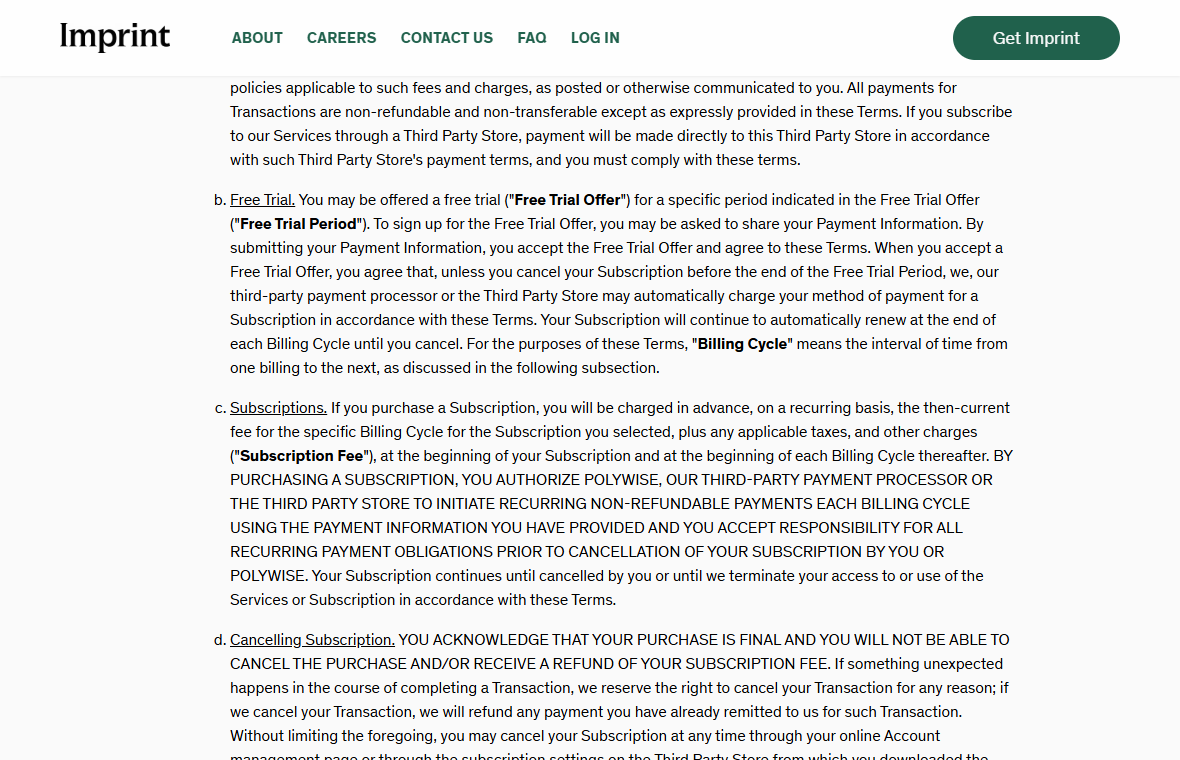
Its terms say a free trial may require payment information. If you do not cancel before it ends, a paid subscription starts automatically.
That subscription renews each billing cycle until canceled. The exact trial length and price are offer-specific, so the screen you accepted matters.
The concern is a common subscription misunderstanding, not proof that the company secretly charged every user. A disclosed renewal can still catch an inattentive customer.
Deleting the account does not stop the charge
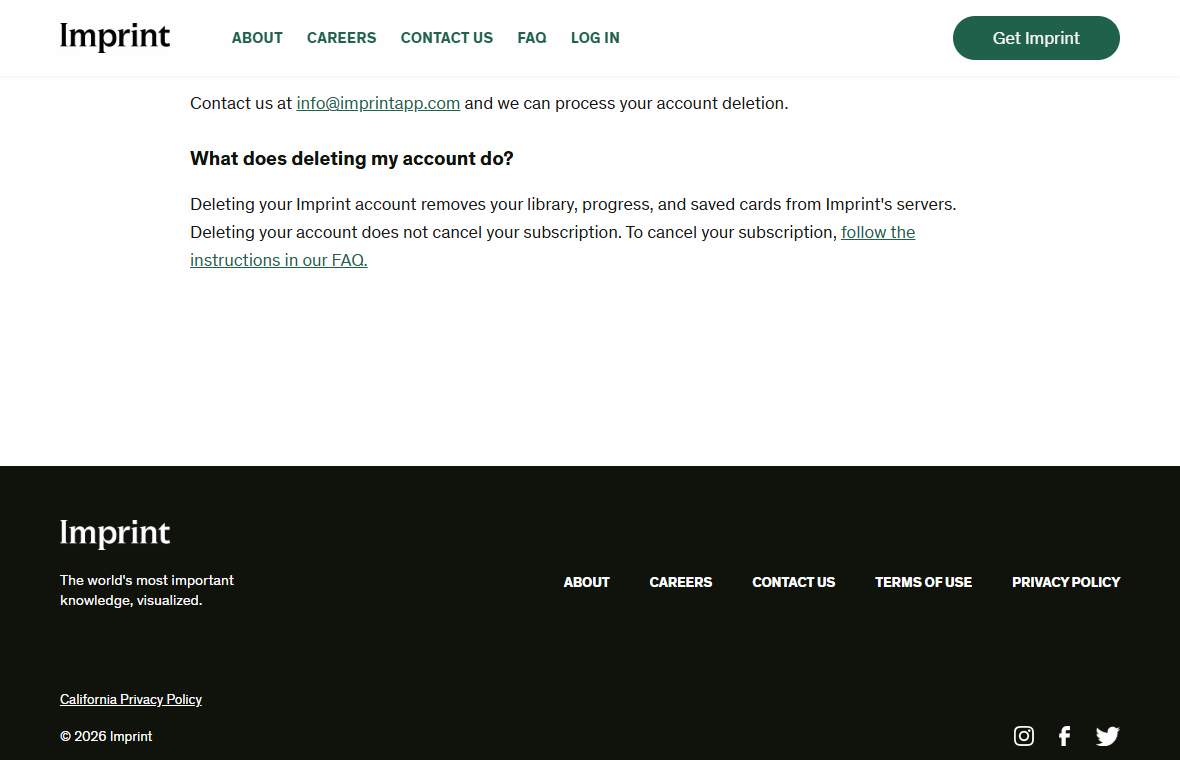
Imprint’s own account-deletion page states the point unusually plainly: deleting your account does not cancel your subscription.
Removing the app from your phone also does not cancel an Apple, Google, or direct web subscription. Those are separate actions in separate systems.
That distinction is the key finding in this Imprint review. A user could erase progress and still see a recurring charge if the payment plan remains active.
First identify who bills you. An App Store receipt, Google Play receipt, or direct Polywise charge points to a different cancellation route.
The sensible verdict is to treat the trial as a timed purchase
Imprint may be useful for someone who enjoys its lessons and knows the renewal price. The risk comes from assuming “free” remains free indefinitely.
Its terms generally make current-cycle subscription payments non-refundable after a charge. Canceling normally prevents future cycles rather than reversing the present one.
Before starting any trial, record these details:
- The date and time the offer expires, including your time zone.
- The full price and billing frequency after the trial.
- Whether Apple, Google, or Imprint directly holds the subscription.
- The cancellation path shown in the offer and receipt.
- Written confirmation that a cancellation actually took effect.
Why a Free Learning Trial Feels Different From a Paid Plan
The first minutes in an app are about curiosity. A short lesson ends, another begins, and the interface encourages a habit before any bill arrives.
That is ordinary product design. It becomes a money issue when a trial converts before the user understands the deadline or renewal cycle.
Imprint’s terms do not publish one universal price for every user. Offers may differ by store, country, campaign, or selected plan.
We therefore did not treat a price seen in a review or advertisement as the amount every customer pays. Your accepted checkout screen is controlling evidence.
Many people think the trial ends automatically because the word “trial” sounds temporary. In subscription billing, the trial is often the entry period.
The paid plan can begin without a second confirmation if the original signup authorized it. Imprint states that mechanism in its subscription terms.
There is nothing inherently fraudulent about auto-renewal when properly disclosed. The buyer problem is that the disclosure may not remain visible when the bill appears.
Set a calendar reminder at least a day before the deadline. A last-minute attempt can fail because of time zones, app-store processing, or login trouble.
If you are unsure whether you will use the app after the trial, cancel early and check whether access continues until the trial ends.
Do not assume the answer for your offer. Verify it in the subscription manager before relying on the lessons for a deadline-sensitive course.
How the Imprint Trial and Renewal Work
Step 1: A short lesson builds interest
An Imprint promotion may emphasize quick visual explanations instead of a large textbook. That pitch is appealing to people who want manageable learning sessions.
Explore the available sample content before entering payment information. Decide whether the teaching style works for you, not just whether the artwork looks inviting.
The app may show several plans or trial offers. Read the entire purchase sheet, including renewal price and length of the subsequent billing cycle.
A free trial attached to an annual plan can create a larger charge than a shopper expecting monthly billing. The precise plan must be checked at signup.
Step 2: The signup authorizes a future charge
According to Imprint’s terms, accepting a trial with payment details authorizes the later subscription charge unless cancellation occurs before the trial period ends.
The payment may be handled by Apple, Google, Polywise, or a processor. The company running the lessons is not always the same screen controlling cancellation.
Save a screenshot of the confirmation showing trial end, price, and merchant. Keep the receipt email, even when the initial charge is $0.
Look closely at whether a particular promotion includes a discount only for the first cycle. A later renewal may use the then-current fee.
Step 3: The trial expires and renewal begins
If no cancellation is recorded, the subscription moves into a paid cycle. Imprint’s terms say the plan continues renewing until the user cancels.
A user who has stopped opening the app may not notice the change until a bank notification appears. App usage and billing are not automatically linked.
The relevant question is not “Did I use it?” but “Was the subscription still active when the next cycle began?”
Open the receipt and identify the billing provider. Do not cancel through an unrelated website merely because it appears in search results.
Step 4: The wrong cancellation action leaves the plan active
Uninstalling Imprint removes an icon. Deleting an Imprint account removes a library and saved progress. Neither necessarily changes the payment agreement.
The company’s deletion page explicitly says account deletion does not cancel the subscription. This is more than a technicality: the actions live in separate systems.
If Apple billed you, use the subscription controls tied to your Apple ID. If Google billed you, inspect subscriptions in Google Play.
For a direct Imprint subscription, use the online account-management page described in its terms. Contact support if the account link no longer works.
Step 5: Cancellation normally stops a future cycle
Imprint’s terms say cancellation becomes effective at the end of the current billing cycle. They generally exclude a partial refund for that period.
This is why cancellation after seeing a new charge may prevent another one without reversing the charge that already posted.
Preserve the cancellation confirmation and verify the next billing date no longer appears as an active renewal. Screens sometimes show “expires on” instead.
If charges continue after confirmed cancellation, present both records to support and your payment provider. The documentary trail matters.
The App, the Account, and the Payment Provider Are Not the Same Thing
Subscription problems often turn on three separate layers. Understanding them makes the correct remedy much easier to find.
The app is the software on your device. Uninstalling it changes access on that device, not a billing contract stored elsewhere.
The Imprint account holds learning progress, saved content, and preferences. Deleting it affects data, but the company says it does not cancel a subscription.
The payment provider holds the active plan. That might be Apple, Google, or a direct Imprint billing arrangement, depending on how you signed up.
Search the original receipt rather than guessing. It usually identifies the provider and a transaction or order number.
If the receipt says Apple, start with Apple subscriptions. A bank descriptor alone might be less clear because merchant names can be shortened.
If the receipt says Google Play, use the Google account that made the purchase. A different Google account on the same phone may show no subscription.
If the charge came directly from Polywise or Imprint, use the site’s account manager and request written cancellation confirmation from support.
Do not send a stranger your complete card number because they claim to be “subscription recovery.” The real provider can locate an order by safer identifiers.
When support asks for proof, provide a receipt number and a redacted statement. Keep full payment details out of ordinary email.
Refund Terms and the Questions They Leave Open
Imprint’s current terms describe subscription fees as recurring and generally non-refundable. They also say a canceled subscription remains usable until the cycle ends.
These are the contract terms the company publishes. They do not erase consumer rights that might apply under a particular country’s law or store policy.
If the charge followed an unclear offer, accidental purchase, or cancellation that did not stick, ask the billing provider for its specific review process.
Be precise. “I forgot to cancel” and “I canceled before the deadline but was charged” are different claims supported by different records.
For the latter, attach a confirmation email or screenshot with a timestamp. A cancellation request without proof may be difficult to verify later.
For a forgotten trial, ask politely for an exception, especially if you noticed immediately and did not use the paid period.
Do not assume a courtesy refund is guaranteed. The written terms do not promise one for ordinary cancellations after billing.
Third-party stores can apply their own procedures. Contact the store that billed you before demanding a refund from an app developer who did not process the payment.
Keep an eye on any promotional discount. A lower first-year amount does not necessarily mean the same renewal price next year.
Recheck the active subscription record after any plan change. A price switch can create confusion if an old confirmation stays in your inbox.
What to Do If Imprint Charged You Unexpectedly
- Find the original receipt. Search your email for Imprint, Polywise, Apple, and Google Play. Note the trial start, renewal date, plan, and billing account.
- Cancel in the correct place. Use Apple or Google subscription settings when that store billed you. For direct billing, use Imprint’s account manager.
- Keep proof of cancellation. Save the confirmation screen and email. Record the date, time, and account used so later charges can be matched accurately.
- Request a refund through the biller. Explain what happened and provide the receipt. Distinguish a missed trial deadline from a charge after confirmed cancellation.
- Check your bank statement. Compare the posted amount with the accepted plan. Ask the issuer about a dispute if a charge was unauthorized or remains unresolved.
- Delete your account separately if desired. Only after confirming billing is stopped, use Imprint’s deletion process if you no longer want your learning data stored.
- Watch the next cycle. A successful cancellation should prevent another renewal. If the same merchant charges again, respond with your saved confirmation.
Do not panic over one unfamiliar descriptor. Start with the receipt and subscription manager; they usually reveal whether the charge belongs to your own trial.
There is no reason to install a “refund tool” or pay a third party to cancel this app. The official billing controls are the appropriate route.
How to Decide Whether Imprint Is Worth Keeping
Subscription value is personal. One reader may finish lessons daily, while another realizes the app duplicates books and videos they already use.
Look at your actual behavior during the trial. Did you complete several lessons, or did the app disappear beneath other icons?
Compare the renewal fee with alternatives you genuinely use. A discounted trial is not evidence that the full-price cycle is a good purchase.
Check whether your selected plan grants access to the subjects you wanted. Do not assume every advertised topic is available under every offer.
If a topic matters professionally, treat an app lesson as an introduction, not formal instruction or a credential. Imprint’s own terms disclaim professional advice.
For a child or family account, confirm which adult payment method is connected. A trial started on one device may bill a different household account.
If you keep the subscription, set a reminder before the next renewal. That converts a passive auto-charge into a deliberate choice.
If you cancel, make a note of when access ends. Use any remaining paid period, then decide whether to delete the account afterward.
The best outcome is not automatically a refund. It is knowing what you bought and making the next payment intentional.
Frequently Asked Questions
Is the Imprint learning app a scam?
Imprint is a real app. The verified concern is automatic trial conversion and recurring billing, not evidence that the service itself is fake.
Does deleting Imprint cancel its subscription?
No. Imprint’s deletion page explicitly says account deletion does not cancel a subscription. Cancel through the provider handling your payment.
Will uninstalling the app stop future payments?
No. Removing software from a device does not change an active Apple, Google, or direct billing plan.
Where can I see my Imprint trial deadline?
Check the signup screen or original receipt and your payment provider’s subscription manager. The length can vary by the offer you accepted.
Can I get a refund after Imprint renews?
The published terms generally do not promise one. Ask the billing provider to review your circumstances, especially if cancellation was confirmed before renewal.
Who operates Imprint?
The app’s current terms identify Polywise Inc. as its provider. Your receipt identifies whether Polywise or an app store handled a particular charge.
The Bottom Line
Imprint is a legitimate learning app with a real subscription commitment. Its trial becomes paid unless canceled before the offer’s deadline.
Do not mistake deleting the account for canceling the plan. Find your original biller, stop renewal there, and save the confirmation.

Join the discussion
0 commentsShare your experience or ask a question about this article.
Discussion
Start the conversation
Have a question or something useful to share? Add the first comment.