

A shopping app offers a free trial, member-only prices, and the possibility of turning rewards into money. It feels like a bargain before the first purchase.
Blidz is a real service, but its membership promise deserves a slower look. The important details are scattered across the homepage, subscription terms, and help center.
Overview
The verdict: a real app with a costly, confusing membership path
Blidz operates a shopping and rewards platform. It is not a fake storefront invented only to steal a card number.
The risk is clearer and more ordinary: a short trial can become a recurring membership that costs far more than the first tempting deal.
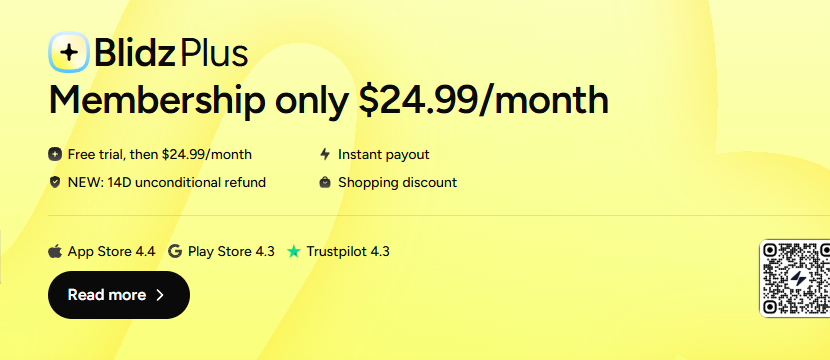
The site’s homepage advertised Blidz Plus at $24.99 per month after a free trial, while its membership terms list weekly, monthly, and annual plans.
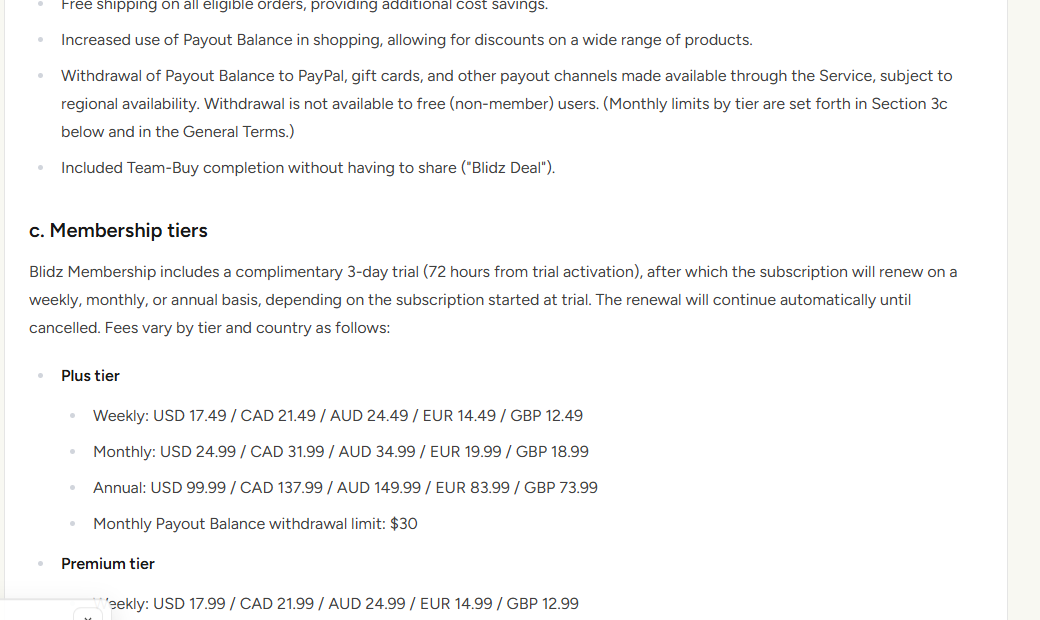
Those terms describe a three-day trial followed by automatic renewal until cancellation. A buyer who only wants one discounted item should price the membership too.
Our advice is firm: do not activate the trial for a casual purchase unless the exact tier, renewal date, and cancellation route are clear.
The refund promises do not line up neatly
The homepage displayed a “14D unconditional refund” message. The detailed terms described a 14-day guarantee on the first paid membership charge, not an unlimited refund right.
An official help article separately referred to a 30-day first-fee guarantee. That inconsistent window matters when someone tries to recover a recent charge.
The safest assumption is not that you automatically get 30 days. Ask support to confirm in writing which policy applies to your account before you rely on it.
Renewal charges are generally excluded from the first-fee guarantee. Product-return rules are also a different subject from membership-fee refunds.
What you need to decide before accepting
Do not tap “free” until you can answer these:
- Is the offer Plus, Premium, or another membership tier?
- Will billing start weekly, monthly, or annually after the trial?
- At what exact date and time must you cancel to avoid the first charge?
- Is the advertised item price available without a membership?
- What benefits disappear when you cancel?
- Does a refund request cover the first paid fee, a renewal, or a product order?
If the numbers are not displayed together at checkout, pause. A low item price is not a complete cost comparison.
The Trial Is Shorter Than Many Shoppers Expect
Blidz’s published membership terms describe a complimentary three-day trial. Three days is enough to browse, but not much time to assess a delivery or reward program.
The clock begins when the trial activates, not when you receive the first order. A parcel may not even be shipped before billing begins.
After the trial, the chosen membership renews automatically. The terms list weekly, monthly, and annual billing, depending on the option selected.
For Plus, the U.S. schedule in the terms included $17.49 weekly, $24.99 monthly, and $99.99 annually. Premium had higher listed rates.
That makes “free trial” an invitation into a paid plan, not a free sample of a product. The distinction should be obvious before a card is entered.
Blidz says shoppers must separately affirm the renewal terms and that it does not use prechecked membership boxes. We have not audited every checkout variant.
Customer complaints about surprising charges should be investigated against the actual checkout screen and consent record for that purchase.
Do not conclude that every charge was unauthorized merely because a user forgot the deadline. Do not dismiss every complaint as forgetfulness either.
Take a screenshot of the enrollment screen before confirming. It should show the tier, price, interval, first paid date, and cancellation instructions.
If that information is absent or too hard to see, abandon the deal. A first order should not require guessing the full recurring cost.
How the Blidz Membership Journey Creates Risk
Step 1: A cheap deal leads to member pricing
The app combines discounted items, “free deals” with shipping charges, rewards, and team-buy promotions. A visitor is encouraged to think about the item first.
Member pricing can be legitimate. The problem is comparing the discounted item with a full-price alternative while leaving the membership fee out.
Suppose a member price saves $8 on one purchase but the next monthly fee is $24.99. The deal may cost more overall.
That example is not a claim about a specific Blidz product. It shows why a shopper must calculate the complete trial-and-renewal path.
Check whether a standard nonmember purchase is possible. The terms say a checkout membership offer can be declined, though the item price may change.
Step 2: Trial enrollment authorizes later billing
The trial is described as three days. Blidz says enrollment requires a separate affirmative action and sends confirmation of the amount and next billing date.
Save that confirmation as soon as it arrives. If none appears, inspect the membership status inside your account before making another order.
Look closely at the tier. Plus and Premium do not share one universal rate, and weekly billing can recur faster than a casual shopper expects.
Do not assume the trial cancels after one purchase. The terms say the plan continues until canceled.
Set your own reminder for the next day, not the final hour. That leaves time to resolve a login or cancellation problem.
Step 3: Rewards can make membership feel necessary
Blidz describes extra deals, shipping benefits, payout features, and increased reward-balance use for members. Those features can make a subscription seem productive.
Its terms say withdrawing a payout balance is not available to free users. Ending the membership can therefore change how you use earned rewards.
That does not prove the rewards are worthless. It means the advertised balance should not be treated as cash you can access on identical terms forever.
Ask whether a reward is store credit, discount, payout balance, or an amount that can actually be sent to a payment account.
Compare withdrawal caps with subscription fees. A plan that costs $24.99 monthly is a poor fit if the benefit you seek is smaller or difficult to realize.
Step 4: The first charge arrives quickly
If the trial remains active, the selected recurring fee is charged after it ends. Later billing follows the weekly, monthly, or annual schedule.
A shopper may first notice the charge when checking a bank alert rather than when reviewing the app’s membership page.
Do not wait for another charge to investigate. Open the account, identify the plan and renewal date, and save the billing history.
The company says a small provisional card charge can be used for verification. Ask support to distinguish a temporary hold from a settled membership fee.
Do not send card photographs or full account credentials to a commenter offering to “reverse” the payment. Use official app and card-provider channels.
Step 5: Refund language creates a false sense of extra time
The homepage’s 14-day message sounds broad. The detailed terms target the initial paid membership charge, while later renewals are generally nonrefundable.
The help center’s 30-day language is different again. A buyer should not have to reconcile conflicting windows after a fee appears.
Request the current applicable written policy and identify the date of your first paid charge. Do it immediately rather than waiting for a support debate.
Remember that a refunded product order does not necessarily cancel the membership. These are separate transactions with different rules.
If support rejects a first-fee request, ask it to cite the exact provision and explain the timing and benefit-use reason.
Step 6: Cancellation needs its own confirmation
The membership terms say cancellation is available in the app and through support. They also warn that deleting the app or account does not automatically stop billing.
Go to the membership management area while you can still log in. Keep a screenshot showing the status and the final renewal date.
Send a support email if the in-app route fails or gives no receipt. Include your account email and a clear request to end recurring billing.
Wait for written confirmation, then watch the next billing date. If another charge posts, the cancellation timestamp becomes important evidence.
Do not rely only on removing your card from a device wallet. The merchant may already have an authorized recurring payment method on file.
The 14-Day and 30-Day Messages Need Reconciliation
The strongest evidence in this investigation comes from Blidz’s own pages, not an anonymous complaint.
On the promotional page, a short line calls the refund “unconditional” for 14 days. The membership terms narrow that promise to the first paid fee.
An official help article, available during our review, still used 30 days for the first payment. It also repeated the 30-day message in its cancellation guidance.
Those statements cannot all be used as the same simple rule. A buyer deserves one current answer before activating a trial.
We did not resolve which version Blidz would apply to a particular account. Timing, locale, tier, and the actual checkout disclosure could matter.
Our practical recommendation is to use the shorter 14-day window for action while asking support about the 30-day help-page promise.
Save both pages and the checkout confirmation. If support claims a different period, ask when the change took effect and which version governed your enrollment.
Do not mistake “14 days after first fee” for 14 days after downloading the app. The trial and first paid charge are separate events.
Do not assume a second month receives the same guarantee. The formal terms generally exclude renewal fees, except where law requires otherwise.
When a policy looks inconsistent, that is a reason to act faster, not a reason to wait for a perfect explanation.
Company, Address, and Fulfillment Checks
Blidz Inc. identifies itself
The membership terms name Blidz Inc. and list an Austin, Texas registered address. That is a real company disclosure, not proof of a fake identity.
Match the company name with your card descriptor and subscription confirmation. Ask support to explain any descriptor you do not recognize.
We did not visit the address or verify what operations occur there. A legal mailing address does not tell you where a marketplace item ships.
Support must handle two separate problems
A membership-fee dispute and a product-return request need separate case numbers or written threads. Combining them can obscure the deadline for each.
The terms provide an email and phone contact. Use the official help center or account interface rather than a social-media profile claiming to be support.
Ask for a cancellation confirmation and a first-fee refund decision separately. Save each reply.
Product fulfillment is not the membership itself
Blidz may sell goods through merchants or deal structures. A delayed or disappointing item does not necessarily make the membership charge refundable.
Check the product’s shipping estimate, seller, and return route before ordering. Keep its receipt apart from the subscription record.
Do not assume a “free deal” means no shipping expense or no ongoing membership obligation.
Public complaints need transaction-level proof
BBB complaint records include membership-charge disputes and company responses, sometimes reporting cancellations or refunds. Those records show friction, not a universal outcome.
A screenshot of your own enrollment, charge, cancellation, and correspondence is stronger evidence than another person’s review.
If your case differs from the written terms, state the difference clearly instead of calling every Blidz customer a victim.
What to Do If Blidz Charged You Unexpectedly
- Identify the charge. Match the date and amount with your Blidz account, tier, and any card verification hold. Confirm whether it settled before alleging a recurring fee.
- Cancel the membership now. Use the app’s account or subscription-management section. Do not merely delete the app. Save the cancellation screen and confirmation email.
- Request the first-fee refund promptly. If it is your first paid charge, contact official support within 14 days and mention the conflicting 30-day help page. Ask for the applicable policy in writing.
- Check for other cycles. Review bank statements for earlier weekly or monthly charges. A refund of one fee does not automatically reverse prior renewals.
- Separate merchandise issues. If an item is missing or misdescribed, file that claim using the order number and product-return policy, not only the membership thread.
- Escalate with evidence. If cancellation fails or a disputed charge remains unresolved, contact your card issuer with enrollment, billing, cancellation, and support records before its deadline.
Keep your tone factual. “I canceled on this date and was charged on that date” is more useful than a general statement that the app is a scam.
If you still want to shop without membership, confirm the nonmember price and reward limitations first. Rejoining solely to withdraw a small balance may not pay.
Frequently Asked Questions
Is Blidz a confirmed scam?
No such conclusion follows from the available evidence. It is an operating shopping service with a recurring membership that can be a poor fit or a surprise.
How long is the Blidz free trial?
The membership terms reviewed here describe a three-day trial. Check the exact checkout offer because plans and promotions can differ.
What does Blidz Plus cost after trial?
The homepage advertised $24.99 monthly. The formal terms also listed weekly and annual Plus plans, so confirm the tier and interval you actually select.
Is the refund window 14 or 30 days?
The promotional page and membership terms say 14 days for the first paid fee; an official help article said 30. Act within 14 days and request clarification.
Does deleting the Blidz app cancel billing?
No. The published terms warn that removal or account deletion alone does not cancel the subscription. Use the cancellation process and save confirmation.
Can I withdraw Blidz rewards after canceling?
Membership benefits change after cancellation. The terms say payout-balance withdrawal is unavailable to free users, so check your balance and options before deciding.
The Bottom Line
Blidz is a real app, but a three-day trial, multiple renewal schedules, and conflicting first-fee refund messages make its membership easy to misunderstand.
Skip the trial unless the paid plan genuinely saves you money. If already charged, cancel separately, request a first-fee refund promptly, and preserve your account records.

Join the discussion
0 commentsShare your experience or ask a question about this article.
Discussion
Start the conversation
Have a question or something useful to share? Add the first comment.