

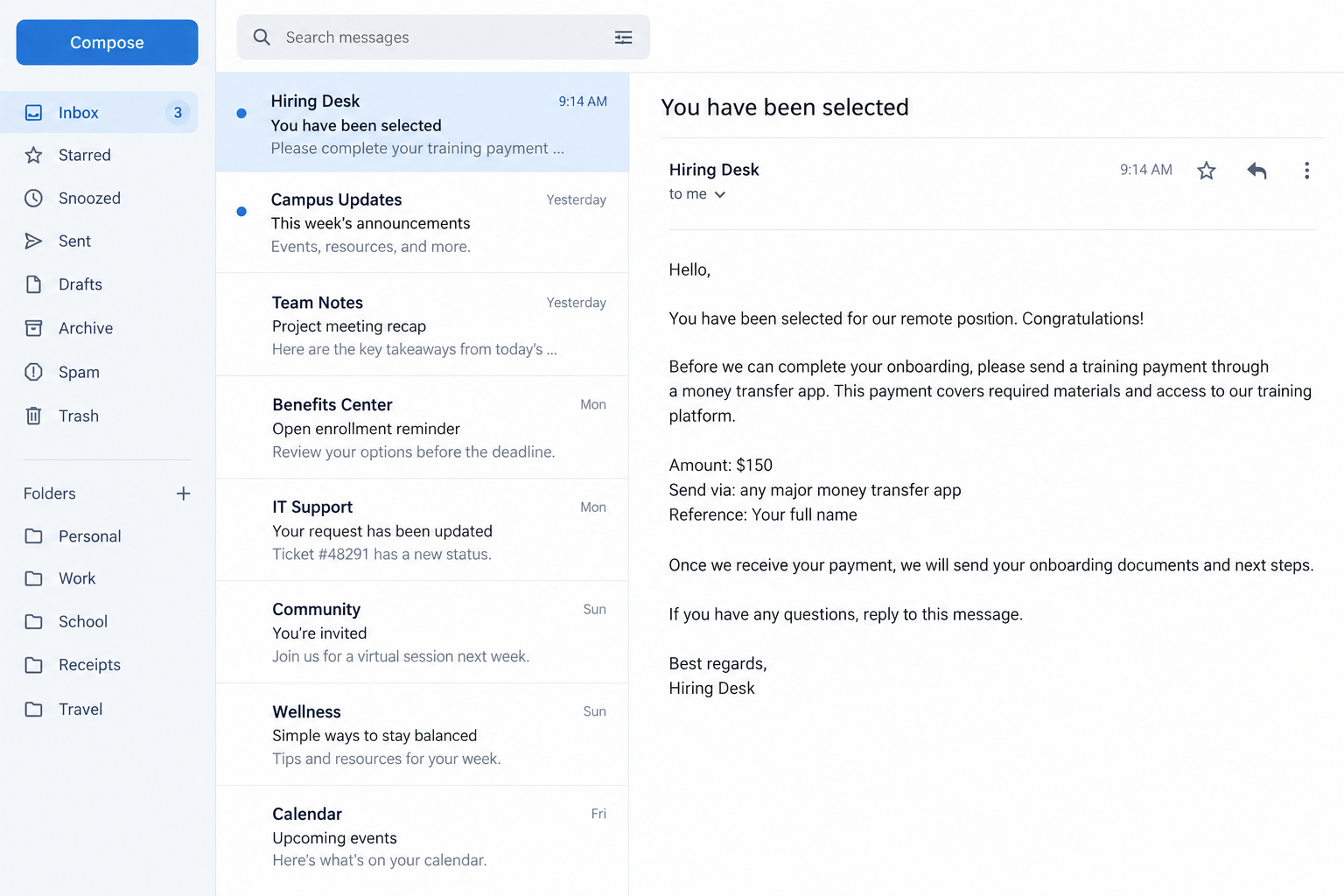
A recruiter offers a remote job and says a small transfer will cover training. The request looks routine until the payment route leads overseas.
If the instruction mentions Remitly, the app’s familiar name can make the request feel safer. The person asking for money still needs checking.
Overview
The payment service is real; the story may not be
Remitly is a legitimate international money-transfer service. A Remitly payment scam happens when a fraudster persuades someone to send money using it.
The story may involve a job, romance, apartment, family emergency, official fee, or bargain purchase. The common feature is a deceptive reason to pay.
In a separate account-fraud situation, someone may access a customer account without permission and attempt a transfer. These require different responses.
OnlineThreatAlerts discusses the broad risk of transfers to scammers. Its examples should not be treated as allegations against Remitly itself.
What the evidence supports
Remitly’s safety center distinguishes scams that trick customers into sending money from unauthorized account activity.
That distinction matters. A transfer you knowingly authorize under false pretenses is not the same event as a transfer initiated by an intruder.
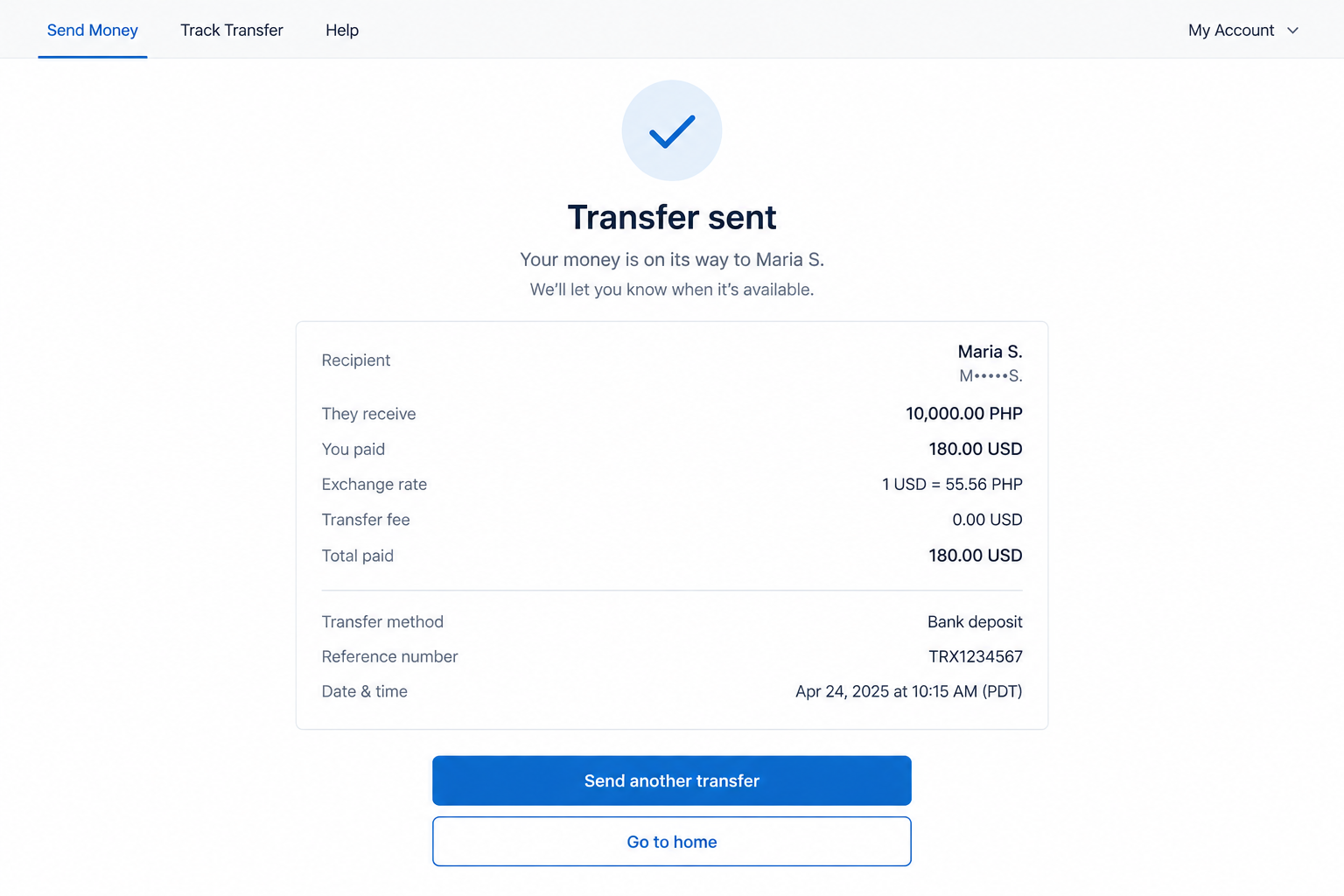
We have not verified one named recipient or claim from a live case. The images below are fictional reconstructions of a payment request and confirmation view.
The useful question is not whether every transfer is suspicious. It is whether the recipient and reason for payment survive independent verification.
Red flags before you send
- A prospective employer asks you to pay for training, equipment, or onboarding before work starts.
- A stranger insists on a transfer because card or bank payment would supposedly delay the deal.
- The recipient name differs from the person or company you thought you were paying.
- The requester wants a screenshot of the confirmation or transfer reference immediately.
- A supposed authority demands money by message instead of using published official payment channels.
- The story becomes more urgent whenever you ask for a contract, address, or independent verification.
One unusual detail is a reason to ask questions. A story that collapses under basic checking is a reason not to send.
Why International Transfers Attract Scammers
A completed transfer can be hard to undo
Money-transfer services are built to deliver funds efficiently. That feature helps families and businesses, but it can also help a scammer after an authorized payment.
Available cancellation or recall options depend on the transfer’s status and route. Do not assume you can reverse it after the recipient collects the money.
A fraudster may say the payment is only temporary. They may promise a refund, reimbursement, or larger payout after it arrives.
The promise is separate from the transfer you approve. Verify the underlying relationship before money leaves your account.
The app’s legitimacy can mask a fake pretext
A payment confirmation proves the service received instructions. It does not prove the recruiter’s job exists or an online seller will ship a product.
Scammers often rely on that confusion. They point to a well-known app as if it has checked their identity and promises.
Use the same skepticism you would apply to a bank transfer. Ask who the recipient is, why they are being paid, and what recourse exists.
If the explanation changes when you ask those questions, stop before final confirmation.
How the Remitly Payment Scam Works
Step 1: A believable relationship starts the conversation
A person responds to a job application, social profile, listing, or dating conversation. They spend time making the interaction feel ordinary.
In a job version, the offer may include familiar paperwork and a short interview. The details can be copied from a real employer.
In a sale, the item may have normal photos and a plausible price. Neither presentation establishes that the person can deliver.
The longer the exchange lasts, the harder it may feel to question the other person’s motives. That emotional investment is part of the pressure.
Step 2: A payment problem suddenly appears
The employer says onboarding requires a fee. A seller claims customs charges are due. A new acquaintance describes an emergency.
The amount may be small enough to seem manageable. Once you pay, another fee can follow.
Watch for a request framed as the only thing standing between you and a job, shipment, visit, or refund.
Real employers and agencies have verifiable procedures. Check their published channels before accepting an unexpected transfer instruction.
Step 3: The requester steers you to a money transfer
The person gives you a recipient name and destination, then asks you to use Remitly or another transfer provider.
They may say card payment is unavailable or that the recipient is a colleague. Those explanations do not verify the recipient.
Read every field yourself. A payment to an individual abroad is materially different from a purchase from a registered business.
If the recipient name changes at the last minute, stop and independently confirm why. Do not accept a hurried correction by chat alone.
Step 4: The transfer is authorized
You may complete identity checks and confirm the payment inside a genuine Remitly interface. That can create a false sense that the underlying deal was reviewed.
The transfer service processes your instruction; it does not independently guarantee the job, listing, relationship, or government claim.
Before pressing the final button, confirm the person through a separate route and review the transfer details for unexpected names or locations.
If you cannot explain why that recipient should receive your money, do not continue.
Step 5: A confirmation becomes leverage
The requester asks for the receipt, reference, or screenshot. They may need it to identify the transfer or to keep you invested in the story.
They may then claim that payment is delayed and demand another amount. A supposed release fee can follow a completed transfer.
Do not send additional money because the first payment is already gone. Sunk cost does not make a second payment safer.
Contact the service’s official support promptly. Whether it can cancel or recall a transfer depends on its status.
Step 6: The promised benefit never arrives
The job disappears, the item is never delivered, or the person becomes unreachable. In some cases the conversation continues with new excuses.
Save the entire message history. A short screenshot of the final demand may omit the original representation that caused the payment.
Later, someone may claim they can recover your money for a fee. Treat that as a separate potential scam.
When reporting, describe precisely what you authorized and what was false. The distinction helps the provider investigate the correct type of case.
Authorized Scam or Unauthorized Account Fraud?
When you pressed send because the story was false
You knowingly completed a transfer, but you would not have done so if the other person’s story had been true.
That is a scam-induced authorized payment. Report the deception, not just a claim that the payment appeared without your action.
Provide the recipient information, messages, advertisement, and exact promises. Ask immediately whether the transfer can be stopped.
Outcomes are not guaranteed. A truthful, detailed report gives the provider and authorities the best chance to assess available options.
When someone used your account without permission
An unfamiliar transfer you did not initiate points to possible account compromise or another unauthorized transaction.
Secure the account, change linked email passwords, review sign-in sessions, and report the activity through Remitly’s official support channel.
Contact your bank or card issuer if funding details may have been exposed. Tell them whether you recognize the transfer.
Do not let a stranger “help” by asking for one-time codes or remote access. Those requests can worsen the incident.
How to Verify the Person Before a Transfer
For a job or business request
Find the organization’s website without using the link in the message. Call a published number and ask whether the named recruiter and payment policy are genuine.
A real company may use third-party recruiters. That does not make a request for personal transfer fees normal or safe.
Ask for a written offer, legal employer name, and explanation of who receives the money. Compare those details with the transfer recipient.
If the purported employer forbids outside verification or says the offer vanishes within minutes, treat that pressure as evidence against the request.
For a purchase or rental
Check whether you can inspect the item, verify ownership, and pay through a method with appropriate buyer protections.
A seller who refuses ordinary marketplace checkout but requests an international transfer changes your risk substantially.
For rentals, check property records or contact a known management company independently. A copied listing photo is not proof of authority to lease.
If the seller’s name, location, and transfer recipient do not align, do not accept a vague explanation about an assistant or relative.
For a relationship or emergency
Emotion can make verification feel disloyal. A genuine person should understand a pause before an international money transfer.
Try a separate communication channel you already trust. Do not assume a video call alone proves the story or the beneficiary’s identity.
Ask whether another safe route exists, such as direct payment to a verified hospital or service provider. Confirm that provider independently.
Never send money you cannot afford to lose because a new online acquaintance says there is no time to check.
What to Review on the Transfer Screen
Recipient, country, amount, and delivery method
Slow down at final confirmation. Read the full recipient name, destination country, payout method, fees, and amount.
A recipient may use a name that differs slightly from what appeared in chat. Do not assume a mismatch is a harmless transliteration.
Ask the person to explain any difference, then verify that explanation independently. If the answer keeps changing, cancel the payment attempt.
Keep in mind that a completed transaction can reach a person you never met. The interface cannot decide whether that person deserves your trust.
Instructions to share a receipt
A stranger may ask for the transfer confirmation as soon as you press send. Do not provide extra account details hidden in the screenshot.
Some recipients need a legitimate reference to collect money. That does not make the original request honest.
If you suspect deception immediately after sending, contact support first. Do not wait for the requester to explain why the funds are not visible.
Save the receipt for your own records and official reports. Avoid posting it publicly, where someone else could use its identifiers.
What a Trustworthy Payment Request Looks Like
The purpose and beneficiary are clear
A sound request explains why you owe money, who legally receives it, and what happens if the transaction fails.
It leaves room to verify those facts. Urgency can be real, but it does not remove your need to confirm the beneficiary.
A formal invoice should match the organization and payment recipient. A polished PDF alone is not proof that it came from that organization.
For a job, the employer’s published policies should support any charge. If no such policy exists, do not invent one for the recruiter.
There is a path to resolve a problem
Before paying, ask what customer support, contract, or platform protection will apply if the promised item or service is not delivered.
A seller who moves the conversation off a marketplace may remove protections that would otherwise help you challenge a problem.
Money transfer is appropriate for many real relationships. It is poorly suited to proving a stranger’s promise is enforceable.
When the only evidence is a chat message and a deadline, the safer choice is to wait.
What to Do if You Have Fallen Victim to This Scam
- Contact Remitly immediately. Use its official support route, not a number supplied by the requester. Give the transfer reference and ask whether cancellation, recall, or review is possible.
- Tell your bank or card issuer. Explain whether you authorized a payment under deception or found an unauthorized charge. Ask what dispute or account-protection options apply.
- Preserve the full story. Save the job post or listing, profile, messages, recipient details, receipts, and promises of reimbursement. Record dates and any additional payment demands.
- Secure accounts if access was exposed. Change passwords for Remitly, email, and any reused accounts. Enable strong multifactor authentication and review active devices. If you installed software, remove it and run a Malwarebytes scan.
- Report the scam. In the United States, use FTC ReportFraud. Elsewhere, contact your local consumer-protection or cybercrime authority. Report the profile or listing to its platform.
- Reject recovery-fee approaches. Anyone promising guaranteed retrieval for an advance payment may be targeting you again. Deal directly with the transfer provider and law enforcement.
If a legitimate employer’s name was used, notify the company through its published website. It may warn other applicants.
Frequently Asked Questions
Is Remitly a scam?
No. This article concerns people who misuse a legitimate money-transfer service or impersonate its support staff.
Can Remitly reverse a transfer sent to a scammer?
Possibilities depend on the transfer status and route. Contact official support immediately; do not rely on a stranger’s promise of recovery.
Is a job training fee always fraudulent?
Not every educational expense is fraud, but an unexpected payment to a recruiter’s personal recipient is a serious warning sign. Verify the employer independently.
What if the recipient is someone I met online?
Confirm their identity and reason for payment outside the same chat. A long conversation and shared photos do not establish that a transfer is safe.
Should I say the transfer was unauthorized if I pressed send?
Describe the facts accurately. Say you authorized it because of deception, and provide the messages that show the false promise.
Can a fake Remitly support message steal my account?
Yes. A phishing link or caller asking for passwords and codes can threaten account access. Use official support reached independently.
The Bottom Line
A Remitly payment scam depends on a false reason to send money, not on the transfer app being fake. The recipient and underlying story deserve scrutiny.
Stop when a stranger controls the timetable, verify the relationship separately, and act quickly if you already paid.








