

Your phone says someone tried to move cryptocurrency out of your CoinSpot account. The message gives you a number to call before the transfer goes through.
It feels like a security alert. Yet the fastest-looking route to help may be the detail you need to question first.
Overview
A fake emergency built around a real exchange
The CoinSpot security alert scam uses a text, email, or call to claim that a login or withdrawal needs immediate attention.
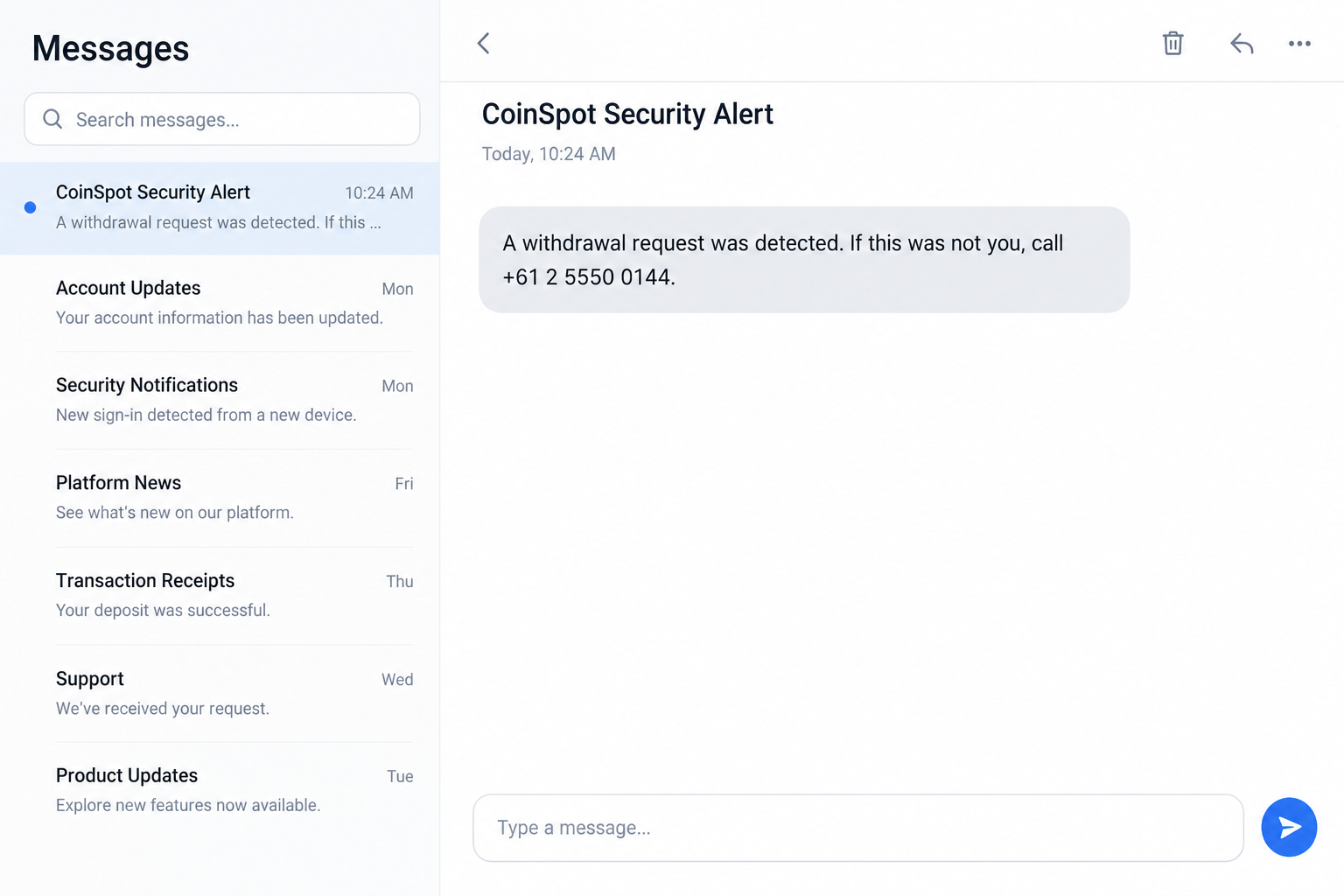
It may include an amount, location, case number, or countdown. The message then asks you to call a supplied number or follow a link.
CoinSpot is a legitimate cryptocurrency platform. The scam is the unauthorized message or impersonator, not the service named in the alert.
A reported example collected by OnlineThreatAlerts describes suspicious messages that steer customers toward a purported security response.
What can and cannot be concluded
A screenshot of an alert can show its wording and callback instruction. It cannot, by itself, prove that a withdrawal occurred or identify the sender.
The caller may seek a password, one-time code, wallet transfer, or remote access. Those are possible scam paths, not verified outcomes for every recipient.
CoinSpot’s own terms warn users to protect passwords and two-factor codes. Its official contact page provides an independent route to support.
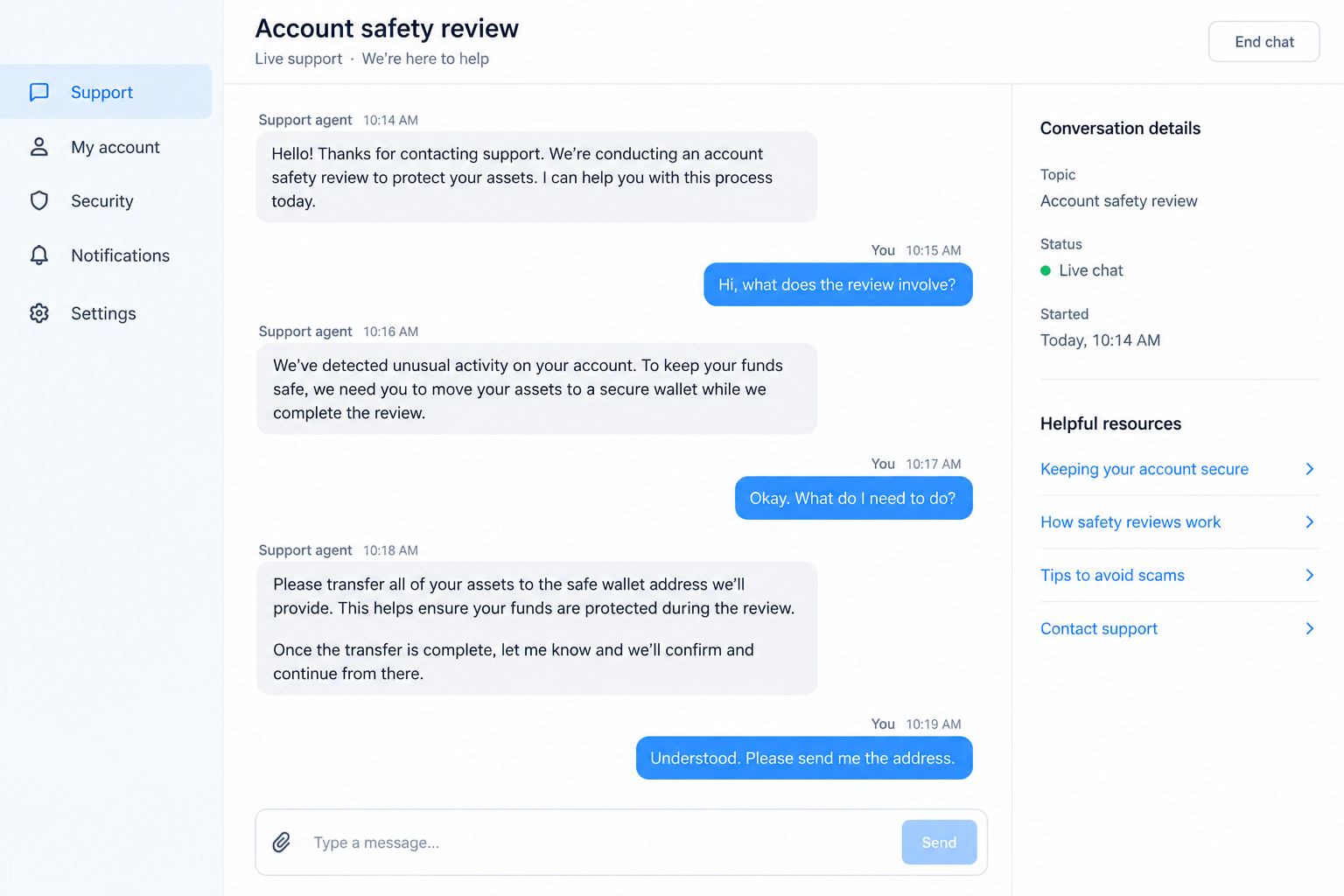
Both images here are fictional reconstructions. They show the pressure tactics and follow-on conversation without reproducing a victim’s private account.
Warning signs that should slow you down
- The alert provides a phone number you have never used before.
- A caller asks for your password, recovery phrase, or one-time authentication code.
- Someone says a transfer to a “safe wallet” will protect your funds.
- The sender insists you stay on the phone while opening your exchange account.
- The link’s domain does not match a destination reached from CoinSpot’s own website.
- The message threatens instant loss if you take time to verify it separately.
Genuine account trouble can be urgent. You can still verify it through the app or official website you already know.
Why the Alert Feels Credible
Specific details create an impression of access
A fake text may name a city, transaction amount, or device. Those details make the message feel connected to account monitoring.
They may be invented. They may also be drawn from information disclosed elsewhere, without any access to your CoinSpot account.
Scammers do not need to know your actual balance to frighten you. A claim about a pending withdrawal can make almost anyone respond quickly.
If the message contains personal information, treat it as a reason to check your accounts, not as proof the sender represents CoinSpot.
The callback moves the conversation to their terms
When you dial the number inside a suspicious alert, you may reach a person prepared with a convincing security script.
That person can guide the call, discourage independent checks, and ask for information at precisely the moment you are most worried.
Caller ID is not reliable proof. A displayed business name or familiar-looking number can be spoofed or misrepresented.
The safer route is to open the platform from your own bookmark or type its known address, then use its published support options.
How the CoinSpot Security Alert Scam Works
Step 1: The scammer creates a security event
The message says someone initiated a withdrawal, added a new device, or logged in from an unfamiliar place. It may claim action is required immediately.
There may be no account event at all. The purpose is to create a problem that only the sender’s supplied path appears to solve.
Some messages arrive by email; others use SMS. The channel alone cannot tell you whether the alert is genuine.
Notice whether the text states a verifiable fact or simply asks you to trust a claim. Open the account independently to check activity.
Step 2: The message supplies a convenient rescue route
A callback number, link, or reply instruction sits close to the warning. The sender wants you to use it without examining the sender’s identity.
The number may have an ordinary Australian format. That appearance does not establish who answers it.
Do not search the number and assume a result page authenticates it. Scam numbers can appear in copied posts or fabricated listings.
Find CoinSpot’s contact method from its official contact page, reached independently of the alert.
Step 3: A supposed agent gains your confidence
If you call, the person may know the wording of the text because they sent it. They can repeat its case number and sound well briefed.
They may ask you to verify your name and email first. That can feel routine while revealing more account details.
Another tactic is to claim that your login is unsafe and offer to “secure” the account during the call.
End the conversation if the agent asks for secrets or tells you not to use normal support. Then contact the company by your own route.
Step 4: The safety story becomes an instruction
The caller may ask you to read a one-time code aloud, approve a sign-in, install software, or move coins to a wallet described as safe.
Those requests serve different goals. A code may open your account; remote access may expose your device; a transfer may send funds away.
Do not interpret a real code from CoinSpot as proof the caller is genuine. A code can be generated by someone attempting to sign in.
No customer-service conversation should require you to reveal a recovery phrase. That phrase can provide direct control of a self-custody wallet.
Step 5: Money or account access leaves your control
If you authorize a cryptocurrency transfer, the destination wallet may be controlled by the scammer. Confirmed transfers are generally difficult to reverse.
If you disclose credentials, the person may try to change security settings, withdraw funds, or reuse the password elsewhere.
A scammer may ask for additional money to reverse the first transaction. That second demand is another warning sign, not an official recovery process.
The precise response depends on whether you merely read the alert, called, gave a code, installed software, or sent funds.
How to Verify a Real CoinSpot Security Concern
Check the account without touching the message
Open the app already installed on your device or type the official web address yourself. Review login history, withdrawals, and security notices there.
Do not enter your credentials into a page opened from the alert. A familiar logo can be copied, and lookalike domains can be subtle.
If you cannot sign in, contact official support from a different device or connection if necessary. Explain what the message claimed.
Ask whether there is an actual pending transaction, then follow the platform’s documented account-protection process.
Distinguish a verification call from a transfer request
Companies may communicate through several channels. Avoid sweeping rules such as “no real company ever phones customers.”
The reliable boundary is the information and action requested. A stranger asking for your password, code, or wallet transfer is not a safe shortcut.
CoinSpot’s published materials allow you to initiate contact and review its security guidance. Keep control of that route.
If a caller claims to be from CoinSpot, end the call and reconnect through an independently found official channel.
Common Versions of the CoinSpot Impersonation
A withdrawal text with a callback number
The simplest version states that a transfer is pending and asks you to call if it was not yours. That reverses the usual safety instinct.
Normally, a worried customer wants to call support. The scammer places their own number exactly where that customer expects help to appear.
Some texts include a reference code. It may help the operator sound organized during the call, but it does not authenticate a case.
Do not needlessly repeat the number to friends or in public comments. Share the screenshot with the platform or authorities instead.
An email leading to a fake sign-in page
An email may describe a suspended account or an unfamiliar login. Its button leads to a page that asks for exchange credentials.
A convincing page may also collect a one-time code after you submit the password. This sequence can capture both pieces during a live login attempt.
Inspecting the displayed sender name is not enough. The real destination domain and the account activity inside the official app matter more.
If you entered credentials, change them immediately through the official website. Also secure the email account that receives password resets.
A supposed fraud team asking for a safe transfer
Another variation begins with a call or chat. The operator says your assets must be moved to a protected wallet while an investigation runs.
The phrase sounds reassuring. In practice, the wallet address may belong to the same person telling you there is danger.
No screenshot or voice explanation can establish that an outside wallet is controlled by an exchange. Treat an unexpected transfer instruction as a stop sign.
If you are worried about funds in an account, ask official support what account-level controls are available before making any transaction.
What the Different Outcomes Mean for You
If you only received or opened the alert
Reading a text or email does not automatically compromise an account. Check the app for actual activity, then block or report the suspicious contact.
Do not panic because the message knows your phone number. Phone numbers are widely exposed through many sources and can be sent messages in bulk.
If the alert references a password you still use, change that password through the official account and enable strong multifactor protection.
If you spoke with the caller
Write down what you said and what the person asked you to do. A conversation alone is different from revealing a code or authorizing a transaction.
If you shared an email address, watch for follow-up phishing. If you shared a one-time code, contact official support immediately.
Do not keep the conversation going to gather evidence yourself. The operator may use the extra time to pressure or confuse you.
If you sent funds or granted access
Timing matters most here. Report the transfer and destination address to the exchange as soon as possible, even if recovery appears unlikely.
If someone remotely controlled your computer, assume they may have seen more than the exchange account. Review other logged-in financial and email services.
A bank-funded payment may have different dispute options from an on-chain transfer. Describe the precise funding method to your provider.
Keep copies of all responses and case numbers. They can help connect a later suspicious message to the original incident.
If your identity documents were shared, ask the relevant identity provider or bank about additional monitoring. A phone scam can create risks beyond one exchange account.
Consider warning household members who use the same phone plan or email inbox. Explain the specific false alert so they recognize a repeat attempt.
Keep the original message until your reports are filed. Deleting it immediately may remove a sender address, link, or timestamp that investigators could use.
What to Do if You Have Fallen Victim to This Scam
- Stop following the message. Do not call again or transfer more cryptocurrency. Save the alert, caller number, website, chat, and any transaction IDs before blocking the sender.
- Tell CoinSpot through its official support route. Explain exactly what you disclosed or approved. Ask about account restrictions, unauthorized logins, withdrawal status, and steps available under its security procedures.
- Change credentials from a trusted device. Reset the exchange password and any reused passwords. Secure the linked email account and review active sessions and authentication settings.
- Handle wallet exposure separately. If you revealed a recovery phrase, create a new wallet and move remaining assets. If you sent funds, preserve the destination address and transaction hash for reporting.
- Address device access. If you installed remote-control software or opened a suspicious download, disconnect that session, remove the program, and scan the device with a reputable tool such as Malwarebytes.
- Report the incident. In Australia, use Scamwatch and the police or cybercrime channel appropriate to your case. Notify your bank if card or banking details were exposed.
Be skeptical of anyone who later contacts you offering to trace or recover the coins for an advance payment. Share records only through verified channels.
Frequently Asked Questions
Is CoinSpot itself the scam?
No. This report concerns messages or callers impersonating a legitimate exchange. A fake security alert does not establish wrongdoing by CoinSpot.
What if the text came from a familiar sender name?
Sender names can be manipulated or grouped with legitimate messages. Verify activity inside your account and contact support independently.
Could a real CoinSpot alert arrive by phone?
Communication channels can vary. Judge the request, not the channel alone. Never provide a password, one-time code, or recovery phrase to an unexpected caller.
Does receiving an authentication code mean my account is already compromised?
Not necessarily. Someone may have attempted a login. Do not share the code, and review account security through the official app or website.
Can a sent cryptocurrency transfer be reversed?
Confirmed blockchain transfers are usually not reversible. Contact the exchange promptly anyway, preserve identifiers, and avoid anyone guaranteeing recovery.
Should I reply “STOP” to the suspicious alert?
Replying may confirm that your number is active. Report or block the message through your phone and carrier tools after saving evidence.
The Bottom Line
The CoinSpot security alert scam turns concern about a withdrawal into a request to follow a stranger’s instructions. The alert is not proof of a real transaction.
Check your account independently, use official support, and never move funds or share authentication secrets because an unsolicited message tells you to.








