

An invoice lands in your inbox with a familiar accounting service around it. Inside, a Norton renewal appears, although you never ordered that plan.
The charge looks large enough to demand attention. Before calling the listed number, look closely at what the message actually proves.
Overview
Two familiar names in one confusing message
The QuickBooks Norton cancellation scam places a supposed antivirus renewal inside an invoice or billing notification associated with accounting software.
That unusual pairing is the hook. QuickBooks is associated with invoices, while Norton is associated with device protection. Seeing both can make the message feel administrative.
The reader is told to resolve a charge by calling a number in the message. That number, rather than the billing claim, is often the critical part.
A person who calls may reach someone posing as a refund or cancellation agent. The conversation can then move toward payment details or computer access.
What the available evidence establishes
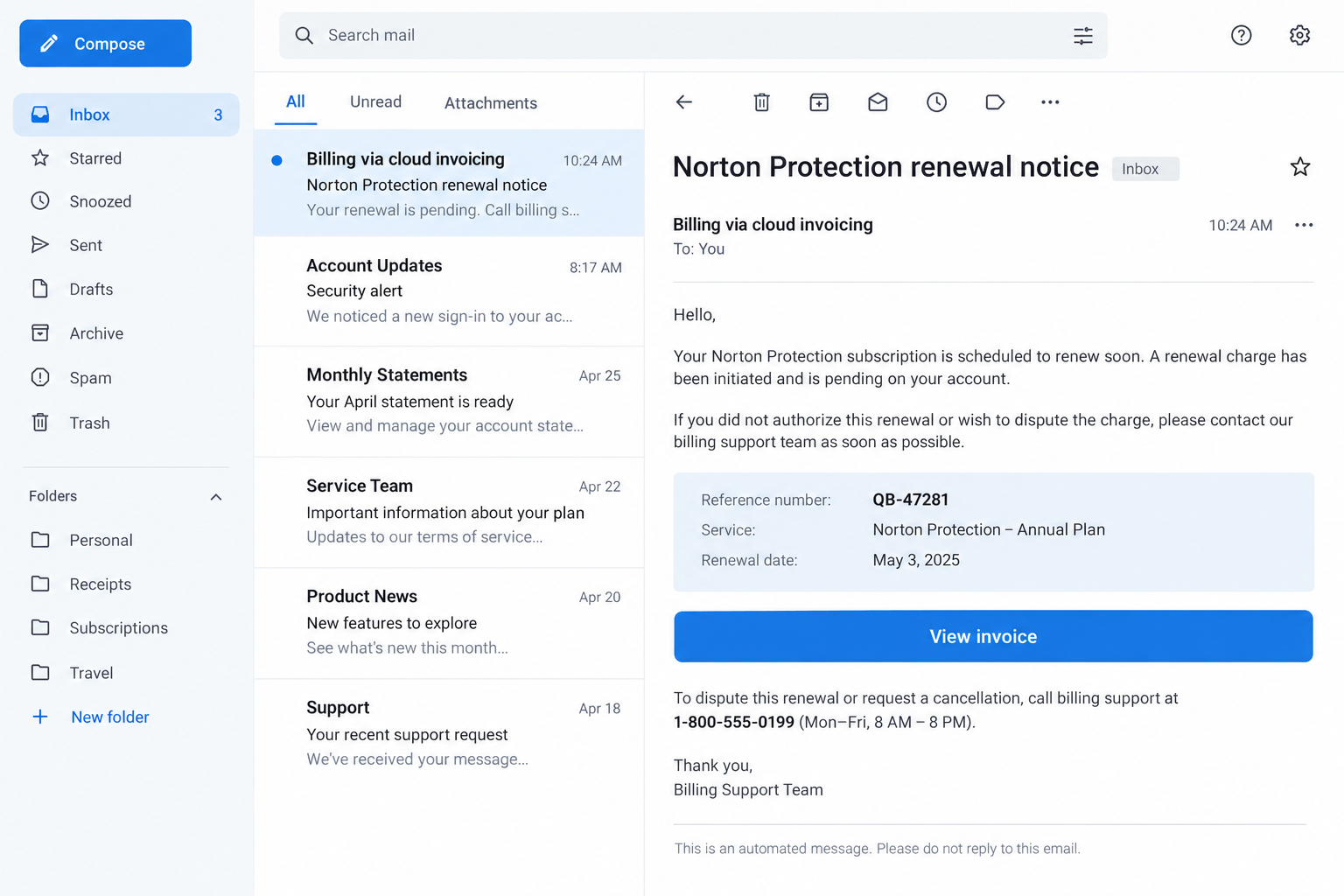
The reported message uses a protection-plan label, a reference number, and a callback instruction.
Those details show the claimed charge and requested action. They do not prove a subscription exists, a payment settled, or Norton issued the notice.
Nor does an accounting platform’s name prove that the sender’s billing claim is accurate. An invoice can be created by someone other than the brand named inside it.
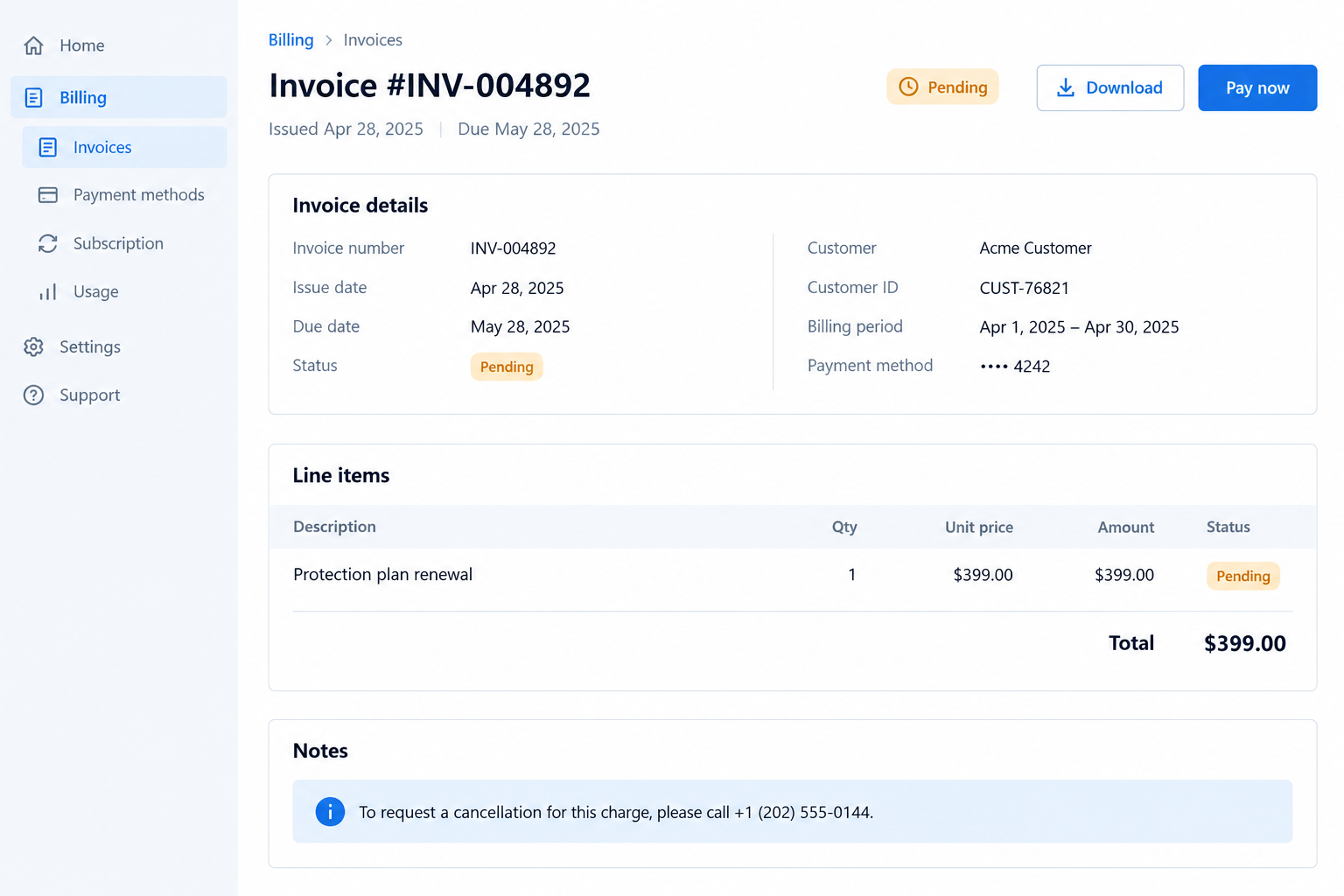
The two screen images here are illustrative reconstructions. They show how the pitch may appear; they are not captures of a verified sender’s mailbox.
The clues that matter most
- The product named in the invoice was never purchased or linked to your account.
- A third-party billing message tells you to call a number to cancel a Norton plan.
- The note combines vague account activity with a precise-looking reference ID.
- The sender urges a phone conversation before you can verify a real charge.
- The claimed seller, invoice creator, and payment destination are not clearly connected.
You do not have to decide whether the sender compromised a business account. The safe response is the same: verify the alleged charge elsewhere.
Why a Real Invoice Platform Can Carry a False Claim
Delivery and truth are separate questions
Many businesses use invoicing software to request payment. The software can deliver a real notification even when a seller writes a misleading description.
Imagine receiving a letter in a properly addressed envelope. The postal service delivered it; that does not certify the claim printed inside.
The same distinction applies to a message that appears connected to an accounting platform. Check who created the invoice and whether you recognize the transaction.
Intuit’s fraud guidance describes suspicious messages and ways to check genuine communication. It does not certify invoices simply because they mention QuickBooks.
A disputed charge may never have existed
The message may describe a completed payment, an upcoming renewal, or a request to review billing information. These are different claims.
Check your card and bank activity through your established app. An email does not move money merely by saying a transaction happened.
If no charge appears, avoid giving a stranger the card details needed to create one. Continue monitoring for any later unexpected activity.
If a charge does appear, ask your issuer to identify the merchant and the dispute process. Do not rely on the email’s callback number.
How the QuickBooks Norton Scam Works
Step 1: A billing message borrows an ordinary workflow
The recipient sees a notice that resembles an invoice, transaction summary, or request for account review. Formatting may include a date and reference number.
These familiar fields reduce friction. People expect real businesses to send structured receipts, so a fraudulent note can hide inside the format.
The message may have come from a lookalike sender or through a real invoicing tool. Without original headers and account records, do not assume which occurred.
Step 2: A Norton renewal creates the reason to react
The invoice names antivirus protection, a subscription renewal, or a service plan. The recipient may not remember buying anything similar.
That mismatch is intentional in many callback scams. It invites a worried person to ask for an immediate cancellation or refund.
Norton warns about fake renewal notices that claim a large charge and steer recipients toward a contact channel supplied by the scammer.
Norton itself remains a real company. The deceptive invoice and anyone falsely claiming to handle its billing are the problem.
Step 3: A phone number replaces independent verification
The message supplies a billing or cancellation number. Calling it keeps the person inside the process designed by whoever wrote the invoice.
The caller may hear a professional greeting and be asked for the reference number. Those details can be read from the same fraudulent template.
Do not treat a confident answer as proof. A scammer can confirm information that they placed in the original message themselves.
Look up Norton’s support through its official website and examine the subscription area of any account you actually own.
Step 4: The refund conversation requests something valuable
Some operators ask for card details to locate the payment. Others claim they must confirm identity before stopping a renewal.
The request may sound procedural, but the caller has not established that a charge exists or that they represent the named provider.
Do not provide passwords, one-time codes, security answers, full card numbers, or banking login details to an unsolicited billing contact.
A genuine provider can direct you to a secure account process reached through its own published site, without relying on the invoice’s number.
Step 5: A possible remote-support request raises the stakes
Some refund scams expand beyond a phone conversation. The caller may ask you to install software so they can supposedly process a cancellation.
That is a separate, more serious exposure. Screen access can reveal banking sessions and let the operator make changes while you watch.
The sample notice alone does not prove that every caller demands remote access. Treat it as a conditional risk if the call takes that turn.
If someone asks to control your device, end the call. Nothing about disputing an invoice requires handing a stranger your desktop.
Step 6: The claimed refund becomes another demand
A caller may say the refund failed, needs a verification payment, or requires you to move money temporarily. Each explanation changes the original problem.
Do not send money to obtain the return of money you did not confirm was taken. Contact your payment provider directly.
A real card dispute follows the issuer’s documented process. It does not require gift cards, a cryptocurrency transfer, or an unknown person’s remote instructions.
How to Check the Invoice Safely
Start with your accounts, not the message
Open the bank or card app you normally use. Search recent and pending activity for the stated amount and merchant description.
Then check any Norton account independently. If you have no account, the invoice does not create one on your behalf.
Do not click a message link just to investigate. Type the known website address or use an app already installed from an official store.
Identify the actual invoice issuer
Look for a real business name, a prior order, and a relationship you recognize. The product label alone may be copied text.
A sender can change the note inside a standard invoice. The support phone number may belong to neither Intuit nor Norton.
If the notice seems to originate from a real invoicing platform, report the suspicious invoice through that platform’s official abuse route.
Preserve the message and full sender details for your report. Do not forward the suspicious number to friends as though it were support.
Understand what each company can verify
Your bank can verify whether a card was charged. Norton can verify your subscription. Intuit can review misuse of its invoicing service.
These are different questions, so one company may not have the entire answer. Contact each only through its own published channel.
A quick independent check is usually more useful than a prolonged debate with an unknown caller about how official the invoice looks.
What the Email Details Can and Cannot Tell You
A familiar sender is useful context, not a final answer
Some inboxes display a friendly sender name prominently and hide the underlying address. Expand the sender details before deciding who actually contacted you.
A lookalike domain can be a warning sign. Conversely, a message routed through a genuine billing platform still may contain a fraudulent invoice.
That is why examining the address helps, but it cannot settle the entire question. Match the claimed purchase to your own records.
The invoice number only identifies this message
A reference such as NT-66548 can make an email seem tied to an account. Anyone writing an invoice can assign a plausible-looking identifier.
Ask yourself whether you have an order confirmation, prior subscription notice, or matching card entry from a source you already trust.
Without that independent record, the number is just part of the claim. Do not supply more personal details to help the caller search for it.
Distinguish a payment request from a payment receipt
Invoice software can send requests for payment. A request is not the same as a settled transaction on your bank statement.
Scam notes sometimes blur this by saying payment details are available while also implying that a charge has already happened.
Open your actual account history and check dates, merchant names, pending authorizations, and posted transactions. Your issuer can explain entries you do not recognize.
Do not pay a new invoice to cancel an old one. That would create a real transaction while leaving the original claim unverified.
A trustworthy path survives when you close the email
If you are truly subscribed, the plan should appear in your Norton account or other original purchase records after you close the message.
If there is a genuine card charge, your issuer can investigate it without the email’s phone number. The process does not depend on staying inside one notification.
Taking five minutes to verify through established accounts is reasonable. The caller’s urgency is not evidence that you must surrender that time.
What to Do if You Have Fallen Victim to This Scam
- End the call and stop following the invoice instructions.
Do not accept a transfer to another supposed department. Write down what you shared, installed, or paid while the details are fresh.
If you only opened the email, that alone does not establish that money or account access was lost. Focus on the exposure that actually occurred.
- Contact your card issuer about charges or card details.
Use the number on your card or your established banking app. Report the claim and ask whether a transaction exists.
If you disclosed card data, ask about replacement and monitoring. If you paid, explain honestly whether you authorized the transaction under a false pretext.
- Secure any account credentials you gave away.
Change the affected password through the genuine service. Revoke unfamiliar sessions and enable stronger sign-in protection where available.
Prioritize email and banking because they can be used to reset other accounts. Never read a new verification code to the caller.
- Respond to any remote access immediately.
Disconnect the device from the internet and remove the remote-support tool if someone had control. Use a trusted device to change sensitive passwords.
Run a full Malwarebytes scan if software was installed or files were downloaded. A scan cannot reverse a payment or undo account disclosures.
- Save the invoice and call evidence.
Keep the original message, full sender information, call log, receipts, and any remote-support session details. Record the exact claim and requested action.
Do not publish your full card details or private documents. They are for your financial institution and any legitimate investigation.
- Report the misuse to the relevant organizations.
Send the suspicious invoice to Intuit through its official fraud guidance. Notify Norton if its brand was used to solicit a callback.
In the United States, file a report at ReportFraud.ftc.gov. Reporting does not replace a separate bank dispute.
- Watch for a second refund pitch.
A follow-up caller may know the original invoice number and claim the first representative made an error. That continuity does not authenticate them.
Work through your card issuer and companies you contact independently. Do not pay another fee for promised recovery.
Frequently Asked Questions
Does a QuickBooks notification mean the Norton charge is real?
No. It can show that an invoice message was delivered, but the statement inside still requires independent verification against your accounts.
Should I call the cancellation number printed in the email?
Use Norton’s published support route or your card issuer instead. The number inside an unverified invoice may connect to the person who created it.
What if I have never subscribed to Norton?
That makes the claim less plausible, but check card activity before concluding anything was charged. Preserve the message and avoid the supplied callback.
Can the invoice creator use a real accounting service?
Possibly. Legitimate tools can be misused by dishonest senders. Without original delivery records, do not assume the exact route used for your message.
Do I need to scan my computer after merely reading the email?
Reading an email does not by itself prove malware infection. A scan matters if you downloaded a file, installed a program, or allowed remote access.
Can I get a payment back if I called and paid?
Contact the payment provider immediately and ask which dispute or recall options apply. Results depend on the payment method and facts; nobody can guarantee recovery.
The Bottom Line
The QuickBooks Norton scam uses a believable invoice setting to make a false renewal feel urgent. The printed callback number is the path into the trap.
Verify actual charges and subscriptions through your own bank and Norton account. If you shared information, respond to that exposure promptly and keep the message as evidence.

Join the discussion
0 commentsShare your experience or ask a question about this article.
Discussion
Start the conversation
Have a question or something useful to share? Add the first comment.