

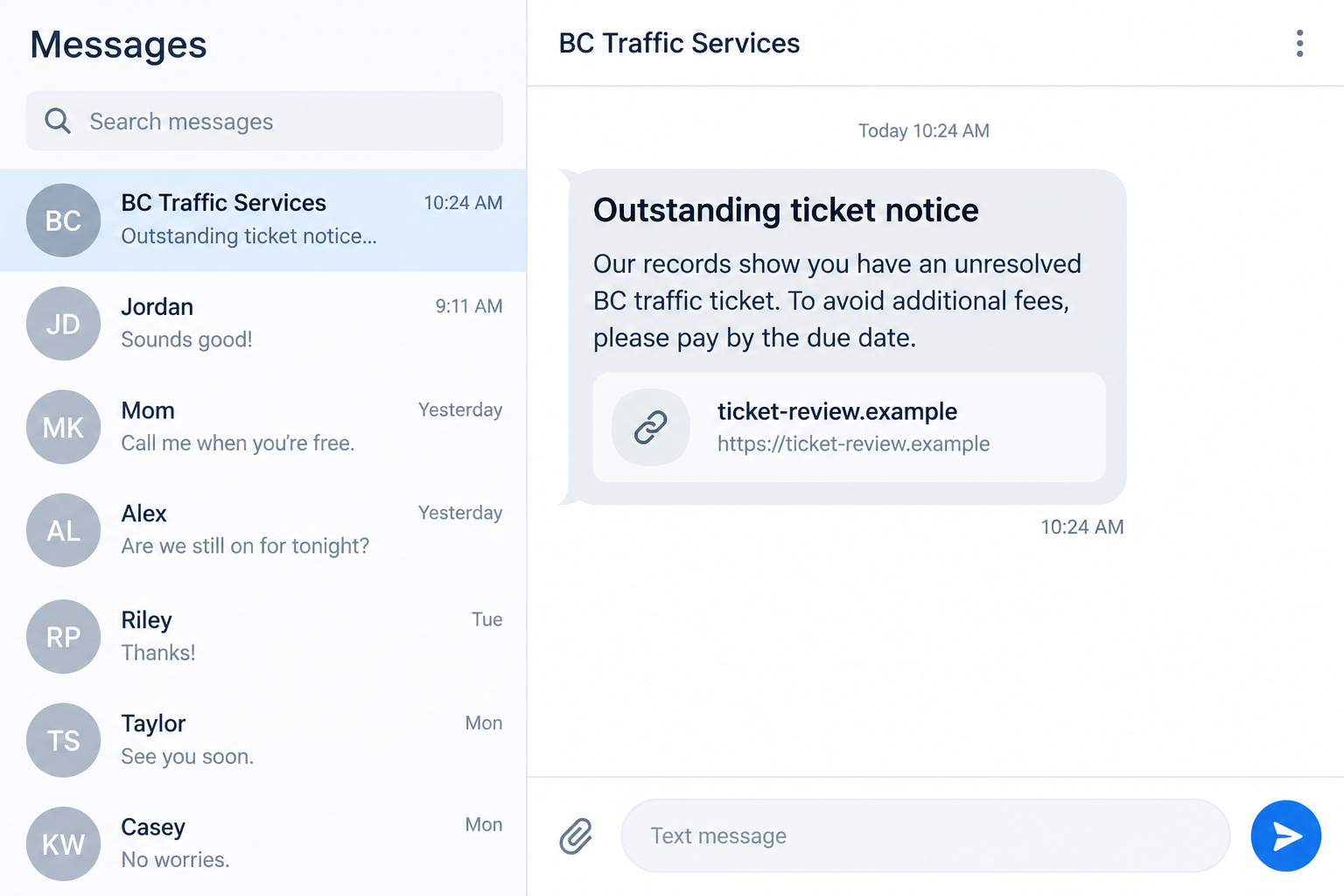
A text says you have an unpaid British Columbia traffic ticket. It warns that the balance may grow unless you settle it through the link today.
Even if you drove recently, the message is not a ticket record. The way it asks you to pay is the part that deserves attention.
Overview
A fake ticket notice using a real public service
The ICBC text scam impersonates a traffic-ticket notice and directs the recipient toward a payment page controlled by the sender.
An example collected by OnlineThreatAlerts describes a message claiming an unpaid ticket and urging immediate action through a link.
The brand choice matters. The Insurance Corporation of British Columbia is involved in the real ticket-payment process, so the reference can sound credible.
That does not make the text genuine. ICBC’s ticket-payment guidance says a text message about an outstanding ticket is a scam.
What is established and what remains unknown
The reported message shows a deceptive route into a supposed ticket payment. It does not prove that a ticket exists for the recipient.
Nor does a copied logo or official-sounding title identify the sender. A phishing page can reproduce public wording without connecting to an ICBC record.
ICBC has separately warned about ticket-related scam messages. Its advice supports checking through official channels, not a link delivered by text.
Some versions may collect card details or personal information. Others may request a payment and then disappear. The exact outcome depends on the page reached.
Both images here are fictional, nonfunctional screen reconstructions. They show the notice and follow-on page without reproducing a live harmful link.
Fast checks before you take action
- Ask whether you have an actual ticket or citation number from an officer or official notice.
- Look at the destination domain instead of the brand name in the message.
- Do not pay through a link in an unexpected outstanding-ticket text.
- Check ICBC’s ticket guidance by opening its website yourself.
- Be skeptical of threatened late fees that appear only in the message.
- Never enter bank credentials or a one-time code on the linked page.
You can take a genuine ticket seriously while rejecting a questionable payment route. Those are not contradictory decisions.
Why This Text Feels More Serious Than Ordinary Spam
It invokes a public obligation
A traffic fine is different from a retail bill. People worry about penalties, license consequences, and whether ignoring the notice could make matters worse.
The scammer borrows that concern. Even a driver with no ticket may wonder whether a camera or parking event generated one.
The text often leaves out details that would allow a proper check. Instead, it offers a button that promises to reveal everything after a click.
That structure reverses the normal order. You should establish that a ticket exists before entering information or paying anyone.
It uses a genuine institutional connection
ICBC has a real role in British Columbia’s ticket process. Saying otherwise would make the warning less accurate, not more useful.
The impersonation works precisely because the reference is plausible. A sender can mention ICBC without having any access to its records.
A government or insurer name in a text is a claim, not authentication. The same applies to official-looking seals or copied payment-page layout.
Reach the official ticket information page from a fresh browser tab. Do not let the message choose the website for you.
It turns a deadline into a shortcut
The message may claim that fees will rise soon or that a payment window is closing. The purpose is to make independent checking seem too slow.
A legitimate matter can still be checked through official channels. An extra few minutes spent finding the real payment route is worthwhile.
Pressure is especially suspicious when the page asks for card data before showing an identifiable citation, violation date, or account record.
If the page seems to accept any name or ticket number, stop. A generic form is not evidence of a real fine.
How the ICBC Text Scam Works
Step 1: An unexpected notice appears
The message claims an unpaid ticket, overdue amount, or final payment opportunity. It may address “the driver” instead of naming a person.
Broad wording makes mass sending possible. The scammer does not need a list of actual ticket holders to reach people who will worry.
A familiar organization name may appear as the sender. That alone is not a reliable test of where the message originated.
Do not answer with your license number or address. Those details would help a stranger make a later message more convincing.
Step 2: The link promises immediate resolution
The text provides a web address or button labeled as ticket payment. Its convenience is the trap: it replaces independent navigation with the attacker’s route.
The address may contain “ICBC,” “BC,” “ticket,” or “fine” in a longer string. Those words can be placed in an unrelated domain.
Even a padlock symbol does not prove the page is official. Encryption protects the connection to a site; it does not establish who owns the site.
Rather than test the link, open the official ICBC website separately and find its ticket section from the menu.
Step 3: A payment page imitates a normal process
After the click, a polished page may ask for a citation number, driver’s details, or card information. Those fields give the impression of a formal record.
The second image shows a fictional example of this kind of screen. Its domain is an example address, not a functioning payment destination.
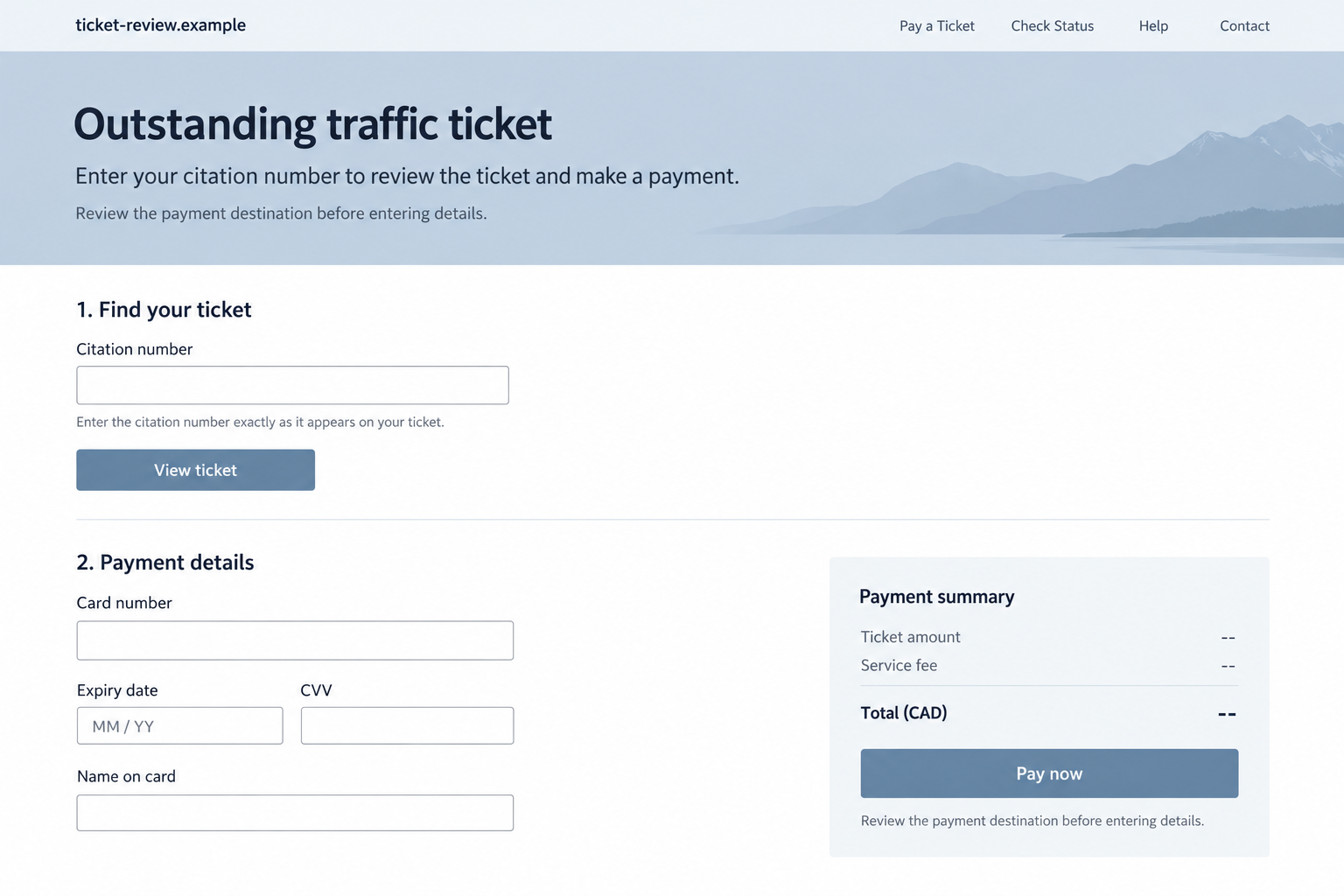
A real-looking design is not a substitute for a verifiable ticket. Ask how the site knows the alleged violation before you enter data.
If the form proceeds with incomplete or arbitrary details, it may be collecting information rather than retrieving a genuine citation.
Step 4: The victim may pay or surrender information
The page may demand a card number, address, and security code. Some flows could seek a bank authentication code to complete a charge.
Other versions might focus on personal identifiers that can support later impersonation. Do not assume that avoiding payment makes the page harmless.
A suspicious page can also send a confirmation that looks like a receipt. That does not mean an official ticket has been paid.
Check your card statement and the genuine ticket record independently if you have already submitted information.
Step 5: Follow-up messages exploit the first response
Someone who replied or entered details may receive a second text saying the payment failed, the fine increased, or identity verification is required.
Those new messages may quote information you just supplied. That can feel like proof of access to official records, but it may be recycled from your form.
Do not keep trying alternative links or cards. Stop the flow and ask the card issuer and official ticket service what actually happened.
Keep the original message for reporting, but do not return to the page just to see whether it changed.
How to Check a Real British Columbia Ticket
Use the citation you actually received
If you have a paper or official ticket notice, use its citation details to check the status through the official process.
Compare the alleged violation date and amount. A scam text that cannot match those details has not established a debt.
Do not enter a full driver’s license number into a newly received link just to discover whether a ticket might exist.
Where you are unsure, contact the official service using a number or website you independently obtained.
Separate payment from dispute rights
A real traffic ticket may have payment and dispute options. An unsolicited text that pushes immediate payment may omit those choices.
ICBC’s official guidance describes the legitimate routes. Read it before making a decision based on a message.
Do not let a fake deadline pressure you into waiving questions about the alleged violation or the amount.
Even if you eventually decide to pay, use the verified channel tied to the actual ticket, never the shortcut introduced by the text.
What the Fake Page Cannot Prove
A field for a citation number is not a citation
Putting a box labeled “ticket number” on a page is easy. The form does not establish that any official record exists behind it.
Some pages may accept whatever you type and proceed to payment. That behavior suggests the information is being collected, not checked.
A real violation should have identifiable details you can verify through the proper ticket process. A vague text alone cannot supply them.
If you do not have a citation, do not invent one or enter personal information to see what the page does next.
A matching province or logo is not ownership
A fraudster can copy colors, road imagery, and public organization names. Visual familiarity makes a page persuasive but does not authenticate its operator.
Check the full web address and how you arrived there. A page opened from a suspicious text remains unverified even if it looks polished.
Open the official ICBC site in a separate browser tab and navigate to ticket guidance. Compare the route, not just the appearance.
Be especially cautious if a page asks for a card before showing a specific ticket. A payment form should not be your first proof of debt.
A confirmation screen is not an official receipt
After a payment, a phishing page can display a green checkmark and transaction number. Those elements may come from the fraudulent website itself.
Check the genuine ticket record to see whether the fine was settled. Also ask your bank where the card charge went.
Do not ignore a real ticket merely because a questionable site says it is paid. A fake payment can leave the underlying obligation untouched.
Save the supposed receipt for the bank and fraud report, but verify its meaning through independent records.
How to Handle the Text Without Losing Evidence
Take a screenshot that includes the sender display, message body, date, and link preview. Avoid clicking the link merely to capture another image.
Use the messaging app’s report-spam option where available. Blocking the sender may stop repeat contact, though attackers can switch numbers.
If another person in your household drives the vehicle, ask whether they received an actual citation. Do not forward the suspicious link as a shortcut.
When reporting, include the exact domain and wording. Do not publish your driver’s license, address, or card details in a public complaint.
A short record can help investigators connect similar messages. It also gives your bank a clear timeline if you already entered payment data.
Most importantly, separate the question “Do I owe a fine?” from “Is this text authentic?” The first deserves verification; the second has a clear warning.
What to Do if You Have Fallen Victim to This Scam
- Stop using the linked page. Close it and do not submit a second card or identity form. Save the message and URL without revisiting them.
- Call your card issuer if you entered payment details. Use the number on the card or official banking app. Explain the ticket-text impersonation and ask about a card replacement or dispute.
- Tell the bank about any one-time code. A code entered for an alleged ticket may have authorized a different transaction. Ask the bank to review pending activity.
- Check the real ticket record. Use ICBC’s official ticket guidance or a citation you actually received. A payment to a scam page does not settle a legitimate fine.
- Protect any account credentials you entered. Change passwords through the genuine site, sign out unfamiliar sessions, and update reused passwords elsewhere.
- Keep useful evidence. Save the full text, sender display, page address, screenshots, bank entries, receipts, and your call dates. Record what information you disclosed.
- Report the impersonation. Tell ICBC through its official contact channel and report the fraud to the Canadian Anti-Fraud Centre or local police as appropriate.
- Watch for targeted follow-ups. An impostor may use your name or ticket details in a second message. Verify every new request independently.
If you opened the link but entered nothing, the main immediate step is to stop using it. Scan the device if you downloaded or installed a file.
A web visit alone does not prove malware infection. Focus on the exposure that actually occurred: payment, credentials, personal details, or a downloaded app.
Frequently Asked Questions
Does ICBC really handle traffic-ticket payments?
Yes, ICBC has a genuine role in the British Columbia ticket process. That makes impersonation more plausible, but it does not authenticate an unexpected text.
Will ICBC text me about an outstanding ticket?
ICBC’s official ticket guidance says that a text message about an outstanding ticket is a scam. Verify any concern through its website directly.
What if I did recently receive a traffic ticket?
Use the citation you actually received and the official payment or dispute route. A real ticket does not make a separate text link safe.
Is a padlock in the browser enough to trust the page?
No. It means the connection is encrypted. A phishing site can also use encryption, so the site’s ownership and official route still matter.
What if I paid and got a confirmation email?
Check both your card statement and the genuine ticket record. A receipt from an unrelated site does not prove the fine was settled.
Should I reply to ask for the citation number?
No. That keeps you in contact with the unverified sender. Use official ICBC guidance or a ticket document you already possess.
The Bottom Line
The ICBC text scam borrows a real public-service name to make an invented or unverified ticket feel urgent. The payment link is the point of danger.
Check any ticket through ICBC’s official route, independently of the text. If you submitted payment or identity details, contact your bank and report the message promptly.








