

A text says an unpaid Pennsylvania traffic ticket is about to affect your license. There is a link, a deadline, and just enough official-sounding language to interrupt your day.
If you drive in the state, the message may feel personal. Before paying or replying, it helps to know what the actual agency says about these notices.
Overview
What the PennDOT traffic ticket text claims
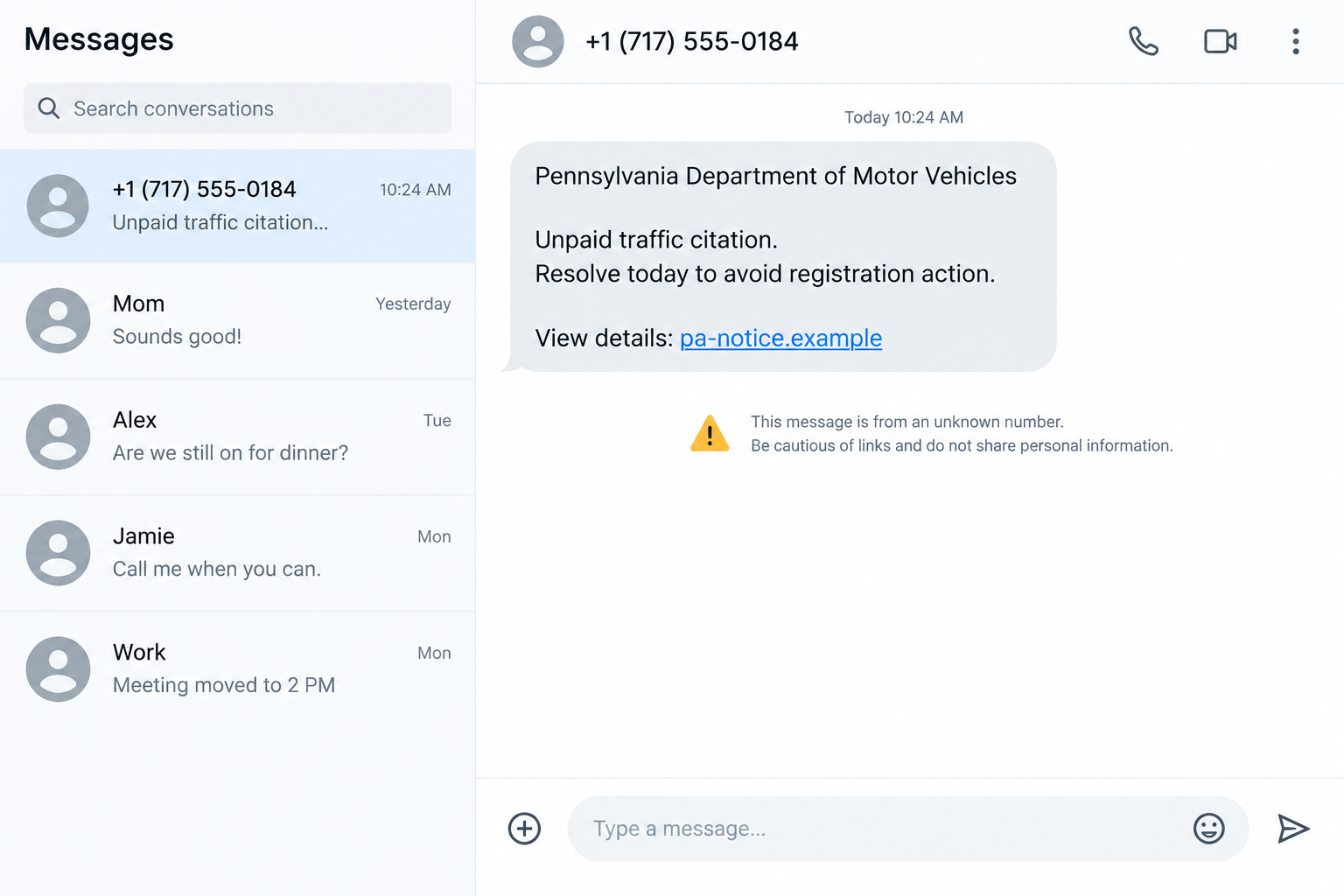
The PennDOT traffic ticket text scam presents an urgent fine or violation as though it came from a Pennsylvania motor-vehicle authority.
Reported messages threaten license suspension, registration trouble, additional penalties, or enforcement unless the recipient uses an attached payment link.
An OnlineThreatAlerts report describes this pressure tactic. The text is designed to turn uncertainty about a citation into a rushed visit to another website.
PennDOT is a real government agency. The fraudulent notice is an impersonation attempt, not evidence that PennDOT sent it or exposed driver records.
What PennDOT has actually confirmed
In its warning about text phishing, PennDOT says it does not send text messages to customers. It describes fake notices about traffic fines, tolls, and possible penalties.
PennDOT says its legitimate customer notices are delivered through traditional postal mail. That is a strong reason to distrust a PennDOT-branded payment text.
This does not mean every communication from every Pennsylvania court or transportation service follows the same rules. Verify the exact agency independently.
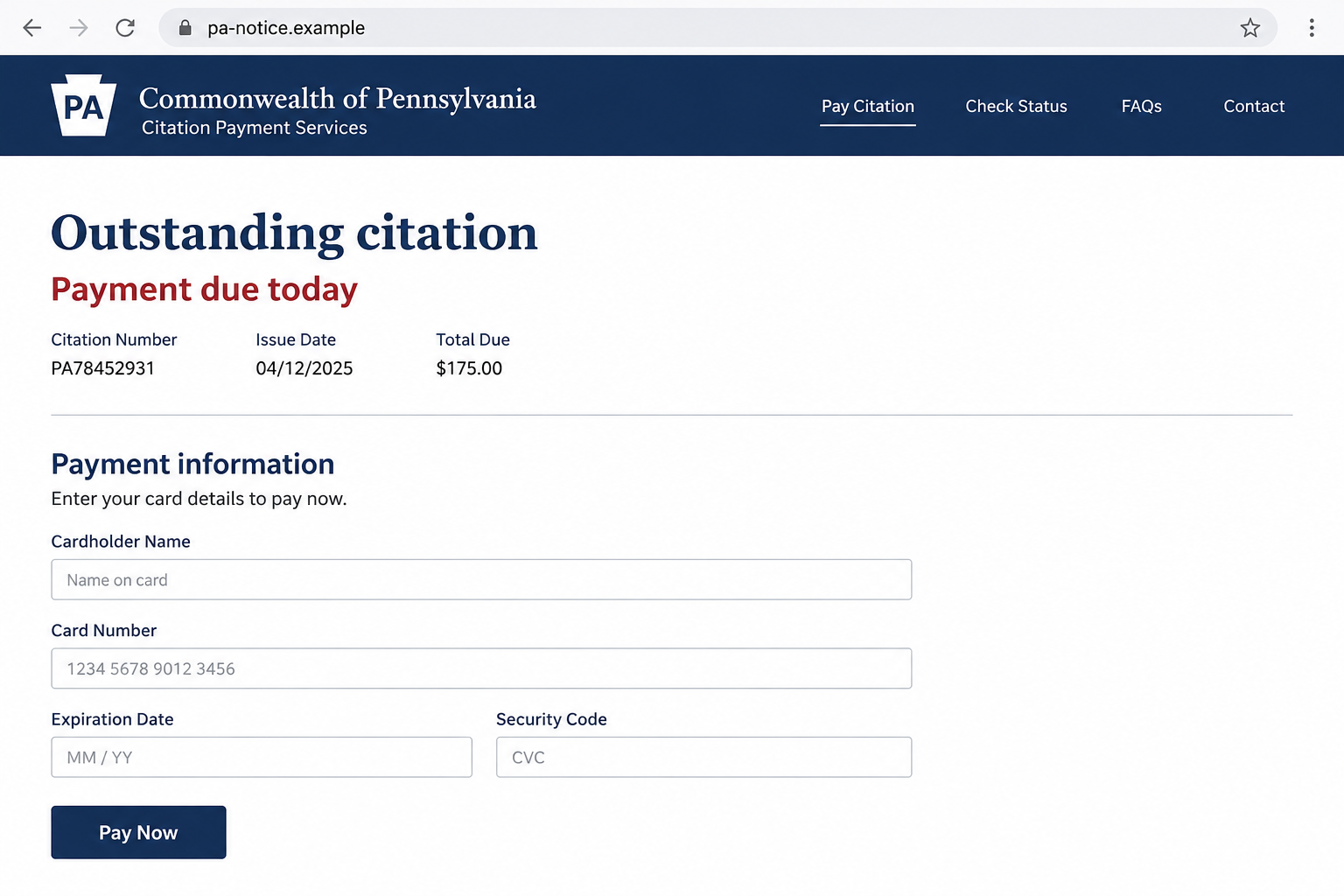
The images here are fictional screen reconstructions. They show the type of message and payment page a reader might encounter, not a captured live campaign.
The clues worth noticing immediately
- The notice arrives as an unexpected PennDOT text, despite PennDOT’s stated customer-contact policy.
- It asks for immediate payment before you can identify a specific ticket or issuing authority.
- The link is not an address you reached from an official Pennsylvania website.
- The message combines license or registration threats with a short deadline.
- It asks you to reply, open a link, or enter card details to avoid consequences.
- The sender name, state seal, or familiar area code is treated as proof of authenticity.
None of those details should replace a direct check of an actual citation. The safest first move is to leave the message alone.
Why a Fake Traffic Fine Feels Urgent
A driver may not remember every roadside detail
Not every citation follows a memorable traffic stop. Cameras, parking notices, and mailed correspondence make some drivers wonder whether they missed something.
The scam borrows that uncertainty. A person does not need to recall a violation for the message to create doubt.
It also borrows familiar words, such as citation, suspension, registration, or motor vehicles. Those words sound official without proving an official source.
A true obligation should be traceable to a specific issuing authority and reference. A vague text does not establish that obligation.
The deadline shifts attention away from verification
A threatened license hold can affect work, family errands, and insurance worries. That makes the message harder to ignore than a routine spam offer.
The sender wants the reader to focus on preventing the threatened consequence. The website address and payment recipient receive less attention.
Some texts ask recipients to reply with a letter before a link becomes clickable. That extra step can make the interaction feel procedural.
It is still a link supplied by an unverified sender. Replying can also confirm that the number is active and invite more messages.
Official-looking design is cheap to copy
A fake page can display Pennsylvania colors, a keystone shape, a citation number, and reassuring security language within minutes.
None of those design elements tells you who controls the domain or receives the card information. A padlock icon only describes a connection.
Even a plausible-looking citation number may be invented. A form that appears to know your state does not necessarily know your driving record.
The important test is independent confirmation through the actual issuing authority, using contact details you locate yourself.
How the PennDOT Traffic Ticket Text Scam Works
Step 1: An official-sounding text arrives without context
The message may identify itself as PennDOT, a Pennsylvania motor-vehicle department, a court, or a traffic enforcement office.
It often says an unpaid citation has reached a final stage. The exact wording changes, but the requested action is usually immediate.
A sender may not provide a plate number, violation date, or location. That omission is easy to miss when the threat sounds serious.
If the text does include personal details, those could have come from public records or previous exposure. They do not authenticate the sender.
Step 2: The text attaches consequences to delay
Suspension, registration restrictions, collections, or additional fees can appear in the warning. The purpose is to make normal checking feel risky.
Real traffic obligations have procedures and records. A text that demands instant action without a verifiable case record deserves skepticism.
Do not assume the sender has access to your motor-vehicle file merely because it mentions a consequence that sounds possible.
The threat is persuasive precisely because it does not need to be tailored to your actual driving history.
Step 3: A payment link moves the reader away from known channels
The link may contain words such as Pennsylvania, DMV, citation, or payment. The full domain matters more than those fragments.
A lookalike page can imitate a government layout while sending information to a private operator. The address bar is part of the evidence.
The fictional page below illustrates the handoff. Its `.example` address is not a live payment destination.
Do not enter your plate, name, date of birth, card number, or password to see whether the page recognizes you.
An empty form can accept information even when there is no underlying ticket. The page’s willingness to continue proves little.
Step 4: The page asks for personal and payment details
A fake citation portal may ask for a driver’s name, address, license details, card number, expiration date, and security code.
Some variants may show a modest fine; others may invent fees for immediate clearance. The reported text does not prove every page follows one script.
Once a card number is submitted, the attacker may attempt a transaction or retain the details for later misuse.
A page could also ask for an account password or one-time code. Never treat those prompts as routine ticket verification.
Step 5: The interaction can continue after payment
A person who pays may receive a fake receipt or another demand for a processing charge. Neither document confirms that a citation existed.
If the sender captured contact details, further traffic, toll, bank, or identity-verification messages may follow.
These are possible follow-on tactics, not proof that every PennDOT-themed text does all of them. The immediate priority is limiting exposure.
Do not return to the suspicious portal to test a receipt. Use a real agency channel to check whether any ticket exists.
How to Verify a Pennsylvania Traffic Notice Safely
Identify the supposed issuing authority
PennDOT, a local court, a parking authority, and a toll operator are not interchangeable. A real fine should identify who issued it.
Read a mailed citation or earlier official correspondence if you have one. Compare its reference, date, vehicle, and payment instructions.
If you have never received a citation, do not invent one to match the text. The burden is on the notice to establish a real case.
A scam message may include a date that falls on a weekend or holiday. That detail can be fabricated just as easily as a citation number.
Ask the official office which record system holds the case. A genuine reference should lead to an identifiable proceeding, not only a payment form.
Search for the agency through an official state or local government site, not through the text’s link or a sponsored search result.
Use contact information you found yourself
Call the listed office or use its authenticated online service. Ask whether the exact citation number, vehicle, and amount are on record.
Do not call a number printed only in the suspicious message. A convincing operator on that line may be part of the same scheme.
If a toll or parking account is involved, open the operator’s official app or site from an existing bookmark.
A legitimate issue can still be resolved after verification. The point is to avoid paying a stranger for a problem that has not been confirmed.
Separate a real violation from a fake payment route
Finding a real citation does not make the text legitimate. Attackers can send broad messages that happen to reach people with actual fines.
Pay only through the method the issuing authority confirms directly. Compare the amount and recipient before entering a card.
If the official record shows no matching citation, save the text as evidence and report it. You do not need to negotiate with the sender.
Be especially wary when the page asks for unrelated credentials or a one-time banking code. Those are not ordinary ways to verify a ticket.
Common Questions Before You Decide to Pay
What if the message has my name or license plate?
Personal details can make a notice more convincing, but they do not establish the source. Data may be public, guessed, purchased, or previously exposed.
Check the citation through the real issuer. Do not supply additional details to a sender simply because it already knows one fact.
What if the link begins with a familiar abbreviation?
A domain can include official-sounding words without belonging to the state. Read the complete address, including the part before the first slash.
Even then, the best check is to open the official agency site independently, not to decide from appearance alone.
What if I clicked but did not type anything?
Closing the page is usually the first sensible action. A click alone does not prove that a device was infected or money was taken.
If you downloaded a file, allowed notifications, or entered information, the response changes. Follow the steps below for the specific exposure.
What to Do if You Have Fallen Victim to This Scam
- Stop the interaction. Close the link and do not reply to the sender. Keep the text and any confirmation screen as evidence, but do not revisit the page.
- Call your card issuer if you entered payment details. Use the number on the card or in your banking app. Ask about blocking the card, replacing it, and reviewing pending charges.
- Report any code you provided. If a bank or account sent a one-time code, tell that institution immediately. A code may authorize an action beyond the supposed fine.
- Secure any account whose password you entered. Change it from the genuine service, enable multifactor authentication, and check active sessions. Update other accounts if you reused the password.
- Verify the ticket separately. Contact the actual court, parking authority, toll operator, or PennDOT through an independently found website. A real citation, if one exists, still needs proper handling.
- Preserve useful details. Save the message, visible sender, full destination, screenshots, dates, receipt, and bank transaction reference. Those details help the bank and investigators.
- Report the fraud. Send the text to your mobile carrier’s spam-reporting service and report the attempted fraud through ReportFraud.ftc.gov. Ask the relevant agency where it accepts impersonation reports.
- Check your device only if there was a risky action. If you installed software, downloaded a file, or enabled browser notifications, remove the unwanted access and run a reputable scan.
- Watch for a second approach. Fraudsters may follow a first payment with a supposed refund, clearance fee, or bank call. Confirm every new request through an independent channel.
If you only saw the text and did nothing, no account reset is automatically required. Reporting and deleting it may be enough.
If you shared identity information, ask your bank what monitoring is appropriate. In the United States, IdentityTheft.gov can guide recovery after identity misuse.
Frequently Asked Questions
Does PennDOT text drivers about unpaid tickets?
PennDOT says it does not send customer text messages. A PennDOT-branded traffic-fine text should be treated as suspicious and checked through official channels.
Can a traffic citation be real if the text is fake?
Yes. A broad scam message can reach someone with a real ticket by coincidence. Confirm the actual case and pay through the issuing authority.
Is a Pennsylvania-looking domain enough to trust the payment page?
No. Anyone can put state words into a domain or page design. Reach the official site independently and compare the exact payment route.
Should I reply to ask for the citation number?
No. Replying does not verify the sender and may encourage more messages. Ask the real agency for a record instead.
What if I only clicked the link?
Close it. If you entered no data and installed nothing, that click alone does not prove compromise. Watch for downloads or notification permissions.
What if I already paid through the link?
Contact your card issuer promptly, document the payment, and verify any real citation separately. Do not pay an additional supposed clearance fee.
The Bottom Line
The PennDOT traffic ticket text scam uses an official-sounding penalty to push drivers toward an unverified link. PennDOT says it does not send customer texts.
Leave the message alone, check any genuine citation with its actual issuer, and involve your bank quickly if you entered card details.








