

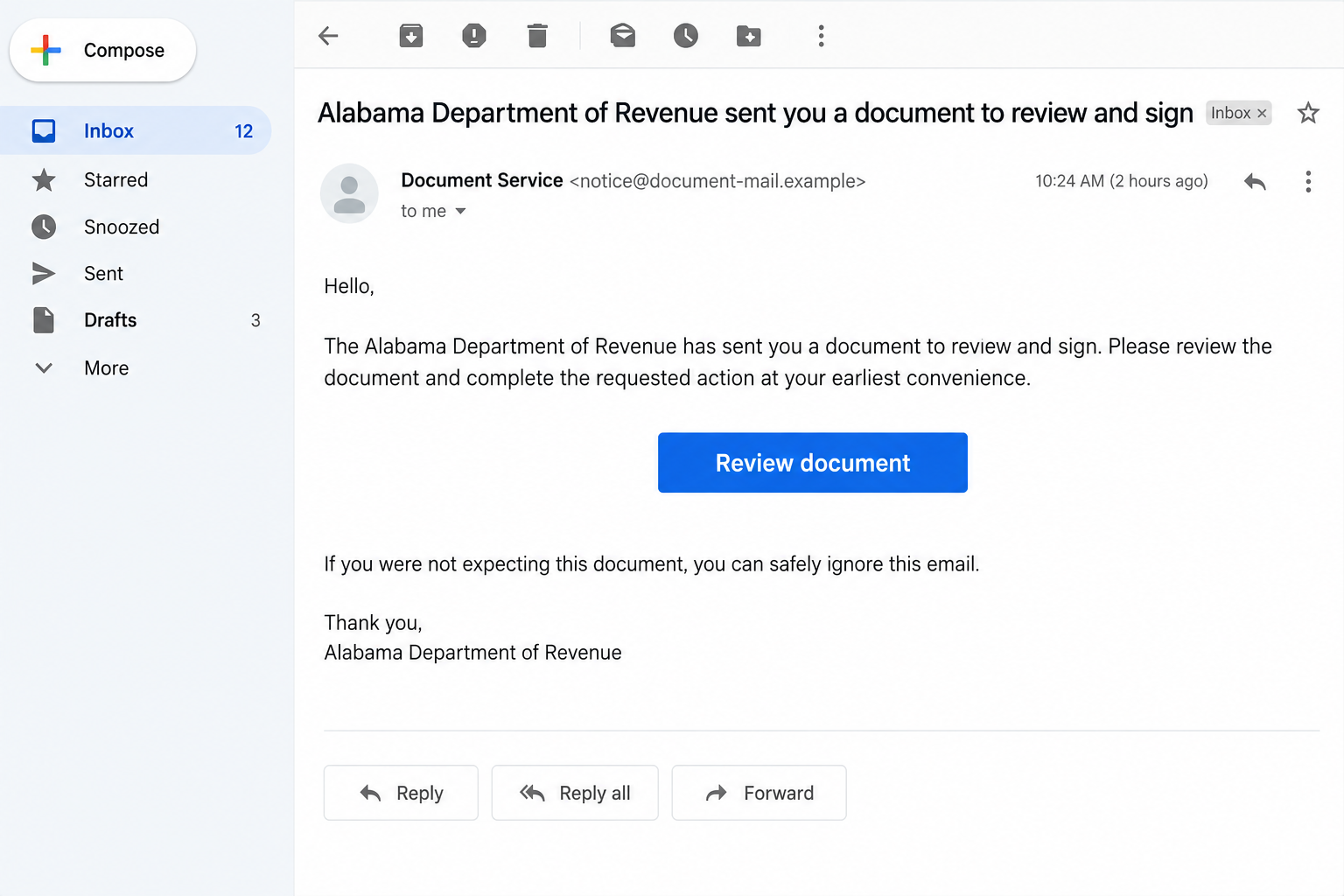
An email says the Alabama Department of Revenue sent a document to review and sign. It arrives through a familiar workflow, making the request feel routine.
The unusual part may not appear in the email at all. It can wait one click deeper, inside the document you were invited to open.
Overview
What the Alabama revenue DocuSign scam claims
The Alabama revenue DocuSign scam uses an e-signature notification to make a fraudulent tax-related document appear worthy of immediate attention.
The email may say the Alabama Department of Revenue, or ALDOR, sent a document for the recipient to review and sign.
OnlineThreatAlerts notes this document theme among several Alabama tax impersonations. The specific mechanism is confirmed more clearly by ALDOR itself.
The real revenue department and the real e-signature service are not the scam. The deception is an unauthorized document request and the risky link inside it.
What the state has verified
ALDOR’s public warning says attackers abused the legitimate DocuSign platform to send a notification that appeared authentic.
The message stated that ALDOR sent a document to review and sign. The email displayed a genuine DocuSign domain, adding apparent credibility.
According to ALDOR, the document itself contained an additional malicious link and a QR code. That second step was the trap.
ALDOR did not identify every final data field or confirm that all recipients lost credentials. Treat those as possible risks, not observed facts.
The warning signs in this specific route
- You were not expecting an ALDOR document or had no active matter that would explain it.
- A document request arrived without a verified state contact or case reference.
- The notification’s document mentions an unrelated or disposable sender address.
- A button inside the document sends you to another website beyond the e-signature service.
- A QR code asks you to change devices or conceal the destination before you can inspect it.
- The final page requests tax, identity, account, or payment details without independent confirmation.
Both images here are fictional, nonfunctional screen reconstructions. They illustrate the reported two-stage journey, not an actual captured ALDOR or DocuSign message.
Why a Genuine Platform Can Carry a Fraudulent Request
The delivery service is not the sender’s identity
Document platforms let many organizations invite recipients to view and sign files. A notification can be technically delivered by the platform while the document’s claimed sender is false.
That distinction matters. Seeing a familiar e-signature domain does not prove that the Alabama Department of Revenue authorized the request.
An attacker can use a real service to place fraudulent content in front of a recipient. The service and the specific document are separate things.
Verify who initiated the request before interpreting the platform’s branding as proof of government origin.
The first click may feel reassuring
A recipient who checks the initial link may see a legitimate document platform. That can make the next button feel safe by association.
ALDOR warns that the extra link and QR code within the document are malicious. The decisive redirect comes after the apparently credible invitation.
Do not carry trust from one page to another automatically. Each new link has its own destination and purpose.
This is especially important for a tax document, which may imply private records or an urgent signature deadline.
A QR code can hide the destination until later
Scanning a code often shifts the action to a different device. The recipient may no longer see the email or document context while deciding.
A code is only another way to open a link. It does not make the destination official or safer than a button.
In the reported ALDOR case, the code was part of the suspicious extra step. Do not scan it to determine whether the document is real.
Ask the actual agency about the request using contact details on its official site.
How the Alabama Revenue DocuSign Scam Works
Step 1: An e-signature invitation uses the state’s name
The recipient gets a notification stating that ALDOR has sent a document for review and signature.
The wording borrows a common business workflow. Tax departments do send real correspondence, so the claim can feel plausible at first glance.
ALDOR’s warning identifies the impersonation. It does not say that the recipient has a real tax debt, refund, or required document.
Before opening anything, ask whether you expected a state document and whether the request matches a known contact.
Step 2: A legitimate platform supplies apparent authority
The reported notification used the real DocuSign service. A genuine service domain can therefore appear in an email that carries fraudulent content.
Some people check only whether the first button opens a known platform. In this case, that test would be incomplete.
ALDOR also noted an unrelated temporary-looking address in the message body. A mismatch between claimed agency and underlying sender deserves attention.
Do not conclude that DocuSign itself is fraudulent. The concern is who created the request and what the document asks you to do.
Step 3: The opened document introduces a second link
Instead of simply presenting a government form, the document asks the recipient to open another link or scan a QR code.
The fictional document viewer below shows how a second-stage prompt can be embedded inside an apparently ordinary review flow.
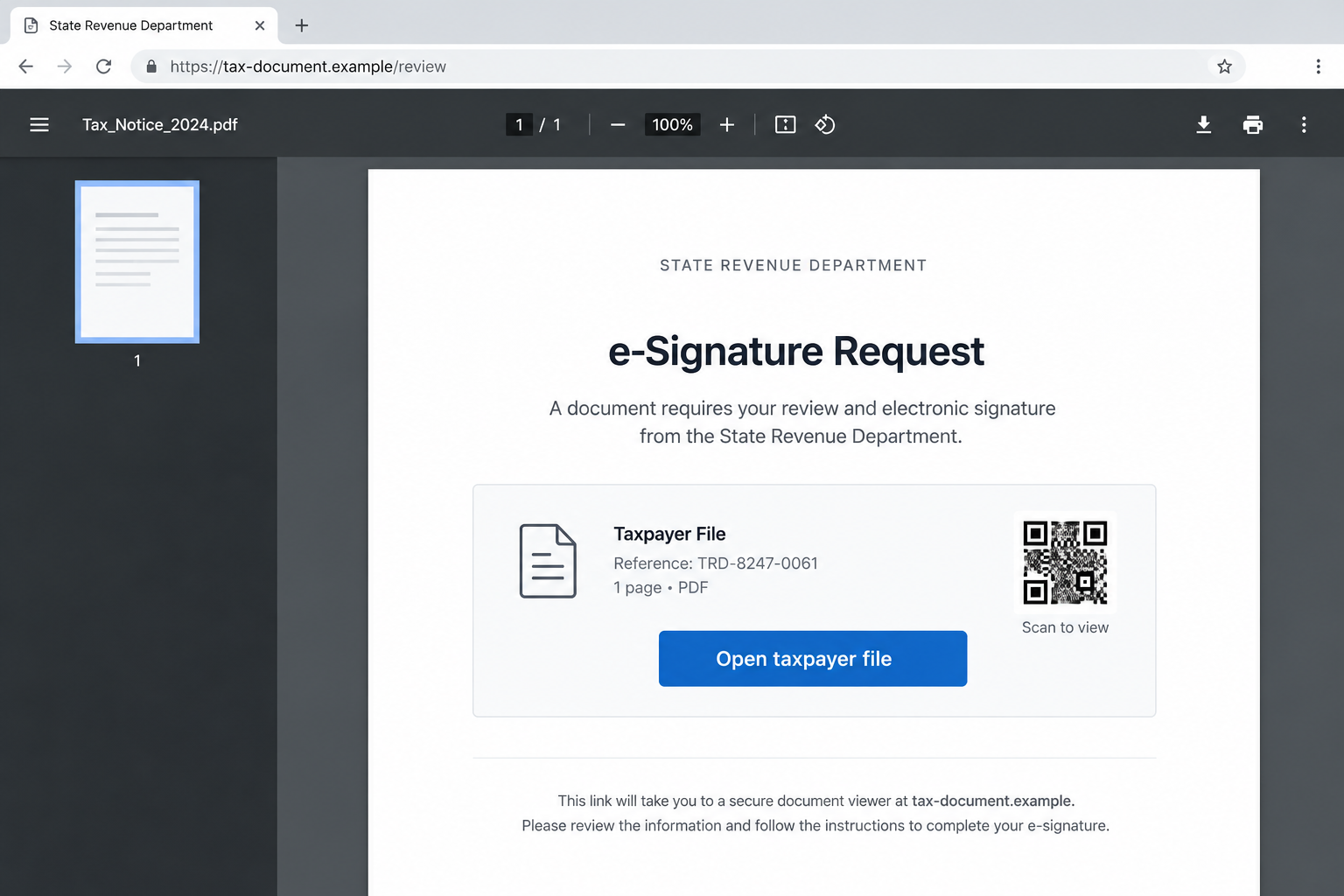
The extra step matters because the new destination is not authenticated by the service that delivered the first notification.
A document that moves you elsewhere for identity or payment information needs independent verification before any interaction.
Step 4: The reader is pushed toward an attacker-controlled destination
ALDOR calls the added link and QR code malicious. Its public release does not detail the final form or data captured in each visit.
A fraudulent destination could request credentials, tax identifiers, financial data, or payment. Those are risks to consider, not confirmed outcomes for every recipient.
The right response is to stop before submitting anything, rather than testing how far the process goes.
If you already submitted information, record exactly which fields you entered. Recovery should match the actual exposure.
Step 5: Follow-up pressure may attempt to finish the job
Some attackers send reminders that a document remains unsigned. Others may pose as support to explain a failed link.
Those are possible follow-up tactics, not details ALDOR confirmed for every instance. A second message does not authenticate the first.
Do not call a number or reply to an address provided within the suspicious workflow to verify it.
Contact ALDOR through its official website and ask whether it initiated that specific document request.
How to Verify an Alabama Tax Document Request
Check your known tax correspondence first
Look for an existing account notice, mailed letter, or previous direct conversation that explains why ALDOR would ask for a signature.
A vague email with no matching matter should not create a new obligation by itself. Do not provide information merely to discover what the document contains.
If you have a tax professional, contact that person through the number or address already on file.
Ask whether a document request was expected and whether the reference or sender is recognized.
Contact the department independently
Open ALDOR’s official site yourself and use a contact route listed there. Describe the invitation without clicking its internal links.
Include the claimed document title, sender details, and date. Do not send tax identifiers through an insecure contact form unless the agency instructs you.
Be careful with search ads or unofficial “tax help” pages. The safest route is a known bookmark or a manually entered government address.
If ALDOR confirms no request exists, report the message through the platform and your email provider.
If the department confirms a real request, ask it how to access the document safely. Do not assume the suspicious invitation becomes valid retroactively.
A genuine taxpayer portal or mailed notice may offer a separate path. Follow the agency’s direct instructions, not the email’s embedded directions.
Keep the case reference from the official conversation. It helps separate the verified matter from the unsolicited document link.
Review each handoff separately
The email, the e-signature platform, the document, and the final link are separate layers. Trust in one does not transfer automatically to the next.
Look for mismatched sender details or a request to leave the document platform. A QR code should be treated as a link with a hidden destination.
If a real agency requires a document, it can confirm the workflow independently. You do not need to guess based on visual design.
Do not sign a document you have not read or provide identity information just to bypass a supposed verification gate.
What to Avoid Saying About This Campaign
A real service email does not prove a real agency request
It would be inaccurate to label every DocuSign email fake. The platform may have delivered a real notification containing a fraudulent request.
The distinction helps readers avoid a simplistic domain check. The first domain can be genuine while a later destination is unsafe.
Judge the claimed sender and requested action, then verify with the agency outside the email.
This method applies to many shared-document services, but the documented case here concerns ALDOR impersonation.
A QR code is not inherently malicious
Many legitimate documents use QR codes. The concern is this unsolicited request and ALDOR’s warning about the embedded code.
Do not scan a code merely to learn whether it is safe. The agency can confirm the document without that step.
If you scanned but submitted nothing, close the page and inspect for downloads or permissions. A scan alone does not establish a data loss.
If you typed information afterward, treat the information submitted as exposed and act accordingly.
The final theft mechanism is not fully public
ALDOR’s release identifies the malicious redirect but does not publish a complete account of what every final page collected.
Do not assume that every recipient saw the same login, tax form, or payment demand. Campaign pages can change.
That uncertainty does not weaken the warning. An unverified second-stage link inside an impersonated tax document is enough reason to stop.
If you were affected, record the exact page and fields you saw for a targeted recovery plan.
What to Do if You Have Fallen Victim to This Scam
- Stop at the current page. Close the additional link and do not scan the QR code again. Save the email and document invitation without revisiting the suspicious destination.
- Record what you actually submitted. Note whether you only opened the document, clicked the extra link, entered a password, supplied tax identifiers, or paid anything.
- Change exposed passwords. Use the genuine account site, enable multifactor authentication, and update any other account where the same password was reused.
- Protect financial details. If you entered a card or bank account number, contact the institution through its official app or the number on the card.
- Verify the tax matter. Contact ALDOR through its official website and ask whether it sent the document. Handle any genuine obligation only through confirmed channels.
- Preserve the chain of evidence. Save the sender details, platform notification, document title, second link, QR-code screenshot, final URL, and dates. Do not publish personal tax data while reporting.
- Report the attempt. Use the e-signature platform’s abuse controls, your email provider, and the FBI Internet Crime Complaint Center when appropriate.
- Check downloads and permissions. If you installed software, opened an unexpected file, or granted browser notifications, remove the access and run a reputable security scan.
- Beware of a recovery message. An attacker may claim it can cancel the document or recover data for a fee. Deal only with the real agency and your institutions.
If you shared sensitive identity information, consult IdentityTheft.gov for recovery steps suited to the information exposed.
If you only received the email, do not panic. Reporting and deleting it without opening the extra link may be sufficient.
Frequently Asked Questions
Was the reported email really sent through DocuSign?
ALDOR says the attackers abused the legitimate platform. A real delivery service does not establish that ALDOR authorized the document.
Why is the second link more important than the first?
The first link can open the genuine service. ALDOR says the malicious link and QR code were placed inside the document.
Does ALDOR normally send tax documents by email?
Do not rely on a blanket rule. Ask ALDOR directly whether it initiated this exact request before opening links or supplying information.
Is the QR code safe if the page looks official?
No appearance can authenticate the destination. ALDOR specifically warned against scanning the code in the reported fraudulent document.
What if I viewed the document but entered nothing?
Stop there, save the details, and report the request. Viewing alone does not prove that credentials or payment details were stolen.
What if I typed a tax identifier into the final page?
Document what was disclosed, contact ALDOR through its real site, and use identity-recovery guidance appropriate to that identifier.
The Bottom Line
The Alabama revenue DocuSign scam shows why a genuine platform notification can still lead to a fraudulent document request. The unsafe step may be inside the document.
Verify the claimed agency independently, do not follow the extra link or QR code, and respond according to the information you actually exposed.








