

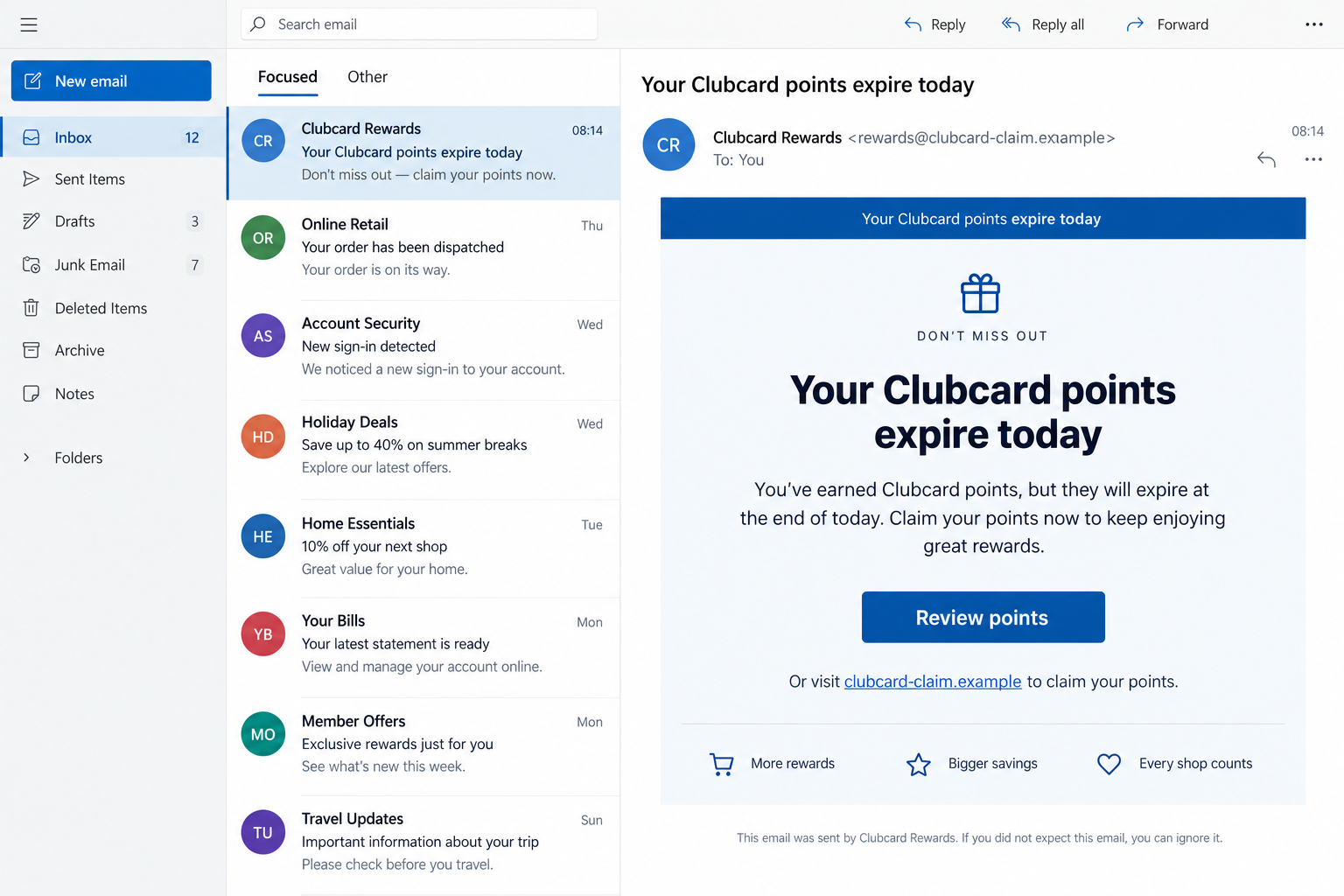
An email says your Clubcard points expire tonight. It looks like a routine reminder, and the button promises to keep a reward you already earned.
If you shop at Tesco, that small deadline can feel plausible. The safer choice begins with a simple question about where the button really leads.
Overview
What the Tesco Clubcard points scam claims
A Tesco Clubcard points scam may tell shoppers that vouchers or points will disappear unless they click a link and sign in immediately.
The destination can imitate a loyalty account page and ask for an email address, password, Clubcard number, or other personal details.
OnlineThreatAlerts discusses phishing and voucher misuse connected to Clubcard accounts. Its broader claims about internal exploitation are not needed to explain this threat.
Tesco is a real retailer with a real loyalty program. The fraudulent message or lookalike page is the scam, not Clubcard itself.
What Tesco’s own guidance says
Tesco’s account-security advice warns about genuine-looking emails that request passwords, birth dates, Clubcard numbers, or bank details through a link.
It tells customers to open Tesco.com directly rather than signing in through a message. Tesco also says it never asks customers for their password.
Tesco’s Clubcard guidance says someone with an account username and password may gain access to Clubcard vouchers.
Genuine Tesco emails and verification texts do exist. The correct lesson is independent checking, not a claim that every Tesco message is fake.
Quick signs that the route is wrong
- The email pushes a short expiry deadline but offers no account details you can verify independently.
- The button opens a domain that is not the Tesco site you normally use.
- A login page asks for your password to “restore” points that are supposedly about to disappear.
- The message demands bank-card details for a loyalty reward or a small release fee.
- The sender display name says Tesco, but the actual address belongs to an unrelated domain.
- The page asks you to type a one-time code into a form reached through the email.
Both images in this article are fictional screen reconstructions. They show the mechanism, not a captured Tesco email or live phishing page.
Why a Clubcard Reminder Can Look Convincing
Points and vouchers are real account value
Clubcard points are not an abstract number to a regular shopper. They can become vouchers and offers with real value to a household.
Tesco sends genuine statements and account communications. That normal background makes a fake reminder less jarring than an unexpected prize offer.
A scammer only needs the recipient to believe a routine account action is overdue. The reward itself creates the motivation.
The actual balance is available through an account reached independently. The email does not have to be trusted to check it.
A sender name is easy to imitate
Email programs often show a friendly name prominently and hide the full address until expanded. “Clubcard Rewards” can appear even when the sender is unrelated.
A familiar logo or layout can be copied. A perfect-looking message still needs a trustworthy route to the account.
Do not rely only on a sender address either. Addresses can be spoofed, and real service messages may come from more than one legitimate system.
The dependable check is to open the Tesco app or type Tesco.com yourself, then inspect account activity there.
The deadline encourages a one-minute mistake
“Expires today” is powerful because it suggests a loss that cannot be fixed tomorrow. It also discourages calling support or checking the account.
A fake page can copy the visual style of a loyalty portal and add a large sign-in button. A shopper may never notice the domain.
The pressure is the reason to slow down. A legitimate account will still be there when opened through the retailer’s own app or website.
If a reward truly expires, the genuine account should show its status without requiring a detour through a suspicious email.
How the Tesco Clubcard Points Scam Works
Step 1: A points or voucher warning appears
The first contact may be an email, text, or social message claiming that points are expiring, missing, locked, or ready to be claimed.
Some versions promise an extra voucher; others threaten the loss of existing points. Both aim to make the recipient act quickly.
A genuine Tesco message might discuss offers, so the topic alone is not proof. Look at how the message asks you to respond.
If it demands a sign-in through its own link, leave that route and check the account independently.
Step 2: The message supplies a convenient button
A button labeled “Review points” or “Claim voucher” reduces the action to a single tap. That is the moment the sender chooses your destination.
The link might contain Tesco or Clubcard in a longer address. Familiar words inside an unrelated domain do not make it official.
Do not use a shortened link or a QR code in the message to solve uncertainty about the destination.
Instead, launch the app you already have or enter Tesco.com in a fresh browser tab.
Step 3: A lookalike page requests credentials
The landing page may ask for an email and password beneath a Clubcard-style heading. It can look like a standard sign-in screen.
The fictional page below shows how that handoff might look. The `.example` address is deliberately nonfunctional and is not an observed attacker site.
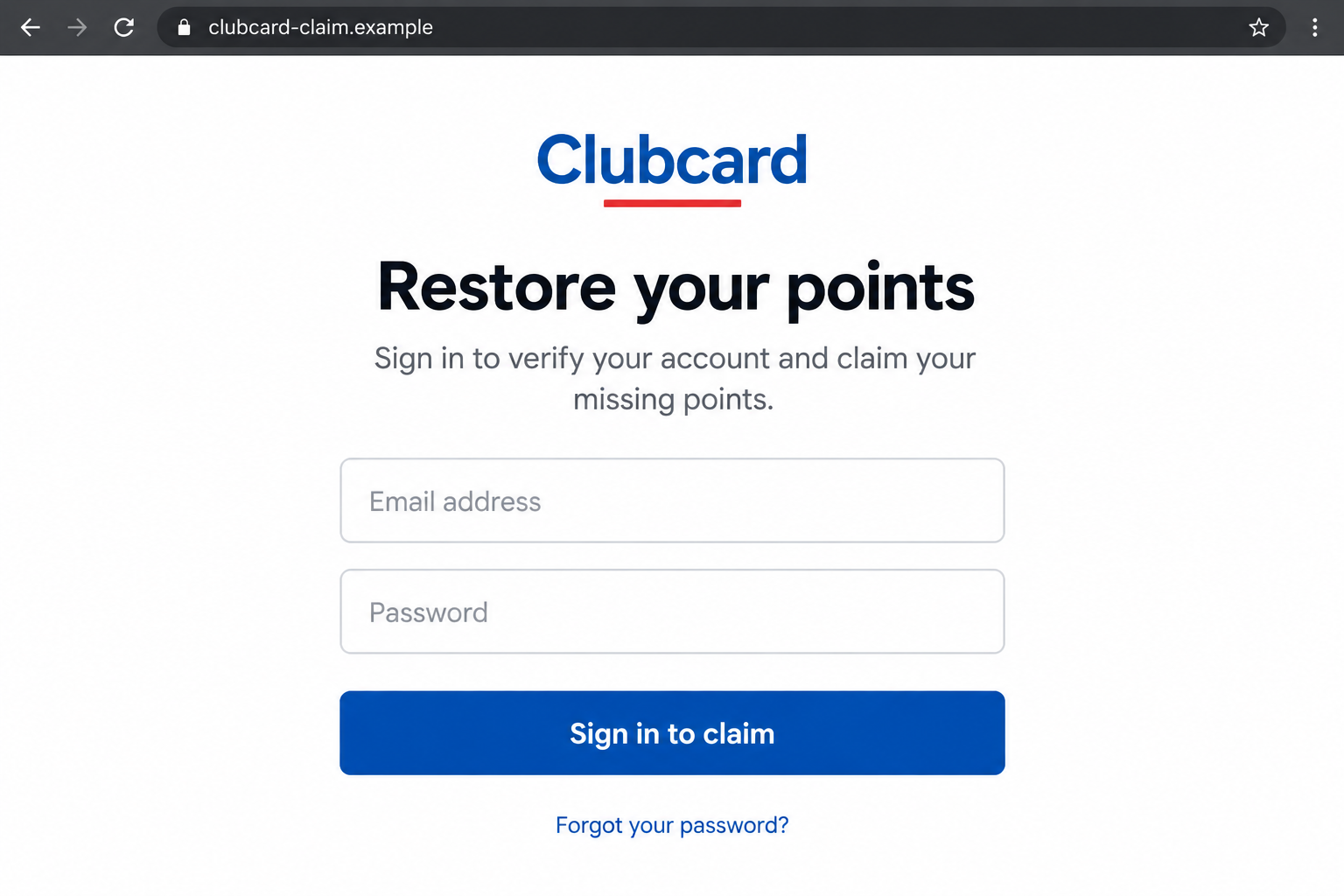
Typing credentials into the wrong page may give an attacker a chance to enter the real Tesco account.
Do not assume a failed login kept the details private. A fake page can capture them before showing an error.
Step 4: A second prompt may ask for more
After the password, a fraudulent page may ask for a Clubcard number, birth date, card details, or one-time verification code.
Those requests can support account takeover, identity misuse, or a direct charge. The exact sequence varies between campaigns.
Tesco does use verification methods for genuine account actions. The key difference is whether you initiated the action through its real app or site.
Never read a code to someone or type it into a site opened from an unsolicited message.
Step 5: The stolen account may be used for vouchers
If a scammer gains access, it may view personal information, change details, or try to use Clubcard value.
Tesco warns that exposed usernames and passwords can put vouchers at risk. That is a concrete reason to act promptly after credential entry.
A missing voucher has more than one possible cause, including redemption or an account issue. Confirm the history with Tesco before assigning blame.
If an unauthorized redemption appears, record it and ask the retailer to investigate the account.
How to Check Your Clubcard Without the Message
Open the official account yourself
Use the Tesco Grocery & Clubcard app or type Tesco.com into your browser. Sign in from there rather than following the reminder’s button.
Review the current points, available vouchers, redemption activity, and personal details. Compare those records with the message’s claims.
If the account looks normal, do not return to the suspicious email to “confirm” anything.
If there is a genuine issue, use help options shown inside the official site or app.
Take a moment to review saved addresses and communication preferences too. A changed phone number or email can make later recovery harder.
If you share a household account, ask whether someone else redeemed the voucher before treating every missing point as unauthorized activity.
A genuine expiry date should be visible in your account’s voucher details. The email’s countdown is not the only place to find it.
This check also protects against a less dramatic error: mistaking an old or already-used voucher for a new reward.
Understand legitimate verification without trusting a phish
Tesco’s verification guidance explains that some real account changes use a texted code or Clubcard details.
That does not make a code request from an unfamiliar page safe. Context matters: you must have started the action in your own official account.
A code arriving unexpectedly can indicate someone else is trying to sign in or change information. Do not share it.
If you did not initiate the action, change your password through the genuine account and contact Tesco if anything looks altered.
Use the real help route for unexplained activity
Report a suspicious account change or missing voucher through Tesco’s official support pages, not through a phone number inside the email.
Give the support team the date, message, and account activity you observed. Avoid forwarding a full password or complete payment details.
Ask whether other sessions should be signed out and whether the Clubcard account needs additional protection.
Document any unauthorized redemption while the account history is still available.
Three Situations That Need Different Responses
You opened the email but did not click
Reading an email alone does not mean an account was compromised. Report it through the available spam or phishing controls and delete it.
You can still check the genuine account if the message caused concern. Do not use the email’s button to do that.
Be aware that the sender may send a second message claiming the first one was a mistake. Treat the new request independently.
No password change is automatically needed merely because the email appeared in your inbox.
You clicked, but entered nothing
Close the page and check whether the browser downloaded a file or requested notification permission. A click alone does not prove account takeover.
If you allowed notifications, remove the permission. If you downloaded software, scan the device with a reputable security tool.
Open the Tesco account through the official route if you want to verify points. Do not revisit the suspicious page to inspect it.
Save the URL and message if you plan to report the attempt.
You entered a password or a code
Change the Tesco password immediately from its genuine site or app. Change it elsewhere if you reused the same password.
Check Clubcard vouchers, account details, and any linked payment information. Tell Tesco that you entered credentials into a suspected phishing site.
If you supplied a one-time code, say so specifically. It may have allowed a login or account change already in progress.
If you also entered a bank-card number, contact the card issuer separately. Account protection and card protection are different tasks.
What to Do if You Have Fallen Victim to This Scam
- Leave the fake page. Do not submit more information or use its password-reset link. Keep the original message and visible URL for reporting.
- Secure your Tesco account. Open Tesco.com or the official app yourself, change your password, and review account details and voucher activity.
- Protect reused passwords. If the same password protects email or another retailer, change those accounts too. Start with email, because it controls many password resets.
- Report a shared code. Tell Tesco if a one-time code was entered. Ask what account actions occurred and whether sessions can be ended.
- Contact your bank if payment details were exposed. Use the number on the card or banking app, explain the phishing page, and ask about monitoring or replacement.
- Record voucher losses. Save screenshots of the points balance, redemption history, altered profile details, and support case number before information changes.
- Report the message. Use Tesco’s genuine support route and your email provider’s phishing control. For UK fraud reporting, follow current guidance from Action Fraud.
- Check the device only when warranted. If a download ran or browser notifications were enabled, remove the unwanted access and run a reputable scan. A scan does not replace an account password change.
If a caller offers to restore stolen points for an upfront fee, do not engage. Work directly with Tesco through a route you opened yourself.
Tell household members who use the same account what happened so they do not approve an unexpected sign-in or follow-up message.
Frequently Asked Questions
Does Tesco send genuine Clubcard emails?
Yes. Tesco sends account and loyalty communications. Verify any urgent claim inside the official app or site instead of trusting the message’s link.
Can a fake page steal points with only my password?
Account access may expose vouchers and personal details. Tesco warns that someone with account credentials may gain access to Clubcard vouchers.
Is an expiring-points email automatically fake?
No. The subject alone is not the test. Open Tesco independently and check whether the claimed balance or expiry appears there.
Should I trust an email because it uses my name?
No. A name can be copied from previous data or an account record. Verify the destination and account activity directly.
What if a real Tesco code arrived after I clicked?
Do not share it or enter it on the suspicious page. Secure the genuine account and tell Tesco if you did not initiate the action.
Will a malware scan recover stolen vouchers?
No. A scan may help after a risky download, but voucher disputes and account recovery must be handled through Tesco.
The Bottom Line
The Tesco Clubcard points scam uses a plausible reward deadline to steer shoppers to a lookalike sign-in page. Tesco’s real program is not the source of the fraud.
Check points through the official account, never enter a password through an unexpected message, and contact Tesco quickly if vouchers or details change.

Join the discussion
0 commentsShare your experience or ask a question about this article.
Discussion
Start the conversation
Have a question or something useful to share? Add the first comment.