

A trading shortcut can look surprisingly popular before anyone checks whether it works. Stars, downloads, upbeat comments, and tutorial videos can all appear at once.
One group of “predictor” and bot downloads had another function entirely. The most expensive mistake could happen later, during an ordinary wallet transfer.
Overview
The products promised an edge
The campaign advertised several kinds of software to people seeking fast gains. Some downloads claimed to be Solana or Pump.fun sniper bots.
Others called themselves Aviator Predictor or crash-game predictors, implying they could foresee outcomes in games built around uncertainty.
Those product names were interchangeable entry points. The common destination was a Rust-based clipboard hijacker for Windows or macOS.
Check Point Research documented the connected landing page, code-hosting projects, video promotion, suspicious engagement, and malicious binaries.
The research concerns this observed operation, not every open-source trading project or every betting discussion online.
The real function waits for a wallet address
A clipboard hijacker, often called a clipper, watches copied text. When it recognizes a cryptocurrency address, it can replace that text before the user pastes it.
The victim may believe they copied a trusted recipient address. The transaction screen can instead contain an address controlled by the attacker.
Blockchain transfers are usually difficult or impossible to reverse once confirmed. That makes a small clipboard change financially significant.
The observed Windows sample contained more than 15,500 attacker-controlled addresses across multiple formats. That scale let it target many wallet types.
Popularity was part of the disguise
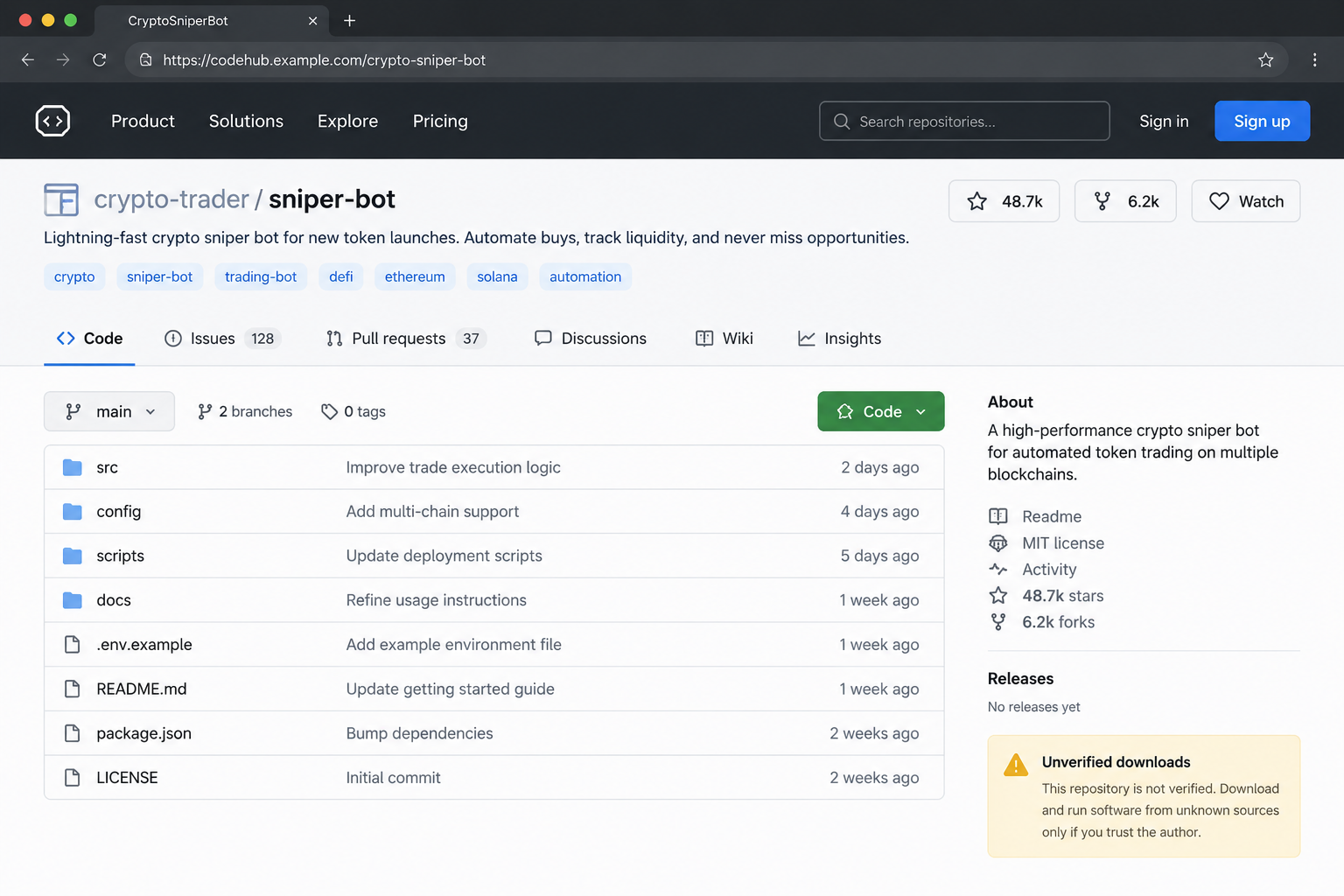
The campaign used a central website and projects on GitHub and SourceForge. It also promoted the same tools through a YouTube channel.
Check Point saw inflated-looking stars, forks, downloads, views, comments, and positive reputation votes. Some signs pointed to coordinated or fake accounts.
Download numbers are not infection counts. The report identified over 5,000 GitHub downloads or potential infections, but not a verified victim count.
SourceForge showed more than 44,000 reported downloads, many apparently from Android devices despite only Windows and macOS versions being offered.
- The sales story is faster trading or predictable game results.
- Several platforms repeat the story and create social proof.
- Installing the file can place a clipper on the device.
- The malware acts later, when a wallet address is copied.
- A “safe” vote or low scanner detection does not establish safety.
How the Fake Crypto Sniper Bot Scam Works
Step 1: The pitch finds someone seeking an advantage
People looking for a new-token trading bot or a crash-game predictor are often searching for speed, automation, or an edge over other players.
The campaign met that desire with a collection of tools instead of one fixed brand. If one name lost credibility, another could carry the same malware.
Links appeared in social posts, crypto forums, Telegram channels, and videos. A visitor could arrive from several directions and still reach the same hub.
Some offers promised features that cannot be independently verified from a landing page. A polished claim is not evidence of profitable trades or accurate predictions.
When a tool claims to predict a game designed around unpredictable outcomes, demand reproducible independent evidence before giving it access to your computer.
More importantly, consider why a shortcut should require a local executable on the same machine used for financial accounts and wallets.
Step 2: Fake reputation follows the visitor across platforms
The landing page linked to familiar software and video platforms. Those names made the download seem less isolated than a file from an unknown website.
Several GitHub accounts appeared to star or fork one another’s repositories. Check Point assessed much of the activity as likely artificial.
SourceForge reviews offered another endorsement layer. A handful of enthusiastic comments can feel persuasive when a reader is already interested in the promised result.
The YouTube channel used tutorial-style footage and an AI-generated narrator. Sudden view spikes and uniformly positive comments raised questions about organic interest.
Some files also received positive “safe” comments on VirusTotal despite suspicious behavior. Community sentiment is a clue to investigate, not a security certificate.
The same software can look popular in five places if one operator controls the accounts behind the activity. Cross-platform repetition is not independent validation.
Step 3: The user downloads a package that hides the real payload
The Windows version arrived in a ZIP archive. The visible entry file looked like a premium or trial trading tool.
Check Point found that the first executable acted as a loader for another program inside the package. Extra files made the archive look more substantial.
The dangerous program was a Rust-built clipper. Its purpose was not to place trades or predict a game, regardless of the surrounding labels.
On macOS, the archive included instructions for an “unlocker” if the application was blocked. That guidance pushed users to override a built-in warning.
A security prompt may be inconvenient, but it is not proof the operating system is broken. Do not follow a download’s own instructions to disable the warning.
Stop at the archive if you cannot verify the developer, source code, reproducible build, and independent security history. A repository page alone is insufficient.
Step 4: The clipper stays ready for a future transfer
On Windows, the analyzed sample copied itself into the user’s application-data area and arranged to run again when the user signed in.
It monitored changes to the clipboard rather than opening a conspicuous wallet-stealing page. That delayed behavior can make the original download easy to forget.
The code checked whether copied text resembled addresses for Bitcoin, Ethereum-compatible chains, and several other currencies.
When it found a match, it substituted an address from a large internal list. The person might not see the switch until inspecting the final transaction.
Different address formats matter here. A clipper written for only one coin would miss other users; this sample was built to cover many.
Do not conclude a transfer is safe simply because the wallet application itself is genuine. The changed address can arrive through the operating system’s clipboard.
Step 5: The recipient address changes at the last moment
Imagine paying a contractor or moving funds to a cold wallet. You copy the destination from a message or your own records.
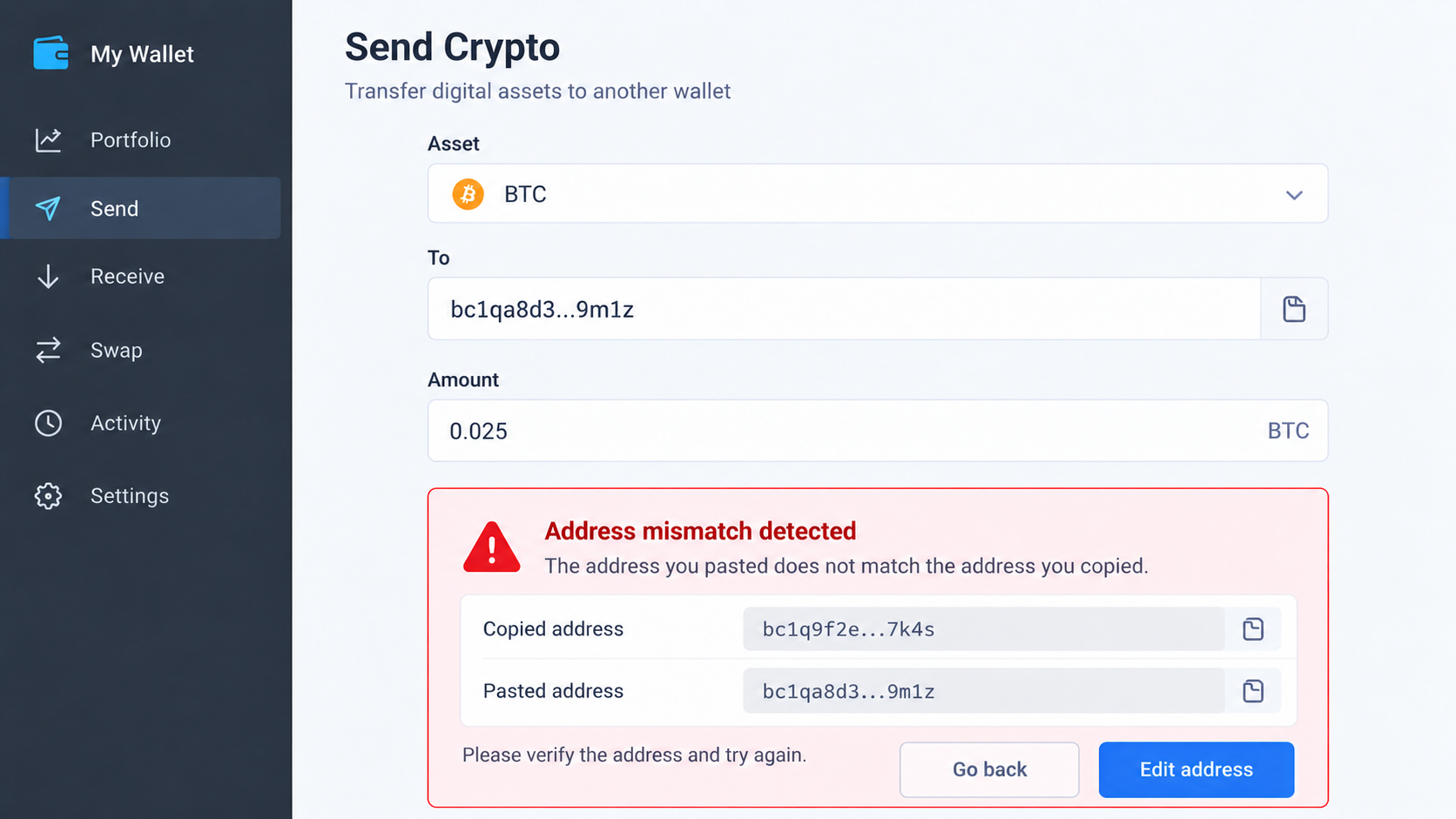
The clipper detects the address pattern and replaces the copied value. When you paste, the field can contain a different address that still looks syntactically valid.
Checking only the first few characters may not catch every substitution. Compare the full address against an independent source before authorizing a transfer.
For significant transfers, send a small test amount and verify receipt through the intended wallet. A test is an extra safeguard, not a substitute for checking.
Some wallet interfaces display a name or recent destination. Treat those cues carefully if the device itself may be compromised.
Use a clean device to confirm the recipient when possible. If the address changes between copy and paste, stop all transactions on that computer.
Step 6: The loss may look like an ordinary wrong-address transfer
Once a transaction is confirmed on-chain, there is usually no card-style chargeback. The attacker benefits from the sender’s own authorization.
Check Point observed attacker-controlled wallets that appeared to have received multiple transactions. It did not establish a complete public loss total for every download.
Some victims may first suspect they copied the wrong address themselves. That delays the search for malware still running on the machine.
Preserve the intended address, pasted address, transaction hash, time, and download history. These details help distinguish a clipper from a simple mistake.
Do not send another transfer to “test” the same wallet while the device remains suspect. The malware can replace the address again.
Beware of accounts offering paid recovery in response to a public complaint. They may be unrelated scammers seeking another payment or seed phrase.
Why Stars, Reviews, and Scanner Votes Failed as Proof
Open repositories and community scanners are useful resources. Their value depends on evidence, not the raw count beside a project.
Stars can be obtained from throwaway accounts. Downloads may be automated. Comments can repeat a script or appear in bursts rather than grow naturally.
In this case, the same operator apparently reused accounts across projects. That created a web of endorsements without truly independent users.
The Android-heavy SourceForge download pattern was particularly odd because the advertised software targeted desktop systems. A large number made the story less credible.
A VirusTotal “safe” comment is a person’s vote, not a proof of harmless behavior. Low detections can occur when a sample is new or changes often.
Good verification asks what the program actually does, who maintains it, and whether reputable independent analysts have reviewed the distributed binary.
How to Check a Crypto Tool Before It Touches Your Wallet
Start by separating research from installation. Read the documentation and project history without running the package on your primary computer.
Inspect the publisher’s identity and whether the official website links back to the exact repository. Look for a history of real releases and resolved issues.
A claimed open-source project may still distribute a binary that does not match its visible code. Reproducible builds and independent review matter.
Search for negative reports, not just the creator’s testimonials. Mixed, specific feedback is more credible than waves of identical praise.
Be especially cautious with tools that promise guaranteed returns, secret prediction abilities, or a “free premium” unlocker that bypasses operating-system warnings.
Keep wallets on a separate, well-maintained device where practical. A trading experiment should not share a clipboard with the account holding your savings.
Finally, review the full destination address on the signing device itself. Clipboard convenience should never replace destination verification.
Why Mac Users Are Included in This Warning
The same campaign offered macOS downloads, not just Windows executables. A Mac’s built-in security checks are useful, but they depend on users respecting warnings.
Check Point found a text file telling Mac users to run an “unlocker” if an app appeared damaged or came from an unidentified developer.
That wording reframed a security block as a technical nuisance. The included script removed quarantine information before launching the application.
A person trying to make a new tool work might follow those steps without realizing they are removing the barrier that stopped it.
Do not treat a fix supplied inside the suspicious download as independent advice. The author of the package also controls those instructions.
Use the official developer channel to verify the release, and ask a trusted security professional before changing macOS protections for any trading software.
Mac users should apply the same transfer checks as Windows users. The wallet destination matters more than the operating system’s reputation.
If you already ran an unlocker, record that step precisely. It helps responders understand whether the application was launched despite a warning.
What to Do if You Installed One of These Bots or Predictors
- Stop sending cryptocurrency from the device. Do not rely on a quick visual check of the next pasted address. Disconnect the suspect system from accounts and wallets.
- Record what you downloaded. Save the project name, page, archive, installation time, and any unusual prompts. Avoid running the files again for evidence.
- Review recent transfers from a clean device. Compare each intended recipient with the on-chain destination. Preserve hashes and contact the relevant exchange if funds passed through its platform.
- Check wallet secrets and sessions. If a seed phrase or private key was ever exposed on the affected computer, move funds to a new wallet created on a clean device.
- Remove the malware with qualified help. Malwarebytes can help detect a clipper, but an infected financial workstation may need a clean rebuild and account review. Update before returning to use.
- Harden future browsing. AdGuard can reduce exposure to malicious promotional pages, but it cannot reverse an on-chain transfer or replace a compromised wallet.
- Report the distribution pages. Send the malicious repository or listing to its host and warn contacts with a non-clickable description, not a live download link.
Frequently Asked Questions
Do sniper bots always contain malware?
No. This investigation concerns a documented campaign hiding a clipper behind several bot and predictor names. Verify each download independently.
Can a crash-game predictor really guarantee wins?
A claim of predictable outcomes needs extraordinary independent evidence. In this case, the predictor pitch served as bait for malicious software.
Why did the repository show so many stars?
Researchers observed patterns consistent with fake or coordinated accounts. A count alone cannot tell you whether real users verified the software.
Does a low VirusTotal detection score mean the file is safe?
No. New or frequently changed malware may be missed, and favorable community comments do not validate the file’s behavior.
Can I recover a transfer sent to the wrong wallet?
On-chain transfers are generally irreversible. Report quickly to any involved exchange, keep evidence, and distrust anyone promising guaranteed recovery for a fee.
How do I know if my clipboard was changed?
Compare the full destination against the original source before signing. A mismatch after copying is a serious reason to stop and inspect the device.
The Bottom Line
The fake crypto sniper bot campaign sold an edge, manufactured popularity, and installed software designed to divert future wallet transfers.
Do not let stars or tutorial videos make the decision for you. Verify the software and the full transaction destination before either reaches your money.








