

A possible Desert Financial scam text puts you in an awkward position. Nobody wants to ignore a warning that might protect their savings.
But the route offered by that message deserves its own check. Before tapping, give yourself a moment to look beyond the account-alert wording.
Overview
What makes these Desert Financial messages fraudulent
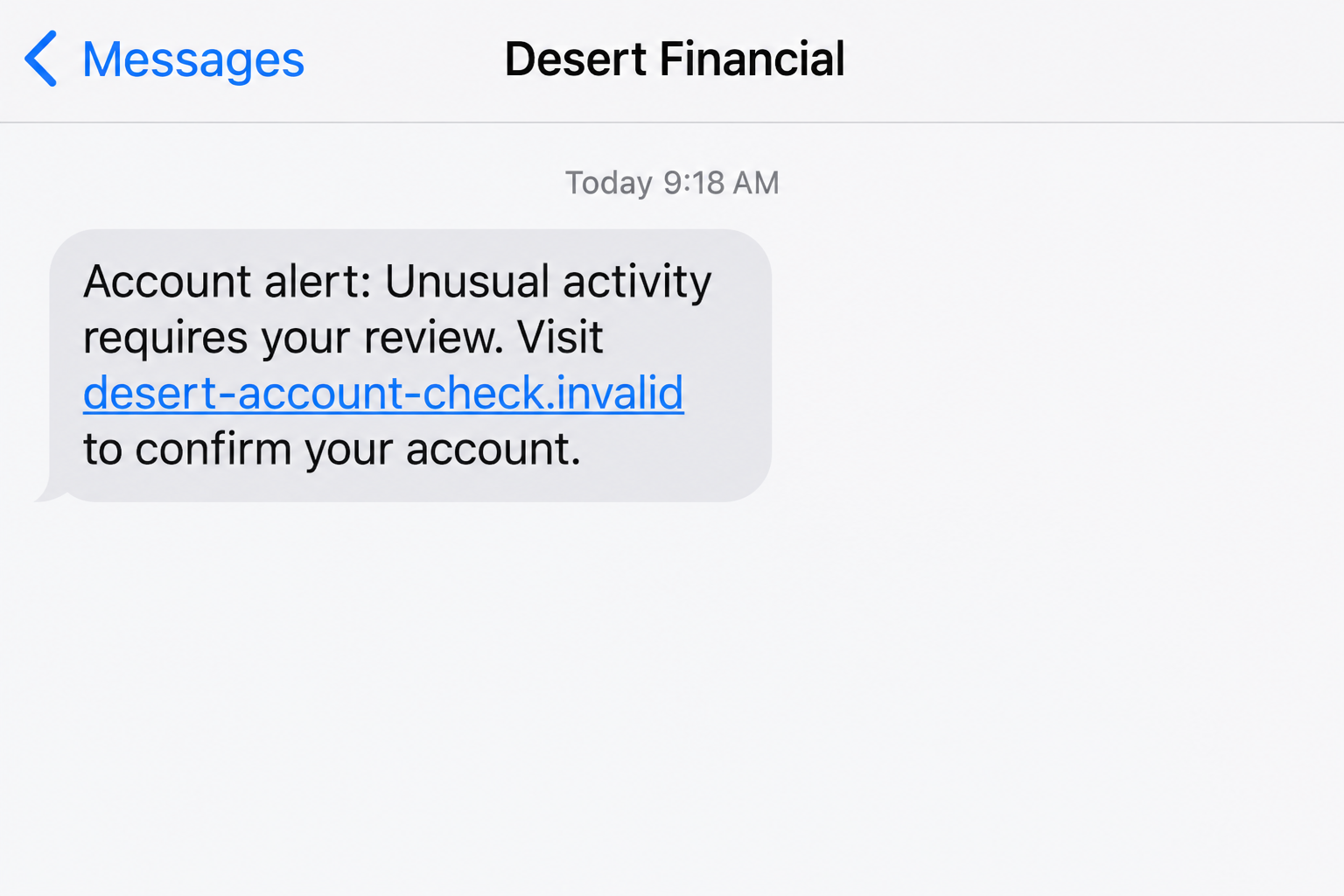
The Desert Financial scam text impersonates the credit union and steers recipients toward an unverified account-review or login process. The aim is information theft, not account protection.
A historical October 2023 report described messages leading to copied banking sites. Desert Financial independently publishes fake text examples and warns about credential and verification-code requests.
This is a warning about impersonators abusing the institution’s identity. Desert Financial’s genuine banking service and legitimate account notifications are not the scam.
The essential question is not whether the message mentions banking. It is whether the sender is trying to control how you disclose information or verify activity.
An account alert should not turn an unknown website into a trusted place to enter your banking password. Check the underlying issue through a route you choose.
How a plausible alert becomes a risky instruction
Fake alerts can arrive from ordinary-looking numbers and contain addresses resembling the institution’s name. Those features help the message blend into routine communications.
The allegation of unusual activity gives you a reason to hurry. A request to review or confirm can sound safer than an obvious demand for money.
- A banking concern arrives unexpectedly with a link chosen by the sender.
- The destination’s branding resembles Desert Financial, but ownership is unverified.
- The process asks for access information or a verification code.
- A later contact insists the information is needed to protect your funds.
- You are pushed to continue before consulting the credit union independently.
These clues describe the impersonation route. Not every message has identical wording, and not every recipient encounters a follow-up contact.
An accurate name or plausible transaction detail cannot settle the question. The requested action and independently verified channel deserve more weight than appearance.
Real texts exist, but access secrets stay private
Desert Financial offers genuine text banking and account alerts. Its April 2026 text-service terms describe informational messages, rather than unsolicited requests for sensitive credentials.
The credit union’s fraud guidance states that it will not ask for usernames, passwords, or verification codes in texts, emails, or phone calls.
A genuine authentication code can still arrive by text during a legitimate operation. Receiving it is different from giving it to an unverified person.
The examples date back to 2023. Senders and links change, so do not wait for a word-for-word match before checking an unexpected request.
How the Desert Financial Scam Text Works
Step 1: The message presents an account concern that feels immediate
The sender introduces a problem you would normally take seriously. Unusual activity or an access issue can make a banking text stand out among ordinary notifications.
That urgency encourages a quick response before you have checked a statement or opened the app. The criminal benefits from narrowing your attention.
You might remember a recent purchase and wonder whether it triggered the warning. That personal connection can make a broad message feel specifically informed.
Do not let the timing supply evidence the sender has not provided. A recent transaction and an unrelated phishing text can occur on the same day.
If the message contains a precise allegation, verify it with the institution. The detail is a reason to investigate safely, not permission to follow the link.
You can respond promptly without responding to the sender. Independently opening your banking app preserves that distinction.
Step 2: A review link is framed as preventing a loss
The text offers an action that appears to address the problem. A reader may think tapping the link will deny activity or restore protection.
That framing disguises the information request as a defensive step. The person trying to protect the account becomes the person supplying access details.
Review the proposed action before taking it. A request to enter credentials into an unfamiliar destination is not merely asking whether you recognize a transaction.
Desert Financial’s official warning specifically notes links resembling its own address. A close visual resemblance is not enough to establish institutional control.
The safer route is one you already know. Use a saved app or bookmark rather than letting the unexpected text choose the destination.
You do not need to reply to ask whether the message is genuine. An impersonator can answer that question as confidently as the real institution.
Step 3: A lookalike banking page asks you to continue
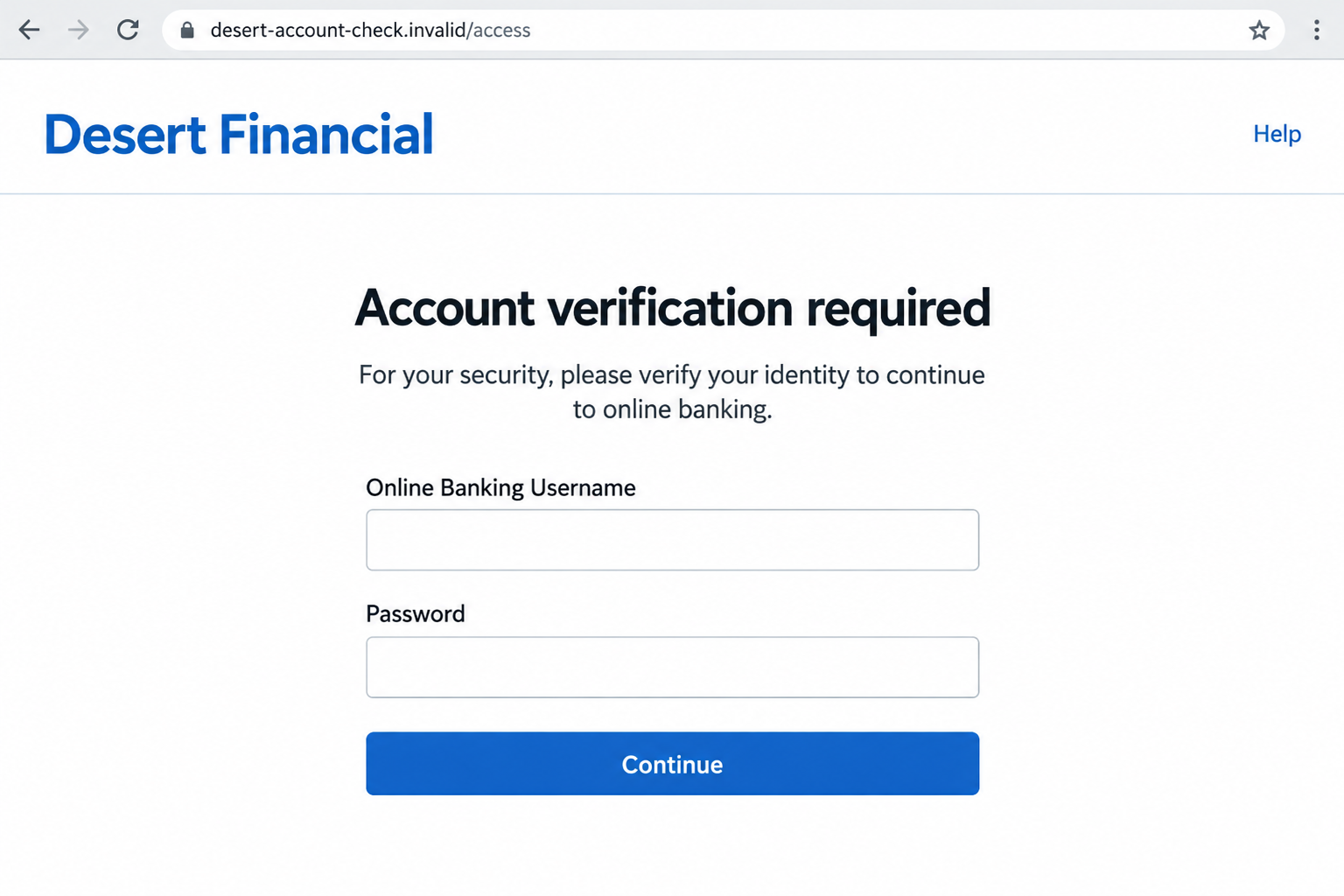
A fraudulent destination can copy a login layout and use familiar account terminology. The design supports the story introduced by the text.
People often expect to log in before viewing private banking information. That sensible expectation becomes dangerous when the website itself has not been authenticated.
The hostname matters more than an on-page logo. A brand name inside a page, path, or misleading subdomain does not establish ownership.
For illustration, desertfinancial.example.invalid belongs beneath the fictional example.invalid hostname. The familiar word at the beginning does not make it the credit union’s website.
Likewise, a secure-connection symbol only describes the connection to that destination. It does not verify the bank-like claims displayed there.
If you reached the page, leave without entering anything further. Do not download a supposed security update or enable permissions as part of an account review.
Step 4: The process reaches passwords or authentication information
A submitted login may be usable in an attempted account takeover. A page does not need to display a successful login to collect what you typed.
Some phishing interactions can also request a code. That request is especially risky if the code corresponds to a real operation initiated elsewhere.
Pay attention to the code message’s stated purpose. Do not let a fake page redefine a login or transaction code as a harmless fraud-cancellation number.
Desert Financial warns that verification codes should remain private. A caller claiming to be a fraud specialist does not make an unsolicited code request safe.
The exact screens can vary, and this article does not establish every subsequent request in the historical examples. Recognize the sensitive boundary rather than memorizing a script.
If you already submitted information, stop and contact the credit union. Continuing in hopes of correcting the problem may simply expose more details.
Step 5: A reassuring ending can delay the real response
A copied page might display a completion message, an error, or another instruction. None of those outcomes proves that the account is secure.
The recipient may believe the unusual activity has been handled and return to daily tasks. That delay gives any attempted misuse more time.
Do not wait for a missing balance to confirm that disclosing credentials was risky. Ask Desert Financial to assess the exposure promptly.
If the sender follows up, treat that contact as unverified too. Knowledge of the first message may simply connect two parts of the same deception.
A claim that money must be moved to safety deserves particular caution. You should not authorize a stranger’s transfer instructions because they use security language.
The solution is to leave the untrusted process, not to find a better-looking page inside it. Consult the real institution through independently obtained support.
How to Check a Desert Financial Alert Safely
Look inside your established banking channel
Open the app you normally use and review available account activity. Avoid starting from the suspicious link, even if its wording appears to match a real transaction.
If something is unfamiliar, keep the relevant details and contact the institution. A genuine account concern can coexist with an unrelated fraudulent message.
Desert Financial’s official fraud page lists 602-433-7000 for assistance. Verify contact information on your card or independently opened official site before discussing private matters.
Tell the representative what the text alleged and which action it requested. Let the credit union determine whether the claim corresponds to a real issue.
Do not confuse text banking with an unsolicited access request
The official text banking terms explain that legitimate informational messages can concern accounts. That does not authorize a stranger’s password request.
Your own banking settings can help explain why you receive legitimate alerts. Review them within the app rather than changing them through a text’s link.
A familiar short code may be useful context, but the instruction still needs scrutiny. Sensitive disclosures should not be justified by sender appearance alone.
Keep alerts that help you monitor accounts. The safer habit is independent verification, not turning off every notification because criminals imitate the format.
What to Do If You Have Fallen Victim to This Scam
Your response should reflect your actual exposure. Reading a message is different from submitting a password, revealing a code, or approving a financial action.
- Break off the interaction before it expands.
Exit the copied page and end any connected conversation. Decline requests to finish verification, send another code, or move money while a caller supposedly protects it.
If you only received the text, keep a copy for reporting and block the unwanted sender. Do not assume receiving it means an account was accessed.
- Contact Desert Financial through a trusted route.
Use the independently verified phone number and explain what you disclosed. Include the timing and whether any real code or transaction approval was involved.
Ask the institution to assess account access and financial activity. Follow its instructions about appropriate restrictions, replacement information, and review procedures.
Write down the case reference and important next steps. If you call again, those notes can prevent confusion about what has already been done.
- Replace any exposed credentials and inspect access settings.
Change the banking password through the genuine app or website using a trusted device. If access fails, seek official help rather than another online unlocking offer.
Secure the email used for banking notifications, especially if it shared the exposed password. Replace reused credentials wherever they protect another important account.
Ask about suspicious changes to contact information or account access. A password reset is helpful, but should not be mistaken for a complete investigation.
- Review transactions and use the proper dispute process.
Check recent activity, pending transfers, and unfamiliar recipients with the institution. Report concerns immediately rather than attempting a reversal through the suspected sender.
Explain honestly whether a payment was unauthorized or something you approved under deception. The financial provider needs those facts to assess the situation.
Request the applicable review and keep supporting records. Recovery depends on circumstances; do not assume a promised refund or automatic rejection before the institution responds.
- Report the text without revealing more information.
The fraud page asks recipients to send a copy to emailfraud@desertfinancial.com. Include relevant message details, not an account password or current security code.
Keep screenshots showing the sender, timestamp, and request. If a link is already visible, preserve it without reopening the destination.
For broader U.S. reporting, use the FTC fraud report form. A report helps document the incident but does not replace immediate account protection.
- Check device safety when downloads or permissions were involved.
If you installed an app, opened an unexpected file, or granted browser permissions, assess that separately. A form submission alone does not establish a malware infection.
Malwarebytes can help scan supported devices for malicious software. Obtain it from a trusted source, not from a page or caller claiming to handle your banking alert.
AdGuard’s relevant filtering features can reduce some unsafe web and advertising exposure. It cannot validate every text, reverse a payment, or secure an exposed banking password.
- Monitor identity concerns and reject paid recovery offers.
If you supplied identity details, consult IdentityTheft.gov for a recovery plan matched to the disclosure. Keep financial and identity records organized.
A subsequent caller may claim the problem requires a recovery fee or another transfer. Verify independently, particularly if the person knows details from the earlier interaction.
Share the situation with a trusted helper if needed. Support can make follow-up pressure easier to handle without surrendering control of your accounts.
Make Account Alerts Useful Without Making Them a Shortcut
An alert can tell you where to focus attention without deciding how you must act. Keeping that distinction makes notifications useful even when messages are imitated.
Consider a simple routine: read the allegation, close the message, and check the app. If necessary, call the saved support number.
That routine avoids the need to recognize every changing domain or script. You are not depending entirely on the criminal making a visible mistake.
Use a unique banking password and keep software current. Strong account habits limit additional exposure if a convincing text reaches you during a distracted moment.
Family members can adopt the same routine without sharing credentials. Helping someone verify a message should not require taking over their account or private access information.
If a notification really concerns fraud, an independent check still moves you toward the institution that can help. It only removes the stranger’s preferred shortcut.
Frequently Asked Questions
Is every text from Desert Financial fraudulent?
No. Genuine alerts and text banking exist. The scam involves impersonation and unverified requests that expose sensitive information or direct unsafe account actions.
What if the text mentions an amount I recognize?
Verify it through the app or institution. A plausible detail is worth checking, but it does not authenticate the message’s link or requested disclosure.
Can a genuine code be part of an attempted scam?
Yes. An attacker may trigger a real operation and then ask you for its code. Keep it private and read the purpose stated in the message.
Where should I send a suspected Desert Financial phishing text?
The institution lists emailfraud@desertfinancial.com for copies. If you already revealed sensitive information, also contact independently verified support promptly.
Does a clean scan mean my banking password is safe?
No. Information entered into a phishing form can be exposed without malware. Replace exposed credentials and consult the credit union even if scanning finds nothing.
Should I turn off legitimate banking alerts?
Not simply because scammers imitate them. Keep useful notifications and verify account concerns through your trusted banking route rather than unexpected links.
The Bottom Line
The Desert Financial scam text makes an account-protection request the entry point for information theft. A familiar banking name does not authenticate the link.
Check through the real institution before acting. If you disclosed sensitive details, stop the interaction and ask Desert Financial to help assess and protect the account.








