

A free World Cup shirt bearing your company logo sounds like the sort of small perk you might mention to a coworker. The email even knows your name.
That personal touch is exactly why this message deserves a closer look. Before choosing a size or opening anything, pause at the claim behind the offer.
Overview
A familiar workplace detail gives the offer its pull
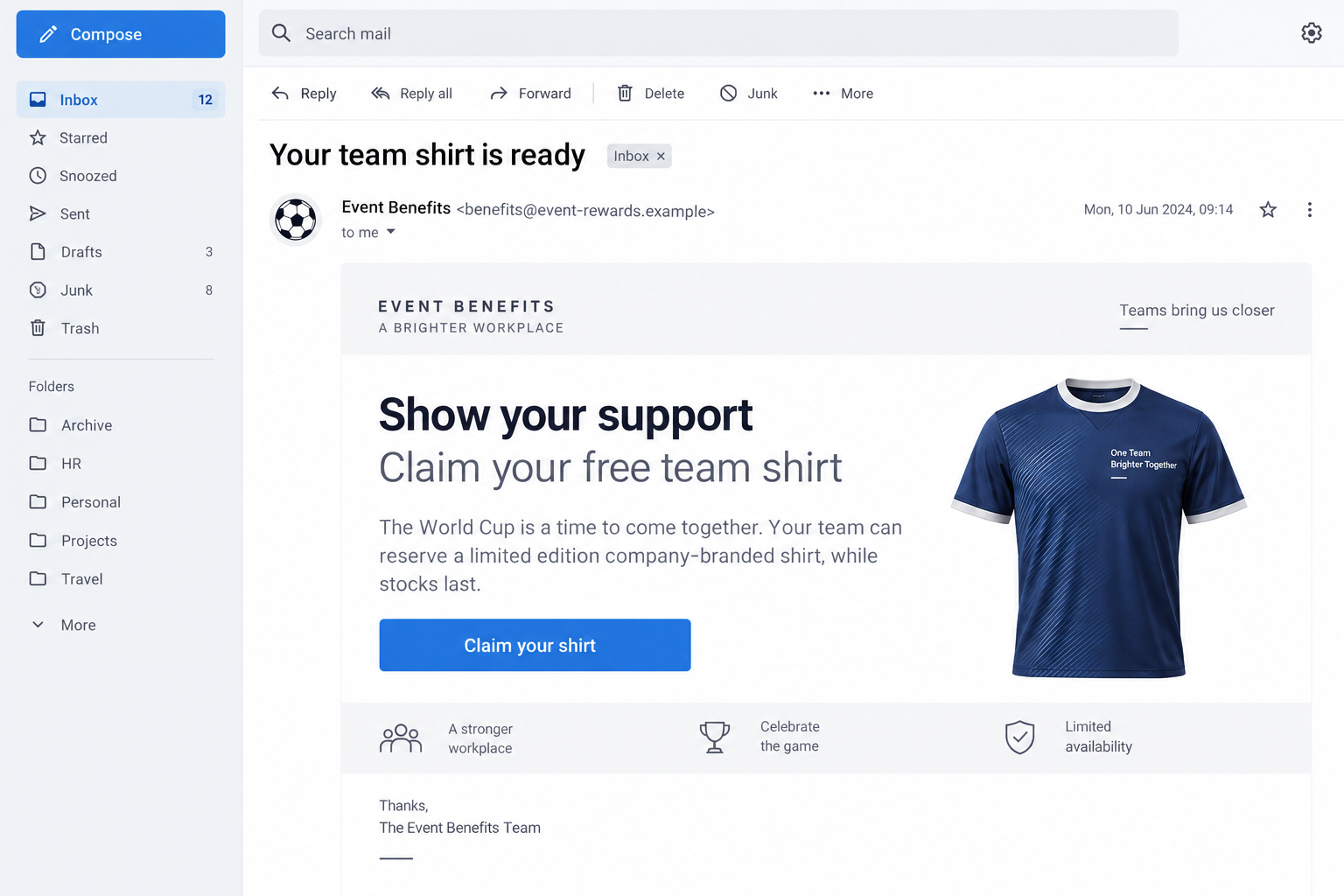
The World Cup company T-shirt email is a documented phishing lure, not an ordinary promotion. It claims a FIFA partnership and displays the recipient’s employer logo on a shirt.
Cofense reported that messages in this campaign also used individual names and company names. That combination can make a mass sporting event feel like a private workplace benefit.
The important question is not whether the shirt looks plausible. It is whether your employer actually announced this promotion through its normal internal channels.
What researchers observed, and what they did not
Cofense connected the campaign to delivery of malware it calls Voidrift. Its June 2026 report describes an executable hosted on a legitimate domain and a highly personalized email lure.
The report also says its observed samples passed through three named email security gateways. That finding describes this campaign’s sample, not a guarantee that every filter misses every version.
Public reporting does not establish that every recipient opened the file, that every organization was compromised, or that a particular employee lost data.
The practical verdict for employees
Treat an unexpected shirt claim as suspicious until your employer verifies it independently. A convincing logo is not authorization to download a file.
- The sender claims a FIFA arrangement that should be easy for your company to confirm.
- The offer asks you to leave normal workplace channels to claim a shirt.
- The download, rather than the merchandise, is the security event.
- Your IT or security team can inspect the message without you interacting with it.
FIFA, the employer, and the real hosting provider are not necessarily involved. Their names, branding, or infrastructure can be abused by the attacker.
Why a Free Shirt Can Look So Convincing
Most phishing messages are easy to dismiss because they feel generic. This one begins with something a recipient can recognize immediately: their own employer’s identity.
A company logo on a shirt mockup creates a visual shortcut. The reader may assume someone in human resources or marketing approved the promotion.
A name in the greeting adds another nudge. It suggests the sender knows who belongs at the company, even though names and logos are often publicly available.
Think of a recruiter profile, staff directory, conference agenda, or social post. An attacker can gather enough information from such sources to personalize a lure without breaching the organization.
The World Cup setting adds timing. During a major tournament, branded giveaways and office viewing events are conceivable, so the request does not feel random.
That does not make a shirt offer inherently malicious. The problem is the unverified route from an unsolicited email to a file or page controlled by someone else.
A real internal promotion should survive a simple independent check. Ask the team supposedly running it through an address or chat channel you already know.
How the World Cup T-Shirt Email Scam Works
Step 1: The sender prepares an employer-specific lure
The observed messages put the recipient’s name and employer details into a World Cup-themed offer. The shirt image even includes the company’s logo.
That preparation matters. It replaces the usual generic prize bait with a reason the employee might think, “This was meant for us.”
The supposed FIFA partnership is an authority cue. It should not be interpreted as evidence that FIFA or the employer authorized the email.
In a large company, the sender may not need to know the employee’s job. A public logo and a name can be enough to begin the conversation.
Step 2: The email asks for a small, ordinary action
Claiming a shirt feels lower risk than paying an invoice or changing a password. A recipient may expect to select a size or confirm delivery details.
This is why the lure works particularly well as workplace phishing. It asks for a quick personal action while the user is already reading business mail.
The visible request can change between messages. The constant is the attempt to move the recipient away from verified employer communication.
Do not assume a message is safe because it contains no urgent warning. A pleasant offer can be just as effective as a threat.
Step 3: The claim path leads toward an attacker-selected file
In the documented campaign, the destination was associated with a Voidrift binary. A downloaded program is a very different thing from a shirt order.
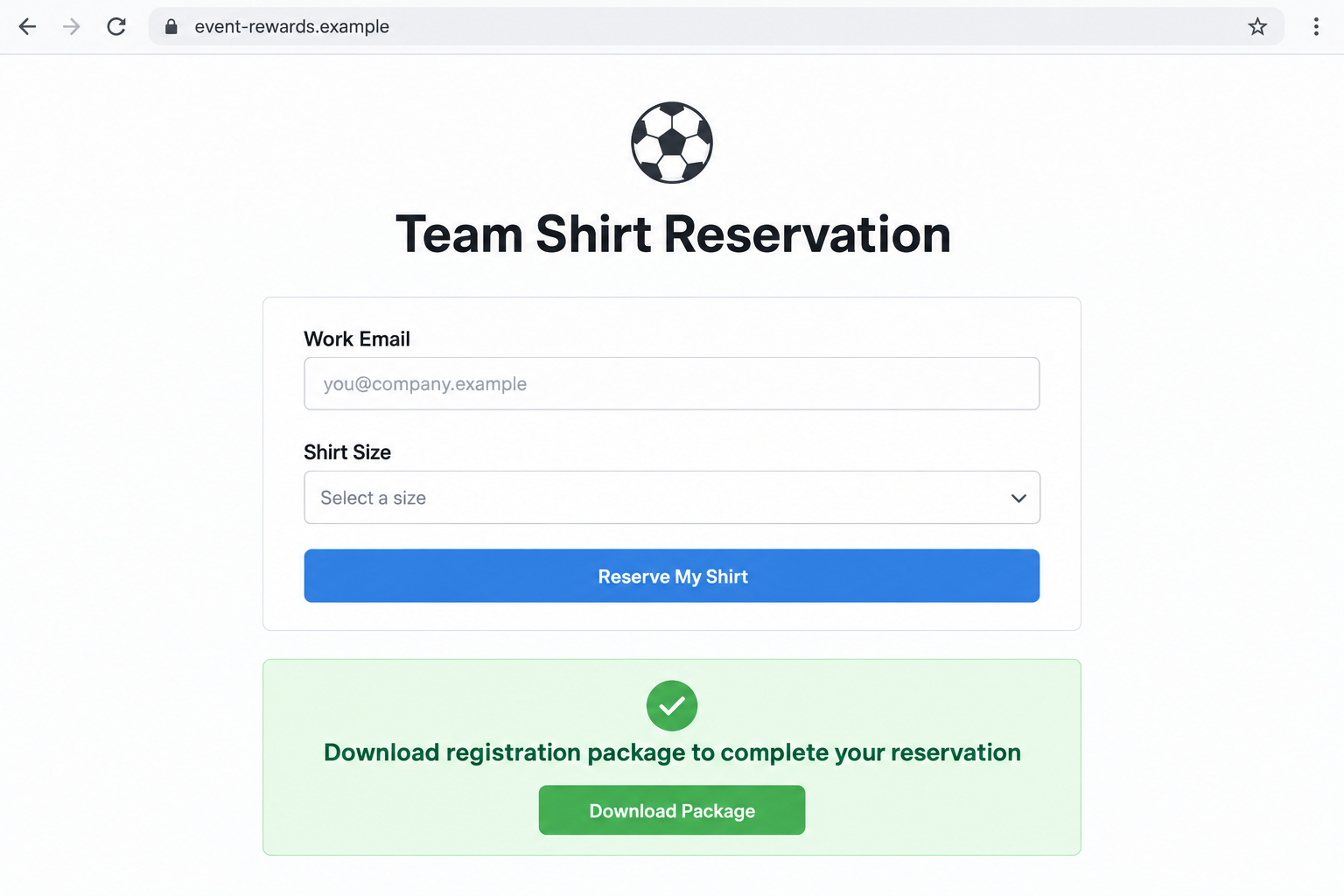
It may arrive through a page, link, or download prompt presented as part of the claiming process. The exact screen can vary, so focus on the file handoff.
A form asking only for a shirt size can still be part of the journey. Its harmless appearance does not validate the later download.
Likewise, a real-looking web address is insufficient. Cofense observed the malware binary on a legitimate domain, showing that trustworthy infrastructure can be misused.
Step 4: The download tries to cross the device boundary
Opening an email is not the same as running malware. The critical escalation comes when the recipient executes a downloaded file or follows a prompt that enables it.
The file might be labeled as a confirmation tool, voucher, order document, or another innocent-sounding item. Those labels do not change its behavior.
On a managed work computer, application controls may stop execution. On another device, the same file could run if the user grants permission.
Neither outcome can be inferred from the email alone. An incident responder needs the actual message, URL, downloaded file, and endpoint logs.
Step 5: The attacker relies on a quiet aftermath
Cofense characterized Voidrift as difficult to analyze and having a low detection footprint. That is a research observation, not proof that every infection remains hidden.
After a suspicious download, an apparently normal computer is not a clean bill of health. Some malicious programs do not announce themselves with pop-ups.
The same applies to an email gateway that delivered the message. Passing through a filter says only that the filter did not block that copy.
Prompt reporting gives security staff a chance to look for the file and block similar messages before more coworkers encounter them.
What the Email Can and Cannot Prove
A company logo is a piece of artwork, not a digital signature. It can be copied from a public website and printed on a mockup in minutes.
Your name is not a secret either. It may appear in a work email address, event listing, professional profile, or previous data exposure.
Even a familiar domain somewhere in the link chain is not final proof. Attackers sometimes place files on compromised or otherwise legitimate services.
Instead, verify the organizational claim. If the email says the company arranged a giveaway, the company’s known internal channels should have a matching announcement.
Check the sender address as one clue, not the entire test. Display names can be forged, and an attacker might use an unrelated mailbox with a plausible name.
Do not forward the message broadly to ask “Is this real?” Use the report-phishing button or the security address your employer provides.
That preserves useful technical details and reduces the chance that a curious coworker clicks the same lure.
Warning Signs Worth Noticing
There is no single typo or color that identifies every version. The strongest warning signs concern the mismatch between the promise and the action required.
- A giveaway supposedly arranged by your employer is unknown to your employer’s communications or IT team.
- The claim process requests a program download, browser extension, or permission unrelated to clothing delivery.
- A page uses your company logo but is reached only through a stranger’s email.
- The offer pressures you to act before checking with a coworker or manager.
- The sender’s reply address and the destination domain do not fit the organization named in the message.
One clue is enough to stop and verify. You do not need to prove the file malicious before declining to run it.
A real giveaway should still make sense after you navigate to the employer’s benefits page or ask the team responsible for events.
What to Do if You Have Fallen Victim to This Scam
- If you only received the email, report it internally. Do not click again to investigate. Submit the original message through your organization’s phishing-reporting channel, including the sender and time received.
- If you opened a page but entered nothing, close it and preserve the URL. Tell IT exactly what you saw. Opening a page alone does not prove infection, but redirects or downloads warrant checking.
- If a file downloaded, do not open or delete it before talking to security. Tell responders the filename and save location. They may need the file and browser history to identify the campaign.
- If you ran a file, disconnect the affected device as your security team instructs. Contact them from a different trusted device. They can isolate the endpoint and decide how to collect evidence safely.
- Run an approved malware scan. On a personal device, update Windows security and consider Malwarebytes for a second opinion. On a managed device, follow company policy before installing anything.
- Review accounts only after the device is considered safe. If you typed credentials, change them through the real service on a clean device, revoke suspicious sessions, and tell your organization which accounts were involved.
- Block repeat lures where appropriate. AdGuard can reduce exposure to malicious advertising and known harmful destinations, but it cannot prove this particular email or downloaded file safe.
- Keep the incident details together. Save the original email, download name, timestamps, and any security alerts. Give them to your IT team rather than publishing them in a forum.
Questions to Ask Before Claiming Any Workplace Giveaway
When a message invokes your employer, the easiest independent check is often nearby. Ask the benefits, internal communications, or events team whether the promotion exists.
Use contact details from your organization’s directory. Do not reply to the sender to request confirmation, because that lets the same person supply the answer.
Ask whether employees should use a known internal portal. If the process instead requires a third-party installer, request an explanation from IT.
For a physical shirt, the company may need a size and address. It does not need you to execute a Windows program to process a garment request.
If a colleague already clicked, keep the conversation calm. Fast reporting helps the organization protect others and is more valuable than assigning blame.
What Your Security Team Can Look For
The original email carries more than visible words. Its headers, link redirects, and attachment details can help responders connect multiple copies of the same campaign.
That is why a screenshot alone is less useful than reporting the message itself. A screenshot shows the lure; the full message helps trace how it arrived.
Security staff can compare recipients and timestamps. If several employees received personalized versions, the team can warn them before anyone opens the claim route.
The company may also inspect downloads and endpoint alerts. Even if the email gateway missed a message, another control might have stopped the binary.
Do not assume “delivered” means “infected.” A file must pass additional steps before it can affect a device. Those steps should be investigated separately.
Likewise, do not assume a quiet antivirus dashboard means nothing ran. The investigated malware was described as evasive, so incident review should use available logs and evidence.
If the link used a legitimate hosting domain, blocking every address on that service may disrupt ordinary work. Targeted response is better than a broad guess.
Employees can help by describing exactly what they did: opened the email, clicked a link, typed information, downloaded a file, or ran a program.
Each action changes the likely exposure. That simple timeline is often more useful than trying to decide alone whether the computer is infected.
The shirt image itself is another useful clue. Multiple copies with different employer logos suggest preparation across organizations rather than a genuine local giveaway.
Only the employer can confirm whether it authorized its logo for an offer. Public branding on an email is not an internal approval record.
After the immediate incident, the team can decide whether to remove related messages and publish a short internal notice naming the specific warning signs.
A good notice tells staff how to report and what not to run. It need not circulate the clickable URL or display the suspicious email in full.
When reporting is encouraged without blame, employees are more likely to speak up quickly. That makes a personalized campaign easier to contain.
Frequently Asked Questions
Is the World Cup company T-shirt email a genuine FIFA promotion?
The campaign Cofense documented falsely claimed a FIFA partnership. Verify any separate offer with your employer before using its link.
Why does the message know my name and company logo?
Those details can be collected from public sources. Personalization makes the lure believable but does not prove the sender has internal authorization.
Does opening the email infect my computer?
Simply reading the message is different from running a downloaded program. Report the message and describe any links, downloads, or prompts you used.
Could a legitimate website host the malicious file?
Yes. Researchers said the Voidrift binary in this campaign was hosted on a legitimate domain. Judge the complete interaction, not one domain’s reputation.
What if I selected a shirt size but never downloaded anything?
Tell your IT team what information you submitted. The risk depends on the actual page and data involved, not merely the size choice.
Should I warn everyone at work by forwarding the email?
Use your organization’s reporting process. Security staff can issue a safe warning without circulating the clickable lure to more employees.
The Bottom Line
The documented World Cup shirt lure traded on real workplace details to make a malware delivery route seem like an employee benefit.
If your employer did not independently announce the offer, do not claim it through the email. Report the message, and seek prompt help if you downloaded or ran a file.








