

You search for your bank, click a result near the top, and see a familiar login page. Nothing about that routine feels unusual.
Yet a link can behave differently depending on how you reached it. That detail matters when the page is asking for banking credentials.
Overview
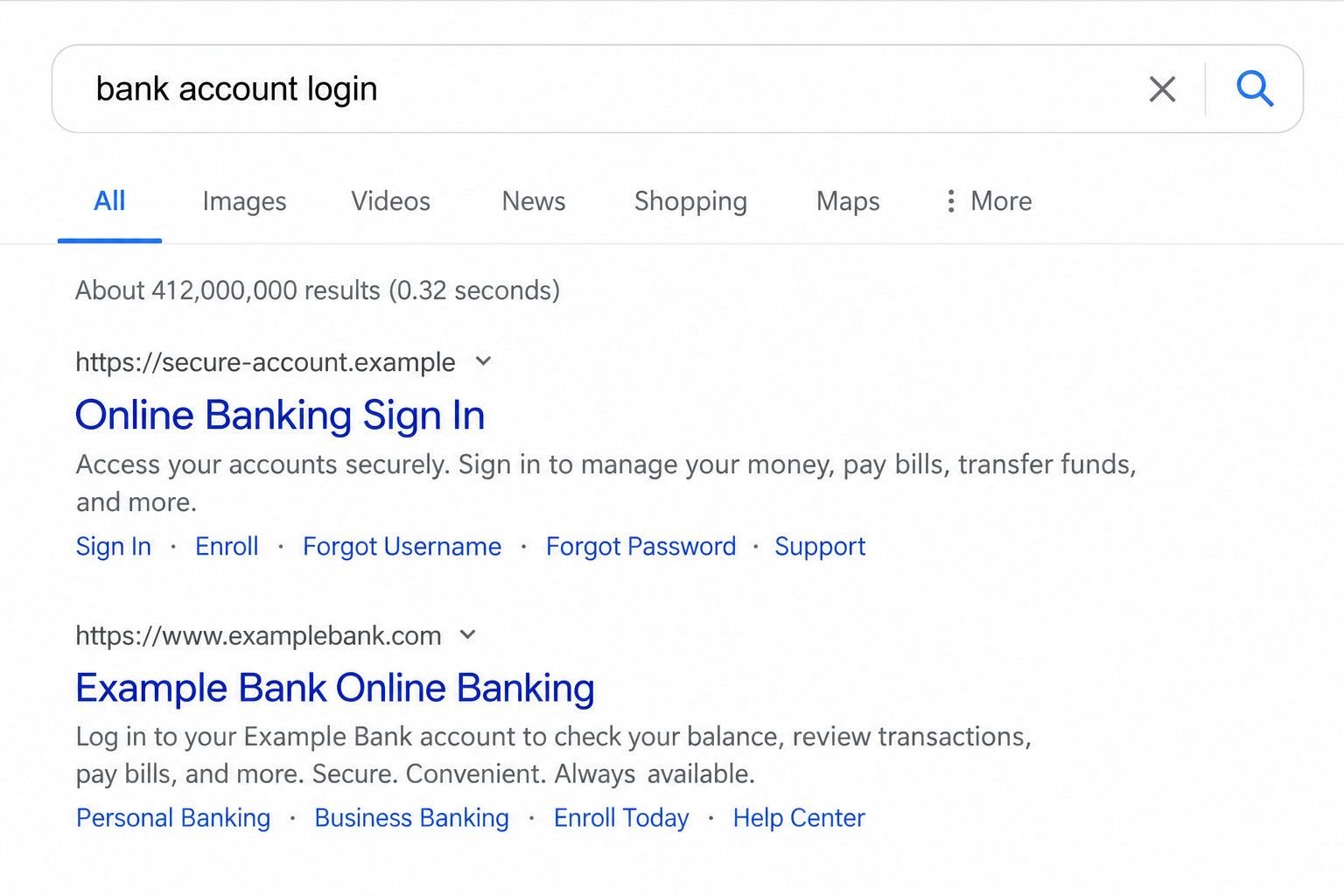
The search result is the beginning of the trap
Fortra reported phishing sites that appeared for bank-login searches and displayed convincing banking portals to users arriving from search engines.
The researchers call the tactic Chameleon SEO poisoning. The name describes how the malicious site changes its appearance for different visitors.
This is an impersonation of financial institutions. The banks and the search engines are not shown to be partners in the fake pages.
Why a quick link check can miss it
Fortra observed that directly opening the same suspicious address could show an offline or fake 404 page. Clicking through a search result exposed the phishing page instead.
That split matters because a friend, scanner, or security analyst might paste the URL and see nothing alarming. The victim saw a working bank clone.
The report describes observed campaigns targeting major financial institutions, not proof that every high-ranking bank result or every second-level domain is malicious.
The safer route to a bank account
Use the bank’s official app or a bookmark you previously established from a trusted source. Do not rely on a search result each time you sign in.
- A top position in results is not identity verification.
- One address can present different pages to different visitors.
- A cloned login may collect passwords or other account details.
- Your bank can confirm activity through its official app or card contact line.
If you already entered information, focus on account security and bank contact, not on proving whether the suspicious page still loads.
Why Searching for a Bank Is an Attractive Target
People often search for a bank’s name instead of typing a complete address. The search engine becomes an informal navigation menu.
A person looking for “bank customer portal” is already prepared to log in. That is a much warmer target than someone browsing unrelated news.
Attackers can place lookalike domains in results, sometimes using sponsored placements or search-optimization techniques. The observed Fortra case emphasized poisoned organic visibility.
A headline and snippet can closely resemble the bank’s language. The actual destination, however, can contain a subtle spelling change or an unfamiliar domain ending.
Mobile screens make those differences easier to miss. The address bar may show only part of a long URL, while the form fills the screen.
None of this means a search engine deliberately recommends fraud. It means ranking and snippets are not substitutes for authenticating the site you use.
How the Cloaked Bank Login Scam Works
Step 1: A lookalike address is prepared for bank-related searches
The attacker registers or controls a domain designed to resemble a financial institution. It may differ by one word, letter, or unfamiliar domain structure.
Fortra said the cases it studied used typosquatted second-level domains. The precise addresses can change as pages are removed or replaced.
The site is positioned around high-intent searches, such as a customer portal or credit-card login. The aim is to intercept a routine sign-in.
Do not treat a page as official because its title contains the bank’s name. Anyone controlling a page can put that name in its title.
Step 2: A result leads the user into the fake site
From the search page, the user clicks what appears to be the right destination. The browser sends information about the referring page as part of normal navigation.
The attacker-controlled server can use that information to recognize a search referral. It then serves the page intended for a banking customer.
This is why the starting point matters. A saved screenshot of the fake bank form is more informative than the URL alone.
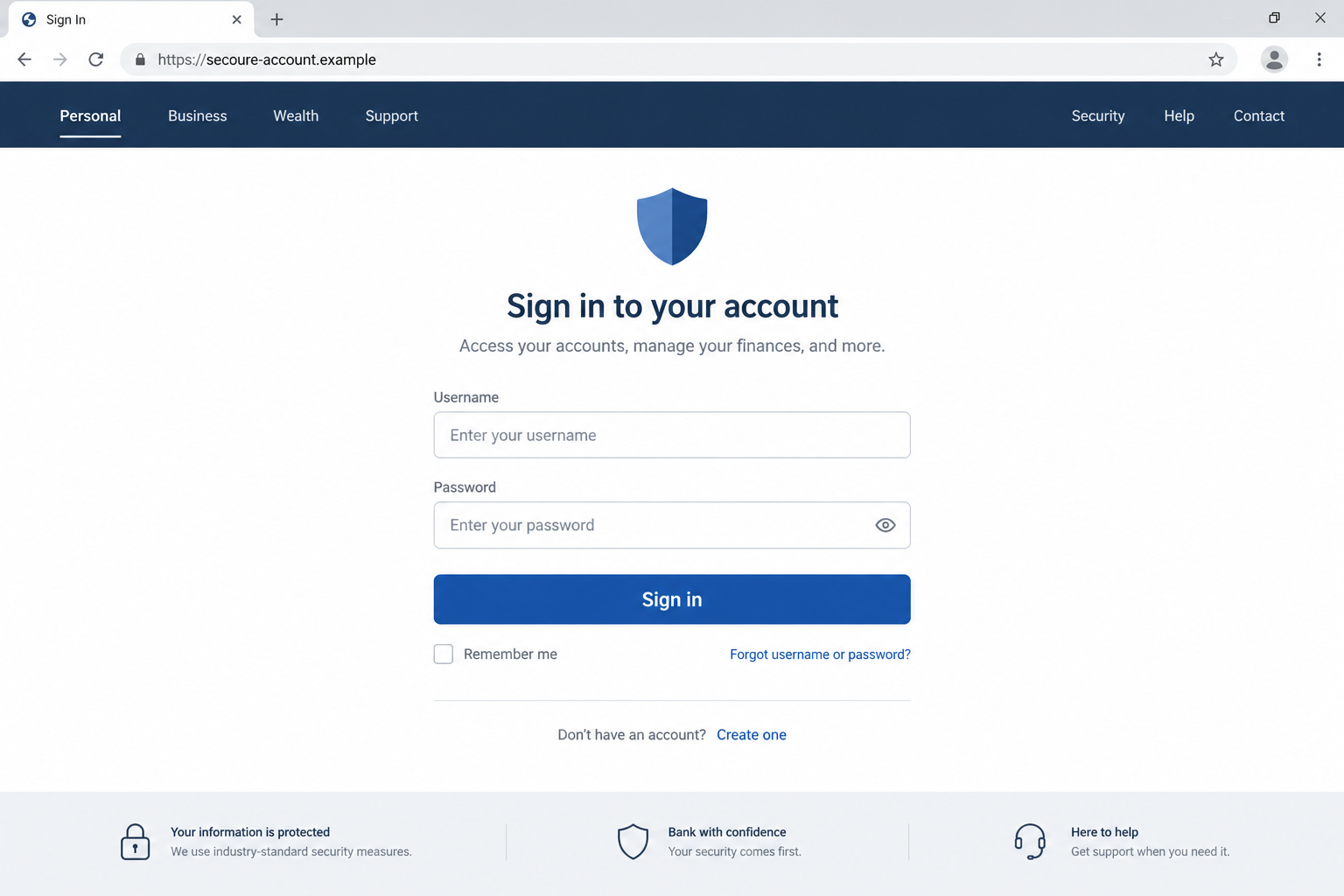
For the user, the transition may look seamless: familiar name in results, familiar colors on the page, and a familiar username box.
Step 3: A direct visit reveals a harmless-looking mask
A security tool or person who types the address directly may be shown an offline notice or fake 404 page instead of the banking clone.
That does not mean the earlier report was mistaken. The site is choosing which presentation to deliver based on the visitor’s route.
Fortra described this conditional display as cloaking. It can delay takedowns because an investigator may not reproduce the experience on the first try.
Customers should not try to recreate the harmful page for evidence. Save what you already saw and let bank or security investigators handle the link.
Step 4: The clone asks for banking credentials
The version shown to search visitors imitates a bank portal. Its purpose is to collect information a real bank would use to authenticate customers.
Depending on the page, that may include a username, password, or follow-up prompts. Fortra described credential theft and session-hijacking risks in the campaign family.
Do not infer a particular customer’s account was hijacked from the existence of a fake page. That requires evidence from bank records and sign-in activity.
Still, entering credentials into a clone is enough reason to contact the bank promptly. Time matters if the attacker can use those details.
Step 5: The fake page may disappear when checked later
A user might return through a bookmark or a security analyst might open the copied link and see an error. That change is built into the deception.
It can make a report feel hard to substantiate. Preserve the original search terms, screenshot, time, and browser history so investigators can reconstruct the route.
The disappearance does not verify that your bank account is safe. Review the genuine account through the bank’s app and ask for help if you submitted data.
Conversely, a working search result is not automatically malicious. The warning concerns a specifically documented pattern of impersonation and conditional content.
How to Tell the Official Bank Route From the Search Shortcut
Most people cannot inspect a page’s server logic, and they should not need to. They can choose a safer path before entering a password.
Install the bank’s app using a link from the bank’s verified site or a known official app-store listing. Keep it updated and sign in there.
For a browser, bookmark the bank address after confirming it through account paperwork, a card, or the bank’s verified communications.
When using a result anyway, read the complete domain before signing in. A bank name appearing before an unrelated domain ending is not enough.
Do not be reassured solely by a padlock icon. Encryption protects the connection to the site you reached, which could still belong to an impersonator.
If a page behaves oddly, stop. Open the bank app independently and see whether there is a matching notice or account alert.
Call the number printed on your card if the issue seems urgent. Avoid the phone number shown on the questionable search result.
What to Record if the Page Vanishes
A missing page makes people doubt their memory. In this tactic, an offline screen may be exactly what a direct visitor is supposed to see.
Record the search phrase, search engine, approximate time, and exact result title. Save a screenshot of the visible page if you already have one.
Copy the suspicious address without opening it again. Keep browser history available until the bank or incident team has the details it needs.
If you entered a username, password, or code, tell the bank the sequence. The difference between viewing a page and submitting details changes the response.
Do not post live banking credentials, one-time codes, or full account numbers with a public warning. Share evidence privately with the bank or appropriate abuse team.
What to Do if You Have Fallen Victim to This Scam
- Leave the suspicious page. Do not continue to a second form or try another password. Use the verified bank app or the number on your card.
- Tell your bank what you submitted. A username alone, a password, a code, and a payment instruction carry different risks. Describe each accurately.
- Change the banking password through the official route. Choose a unique password and ask the bank to review sessions, trusted devices, and security settings.
- Report any one-time code or approval you shared. Ask the bank whether it can revoke sessions, block transfers, or place additional protection on the account.
- Review transactions and alerts. Look for transfers, added payees, contact changes, and unfamiliar devices. Report unauthorized activity immediately.
- Keep the evidence of the search journey. Save the result title, URL, time, screenshot, and bank case number. A later 404 does not negate the earlier page.
- Check your device only if your actions warrant it. A fake login mainly threatens credentials. If you downloaded software, run a current scan and consider Malwarebytes; AdGuard can reduce some malicious ad exposure.
- Watch for follow-up contact. Someone claiming to recover your funds may be another fraudster. Work only with the bank and official reporting channels.
What This Means for Security Teams and Families
A report that a copied URL now displays 404 should not be dismissed without reviewing how the customer arrived. The path may determine the page shown.
Teams investigating a suspicious result should preserve the search query, referring page, browser context, and customer screenshot. The domain alone may be misleading.
Families can simplify the issue: make a trusted bank bookmark for anyone who routinely searches for the login page. That removes the risky search hop.
Make the rule specific, not frightening. Search is useful for general information, but a banking password belongs in a verified app or saved address.
What a Search Result Can Hide From View
A result card usually shows a title, small description, and shortened address. Those elements can be written to resemble an official bank page.
The actual host may differ from the bank’s real domain. A single extra word or unfamiliar domain suffix can be easy to overlook before a login.
Some people assume the result’s placement has been checked by the search company. Placement is about relevance and ranking, not proof of legal identity.
Even if you notice the odd URL later, revisiting it might show a dead page. The server may reserve the banking clone for search referrals.
That conditional behavior is why a report should include the route taken. “I searched these words and clicked this result” is more useful than “this URL is broken.”
A screenshot of the search results can preserve the title and visible address. A screenshot of the clone can preserve the false branding.
Neither screenshot should be posted with personal account information visible. Redact sensitive details before sharing them outside the bank or incident team.
Fortra reported its observed tactic in financial services. It should not be assumed that every banking fraud works this way or that every search result changes by referrer.
The broader habit is still valuable: separate discovery from authentication. Search can help find a bank’s public information; a verified app should handle sign-in.
If you need the bank’s address for the first time, check materials that came directly from your account relationship. A card or statement can help identify official contact routes.
When in doubt, call the bank using a known number and ask it to confirm the correct digital login. Do not ask the questionable page’s own chat widget.
The bank can also advise whether a clicked link warrants further action when you entered no information. Give them the exact sequence rather than guessing.
Families can make this routine before a crisis. Set up bookmarks together and explain why the top search result is not a shortcut worth trusting blindly.
It is a small change, but it removes the encounter point the observed campaign depended on.
Frequently Asked Questions
Can the first bank result in search be fake?
Yes. Fortra documented lookalike banking sites positioned in search results. Ranking does not verify the operator of a result.
Why did my friend see a 404 at the same address?
The observed sites could display different content depending on whether the visitor arrived from search or opened the address directly.
Does the padlock mean the bank login is genuine?
No. It means the connection is encrypted. A phishing site can also use encryption while impersonating a bank.
What if I typed my password but did not click submit?
Tell the bank exactly what happened. Some pages can collect data during typing, so changing the password through the official route is prudent.
Should I search for the bank again to find the real page?
Use the bank’s verified app, an established bookmark, or the address printed in trusted account materials instead.
Does this prove the bank itself was breached?
No. The documented mechanism involves external lookalike sites. A customer’s exposed credentials require a separate account investigation.
The Bottom Line
A poisoned bank result can show a convincing login after a search click and an inert page when someone checks the same link directly.
That inconsistency is part of the danger. Use a verified bank route, and contact the institution quickly if you entered account information.

Join the discussion
0 commentsShare your experience or ask a question about this article.
Discussion
Start the conversation
Have a question or something useful to share? Add the first comment.