

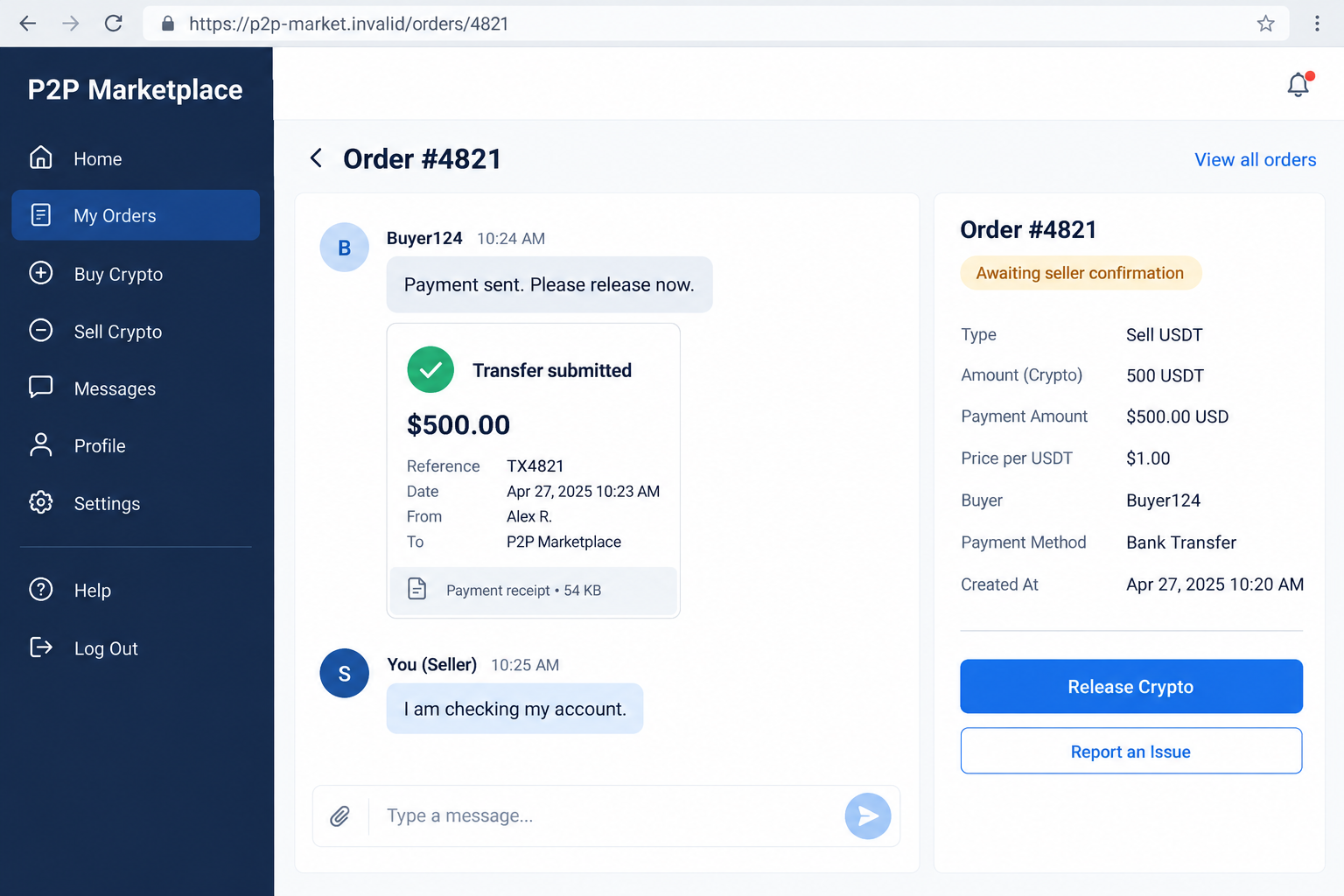
The buyer says the transfer is complete. A receipt appears in the chat, and the next message asks why you have not released the coins.
A P2P crypto scam can begin at exactly that moment. Before treating the image as proof, there is one part of the trade worth slowing down.
Overview
The scam targets the decision to release crypto
In a peer-to-peer trade, the buyer and seller exchange cryptocurrency and an agreed payment. The danger comes when someone falsely claims their side is complete.
A fabricated receipt, misleading payment notification, or dishonest support message can persuade the seller to release assets without receiving the expected money.
That is payment fraud, not an ordinary delay. The dishonest party is exploiting the gap between what a chat claims and what the payment account shows.
A legitimate P2P marketplace is not the same thing as a fraudulent counterparty. Nor does this warning mean every unfamiliar trader is dishonest.
Official exchange warnings confirm the deceptive mechanism
Binance’s payment-proof warning describes false transfer records followed by pressure to release crypto. It tells sellers to verify receipt independently.
Other variations involve payments from unrelated accounts or a later dispute over the money. These are different problems, even when the initial conversation looks similar.
No particular trader, wallet address, or loss is being attributed here. The example screens use fictional orders and amounts to explain the decision points.
This article is about settlement fraud during a trade. It is not an endorsement of an exchange, a payment method, or cryptocurrency investing.
Check the money, the payer, and the order together
One reassuring detail cannot settle all three questions. A familiar-looking receipt says nothing reliable about whether the money reached your account.
- Confirm receipt through the banking or payment service you already use.
- Compare the amount, currency, payer, and reference with the actual order.
- Do not let a screenshot replace those checks.
- Resolve an unfamiliar payer or contradictory record through the marketplace’s official dispute process.
- Stop when someone insists that releasing crypto will make the payment arrive.
If you cannot verify the payment, do not guess. Keeping an unresolved trade unresolved is safer than completing it because someone is becoming impatient.
Why a Convincing Receipt Is Not the Same as a Payment
The image belongs to the sender’s story
A receipt in the chat is information supplied by the other party. Your own account record is a separate source of information.
Those sources can agree during a genuine trade. They can also disagree because of a delay, a mistaken transfer, an incorrect account, or deliberate deception.
You do not need to identify the exact reason before refusing to release assets. First establish whether the agreed funds actually arrived where they should.
Looking for crooked fonts or spelling errors can help, but polished formatting does not resolve the payment question. A neat image can still contain false information.
A payment status needs context
Do not confuse a buyer marking an order paid with your bank confirming receipt. These are different events recorded by different services.
A pending entry is also different from a completed credit. If the wording is unclear, ask your payment provider what it means before proceeding.
Even a visible credit can raise questions about the payer or payment method. Account receipt and the possibility of a later reversal are separate issues.
There is no universal waiting period that makes every payment safe. Rules, processing, and disputes depend on the payment service and circumstances.
How the P2P Crypto Scam Works
Step 1: A real-looking trade creates an expectation of payment
The interaction begins with an order, a quoted amount, and payment details. That ordinary structure makes the later request seem like routine completion.
The buyer may have a convincing profile or a history of completed trades. Those details can inform your assessment without proving this payment is genuine.
The important reference is the particular order in front of you. Previous successful transactions do not establish what happened to today’s funds.
Before discussing release, know the agreed currency, amount, payment route, and counterparty. A vague understanding gives contradictory explanations more room to sound acceptable.
Step 2: A claimed transfer takes the place of independent confirmation
The buyer sends a screenshot, receipt, or message announcing payment. In the false-proof version, that announcement is designed to stand in for money.
A fake banking notification may add another layer. It can make the claim feel independently confirmed when both messages actually support the same deception.
The seller is encouraged to look at the supplied evidence instead of opening their own payment account. That substitution is the central trap.
A legitimate buyer can provide a receipt to help investigate a delay. The receipt still does not authorize release while the agreed payment remains unverified.
Step 3: Urgency makes a normal verification step feel unreasonable
The conversation can shift from helpful to impatient. A stranger’s inconvenience becomes your supposed responsibility, and checking your account is presented as needless obstruction.
Pressure may focus on feedback, a deadline, or an alleged processing problem. None of those concerns establishes that the seller has been paid.
Keep your response focused on the unresolved fact: the payment has not been verified. You do not need a long argument about the buyer’s motives.
If the tone becomes threatening, preserve the messages and use official support. Do not settle a payment dispute by complying with the loudest person.
Step 4: A side channel or false support message offers a shortcut
The counterparty may suggest moving to a separate messaging app or following a link. That change can separate the conversation from the original order record.
A supposed support agent might then claim that funds are waiting and release is required. Treat that assertion as something to verify, not an instruction.
Open the service’s help channel yourself. A logo, account name, or screenshot of a support conversation does not prove who is directing you.
Do not provide login codes, wallet recovery words, or remote access to someone who appears during a trade. None is needed to demonstrate an incoming bank payment.
Step 5: The seller releases assets while the payment problem remains
If the seller completes the release on false evidence, the counterparty may receive the crypto without making the promised payment.
The two sides of the trade are now out of balance. A friendly explanation that money will arrive afterward does not repair that imbalance.
Some services hold assets while an order is unresolved. The exact protection varies, and releasing assets can remove the protection that was available.
Do not assume every marketplace uses identical escrow arrangements. Read your provider’s current process and ask support what a disputed release would actually do.
Step 6: A different version leaves a disputed or mismatched payment
Not every P2P fraud begins with nonexistent money. Another version involves a payment that later becomes disputed or that came from an unrelated account.
Binance’s broader P2P guidance warns about third-party payments and chargeback scams. Whether money can be reversed depends on the method and facts.
These risks explain why seeing an amount is not your only check. You also need to understand who paid and whether the order details match.
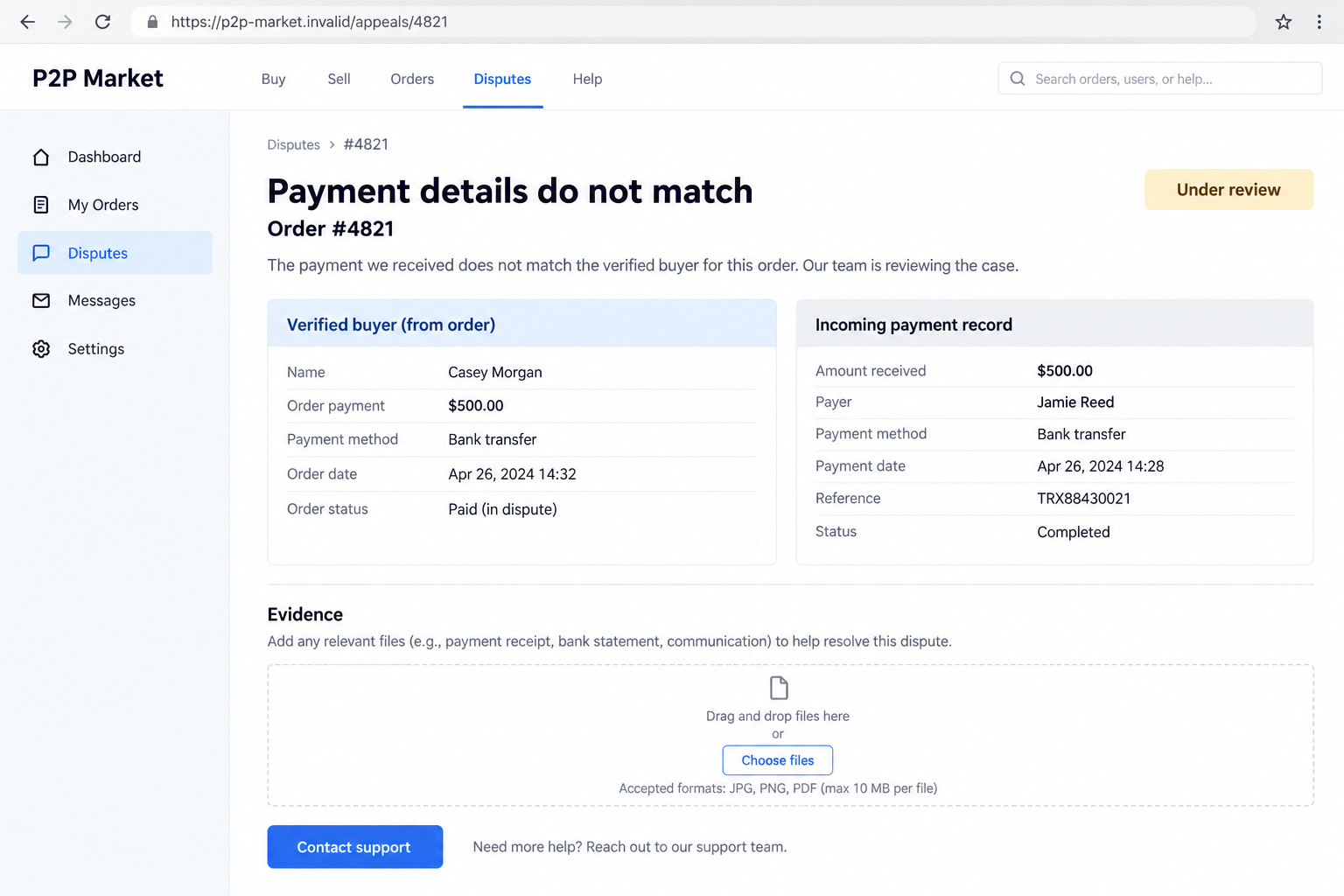
The example below shows a fictional mismatch. It is not evidence that a particular bank, customer, or real order participated in fraud.
When a Payment Arrives but the Details Do Not Match
Do not turn an incoming transfer into an automatic approval
An amount that looks correct can still belong to another order or an unrelated person. Check the record before attaching it to this buyer.
If the payment name differs, do not accept a casual explanation as confirmation. Ask the platform how its rules apply to that specific mismatch.
A family member, business account, or shared account can create legitimate complexity. That complexity is a reason for clarification, not a reason to abandon controls.
Do not send a requested refund to a new destination in the chat. Involve the payment provider and platform before moving money that may be disputed.
Keep parallel orders separate
Busy sellers can have several conversations open at once. A receipt connected to one order should not become evidence for another simply because the amounts resemble each other.
Use the platform’s order identifiers and your account references to keep a clear record. Do not let the counterparty decide which payment belongs where.
If two people claim the same transfer, stop both conversations from pushing you into a release. Ask support to reconcile the records.
Bybit’s safety guidance describes reused payment proofs and false support instructions. Its examples reinforce the need to preserve order-specific evidence.
A Practical Check Before Completing Any P2P Order
Make verification repeatable
A consistent checklist is useful because pressure is less persuasive when you have already decided what you need to confirm.
You are not accusing every buyer of fraud. You are applying the same completion standard to everyone, including people who seem friendly or experienced.
- Open your own payment account independently, without using a link in the trade chat.
- Find the actual incoming transaction and check its status.
- Match the amount and currency, not just a rounded balance change.
- Compare the payer details with the platform’s verified counterparty information.
- Check the order reference and make sure the credit has not already been used for another release.
- Escalate missing information or contradictions before completing the order.
A payment notification can be a prompt to investigate. It should never be the only fact that authorizes you to transfer something valuable.
Know what the platform cannot promise
Identity checks and trader ratings provide context. They do not transform every receipt into a reliable bank record or eliminate every dispute.
A dispute process can help review evidence, but its outcome is not guaranteed. Off-platform conversations and missing records can make the situation harder to explain.
Before using any service, check its availability and rules in your location. Do not assume a guide for one marketplace applies unchanged to another.
What to Do if You Have Fallen Victim to This Scam
-
Pause the trade and any additional transfers. If assets have not been released, leave the order unresolved while you contact official support.
Do not pay a supposed verification charge, send a second transfer, or complete another order to fix the first one. Keep the disputed situation contained.
If release already happened, say so clearly. A support agent needs the actual sequence, not an assumption that the money will eventually appear.
-
Save a complete order record. Preserve the order ID, counterparty profile, chat, supplied receipts, timestamps, and your own relevant payment-account entries.
Record what was claimed and what you independently observed. If a transaction exists, keep its reference, currency, amount, and payer information.
Retain wallet addresses or transaction hashes if available. Share sensitive records through official reporting channels, not a public comment or unsolicited direct message.
-
Open the provider’s dispute or appeal process. Start from the actual order or independently accessed support page.
Explain whether the problem is missing payment, a payer mismatch, a reversed credit, or a suspicious instruction. Those distinctions help support investigate the right issue.
Do not close an appeal because the counterparty promises a private resolution. Ask official support what closing or agreeing would do to the assets.
-
Contact the payment provider promptly. If money moved, identify the particular transaction and explain the suspected fraud.
Ask what investigation, hold, or recall options apply. Do not assume your transfer is reversible, or that an incoming payment is automatically yours to refund elsewhere.
The FTC’s recovery guidance recommends quickly contacting the service involved. Acting promptly can help, but it does not guarantee the funds return.
-
Secure any account exposed during the conversation. Change a disclosed password through the genuine service and review its security settings and recent activity.
If you shared a verification code, tell the provider what it authorized. If wallet recovery information was exposed, seek trusted wallet-specific guidance immediately.
Only address device infection when relevant. If an attachment or app was downloaded, use Malwarebytes or another reputable security tool to investigate.
For unwanted advertising or redirects, review browser permissions and consider AdGuard. These tools do not reverse a crypto release or resolve a payment dispute.
-
Report the counterparty and reject paid recovery promises. Give the platform the preserved evidence and use your jurisdiction’s official fraud-reporting route.
Keep the case number and a dated record of each response. That makes follow-up easier if a payment provider asks for supporting information.
The FTC warns about recovery scams that demand money from people already harmed. Do not fund another stranger’s promise to retrieve your assets.
Frequently Asked Questions
Does a receipt prove that a P2P buyer has paid?
No. A receipt supplied in chat can be false or unrelated. Verify the particular payment through your own account and compare it with the order.
What if the buyer has excellent ratings?
Ratings can inform your assessment, but they do not confirm this transfer. Apply the same payment checks even when the profile looks established.
Should I release crypto if I cannot open my banking app?
Do not release based on the buyer’s claim alone. Keep the order unresolved and contact official support about the verification problem.
Is a third-party payment always evidence of a crime?
Not automatically, but it can violate platform rules or conceal a serious mismatch. Have the provider review it instead of accepting an explanation from the counterparty.
Can a marketplace guarantee recovery after release?
No. Available remedies depend on the provider, records, payment method, and circumstances. Report promptly without assuming the transfer can be undone.
Will scanning my device recover the coins?
No. Security software addresses relevant malicious software exposure. It cannot reverse a completed trade, manufacture a missing payment, or decide a banking dispute.
The Bottom Line
The P2P crypto scam turns someone else’s claimed payment into your decision to release assets. A convincing image should never make that decision for you.
Verify the money and order independently. If the records do not agree, stop and use official dispute channels before anything else leaves your control.








