

A call about your card arrives while you are doing something else. The caller sounds helpful and says a quick account check will clear things up.
A Mission Lane scam call can borrow that familiar routine. Before answering the next question, it is worth checking who is actually on the other end.
Overview
The warning concerns impersonators, not Mission Lane itself
People pretending to be Mission Lane agents can use the company’s name to make a request for personal information seem like ordinary card servicing.
The deceptive act is the false identity. Mission Lane is a real financial-services company, and this warning is not an accusation against its legitimate operation.
A call about a balance, payment, or account question is not automatically fraudulent. The key issue is whether the person and requested action can be verified.
Do not assume a vaguely similar name proves a connection. An unfamiliar caller’s claim needs confirmation through the account service you actually use.
Mission Lane’s own advice is to stop and verify
The official impersonation warning advises customers to end suspicious calls and contact Mission Lane independently. It also warns about social profiles seeking personal information.
The help page offers secure messaging and lists 1-855-790-8860 for phone support. Confirm current contact details through your account or official help center.
That guidance establishes a real impersonation concern. It does not establish that every unsolicited caller, past-due notice, or account reminder is fake.
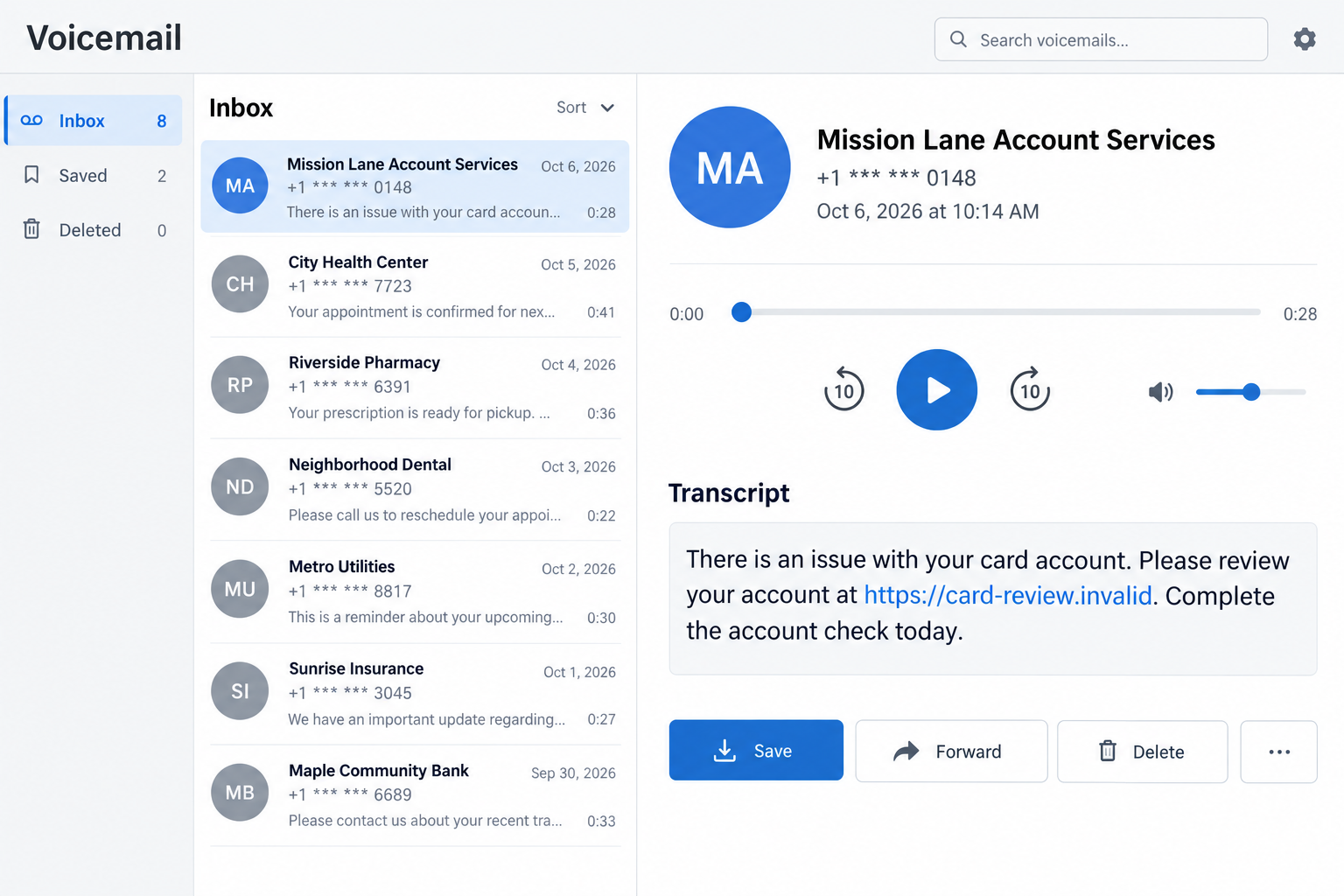
The screens in this article are fictional examples. They illustrate warning signs without claiming to show an intercepted Mission Lane message or captured phishing destination.
An unexpected request should not control your next move
The safest response is to separate the account question from the caller’s instructions. You can check your card without continuing the suspicious conversation.
- Do not treat caller ID or a displayed company name as identification.
- Check your account through the official app or a saved website address.
- Use a trusted support route, not the number supplied in an unexpected message.
- Keep passwords and one-time codes out of an unverified conversation.
- Report social accounts pretending to be company agents and soliciting personal details.
A genuine account issue will still be there when you reconnect independently. A stranger’s insistence that you stay on the line does not make them trustworthy.
Why a Card-Services Conversation Can Feel Familiar
The subject is something you already handle
Most cardholders have dealt with due dates, transactions, and payment questions. A caller using that vocabulary does not need an elaborate story to sound relevant.
You may be expecting a statement or remembering a recent purchase. Those ordinary concerns can make the call feel connected to something genuine.
That connection is not proof of identity. An impersonator can borrow a topic you recognize without being authorized to discuss your account.
Keep the distinction simple: the card may be real, the account question may matter, and the person presenting the question may still be an impostor.
Partial personal details are not reliable authentication
A caller who knows your name can sound less like a stranger. Knowing a name or address does not establish access to the legitimate servicing system.
Do not let one correct detail become permission to disclose several more. A request for sensitive information deserves its own independent check.
You also do not need to explain everything you suspect. End the interaction politely and ask the real provider whether it contacted you.
A useful verification process should answer an account question, not require you to trust the original caller merely because they sounded confident.
How the Mission Lane Scam Call Works
Step 1: A caller or message borrows the company’s identity
The approach begins with a claimed connection to Mission Lane. It may appear in a call, voicemail, text, or social-media conversation.
The name makes the contact seem relevant to a credit-card account. A professional greeting can encourage you to respond before checking the channel.
Caller ID can be misleading. The FTC’s phone-scam guidance explains that scammers can make displayed names or numbers appear familiar.
A label on your screen therefore cannot finish the identity check. It is something the conversation presents, not independent confirmation of who is contacting you.
Step 2: An account-related story supplies a reason to continue
A possible pretext is a payment question, security review, or alleged account problem. The purpose is to make replying feel like responsible card management.
These are examples of how impersonation can work, not a claim that every Mission Lane scam uses one exact script.
The subject may create worry even when no specific charge is mentioned. An unfinished account issue can be enough to keep someone listening.
Check the actual account instead of resolving the caller’s story on the spot. A real balance or alert should be investigated through genuine support.
Step 3: Routine verification language opens the door to sensitive requests
The next question may be framed as confirming identity or completing a review. That wording can conceal the fact that the recipient is supplying valuable information.
Depending on the tactic, an impersonator could seek a password, card details, identity information, or a verification code. The risk depends on what was disclosed.
Not all account verification is suspicious. The safer distinction is whether you initiated contact through a trusted route and understand why the information is needed.
If a code arrives, read its purpose yourself. Do not let an unknown caller reinterpret a login or transaction code as harmless proof of identity.
Step 4: A link or payment instruction can extend the deception
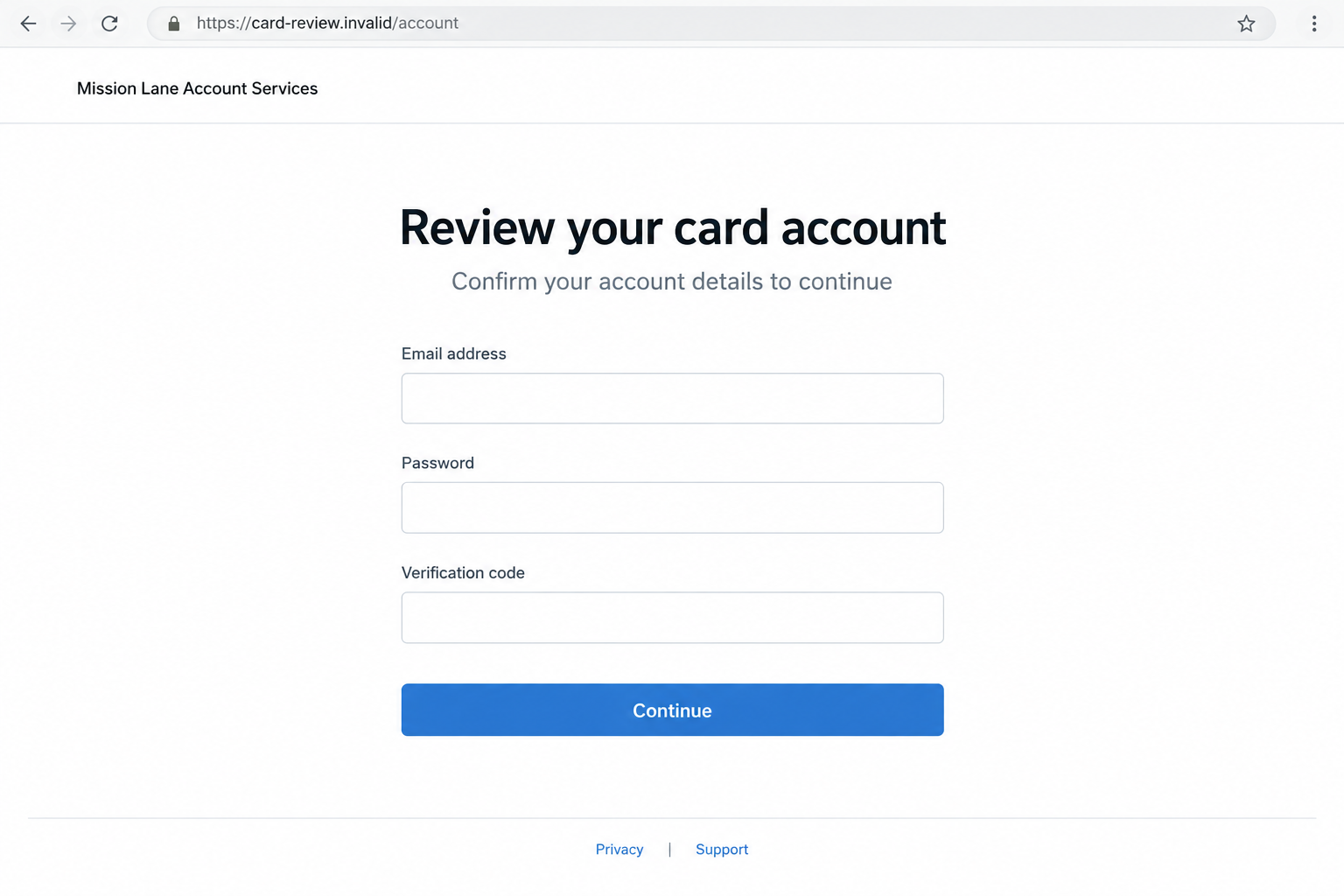
An impersonator may direct you to a separate page or send instructions supposedly connected to the account issue. A copied appearance can make the transition seem seamless.
A page reached through an unverified contact should not receive your login merely because it contains a familiar name. Its destination needs independent confirmation.
If payment is requested, compare it with the balance and options shown in your real account. Do not pay an unfamiliar recipient to satisfy the caller.
The second image illustrates a hypothetical account-review page. No such live destination was established as part of this investigation, and its address is fictional.
Step 5: Disclosed information creates a separate account-security problem
If someone receives account credentials, they may attempt access through the genuine service. Payment or identity details can create different risks requiring different responses.
Giving information does not prove that theft already happened. It does mean the provider should know precisely what was exposed and when.
The original account issue may never have existed. That does not remove the need to check for changes, unfamiliar transactions, or altered recovery details.
The important next step is not arguing with the impersonator. It is bringing the real account provider into the situation through a verified channel.
How to Check a Mission Lane Contact Safely
Start with the account you already recognize
Open the official app or use a saved address for your account. Avoid getting there through a link supplied during the suspicious conversation.
Look for the claimed issue without assuming it must exist. Review recent activity and messages, then ask support about anything you cannot explain.
Do not ignore an actual payment deadline simply because a caller was suspicious. Handle the legitimate account separately from the possible impersonation.
If you do not have a Mission Lane account, do not create one to satisfy a message. Ask official support about the unexpected claim instead.
Choose a contact route the caller did not provide
Mission Lane’s help center offers a secure message option for account questions. Using that route avoids debating whether a return number belongs to the caller.
For a phone call, obtain the number from the official account, card, or help center. A number inside an unexpected message is not independent evidence.
When you reach genuine support, describe the contact and requested action. Ask whether it matches a recorded account issue or authorized communication.
You can ask for clarification before giving sensitive information. A confusing interaction does not require you to make an immediate decision.
Evaluate the request as well as the person’s name
Even after checking the claimed company, examine what the contact wants you to do. Sharing a login code and reviewing a statement are not equivalent actions.
A payment directed outside your normal account process deserves particular attention. Ask genuine support whether that destination or method has any connection to your account.
The FTC’s phishing guidance recommends contacting the organization through a known route instead of trusting an unexpected message.
This is useful even when the message looks polished. Good spelling, a familiar color scheme, and a company name cannot establish authorization.
Social-Media Agents Deserve a Separate Check
A public profile is not your secure account channel
A page can display a recognizable name while having no company connection. Do not use its direct messages as a substitute for secure account support.
Mission Lane specifically advises reporting and blocking profiles that claim to be its agents while requesting personal information. That is a direct company warning.
Do not publish a card number or account screenshot while trying to get attention. Keep necessary details for the provider’s approved support process.
If you already exchanged messages, save the profile address and conversation before blocking. Those records can help explain what the person requested.
Separate a genuine support response from an unrelated approach
Posting a complaint publicly can attract people who were not part of the original issue. A helpful reply does not prove the responder works for the company.
Start a fresh support conversation yourself rather than following a stranger into another app or page. You do not need to use their offered shortcut.
Be cautious of anyone who claims they can remove a balance, secure a refund, or restore access for a private fee.
A legitimate account dispute needs legitimate account support. An unknown intermediary adds another person to trust without establishing that they can resolve anything.
What to Do if You Have Fallen Victim to This Scam
-
End the suspicious interaction. Stop the call, do not continue the chat, and do not use any link or payment instruction it supplied.
If the contact raises a genuine concern, write that concern down. You can investigate it without keeping the unverified person involved.
Do not call back to confront the caller. Preserve what you have and spend your next effort reaching real account support.
-
Tell Mission Lane exactly what happened. Use the official account or help center to reach support and explain the date, channel, and claimed purpose.
Specify whether you shared a password, code, card number, identity detail, or payment. Those are different exposures, not one interchangeable security problem.
Ask support about account restrictions, replacements, or review options appropriate to the facts. Keep the case reference and any instructions you receive.
-
Secure exposed credentials and recovery settings. Change a disclosed account password from the genuine service, not from a link sent by the impersonator.
If you reused it elsewhere, replace those copies too. Review available authentication protections and any unfamiliar changes to contact or recovery information.
A code disclosure deserves immediate explanation to support. Tell them what the message said the code would authorize, rather than guessing it was harmless.
-
Review transactions and report anything you did not authorize. Check account activity for unfamiliar charges instead of relying on the original caller’s description.
Mission Lane publishes an unauthorized-charge procedure. Follow current account instructions and ask support about any applicable reporting deadlines.
If you paid through another service, contact that service promptly as well. Explain the particular transaction and ask what fraud-reporting or recovery options apply.
-
Keep evidence and address identity exposure. Save voicemail, texts, email details, profile links, receipts, and a short timeline of what you disclosed.
Do not put full account numbers or identity documents in a public report. Use official private channels when evidence needs sensitive detail.
If identity information was exposed, use IdentityTheft.gov for situation-specific recovery steps. Account security alone may not address wider identity misuse.
-
Check the device only when your actions make that relevant. Answering a call does not by itself show that your device contains malware.
If you installed software, downloaded an attachment, or allowed remote access, describe that exposure to trusted support. Scan with Malwarebytes or another reputable security product.
Remove unfamiliar browser permissions or extensions you approved during the interaction. AdGuard can help with unwanted advertising or redirects, but it cannot recover a payment.
-
Report the impersonation and avoid follow-up offers. Flag the social account or message through the service where it appeared and give Mission Lane the preserved details.
You can also report fraud through the FTC’s reporting portal. Keep a copy for your own records and later follow-up.
Reject strangers offering to retrieve money for an upfront payment. A second convincing conversation is not a reason to provide more account access or funds.
Frequently Asked Questions
Is Mission Lane itself a scam?
No. This warning concerns people impersonating its agents. Mission Lane’s own help center explains how customers can verify suspicious contacts and report them.
Does every unexpected card-services call need to be ignored?
Do not ignore genuine account obligations. End an uncertain interaction, then check the issue through your official account or independently reached support.
What if caller ID displays a trusted support number?
Displayed information can be spoofed. Use a number you obtain independently, rather than trusting the incoming call because its label looks familiar.
Should I give an agent a code that arrives by text?
Do not disclose it to an unverified caller. Read its stated purpose and contact official support if someone pressured you to share it.
How can I verify a Mission Lane social-media agent?
Move your question to the official account support route yourself. Report profiles claiming to be agents while requesting personal information, as Mission Lane advises.
What if I only answered the call?
Answering alone is not proof of account theft or malware. Check whether you disclosed information or took an action, and respond to that specific exposure.
The Bottom Line
The Mission Lane scam call borrows a real company’s identity to make an unverified request feel routine. The account and the caller must be checked separately.
End the uncertain contact and reconnect through official support. If you shared information or money, describe exactly what happened so the right protections can be applied.








