

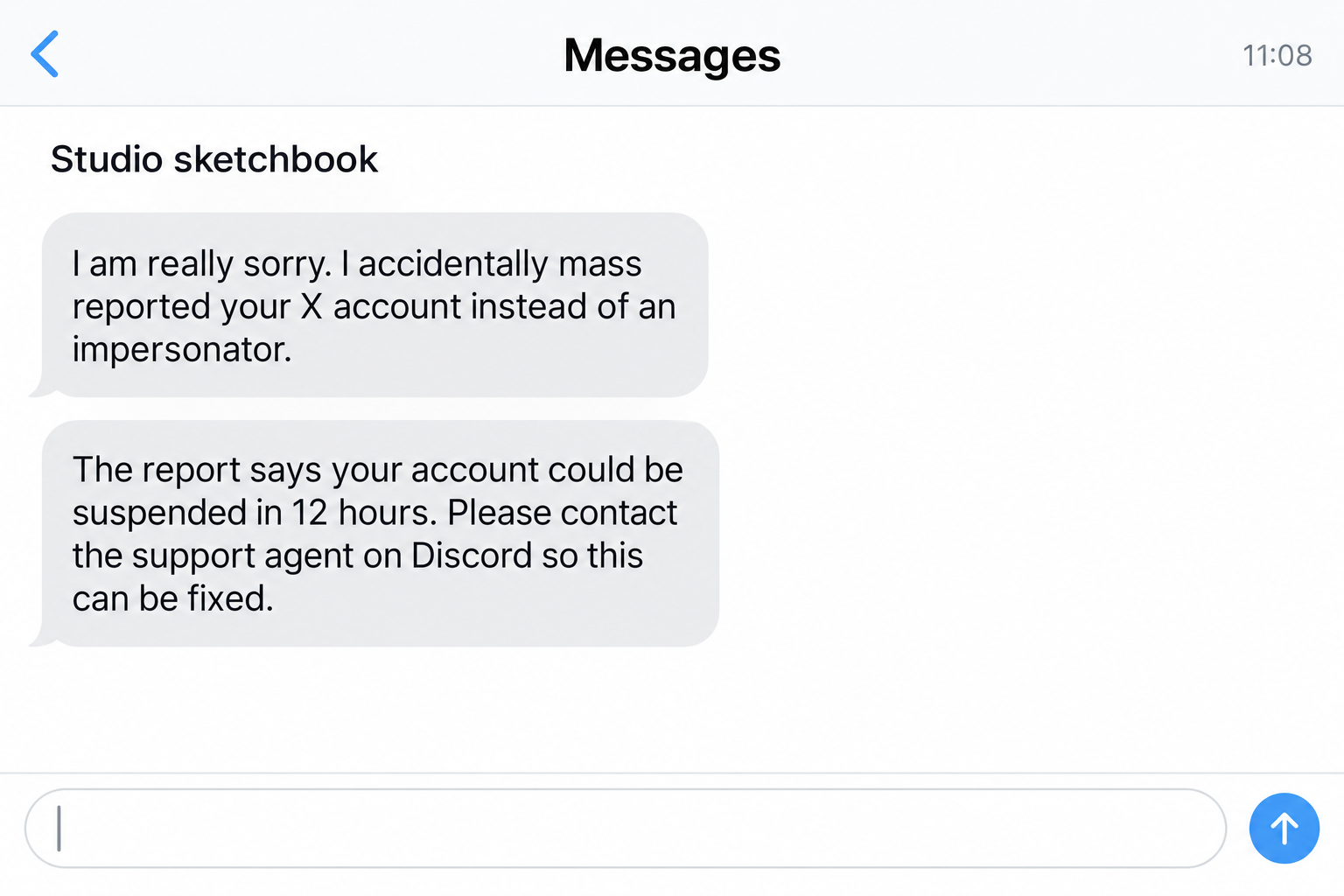
A familiar-looking account sends an awkward apology: they accidentally reported you on X. Now they need your help before the account disappears.
The X mass report scam starts with that small favor. The conversation soon becomes much stranger than an ordinary disagreement between users.
Overview
The apology introduces a fake support agent
This is a confirmed account-takeover mechanism, not evidence that X or Discord is defrauding users. Impostors borrow both services to make their instructions sound official.
The sender claims a mistaken report could get your X account suspended. They direct you to a particular Discord account that supposedly handles the appeal.
That private contact may request an email change, credentials, or payment. None of those requests becomes legitimate because someone first apologized.
The damaging action is a change you make yourself
A recent public report describes someone changing their X account email to an address supplied by a fake Discord agent, then losing access.
The poster also reported a demand for a supposedly refundable $250 appeal fee. The account does not establish that this payment was made.
Similar reports show the approach recurring. The useful warning is the repeated support-impersonation pattern, not an assumption about every account that sends an unusual message.
A report is not permission to hand over ownership
X’s security guidance says it will not request passwords through direct messages or ask users to sign in on a non-X site.
- The report arrives through another user, not a verified case you opened.
- The supposed solution requires speaking to a stranger on Discord.
- You are asked to replace your account email with someone else’s address.
- A deadline discourages checking the account through X.
- A refundable deposit or appeal fee is demanded privately.
Check any actual account restriction through the platform itself. Ignore the stranger’s chosen route, even if their profile has years of history.
Why an Apology Can Be More Persuasive Than a Threat
The first message does not sound like an attacker. It sounds like someone who made a mistake and is trying to prevent damage.
That changes the emotional balance. Instead of defending yourself from a demand, you may feel responsible for helping a person who seems upset.
The sender can say the real offender copied your name or profile picture. That detail makes the mistake understandable without providing any actual case evidence.
An artist, mutual follower, or community member can make the explanation feel especially plausible. You may already know their work or recognize old conversations.
A recognizable profile does not authenticate the person currently using it. Accounts can be compromised, and criminals can also imitate existing identities.
Do not assume a particular sender was hacked unless you have confirmation. The practical point is that profile history cannot validate the next instruction.
The scam then adds urgency. You supposedly have only a few hours to correct a misunderstanding before an automated ban becomes permanent.
That deadline encourages action before verification. A real issue should survive a pause long enough for you to open X and check independently.
You do not owe a stranger an emergency conversation. Even a sincere accidental report would not entitle them to control your account settings.
How the X Mass Report Scam Works
Step 1: Someone claims they reported the wrong account
The opening message says an impersonator scammed them, or that they confused your account with another one. They may say friends submitted reports too.
The story gives you something to fear and someone to sympathize with. Both emotions make the sender’s proposed solution easier to accept.
Do not debate whether an accidental report is possible. The more important question is why that person is assigning you a private support agent.
Keep the message if you need to report it. You can stop at this stage without proving your innocence to the sender.
Step 2: A screenshot or deadline makes the warning feel official
A fake case image may contain an employee name, ticket number, or instruction to contact a certain username. It is still material supplied by the stranger.
The message can claim deletion, suspension, or noncompliance if you do not respond quickly. The wording is designed to make waiting feel dangerous.
Check the account directly instead. A screenshot from someone else’s conversation is not the same as an authenticated notice inside your own account.
If an actual restriction exists, use the official appeal options. A restriction does not prove that the stranger’s contact is involved.
Step 3: The supposed X case moves onto Discord
The handoff separates the friendly messenger from the authoritative agent. Two accounts seem to confirm each other, although they may be controlled together.
Discord is a legitimate communication service. An official-sounding display name there does not make someone an X employee or give them moderation powers.
Some impostors answer quickly and appear to know the case already. That is not independent confirmation when the first sender selected the contact.
A private conversation also lets the fraudster vary the instructions. You may be asked about usernames, email addresses, other accounts, or how you normally sign in.
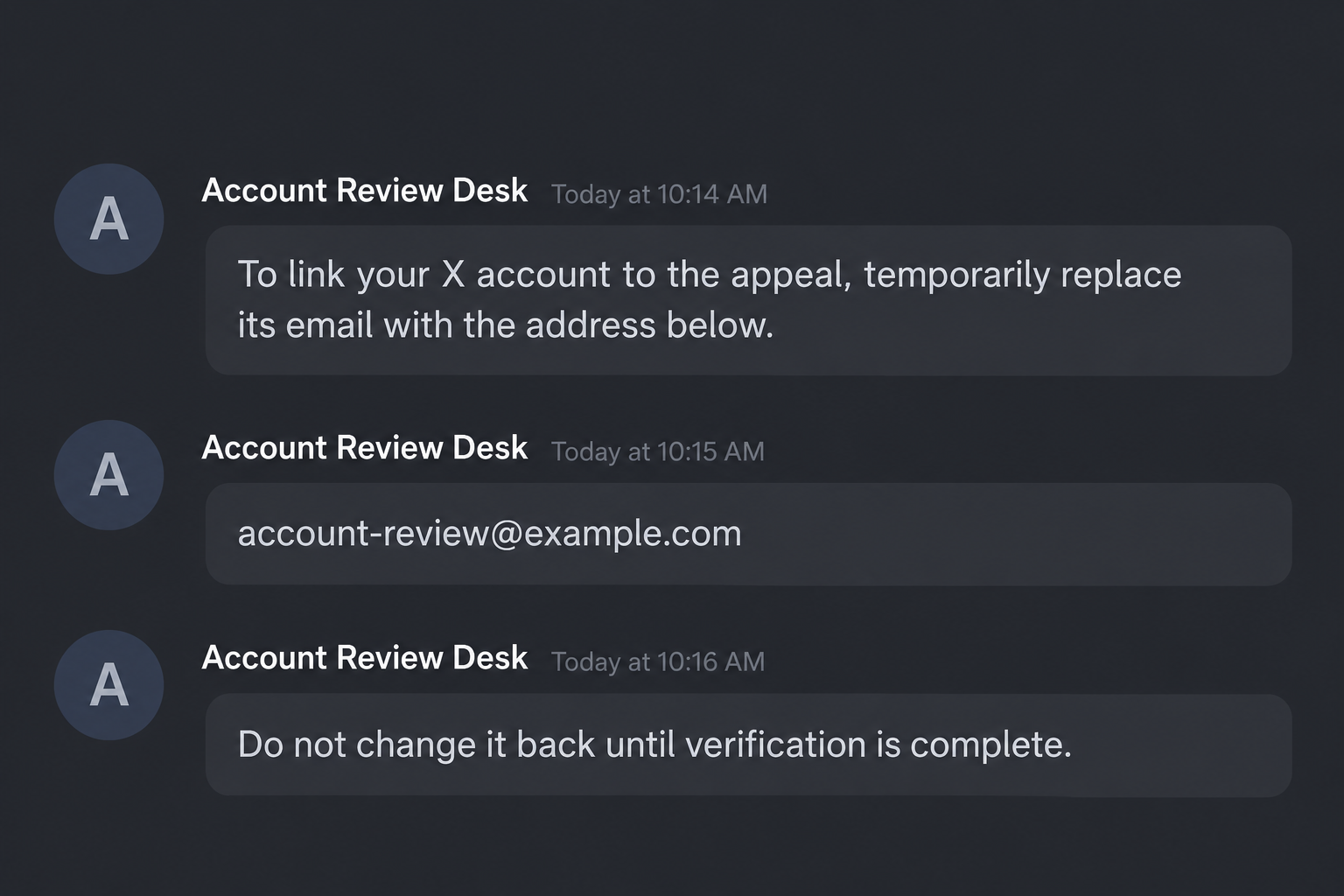
Step 4: The agent asks you to replace the account email
The request may be framed as connecting your account to a database, proving ownership, or temporarily moving it into an appeal system.
Changing the email to an address you do not own is not a harmless administrative step. It gives another person a powerful recovery route.
The stranger may promise you can change it back later. That promise matters little if they can prevent you from signing in first.
Our example screens illustrate the sequence with fictional details. They are not original screenshots, and the example address is not a real support contact.
Step 5: Lost access is explained as a temporary review
The impostor may describe the lockout as suspension, protection, or a review stage. This keeps the victim waiting inside the same private conversation.
Do not accept that explanation without checking. Loss of access after changing recovery details is a reason to begin official recovery immediately.
The public report does not establish whether the account was deleted, deactivated, or simply inaccessible. Only the service can confirm its actual state.
That uncertainty should not delay action. Tell X exactly what you changed and when, rather than relying on the fake agent’s diagnosis.
Step 6: A refundable fee creates another opportunity to steal
A private payment demand can appear after the account is already lost. The agent says money is necessary to appeal, verify, or restore access.
Calling the fee refundable makes it sound temporary. It does not create a refund obligation that the criminal intends to honor.
In the report reviewed here, the demand was $250. That is a reported example, not a standard price or a verified total loss.
Do not pay to discover whether the promise is real. Contact the actual platform and the payment provider if funds have already been sent.
Why the Email Address Matters More Than the Support Badge
An account email is not just a label under your username. It helps determine where recovery instructions and security notices are delivered.
Someone asking you to replace it is asking for control over that route. Their explanation does not change what the setting does.
A mailbox name containing official, database, admin, or X is not a credential. Anyone can put impressive words into an ordinary address.
Even if the address were on a professional-looking domain, it would still be someone else’s mailbox. Your account should remain linked to contact details you control.
A safe support interaction should not require you to transfer ownership before receiving help. Treat that inversion as the central warning sign.
Backup codes and one-time login codes also deserve protection. Giving one to the agent may finish a login rather than verify your identity.
Read the genuine message containing a code. Its purpose can reveal which action was triggered, but do not send the code to a private helper.
If a password manager refuses to fill a login, do not disable its safeguards just because the caller says the page is official.
Find the Real X Recovery Route
Open X or its Help Center yourself. Do not use a support link selected by the person who introduced the report.
If you cannot sign in, use the official compromised-account recovery form. Describe the email change and resulting loss of access.
Use accurate details you know: the original email, username, approximate time, and any confirmation notice. Do not invent account facts to fill a gap.
Check the old mailbox for an email-address-change notification. X’s documentation explains that a notice is sent to the previously associated address when it changes.
Preserve that notice. Reach any recovery instructions through the genuine service, and remain cautious about extra messages that arrive after the incident.
Do not send repeated tickets with conflicting explanations. Keep a clear timeline and follow instructions from the official case you initiated.
Account recovery can take time. A stranger promising instant restoration for a fee does not gain credibility because the official process feels slow.
The related Discord false-report scam uses similar social pressure, but the recovery destination must match the account actually affected.
What to Do if You Have Fallen Victim to This Scam
-
End the fake appeal. Stop speaking to the apologetic sender and the support account. Do not make another email change or submit another verification payment.
-
If you still have access, restore contact details you control and change the X password through X itself. Review available account-security settings immediately.
Inspect authorized applications and active sessions. Remove access you cannot explain, especially anything approved during the supposed support process.
-
If you are locked out, submit an official recovery request. Explain that an impersonator instructed you to change the account’s email.
Save the supplied address privately for the report. Do not publish it alongside your personal recovery details.
-
Protect your email account independently. Change a reused or disclosed password, review its recovery settings, and enable appropriate multifactor protection.
Check for forwarding or filters you did not create. An exposed mailbox can undermine recovery even after the social account is restored.
-
Warn important contacts through another channel. Explain that messages from the affected X account may not be yours until you confirm recovery.
For a business account, tell colleagues responsible for advertising, customer support, or connected tools. Their access may need separate review.
-
Collect the original messages, profile links, Discord identifiers, account-change emails, and payment demands. Keep dates and times in a simple timeline.
Report impersonation using each service’s official tools. A display name alone can change, so preserve the relevant message and account identifiers where available.
-
If you paid, contact the payment service quickly and explain the support-impersonation fraud. Ask what dispute, recall, or fraud-reporting options apply.
Do not describe an authorized transfer as unauthorized if you made it yourself. Explain the deception accurately so the provider can assess it.
-
If the agent sent software you installed, have that device checked before using sensitive accounts. Malwarebytes can help detect unwanted or malicious programs.
AdGuard offers an additional barrier against known malicious destinations. It cannot authenticate chat staff, reverse an email change, or guarantee account recovery.
After Recovery, Check What Changed While You Were Out
Getting back into the account is important, but it is not the end of the review. Inspect the profile, posts, direct messages, and connected applications.
Look for messages sent to followers during the lockout. Tell recipients not to follow verification instructions or send money based on those messages.
Check whether business contact information or external links were replaced. A recovered account can still direct visitors toward something the attacker inserted.
Review security methods and remove ones you did not add. Keep your own recovery information current and store backup codes privately.
If you cannot confirm whether a particular action occurred, ask support rather than guessing. A cautious, accurate incident record is more useful than a dramatic one.
Finally, expect opportunistic recovery offers. Publicly discussing a lockout can attract people claiming they know an employee or private hacker who can fix it.
You do not need a second unofficial intermediary. Stick with the case opened through X, and refuse payments for guaranteed restoration.
Frequently Asked Questions
Can a real user accidentally report my account?
They can make a mistake, but that does not require you to contact their chosen Discord agent or surrender your X account email.
Is the sender necessarily a hacked friend?
No. Compromised accounts are one possibility; copied identities are another. The message’s requested actions matter more than guessing how the profile was obtained.
Does ignoring the private agent automatically ban my account?
No stranger can establish that consequence through a private deadline. Inspect genuine account notices and any official appeal process directly on X.
Why is changing the email so dangerous?
It redirects a key recovery channel to somebody else’s mailbox. A promise that the change is temporary does not protect you from being locked out.
Will the $250 appeal fee restore access?
A private impostor’s refund promise provides no such assurance. Do not pay; ask X about account access through its genuine recovery process.
What if I only gave my public username?
A username alone is not a password. Stop the conversation, review the account directly, and do not escalate disclosure to codes, documents, or recovery settings.
The Bottom Line
The X mass report scam turns an apology into a private appeal, then uses that appeal to obtain account control or money.
Leave your email attached to a mailbox you own. Any real X problem belongs in X’s official systems, not with a Discord contact supplied by a stranger.








