

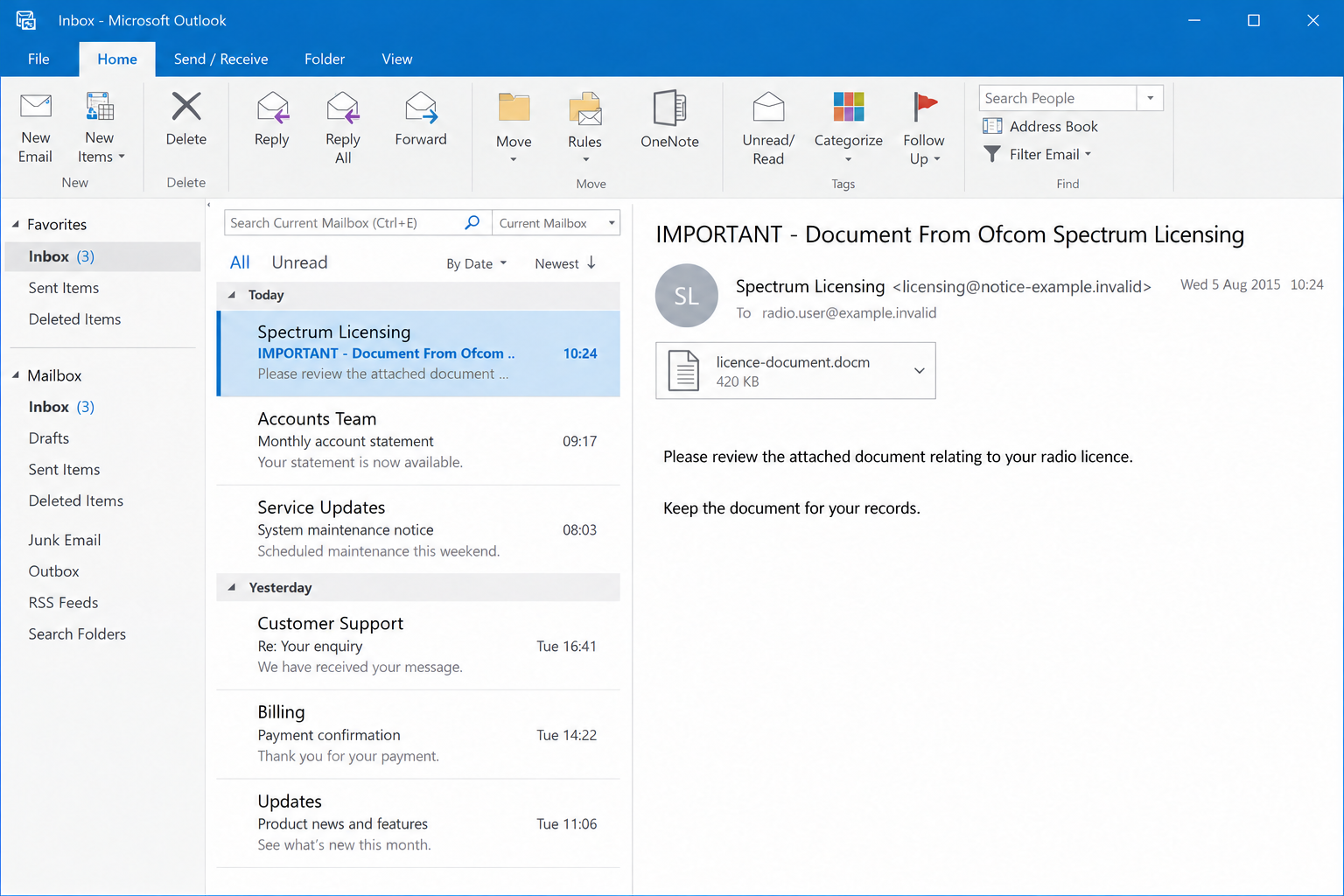
The email sounds like routine licensing paperwork. An important document is attached, and the sender asks you to read it and keep it for your records.
The Ofcom Spectrum Licensing email scam makes that ordinary task worth a second look. The danger becomes clearer when the document asks for something extra.
Overview
The documented warning concerns an August 2015 impersonation
A historical campaign used the subject IMPORTANT – Document From Ofcom Spectrum Licensing and a supposed licensing document to attract recipients’ attention.
The Radio Society of Great Britain’s August 5, 2015 notice relayed Ofcom’s warning that the email had not been sent by the regulator.
Researcher Conrad Longmore’s August 2015 sample analysis identified a malicious document macro that downloaded another executable.
That is historical analysis, not a fresh test performed for this article. The unsafe mechanism was active code, not an ordinary licensing update.
This is a guide to that documented impersonation pattern. We are not announcing a newly intercepted 2026 wave or claiming to have analyzed a fresh malware sample.
Ofcom is a legitimate regulator. The fake email and dangerous document request are the scam, not the existence of real spectrum licensing correspondence.
A macro-enabled file is different from a plain notice
A macro can automate actions inside an Office application. That legitimate capability becomes dangerous when an untrusted document uses it to execute malicious instructions.
The .docm extension indicates a macro-enabled Word document. It does not prove infection by itself, and receiving the email does not mean a macro has run.
Modern protections vary by Office version, platform, file origin, and policy. Do not assume that a historical yellow warning bar describes every current installation.
The practical rule stays simple: an unexpected licensing attachment should not persuade you to weaken its security restrictions to see the notice.
Verify the license question without activating the file
If the message concerns a real license, confirm that separately through Ofcom’s independently reached licensing guidance and the account process appropriate to your license.
- Do not enable macros, trust the document, or unblock a suspicious file.
- Check whether you were expecting this particular correspondence.
- Save the email details for reporting without forwarding a dangerous attachment casually.
- Use a trusted route to ask Ofcom about the document.
- If code was enabled, treat that action as a separate device-security incident.
Both images are fictional PNG illustrations. They reproduce the type of email and prompt, not an authentic Ofcom document, current warning, or executable malware sample.
Why Licensing Paperwork Is a Useful Disguise
The subject fits a real administrative responsibility
Radio licensees expect records, conditions, and official correspondence. A message about keeping information current can sound more credible than a spectacular prize announcement.
The recipient may already have a reason to interact with Ofcom. That existing relationship makes an unsolicited document easier to mistake for something expected.
A generic message can reach both licensees and people with no relevant license. The fact that it fits your circumstances does not establish how the sender found you.
Do not infer an agency data breach merely because an impersonation reaches a real licensee. The available historical notice did not establish such a breach.
Keep the administrative question separate from the computer instruction. You can check license information without allowing an unknown document to execute code.
A document feels more official than a short message
An attachment gives the email something tangible. A formal filename or copied heading can suggest that the sender has produced a specific record for you.
Those details are easy to create. A document’s appearance does not prove that the regulator issued it or that its active content is necessary.
Even an authentic-looking signature block can be copied from public information. It should not become the reason to ignore a security warning.
Ask whether the same matter can be confirmed through the established licensing system. A sender demanding that only this attachment can answer the question deserves caution.
How the Ofcom Spectrum Licensing Email Scam Works
Step 1: The email borrows the regulator’s identity
The message presents itself as Spectrum Licensing correspondence. It describes important records rather than an obviously unusual financial opportunity.
A displayed official address can be misleading. The visible From field is not sufficient evidence that the agency sent or authorized the message.
The historical Ofcom warning confirmed the impersonation. It should not be rewritten as proof that all modern emails using similar wording are fraudulent.
If you receive a comparable message, identify the specific correspondence you expected. A general need to maintain a license is not confirmation of this attachment.
Do not reply to the suspicious email for authentication. That asks the same unverified sender to approve its own story.
Step 2: The licensing task moves into an attached document
The attachment becomes the proposed place to find the important information. A reader may open it simply to determine whether any action is needed.
That is why file handling matters. You should not have to expose your device merely to discover the subject of an unexpected notice.
Do not download or open a suspected historical malware sample to compare it with an article. The filename alone is not a safe testing method.
Likewise, do not send the file to a friend who owns a different computer. That can spread the risk rather than resolve the administrative question.
Use a screenshot of the email text where appropriate. If a security team needs the actual file, follow its designated evidence-handling process.
Step 3: A blocked feature becomes the excuse for another click
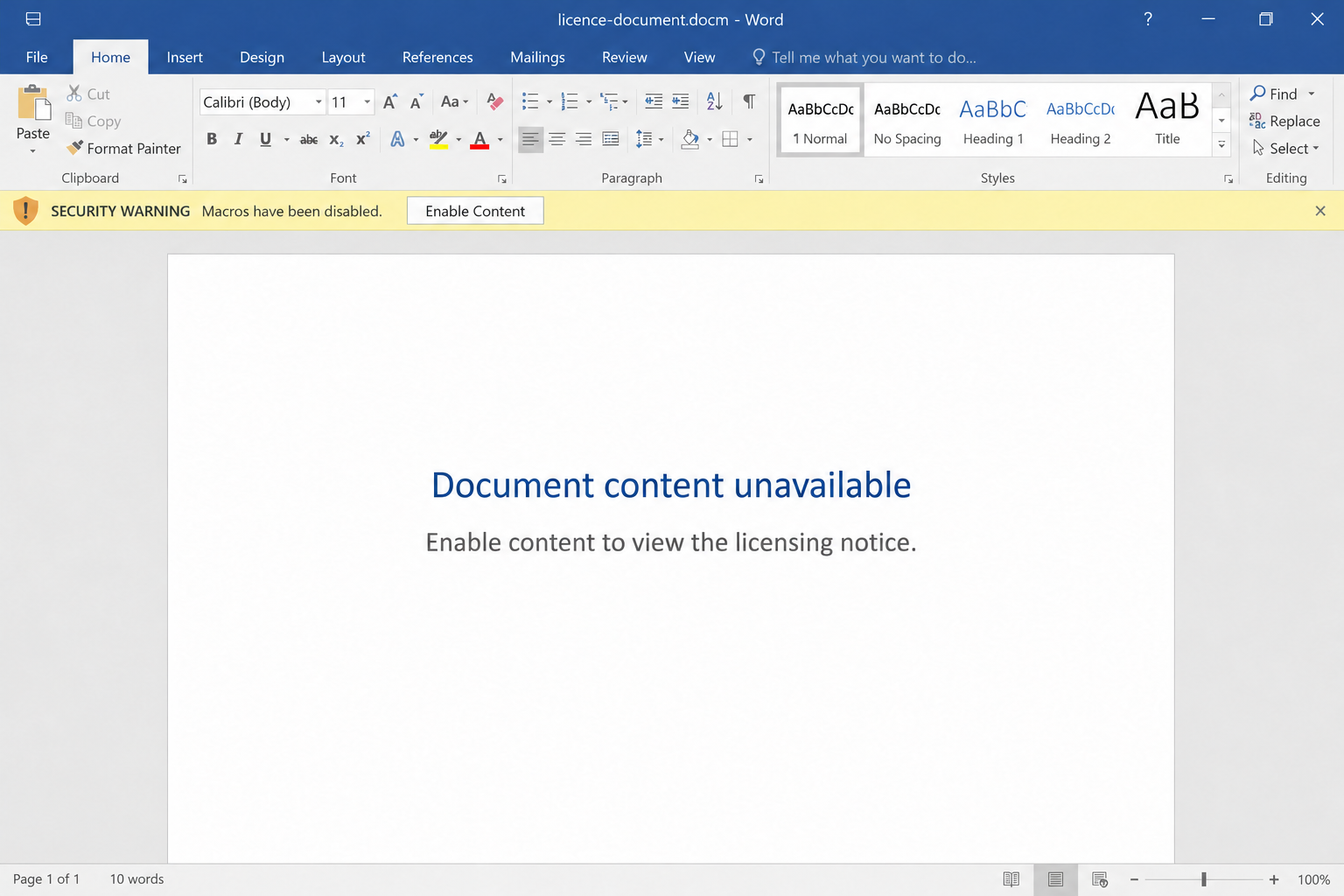
A suspicious document can claim its content is unavailable until macros or another active feature are allowed. This turns a protective boundary into an apparent obstacle.
The reader thinks they are making a notice readable. The instruction may instead change what the document is permitted to do.
A security warning should not be resolved by obeying the untrusted document’s own explanation. Close the file and verify the supposed notice through another route.
Do not add the file to a trusted location or follow instructions to remove its restrictions. Those actions can have the same effect as granting permission directly.
The fictional word-processor screen below resembles an older warning style. It illustrates the persuasion step, not the exact appearance of every Office installation.
Step 4: Allowed code can turn paperwork into a device threat
When malicious active content is permitted to run, the document may perform actions unrelated to licensing. The precise result depends on the code and environment.
This can include obtaining additional malicious software or facilitating information theft. Those are possible outcomes of the mechanism, not a diagnosis of your device.
We do not identify a malware family from an email subject alone. A filename, warning screenshot, or old article cannot establish the payload in a different file.
A document may fail to display useful content even after a harmful action. The absence of an obvious crash does not prove the operation was harmless.
If you enabled code, tell your security provider or IT team exactly what happened. Avoid replacing that fact with either panic or reassurance based on appearance.
Step 5: The reader must resolve two separate questions
First, determine whether a real licensing matter needs attention. Second, determine whether the interaction exposed a device or any account information.
These questions can require different people. Ofcom can clarify correspondence, while a trusted technical team can investigate what ran on the computer.
A license record does not prove the device is clean. Similarly, a clean scan does not confirm that the attachment came from Ofcom.
Continue through independently verified routes for both issues. The person who supplied the questionable document should not supervise your recovery process.
Old Warning Screens and Modern Office Protections
A missing Enable Content button is not a problem to fix
Microsoft’s current guidance explains default blocking of internet-sourced macros in affected Windows Office products.
Some installations show a stronger security-risk notice instead of offering the older one-click option. The exact behavior also depends on organizational policy and file trust.
Do not look for a workaround because an email tells you to. A blocked document can be verified through its claimed issuer without being made executable.
A sender’s insistence that security is preventing essential paperwork is part of the risk assessment. It is not evidence that the restriction is mistaken.
Different platforms do not have identical settings
Microsoft also provides separate Mac macro guidance. Avoid assuming that a Windows screenshot describes a Mac’s controls or protections.
A work computer can have settings managed by an organization. Do not change those policies to read an unsolicited licensing attachment.
Updates and protections reduce risk, but they are not permission to test unknown files. Maintaining the boundary is safer than checking whether the malicious content succeeds.
The incident response should reflect your platform and actions. Tell a technician whether you merely received the file, opened it, or allowed additional content.
Not every real licensing email is suspicious
Ofcom’s published licensing instructions include genuine documents delivered by email and records accessed through its licensing system.
That prevents an overly broad conclusion. Email delivery, a document attachment, or the Ofcom name alone is not the fraudulent mechanism.
Check the particular license process and whether the correspondence was expected. A genuine administrative record should not rely on an unverified instruction to weaken Office security.
If a matter remains unclear, ask the regulator through its current contact route. Do not reuse old contact details from a historical scam example.
What to Do if You Have Fallen Victim to This Scam
-
Stop interacting with the document. Close the suspicious file and do not enable another feature, run a repair tool, or accept a new download.
Preserve what you can safely record about the email and filename. Do not reopen it simply to improve a screenshot.
-
Describe your actions precisely. Note whether you received, downloaded, opened, or enabled content in the attachment. Record the device and approximate time.
These distinctions help a technical team choose a proportionate response. Receiving an email alone does not establish that its code executed.
If a login or payment page also appeared, record that separately. File execution and information submitted to a website can produce different exposures.
-
Involve your workplace IT team when relevant. If this happened on a managed computer, follow your organization’s incident process promptly.
Do not delete logs, install cleanup tools, or change security policies before asking how evidence should be preserved. The team may need to review the original message.
If malicious code may have run, avoid using the affected device for sensitive logins until trusted support advises you on containment.
-
Investigate a personal device with trusted assistance. A Malwarebytes scan can help identify threats after suspicious content was enabled or software unexpectedly appeared.
Keep the product updated and follow its findings. A scan is useful evidence, not a guarantee that every possible account exposure has been resolved.
AdGuard can reduce malicious-ad exposure in the browser, but it does not make a macro-enabled email attachment safe or substitute for malware investigation.
-
Secure any accounts that may be exposed. Use a device you trust to change disclosed or reused passwords and review relevant recovery settings.
If banking activity is suspicious, contact the bank through its existing app or established number. Explain the actual activity, not an unconfirmed malware-family label.
A document warning by itself does not prove financial theft. The bank can investigate identifiable changes, transactions, and access concerns.
-
Verify the license matter independently. Start from Ofcom’s current website and locate the process appropriate to the license mentioned.
Ask whether the particular correspondence is genuine and whether any real update is needed. Do not let the historical fake notice create a new deadline.
Genuine licensing responsibilities still matter. Rejecting a malicious attachment should not become a reason to ignore an independently verified official requirement.
-
Report the message without casually spreading the file. Use your mail service’s reporting process and your organization’s safe evidence route where applicable.
For U.K. phishing reporting, follow the NCSC’s current instructions. Financial fraud can require a separate report to the appropriate authorities.
Keep report references and technical findings together. Do not publish full email headers containing private addresses or other people’s information.
-
Decline unsolicited repairs and refunds. Someone claiming to represent Ofcom or a security company after the incident may offer another unsafe download.
Choose technical help yourself. Do not grant remote access or pay a clearance charge to a person whose identity depends on the original suspicious message.
Frequently Asked Questions
Is this a newly discovered Ofcom attack?
No. The case described is documented in August 2015. Its lessons concern impersonation and unsafe active content, not a newly verified campaign or payload.
Does a .docm attachment automatically mean malware?
No. It identifies a macro-enabled Word file. Whether it is malicious depends on the file and context, but an unexpected request to enable code warrants caution.
Can reading the email alone run the document’s macro?
Reading the message does not itself authorize the attached document’s macro. Report what you actually opened or enabled rather than assuming execution from receipt alone.
Should I unblock the document if Office refuses it?
Not on the instructions of an untrusted message. Leave the protection in place and verify the claimed licensing record through an independently reached official route.
Did the historical warning prove Ofcom suffered a data breach?
No. The contemporaneous notice relayed by RSGB said the agency had not experienced a data or system breach. Impersonation should not be treated as proof otherwise.
Are genuine Ofcom documents ever sent by email?
Yes. Its published licensing processes include emailed documents. Evaluate the specific correspondence and unsafe instruction rather than declaring every agency email fraudulent.
The Bottom Line
The Ofcom Spectrum Licensing email scam used a believable administrative task to bring an untrusted document into the reader’s workflow. Allowing active content changes the risk.
Leave suspicious file protections in place, verify the license separately, and seek trusted technical help if code was enabled. A licensing notice should never dictate your security settings.








