

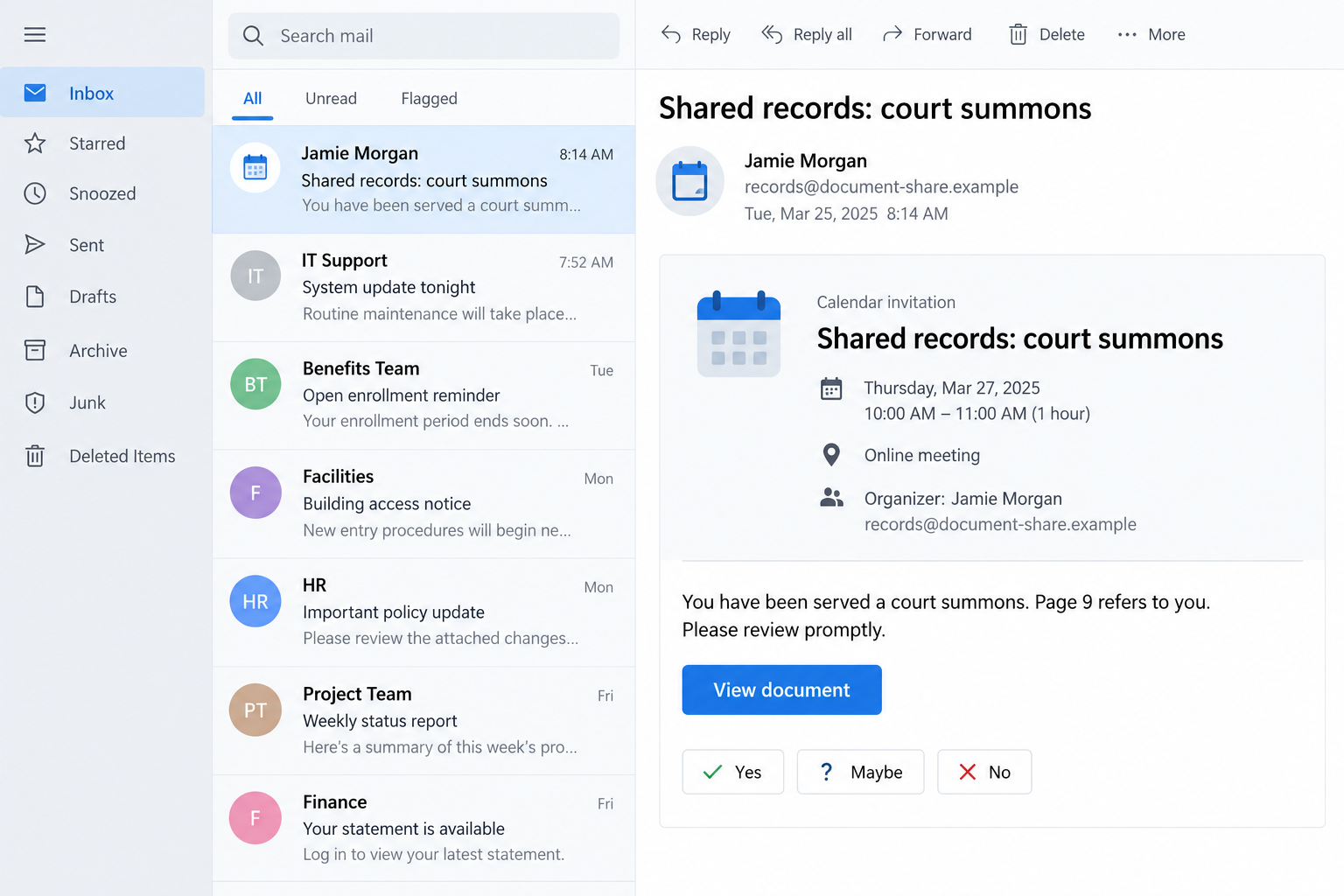
A calendar invitation arrives from a name you recognize. The message says you have been served a court summons, and page 9 refers to you.
That is a difficult notification to leave unopened. The Google Calendar court summons scam gives a routine scheduling message an unusually personal, alarming subject.
Overview
The page 9 document request is a phishing lure
Reported messages claim that legal records have been shared through a calendar event. They direct the recipient to view a document, with a login request following the link.
The warning is about a deceptive document invitation, not Google Calendar itself. A legitimate scheduling service can carry content created by someone with dishonest intentions.
Do not open the document route or enter account information to settle the allegation. Verify the supposed sender and legal matter through channels outside the invitation.
The broader abuse of calendar notifications is independently documented. Security researchers have observed mass phishing that uses familiar event formatting to move people toward malicious destinations.
A familiar contact and a specific page make the claim feel real
One recipient reported that the invitation appeared connected to a former client. The message suggested records had already been sent and were now being reshared.
That wording makes the contact sound like a continuation of an existing conversation. You may wonder whether you missed something important, rather than questioning the premise.
The page reference adds a second hook. It promises that the document contains something specifically about you, giving you a reason to locate that page quickly.
- A calendar event carrying legal-document language rather than a normal meeting purpose.
- A statement that you have been served a summons.
- A claim that page 9, or another numbered page, refers to you.
- A view-document button instead of independently verifiable case information.
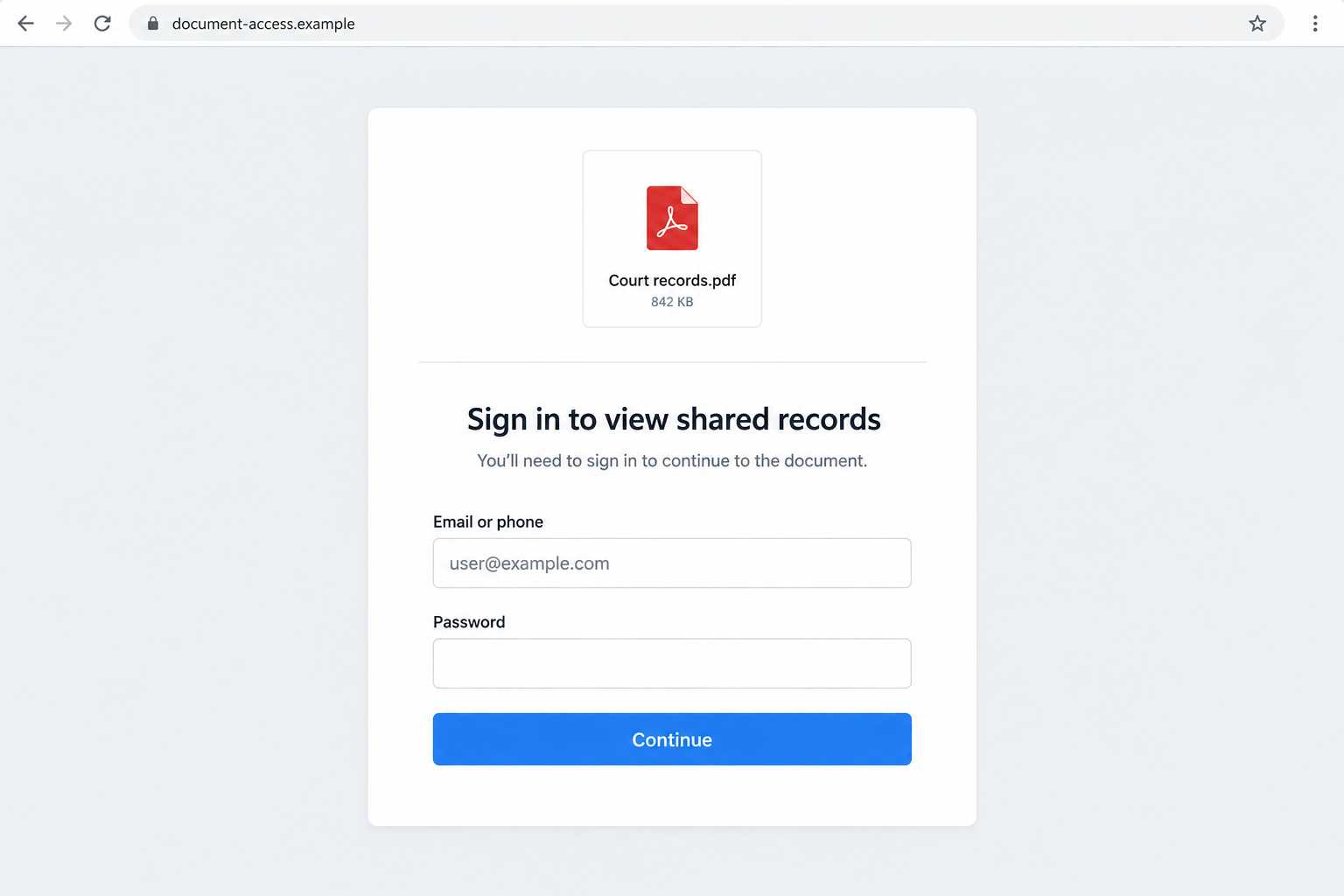
- A sign-in or verification step introduced by the unexpected link.
The legal claim must be checked without trusting the link
Do not conclude that all electronic legal correspondence is fake. Service rules vary, and genuine legal processes should be checked with the relevant court or your lawyer.
Equally, an event in Google Calendar does not establish valid service. The invitation’s presence, sender label, and page number cannot prove the claimed legal matter.
A reported unfamiliar-location sign-in prompt is a reason to stop and review account activity. By itself, a location label does not identify the attack’s technical method.
The images are nonfunctional reconstructions with fictional names and addresses. They demonstrate the invitation and login lure without reproducing a private client’s records.
Why Page 9 Is Such an Effective Hook
A vague warning can be easy to dismiss. A numbered page sounds like evidence you can inspect, rather than an accusation you must take on trust.
The sender does not have to show that page in the message. They only need you to believe it exists and contains your name.
That creates a small unfinished task. You may feel you should at least look before deciding whether the contact is genuine.
But the viewing route is exactly what needs verification. The promise of evidence is not the same as evidence safely supplied.
The reference to an earlier message makes the recipient feel behind. Perhaps you missed the records last week, and now the sender is politely reminding you.
A familiar name makes that story easier to accept. A former client or colleague may legitimately share files, so an unexpected document does not immediately seem impossible.
Still, name recognition and message authenticity are different questions. A display name can be copied, and a real contact’s account can be abused.
There is no need to determine which happened before protecting yourself. Ask the person through an established separate route whether they actually sent the invitation.
The invitation also includes language about contacting the issuing office or a lawyer. That can make it sound restrained, even while its document button controls the next step.
Take the sensible part of that instruction independently: consult the real office or your own counsel. Do not accept contact details selected by the questionable message.
How the Google Calendar Court Summons Scam Works
Step 1: A legal claim arrives inside an ordinary calendar format
The notification says documents or records have been shared through an event. Scheduling controls and familiar formatting make the delivery feel routine.
A calendar notification can be authentic as a notification without its organizer’s claims being true. Those are separate levels of trust.
The reported legal lure does not establish whether the organizer account was compromised or a name was copied. Avoid treating either explanation as confirmed.
Your first check should be the purpose. A surprise summons presented as a file-sharing event deserves verification before you take any account action.
Step 2: The description creates a reason to open the records immediately
The message says a numbered page refers to you and asks for prompt review. It directs attention toward the contents, away from the delivery route.
You may worry that delaying will affect a case or obligation. That concern is understandable, but the invitation has not established that such an obligation exists.
Do not click simply to find out whether the allegation is true. Check the supposed sender or named court first using independently held contact information.
If you already have a lawyer handling a related matter, ask them about the notice. Send a safe description rather than forwarding an unexplained file for them to open.
Step 3: The document button introduces an account-access request
The view-document route leads toward a login or verification step. That changes the task from reading legal information to supplying access to an account.
A sign-in page can be copied. A genuine login page can also be involved in a deceptive request, such as an unexpected authorization or attacker-initiated sign-in.
The reported case lacks the technical evidence needed to identify one exact route. What matters is that the unsolicited legal lure should not authorize it.
Check the actual destination and action. Do not approve a prompt or grant permissions merely because the previous screen promised a court document.
If a location or device looks unfamiliar, deny the request and investigate through your account’s normal security page. Do not keep retrying until the document opens.
Step 4: Credentials or approvals may give the attacker useful access
A fake login form can collect credentials. If an attacker obtains working access, the account may expose messages, documents, contacts, or services linked to it.
Those are possible consequences, not proof that the reported recipient lost every account. The available report does not establish a completed takeover.
Do not assume a failed document opening means information was never submitted. A page can show an error after collecting what the person typed.
Likewise, changing a password may not address every unfamiliar session, application permission, or recovery setting. Review the account through the provider’s established recovery process.
Step 5: The message can reach more people through familiar relationships
A legal-looking invitation is reusable. Another recipient reported receiving the same type of message, while researchers have documented calendar phishing at much broader scale.
That does not establish that every event belongs to one campaign or operator. Treat matching wording as a useful warning, not forensic attribution.
If a known contact appears involved, alert them through another channel. They may need to review their account or warn other people who received the message.
Do not reply to the suspicious invitation to warn everyone. You could reveal active recipients or continue a conversation controlled by the person who created it.
Calendar Delivery Is Not a Safety Certificate
Calendar services let users add descriptions, guests, and links. A platform’s familiar interface cannot independently verify every claim placed inside an event.
Check Point’s research on calendar phishing documents attackers using these trusted-looking formats to direct recipients toward deceptive pages.
Its documented campaign used other lures and destinations. That evidence supports the wider mechanism, not a claim that the court message shares its exact operators.
Be cautious of the idea that an email reaching the inbox proves screening succeeded. A malicious request can arrive through a system normally used for legitimate activity.
A familiar sender address is helpful context, but it does not settle whether that person intended this invitation or whether its document request is safe.
Google’s calendar spam guidance explains controls for invitations and reporting. Restricting automatic additions can reduce surprise events.
Those controls are not a substitute for checking a known contact’s unexpected request. A recognized account may still send something you should not trust.
How to Check the Supposed Summons Without Opening It
Begin with information outside the message. Use your own records for the former client or colleague, not a newly supplied number or reply address.
Ask one clear question: did you send me a calendar invitation about court records? Do not supply more identity information to help a stranger verify you.
If the message names a court, find that court’s official website independently. Ask the clerk how to verify the document or case through the proper procedure.
Do not rely on a search advertisement claiming to be the legal office. Use a known official directory or your existing lawyer’s contact details.
Keep the legal question and account-security question separate. A court can help with its records; an account provider can help with unauthorized sign-ins and permissions.
If you receive a genuine notice through a verifiable channel, handle its deadline appropriately. Rejecting a phishing link does not mean ignoring every possible legal obligation.
You can preserve the invitation as evidence without acting on it. Record the organizer, subject, displayed case details, and URL text where safely available.
What to Do if You Have Fallen Victim to This Scam
-
Close the document path and stop further approvals. Do not enter another password, provide a verification code, or retry an unfamiliar-location request to finish reading page 9.
If you only saw the notification, report the event. Its appearance alone does not prove a successful login to your account.
-
Review your Google account through its official security route. Google provides instructions for a compromised account.
Look for unfamiliar devices, security events, recovery details, and access you did not authorize. Use the provider’s controls rather than instructions from the invitation.
-
Replace an exposed password from a trusted device. Choose a unique password and change it wherever you reused the same one.
Keep two-step verification enabled. Review unexpected prompts carefully, and do not approve a sign-in because someone claims it will cancel an earlier attempt.
-
Inspect permissions as well as sign-ins. If you granted an application access, review and revoke anything unfamiliar through the account’s normal settings.
For a work-managed account, involve your administrator. They may need to assess organizational access or retained sessions that you cannot review yourself.
-
Tell the real contact about the impersonation. Reach them using a previously verified phone number or other established channel.
Explain what the invitation claimed and when it arrived. Do not insist their account was hacked unless that has been confirmed.
-
Remove and report the unwanted event. Follow Calendar’s spam-reporting process and review which invitations are automatically added.
Avoid sending an RSVP or reply as a way to confront the organizer. You do not need to negotiate removal with the suspicious sender.
-
Assess the device only according to its exposure. After an unexpected file or installation, Malwarebytes can help inspect a supported system.
AdGuard may help block known malicious browsing destinations. Neither tool substitutes for changing exposed credentials or revoking unauthorized account access.
A normal page visit is not proof that malware installed. Tell a technician what actually downloaded or ran, instead of assuming the most alarming explanation.
-
Preserve a private incident record. Keep the message, organizer details, destination text, account alerts, and recovery timeline for reporting.
Do not post private legal documents, client addresses, or login information publicly. Notify your workplace security team when professional contacts or business records may be affected.
-
Verify any genuine legal issue independently. Contact the relevant court or your lawyer through established details rather than dismissing a matter solely because this invitation was suspicious.
Ignore unsolicited offers to clear the alleged case for a fee. An impersonator’s document lure does not give a second caller authority over your legal affairs.
Frequently Asked Questions
Is the page 9 court-summons invitation a scam?
The reported calendar message is a phishing lure directing recipients toward account access. Check the claimed legal matter separately through the relevant court or established counsel.
Why did it appear to come from someone I know?
A familiar name can be copied or an account abused. The available report does not establish which occurred. Confirm directly through a separate, previously trusted contact route.
Can a real Google notification contain a malicious link?
Yes. A scheduling notification may deliver user-created event content. The platform’s identity does not authenticate every legal claim, organizer, or external document destination.
Does an unfamiliar sign-in location prove I was hacked?
No. Location estimates and network routing can vary. Deny unexpected requests and examine actual devices, sessions, permissions, and account activity through Google’s security tools.
Are court documents never sent electronically?
Do not assume that. Electronic-service rules differ. The safe check is with the named court or your lawyer, not the calendar invitation’s document button.
What if I changed my password immediately?
That can help after credential exposure. Also review sessions, recovery settings, and application permissions, especially if you approved a prompt or granted access before stopping.
The Bottom Line
The Google Calendar court summons scam makes a familiar invitation feel urgent by claiming a document mentions you personally. Page 9 is the hook, not independent proof.
Leave the document link alone. Verify the sender and legal claim separately, and use Google’s official account-security tools if you supplied credentials or approved access.








