

An email reaches the person who runs the business. Someone overseas supposedly wants its name, and a helpful registration office says there is still time.
The Chinese domain registration scam makes an unfamiliar technical matter feel like an urgent ownership decision. Before answering, separate the sender’s story from your actual assets.
Overview
A supposed competing applicant creates the sales opening
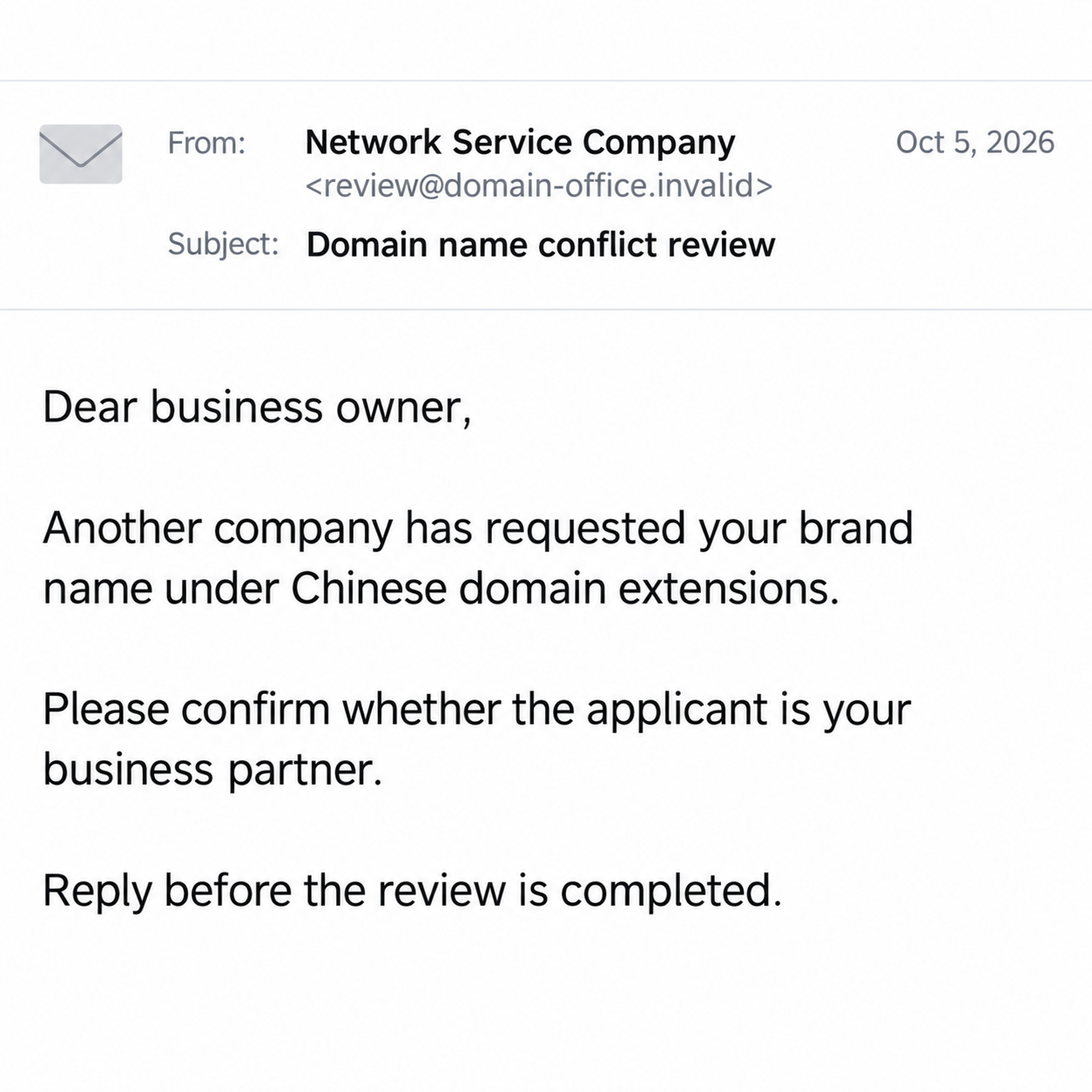
The message claims another organization has requested your business name as Chinese domains or an internet keyword. It asks whether that organization is your partner.
The pressure pitch then offers registration through the sender as the way to protect the name. The claimed conflict supplies the reason to buy quickly.
This is a recognized deceptive solicitation pattern. Scamwatch’s overseas-domain warning describes the supposed competing applicant, urgency, and expensive registration offers.
A recent example used the generic description Network Service Company. Those words are not a verified legal identity, accreditation record, or authority over your trademark.
The example does not prove who controls every similar email address. The actionable finding is the unverified conflict being used to sell a protection decision.
Your existing domain and an overseas registration are different assets
A business’s existing website can remain under its usual registrar while an email discusses separate country-code addresses. The sender should not blur those two matters.
Registering a matching name under another extension does not automatically transfer your existing domain. Nor does an unsolicited email decide ownership of your business name.
Trademark disputes can be real, and international domains can have genuine business value. This warning does not replace legal advice or your own registration strategy.
It does mean that the stranger’s proposed deadline and payment route are not sufficient evidence. A useful decision starts with independently checked information.
Check the claim without accepting the sender as your adviser
- Identify which exact domain extensions are being discussed.
- Separate a new registration offer from a renewal of your existing domain.
- Ask your established registrar about any real account change.
- Verify accreditation through the authority responsible for that extension.
- Have a qualified adviser assess a genuine trademark concern.
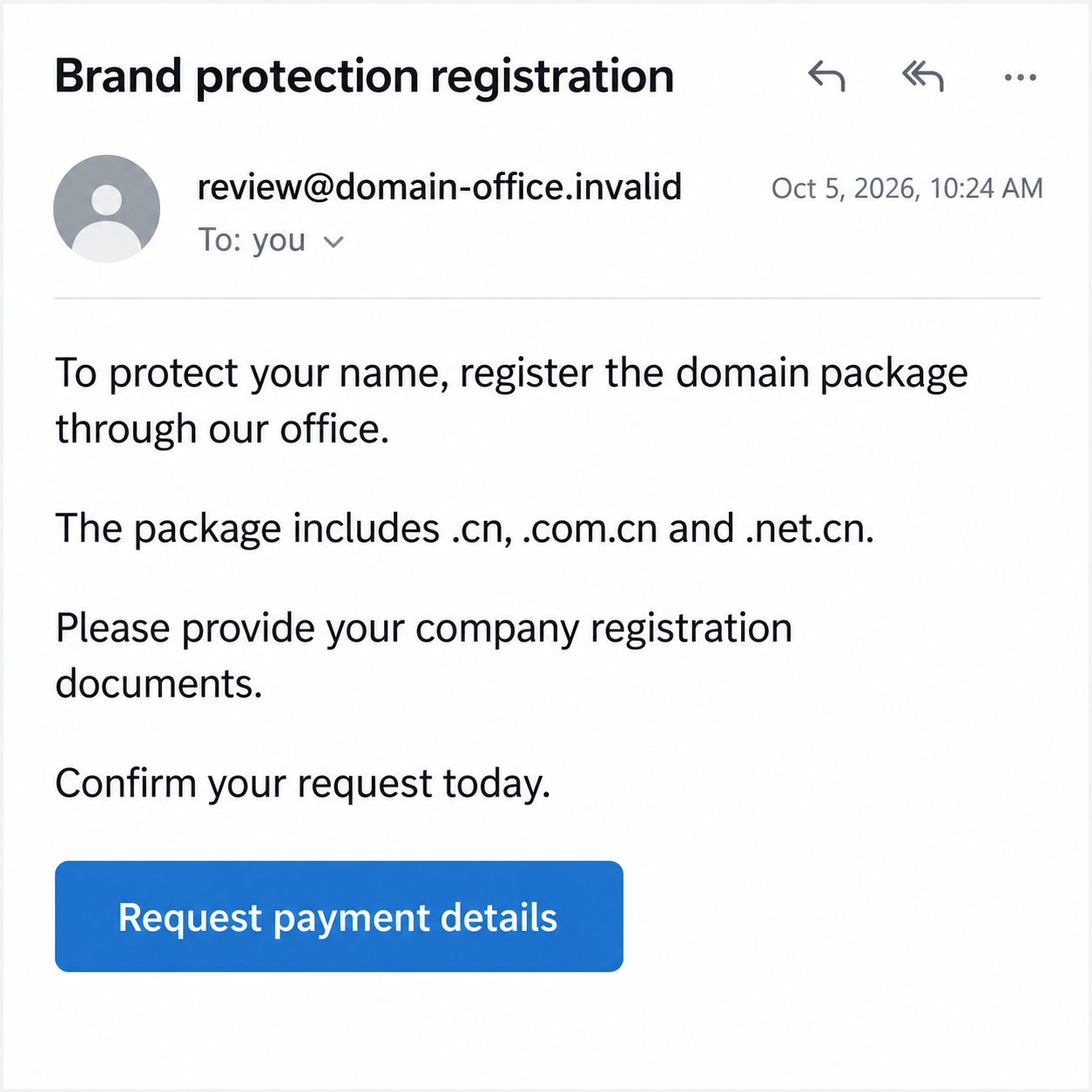
The images are invented interface examples with nonfunctional addresses. They illustrate the solicitation and a possible follow-up, not an actual registrar’s verified correspondence.
Why the Brand-Conflict Story Gets Attention
It reaches the person most worried about the company’s name
The email often addresses a director or asks staff to forward it to the owner. That makes a routine inbox message look like a management problem.
A small company’s name may represent years of customer relationships. A threat to that name can feel more serious than an unfamiliar service invoice.
The recipient need not understand domain registration for the hook to work. They only need to imagine another company using a similar-looking address.
That concern deserves a sensible review. It does not require choosing the vendor who introduced the fear or sending them documents before they are verified.
The courtesy can make the stranger seem trustworthy
The sender presents itself as considerate: it noticed a conflict and contacted you before completing another application. The supposed favor encourages a quick, grateful response.
But a helpful tone does not establish a formal duty to protect you. Ask what evidence supports the application and who gives the sender its authority.
You can investigate those questions elsewhere. There is no need to argue with the email’s author or prove that your business deserves its own name.
Even accurate public details are not authentication. A business name, website, staff title, or office address may be available through ordinary research.
How the Chinese Domain Registration Scam Works
Step 1: The email announces a conflict before you requested help
The opening says an applicant wants your name under extensions such as .cn, .com.cn, or .net.cn. An internet-keyword claim may appear alongside them.
These are claims made by the sender. An email listing several addresses is not proof that an application was submitted or that a competing business exists.
Do not automatically accuse the named applicant of wrongdoing. Its name could be invented, borrowed, or unrelated to whoever sent the message.
The specific-looking list gives the warning weight. It also moves attention away from the unanswered question: why should this office manage your response?
Keep the proposed addresses as text if needed. You do not have to visit them, contact the supposed rival, or reply to preserve the initial evidence.
Step 2: A simple partner question starts the relationship
The first requested action may be modest: confirm whether the applicant is your distributor or partner. Replying can feel easier than dismissing a possible business conflict.
An answer gives the sender an engaged contact and may reveal who makes decisions. It does not, by itself, transfer your domain or create a payment.
The next exchange can move from verification to sales. The sender may say that the application will proceed unless you register the names first.
That is the moment to pause. You started answering a question, not authorizing a supplier, appointing a registrar, or buying a multi-year package.
Tell the relevant colleague if several people received the message. One employee’s reply should not become another employee’s reason to approve an invoice.
Step 3: A registration package becomes the proposed solution
The solicitation can bundle several extensions and years of service. The package is presented as urgent brand protection rather than a purchase you can evaluate normally.
Ask what is actually being sold: domain registration, a keyword service, a listing, or advice. Similar-sounding labels can describe very different products.
A high price alone is not a fraud verdict. The concern is a misleading claim of necessity, authority, or an existing conflict used to obtain payment.
You may genuinely want an international domain. Compare independent providers and the relevant registry rules rather than treating this email as your only opportunity.
The following fictional reply shows that pressure-sales stage. Its request is illustrative; it is not evidence that a particular current vendor issued those exact instructions.
Step 4: Documents or account access can raise the stakes
Some requests seek business registration materials to prove entitlement. Other interactions may ask for payment details, a registrar login, or a domain authorization code.
Those exposures are not interchangeable. A public company extract differs from a private identity document, and both differ from credentials that can control an account.
Do not send a bundle of documents because the sender says a rival is waiting. Verify the receiving organization and the actual registration requirement first.
If a transfer code is requested, ask your existing registrar what it would authorize. A new overseas-domain proposal should not quietly become an existing-domain transfer.
These are potential escalations, not a finding that every conflict email attempts domain theft. Record the actual requests rather than assuming the worst outcome already happened.
Step 5: Payment can leave the original worry unresolved
A receipt from the sender does not establish that a domain was registered for you, that the registrant details are correct, or that trademark protection exists.
Check any claimed registration through independent records and the genuine account. If a service was delivered, review exactly what it covers and who controls renewal.
Another demand may follow: an additional extension, verification fee, or supposedly final protection step. Paying once does not make later instructions trustworthy.
Return to your own business requirements. You should not keep expanding a package because the person selling it also controls the story about the threat.
Domain and Registrar Checks That Actually Help
Start with an asset list you already trust
Find the account where your current domain is managed. Note its registrar, expiration date, contact email, and the staff member or agency responsible for it.
Then list the different addresses mentioned in the email. This separates an unfamiliar proposed purchase from something your company already owns and must maintain.
If an agency handles your registration, contact it through your established channel. A forwarded warning should not become an instruction to release passwords or transfer codes.
Use the correct accreditation system
ICANN’s registrar information distinguishes generic top-level domains from country-code registrations. Its accreditation does not apply to every domain extension.
For a country-code address, consult the corresponding registry’s published information. A sender claiming to be approved should be checked against the appropriate authority.
Finding a legitimate registrar’s name does not authenticate an email using that name. Reach the organization independently before relying on a quotation or document request.
Evaluate the commercial offer separately from the fear
A clear quote should identify the service, term, total charge, renewal arrangement, account control, and cancellation conditions. Keep it distinct from any unsupported rival story.
Ask whether the registration suits your customers and market. An address can be useful, unnecessary, or already unavailable without making every vendor a criminal.
If a real trademark conflict is found, obtain qualified advice for the relevant jurisdiction. The salesperson’s deadline is not an independent assessment of your rights.
Handling the Message Inside a Business
Give accounts payable a concrete verification task
Do not simply forward the email with “please handle.” Explain that it is an unsolicited claim and that no purchase or supplier relationship has been approved.
Ask the person responsible for domains to check the relevant assets. A short written decision can prevent a polished follow-up invoice from gaining authority internally.
Keep any legitimate renewal reminders active. Rejecting this solicitation should not cause staff to ignore the real registrar’s billing and account notices.
Do not make a public accusation from an email signature
A copied address or telephone number may belong to someone uninvolved. Preserve it for reporting, but do not treat the signature as established criminal identification.
The same caution applies to a supposedly interested company. You can describe the deceptive request clearly without claiming to know who authored it.
What to Do if You Have Fallen Victim to This Scam
-
Stop the registration conversation. Decline further documents, additional packages, or fees while the sender claims to finish protecting your name.
Preserve the original email, subsequent quotation, and payment instructions. Do not reopen a questionable attachment just to assemble a more complete record.
-
Ask your payment provider to review any charge. Explain what was promised and whether an actual service or registration can be independently confirmed.
Provide the amount, transaction date, payee, and correspondence. Ask about dispute options and time limits that apply to your payment method.
Do not assume a refund is guaranteed. An accurate description helps the provider distinguish a misleading purchase from credential theft or an unauthorized transaction.
-
Contact the registrar you already use. Report any disclosed password, transfer code, unexpected contact change, or unauthorized domain activity.
Ask support to identify what occurred and which protections are available. A suspicious solicitation alone is different from an actual transfer or DNS change.
-
Secure exposed accounts through their genuine channels. Replace compromised credentials, review recovery contacts, and check active sessions where those controls are available.
Coordinate with the domain administrator before making technical changes. Do not alter working DNS records at the direction of the person who sent the solicitation.
-
Review documents that were shared. List which company or identity materials went to the sender and whether they contain information not already public.
Ask the appropriate support or identity-reporting service about that exposure. Avoid posting complete documents in public warnings, where they could create a second problem.
-
Verify any claimed domain purchase. Check the registration and account control independently, rather than relying on the sender’s invoice or a screenshot.
If a genuine legal conflict exists, seek qualified advice. Paying this sender does not settle every trademark issue or establish that a rival never applied.
-
Investigate technical exposure only when relevant. If you installed software, granted browser permissions, or opened a risky download, involve your IT support team.
Malwarebytes can help check questionable software, and AdGuard can reduce malicious-ad or redirect exposure. Neither verifies domain ownership or reverses a registration payment.
-
Report the conduct and reject paid recovery promises. Use your location’s fraud-reporting route and the genuine registrar’s abuse channel if its identity was impersonated.
Scamwatch’s recovery guidance offers a practical starting point for Australian recipients. Elsewhere, use the corresponding local services.
Keep case references with the original records. An unsolicited adviser promising to retrieve the money for another advance fee deserves the same independent verification.
Frequently Asked Questions
Will someone registering a .cn name automatically take my .com?
No. They are separate domain registrations. Check your existing account for actual changes, and get qualified advice if a genuine trademark issue is identified.
Is every Chinese domain registrar fraudulent?
No. The warning concerns misleading conflict claims and pressure sales. Evaluate the actual provider through the appropriate registry, not its country or an email label.
Does replying to the partner question transfer my domain?
A reply alone does not establish a transfer. It can begin an unwanted sales conversation, so avoid further disclosure and check any actions you actually authorized.
Are overseas domains always unnecessary?
No. Their value depends on your business and registration strategy. Decide independently, with clear terms, rather than treating an unsolicited warning as a purchase instruction.
Does a receipt prove my brand is protected?
No. Verify which service was supplied, who controls any registered domain, and what rights actually apply. A payment record is not a universal trademark certificate.
Should I disable my website after receiving the email?
Not merely because the message arrived. Consult your established registrar or administrator about actual account changes. Avoid creating an outage while responding to an unverified claim.
The Bottom Line
The Chinese domain registration scam converts a supposed rival’s application into an urgent sales pitch. The sender’s concern for your brand is not proof of authority.
Check the domains, registrar, and genuine business need independently. If you paid or disclosed access, address that specific exposure without buying another protection promise.








