

The message sounds like the last step of a payment you might have overlooked. An Ontario fuel rebate is supposedly complete, and a short reply will finalize it.
The Ontario fuel rebate scam relies on that unfinished-business feeling. Before answering, ask which real program and application could account for the notice.
Overview
The reply request is not proof of a government payment
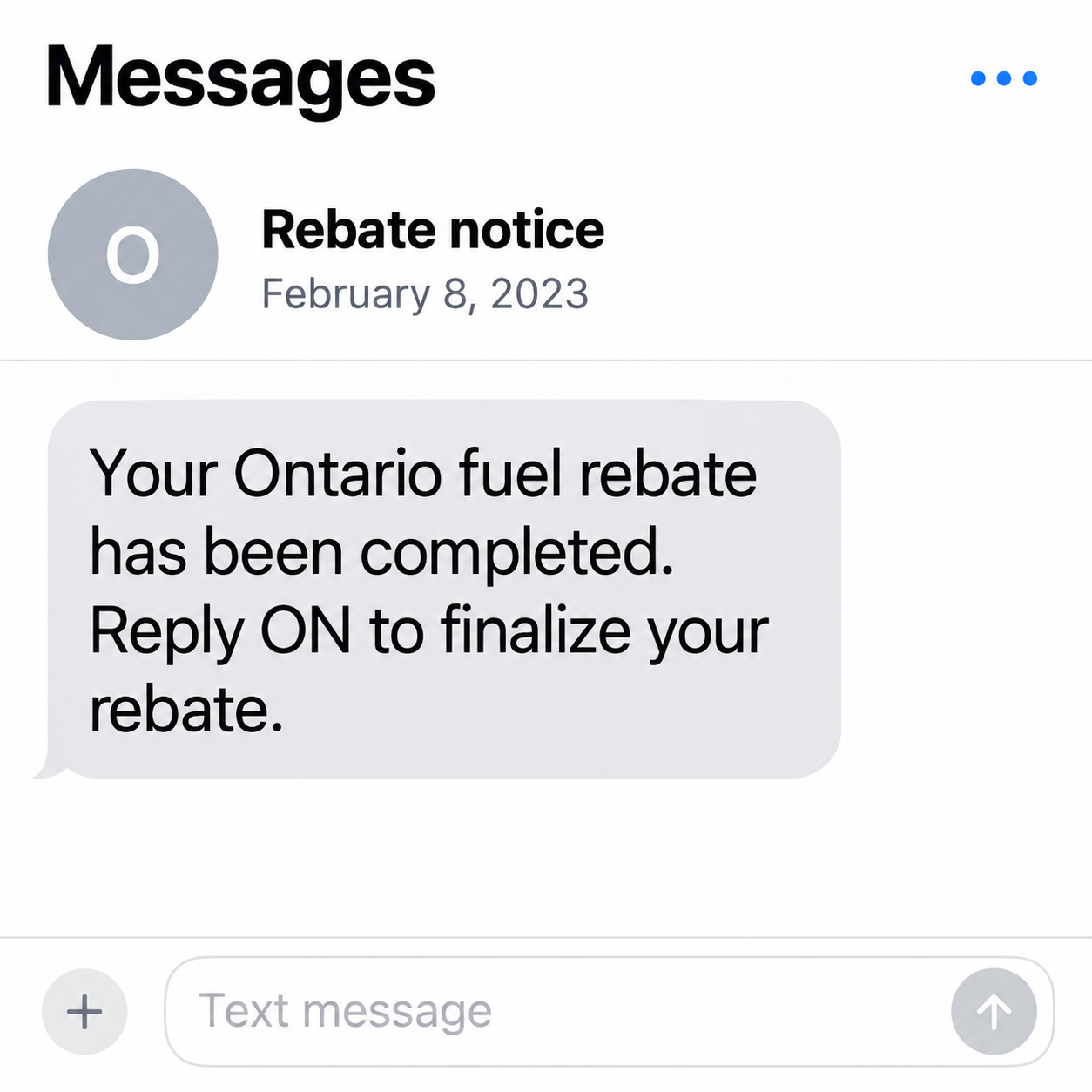
The historical message claims that an Ontario fuel rebate has been completed. It asks the recipient to reply ON to finalize the supposed payment.
That unsolicited claim is the scam hook, not evidence of eligibility, an approved application, or a government office holding money for you.
The example was documented in February 2023. This article does not claim a newly intercepted version, an active claim deadline, or a confirmed payment amount.
A telephone number displayed on an old message does not establish today’s owner or identify the offender. The request itself is what readers should evaluate.
Genuine Ontario refunds need their own program context
Ontario has real tax refunds and rebate programs. Their existence does not authenticate a stranger’s message, and rejecting that message does not cancel a legitimate entitlement.
The province’s taxpayer-rebate page includes a scam alert about proactive money offers and requests for private information. That is a separate program associated with 2025.
Its cheque-based process should not be applied to every provincial refund. Genuine fuel-tax provisions have their own application requirements and payment options.
The right check is the specific program reached through Ontario’s official website, not an assumption that every message about government money is true or false.
Your next action depends on what you actually did
- Only received it: do not reply or use its instructions.
- Replied ON: stop the conversation and watch for follow-up contact.
- Shared personal information: record which fields or documents were exposed.
- Entered financial information: contact the relevant provider promptly.
- Installed something: investigate that separate technical exposure.
A reply alone is not proof of a stolen bank account or infected device. Avoid turning a suspicious text into a conclusion the facts do not support.
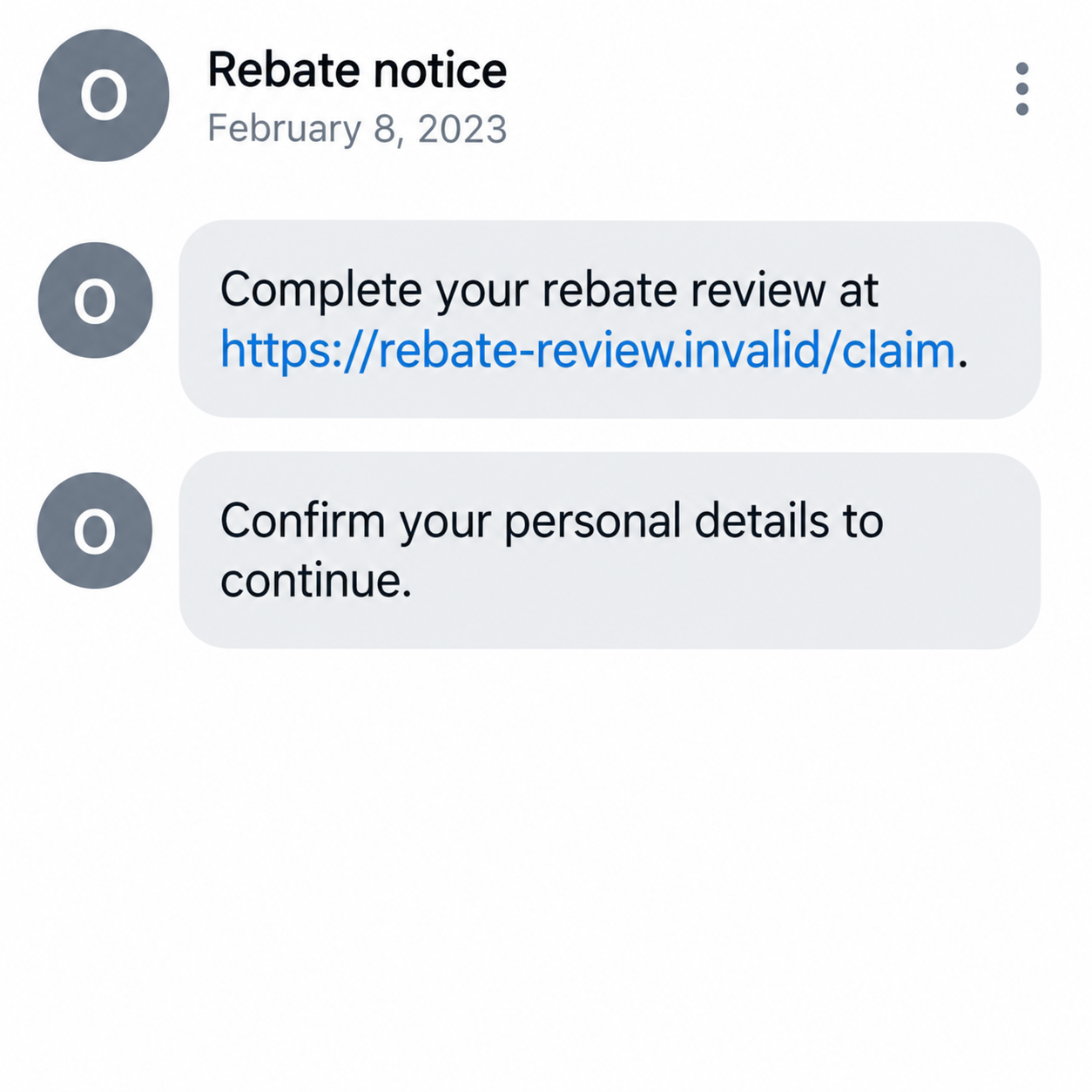
The images are invented examples. The second shows a possible follow-up request, not a destination captured from the historical message.
Why a Completed-Rebate Notice Feels Believable
The message skips over the question of entitlement
A rebate usually sounds connected to something already paid. The recipient may wonder whether fuel prices, taxes, or a recent government announcement explain the offer.
The message does not need to prove that connection if you supply it yourself. A familiar province name can fill the gap left by an unexplained program.
Ask what you applied for and when. A text announcing completion should not replace the records that would normally connect a genuine payment to you.
If you cannot identify the program, check independently. You should not have to provide your identity merely to learn what benefit the stranger claims you received.
A two-letter reply looks like a small commitment
Typing ON can feel less serious than entering card information. That makes the first request easier to follow without much thought.
It can also establish that someone is willing to engage. A later message may have more room to request details because the recipient already expects a payment.
That is a possible conversational risk, not a claim that every reply produces a specific next screen. The historical evidence establishes the opening request.
You can stop after replying. You do not owe the sender further cooperation, and you do not need its permission to verify a rebate elsewhere.
How the Ontario Fuel Rebate Scam Works
Step 1: An unexpected text announces that processing is complete
The wording presents the rebate as an accomplished fact. It does not first establish that you submitted a qualifying application or identify a trustworthy case record.
That matters because “completed” sounds like the government has already done the checking. The recipient is invited to think only about collecting the result.
A sender can make the same claim to many people without knowing their tax records. The message’s confidence is not evidence of access to official information.
Do not assume a nearby area code makes it authentic. A displayed number is a contact detail, not proof that a provincial office controls the conversation.
Step 2: The recipient is asked to reply ON
The short reply is presented as the final administrative step. In the documented example, it is the requested action, not a verified official process.
A reply may encourage more messages, but it does not automatically authorize a bank transfer or disclose an account password. Keep those events separate.
If you replied, note the time and retain the conversation. You can block or report it without continuing to ask the sender whether the payment is genuine.
Do not reply again to correct your answer or request cancellation. There is no established rebate application here that requires closing through this contact.
Step 3: A follow-up may introduce a verification link
A scam conversation can move from a simple response to a page or form described as necessary for payment. That possibility explains why further engagement is risky.
We did not capture such a destination for this historical text. The following stage is an illustration of potential escalation, not a report of an observed website.
If a follow-up arrives, check the actual request. A government-sounding page title or the word rebate in an address does not establish who controls it.
Go to the official program separately. Avoid entering a name, password, or financial detail into an unverified form to see whether it will release anything.
The fictional message below makes that distinction visible. Its address cannot function, and it is not an official Ontario application link.
Step 4: A supposed incoming payment can become an access request
In a possible escalation, the contact asks for banking information, a login, or a confirmation code. Those requests need separate scrutiny regardless of the promised rebate.
Read any genuine bank notification carefully. A code or approval can relate to an action someone else started, not the payment described by the sender.
Do not approve a transaction because the contact calls it verification. The provider’s own description is more important than the explanation in the text conversation.
This does not mean a particular victim approved anything in the documented case. It tells you which additional actions would change your response if they occurred.
Step 5: Waiting for money can keep the conversation going
A person who expects a rebate may continue answering when it never arrives. The sender can offer another explanation instead of evidence that a payment exists.
A processing problem, additional confirmation, or fee request could keep the initial promise alive. Treat each new instruction as unverified, not as progress toward entitlement.
If you need to investigate a real refund, ask the responsible office directly. An unsolicited contact should not control both the promise and its supposed troubleshooting.
Stop any further disclosure while checking. You can resolve a genuine program question without maintaining the conversation that introduced the suspicious claim.
How to Check a Real Ontario Rebate
Find the exact program name
Start on Ontario’s official website and look for the relevant benefit or tax service. Match the name with your application and official correspondence.
A broad phrase such as fuel rebate is not enough. Different taxes, household benefits, and energy programs can have different eligibility and administration.
The province’s fuel-tax refund guidance describes an application process for qualifying circumstances. It does not turn an unsolicited reply-ON text into an approved claim.
Use that official guidance for the actual tax question. This scam warning cannot decide your entitlement from whether you bought fuel or received a message.
Check the payment method in that program’s own guidance
The separate 2025 Ontario taxpayer rebate was issued by cheque, according to its official page. That fact does not prove every provincial refund uses the same method.
Fuel-tax guidance, for example, also describes direct-deposit arrangements. A payment method can be legitimate when established through the correct official process.
The important distinction is how you reached that process. A stranger’s demand for banking information is not authenticated by a different program allowing direct deposit.
Keep currency, dates, and program details straight. A historical text is not an announcement of a new payment or a current deadline to enroll.
Use published contact routes for a real unresolved question
If you have an existing case, find its official reference and contact the relevant office through details you obtained independently.
Do not use a telephone number provided by the suspicious sender to validate the sender. That would leave the same person in control of the answer.
A legitimate response to a question you initiated is different from an unsolicited offer. Ontario’s taxpayer-rebate warning makes that distinction rather than banning every official contact.
Keep the Evidence Useful Without Creating More Exposure
Record the message, not private data from your accounts
Save the wording, date, displayed contact, and any later instructions. You do not need to publish banking screenshots or identity documents to warn someone.
If you report a payment, keep its record for the provider and appropriate investigators. Share only the information they actually request through their verified channels.
Do not reopen an old link for a better screenshot. Your recollection of what you entered can be useful even if the questionable page is gone.
Describe what happened without exaggerating it
A precise account could be: you replied, opened a link, entered an email, and stopped before entering payment details. Each action has a different implication.
That is more helpful than saying everything was hacked. It lets the bank, platform, or support team concentrate on the exposure that actually needs attention.
What to Do if You Have Fallen Victim to This Scam
-
End the rebate conversation. Do not send another reply, open a new claim link, or agree to a payment to finish the supposed processing.
Keep the initial text and follow-ups before using your messaging service’s block or report option. Replying once does not require you to continue.
-
Identify the extent of your response. Write down whether you only replied or also shared information, installed software, or approved something through a bank.
Do not assume receiving the message caused every later account issue. Record dates and the specific actions so a provider can investigate accurately.
-
Contact the financial provider if its information was exposed. Reach it through your usual app or an independently verified support number.
Explain which card or account details were submitted and whether a payment or approval occurred. Ask about immediate protection and transaction review.
The appropriate action depends on the exposure. Do not move funds to a supposed safe account or share additional codes with a caller offering a refund.
-
Protect any login you entered. Use the real service to change an exposed password and review recovery contacts, unfamiliar sessions, and recent activity.
Replace reused passwords where necessary. If access is already lost, start the provider’s official recovery process rather than paying the rebate sender for help.
-
Handle identity documents separately from a text reply. If you supplied a Social Insurance Number or document image, record that specific disclosure.
Consult the relevant official fraud or identity guidance and monitor for misuse. A new identifier is not an automatic way to erase information already exposed.
-
Check software only when the interaction warrants it. A downloaded app, granted permission, or continuing redirect needs more attention than the arrival of a text.
Malwarebytes can help investigate unsafe software. AdGuard can limit malicious-ad exposure, but neither confirms a rebate or recovers a payment.
If you only replied and did not install or submit anything else, do not treat that fact as proof of device infection.
-
Report fraud through Canada’s verified route. The Canadian Anti-Fraud Centre’s reporting page explains how to report fraud and cybercrime.
Contact local police and the affected financial provider when appropriate. Keep the report reference with your messages and payment records.
Do not accuse a number’s current owner based on an old screenshot. Report the displayed contact as evidence, not as a verified offender identity.
-
Keep genuine benefit questions separate. If you were waiting for a real provincial payment, use its published status or contact process.
Reject unsolicited recovery offers that require another fee. You can pursue an authentic application without paying to revive this unverified promise.
Frequently Asked Questions
Is the reply-ON text a real Ontario rebate application?
No verified official process is established by that historical message. Check the specific program independently instead of using the unsolicited reply request.
Did I lose money just by replying ON?
A reply alone does not prove a payment, credential theft, or infection. Stop further engagement and review any additional information or approvals you supplied.
Is this warning announcing a new fuel rebate?
No. It examines a documented February 2023 scam text. It does not establish a new program, current entitlement, or a deadline for readers.
Does Ontario have genuine fuel-tax refunds?
Yes, qualifying provisions have an official application process. Consult the provincial guidance for your situation; the scam text is not evidence that you qualify.
Are all Ontario rebates paid by cheque?
No universal rule is being asserted. The separate 2025 taxpayer rebate used cheques, while other refund programs have their own verified payment arrangements.
Should I call the number shown in the old text?
No. It is not an independently verified government contact. Use the relevant official program’s published route, and do not assume the number’s present owner sent the scam.
The Bottom Line
The Ontario fuel rebate scam presents an unexplained payment as nearly finished, then asks you to start a conversation that has no verified government basis.
Do not finalize it by reply. Check any real program separately, and respond to the specific information, account access, or payment you actually exposed.

Join the discussion
0 commentsShare your experience or ask a question about this article.
Discussion
Start the conversation
Have a question or something useful to share? Add the first comment.