

A campus career email arrives with a part-time opportunity tucked into an attachment. The subject looks relevant, and opening the file seems like a normal application step.
The Montclair job email scam uses that expectation. Before treating the attached document as an opportunity from the university, examine how it reached your inbox.
Overview
The university identified a false career-advising message
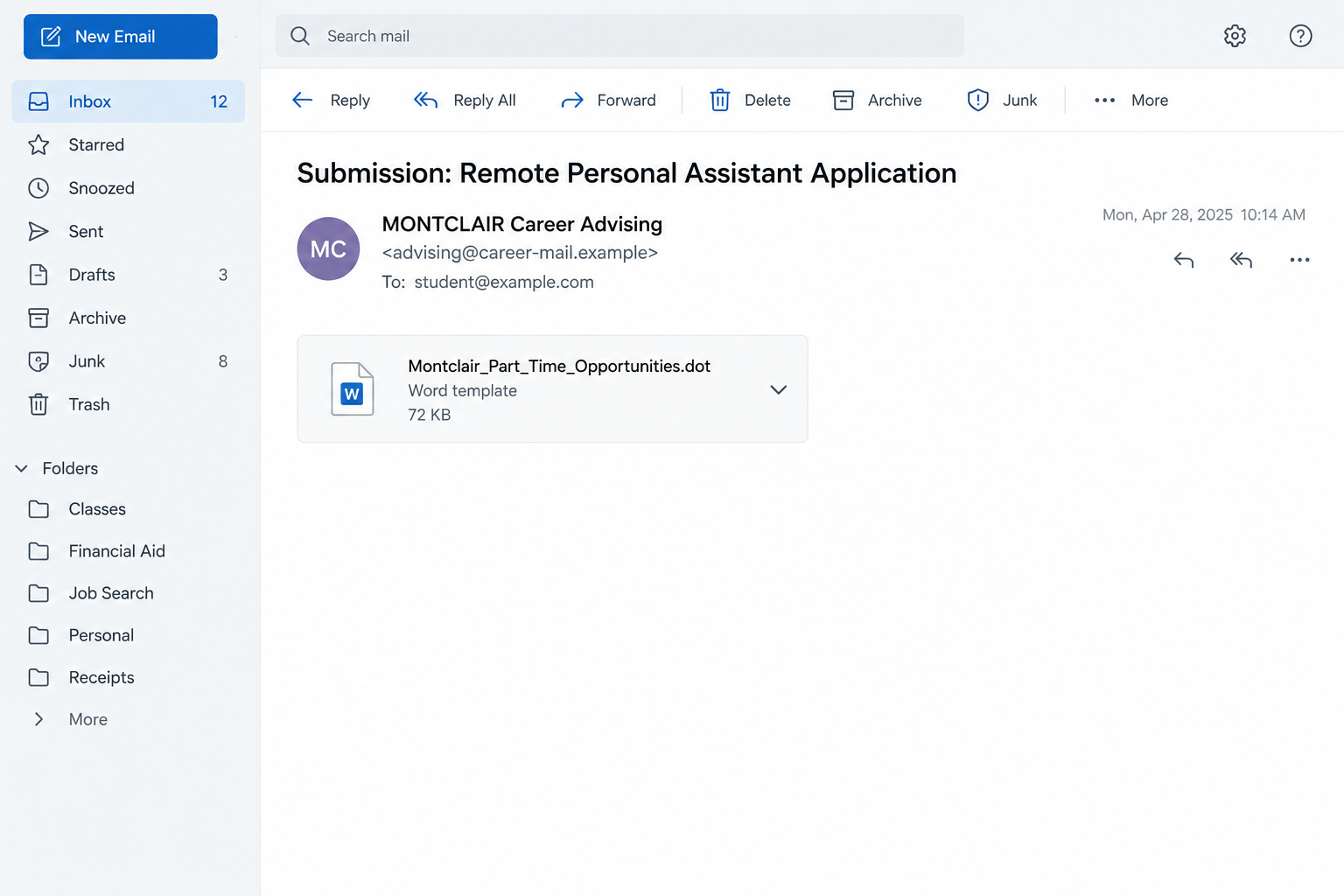
Montclair State University published a phishing alert about this job message. It impersonates Montclair Career Advising while using an external sender.
The subject is Submission: Remote Personal Assistant Application. The email body is blank or minimal, putting the supposed opportunity inside an attached Word template.
The university identifies the attachment as Montclair_Part_Time_Opportunities.dot. Its name is part of the documented lure, not a document readers should download to investigate.
This is a confirmed phishing job offer. The genuine university and its career services are not conducting the scam.
The attachment presents convenient work before the real risk is assessed
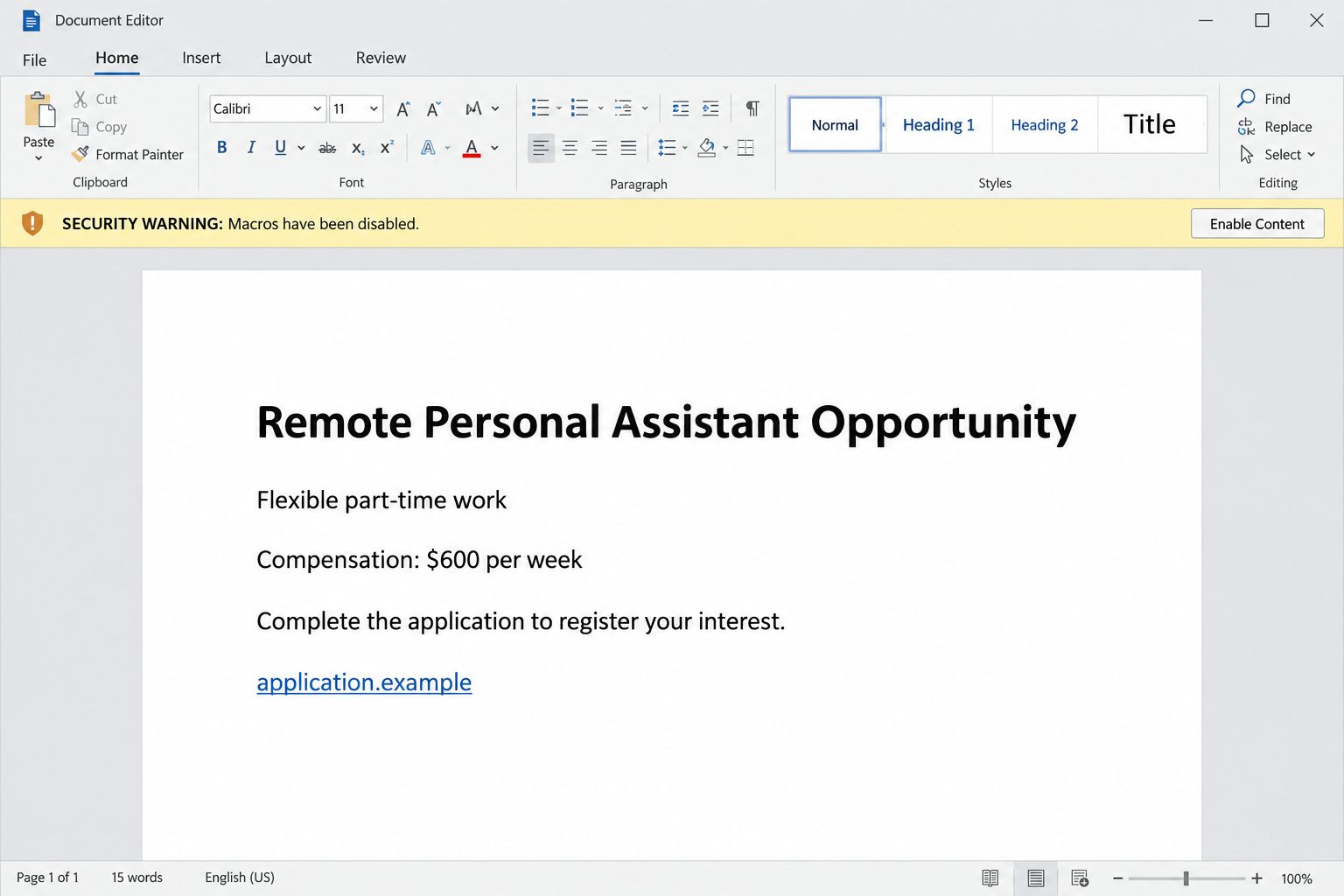
The university’s alert describes an offer of $600 per week for flexible remote work. That advertised figure is not a verified salary for a real campus vacancy.
Someone looking for income around classes may focus on the pay and schedule. The familiar institutional name gives the file another reason to feel worth opening.
Montclair warns about possible malware, macro prompts, and collection of application information. It does not publish a confirmed malware family or prove every opening causes infection.
- The message uses a campus career-advising identity without being an authorized offer.
- The actual sender is external to the university in the documented example.
- The subject promises an application or part-time opportunity.
- A blank or sparse email directs attention toward the file.
- A university-like filename makes the attachment look purposeful.
- The supposed hiring process can lead to risky document actions or disclosure.
Word files are not automatically malicious, but this invitation is not genuine
A Word template has legitimate uses. The .dot extension alone does not identify malware, and the software used to open a document is not the scam.
The university’s finding concerns the deceptive message and risky attachment. You do not need to run the file to determine whether it is an authorized opportunity.
The official alert dates from March 19, 2026. We reviewed it live, but are not presenting it as a newly discovered October campaign.
Our email and document screens are inert reconstructions. The warning bar illustrates a possible security decision, not a captured execution of the reported attachment.
Why a Blank Email Can Still Make Someone Open a File
A sparse message may look unfinished, but an attachment with a useful name can supply its apparent purpose. The subject tells you what the document supposedly contains.
Students regularly receive forms, schedules, instructions, and application documents. The format can feel familiar even when the sender has not been authenticated.
The filename combines a university name with part-time opportunities. Those words make the file appear connected to something you already have a reason to care about.
The advertised weekly pay adds another incentive. You may open it to learn the hours, responsibilities, or application deadline before noticing the external address.
That order matters. The file should not become your evidence that its sender is genuine. Verify the offer before making the document part of your workflow.
You can ask career services about a vacancy without opening an untrusted template. The email’s subject and attachment name provide useful information for an initial inquiry.
If a classmate forwards it, the message remains unverified. They may simply have assumed the same campus identity made it legitimate.
A file being hosted or sent through a familiar service would not settle the issue either. Ordinary platforms can carry documents supplied by someone misrepresenting themselves.
Do not treat a missing logo or a spelling error as the only protection. An accurate-looking campus name can appear in a completely unauthorized message.
How the Montclair Job Email Scam Works
Step 1: A sender adopts a campus career-services identity
The documented message presents itself as Montclair Career Advising. That identity suggests someone connected with the university is helping students find part-time work.
The actual sender is external in the example described by the university. Checking the address helps expose the gap between its display name and origin.
An institutional display name can be typed into an unrelated mailbox. It does not show that career services authorized the sender or reviewed the job.
For other campus emails, a matching domain is still not a complete guarantee. A real mailbox can be compromised, although that is not the documented opening here.
Keep this case specific. Do not accuse a real staff member of sending the fraud just because an attacker uses the department’s name.
Step 2: The subject makes an attached template seem relevant
The subject refers to a remote personal assistant application. It creates an expectation that the attachment will explain a position or begin an application process.
A blank or nearly blank body leaves few details to assess before opening. The attachment becomes the place where the reader expects to find the opportunity.
Montclair identifies the filename in its alert. A matching name is a useful warning signal, but attackers can rename a file without changing the underlying approach.
Do not rely on the exact filename as a complete filter. Unexpected career messages with other filenames still need verification through the actual department.
A template is not needed to ask whether a vacancy exists. Use the university’s independently opened career resources and established contact channels.
Step 3: The document supplies an attractive remote-work offer
The attached material promotes flexible work and a weekly payment. That moves the recipient’s attention toward the proposed benefit rather than the source of the document.
The official alert describes $600 per week. Treat it as the lure’s advertised compensation, not a legitimate employer’s confirmed offer.
A role involving ordinary administrative tasks can feel plausible because real assistant jobs exist. The title does not authenticate the particular application route.
Any request for a resume or contact information should still be evaluated. Those records can support follow-up impersonation even before financial details are supplied.
If the document sends you elsewhere to apply, that destination needs its own check. Do not assume an embedded form belongs to the university.
Step 4: Document instructions can cross a security boundary
The university warns that recipients may be prompted to enable macros. Macros can automate tasks, but untrusted code can also create device risk.
Microsoft’s macro guidance says they should not be enabled unless their purpose is understood. Viewing or editing a file does not require enabling macros.
Do not click Enable Content just because a document says that is necessary to read an application. The file’s own instructions cannot establish that its code is safe.
Do not change macro settings, add a trusted location, or bypass a block to complete the supposed job application. Those actions expand what an untrusted file can do.
Our document screen demonstrates the decision point. It does not show that this exact sample displayed that bar or installed a particular payload.
Step 5: Follow-up can seek records, credentials, or financial cooperation
Once a reader expresses interest, the false offer can continue through an application or conversation. A familiar subject makes later questions feel connected to an existing process.
Montclair’s alert warns about possible personal-information collection and follow-up requests for banking details or payments. These are risks, not verified outcomes for every recipient.
A resume and a bank login do not belong in the same category. Normal work-history questions should never make a later private-code request feel automatically acceptable.
If the contact asks you to pay, install more software, or share authentication information, stop. Check the actual vacancy with career services before taking another step.
No particular fake-check amount or gift-card assignment was established for this attachment. This report does not borrow another campus campaign’s financial script.
What Receiving, Downloading, and Opening Actually Mean
Receiving the message is not the same as executing the attachment
Finding the email in your inbox does not mean you installed its contents or supplied an application. You can report it without interacting further.
Keep a copy if your university reporting process requires the original message. Avoid forwarding the attachment to friends who may open it out of curiosity.
You do not need to test whether the file works. The university has already identified the message as phishing.
Downloading deserves care, but it does not prove infection
Saving a file and running its contents are different actions. Explain exactly what you did rather than assuming the worst or dismissing every risk.
If you have not opened it, do not start now to find more details. Follow your IT team’s instructions about preserving or safely removing the file.
Do not submit the attachment to an unfamiliar website that promises to repair the application. That introduces another unverified service into the situation.
Opening or enabling content calls for a specific review
Tell IT which program opened the file and whether you accepted any warning, enabled content, followed a link, or entered information.
The answers matter more than a vague statement that you clicked the email. They help separate document exposure, account disclosure, and possible code execution.
A clean-looking document is not a guarantee of safety. Conversely, the presence of a warning is not a forensic finding that a named malware family executed.
Use a separate trusted device for important account changes if suspicious code may have run. Do not continue sensitive activity on a device awaiting assessment.
What to Do if You Have Fallen Victim to This Scam
-
Stop the application process. Close the document and avoid further links, replies, security-setting changes, or instructions from the purported career adviser.
Continue looking for real opportunities through established university channels. You are declining an identified phishing offer, not giving up on legitimate part-time work.
-
Report the message through Montclair’s published route. Its alert recommends the Phish Alert Button or phishfiles@montclair.edu for relevant suspicious emails.
Check the route on the actual university site. Provide the original message as instructed, without distributing unredacted student records or opening the attachment again.
-
Describe your interaction accurately to IT. Explain whether you only received the email, downloaded the file, opened it, or enabled additional content.
Include any login or form you completed afterward. An exact sequence helps the team decide which account and device checks are appropriate.
-
Pause network use if suspicious code ran. If you enabled untrusted content or noticed unusual behavior, disconnect the affected device while seeking competent IT help.
Do not assume disconnecting or deleting the template fully removes a compromise. Ask the team how to assess and restore the device safely.
-
Inspect relevant device exposure. Malwarebytes can help examine supported systems after a suspicious file was opened or untrusted content was executed.
If the application led to harmful web pages, AdGuard may reduce further exposure. Neither tool authenticates the job or replaces the university’s incident review.
-
Protect credentials or approvals you disclosed. Change affected passwords through real services from a trusted device and review unfamiliar sessions and recovery information.
Tell university IT if a campus login or authentication approval was involved. Do not send your new credentials to the person claiming to help with the application.
-
Respond to money or identity exposure separately. Contact the relevant financial institution if you paid or supplied sensitive payment details during follow-up.
For disclosed government identification, use appropriate issuing-authority safeguards. US readers can consult IdentityTheft.gov without assuming every resume disclosure becomes identity theft.
-
Keep records and reject rescue offers. Save the email details, filename, contacts, and relevant changes for the university and any financial or fraud report.
An internet-related financial loss can be reported to IC3. Avoid strangers promising to fix the damage or recover funds for an advance fee.
Frequently Asked Questions
Is the university offering this remote assistant position?
Montclair identifies the documented message as phishing that impersonates Career Advising. Verify genuine vacancies through the university’s established career resources rather than the attached template.
Does the .dot extension prove a file is malware?
No. Word templates have legitimate uses. Here, the university’s alert identifies the deceptive message and warns about the attachment’s risks, without publishing a confirmed malware family.
Should I enable macros to read the application?
No. Microsoft says viewing or editing does not require enabling macros. Do not expand document trust or weaken security settings for an unverified job offer.
Was the $600 weekly payment a real salary?
It is the compensation advertised in the phishing lure described by the university. It was not verified as an offer for a genuine vacancy.
Am I infected if I only received the email?
Receipt alone does not establish infection. Report the message and explain any additional interaction to IT, especially opening the attachment, enabling content, or supplying credentials.
Can I send the file to a classmate to check it?
Do not spread an identified suspicious attachment. Use the university’s reporting process so qualified staff can assess it without exposing another student.
The Bottom Line
The Montclair job email scam places an attractive assistant offer inside an untrusted Word template. The university’s alert makes the verdict clear: this is not an authorized opportunity.
Leave the file unopened, report the message, and find real work through verified career channels. If you already interacted, describe the steps accurately and get appropriate help.








